
A customer calls your office. Your employee answers quickly, but then the dead time starts. They ask for the caller's name, company, account details, and why they're calling. The customer has already explained this before. They're annoyed. Your employee is clicking between a phone screen, a CRM, maybe an inbox, maybe a help desk. By the time the conversation becomes useful, the call already feels clumsy.
That disconnect costs more than a few awkward seconds. It slows sales conversations, drags out service calls, creates messy records, and makes your team sound less prepared than they are. For smaller businesses and distributed teams, it's even worse because one person often wears three hats and doesn't have time to babysit disconnected systems.
The Disconnect Between Your Phone and Your Business
When a phone system operates separately from the rest of the business, every call starts cold. The person answering has to become a detective before they can become helpful. That's a bad experience for the caller, and it's a waste of paid time for the team.
Computer telephony integration software fixes that gap by connecting the phone system to the applications people already use. Instead of treating a call as an isolated event, it turns the call into part of a workflow. The phone rings, the system identifies the caller, the relevant record appears, and the conversation starts with context.

For businesses already moving away from legacy hardware, this matters more than ever. If you're reviewing how a cloud phone system works, CTI should be part of that conversation, not an afterthought.
Why this isn't old telecom jargon
A lot of owners still hear “CTI” and assume it belongs to an older generation of call center tech. The market says otherwise. The CTI software market is projected to grow from $3.99 billion in 2026 to $17.46 billion by 2035, driven by the need for integrated cloud communications and CRM synchronization across businesses of many sizes, according to Business Research Insights market coverage.
That tracks with what happens in the field. Teams don't want another phone appliance. They want their phone system to work inside the rest of the stack.
Practical rule: If your staff still has to ask basic questions that your software already knows, your phone system isn't integrated enough.
For SMBs, multi-location companies, and remote staff, CTI isn't about building a giant contact center. It's about making every inbound and outbound call less manual, more informed, and easier to track.
What Is Computer Telephony Integration and Why It Matters
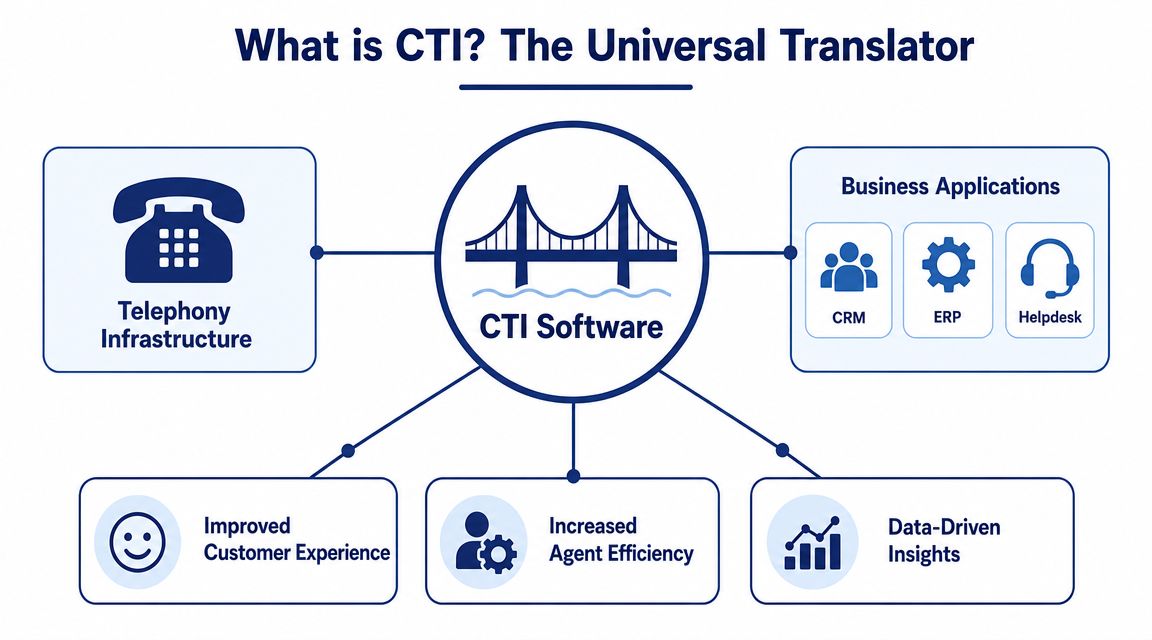
The simplest way to think about computer telephony integration software is this. It acts like a translator between your phone system and your business applications. Your telephony platform knows a call is happening. Your CRM, help desk, or service system knows who the customer is. CTI makes those systems talk to each other in real time.
That changes the role of the phone. It stops being a separate endpoint and becomes part of the business workflow. When the call comes in, software can react to it.
What the connection actually enables
Historically, CTI established the bridge between telephony and business applications, enabling features like screen pops and automatic call logging that are now foundational for modern cloud contact centers and unified communications systems, as described in Nextiva's CTI overview.
In practical terms, that means software can respond to phone events with actions such as:
- Showing caller context: A CRM record, open ticket, or account note appears when the phone rings.
- Launching calls from software: Staff click a number in a CRM or directory instead of dialing manually.
- Logging activity automatically: Call details attach to the right customer record without after-call data entry.
- Supporting call control from the desktop: Agents can answer, hold, transfer, and disconnect from the computer interface.
Why business owners should care
The value isn't the integration itself. The value is what your team stops doing manually.
Without CTI, your people search, copy, paste, dial, retype, and guess. With CTI, they start the conversation with more context and finish it with cleaner records. Sales teams waste less time hunting for the right contact. Service teams don't have to ask customers to repeat themselves. Managers get more usable call data without forcing staff into extra admin work.
A lot of businesses first encounter this through Microsoft environments, CRM connectors, or unified communications rollouts. If you're already evaluating Teams-based calling, F1Group Teams Phone expertise is a useful reference point because it shows how telephony and business workflows increasingly get designed together, not as separate projects.
CTI matters because customers don't experience your tools separately. They experience one conversation.
For a business owner, that's the true test. Does the call feel informed, fast, and consistent, or does it feel like your staff is assembling the answer in real time?
How CTI Works A Look Under the Hood
CTI sounds complex until you break it into one pattern. A call happens. The phone system detects it. The integration layer passes that event to another application. That application does something useful.
Here's the workflow visually.
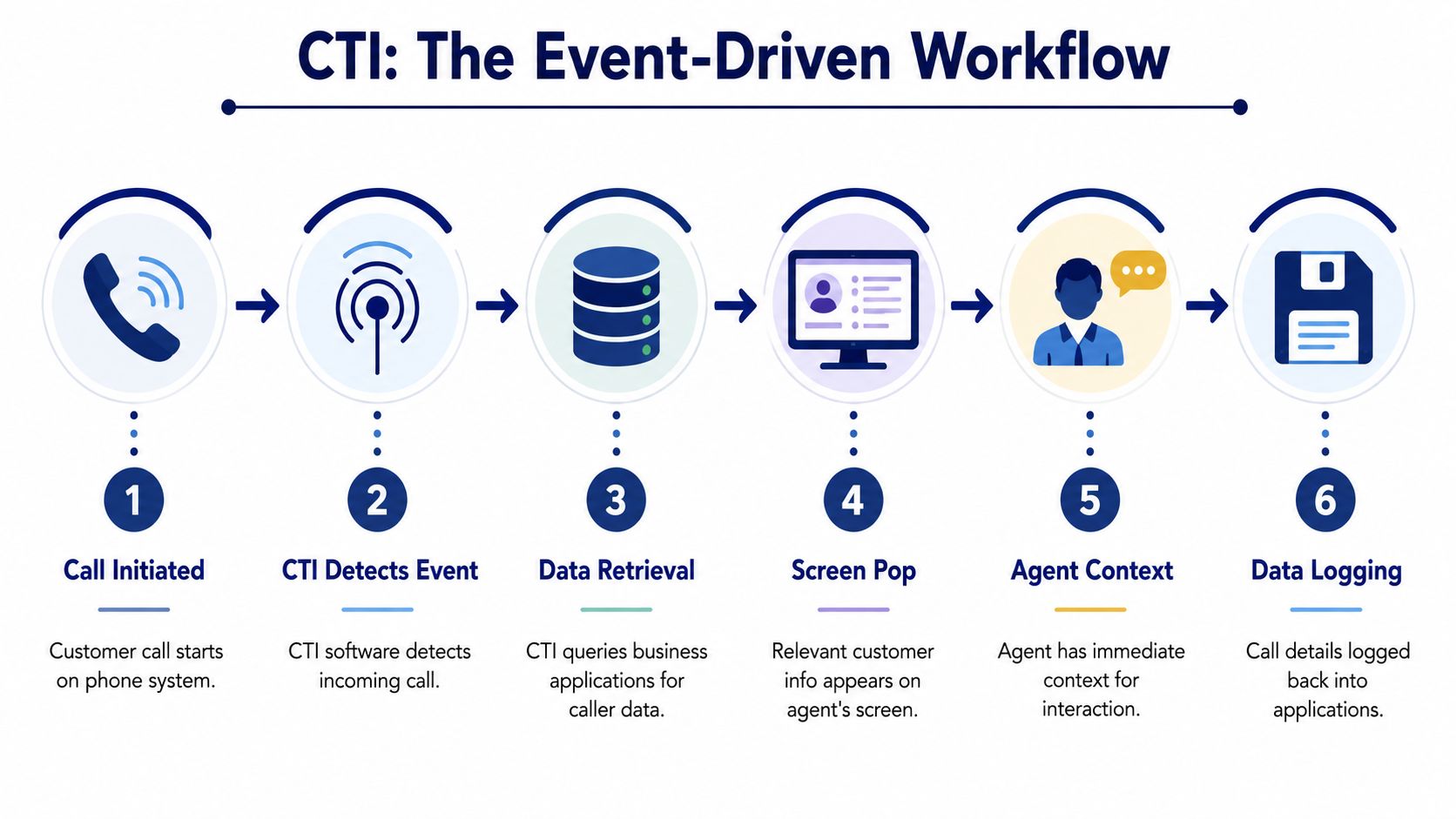
An effective CTI architecture is event-driven. When the telephony layer detects a call, it pushes events to the desktop or CRM, which triggers actions like screen pops and click-to-call, eliminating manual lookups and context switching for agents, as outlined in Upland Software's CTI explanation.
The three parts that do the work
Most CTI setups involve three moving parts:
The telephony system
This is your phone platform. It might be a PBX, a hosted VoIP service, or a cloud calling platform.The integration layer
This is the connector, middleware, adapter, or API logic that listens for call events and passes data between systems.The business application
Usually a CRM, help desk, ticketing platform, ERP, or a custom line-of-business app.
When these pieces are aligned, the workflow feels simple to the end user. The caller rings in, the record appears, the employee clicks buttons on screen instead of on a desk phone, and the system writes call activity back into the database.
Here's a simple comparison:
| Model | How it's typically built | What tends to go wrong |
|---|---|---|
| Legacy on-prem CTI | PBX hardware, local connectors, desktop clients, custom configuration | More infrastructure to maintain, tighter hardware dependencies, harder upgrades |
| Cloud-based CTI | Hosted telephony, APIs, browser or app integrations, admin portals | Vendor fit and integration governance matter more than physical equipment |
Why cloud CTI is usually easier for SMBs
Older CTI projects often involved dedicated hardware links, local server components, and brittle customizations. They worked, but they demanded in-house expertise and careful maintenance. That model made sense when the phone system lived in a closet down the hall.
Today, most businesses want the opposite. They want browser-based access, mobile support, easier rollouts, and simpler administration. Cloud CTI usually delivers that by relying on APIs and prebuilt connectors rather than on-prem telecom plumbing.
This short video gives a useful overview of the concept in action.
If a vendor can demo the integration but can't explain the event flow, support model, and failure handling, the implementation will probably be rough.
That's the part many buyers miss. CTI isn't just a feature checkbox. It's an operational dependency.
Core CTI Features That Boost Productivity
Not every CTI feature matters equally. Some save frontline time on every single call. Others improve consistency across the whole operation. The best systems do both.
Features agents feel immediately
Two features usually deliver value on day one.
Click-to-dial
Staff place calls directly from the CRM, help desk, or directory. That sounds minor until you watch how much time people lose copying numbers from one screen to another. It also cuts dialing mistakes, which matters when teams move quickly.Screen pops
This is often the moment owners finally understand CTI. The phone rings and the customer record appears before the employee starts asking questions. For sales, that can mean seeing deal history, notes, and recent activity. For service, it can mean open tickets, account status, and prior conversations.Desktop call control
Agents can answer, hold, transfer, or end calls from the software interface. That reduces the split attention that happens when part of the conversation lives on a handset and part lives on the computer.
Features managers care about
The next group doesn't just make one call better. It makes the whole system more measurable.
By combining IVR, ACD or skill-based routing, and real-time analytics, CTI deployments can significantly improve first-contact resolution and provide managers with deep visibility into call outcomes and agent performance, according to Zendesk's CTI guide.
That business value usually comes from a combination of these functions:
- Automated call logging
Records get updated without relying on memory and end-of-day cleanup. - Intelligent routing
Calls go to the right queue, team, or specialist using rules tied to caller input, account data, or business logic. - IVR and self-service
Routine requests can be triaged before they reach a human. - Call recording and analytics
Supervisors can review outcomes, coach employees, and audit interactions more easily.
The glue behind the features
From an IT perspective, the visible feature is rarely the hard part. The hard part is the connector quality.
Some vendors offer lightweight browser integrations. Others rely on native desktop apps. Some CRM integrations are mature and deep. Others only provide basic click-to-call and logging. A product page may list the same feature names, but the day-to-day experience can be very different.
A quick way to evaluate that difference is to ask these questions:
- Does the integration write back to the correct record reliably?
- Can users control calls from the same screen where they manage work?
- Does routing use business data or only static phone menus?
- What breaks if the CRM is unavailable or the connector loses sync?
Better CTI isn't the one with the longest feature list. It's the one your staff can use without creating extra work.
That's why I'd separate “phone features” from “workflow features” during evaluation. If the tool only improves calling, it helps. If it improves the work wrapped around the call, it changes the business.
Unlocking Value Through CTI Integration Workflows
The easiest way to judge computer telephony integration software is to follow an actual call from start to finish. Abstract feature lists don't show where the value lands. Workflows do.
Sales workflow with CRM context
A prospect calls after receiving a proposal. Without CTI, the salesperson answers blind, asks who's calling, opens the CRM, searches manually, and tries to reconnect the dots while talking.
With CTI in place, the incoming number matches an existing CRM record. The salesperson sees the account name, recent notes, open opportunity, and last activity before the greeting is finished. If the prospect mentions a pricing concern from the prior call, the rep already has that note on screen.
That changes the tone of the conversation. The rep sounds prepared because they are prepared. They spend less time reconstructing history and more time handling the objection, confirming next steps, or moving the deal forward.
If your team is evaluating this kind of setup, a focused look at CRM with VoIP integration is useful because it frames the phone system as part of the sales stack rather than a separate utility.
Remote team workflow without losing visibility
Now take a different scenario. A field employee, hybrid worker, or manager answers a business call away from the office. In a weak setup, that call becomes an orphan. Notes end up in a text message, a notebook, or nowhere at all. The rest of the team has no clean record.
A stronger CTI workflow keeps the call tied to the business process even when the employee isn't at a desk. The call is still associated with the company number or user identity. The employee can access customer context on screen, and the system can preserve the interaction history centrally so another team member can pick up where they left off.
That matters for:
- Multi-location businesses where one location may answer for another
- Service teams on the move who need account context outside the office
- Owners and managers who take overflow or escalated calls after hours
- Remote staff who still need consistent records and routing
Where workflows usually succeed or fail
The good implementations feel boring. Calls appear where they should. Records update where they should. Staff stop talking about the tool because it's doing its job.
The bad ones fail in predictable places:
| Workflow point | What works | What fails |
|---|---|---|
| Caller identification | Reliable matching to CRM or help desk records | Duplicate records, weak matching, wrong account context |
| Call handling | Users control calls from the app they already use | Employees bounce between desk phone, browser, and CRM |
| Post-call activity | Logs, notes, and outcomes save cleanly | Manual entry gets skipped or saved inconsistently |
| Remote usage | Mobile and browser access preserve workflow continuity | Calls happen outside the system and disappear from shared visibility |
The lesson is simple. CTI earns its keep when it follows the work, not just the handset.
Security and Compliance in a Connected Phone System
A lot of CTI discussions stop at convenience. That's not enough anymore. The minute you connect telephony to CRM, ticketing, recordings, transcripts, and analytics, you've created a data flow that needs governance.
A key consideration in CTI deployment is data governance. As call data, recordings, and AI-generated transcripts flow between telephony and CRM systems, businesses must address data boundaries, retention controls, and compliance to avoid security risks, as noted in Vonage's discussion of CTI and data handling.
The questions buyers often skip
Before rolling out CTI, ask the questions that most demos avoid:
- Where does the call metadata live?
- Where are recordings stored, and who can access them?
- If transcripts or summaries are generated, where do those artifacts go?
- What retention rules apply across telephony and CRM systems?
- How do you handle deletion requests, audit needs, or legal hold requirements?
If your business deals with regulated data, these aren't edge cases. They're design requirements. GDPR, HIPAA, PCI DSS, and internal governance standards all push the same basic issue. You need to know where customer information moves and who controls it at each step.
Security has shifted from hardware to integration governance
Older phone environments often concentrated risk in the PBX and local network. Modern CTI shifts a lot of that risk toward software integrations, identity controls, storage practices, and vendor boundaries. That's why teams evaluating broader implementing cloud security frameworks often find that voice systems belong in the same governance conversation as the rest of their cloud stack.
If your organization records calls, this gets even more concrete. Review how business call recording is stored, managed, and accessed before you approve any integration.
Security in CTI isn't just about encryption. It's about knowing which system owns which data, for how long, and under what policy.
A vendor who can't answer those questions clearly may still have a polished demo. That doesn't make the deployment safe.
How to Choose and Implement CTI Software
Most CTI explainers focus on enterprise contact centers. That leaves smaller companies, distributed teams, and multi-location businesses with the actual buying problem. They need to decide whether CTI should be a standalone layer, a CRM add-on, or a built-in feature inside a cloud phone platform.
That gap is real. Zendesk's analysis of CTI buying context notes that many explanations under-serve SMBs and distributed teams that need practical guidance on those choices.
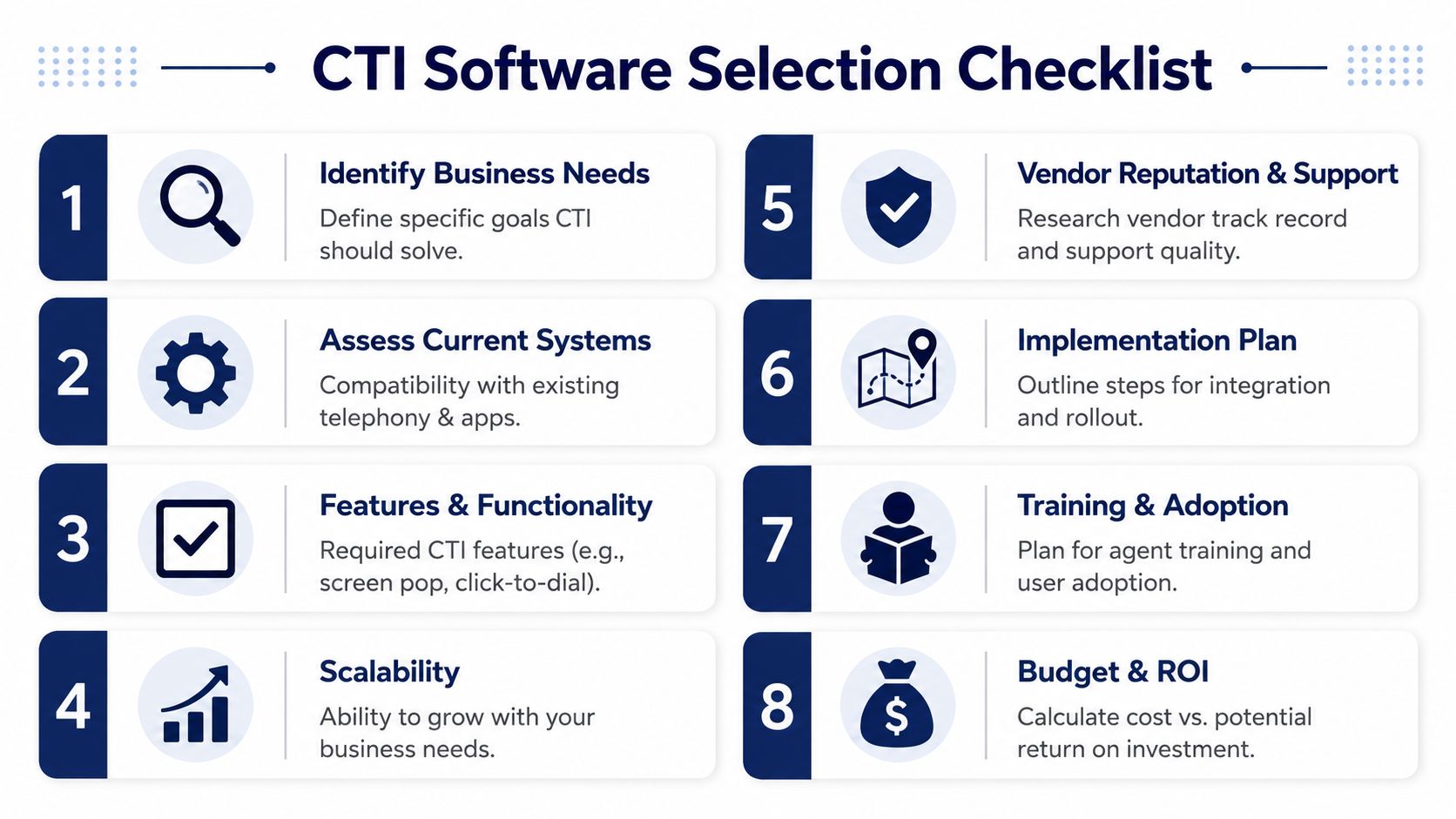
A selection checklist that works in practice
Use this as a working filter, not a marketing checklist.
Start with workflow fit
List the calls that matter most. Sales follow-up, support triage, appointment scheduling, dispatch, billing, or owner escalation. Buy for those workflows first.Map your current stack
Confirm which CRM, help desk, directory, and collaboration tools have to connect. A “supported integration” can mean anything from deep workflow sync to basic click-to-dial.Decide where CTI should live
Some businesses need a dedicated integration layer. Many don't. If your cloud phone system already offers the features you need, adding another tool can create more administration than value.Check support quality early
This is not a side issue. CTI touches telephony, user training, and business systems. When it breaks, your team needs someone who can troubleshoot the whole chain.
A sane rollout plan
Don't launch to everyone at once unless the environment is simple and the connector is proven. Start with one team, one workflow, and one manager who will review what happens.
A practical rollout usually includes:
- Pilot with a small user group
- Define success in business terms
- Train on the workflow, not just the buttons
- Review logs, routing behavior, and record quality
- Expand only after cleanup
If you manage scheduling-heavy service operations or contact center shifts, it also helps to compare call center scheduling tools alongside CTI planning, because staffing models and call-routing logic often need to work together.
The easiest CTI project to support is the one that removes moving parts instead of adding them.
For many SMBs, that means choosing a cloud phone platform with built-in CTI capabilities and managed setup instead of assembling separate voice, connector, and admin layers from scratch.
If you're replacing an aging PBX or trying to make your cloud calling setup work better with the rest of your business tools, SnapDial is worth a look. It's a cloud-based business phone system designed to simplify calling, routing, mobile access, call recording, and administration without the usual legacy complexity, and the white-glove setup model is especially useful for teams that want the benefits of CTI-style workflows without turning the rollout into an internal IT project.