
You're staring at two phone system quotes, and one looks cheap until you read the second page. The handset price is fine, the service fee seems manageable, then the install line, the switch upgrade, the headset line, and the maintenance terms show up and the whole deal changes shape. That's how most SMBs get trapped, they shop for a phone system like it's a one-time purchase, then discover the total bill is spread across hardware, support, network readiness, and downtime risk.
Equipment costs are the part of the decision that decides everything else. If you get that wrong, you overbuy phones, underbuy network gear, and pay for avoidable service calls later. If you get it right, you can compare hosted VoIP and on-prem PBX on equal footing, which is the only way to make a sane choice.
Why Equipment Costs Decide Your Phone System Choice
You can judge a phone system by the handset price and still make a bad purchase. The handset is only one line in a much larger equipment stack, and that stack also includes switches, routers, headsets, mounting hardware, training, and the time lost when the system is unstable.
Stop shopping by sticker price
A low quote usually means some part of the job got pushed somewhere else. On-prem systems load more cost into owned hardware and maintenance, while hosted systems shift more of the burden into subscription pricing and customer-owned endpoints. That is why two quotes can look completely different on paper and still solve the same communication problem.
The better way to evaluate equipment costs is to ask five questions at once. What do we buy today, what do we keep paying for, what network changes are required, what support do we need, and what happens when a user cannot take calls because the setup is wrong?
Practical rule: If a quote does not clearly separate hardware, network work, and ongoing support, assume the actual cost is higher than the number on the front page.
Use three lenses, not one
I'd review every business phone system through component-level pricing, hosted VoIP versus on-prem comparison, and multi-year total cost of ownership. That keeps you from picking the lower upfront price and paying for it later in maintenance or downtime.
The market backdrop matters too. Equipment prices have stayed high in many major markets, and the Federal Reserve's Producer Price Index for Machinery and Equipment was 323.861 in April 2026, up from 322.596 in January 2026 and 323.481 in February and March 2026, which shows equipment pricing did not snap back to an old baseline, according to FRED's machinery and equipment price series. For a more specific segment, the Producer Price Index for Machinery and Equipment: Electrical moved from 139.05 in January 2025 to 150.18 in January 2026, about 8.0% year over year, and rose 2.8% from December 2025 to January 2026 in the same series, according to the Bureau of Labor Statistics Producer Price Index data.
That backdrop applies to phone gear too. If you are budgeting a replacement or a new site, do not ask, “How much does a phone cost?” Ask, “What does the whole system cost over its useful life?”
The Component-Level Equipment Costs You Actually Pay For
Here's where the numbers get real. A business phone rollout is a basket of hardware and labor, not a single purchase. The handset is only the visible item, and in a proper deployment it's usually not even the largest line.
The hardware basket you're really buying
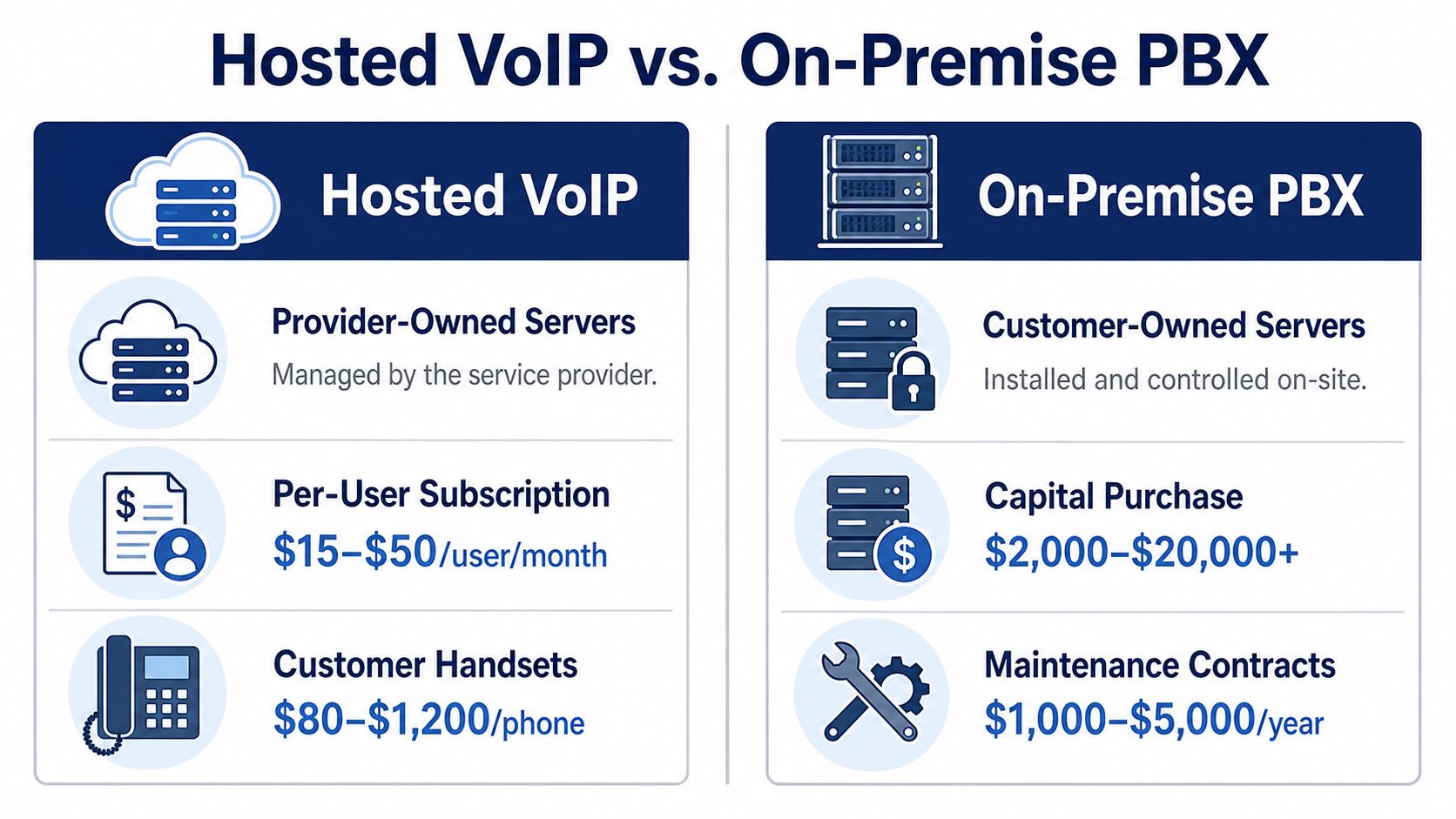
For desk phones, the planning range I'd use is $80 to $400 for standard IP phones and $500 to $1,200 for executive or video-capable models. Headsets usually land around $50 to $300 per agent, with better noise-canceling gear costing more in call-heavy environments. Conference room endpoints tend to run $400 to $1,500 per room, depending on camera quality, speaker pickup, and how polished the room experience needs to be.
Network gear is where many SMBs get surprised. If the existing LAN can't handle voice traffic cleanly, you may need PoE switches and QoS-capable routers, and those upgrades can run $500 to $5,000 depending on office size and how much of the network already exists. Installation labor is another line item, usually $50 to $150 per drop or a flat $1,000 to $5,000 site fee when the work is bundled.
The hidden items that keep showing up
There are always extras. Power injectors, surge protection, wall mounts, spare handsets for new hires, and backup headsets add up. In a real deployment, those forgotten items can push the budget up by 10 to 15% before anyone notices the drift.
A good phone budget assumes some waste and some replacement, because people break headsets, new hires need devices, and conference rooms always cost more than the initial quote suggests.
What to ask before you sign
If you want a usable estimate for your own office, build the quote from the floor up. Count handsets, headsets, room systems, switch ports, and install drops, then add a spare buffer for new users and failures. If you're comparing architectures, this hosted VoIP versus PBX pricing guide is a useful side reference for how the moving parts differ.
Hosted systems also need to fit into the rest of your communication stack. If your team still depends on fax workflows, reliable fax alternatives are worth reviewing before you assume a phone system alone covers the job. The point is simple, buy the full basket or your estimate is fiction.
Hosted VoIP vs On-Premise PBX Equipment Costs Compared
Hosted VoIP keeps the server side with the provider, so your equipment bill focuses on endpoints and network readiness. On-prem PBX moves the burden back to your office, which means more owned hardware, more maintenance exposure, and more effort to keep the system alive.
What hosted VoIP really means
In a hosted setup, the provider owns the core platform, so you're mostly paying for per-user subscription, handsets, headsets, and whatever network work your office needs. That makes the year-one equipment bill lighter because you're not buying a PBX cabinet, server hardware, or the associated maintenance infrastructure.
The tradeoff is obvious. You'll keep paying the subscription, and any extra module, seat, or device you add must be justified against that recurring cost. But for most SMBs, the simplicity is the point. The office gets faster deployment, fewer moving parts, and much less internal telecom overhead.
What on-prem PBX puts back on your desk
On-prem PBX gives you more control, but it also puts the capital purchase back on your books. You buy the system, you own the repair burden, and you carry the risk if the platform ages badly or parts become harder to source. You also need someone who can manage it, which is where the hidden internal labor cost starts to matter.
The logic here is the same as in SnapDial's hosted PBX pricing overview, where the core difference is whether the provider carries the platform or your business does. On-prem can make sense when utilization is heavy and telecom support is already in-house. For everyone else, the hardware ownership burden is usually the wrong bet.
Which model wins on equipment
I'm blunt about this. Hosted VoIP usually wins when you care about speed, lower initial outlay, and easier scaling across remote or multi-site teams. On-prem only starts looking attractive when the organization is large enough, stable enough, and staffed enough to absorb the operational burden.
For context, the Equipment Leasing & Finance Foundation reported that U.S. equipment and software investment reached $2.3 trillion in 2023, up 5.3% from the prior year, and estimated that about 57.7% of that spending was financed, implying an equipment finance market of roughly $1.34 trillion (Equipment Leasing & Finance Foundation horizon report). That financing scale tells you something important, equipment decisions are rarely just procurement decisions, they're capital structure decisions too.
If you need one sentence to anchor the choice, use this one. Hosted VoIP lowers ownership friction, on-prem PBX raises control and responsibility, and the equipment cost difference only makes sense once you include the rest of the life cycle.
Calculating Total Cost of Ownership Over a 7 to 10 Year Horizon
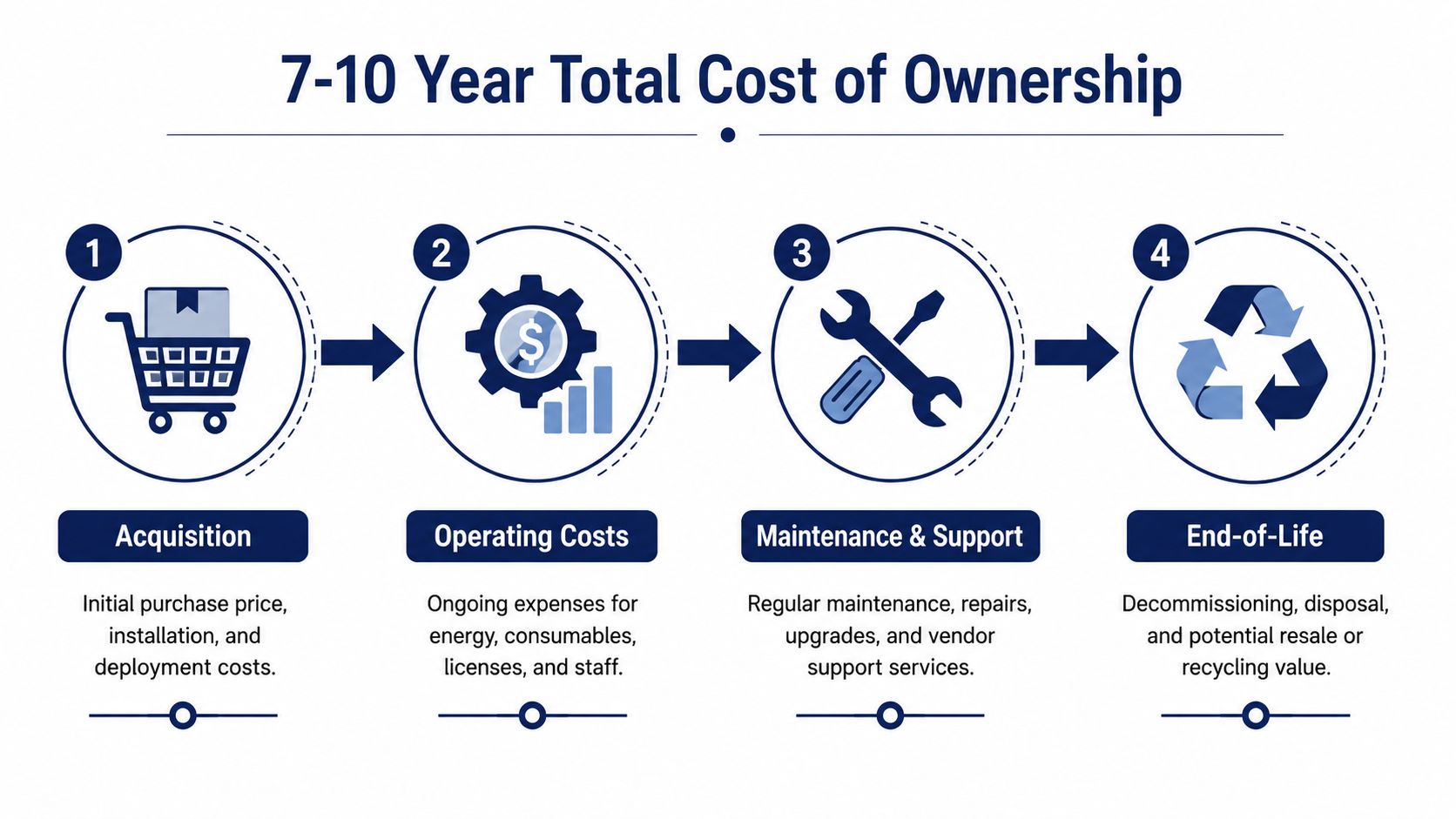
A phone system bought for today's headcount is the wrong comparison. The decision runs over a 7 to 10 year horizon, because that is long enough for maintenance, replacement cycles, support, and downtime to change the outcome. That is the time frame that keeps procurement honest.
Hosted VoIP versus on-prem PBX looks like a sticker-price fight until you price the full stack. The equipment bill includes handsets, headsets, switches, cabling, UPS units, and sometimes conference-room gear. The operating bill includes support, replacements, and the time your team burns fixing problems instead of running the business. If you want the direct model comparison, this hosted VoIP vs on-premise PBX pricing guide and SnapDial's hosted PBX pricing overview put the two cost structures side by side.
Build the model in four buckets
Start with acquisition, then add operating costs, maintenance and support, and end-of-life. That is the spreadsheet structure I would use, because it forces you to capture both upfront and recurring expenses instead of letting the sticker price dominate the decision.
The maintenance benchmark that matters in practice is about 2 to 5% of purchase price per year for industrial equipment, according to Speclens's TCO calculator guidance. It is not a perfect telecom number, but it works as a planning proxy because the bigger lesson is the same. Life-cycle cost is not linear, and a cheaper asset can become expensive once maintenance, downtime, and support are added.
A simple way to run the math
Take a 50-user on-prem deployment with $30,000 of hardware and apply the maintenance benchmark over a decade. On maintenance alone, that lands roughly in the range of $4,200 to $15,000 over ten years, before you even account for operating costs or replacement parts. A comparable hosted deployment at $25 per user per month totals $105,000 over the same period, but it shifts a lot of the hardware burden off your plate.
That comparison does not mean hosted is always cheaper. It means the cost structure is different, and you need to choose the structure that fits your business. If you have stable headcount, in-house telecom talent, and a long asset life, on-prem can still win on per-seat economics. If you have a smaller office, hybrid work, or fast-changing staffing, hosted usually gives you a cleaner number and fewer failure points.
Don't forget the cost of time
The most underestimated part of TCO is downtime. A system that takes an hour to fix, or requires a vendor visit for every small issue, creates real business cost even if no invoice arrives that day. Procurement teams should also include training, support, and disposal in the spreadsheet, not as an afterthought.
Fax flow matters here too. A hosted environment makes it easier to move away from legacy hardware and use reliable fax alternatives without tying up a PBX cabinet for one stubborn use case. That is the kind of detail that keeps a phone project from turning into a hardware graveyard.
For a clean accounting treatment of the asset side, the depreciation schedule guide from Bookkeeping and Accounting is a practical reference when you are mapping hardware into books and budgets. If you only price the purchase, you are not doing TCO, you are doing wishful thinking.
Sample Equipment Budgets by Company Size
The same gear looks cheap in a 10-seat office and expensive in a 100-seat operation. That's why budget by profile, not by category. Headcount, room count, call volume, and redundancy expectations all change the mix.
Small office, multi-site SMB, and call center
| Profile | Headcount | Equipment Outlay | Recurring Service | Notes |
|---|---|---|---|---|
| Small office | 10 | Roughly $2,500 to $6,000 | Roughly $250 to $600/month | Basic handsets, a small switch refresh if needed, and a simple install |
| Multi-site SMB | 50 | Roughly $18,000 to $45,000 | Roughly $1,500 to $3,500/month | More handsets, conference rooms, network cleanup, and spare devices |
| Call center | 100 | Roughly $80,000 to $150,000 | Roughly $4,000 to $10,000/month | Headsets, supervisor stations, wallboards, and redundancy raise the hardware bill |
A 10-person office usually gets the best return from modest equipment and fast deployment. The cost drivers are setup labor and making sure the network can carry voice cleanly, not fancy hardware. If you're shopping in that range, the small-business VoIP phone guide is a practical place to see how endpoint choices affect the bill.
A 50-user SMB starts to feel the weight of room systems, spare gear, and support expectations. That's the size where standardizing phone models matters a lot, because every extra model adds training and inventory complexity. The recurring service line becomes as important as the hardware line, which is exactly why hosted VoIP often looks cleaner in this segment.
A 100-seat call center is a different animal. Headsets, supervisor consoles, wallboards, and failover planning push the equipment number up fast, and management usually cares more about uptime than about owning the gear outright. That's the point where the equipment share of total cost shrinks relative to labor and service delivery, and it's also where more complex procurement can make sense.
Rule of thumb: the bigger the operation, the less useful “phone price” becomes as a decision metric. The budget has to reflect usage intensity, support burden, and replacement planning.
Financing and Procurement Options for Phone System Equipment
How you pay matters almost as much as what you buy. A good procurement structure can make a mid-sized rollout manageable, while a bad one can make a decent system look overpriced.
Four ways to buy the same system
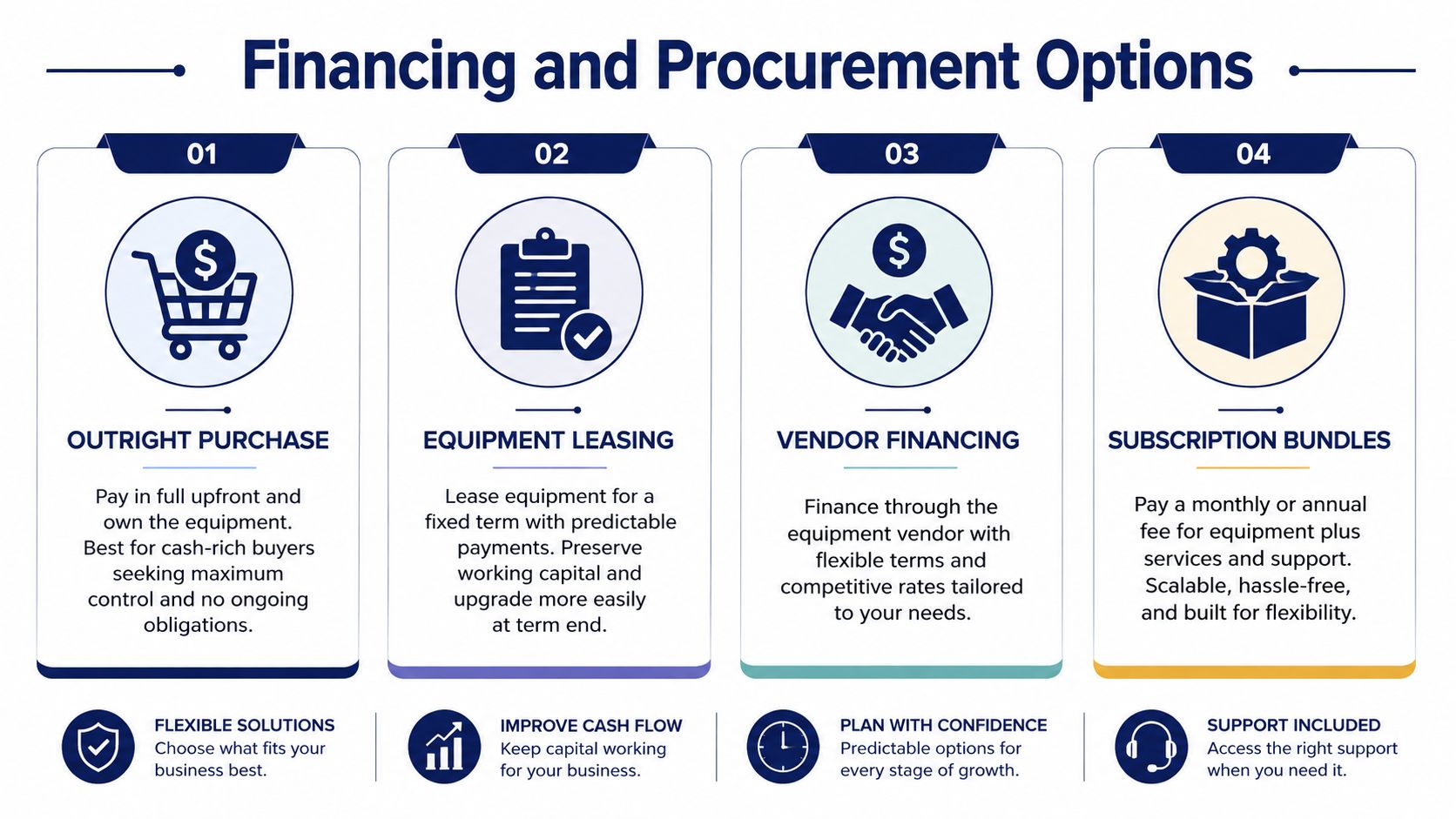
Outright purchase works when cash is available and you want the asset on the balance sheet. It's the cleanest option for long-use hardware, especially if you expect to keep the system in place for years.
Equipment leasing is the better fit when the deployment is large enough that you don't want to drain cash or credit lines. It's also useful when you want a refresh path baked into the contract instead of forcing a full replacement later.
Vendor financing sits between those two. It can smooth the purchase into predictable payments, but the contract terms matter more than the sales pitch. That's where buyers get trapped by renewal terms, hidden module fees, and upgrade language they didn't read closely.
Subscription bundles are the default in hosted VoIP. They turn the hardware and service relationship into a monthly operating expense, which is why they're so common for distributed SMBs and teams that don't want to own the infrastructure.
Pick the structure that matches your life cycle
If you want the asset on the books and expect to use it for 8+ years, buy it outright. If you want predictable payments and a refresh option around month 36 to 48, leasing makes more sense. If headcount swings a lot or your office is moving fast, OPEX subscription is usually the least painful path.
For business owners looking for financing guidance that sits outside telecom sales talk, GoSBA Loans in Los Angeles is a useful resource to review alongside vendor quotes. The main lesson is simple, financing changes the monthly number, but it doesn't erase the underlying equipment cost.
Read the contract like a skeptic
Don't let a low monthly payment distract you from the fine print. Auto-renewal clauses, early termination fees, per-user module charges, and warranty exclusions can inflate the total by 15 to 25% over time. If the procurement terms are vague, assume the vendor expects to make the margin back later.
The best procurement deal is the one that keeps the system stable, the accounting clean, and the replacement path clear. Everything else is marketing.
Practical Cost-Saving Strategies Without Sacrificing Reliability
Cutting equipment costs is easy. Cutting them without creating support pain is the hard part, and that's where most SMBs fail. The trick is to spend less on complexity, not less on reliability.
Standardize the hardware stack
Pick 2 to 3 handset models, not eight. Every extra model increases spare inventory, training time, and troubleshooting overhead, and the savings from “variety” disappear fast once you have to support it. I'd rather see one solid desk phone, one executive model, and one conference room endpoint than a random assortment of bargain devices.
Use soft clients for remote workers instead of issuing a phone to every deskless employee. That keeps the rollout lean and avoids buying hardware for people who don't need it every day. If a remote hire can work cleanly from a laptop and headset, there's no reason to force a physical handset onto the budget.
Buy for reliability, not for the cheapest quote
Cheap phones and cheap headsets often cost more in the long run because they generate support tickets, replacement requests, and user complaints. That's exactly why total cost of ownership matters more than sticker price. A slightly better handset that lasts longer and needs fewer resets is usually the cheaper purchase by the end of the contract term.
You can also lower project cost by using PoE switches you already own instead of buying new ones. If your network team confirms the ports and power budget are fine, don't throw money at hardware you already have. The same logic applies to conference rooms, reuse what's stable and only replace what's the bottleneck.
Practical rule: if a saving creates more tickets, more downtime, or more training, it wasn't a saving.
Time the purchase and refresh the right gear
Vendors discount aggressively when they want quota relief, especially near fiscal quarter-end. That's the best time to ask for better pricing on phones, headsets, and room systems. I'd also keep headset refresh on a tighter cycle than the rest of the system, because worn headsets create complaints faster than almost any other device in the stack.
If you need a low-friction way to deploy hosted calling without building a telecom team, SnapDial is one option that combines cloud PBX, managed setup, and phone hardware into one service relationship. It's not magic, it just moves part of the equipment burden out of your office and into a managed platform.
The final recommendation is blunt. Spend less on model sprawl, not on reliability. Buy enough hardware to support growth, but keep the catalog narrow, the network clean, and the replacement path simple.
If you're comparing phone system quotes right now, use the same lens I'd use in a real procurement review, total cost, support burden, and what happens after install day. Visit SnapDial to review hosted VoIP options, hardware choices, and a cleaner way to roll out business calling without turning equipment costs into a guessing game.