
The cheapest PBX choice isn't always the safest bet for your budget. In cloud PBX comparisons, the bigger trap is assuming the subscription price tells you everything, when the outcome depends on voice quality, support enforceability, and whether your seat count is stable enough to make a long-lived system cheaper over time. Independent comparison material shows why the decision keeps tilting toward cloud for many buyers, but it also shows why some steady organizations should still run the numbers instead of buying the default answer.
| Decision Factor | Cloud PBX | On-Premises PBX |
|---|---|---|
| Upfront spend | Typically $20-$65 per user per month in subscription pricing, with modern market guidance often around $15-$35 per user per month | Often requires $20,000-$100,000+ in upfront hardware and installation |
| Cost structure | Predictable operating expense | Capital expense plus maintenance and refresh cycles |
| Best fit | Growing, multi-location, and remote-friendly teams | Stable organizations with predictable seat counts |
| Hidden risk | Add-ons and migration costs can push total spend higher than expected | Aging hardware and internal labor can become expensive |
The harder question is not whether cloud is modern. It's whether your organization values flexibility enough to justify recurring spend, or whether a depreciated on-prem platform with long refresh cycles could still win over 3 to 7 years. That's the lens that separates a quick comparison from a procurement-grade decision.
Why Cloud PBX Is the Default Choice in 2026
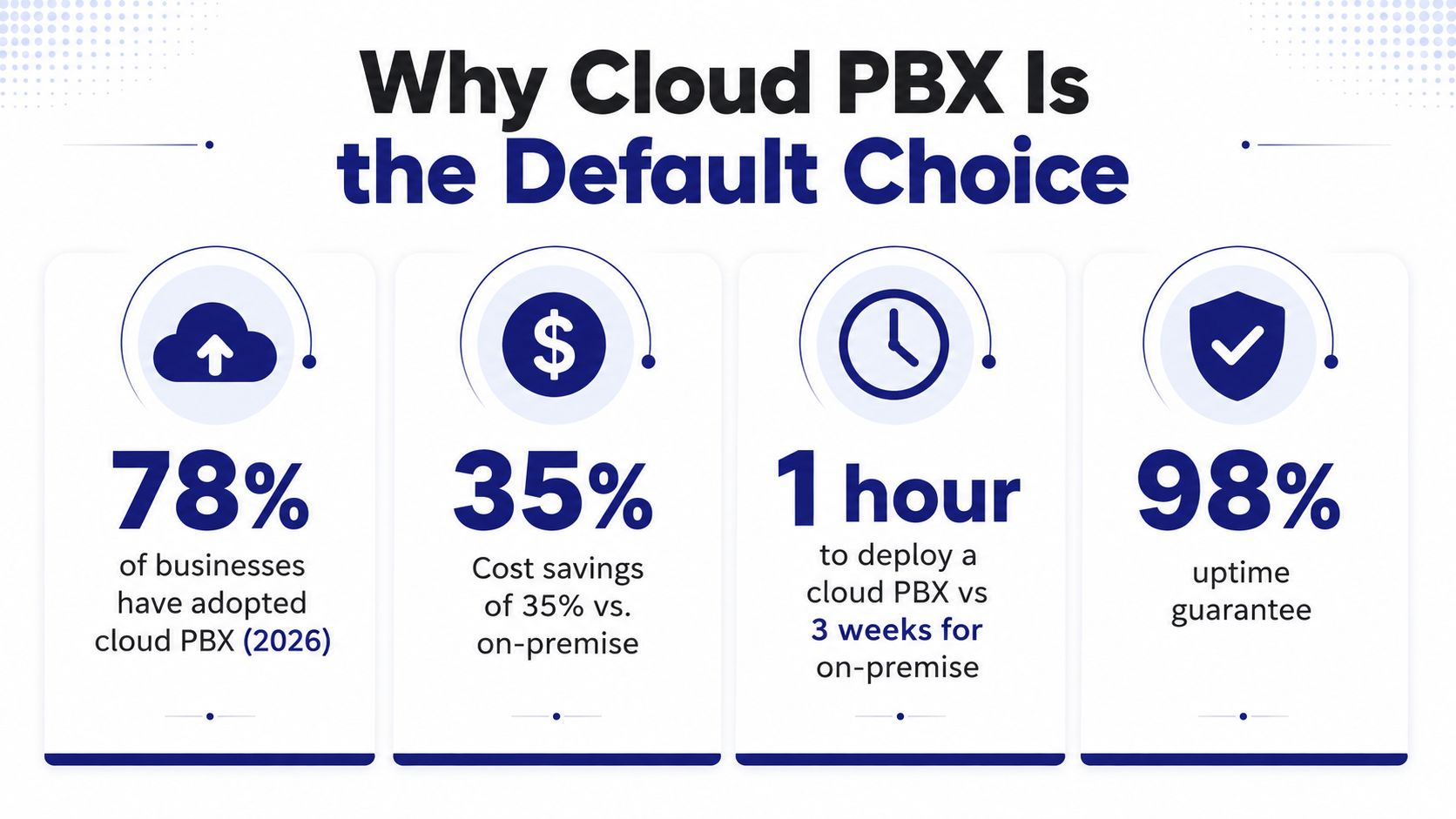
Cloud PBX has become the default starting point because the entry cost is different from legacy telephony. Independent comparison material places cloud subscriptions at about $20-$65 per user per month, while on-premises PBX can require $20,000-$100,000+ in upfront hardware and installation, with 5-year total cost of ownership often 40%-60% lower for cloud deployments. In one illustrative model, a cloud PBX plan averaging $35 per user totaled $242,000-$273,000 over five years when setup and minimal IT labor were included, which explains why SMB buyers often prefer to avoid large capital outlays and refresh cycles. That same cost logic shows up in newer guidance that puts standard cloud PBX pricing around $15-$35 per user per month and frames the spend as predictable operating expense rather than capital expense, especially for multi-location firms that need to add seats quickly (BluIP comparison guide).
The word “default” still needs context. For organizations with frequent hiring, distributed teams, or rapidly changing locations, cloud's subscription model lines up with how telecom spend is now budgeted, which is why procurement teams often treat it as the first option rather than the last resort. A cloud system can also align more cleanly with the way modern offices buy other recurring services, which is a useful parallel if you've ever compared refresh-heavy hardware categories to subscription-led purchases like the top refurbished iPhones UK buyers weigh when they want predictable value without a big upfront hit.
Practical rule: cloud wins when your business keeps changing faster than your phone room can.
One more clue comes from how buyers define the product itself. If you want a plain-language refresher on what cloud telephony usually includes, the overview on what is a cloud phone system gives a concise baseline before you start comparing vendors.
What the market shift really means
The cloud vs. on-prem question is no longer a simple “cloud is cheaper” debate. The comparison is whether your organization's growth trajectory justifies subscription OpEx, or whether your seat count, device lifecycle, and internal IT labor make a depreciated on-prem deployment more defensible. That distinction matters most in businesses that add users often versus those that keep telephony stable for years at a time.
For buyers who are scaling, the cloud model usually removes more friction than it adds. For buyers with static environments, the advantage can be less obvious, and that's exactly why a serious cloud PBX comparison has to go past the headline price.
Feature Framework for Cloud PBX Comparison
Feature lists look persuasive until you test them against actual call traffic. The useful question isn't whether a platform has IVR, queues, voicemail, or mobile apps, it's whether those features behave predictably when callers are waiting and staff are busy. That's why telecom procurement teams should compare capability by functional layer, not by marketing checklist.
Compare the core call flow first
Call routing and IVR are the intelligence layer of the system. If those break down, everything else becomes cosmetic. Queue logic matters just as much for customer-facing teams, especially when you need smart queue management, callback, and wait-time announcements to keep abandonment from becoming a support problem.
Mobile and softphone support also deserve real scrutiny. Some vendors technically “support mobile,” but the experience can be clumsy enough that agents avoid it. Admin portal depth matters too, because self-service controls determine how much your internal team can change without opening support tickets.
Buyer test: if a vendor can't show how a routing change behaves under load, the feature count doesn't mean much.
A productive comparison table helps expose what's being evaluated.
| Feature Category | What to Evaluate | Quality Indicator |
|---|---|---|
| Call routing and IVR | Menu depth, hunt groups, failover behavior, business-hours logic | Calls reach the right destination without manual intervention |
| Call center tools | Queue callback, wait-time announcements, overflow handling, reporting | Agents can manage spikes without losing visibility |
| Mobile and softphone support | App stability, handoff between devices, headset compatibility | Users can answer and transfer calls cleanly off-site |
| Admin portal | User provisioning, routing edits, voicemail controls, permission levels | Internal admins can make changes without vendor help |
| Handset ecosystem | Entry-level desks phones, executive devices, video options | Device choices fit different roles without forcing a single model |
Voice quality deserves a different benchmark entirely. Cloud PBX comparisons should use packet loss, jitter-buffer discards due to late arrival, end-system delay, echo level, and MOS/R-score instead of feature lists alone, because those metrics map to what people hear on a call (Telchemy voice-quality note). Route and media performance metrics like ASR, ACD, and PDD are equally useful as early-warning indicators, and PDD is measured from SIP INVITE to the first 180/183 response or first audio at the PBX, SBC, or provider edge (voice-quality KPI guide).
That is the part many buyer-facing pages skip. They compare features as if all calls are equal, when the question is whether the provider can preserve call behavior when traffic gets messy.
For a practical analogy outside telecom, the tradeoff between product packaging and real operating value is similar to the way buyers compare Square vs Clover features and pricing before choosing a system that will work at the counter, not just in a demo.
Pricing Models and Total Cost of Ownership
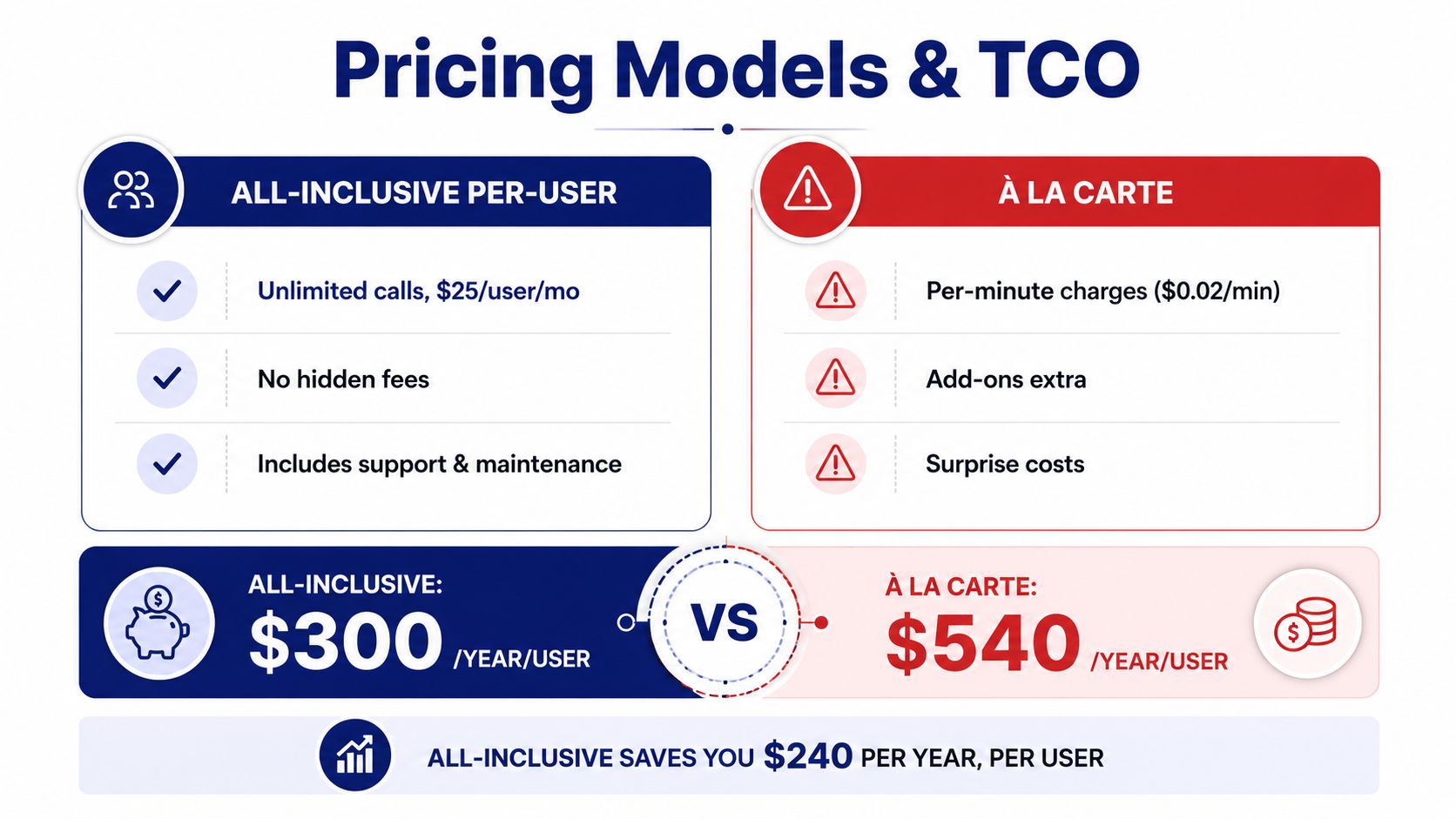
Per-seat pricing is only useful if you know what's included. Some cloud PBX plans bundle calling, voicemail, call routing, and support into a single subscription, while others sell essential functions as add-ons that turn a tidy quote into a messy invoice. That's why all-inclusive pricing is easier to defend in procurement than a low headline rate with recurring extras.
The more important wrinkle is TCO. Most comparison content still frames cloud as automatically cheaper, but recent guidance notes a different outcome for stable, low-change organizations. In static companies, cloud can have higher 5-year TCO than an on-prem system, especially when subscription OpEx, device replacement, and feature add-ons pile up over time. That pattern shows up most clearly in manufacturing, public sector, and mature office environments where user counts rarely change and refresh cycles are predictable.
What belongs in your model
Your spreadsheet should include more than subscription and handsets. Migration costs matter. So does internal IT labor, especially if your team will be documenting call flows, training users, or managing a staged cutover. Device refresh timing matters too, because telephony hardware doesn't last forever and the replacement cycle can shape long-term spend.
The most honest way to compare options is to model your own seat stability. If you add and remove users often, subscription pricing can be worth the premium. If your headcount stays flat for years, the math can shift in the other direction.
Procurement rule: compare the cost of owning change, not just the cost of buying seats.
The difference between simple and complex pricing shows up quickly in service bills, so the safest vendors are the ones that make the pricing structure obvious up front. SnapDial's published hosted PBX pricing is an example of the kind of predictable model buyers should look for, because transparency matters more than a low introductory number (SnapDial hosted PBX pricing).
SLA and Support Quality Assessment
Uptime percentages are necessary, but they're not enough. A provider can advertise availability and still leave you stranded if response times are vague, escalation paths are weak, or support channels disappear once the issue becomes complicated. In a cloud PBX comparison, the SLA should be treated as an operational contract, not a marketing attachment.
Read the SLA like an outage playbook
Start with the basics. Look for a clearly defined uptime commitment, then check how the provider defines service interruption, maintenance windows, and remediation. If those terms are fuzzy, you're left guessing when the phone system goes down.
Then move to support. You want to know whether help is available by phone, chat, email, and portal, and whether the provider uses dedicated regional support or only ticket queues. The difference shows up most sharply during live outages, when call center teams and customer-facing staff need someone who can act quickly, not just acknowledge the ticket.
A useful checklist for the SLA review is straightforward:
- Uptime language: confirm the provider states what counts as downtime and how credits work.
- Response commitments: check whether critical issues have specific response tiers.
- Escalation path: verify who gets involved after the first-line team.
- Support channels: confirm phone, chat, email, and portal access before signing.
- Onboarding support: ask whether setup and migration help are included or billed separately.
If your business depends on phones for revenue, support quality is part of uptime. A five-minute outage with no escalation is often more painful than a longer outage with a team that's actively working the issue and communicating clearly.
A practical benchmark is to ask how onboarding is handled, not just how support tickets are resolved. The vendors worth considering tend to treat migration and post-launch stabilization as one service, because that's where most frustration starts. SnapDial's 24/7 Texas-based support center and end-to-end white-glove onboarding fit that expectation as a reference model for what some buyers should demand from any enterprise-grade provider.
Security and Compliance Requirements
Security starts with control, but compliance starts with scope. A healthcare provider, a payments business, and a public-sector office don't have the same obligations, so the right cloud PBX comparison depends on which rules apply to your environment. That's why a provider's certification list matters less than whether the certification matches your data handling and recording practices.
Match the controls to the business type
For regulated industries, the baseline questions are familiar. Does the system support encryption in transit and at rest, how are recordings stored, who can access them, and what audit trail exists when someone exports data? Those controls become especially important when calls may contain personal, financial, or health-related information.
Different verticals will care about different requirements. A healthcare buyer will focus on HIPAA-related obligations, while a business that processes card payments may need PCI DSS alignment. Companies serving EU customers should also assess GDPR responsibilities, especially if recordings or call logs include personal data.
A clean way to approach compliance is to map each obligation to a provider answer:
- Data protection: ask how voice traffic, recordings, and metadata are secured.
- Access control: confirm role-based permissions and admin restrictions.
- Logging: verify audit logs exist for user and configuration changes.
- Retention: check how long recordings and logs are kept.
- Industry fit: match certifications to the actual vertical, not to a generic checklist.
Security should also extend to the admin side of the system. A strong platform limits who can change routing, export recordings, or alter user permissions, because most internal exposure comes from too much access, not just outside threats.
The right conclusion is simple. Compliance isn't a cloud-versus-on-prem feature, it's a combination of vendor capability, customer policy, and operational discipline. If a platform can't explain those boundaries clearly, it's not ready for regulated use.
Migration and Implementation Considerations
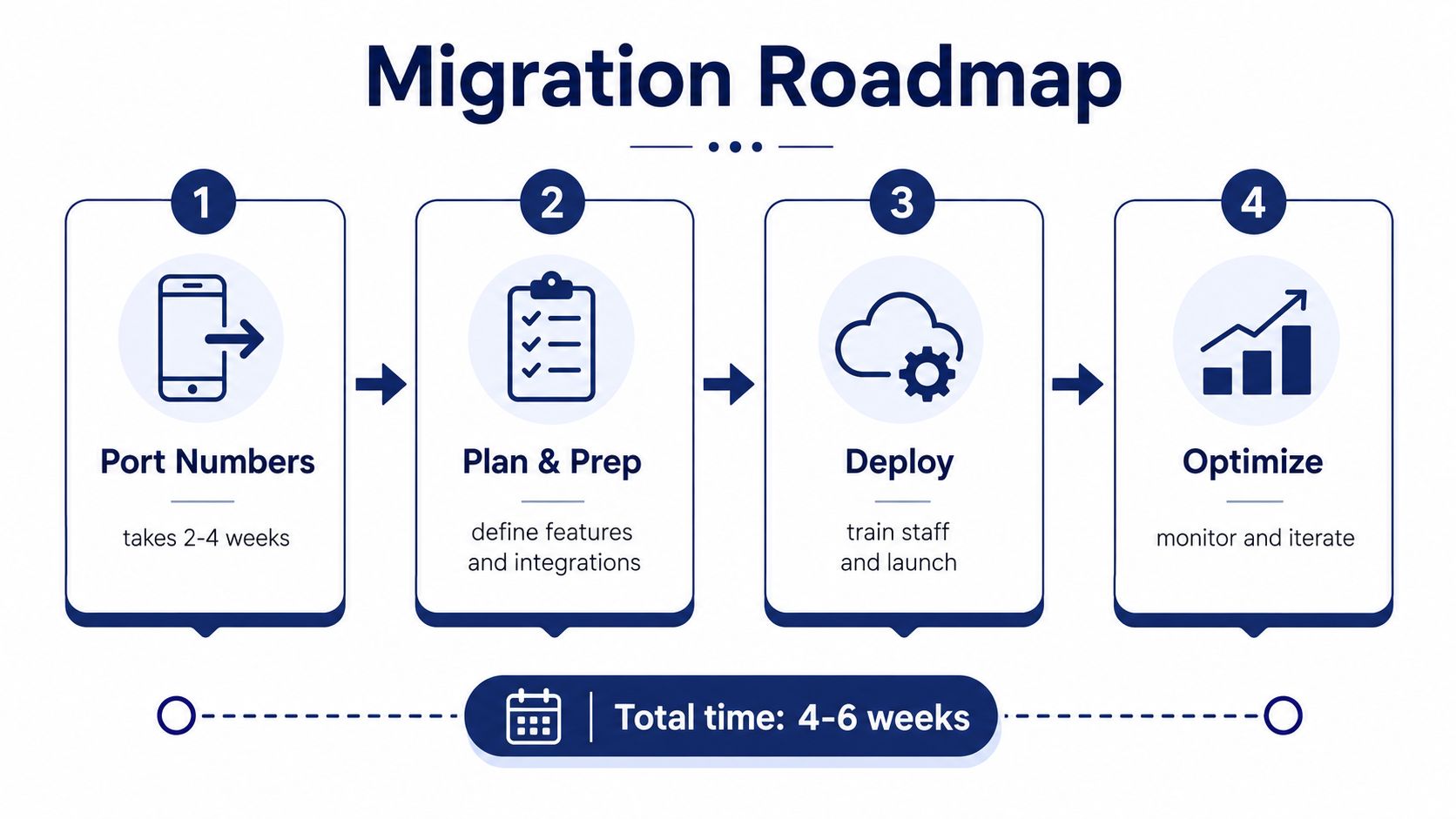
The migration phase is where many “great” PBX deals become expensive. Porting numbers, documenting call flows, training users, and coordinating cutover are all operational tasks, and each one adds friction if the provider treats implementation as an afterthought. A cloud PBX comparison that ignores rollout risk is incomplete.
Evaluate the move, not just the destination
Number porting is usually the first real schedule risk. If the vendor can't explain what documentation is needed, who owns the timeline, and how fallback is handled, the launch can stall before users ever hear the new system.
A clean implementation plan usually follows a simple sequence:
- Inventory the current environment. Document numbers, IVR trees, extensions, devices, voicemail behavior, and integrations.
- Confirm network readiness. Check bandwidth, redundancy, and call-path stability before you cut over.
- Run a pilot. Test a small group before moving everyone.
- Train by role. Admins, receptionists, and end users all need different instructions.
- Monitor the first week closely. Routing errors and user confusion often show up immediately.
A provider's early deployment metrics can also reveal a lot. ASR, ACD, and PDD are useful because they show whether the system is behaving like production infrastructure or a demo environment. When PDD is slow or routing behavior is inconsistent, the issue is usually visible long before management notices it in customer complaints.
Implementation warning: most migration failures come from poor planning, not from the PBX itself.
White-glove setup can reduce that risk when the provider owns the process from porting through training. SnapDial's free white-glove setup and curated Yealink IP phone ecosystem are relevant here because hardware, onboarding, and migration support are often the hidden friction points that stretch timelines. If you want a separate checklist for physical installation standards and rollout sequencing, the guide on business phone system installation is a useful reference.
Use-Case Recommendations and Buyer Checklist
The right cloud PBX comparison ends with fit, not feature bragging. Small businesses replacing older systems usually need predictability and low admin overhead. Multi-location companies need consistent routing and centralized control. Call centers care most about queue behavior and reporting. Remote teams care about mobility, app stability, and device flexibility.
Match the evaluation criteria to the operating model
A startup or small business should prioritize clear pricing, simple onboarding, and enough routing flexibility to grow without hiring telecom specialists. A multi-location company should weigh unified administration, location-level resilience, and consistency across sites. A call center should put queue management, callback, wait-time announcements, and reporting ahead of almost everything else.
Remote and hybrid teams need a different lens. Softphone quality, mobile app reliability, and headset support become more important than fancy admin features that only IT will touch. In that profile, the best platform is the one people will use without workarounds.
For buyers who manage several services at once, MSP-style thinking helps because it forces you to look at operational support, not just software features. The discussion of Sensoriium on MSPs for scaling businesses is a useful reminder that the most effective communication stack is usually the one that fits ongoing administration, not just day-one setup.
SnapDial fits most naturally into call-heavy and distributed environments because it combines call routing, queues, recording, mobile access, and predictable pricing in one cloud PBX package. It also lists smart queue management, queue callback, wait-time announcements, real-time statistics, and detailed reporting, which are the kinds of features support teams feel every day.
Use this checklist before you sign:
- Verify uptime SLA and the response commitments behind it.
- Check number porting support and ask who owns the timeline.
- Confirm integrations for CRM and helpdesk systems.
- Assess security compliance against your industry requirements.
- Review contract flexibility so you're not trapped if your seat mix changes.
The best vendors make every one of those questions easy to answer. The worst ones make you discover the gaps after the first outage or the first invoice.
If you're comparing cloud PBX options and want a platform that combines predictable pricing, white-glove setup, and telecom support that doesn't disappear after cutover, visit SnapDial and review how its cloud phone system fits your call flows, support needs, and migration plan.