
In 2026, cloud IVR usually costs $15 to $150 per user per month, while on-premise IVR can start with $10,000 to $50,000+ in setup costs. If you're comparing quotes, that gap is the first thing to respect, because the cheap-looking option is often the one that hides the most moving parts.
That's the situation most owners and ops managers are in right now. Three vendors, three pricing sheets, and none of them line up cleanly. One quote looks affordable until usage charges appear. Another looks expensive until you realize setup, support, and telecom were bundled. The wrong move is to fixate on the menu price and ignore the platform underneath it.
What You're Really Paying For When You Buy an IVR
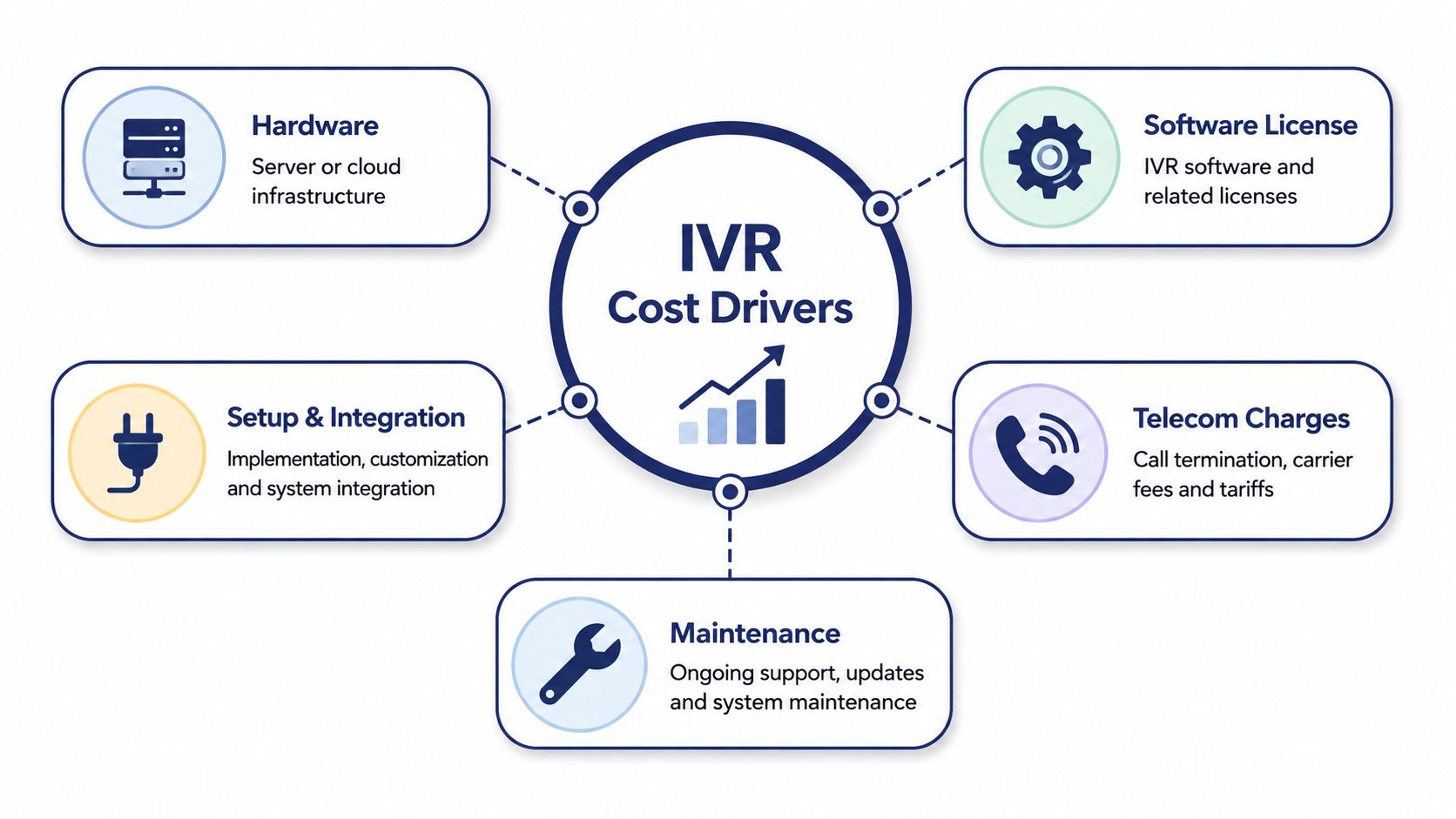
An IVR quote usually mixes together things buyers should treat separately. The menu itself is only one layer. The bill comes from the voice platform that carries the calls, the routing logic that handles them, and the people who install and maintain the system.
That's why two offers that both say $50 per user can land in totally different places. One might be a simple cloud subscription with minimal setup. The other might tack on usage charges, professional services, or telecom fees after the fact. If you don't split the quote into buckets, you're not comparing systems, you're comparing packaging.
The buckets that matter
Start with license or subscription. That's the recurring fee for access to the IVR software and the calling platform.
Then look at usage. Per-minute billing, toll-free traffic, recordings, and other metered charges can swing the total hard, especially when call volume changes.
Finally, ask about professional services. Setup, migration, menu design, number porting, and integration work often live here, and low teaser pricing goes to die here.
Practical rule: don't ask, “What does the IVR cost?” Ask, “What's included in the license, what's metered, and what takes paid services?”
If you want the basic mechanics of an IVR itself, this plain-English overview of what an IVR system is is a useful companion. It helps separate the call flow from the billing model, which is where many buyers get tangled.
One more useful comparison comes from the world of website automation. The way vendors present chatbot examples for small business often looks familiar, because buyers are usually sold a function first and a platform second. IVR works the same way. The menu is the visible feature. Real economics sit underneath it.
The Three Pricing Models Buyers Actually See
The cleanest way to judge IVR system cost is by pricing model, not by feature list. Most quotes fall into one of three buckets, per-seat subscription, pay-as-you-go usage, or a hybrid plan that mixes both.
Per-seat subscriptions
This is the model most SMBs understand fastest. In 2025, industry estimates put cloud IVR at $15 to $150 per user per month, with small teams of 20 or fewer often spending roughly $150 to $1,200 per month depending on features and usage, and mid-market platforms landing around $60 to $200 per employee per month when IVR, call analytics, and CRM integrations are bundled in (Tailwind Voice and Data).
Per-seat pricing makes sense when your agents live on the phones. If people are active most of the day, a flat monthly seat usually beats metered billing because you're paying for access, not for every burst of activity.
Pay-as-you-go usage
CPaaS-style billing charges by consumption. Neutral industry guidance puts per-minute fees as low as $0.005 to $1 (CallHippo). That's the model for spiky volume, seasonal spikes, or very small teams that don't want to carry fixed license cost.
This is the right call when call volume is low or unpredictable. If you only need IVR for certain hours, certain campaigns, or certain months, paying for every minute can still beat a seat fee you barely use.
Hybrid plans
Hybrid plans blend the two. You pay a predictable platform fee, then usage is layered in where it matters. That structure is common in mid-market deals because it gives finance something stable to budget while keeping telephony flexible.
If your average talk time per agent runs for a few hours a day, lean per-seat. If you handle fewer than a hundred calls a month or your volume swings hard by season, lean usage.
The hard truth is that pricing model matters more than brand name. A polished demo doesn't change the math. A good buyer picks the billing structure that fits the call pattern, then checks whether the vendor has hidden the rest of the spend in setup or telephony.
Cloud Hosted IVR vs On-Premise IVR
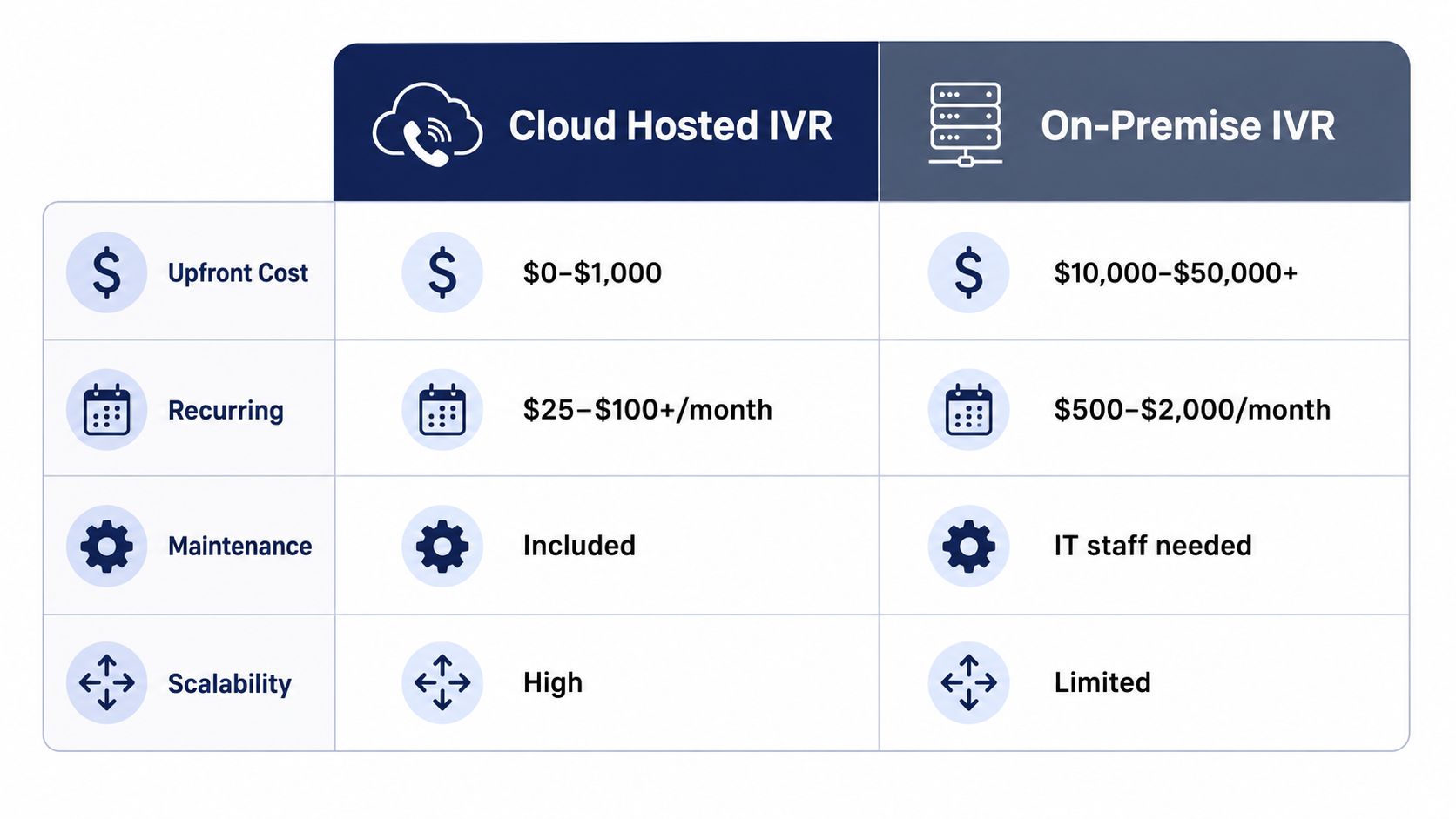
This is the comparison most buyers really need, because the cost gap is not subtle. In neutral 2026 guidance, cloud IVR setups ran from $0 to $1,000 upfront and $25 to $100+ per month, while on-premise deployments often required $10,000 to $50,000+ in setup costs and could push first-year spend above $100,000 for a 50-agent contact center once hardware, licenses, installation, and training were included (CallHippo). That's not a small difference, it's a completely different buying category.
Where cloud wins
Cloud IVR wins on speed, predictability, and cash preservation. You don't need to buy hardware. You don't need to build a maintenance routine around a box in a closet. You get a subscription and move on.
That matters for SMBs that want the phone system to work without turning into a mini IT project. Hosted systems also fit better when you have multiple sites, a remote team, or a manager who needs to update menus without waiting on internal resources.
Where on-premise still makes sense
On-premise only pencils out when there's a specific reason cloud can't satisfy. That usually means a hard integration requirement, a regulatory need, or a legacy environment that already runs around an internal telephony stack.
If you don't have one of those reasons, don't romanticize ownership. You're buying hardware refreshes, support obligations, and staff dependence whether the salesperson says it out loud or not.
The blunt verdict
For most SMBs and growing call centers, hosted cloud IVR is the better financial decision. It's cheaper to start, faster to deploy, and easier to budget. On-premise is a niche choice, not a default.
A plain hosted model with clear pricing, like the kind used by SnapDial's PBX overview, is usually the cleaner fit when you want one number you can plan around instead of a long list of variable line items.
Real Cost Walk-Throughs for Common Scenarios
The fastest way to stop arguing about abstract pricing is to run the numbers against a real business shape. A dental group and a contact center live in very different cost worlds, even if both are buying the same kind of call routing.
A 25-seat dental group with light inbound volume doesn't need an enterprise-style build. A cloud IVR in the $20 to $30 per user range lands at roughly $500 to $750 per month, before setup, which makes year one feel manageable if the implementation stays simple. For a clinic or group practice, that's usually the right zone because the call flow is basic and the workload is stable.

A 50-agent support center is a different animal. At $80 to $100 per agent, recurring cost lands around $4,000 to $5,000 per month, or roughly $50,000 to $60,000 per year. That is still below the first-year spend an equivalent on-premise build can hit once hardware, licensing, installation, and training are counted (CallHippo).
| Year-One IVR Cost Comparison by Scenario | Setup | Recurring | Year-1 Total |
|---|---|---|---|
| 25-seat dental group | Minimal | About $500 to $750/month | Usually under $10,000 |
| 50-agent support center | Moderate to high | About $4,000 to $5,000/month | Roughly $50,000 to $60,000 |
The video below is a useful gut-check if you're mapping your own operation to one of these profiles.
The takeaway is simple. Smaller, lighter-volume teams often do better with a hybrid or pay-as-you-go structure. Larger support teams usually win more from per-seat pricing because the subscription is easier to forecast and often cheaper than scaling minutes one by one.
Total Cost of Ownership Beyond Year One
Year one gets all the attention because buyers are comparing setup numbers. Year two is where discipline starts, because recurring costs and admin burden decide whether the platform stays cheap or becomes annoying.
The cloud bills people forget
Cloud buyers tend to overlook the small items that add up. Number porting, DID inventory, toll-free minutes, SMS or international usage, recording storage, and the time it takes staff to change menus all sit outside the headline seat price in many quotes.
That matters because a clean-looking monthly plan can still carry add-ons that make budgeting messy. If you need frequent menu changes or your calling pattern includes toll-free traffic, the bill won't stay flat just because the salesperson said “subscription.”
The on-premise load nobody likes to discuss
On-premise puts a different set of costs on the table. Hardware refreshes, software support contracts, power and cooling, and the fully loaded cost of a part-time admin or contractor all belong in the model.
If you're evaluating legacy hardware, don't compare only the purchase price. A box on a shelf is not a complete system, and the equipment cost discussion is only useful if you account for what keeps that box alive after installation.
Sanity check: if the quote doesn't show support, upgrades, and admin labor, it's not a TCO quote. It's a sales quote.
How to judge the long run
I like a simple maintenance check. If the solution needs regular internal attention, assume the ongoing load will matter as much as the software fee. If the vendor handles updates, routing changes, and support centrally, the ownership burden drops fast.
That's why a cloud subscription that looks a bit higher per month can still win on total cost of ownership. If it removes even one part-time admin role from the process, the math changes quickly. The monthly invoice matters less than the operational drag it replaces.
Smart Ways to Lower Your IVR Bill
Most buyers can cut IVR system cost before they ever sign by making a few boring, practical choices. None of them are glamorous, but they're the difference between a tidy phone system and a budget that keeps drifting.
Tighten the scope
Don't buy seats you won't use. Don't keep extra numbers alive because nobody wants to kill them. And don't pay for enterprise menu complexity when the caller path only needs three or four clear choices.
A business that consolidates numbers and right-sizes seats usually cleans up both monthly spend and admin work. That's especially true when the old system had duplicate lines, duplicate routing, or unused toll-free entry points.
Choose the billing model that matches your traffic
Flat-rate plans make sense when calls are predictable. Usage-based plans make sense when they aren't. Mixing those up is how buyers end up overpaying for quiet months or getting punished during busy ones.
If your menu traffic is stable, fixed pricing keeps your finance team calm. If your volume swings, pay-as-you-go can stop you from carrying dead weight.
Reduce avoidable calls
Self-service menu design matters more than people admit. If callers are misrouted, they burn agent time and create more telephony cost than they should. Clear options, tighter language, and a simpler flow reduce the amount of waste every month.
If a caller can solve the issue in the menu, your IVR just paid for itself by not creating an extra transfer.
For teams that want a more predictable setup, a hosted package with all-inclusive pricing is often the cost-control move. It removes the line-item churn that makes budgeting painful and keeps the focus on operations instead of invoice archaeology.
Bring this checklist to a vendor call:
- Right-size seats so you aren't paying for idle capacity.
- Consolidate numbers before you port anything.
- Ask about flat-rate versus metered usage based on your call pattern.
- Review recording retention so storage matches compliance, not habit.
- Simplify menus to cut misroutes and transfers.
- Confirm what setup, support, and changes cost.
Your IVR Budgeting Template and Procurement Checklist
Take the emotion out of the purchase and force every quote into the same template. That's the only way to compare vendors without getting fooled by packaging.
| Budget Line | Year One | Year Two Annual Run Rate |
|---|---|---|
| Setup and migration | ||
| Per-seat or platform license | ||
| Usage and toll-free minutes | ||
| Numbers and porting | ||
| Support and training | ||
| Contingency |
Procurement checklist
Use simple yes or no answers. If the vendor can't answer quickly, that's already a signal.
- Is pricing all-inclusive?
- Is setup handled end-to-end at no cost?
- Are support hours 24/7?
- Are call recording and analytics included?
- Is there a self-service portal for menu changes?
- Does the contract cap annual price increases?
- Will my existing numbers port for free?
- Are usage charges clearly defined?
- Are toll-free minutes included or metered?
- Is training included in the initial rollout?
- Does the quote show year-one and year-two totals separately?
- Will I need internal IT to keep this running?
A vendor that can't make the whole bill legible is asking you to take on risk. A vendor that can show a clean year-one number and a believable year-two run rate is much easier to buy from.
If you're comparing hosted options, prioritize the ones that package the IVR, support, and setup in a way your team can budget against. That's the cleanest path for most SMBs and call centers.
If you want a clean, budgetable IVR without the usual setup chaos, take a hard look at SnapDial. It bundles cloud calling, IVR, and end-to-end setup into a format that's easier to forecast and easier to defend in procurement. Start with the budgeting template above, then compare it against a hosted quote you can live with.