
You've probably seen it happen. A branch office adds staff, the receptionist starts juggling more calls, the legacy PBX gets noisier and more expensive to maintain, and the phone bill still arrives looking stubbornly old-fashioned. That's the point where SIP Trunking for Business stops sounding like telecom jargon and starts looking like a practical way to simplify calling, connect locations, and replace aging line-based infrastructure with something easier to scale.
For many IT managers, the shift isn't really about phones. It's about getting rid of a system that locks growth to physical circuits, hardware refreshes, and maintenance cycles that never seem to end. An independent Webtorials study reported that nearly one in three enterprises had already deployed SIP trunking, and those users saw about 33% average cost savings versus older telephony approaches, which helps explain why the move has become mainstream rather than experimental. The pressure to modernize is even clearer in what a cloud phone system can do for modern teams.
Introduction to sip trunking for business
A mid-sized company with three offices often feels the pain first. One site has extra lines no one uses, another keeps hitting capacity during peak call times, and the IT team has to preserve equipment that's becoming harder to support. The business doesn't just want cheaper calling, it wants a cleaner way to handle voice across locations without rebuilding the whole phone environment every time headcount changes.
That's where SIP trunking starts to make sense. It connects an existing phone system, usually an IP-PBX or a cloud-connected call controller, to a provider over the internet instead of through traditional phone lines. In practical terms, the company keeps control over calling logic while shifting the transport layer to a more flexible model.
Practical rule: If your current phone setup makes every change feel like a hardware project, you're already paying the hidden cost of rigidity.
The adoption trend backs up that business case. A Ribbon summary of the Webtorials study reported that nearly one in three enterprises had deployed SIP trunking, with those users seeing approximately 33% average savings versus prior telephony approaches, which shows the appeal is no longer limited to early adopters. As the market has matured, SIP trunking has become part of the standard conversation for organizations replacing PSTN and on-premises PBX systems rather than a niche upgrade. The pressing question for many businesses is no longer whether SIP trunking exists, but whether their current setup is still worth defending.
Understanding the key concepts
SIP trunking is easiest to understand if you separate the call into two jobs. One job is telling the network what the call should do, and the other is carrying the actual voice. Think of the first as the envelope and address on a letter, and the second as the letter itself, because both matter, but they travel differently.
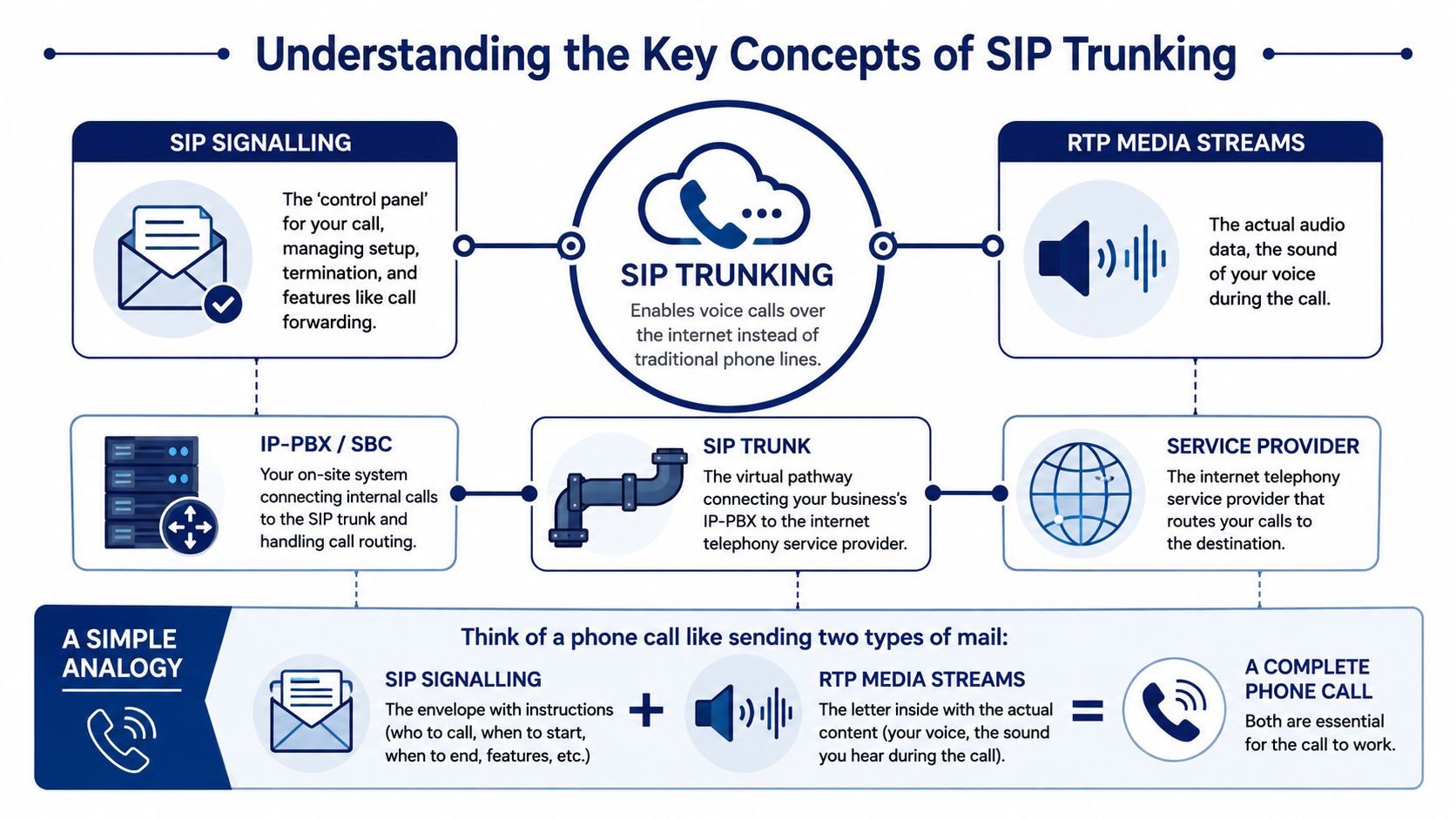
SIP signaling is the control layer. It sets up the call, negotiates features, and ends the session when someone hangs up. RTP media streams are the voice packets, the sound of the call itself, which is why a system can sometimes signal correctly while audio still misbehaves if the media path is blocked or degraded.
How the pieces fit together
A business phone call usually starts at the IP-PBX or SBC, which routes the request to the SIP trunk. The trunk then hands the session to the carrier or internet telephony provider, and the provider connects the call to the public network or another SIP endpoint. That separation matters because the control path and the audio path are not the same thing.
The technical detail that trips people up most often is firewall behavior. SIP signaling commonly runs on UDP 5060 or TCP/TLS 5061/5063, while RTP and SRTP media often use a much broader UDP range, such as 10000 to 65535, so firewall rules have to be split by function to avoid blocking calls that look fine on paper but fail in real use. A carrier specification from FL1 also notes that SIP headers such as From, To, Request-URI, P-Preferred-Identity, and P-Asserted-Identity may need to match the trunk domain exactly or routing can break even when basic connectivity works.
The cleanest way to debug SIP is to ask two separate questions, did the session get set up, and did the audio path stay open?
For a simple visual mental model, think of the path like this. The IP-PBX or SBC creates the call, the SIP trunk carries the instructions, the media stream carries the sound, and the firewall has to allow both roles without mixing them up. If you want a deeper look at how the call path behaves in practice, see how SIP call flow behaves in a real system.
A short video demo can also help teams map the terminology to what they already see in their own phone stack.
Comparing sip trunking vs PSTN and hosted VoIP
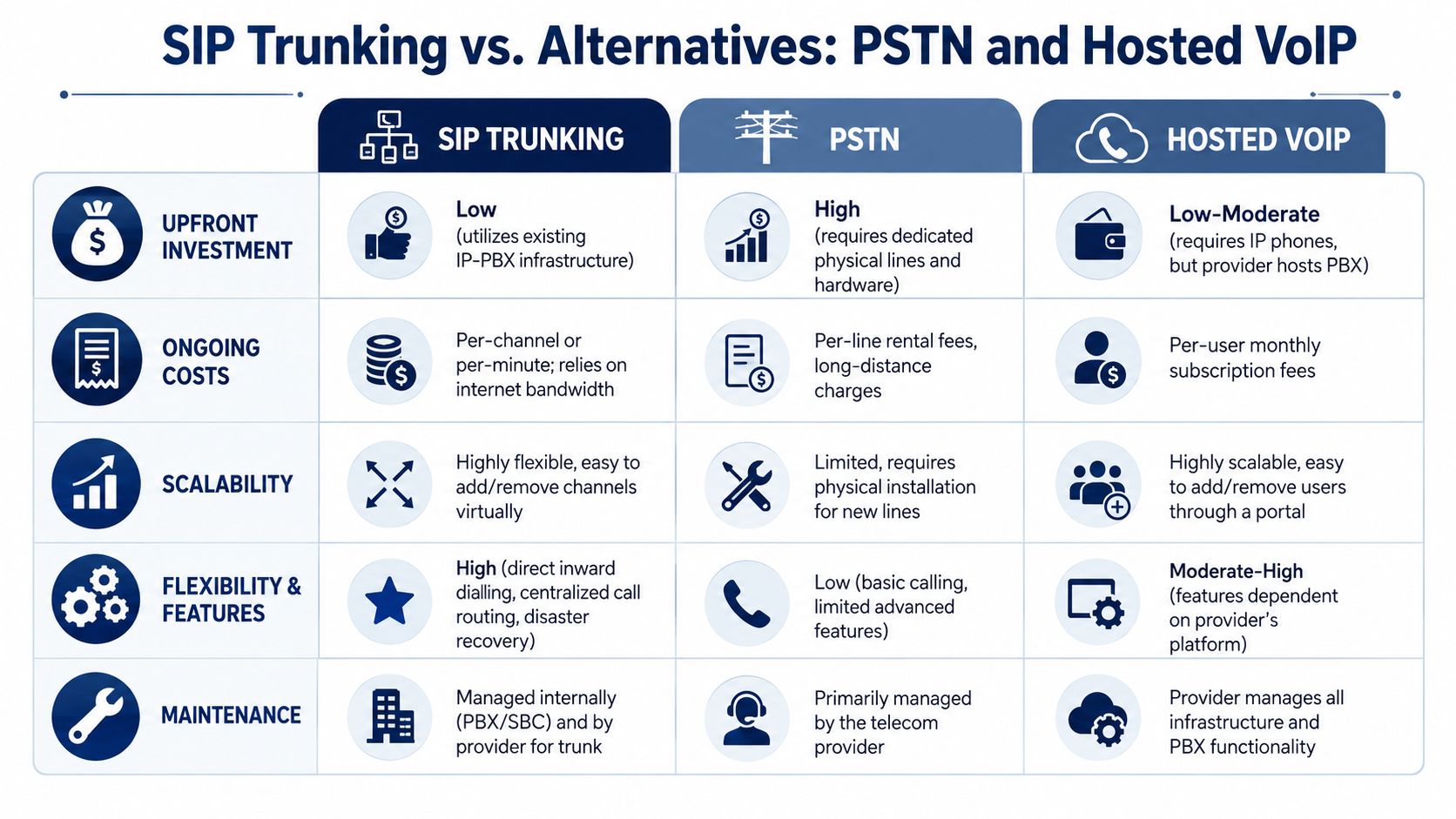
Choosing between SIP trunking, PSTN, and hosted VoIP usually comes down to where you want control to live. PSTN keeps the old physical line model intact, hosted VoIP moves most of the phone system into the provider's cloud, and SIP trunking sits in the middle by preserving your PBX while changing how it connects outward. That middle position is why so many IT teams evaluate it during modernization projects.
Where each model fits best
PSTN is straightforward, but it's also rigid. It depends on physical lines and legacy infrastructure, which makes scaling slower and maintenance more tied to outside providers. Hosted VoIP is more flexible on the surface because the vendor manages the call platform, but that can also mean tighter dependence on the provider's ecosystem, contract terms, and hardware compatibility.
SIP trunking is different because it keeps the intelligence of the phone system closer to the business. That gives IT teams more control over routing, failover, and integration with existing systems, while still moving voice traffic onto a modern IP transport path. For companies with an existing PBX investment, that can be a very practical transition point instead of a full rip-and-replace project.
If you want another perspective on the tradeoffs between landlines and internet-based calling, Nutmeg Technologies has a clear comparison of business phone system options.
The operational difference that matters
The main distinction isn't just feature lists. It's who owns the moving parts when something changes. With PSTN, changes usually mean physical provisioning. With hosted VoIP, you hand more of the stack to the provider. With SIP trunking, your team keeps more control, but that also means you need to understand networking, carrier behavior, and failover design.
Decision point: If your business wants flexibility without surrendering routing control, SIP trunking usually deserves a serious look.
The management model is the reason SIP trunking often appeals to IT leaders who want to modernize in stages. They can preserve endpoints, keep familiar internal call flows, and move external calling to a model that's easier to scale and tune. That's a different promise from a full hosted replacement, and it's often the one that fits companies with mixed infrastructure best.
Benefits cost efficiency and scalability
Cost control is still the headline reason businesses explore SIP trunking, but the useful part is how the savings show up. Telnyx cites research showing that more than 80% of businesses migrating to SIP trunking reported communication cost reductions of 40% to 60%, and about 65% of North American companies have adopted SIP as part of their telecom strategy. That combination suggests the shift is both financially compelling and operationally familiar in mature markets. See the Telnyx SIP trunking resource for the referenced figures.
Why the economics work
Traditional telephony often makes companies pay for physical capacity whether they use it or not. SIP trunking usually changes the cost structure so the business pays for logical channels, usage, and network resources rather than a stack of hardwired lines. That matters when call patterns move up and down with seasonality, campaigns, or business hours, because the expense can align more closely with actual demand.
The value goes beyond the invoice. When a company adds a new site, a new department, or remote workers, SIP trunking can expand without waiting for a technician to install more copper or carrier circuits. That speed is useful for companies that are growing in bursts, because a small configuration change can often do the job of a larger infrastructure project.
Scalability without the hardware drag
The strongest operational advantage is flexibility. A business can often add or remove channels, reroute calls, or support new locations without reworking the entire internal phone environment. That makes SIP trunking especially attractive for organizations that have already invested in an IP-PBX or cloud-ready call control layer and just need a better outside connection.
Large enterprises still dominate the market today, with Mordor Intelligence citing about 60.41% market share for large enterprises in 2025 and a growing SME segment, which shows the model has moved beyond early enterprise-only adoption. The message for smaller firms is simple, the technology is no longer reserved for giant telecom teams.
A good way to think about the ROI is this. If your current system makes every expansion depend on new physical work, then your telecom platform is acting like a bottleneck. SIP trunking reduces that friction, which is why it tends to look like a cost project at first and a growth-enablement project after deployment.
Security reliability and QoS best practices
SIP trunking is only as good as the network choices around it. Voice is real-time traffic, so if security is loose or bandwidth is poorly shaped, users hear the problem immediately as jitter, clipping, or one-way audio. That's why a business rollout needs security and quality controls from the start, not as afterthoughts.
Security controls that belong in every deployment
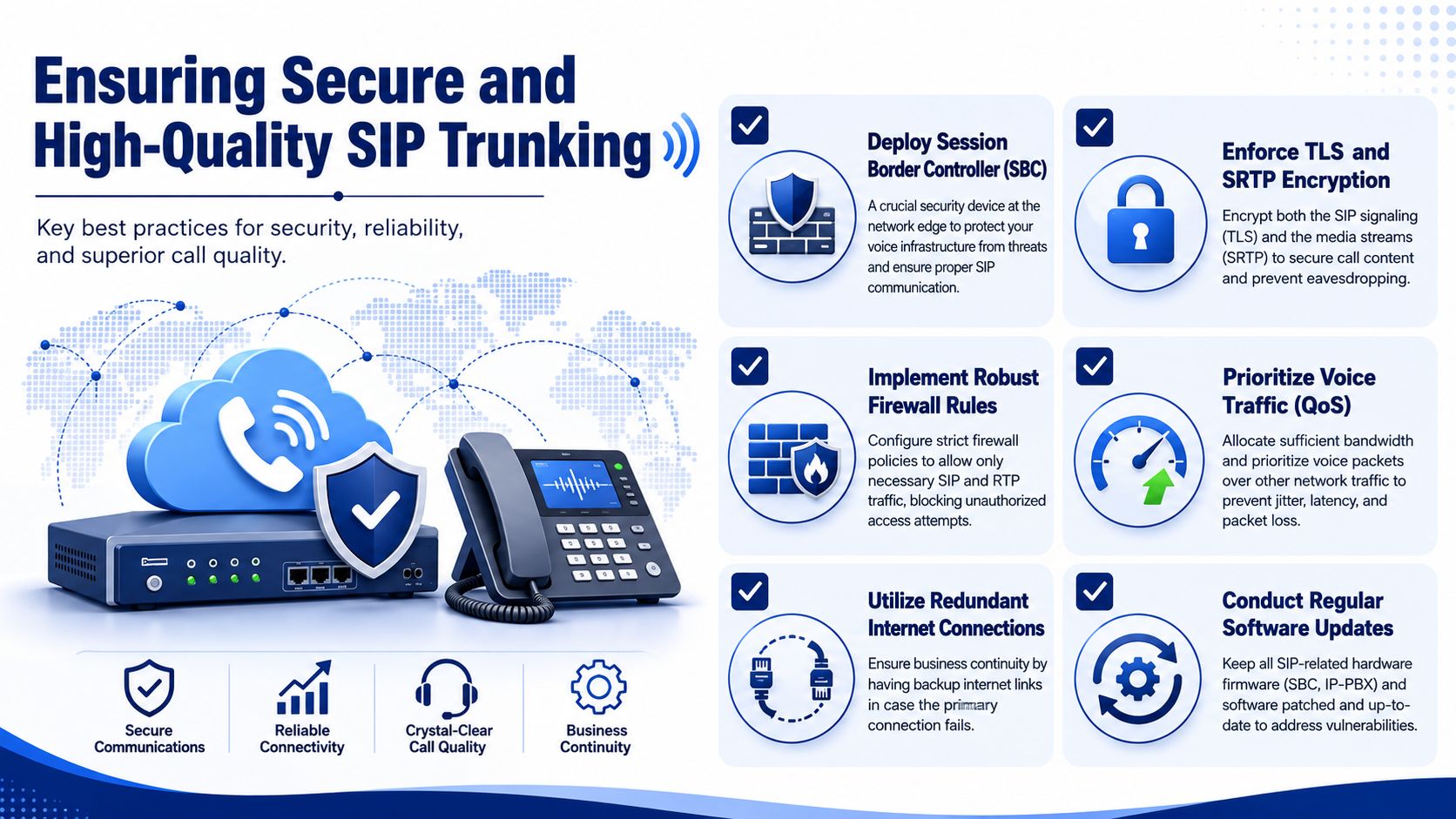
A Session Border Controller, or SBC, sits at the edge of the network and helps enforce call policy, normalize SIP behavior, and protect the voice environment from malformed or unwanted traffic. TLS protects signaling, while SRTP protects the media stream, so both control messages and conversation content are covered.
Firewall rules need to match the architecture, not guess at it. The business has to permit the SIP signaling ports the carrier expects and the RTP media range used for audio, while blocking unrelated traffic. That split is what keeps the call path open without exposing the whole network.
Bandwidth and quality planning
Voice bandwidth needs depend on codec choice and concurrency. Independent technical guidance from Spectrum estimates G.711 at about 85 to 87 kbps per call including overhead, G.729 at roughly 31 to 35 kbps, and Opus at about 32 to 96 kbps. Using the common planning formula of codec bitrate plus roughly 20% to 25% overhead times concurrent calls, a 50-call G.711 peak can require about 4.3 Mbps of voice bandwidth before headroom is added. See Spectrum's SIP trunking tech specs for the planning guidance.
That bandwidth number is only part of the picture. QoS has to prioritize voice packets over ordinary traffic, static addressing helps keep signaling predictable, and SIP ALG should be disabled when it interferes with clean session handling. Businesses that manage multiple sites often pair this with ongoing monitoring, which is where a tool like managed network monitoring for Saskatchewan businesses can fit into the wider operations picture.
Operational shortcut: If call quality gets worse when file transfers or backups start, the network is telling you QoS is underbuilt.
If you want to review the port behavior in a more practical way, use this SIP and IP ports reference. The key is to treat voice as a protected service, not just another application sharing the pipe.
Vendor selection checklist
Picking a SIP trunk provider is where many projects succeed or stall. Providers can look similar on the quote sheet, but important distinctions become clear in network reach, failover design, support quality, and how clearly they explain routing behavior. A low monthly number doesn't help much if the carrier can't handle failover cleanly or leaves your team guessing during incidents.
What to score before you sign
Use the same checklist for every vendor so comparisons stay fair.
- Network footprint and carrier diversity: Ask how they handle routing across regions and whether they support multi-carrier or geographic redundancy.
- Failover behavior: Confirm what happens when a site, circuit, or carrier path fails, and whether traffic can move automatically.
- Contract flexibility: Look for terms that let you scale without getting trapped in rigid commitments.
- Support model: Check whether troubleshooting is handled by engineers who understand SIP, not just general help desk staff.
- Integration fit: Make sure the trunk works with your PBX, SBC, or cloud platform without awkward workarounds.
- Transparency: Push for clear pricing language, clear SLA language, and clear responsibility boundaries.
For a broader perspective on choosing an outside technology partner, find your managed IT partner is a useful read because the same discipline applies when selecting telecom providers.
A good vendor doesn't just sell trunk capacity. They explain how they handle outages, how they verify caller identity, and how they support migrations without forcing you into a one-size-fits-all rollout. That matters even more if you're keeping part of your voice stack on-premises while moving external calling to SIP.
Ask the vendor to describe a failed-call scenario in plain language. If the answer feels vague, the support will probably feel vague too.
If you're comparing providers for a business deployment, SnapDial is one option in the hosted voice space, offering cloud-based business calling and migration support for organizations moving away from legacy PBXs. The useful part of any vendor discussion is not the logo, it's whether their operational model matches your network, your support expectations, and your rollout plan.
Implementation roadmap with practical examples
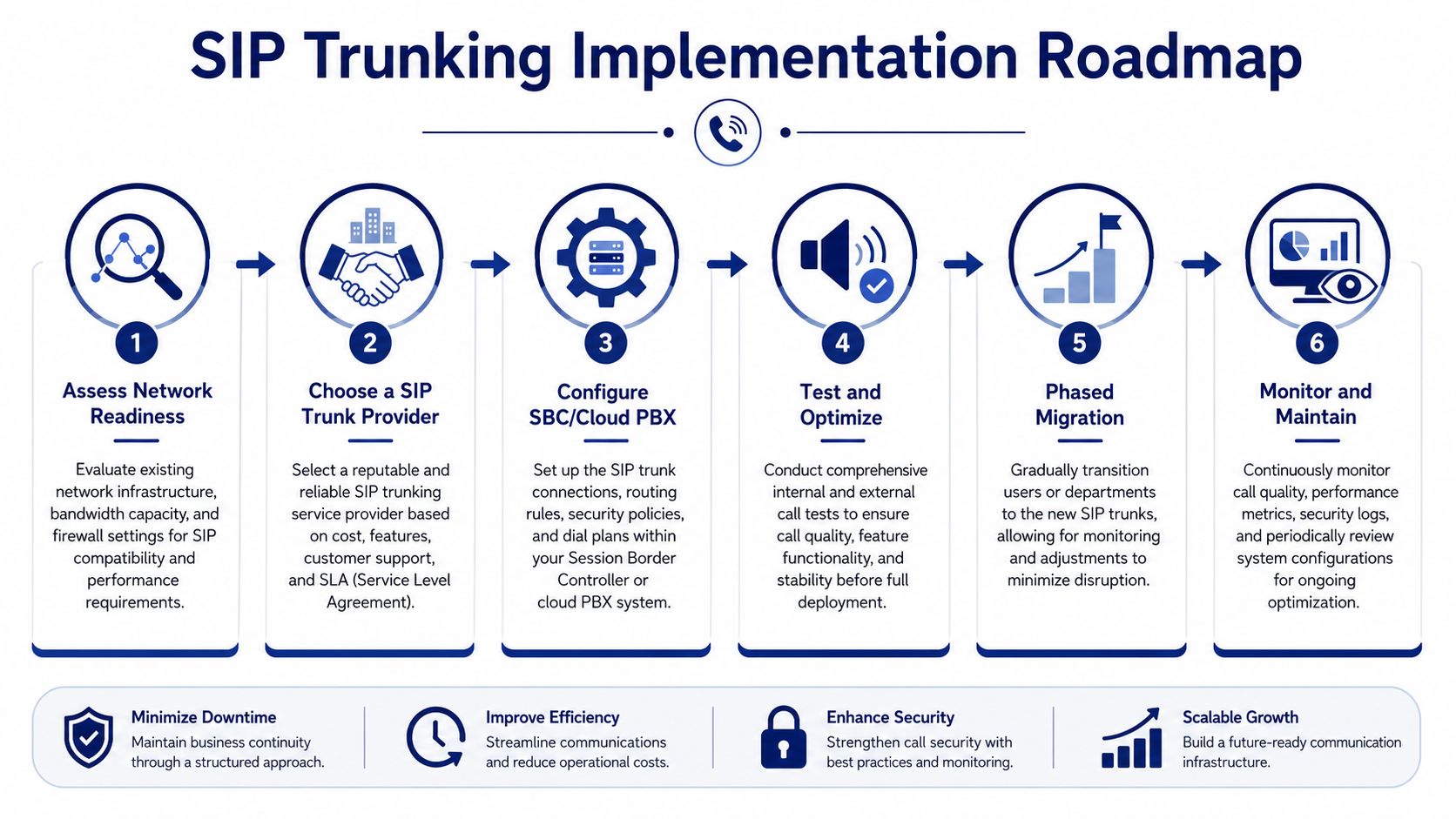
A clean SIP rollout starts long before the first test call. The best migrations treat the project like a controlled infrastructure change, with network readiness checks, a provider choice, controlled provisioning, call testing, and a phased cutover. That sequence reduces surprises because every layer, carrier, routing, endpoints, and user training, gets validated before the whole company depends on it.
Step one through three, prepare the foundation
Start with a readiness review. That means checking bandwidth, confirming that the firewall can handle SIP signaling and RTP media separately, and making sure the internal call controller is compatible with the provider's requirements. If the environment already has an SBC, it should be reviewed before cutover rather than left to chance.
Next comes provider selection and provisioning. During this phase, the carrier assigns trunk capacity, validates identity details, and maps the business call flow to the right routes. A platform like SnapDial can streamline this phase by handling white-glove setup, provisioning channels, and helping coordinate the migration path so the IT team isn't stitching together the plan from scratch.
Step four through six, test, migrate, and watch
Testing should include internal calls, outside calls, caller ID behavior, failover behavior, and voicemail or forwarding rules. Don't test only from one office, because a multi-site organization can have different local network issues even when the core configuration looks fine.
Then move in phases. One department, one site, or one call group at a time gives the team time to catch routing mistakes before they spread. That approach also gives staff a calmer transition because users can be trained in smaller groups instead of all at once.
The disaster-recovery conversation deserves equal attention. Independent guidance from AT&T notes that true resilience often requires multi-carrier architecture and geographic redundancy, and it recommends planning for 3x to 5x traffic spikes during emergencies rather than relying on a single backup trunk. See AT&T's SIP trunking guidance for the resilience framing.
Migration rule: If your failover plan only exists on a slide deck, it isn't a plan yet.
After cutover, monitor call quality, authentication issues, and route behavior closely. The teams that get this right treat the first weeks as a tuning period, not a victory lap. That's where logging, user feedback, and carrier coordination keep the deployment stable while the business settles into the new normal.
Conclusion and next steps
SIP trunking for business works best when it's treated as an architecture decision, not just a cheaper phone bill. The strongest deployments combine the right carrier, the right network controls, and a rollout plan that respects failover and call quality from the beginning. If you use the vendor checklist, validate the firewall and QoS setup, and test disaster recovery before users depend on it, you'll avoid most of the mistakes that turn a telecom upgrade into a support problem.
The big takeaway is simple. SIP trunking can reduce cost, simplify growth, and give your team more control, but only if the technical design matches the business goal. That's the bridge IT managers need to build, and it's what separates a useful deployment from a frustrating one.
If you're evaluating SIP trunking for your business, SnapDial can help you move from legacy PBX thinking to a cloud-based calling model with guided setup and migration support. Visit SnapDial to review how its business phone system fits your rollout plan and start mapping the next step for your team.