
You're probably here because the phones almost work.
Users can dial out, but inbound calls fail. Or registrations look healthy, but audio cuts one way. Or a new firewall went in over the weekend and now the front desk can't transfer a call without dead air. In most business VoIP deployments, those symptoms point back to the same place: SIP IP ports, NAT behavior, and firewall rules.
A lot of guides stop at “open 5060 and your RTP range.” That's enough to create a dial tone in some networks. It's not enough to create a system you can trust on a Monday morning when the office is busy, remote users are active, and the internet line is carrying everything else too. Good VoIP setup is about reliability and security together.
Why SIP IP Ports Are Key to Clear VoIP Calls
When a new IT manager inherits a phone system, the first assumption is often that voice should behave like any other web app. If users can browse websites and reach cloud services, the phones should work too. That's where VoIP trips people up.
A firewall is built to block unsolicited traffic unless you tell it otherwise. SIP is built to set up conversations that involve signaling and then separate media streams. If the firewall only understands “inside to outside web traffic,” your phone system may register and still fail on live calls.
Ports are a routing system, not random numbers
Internet ports sit inside a defined numbering system. The IANA and internet port structure spans 0 to 65,535, divided into 0 to 1,023 for well-known ports, 1,024 to 49,151 for registered ports, and 49,152 to 65,535 for dynamic or private ports, with 5060 and 5061 standardized for SIP signaling, as outlined by 8×8's overview of SIP trunk port numbers.
That matters because SIP traffic isn't picking arbitrary doors into your network. It's using recognized ports that many PBXs, session border controllers, and firewalls already treat differently from general application traffic.
Why call quality problems often start at the edge
The most common VoIP failures look like audio problems, but the root cause is usually policy and translation at the firewall:
- Phones register but calls have no audio because signaling got through and media didn't.
- Only one side hears the call because return media took a path the firewall didn't allow.
- Inbound calls fail intermittently because a helper feature rewrote traffic incorrectly.
- TLS trunks won't come up because the network team allowed the wrong transport on the right port.
Practical rule: If a VoIP issue looks random, check the firewall before you blame the phones.
That's why SIP IP ports matter so much. They're the map your firewall uses to decide whether signaling and voice media are allowed, blocked, rewritten, or exposed too broadly.
Understanding Core VoIP Protocols SIP RTP and RTCP
SIP confuses people because they use one acronym to mean “the phone system.” In practice, a working call depends on different protocols doing separate jobs.
SIP is the call coordinator. It handles registration, call setup, ringing, transfer signaling, and teardown. RTP carries the actual voice packets after the call is established. RTCP rides alongside RTP and reports on stream conditions so endpoints can monitor call quality.
A simple way to think about it
Use this mental model:
- SIP is the dispatcher. It says who's calling whom, when the call starts, and when it ends.
- RTP is the delivery truck. It carries the audio itself.
- RTCP is the quality checker. It tracks the health of the media stream.
If you only allow the dispatcher through the gate, the call may ring but the audio never arrives. If you allow the trucks but the dispatcher can't coordinate the route, the call never sets up cleanly.
Why this split exists
SIP has been around long enough to become foundational in enterprise and mobile communications. It was standardized as RFC 2543 in 1999 and accepted by 3GPP in November 2000 as a signaling protocol and permanent element of the IP Multimedia Subsystem, as noted in the Session Initiation Protocol history summary.
That long adoption path is one reason SIP shows up everywhere: hosted PBX platforms, on-prem systems, carrier trunks, conference platforms, and mobile-ready unified communications. The design separates call control from media, which gives flexibility, but it also means your firewall has to support more than one traffic pattern.
What a healthy call path needs
A successful business call usually needs all of these to line up:
- Registration or trunk signaling has to reach the provider or PBX.
- Call setup messages have to pass without being altered badly.
- Media ports have to open correctly for the voice stream.
- Return traffic has to map back to the right endpoint.
A phone showing “registered” doesn't prove the full path works. It only proves the signaling path works.
That distinction saves a lot of wasted troubleshooting. If users report one-way audio, don't keep rechecking credentials. Start looking at media handling.
Quick Reference for Standard SIP and VoIP Ports
If you need the short version for a firewall worksheet, use this table first. Then validate it against your provider's actual transport and media requirements.
Standard VoIP port assignments
| Port Number | Protocol | Transport | Description |
|---|---|---|---|
| 5060 | SIP | UDP or TCP | Default port commonly used for SIP signaling without TLS |
| 5061 | SIP over TLS | TLS | Conventional port for encrypted SIP signaling |
| 16384-32767 | RTP and RTCP | UDP | Example default media range used by some systems for audio streams |
| 4000-32767 | RTP and RTCP | UDP | Another example media range used in some implementations |
| 4000-4015 | RTP and RTCP | UDP | A narrow local range used in one documented implementation while still connecting to other RTP and RTCP ports |
The key point is that signaling ports and media ports are different things. A port list that only includes 5060 or 5061 is incomplete for live calls.
How to use the table without breaking your firewall
Don't treat the table as “open all of this to the internet.” Treat it as a starting point for policy design.
- Match the transport first. If your provider uses TLS, your rules should reflect that instead of assuming plain UDP.
- Confirm the media range. Different systems use different RTP ranges, so use the one your platform negotiates.
- Keep the media window tight. A narrower RTP policy is easier to secure and troubleshoot than a giant, vague range.
- Separate signaling from media in your notes. This helps when you test registration and call audio independently.
A quick reference is useful, but only if you pair it with transport choice, source restrictions, and NAT awareness.
Deep Dive on SIP Signaling Ports 5060 and 5061
Most conversations about SIP IP ports start and end with 5060 and 5061. That's fine for basics, but it leaves out the decisions that matter when you're trying to keep both service reliability and a sane security posture.
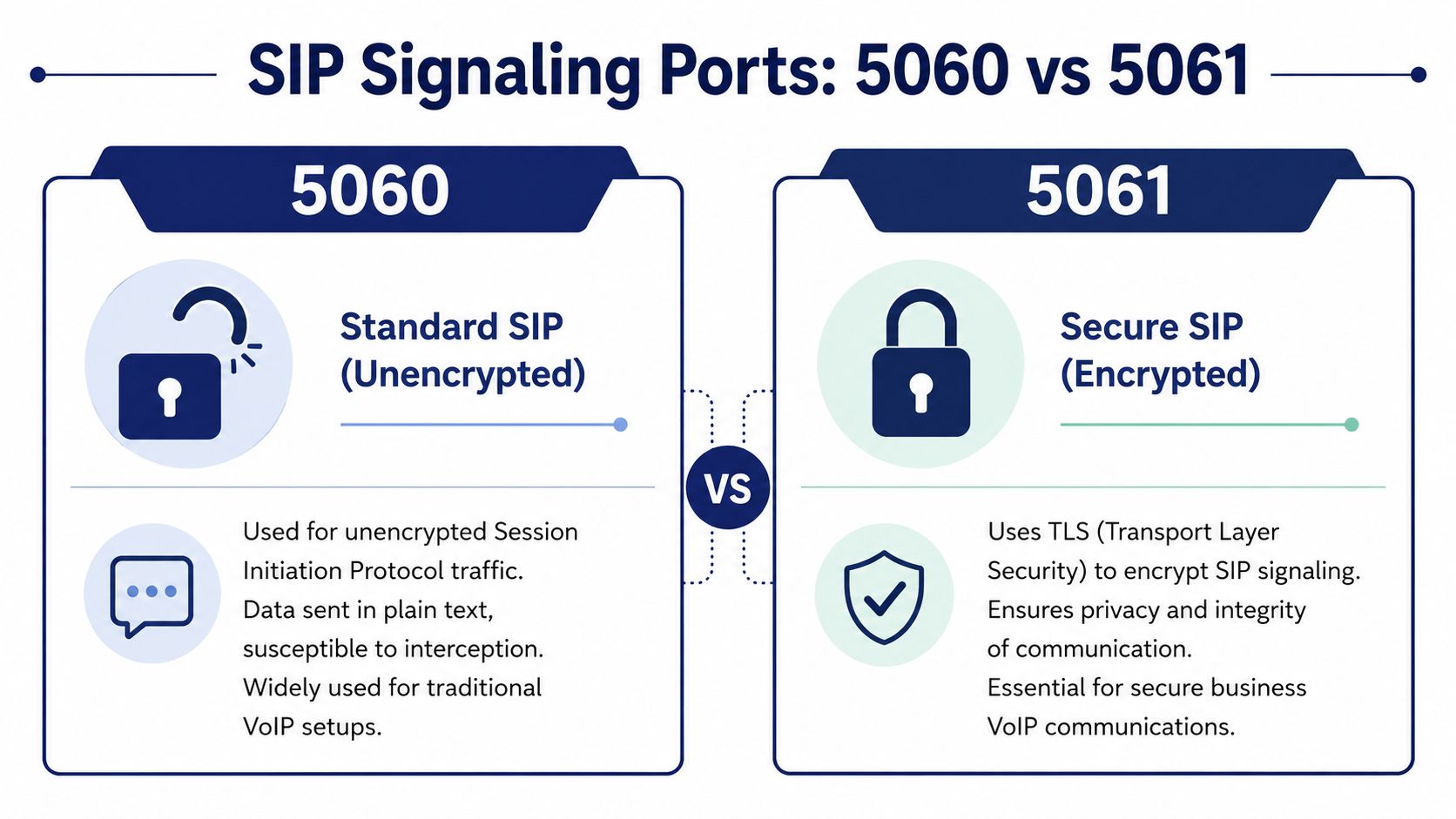
Oracle's session border controller documentation states that 5060 is the default signaling port for SIP over UDP or TCP, while 5061 is the conventional port for SIP over TLS, and it also notes that signaling alone doesn't create a complete call path because media flows must be allowed separately in Oracle's SIP interface and port documentation.
Port 5060 and what it really means
Port 5060 is the familiar default for standard SIP signaling. You'll see it on older PBX deployments, simpler trunks, lab environments, and plenty of installations that were built for compatibility first.
The trade-off is straightforward. If the deployment uses non-encrypted SIP signaling, call metadata and session setup details are more exposed in transit. That doesn't automatically mean the service fails, but it does mean you should be much stricter about where that traffic is allowed from and to.
Port 5061 and why security teams prefer it
Port 5061 is the conventional choice for SIP over TLS. TLS protects the signaling channel so registrations, invites, and other session control messages aren't sent as plain text.
For business environments, that's often the better option, especially on external trunks. If your provider or platform supports it, TLS reduces avoidable exposure in the signaling layer. That's one reason many teams evaluating calling with SIP connectivity options ask first about transport security and certificate handling, not just whether the trunk can register.
UDP, TCP, and TLS are not interchangeable choices
Here's the practical difference:
- UDP for SIP is common and lightweight. It works well, but it gives you less delivery assurance at the transport layer.
- TCP for SIP provides a connection-oriented transport and can be useful where signaling reliability matters more than simplicity.
- TLS for SIP adds encryption on top of the signaling transport and is the right fit when you need to protect session setup data.
If your provider says “use 5061,” don't translate that into “5060 should still be close enough.” Port, transport, and security mode must match exactly.
What admins get wrong most often
The biggest mistake isn't choosing the wrong default. It's assuming the default is all that matters.
A clean SIP registration on 5060 or 5061 doesn't mean transfers, inbound ringing, re-invites, hold music, or call audio will all behave. Signaling has to be right, but it's only one piece of the call.
Navigating RTP and SRTP Media Port Ranges
This is the part that catches new VoIP admins off guard. They expect one service, one port. Voice media doesn't work that way.
RTP uses a range because calls are dynamic. One phone isn't using one permanent audio port all day. Calls are negotiated, media endpoints are assigned, and the stream needs room to move as sessions come and go.
Why the firewall needs a range
Technical documentation from innovaphone notes that RTP media typically uses a separate UDP port range, that many systems allocate 2 ports per call with one for RTP and one for RTCP, and that common defaults such as 16384-32767 are often used, with the recommendation to keep firewall definitions tight in innovaphone's RTP and port guidance.
That matters operationally. If you open signaling correctly but starve the media range, users can place a call and hear nothing. If you open a massive media range without constraint, you create more exposure than you need.
RTP versus SRTP
RTP carries the audio stream. SRTP is the secured form of that media path.
The practical difference is simple:
- RTP gets the conversation from one endpoint to another.
- SRTP protects the audio stream so someone can't trivially listen in if they gain access to the path.
A lot of teams focus hard on securing SIP signaling with TLS and forget that voice privacy also depends on what happens to the media stream. If the business handles sensitive customer conversations, legal calls, healthcare scheduling, or payment-related discussions, the audio path deserves the same scrutiny as signaling.
Sizing media rules the smart way
Don't think about RTP as “open a big range and hope for the best.” Think about capacity, call concurrency, and control.
Use these checkpoints:
- Count expected simultaneous calls. Media allocation should reflect real traffic, not a generic internet forum recommendation.
- Keep the range narrow when possible. Smaller ranges are easier to audit and less messy to prioritize.
- Plan for quality monitoring too. RTCP exists for a reason, and it helps explain issues tied to latency and network jitter in voice environments.
- Document which devices use which range. Mixed vendors often mean mixed defaults.
A phone system doesn't fail because RTP uses a range. It fails because nobody wrote the firewall policy with the range in mind.
If your calls connect but audio is intermittent, clipped, or missing on transfer, media policy is the first place to look.
The Hidden Dangers of NAT and SIP ALG
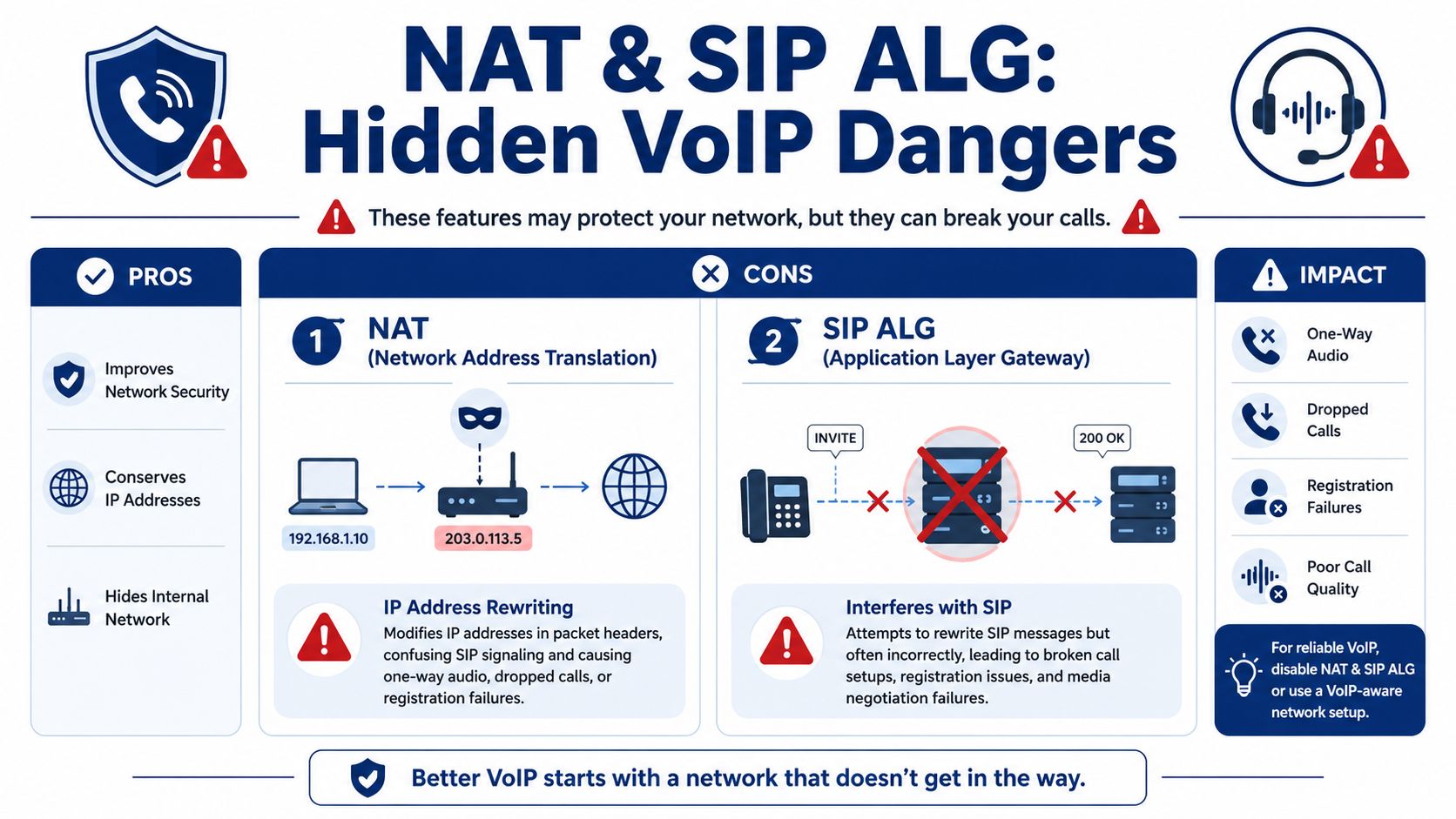
NAT is useful. It lets private devices share public connectivity. For everyday internet use, it's normal and mostly invisible. For SIP, it's often where the pain starts.
SIP messages can include addressing information inside the signaling payload itself. NAT changes addressing at the network edge. If those two views of the world stop matching, the phone system starts making bad assumptions about where media should go.
What NAT breaks in real offices
When NAT interferes with SIP, the symptoms are familiar:
- One-way audio
- Dropped calls after answer
- Phones that register and then lose inbound calls
- Transfers that fail only outside the office
- Intermittent behavior that seems impossible to reproduce
The hard part is that NAT problems rarely look clean. Users report “sometimes it works.” That usually means signaling survived enough to start the call, but media negotiation or return routing fell apart.
Why SIP ALG often makes it worse
A lot of routers and firewalls ship with SIP ALG enabled. The idea sounds helpful. The device sees SIP, rewrites it intelligently, and fixes NAT-related issues automatically.
In practice, many SIP ALG implementations are too aggressive or too sloppy. They modify headers they shouldn't touch, mishandle reinvites, interfere with TLS, or break media negotiation in ways that are hard to spot from a simple ping test.
That's why disabling SIP ALG is a common first step when troubleshooting business VoIP behind a firewall. If you need model-specific steps, this guide on what SIP ALG is and how to disable it is a useful reference.
Don't assume the firewall's “voice optimization” feature is helping. Test with it off before you trust it.
A short visual walk-through helps if you're explaining this to a broader team:
What works better than a helper feature
A stable VoIP edge usually comes from explicit policy, not magic inspection.
Use a predictable design:
- Disable SIP ALG unless the provider specifically requires a tested implementation.
- Permit the right signaling transport instead of assuming UDP covers everything.
- Allow the exact media range your phones or PBX use.
- Restrict trusted sources so your SIP service isn't visible to every scanner on the internet.
- Validate with real test calls including inbound, outbound, hold, transfer, and external mobile destinations.
That approach takes a little more effort upfront. It causes fewer support tickets later.
Secure Firewall Rules for Business VoIP
Here's the part too many guides skip. A VoIP firewall rule can be technically correct and still be a bad idea.
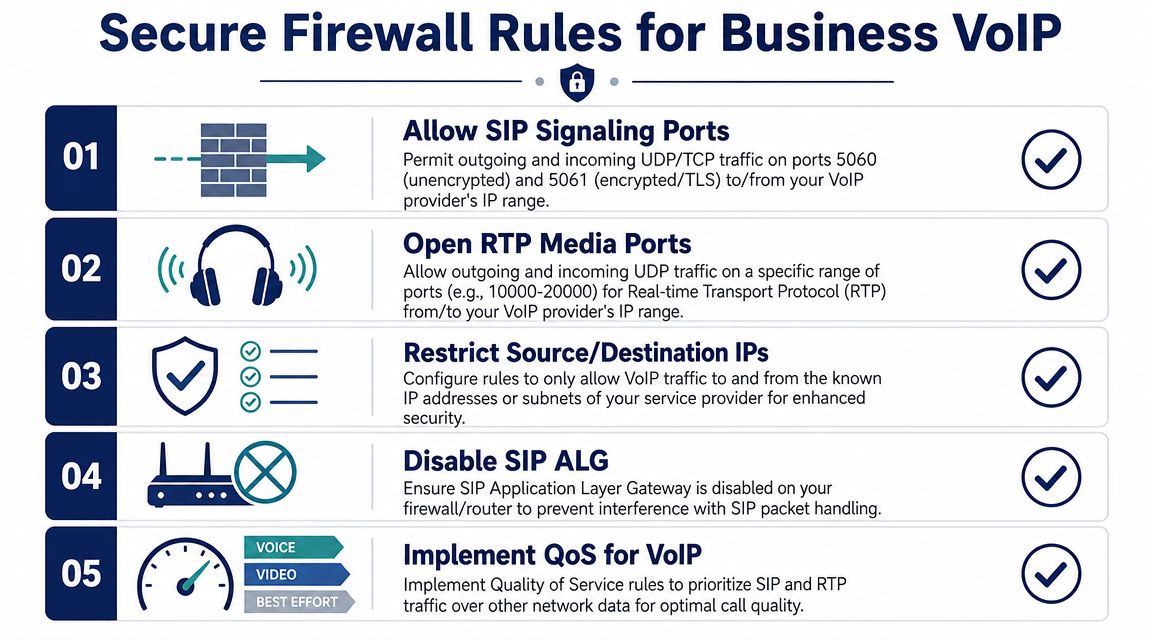
If you open SIP signaling and a broad RTP range to any source on the internet, you might get calls working. You also make your phone system easier to probe, abuse, and flood. Intuitive Technology's guidance explicitly warns that opening SIP and RTP ports has security implications and should be limited to carrier IPs when possible to reduce risks like toll fraud and signaling floods in its VoIP port opening guidance.
The goal is controlled access, not open access
When I'm helping a new IT manager, I don't frame the job as “which ports should I open?” I frame it as “which exact conversations should this firewall permit?”
That changes the rule set immediately.
- Allow signaling only to trusted provider endpoints. If the trunk is supposed to talk to your carrier, don't permit the whole internet to hit those ports.
- Allow media only for the expected RTP range. Broad ranges are easy to type and hard to defend.
- Match protocol to deployment. UDP, TCP, and TLS are separate choices with separate behavior.
- Turn off SIP ALG. Otherwise your clean rule set can still produce broken calls.
- Add QoS where your network supports it. Voice traffic competes with everything else on a busy office circuit.
Rule design examples
These examples show structure, not production values. Replace placeholder objects with your provider's documented addresses, your own voice VLAN or PBX subnet, and your confirmed media range.
Example logic for a Linux firewall
- Permit outbound SIP signaling from your PBX or phones to the provider on the required transport and port.
- Permit related inbound replies from that same provider back to the voice systems.
- Permit outbound and inbound RTP or RTCP only between the voice systems and the provider's approved addresses.
- Deny unsolicited SIP traffic from unknown internet sources.
Simplification occurs for many shops utilizing a hosted platform or cloud PBX. They don't expose an on-prem PBX broadly at all. They only allow voice traffic between managed endpoints and the provider's published network ranges. A service such as SnapDial, for example, is built around hosted VoIP and cloud PBX operations, so the firewall conversation often centers on endpoint connectivity and approved provider paths rather than exposing a legacy PBX at the edge.
Example logic for Cisco ASA or UniFi
Different firewalls present the same policy in different ways, but the checklist stays consistent:
| Rule focus | What to allow | Why it matters |
|---|---|---|
| Signaling | Only the required SIP transport and signaling port to approved provider IPs | Prevents random internet hosts from reaching your call control path |
| Media | Only the defined UDP media range to approved provider IPs | Keeps audio working without exposing unnecessary ports |
| Return traffic | Stateful replies for approved voice sessions | Preserves normal call flow |
| ALG behavior | Disabled | Avoids packet rewriting that breaks SIP |
| QoS | Prioritize voice classes where supported | Helps preserve call quality during congestion |
What works and what doesn't
What works is narrow, intentional policy. What doesn't work is “allow any to 5060” and “allow any to a giant UDP range” because somebody found that advice in a forum thread.
For teams that want a broader security review around firewall publishing and port exposure, Monro Cloud's guide to IT security for port forwarding is worth reading alongside your VoIP-specific rules. The logic is the same. Only expose what the service needs, and only to the parties that should reach it.
Field note: The fastest way to reduce VoIP attack surface is to stop treating SIP like public web traffic.
A practical deployment checklist
Before you call the ticket done, verify all five:
- Transport is correct. Your firewall matches UDP, TCP, or TLS exactly.
- Provider IP restrictions are in place. No broad internet exposure unless there's a specific reason.
- Media range is documented and permitted. Not guessed.
- SIP ALG is disabled. Confirmed, not assumed.
- Live testing covers real call flows. Inbound, outbound, transfer, hold, remote user, and failback scenarios.
That's the difference between “the phones came up” and “the system is ready for production.”
Frequently Asked Questions About SIP Ports
Can I change the default SIP port from 5060
Yes, many systems let you change the listening or destination port. The question isn't whether you can. It's whether every device, trunk, SBC, and firewall in the path will match that choice cleanly.
Changing a port can reduce noise from basic scans, but it doesn't replace transport security, source restrictions, or proper authentication. Security through obscurity is weak by itself. If you move off a default port, document it carefully and make sure support staff know where to look during troubleshooting.
Do I need both 5060 and 5061 open
Not always. You need the one that matches the signaling method your deployment uses.
If the provider requires SIP over TLS, open the TLS path and build policy around that. If your environment uses standard SIP over UDP or TCP, configure for that instead. Opening both just because they're common can create unnecessary exposure.
Why do phones register when calls still fail
Registration only proves part of the signaling path is working. It doesn't prove the media path is allowed, stable, or mapped correctly through NAT.
When registration succeeds but calls fail, check media policy, NAT behavior, and SIP ALG before you start replacing phones or changing credentials.
How many RTP ports should I open
Open the media range your platform requires, then size it around expected simultaneous calls and the devices involved. Since many systems use separate ports for RTP and RTCP, call volume affects how much range you need.
This is one of those decisions that should come from your platform design, not a copied rule from another office.
Is disabling SIP ALG always the right move
Usually, yes, in business SIP environments. Many SIP ALG implementations create more trouble than they solve.
If a provider has a tested requirement for a specific ALG behavior, follow that guidance. Otherwise, explicit firewall rules and controlled NAT handling are more predictable.
Do I need to open ports to the whole internet for hosted VoIP
No. That's the shortcut that causes security trouble.
Where possible, restrict signaling and media to the provider's known network ranges. That reduces exposure and makes logging easier to interpret when something goes wrong.
Does TLS secure the whole call
No. TLS secures SIP signaling. It does not automatically mean the audio stream is protected.
If conversation privacy matters, review how the deployment handles the media side as well and whether secure media is enabled end to end.
If you're replacing a legacy PBX or cleaning up a messy firewall policy, SnapDial can help you map the exact SIP signaling and media requirements for your deployment so your phones work reliably without opening more of the network than necessary.