
You already know the feeling. The office rings, a client is waiting, someone's on a cell phone in the parking lot, the front desk is checking a voicemail that never arrived on the right extension, and the team chat has the latest context but nobody on the call can see it. By lunch, the owner is asking why a “simple phone upgrade” turned into three tools, two logins, and one frustrated customer.
That's the trap with unified communications for small business. It isn't a nicer phone system, it's the difference between one coordinated communication layer and a pile of separate tools that only look connected during the sales demo.
Why Your Phone System Suddenly Feels Small
The worst part of fragmentation is that it usually shows up during a normal workday, not a dramatic outage. A 12-person services firm can survive on desk phones, personal cells, a chat app, and a video tool for a while, until one customer escalation forces all of them to work together. Then the cracks show fast.
The desk phone gets missed because someone stepped away. The voicemail lives on an extension nobody checks after lunch. The person with the answer is in chat, not on the call. By the time the team connects the dots, the customer has already repeated the same issue three times.
That's why fragmented tools are more dangerous now than they were a few years ago. Hybrid work made the handoff problems obvious, and customers now expect the business to remember who they are across calls, texts, and meetings. A separate phone app and meeting app can work for a solo user, but they break down when a small team needs shared context, consistent routing, and a single place to manage who gets what.
Practical rule: if a customer can reach your business in three different ways and still end up at the wrong person, your phone system is too small for how you actually work.
The fix is not another app. It's a unified layer that keeps inbound calls, messages, meetings, and availability in the same operating model so the team doesn't have to reconstruct the conversation every time the phone rings.
What Unified Communications Actually Means
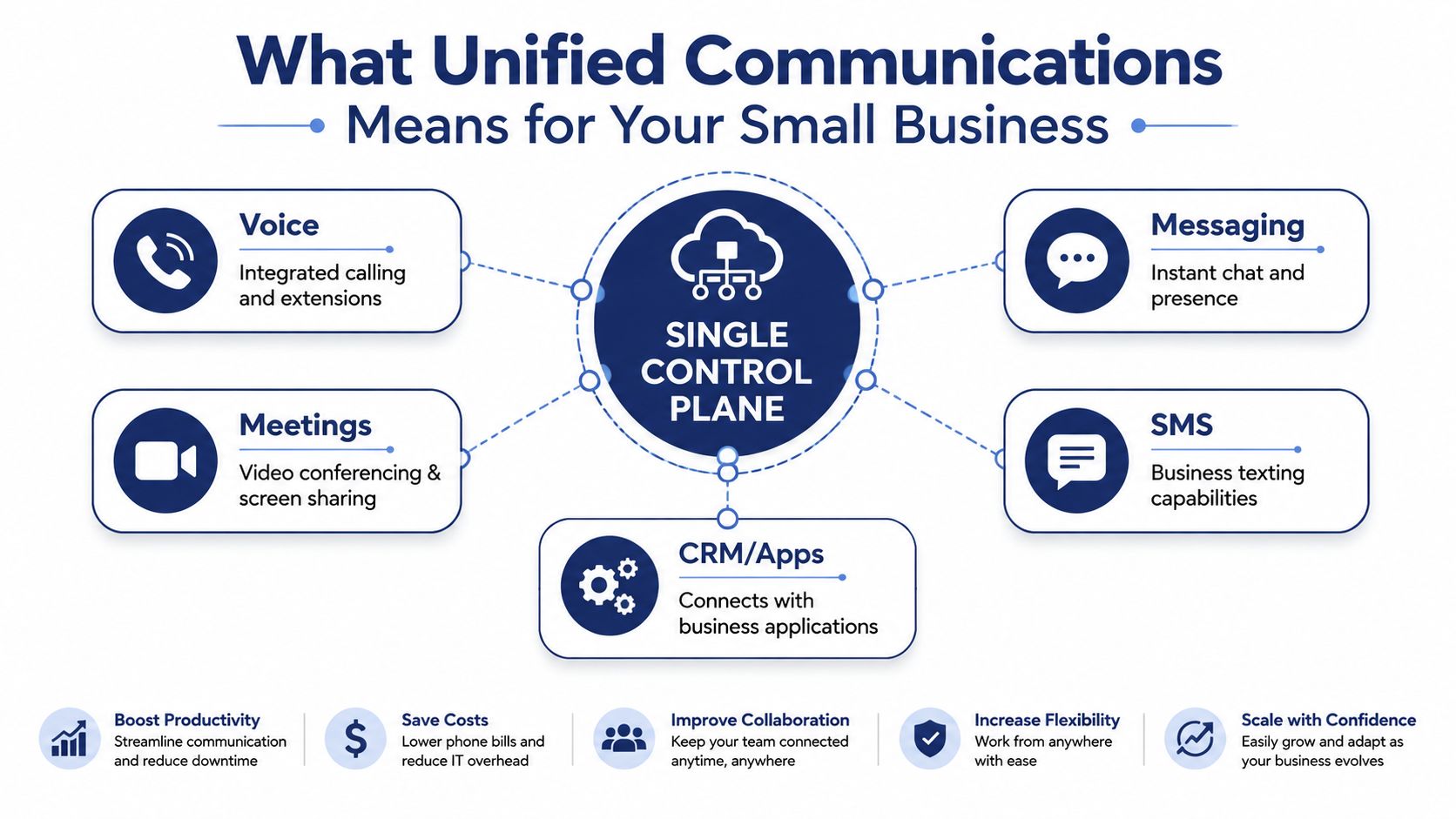
The cleanest way to think about unified communications is a single front desk for every communication method. Voice, messaging, meetings, SMS, and call-routing rules all pass through the same control plane, so identity and availability stay consistent whether someone's at a desk, on mobile, or working remote. That's the practical difference between “we have a few tools” and “we have one system.”
Legacy PBX was built around physical phone hardware and office wiring. Hosted VoIP moved calling into the cloud. UCaaS, unified communications as a service, goes further, it combines voice with messaging, meetings, texting, and administration in one hosted platform, so a small team can manage users and call flows without touching on-site equipment.
For a 20-person business, that matters more than it does for a giant enterprise. One bill is easier to control than four. One admin console is easier to own than a patchwork of logins. One routing model is easier to train than a different workflow for every location.
A useful analogy is a one-room office with a single reception desk. Every caller, texter, and meeting invite walks through the same desk, gets handled by the same rules, and lands with the right person without a scavenger hunt. That's what consolidation really buys you.
If you want the plain-language version from a vendor that frames the category the same way, see Unified Communications for Business.
A small business doesn't need more communication channels. It needs fewer places for calls, messages, and handoffs to go wrong.
The Core Features That Matter
The feature list gets noisy fast, so keep your attention on what people in the business touch every week. If a capability does not change how calls are answered, routed, or followed up, it is probably a nice-to-have, not a reason to migrate.
What each feature really does
| Feature | Who Uses It | Common Buyer Mistake |
|---|---|---|
| Hosted VoIP and cloud PBX | Everyone who answers or transfers calls | Buying a “phone replacement” without checking whether the routing fits how the team works |
| Team messaging | Office staff, ops, sales, dispatch | Treating chat as a bonus instead of a fast way to solve internal questions without interrupting calls |
| Video conferencing | Managers, client-facing teams, remote staff | Paying for meeting tools no one uses because the team already lives in another app |
| Mobile and desktop apps | Field staff, hybrid workers, owners | Assuming personal cell phones are enough, then losing visibility and call control |
| IVR and auto attendant | Front desk, reception, customer service | Overcomplicating greetings and menus before the call flow is stable |
| Call queues and reporting | Service teams, support reps, managers | Buying queue features before the business has enough agents or a clean escalation path |
Hosted VoIP and cloud PBX shape the call. They decide who rings, in what order, and what happens when nobody answers. Small businesses usually stumble on the handoff, not on the call itself.
Team messaging and video help only if they reduce switching. A good UC system keeps the quick internal question out of someone's cell phone text thread and puts it in the same environment where the person can see presence, recent calls, and contact details. Mobile apps matter for the same reason, because “just use your cell” gives up control over routing, logging, and follow-up.
IVR and auto attendant sound boring until the front desk is busy or absent. Then they become the difference between a caller reaching the right department and a caller hanging up. Queues and reporting help when you have enough traffic to justify them, but they are easy to overbuy.
For product-level packaging, the unified communications app framing is the one to study. It keeps the focus on one place for calling, messaging, and admin, which is where small teams feel the operational difference.
The Four Benefits That Move the Needle
The sales pitch usually promises “better collaboration.” That's too vague to justify a migration. The four reasons SMBs should care are more concrete, and each one shows up in daily operations.
First is cost predictability. A hosted platform turns a capital-heavy phone refresh into a monthly operating expense, and that matters because surprise maintenance bills are what sink old PBX projects. You're buying a service layer, not funding another round of hardware replacement.
Second is scalability. If you open a location, add a dispatcher, or shift seats around during seasonality, cloud calling adapts without a new closet of equipment. That's the cleanest answer to the “we might grow later” objection, because growth doesn't need to trigger another infrastructure project.
Third is hybrid-work support. The business can keep the same caller experience while staff move between desk, home, and field. That's where remote communication gets real. For managers who need a practical framework for that part of the rollout, how to communicate with remote teams is a useful companion resource.
Fourth is customer experience. Routing, presence, queues, and visibility keep customers from bouncing between people who don't know the context. That's the part owners can hear immediately. Fewer dead ends, fewer repeated explanations, fewer voicemail black holes.
If the customer experience doesn't improve, the migration was cosmetic. Better tools only matter when the caller gets to the right person faster.
Don't sell yourself on a generic productivity boost. Measure whether calls are answered more cleanly, whether mobile staff are reachable, and whether managers can see where requests got stuck. Those are the operational wins that justify the switch.
What to Fix Before You Cut Over
Most UC migrations fail before the first user logs in. They fail because the network is shaky, the admin plan is fuzzy, or the front desk is left to improvise during the cutover.
Start with the network. Voice and video are only as good as the connection they ride on, so a VoIP readiness check needs to happen before you sign the contract. If your current internet circuit is already strained by backups, video calls, or point-of-sale traffic, the new system will inherit those problems. A practical bandwidth checklist is the right place to begin, and this VoIP bandwidth guide is a useful reference for that planning step.
Next is security and access. Decide who can record calls, who can listen to them, how remote access is handled, and what the approval path looks like when someone joins or leaves. That's not paperwork, it's control.
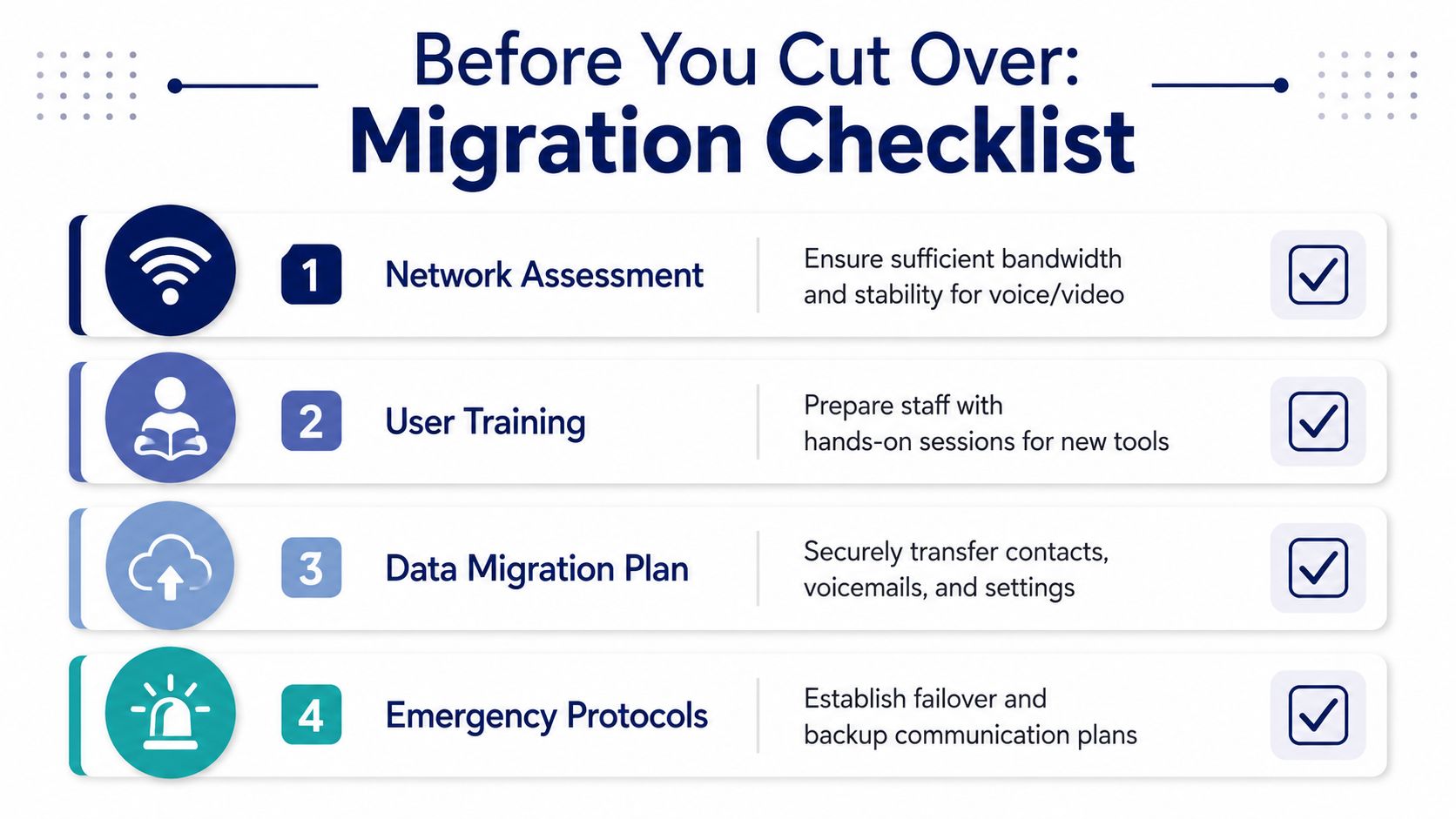
The pre-cutover checklist that prevents pain
- Network assessment: verify stability for voice and video, not just speed.
- User training: run hands-on sessions for the people who answer calls, not just the managers.
- Data migration plan: move contacts, voicemails, and settings with a clear owner.
- Emergency protocols: define backup numbers and failover steps before launch day.
Training is where many projects get lazy. The office manager or front-desk lead often becomes the de facto system owner, so they need the most instruction, not the least. If they don't know how to transfer, park, forward, or re-route calls, everyone else will keep calling them for help.
Change management matters because habits are sticky. People will keep using cell phones and side chats unless you make the new workflow easier than the old one. Treat migration like a project, not a software install, and the cutover stops being dramatic.
Pricing, ROI, and What the Quote Does Not Show
The pricing model is usually simple on paper. SMB UCaaS plans often sit in the roughly $15 to $45 per-user-per-month range depending on tier and contract length, and add-ons like call center, recording, and analytics can move the number quickly. That's why the first quote is never the full quote.
Here's the smarter way to think about return. You're not just replacing phone service, you're reducing separate telecom and conferencing bills, lowering the cost of missed calls, and making it easier to onboard new hires onto one system instead of three. For a small business, faster call handling and cleaner admin usually matter more than abstract efficiency language.
The hidden side of the ledger matters too. Number porting takes time. Training takes time. The first two weeks after cutover usually bring a productivity dip while people relearn transfers, voicemail, and mobile habits. Ignore those costs and your ROI math will be too optimistic.
A simple internal model works better than a fancy calculator:
| Input | What to count |
|---|---|
| Subscription | Monthly per-user cost and any add-ons |
| Migration | Porting, setup, and admin time |
| Training | Time spent getting staff comfortable |
| Operations | Fewer missed calls, cleaner routing, less tool sprawl |
For an adjacent view of how communication hardware and call-handling decisions affect the user experience, the 2026 office intercom system guide is worth a look.
Choosing a Vendor and Rolling It Out Without Drama
Start with the vendor checklist, not the demo. You want predictable all-inclusive pricing, setup handled end-to-end, support that answers quickly, mobile and admin features included without a pile of surprise add-ons, and a path for buying or integrating endpoints like Yealink IP phones under the same contract.
Then map the rollout in phases. Discovery and porting first. Network readiness second. A pilot group next. Full cutover after the pilot holds up. Post-launch tuning last. That order keeps the project from collapsing into a single frantic weekend.
The three mistakes I see over and over are simple. Teams skip bandwidth checks. They under-train the front-desk user who runs the phones. They buy call center features before call volume justifies them.
If you want a hosted VoIP platform that bundles cloud PBX, mobile apps, admin controls, and endpoint procurement in one place, SnapDial is built around that operating model. It fits the same rollout path described here, which makes it easier to keep pricing, support, and device management under one roof.
For a broader operations lens on selecting systems with less friction, IT service management modernization tips is a useful companion read.
The cleanest next move is to list your current call flow, your internet circuit, and the people who answer the phones. Then compare that against a unified platform and schedule a pilot with the team that feels the pain every day.
If you're ready to replace fragmented calling with a system your team can run, visit SnapDial and see how cloud PBX, messaging, meetings, and mobile access fit together in one setup. It's the faster way to decide whether your business needs a full UC platform or a tighter phone system with the right admin controls.