

You're likely looking at a phone setup that works fine for the office desk and falls apart everywhere else. Calls get missed on the road, voicemails sit in two places, and nobody's sure whether the right person was reachable when a customer tried to call.
A unified communications app fixes that problem by putting calling, messaging, meetings, voicemail, and presence into one interface. The point isn't to buy another app, it's to stop forcing people to jump between disconnected tools every time they need to talk, collaborate, or route a call.
What a Unified Communications App Actually Does
A traditional phone system was built around desks, handsets, and a fixed office. That model breaks down fast when your staff work from homes, branch offices, service trucks, client sites, or a mix of all four. A unified communications app gives those users one place to place calls, join meetings, send messages, check availability, and move between devices without rebuilding the whole phone environment.
The clean way to think about it is this. The app is the user-facing layer, while the broader UC platform handles the telephony core, routing, gateways, and media infrastructure behind it. That separation matters because it lets businesses add mobile clients, web clients, and IP phones without treating every device like a special project. TechTarget's UC definition lays out that structure clearly, including voice, video, messaging, voicemail, conferencing, presence, and mobility in one environment, with the backend doing the hard work of call setup and media handling (unified communications definition).
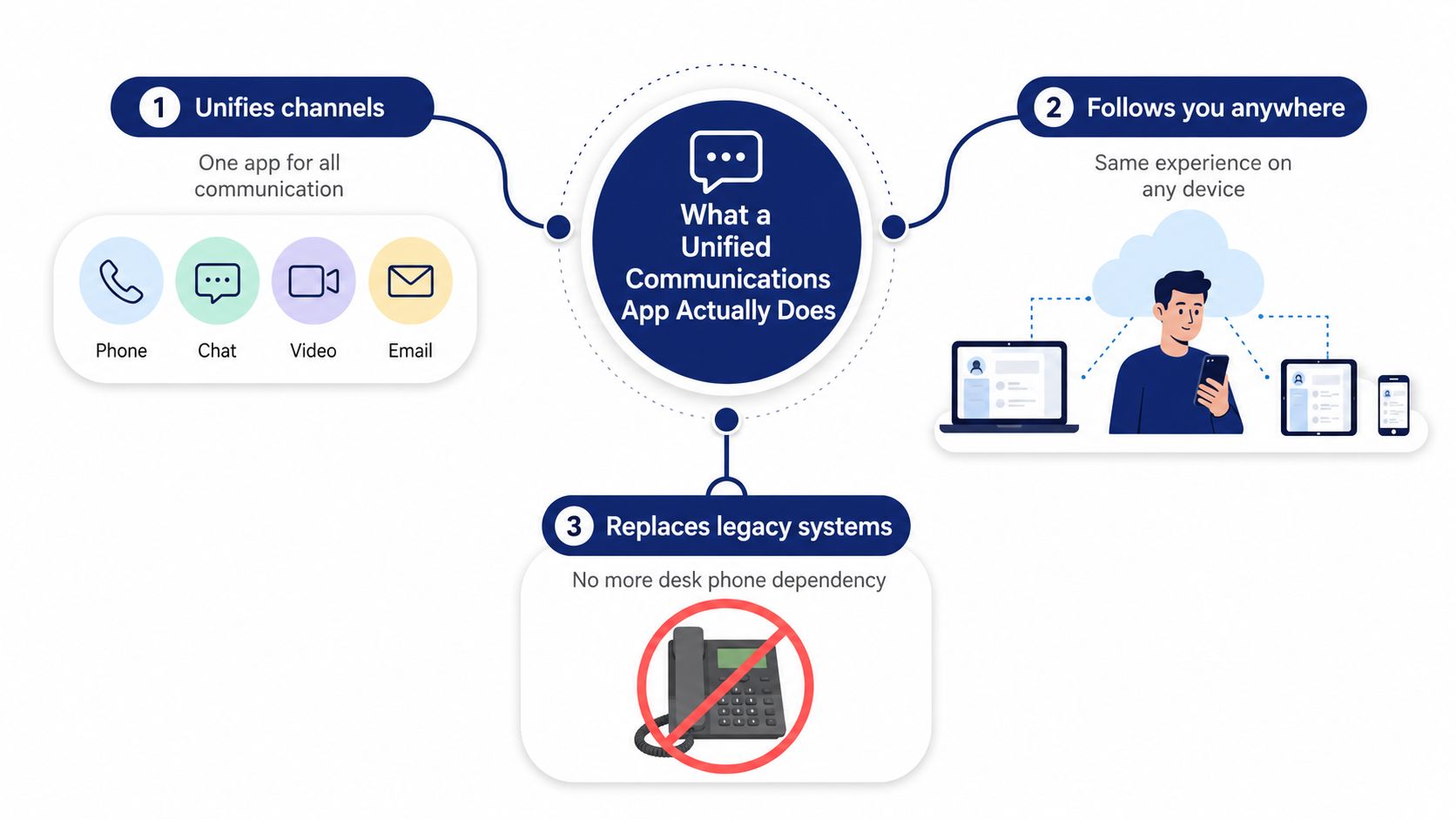
Practical rule: if the system still depends on people being at a desk to be reachable, it's not really unified enough for a modern SMB.
This is also why so many companies replace legacy PBXs. They're not chasing shiny software, they're trying to stop paying for a communications setup that can't follow the business out of the building. If you're weighing that move, a solid starting point is choose between building and buying software, because the decision is less about features and more about how much control, maintenance, and flexibility you want to own yourself.
For a plain-English overview of business use cases, the internal guide on unified communications for business is a useful companion.
Core Features Every Unified Platform Should Include
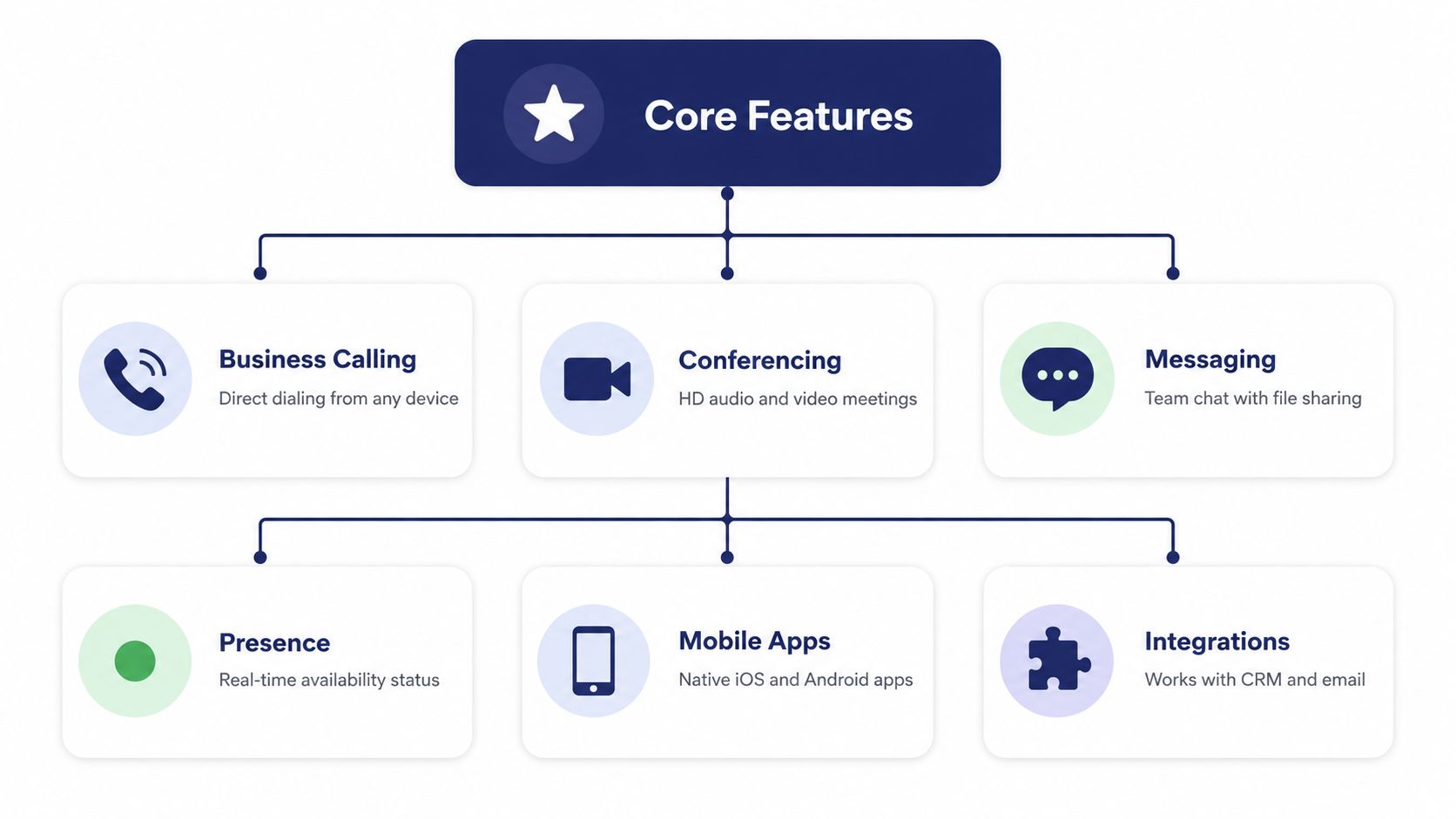
A good platform isn't defined by a long checklist. It's defined by whether the core pieces work together without making your team think about the plumbing. The baseline features are business calling, conferencing, messaging, presence, mobile apps, and integrations. If a vendor can't explain those clearly, keep moving.
A smartphone replaces a camera, calculator, and GPS. You don't buy the phone because it has more icons, you buy it because the tools live in one device and you stop carrying separate hardware for every task. A unified platform should do the same for work communication, only with more control over calling, routing, and administration.
What each core function should actually do
Business calling should let users place and receive work calls from desk phones, desktop apps, or mobile devices without breaking identity or call control. Conferencing should support quick internal huddles and structured customer meetings without forcing people into separate meeting software. Messaging needs to be tied to the same identity as calling, not floating as a side channel nobody trusts.
Presence is underrated. It tells coworkers whether someone is available, busy, in a meeting, or away, which saves a lot of pointless call attempts. Mobile apps matter just as much, because they turn a personal phone into a business extension without exposing the whole company to a consumer app mess. Integrations are the glue, especially for CRM and email workflows.
Modern UC design goes further than a single bulky application. Technical architecture references describe presence and contact management as separate services, and mobile clients invoking cloud UC services through APIs, which is a smarter model than forcing every function into one giant codebase. That modular approach lets call control, analytics, and billing scale independently, which reduces the blast radius when one part changes (open SOA and SOAP/XML overview).
Bottom line: a mature UC platform behaves like a set of connected services, not a monolith pretending to be simple.
For a practical buyer-facing overview of how this looks in a product, see the internal self-care portal guide, because administration is part of the feature set whether vendors admit it or not.
And if you want a useful cross-platform perspective while you compare vendors, the cross-platform compatibility guide is worth a look before you lock into one device ecosystem.
Where Unified Communications Works Best in Practice
The right platform depends on who needs to be reached and where they're working from. That sounds obvious, but too many buyers start with feature lists and only later realize their real problem is mobile reachability, multi-location routing, or customer queue handling. The best fit depends on how much of your business lives away from a single office.
Four environments that expose the difference
For an SMB replacing a legacy PBX, the main win is simplicity. Staff need calling, voicemail, mobile access, and conferencing without a phone closet full of gear or a local admin babysitting hardware. If that's your situation, the key question is whether the replacement lowers friction for your team or just shifts it into a new admin console.
For a multi-location business, the challenge is consistency. You need one numbering plan, one routing logic, and one way to manage users across branches without every site inventing its own rules. That's where unified administration matters more than flashy meeting tools, because local inconsistency kills call handling faster than any missing feature.
Customer-facing teams are different again. A contact center lives or dies on queue behavior, callback options, visibility into wait times, and reporting that tells managers what's happening before complaints pile up. If your business depends on inbound calls, the communications platform has to support operational control, not just person-to-person calling.
Remote and hybrid workforces need a mobile office more than a desktop app. That means calls follow the employee, not the device, and the user keeps one business identity across laptops, phones, and tablets. In practice, that's what keeps customer calls from disappearing when someone leaves the desk to do real work.
If your employees are away from desks most of the day, “unified” should mean reachable anywhere, not just logged into one app on one laptop.
There's also a mobile-first reality that most UC marketing skips over. Lee Essex of Tango Networks has pointed out in a recent discussion that stretching a desktop UC app onto mobile creates friction for frontline workers and visibility gaps for IT, which is exactly why mobility should be a starting point, not an afterthought (mobile and deskless-worker fit discussion). That's the right lens for nurses, field reps, installers, and store managers, people whose work doesn't happen at a desk.
For buyers comparing options, the question isn't “does it have a mobile app.” The question is whether the platform preserves business identity, reachability, and routing when the user is nowhere near the office.
Data-Driven Proof That UC Has Gone Mainstream
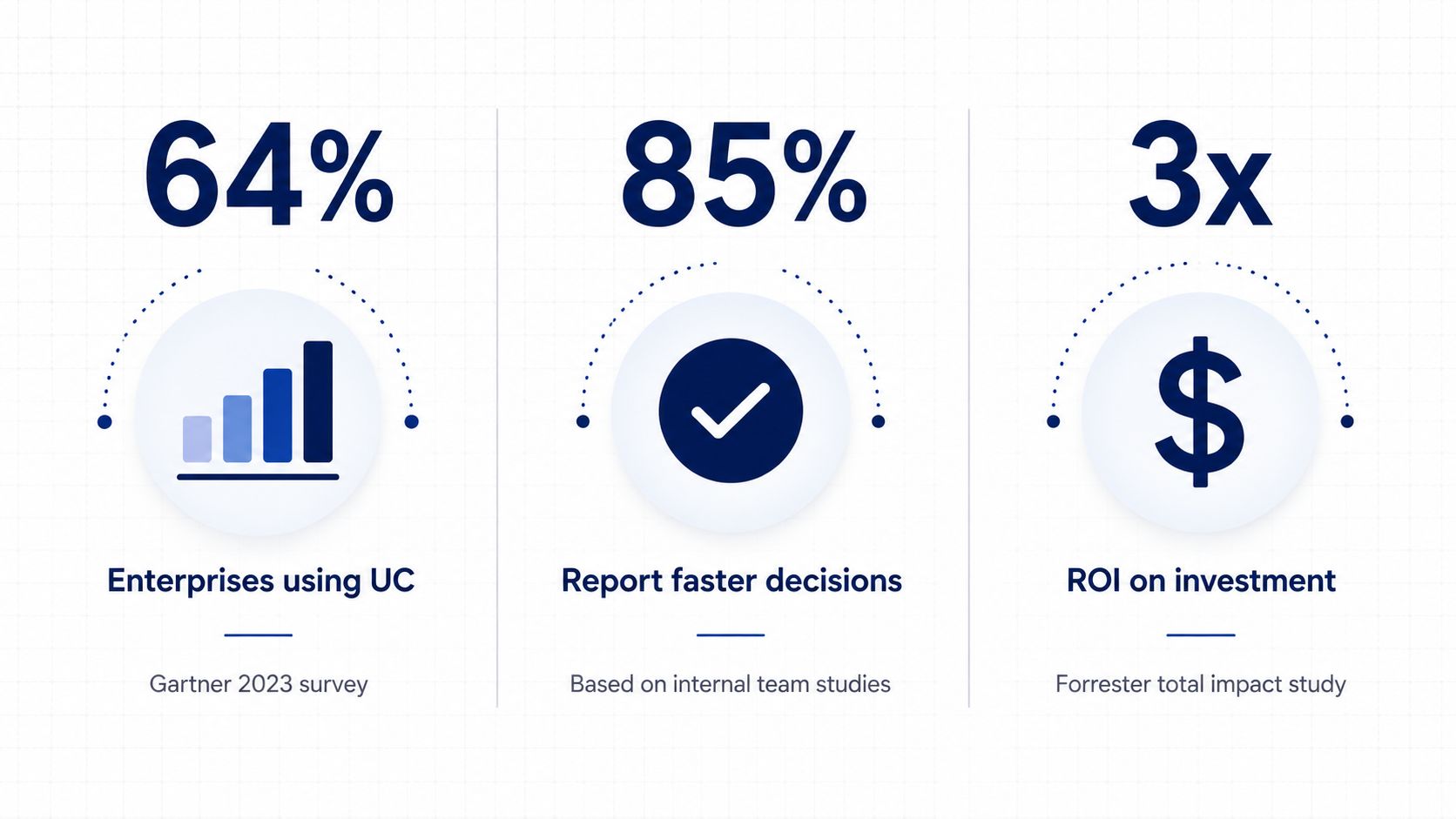
A unified communications app is no longer a side project for IT teams. Major market research now treats it as a core business category. Grand View Research market overview valued unified communications at USD 136.11 billion in 2023 and projected USD 417.86 billion by 2030, with a 17.4% CAGR from 2024 to 2030. That level of growth belongs to a standard platform, not an experimental tool.
Another market assessment put the worldwide UC&C market at USD 64.3 billion in 2023, after 7.9% year-over-year growth, and expected it to approach about USD 85 billion by 2028 (market compilation). That is the kind of trajectory you see when companies stop treating calling, chat, and meetings as separate purchases and start buying one system for the whole business.
Cloud delivery is already the default direction. The same compilation says cloud-based UCaaS will account for 75% of the global UC market by 2025, up from 60% in 2021, and that 90% of enterprise organizations will use UC as a core business tool by 2025 (market compilation). For buyers, the message is simple. The market has moved toward cloud-managed communication because IT wants less hardware, fewer handoffs, and less admin drag.
The ROI argument is the one finance teams care about
Finance does not care about feature lists. It cares about payback, operating cost, and whether the platform removes waste. The same source cites an average 259% ROI over three years from UC deployment, plus $1.2 million in annual savings per 500 employees in one Nucleus Research finding (market compilation). I would use those figures carefully in a board deck, but the point stands. Buyers are funding a communication platform that can reduce overlap across phone, messaging, and conferencing, not just replace a legacy phone system.
For a business-level summary of the upside, the internal article on advantages of unified communications gives a useful high-level framing.
The straightforward takeaway is this: Market growth shows that UC has become mainstream, cloud share shows where deployments are headed, and ROI language gives finance teams a way to approve the spend. If your current setup still depends on aging hardware and manual administration, the burden of proof sits with staying put.
Planning Your Deployment and Migration
A UC rollout succeeds or fails long before the first user logs in. The practical work starts with the network, because voice quality, conferencing stability, and mobile access all depend on a clean foundation. If the internet connection is shaky or the router rules are sloppy, no feature set will save the experience.
The rollout sequence that avoids pain
Network readiness comes first. Check bandwidth, quality of service, and whether your sites can handle voice and video traffic without fighting with backups or guest Wi-Fi. Then map number porting carefully so existing business lines move without stranding customers or creating overlap during cutover.
After that, run pilot groups. Don't test with the most enthusiastic people in the company, test with the users who will stress the system the most. A receptionist, a branch manager, and a field user will tell you more than a dozen happy early adopters. Then move to phased cutover, because switching every location at once is how teams create avoidable support chaos.
Practical rule: if the vendor can't explain how downtime is reduced during migration, you're the test environment.
That's where white-glove provisioning earns its keep. A good provider should help with setup, number migration, user onboarding, and handoff so your staff aren't left guessing on day one. The point isn't luxury, it's risk reduction. In business communications, confusion during cutover is often more damaging than the technical work itself.
Change management matters more than feature badges
Training has to match real use cases. Managers need to know how calls route, admins need to know where to adjust users and policies, and frontline staff need to know how to answer from mobile when they're out of the office. If those workflows aren't rehearsed, adoption stalls and the old habits creep back in.
AI features deserve a reality check too. Buyer guides now treat call transcription, meeting summaries, smart routing, and message translation as standard capabilities on leading platforms, so those badges don't separate serious vendors anymore (unified communication platforms guide). What separates a good rollout is whether the pilot tested the actual workflows your team uses, not whether the demo looked clever.
The right migration plan doesn't chase novelty. It protects call continuity, proves routing before company-wide cutover, and gives users a path they can follow on day one.
Selection Criteria, Security, and ROI
The shortlist should be boring in the right way. You want predictable pricing, responsive support, enough feature depth to cover current needs, integrations that don't require a consultant every time, and a platform that can scale without turning into a licensing puzzle. If a vendor can't explain those things clearly, they'll probably make everything else harder later.
Use a simple scoring model
| Criterion | What to Look For | Weight |
|---|---|---|
| Pricing predictability | Clear monthly structure, few surprise add-ons | High |
| Support quality | Fast, knowledgeable help by phone and online | High |
| Feature depth | Calling, messaging, meetings, presence, mobile | High |
| Integrations | CRM, email, and workflow connectivity | Medium |
| Scalability | Easy to add users, sites, and roles | High |
| Security controls | Access management, admin control, retention options | High |
| Reporting | Call logs, usage visibility, operational metrics | Medium |
Security belongs in the same conversation as operations
Security is not a separate checkbox. It's part of your risk posture, especially if your communications platform touches customer calls, internal meetings, and administrative data. Ask how user access is controlled, how recordings are handled, and how the vendor supports governance across locations and devices. If the answers are vague, the risk is real.
ROI should be measured with operational outcomes, not abstract optimism. Track missed calls, response times, admin overhead, and how quickly staff can get through common tasks after rollout. Those are the numbers that tell you whether the system is saving time or just reshuffling work.
A vendor with good architecture should also fit your network strategy. If you're evaluating business telecom in a dense market, the discussion around UCaaS and SD-WAN options in Chicago is a useful example of how communications and connectivity decisions tend to overlap in real deployments.
The right framework is blunt. Buy for reliability first, admin ease second, and feature depth third. Fancy extras don't matter if the system is hard to govern or annoying to use.
Why SnapDial Fits the Modern Unified Communications Buyer
SnapDial maps well to the buyers who care about reachability over feature theater. For SMBs replacing a legacy PBX, the appeal is all-inclusive pricing and white-glove setup, which lowers migration friction and keeps the rollout focused on the business instead of the hardware closet.
For multi-location companies, the useful piece is the self-service web portal for managing users, routing, voicemails, call logs, and recordings from one place. That central control matters when branch offices need consistent handling without each location inventing its own admin process.
Customer-facing teams get the most value from smart queue management, queue callback, wait-time announcements, and real-time statistics. Remote and hybrid teams get the practical side of UC through mobile apps, visual voicemail with transcription, and call routing that turns a personal device into a business extension without losing the business identity.
SnapDial also fits the “less drama, more control” buyer profile. It combines the communication pieces that matter day to day, without forcing you to stitch together a patchwork of separate tools just to keep people reachable.
If you want a communications system that follows your people instead of trapping them at a desk, take a close look at SnapDial. It's built around business calling, unified communications, and mobile reachability without the usual migration headache. Talk to their team if you want a practical rollout plan instead of another feature demo.