
Most advice about call center phone system features starts with a shopping list. Add automatic call distribution, an IVR, recording, dashboards, artificial intelligence, outbound dialing, and every available integration, then assume performance will improve.
That assumption is wrong. A system can contain an impressive feature catalog and still leave callers waiting, agents switching between screens, and supervisors reacting too late to service problems. The practical question isn't how many features a vendor can demonstrate. It's which capabilities change queue behavior, agent workflow, customer resolution, or management decisions in your operation.
A useful buying process separates foundational controls from expensive distractions. It also accounts for administration, compliance, adoption, and integration work. The right platform may have fewer visible features than a larger competitor, but deliver more value because your team can use its core tools consistently.
Why Feature Lists Miss the Point
A longer feature list can create worse service. Each added control brings configuration choices, training work, permissions, and another opportunity to build a routing path no one has tested under real demand.
For an SMB support team, an elaborate routing tree has limited value if queue reporting is unreliable. Start by answering operational questions: do callers reach the right people, how long do they wait, how often do they abandon calls, and can agents resolve issues without unnecessary transfers? Those answers show whether a feature changes performance. A catalog alone does not.
The distinction matters because call center platforms have moved beyond basic PBX-based call distribution. Routing, queue metrics, recording, monitoring, and reporting are now common platform capabilities. The buying decision is therefore less about finding a system that includes them and more about confirming that they fit the team's workflows, administration skills, and measurement process.
The cost of feature bloat
Feature bloat usually appears in three forms:
- Unused capability: A company buys advanced automation without defining the intents, workflows, escalation rules, or knowledge content needed to operate it.
- Confusing agent experience: Agents face too many panels, notifications, scripts, and status choices, spending time navigating the system instead of helping callers.
- Fragile administration: A routing change that should take minutes requires vendor support because no one understands how queues, schedules, skills, and fallback rules interact.
A polished demo can conceal problems that appear immediately on live calls. Transfers may lose context, callbacks may ignore business hours, and reports may combine queues in ways that produce unreliable staffing decisions. Before approving a feature, test the complete workflow with agents and supervisors, not just the vendor's demonstration path.
Practical rule: Buy the smallest feature set that solves the current operational problem. Require evidence that every added capability will be adopted, administered, and measured.
Prioritize the source of customer friction. Missed calls point toward queue controls, routing, callback, and real-time visibility. Inconsistent answers point toward recording, monitoring, coaching workflows, and CRM context. A call center operations framework can help connect those features to staffing, service levels, and daily management instead of treating them as isolated options.
The strongest SMB deployments stay strategically simple. Supervisors see live demand, agents receive the context required to work efficiently, and leadership gets reliable evidence for the next investment. A feature earns its place when it improves one of those operating outcomes.
The Core Features Every Call Center Needs
A call center phone system earns its place through operating results, not the length of its feature list. Automatic call distribution, interactive voice response, call recording, monitoring, and reporting should function as one connected layer. If agents lose context, supervisors cannot see demand, or reports cannot support staffing decisions, individual features have limited value.
Automatic call distribution and IVR
Automatic call distribution, or ACD-style routing, places incoming calls in queues and sends them to available agents using defined rules. Those rules can account for department, skill, language, business hours, priority, or menu selection. SMB administrators should be able to read, test, and adjust those rules without relying on a specialist for every change.
IVR gives callers a structured entry point. It can identify the reason for contact, provide basic self-service, and send the call to the right queue. Research summarized in industry reporting on IVR and abandonment reports that IVR systems can manage up to 60% of incoming calls. Results depend on menu design, speech recognition, and whether callers can reach an agent when self-service fails.
Keep menus short. Test them with real callers, including people unfamiliar with the terminology used by your business. An advanced IVR that forces customers through irrelevant options creates more friction than a simple menu with clear escape paths.
Recording, monitoring, and reporting
Call recording supports quality reviews, coaching, dispute handling, and process analysis. Call monitoring gives supervisors live visibility, while whispering or barging can provide assistance during difficult interactions. These tools require a defined review process, clear access controls, and agent training on how recordings are handled.
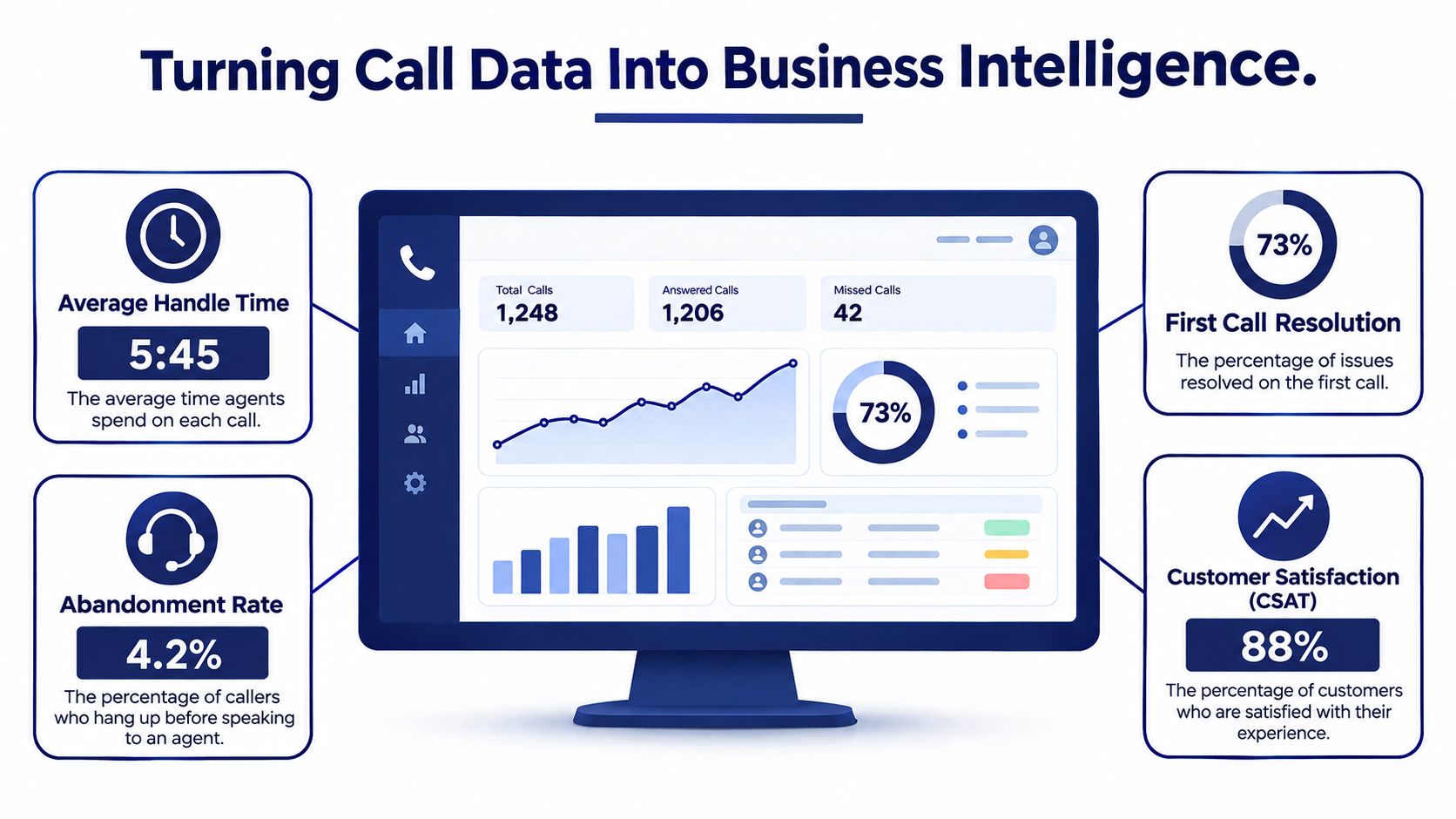
Reporting should show both current queue conditions and historical performance. Track call volume, average wait time, average speed of answer, and average handle time for intraday decisions. Use available data to review first-call resolution, repeat callers, customer satisfaction, and forecasting accuracy. Those measures connect system activity to staffing and service outcomes.
For teams comparing regional providers, find business phone systems Dallas can help frame questions about local deployment, support, and business-phone requirements. The evaluation still belongs in your own queues, with your users and call flows.
A product demonstration is only the starting point. Require a scenario test covering a peak-period queue, failed transfer, supervisor intervention, recording search, and report filtered by team or number. These tests show whether the foundation works under operating conditions, not just along the vendor's preferred demo path.
Advanced Features That Move the Needle
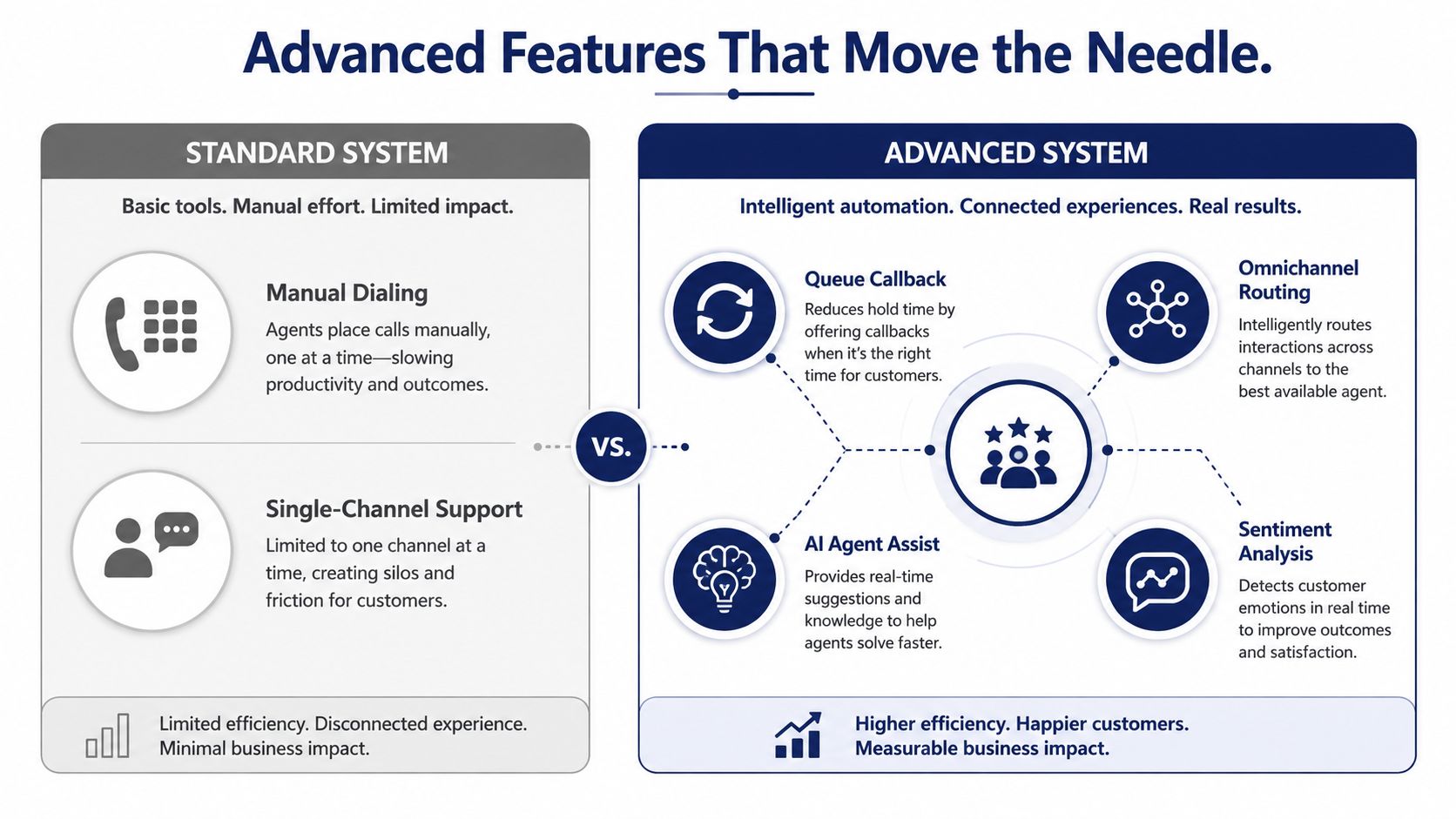
Advanced tools earn their place by removing a measurable source of waste. Automation that lacks clean data, stable processes, or clear ownership can add administration instead of reducing it. Evaluate each feature by the operational problem it solves, the conditions it needs, and the result you can verify.
Queue callback versus more automation
Queue callback is a high-impact upgrade for teams with long hold periods. It lets callers leave the live queue while retaining their position, then returns the call when an agent becomes available. Independent industry reporting cites implementation results in which callback programs cut abandonment by 20–40% within the first deployment quarter, with the strongest gains in centers that already had high baseline abandonment according to this callback analysis.
Callback requires operational discipline. Set accurate business hours, retry rules, caller validation, and sufficient outbound capacity. Test what happens when a caller does not answer, asks for a different department, or already contacted the team through another channel. Late callbacks, duplicate contacts, and unprepared agents shift frustration rather than remove it.
Omnichannel routing earns priority when customers move between voice, chat, email, or messaging and expect their context to follow them. A voice-focused SMB may gain little from it. Confirm first that the CRM, ticketing platform, and agent desktop preserve interaction history across channels.
AI agent assist and predictive dialing
AI agent assist can surface knowledge, suggest responses, transcribe conversations, and summarize after-call work. It reduces repetitive effort when the knowledge base is current and agents understand when to accept, edit, or reject its output. It does not replace a usable knowledge base or a clear escalation policy. Outdated content creates risk at a faster pace.
Predictive dialing directly improves outbound productivity in campaigns with enough call volume, reliable lists, and agents available to handle connected calls. It also requires compliance controls, pacing rules, and careful list management. A preview or progressive dialing approach fits high-value conversations where preparation matters more than raw connection volume.
The market is moving toward analytics, conversational AI, automation, and CRM integration. A 2025 Contact Centre Technology Report highlights a tension buyers should account for, organizations are adopting automation while live voice remains central to service. For SMBs, improving human queues may produce measurable returns before removing work from them.
Use call center automation software only after naming the task, handoff condition, workflow owner, and success metric. Those four decisions separate an operating improvement from a feature shown in a product demo.
Turning Call Data Into Business Intelligence
A dashboard is inert until a supervisor sees a pattern, makes a decision, and later verifies the result. The operational value comes from the action loop, not the number of panels or filters a vendor includes.
Modern systems capture queue measures such as calls offered, calls handled, abandoned calls, service level, and average answer speed. These measures connect customer experience with staffing and routing choices. A sudden rise in unanswered demand may call for schedule changes, queue rebalancing, a revised IVR path, or a callback process. The metric identifies pressure, while a manager still has to determine whether the cause is staffing, routing, demand, or agent availability.
Build dashboards around decisions
A useful dashboard separates live control from historical analysis.
| View | What it helps a supervisor decide |
|---|---|
| Live queue view | Whether to move available agents, adjust priorities, or activate an overflow path |
| Agent activity view | Whether work is distributed fairly and whether statuses reflect actual availability |
| Historical queue view | Whether staffing patterns match recurring demand |
| Quality and outcome view | Which interactions need coaching, process changes, or knowledge updates |
The layout should follow the operation, but each panel needs a recurring management question. If no defined action follows from a metric, remove it from the primary view. A crowded dashboard slows decisions and makes genuine exceptions harder to spot.
Statista reported that 52% of respondents worldwide in 2024 identified marketing analytics as their most popular current analytics use at contact centers, while 48% said sales analytics would be in use within the next two years, as shown in its contact-center analytics data. The figures show interest in connecting call activity with wider business decisions. They do not establish a return for a particular SMB. That depends on who owns the reporting, which decisions change, and whether the team checks the outcome.
Turn historical data into operating changes
Historical reports help managers compare teams, queues, schedules, and routing rules over time. They can reveal recurring demand patterns, identify training needs, and provide evidence when leadership asks whether a technology investment is working.
Avoid optimizing one metric in isolation. A shorter handle time may accompany lower first-call resolution. A stronger service level may reflect excess staffing during an unusually quiet period. Review speed, workload, quality, and customer outcomes together, then investigate meaningful changes instead of rewarding a single number.
Call center dashboards support a regular operating rhythm. Supervisors can review live conditions during the day, examine exceptions after shifts, and use historical trends for staffing and process planning. That cadence turns reporting into management, while features without an assigned decision remain decoration.
How to Evaluate Features for Your Specific Needs
Start with the contact pattern, not the vendor interface. A system that works well for a small inbound support queue may be a poor fit for an outbound sales operation or a multi-location service desk.
Step one, describe the work
Document who calls, why they call, when demand rises, and what agents do after answering. Include transfers, escalations, callbacks, recording requirements, CRM updates, and supervisor interventions. This process map exposes the features that remove friction and prevents a vendor from steering the conversation toward its most marketable tools.
Step two, rank the operational problems
Put each problem into one of three categories:
- Must solve now: Missed calls, poor routing, unreliable recordings, weak visibility, or a broken CRM workflow.
- Should improve next: Callback, skills-based routing, coaching tools, or deeper historical reporting.
- Could explore later: AI assistance, speech analytics, predictive dialing, or broader channel orchestration.
The order matters. Don't buy AI to compensate for an IVR that misroutes callers or a queue that nobody monitors.
Step three, test the workflow
Ask each vendor to demonstrate your exact scenario. A serious test should include:
- A caller enters the correct queue through the IVR.
- The system routes the call to an available and appropriately skilled agent.
- The agent sees relevant customer context.
- A supervisor monitors the interaction.
- The call recording and disposition appear in the expected report.
- A callback or overflow rule activates when the queue is unavailable.
The vendor should explain what an administrator changes, what an agent sees, and what happens when an integration fails. Don't accept a generic statement that the platform “supports” a feature.
Step four, price the work around the feature
Ask who configures routing, maintains recordings, manages permissions, updates prompts, monitors integrations, and trains new staff. A feature that requires constant specialist help may cost more operationally than its subscription suggests.
Check data retention, access controls, transcription handling, mobile access, reporting exports, and support responsibilities before approving recording or AI tools. This industry review of contact-center technology and security emphasizes that modern platforms extend beyond routing into analytics, automation, self-service, and integrations while facing stronger security and regulatory expectations.
End the evaluation with a controlled pilot. Measure adoption, workflow friction, data quality, and supervisor effort, not just whether the feature technically functions.
Implementation Realities Most Vendors Won't Mention
A demo shows a finished configuration. Implementation starts with messy operations, incomplete documentation, legacy numbers, inconsistent agent habits, and business rules that may exist only in one manager's head. The feature checklist rarely shows the maintenance work behind the promised ROI.
Call recording illustrates the gap. Enabling it takes minutes. Deciding which queues record, who can listen, how long files remain available, how agents disclose recording, and how administrators restrict access requires documented policy. Transcription adds another concern because searchable text can expose sensitive content more widely than an audio file.
Routing creates hidden maintenance
A growing company may begin with a few queues, then add departments, locations, languages, schedules, escalation paths, and overflow rules. Each addition creates relationships that require testing. A routing map that looks clear in a sales demo can become difficult to troubleshoot when a holiday schedule conflicts with an after-hours destination.
CRM integration has a similar trap. Screen pops and automatic call logging look simple until field mappings, duplicate contacts, failed writes, and permission limits appear. Agents need a clear fallback when the customer record does not load. Without one, the integration becomes a second source of friction rather than a measurable productivity gain.
Adoption determines the result
One deployment pattern works consistently: configure a narrow foundation, test it with agents, fix the workflow, then add capabilities. Projects that configure everything in a short window, train once, and leave supervisors without dedicated ownership tend to create unused features and inconsistent processes.
A rollout assigns owners for queue design, reporting, recording access, integrations, and user administration. It also gives agents a way to report confusing prompts, missing context, and inaccurate statuses before those issues become normal behavior. Ownership should include time for review, not just a name on a project plan.
For planning dependencies and responsibilities, the WorkSignal implementation guide provides a reliable reference for planning. Treat any vendor timeline as an estimate, not a promise, and include time for testing, training, number changes, policy approval, and rollback planning.
Security belongs in the design review, not at the end. The more places a system sends recordings, transcripts, caller details, and reports, the more carefully access and retention must be managed. Confirm who owns those controls before approving features that expand data collection.
Building Your Feature Roadmap for Sustainable Growth
The sensible roadmap starts with the controls that stabilize daily work. Routing, IVR, recording, queue visibility, and historical reporting create the operating baseline. If those tools aren't configured well, advanced automation will only hide problems behind a more complex interface.
Once supervisors can see demand and agents can handle calls consistently, add the feature that addresses the largest remaining constraint. For high abandonment, test queue callback. For inconsistent answers, improve knowledge access and coaching. For repetitive administrative work, evaluate agent assist or workflow automation. For outbound productivity, assess dialing modes and compliance requirements.
A staged approach
- Stabilize: Clean up queues, schedules, IVR prompts, permissions, recording policies, and essential reports.
- Improve: Add callback, skills-based routing, CRM workflow improvements, and supervisor coaching controls where the data supports them.
- Scale: Introduce AI assistance, deeper analytics, broader channel routing, or outbound automation after the team has the process ownership to manage them.
This approach protects budget and attention. It also gives leadership a clearer connection between a feature and the operational result it was meant to influence.
Don't select a platform only for today's queue count. Confirm that it can add users, locations, routing rules, integrations, and reporting depth without forcing a disruptive replacement. At the same time, don't pay for enterprise complexity before your team has the people, process, and data to use it.
A practical cloud option for SMBs is SnapDial, which combines business calling with call queues, queue callback, skills-based routing, call recording, mobile access, real-time statistics, and detailed reporting. The right choice still depends on your workflows, support expectations, and administration capacity.
SnapDial can help SMBs replace legacy phone systems with hosted calling, IVR, call queues, recording, mobile access, callback, and reporting in one managed platform. Review your current queues and feature priorities, then visit SnapDial to discuss a practical rollout built around the features your team can use now.