
Call forwarding is a standard telephony feature that redirects an incoming call from one number to another destination. For a business, it's a continuity tool that keeps customers connected when the primary line is busy, unanswered, unreachable, or intentionally out of service.
A contractor is driving between job sites when a valuable client calls the office number. The contractor can't answer, the office line keeps ringing, and nobody else is available. By the time the contractor sees the missed call, the client may already be speaking with another provider.
Call forwarding prevents that gap by moving the call to a mobile phone, colleague, alternate office, answering service, or another business number. It has been a standard capability across telephone switching systems, PBXs, desk phones, and modern hosted VoIP platforms for decades, rather than a niche add-on (historical PBX documentation).
Understanding Call Forwarding in Plain English
Think of call forwarding as postal mail forwarding for phone calls. When you move, the postal service redirects mail from your old address to a new one. Call forwarding performs a similar job instantly, sending an incoming call from the number your customer dialed to a different destination.
The caller usually doesn't need to redial or learn a second number. Your business can keep publishing the same main number while calls reach the person or team currently responsible for answering them. That makes forwarding useful for mobile work, distributed teams, office moves, emergency coverage, and planned absences.
The three parts of a forwarding rule
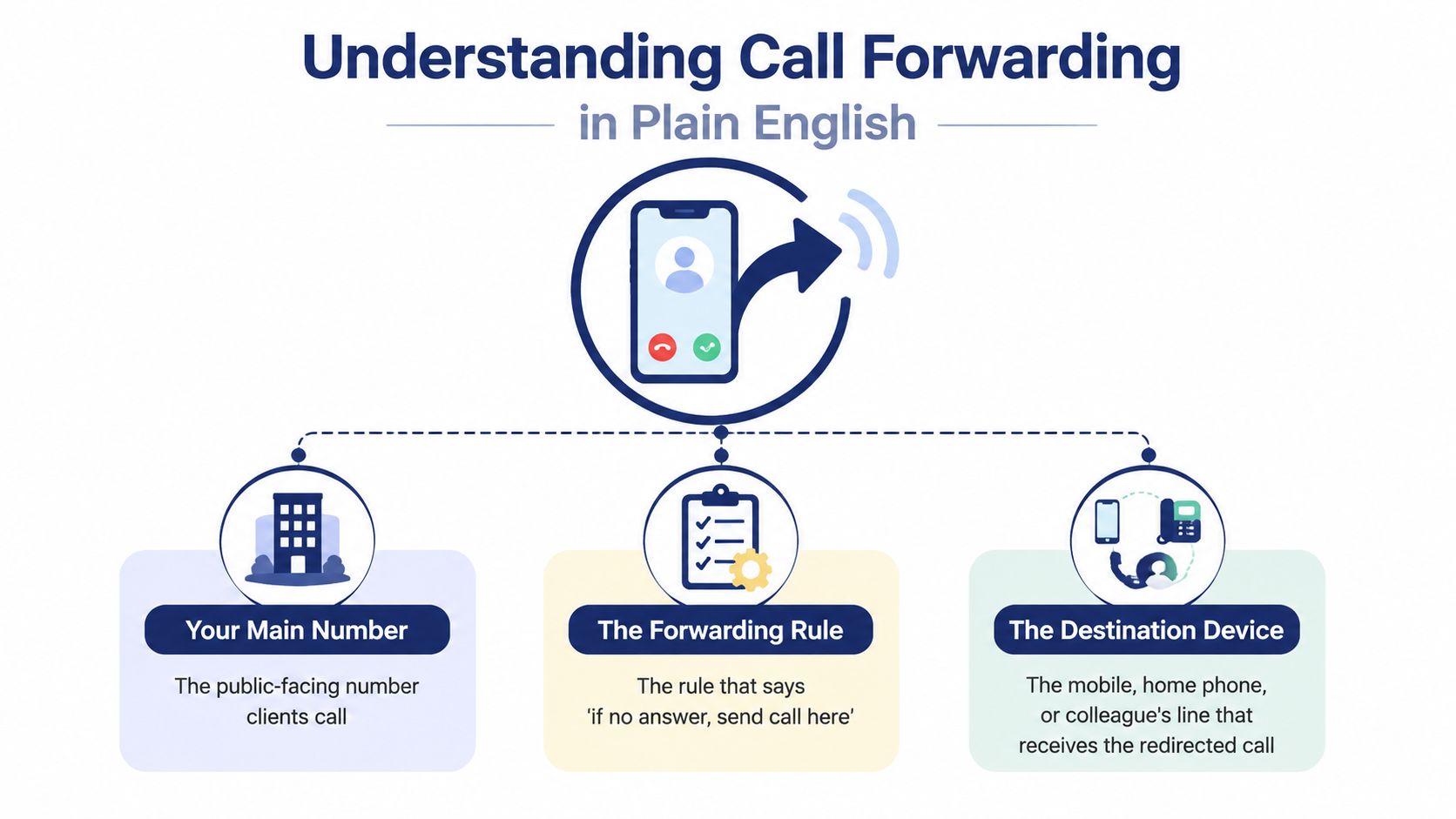
Every forwarding setup has three basic components:
- Your main number: This is the public-facing number customers, suppliers, and partners call.
- The forwarding rule: This determines when the system should redirect the call, such as immediately, when the line is busy, or after nobody answers.
- The destination: This is the mobile phone, alternate line, colleague's extension, answering service, queue, or external number that receives the redirected call.
The original mobile phone may not ring at all when unconditional forwarding is active. The network sends the call straight to the destination, which changes how employees manage availability and how receptionists handle incoming traffic (Verizon's call forwarding FAQ).
Where forwarding can be controlled
Forwarding may live in carrier settings, phone or desk-phone settings, or a hosted VoIP and cloud PBX portal. These locations can overlap, but they don't offer the same level of control.
A carrier rule operates in the telephone network. A device rule is managed from a handset or desk phone. A business phone system can apply forwarding as part of a wider call-handling policy, alongside business hours, extensions, queues, and voicemail.
Practical rule: Decide which system owns the rule before changing it. Otherwise, one setting can quietly override another and create confusing rings, missed calls, or unexpected voicemail behavior.
The business reason is straightforward. Forwarding keeps a caller connected when the primary line isn't available, while call analytics can track forwarded traffic by destination, including total calls, unique callers, missed calls, average duration, answered calls, and voicemails (call forwarding overview and analytics details).
The Main Types of Call Forwarding Explained
Call forwarding rules differ mainly by what triggers the redirect. The right choice depends on whether you want every call moved immediately or only want a backup destination used when the primary line can't respond.
Comparing the common triggers
| Type | When It Activates | Original Line Behavior | Caller ID and Voicemail |
|---|---|---|---|
| Unconditional | Every incoming call is redirected immediately | The original phone typically doesn't ring | Caller ID handling depends on the carrier or business system. The original mailbox may be bypassed, or the destination may handle voicemail |
| Busy | The original line is already handling another call | The active line remains in use, and the new call follows the forwarding rule | The forwarded leg may preserve caller identity. Voicemail depends on the destination and its routing policy |
| No answer | The call isn't answered within the configured ring period | The original line rings first, then the call is redirected | The destination may receive the caller's number, while either the original or destination mailbox can answer |
| Unreachable | The phone is off, out of coverage, disconnected, or otherwise unavailable | The original device can't receive the call | The network redirects the call according to the programmed destination and service policy |
Unconditional forwarding works well when you already know the original line shouldn't receive calls. A traveling owner might send every call to a mobile phone. A company might use it during an office closure or planned absence.
Conditional forwarding is usually more suitable for normal operations. Busy forwarding handles simultaneous demand. No-answer forwarding provides a safety net when staff are occupied. Unreachable forwarding protects continuity when a device, signal, or endpoint isn't available. Telephony standards recognize these conditions as distinct supplementary-service triggers, alongside unconditional forwarding (technical explanation of forwarding conditions).
Caller ID isn't guaranteed to look identical on every forwarded leg. Some systems preserve the original caller and dialed number, while carrier policy and local rules can alter what the destination sees. Voicemail can also shift between the original mailbox, the forwarding destination, or a business system that owns the complete call flow.
For a broader explanation of how routing choices shape customer access, consult this guide to smarter customer connections. You can also compare practical call forwarding options before choosing a rule.
How Call Forwarding Works at a High Level
The forwarding decision happens somewhere between the caller's phone and the endpoint that answers. The location depends on the technology carrying the call.
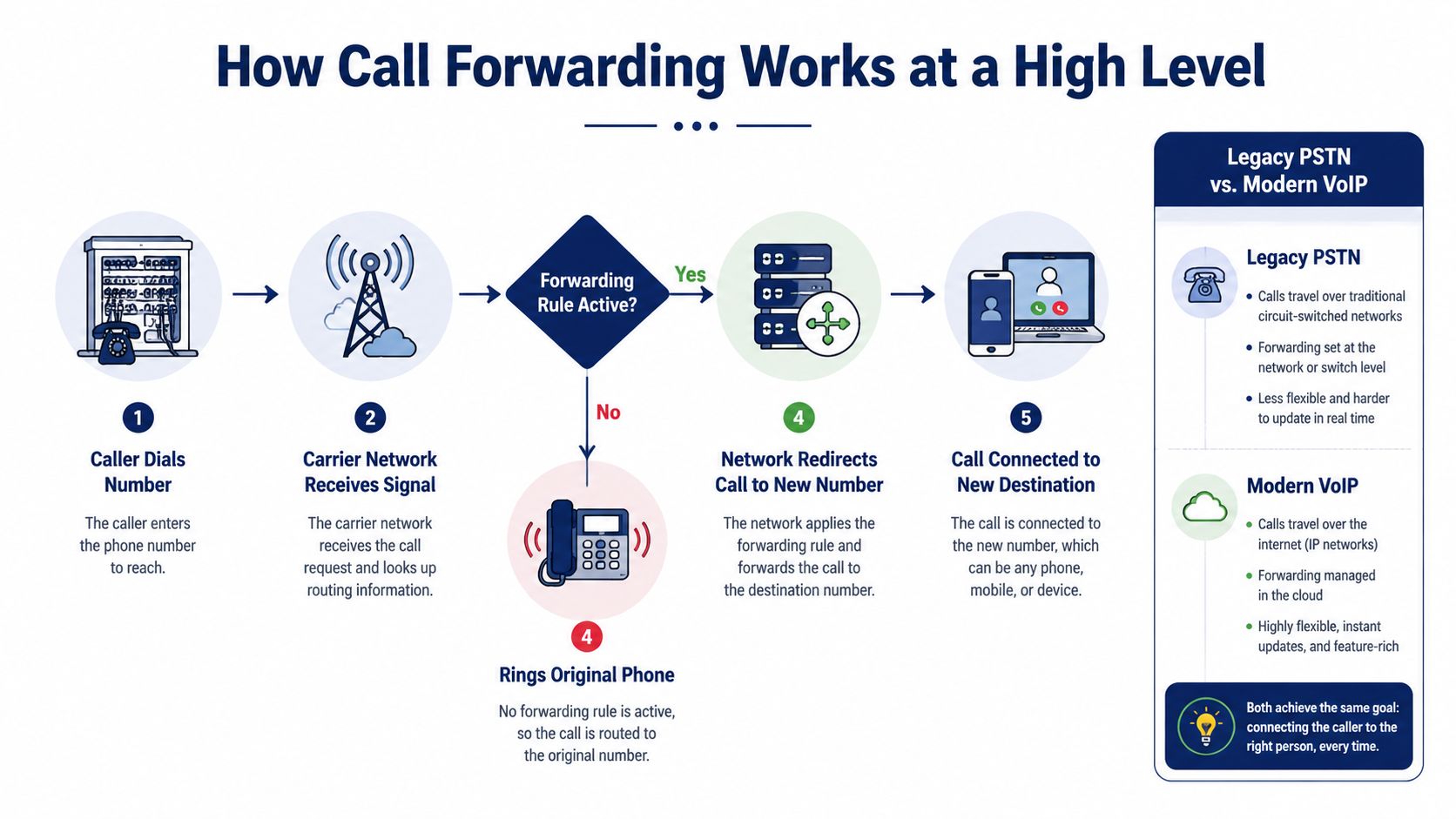
In a traditional PSTN environment, the carrier's switching equipment receives the dialed number and checks the forwarding status attached to that subscriber or business line. If a rule is active, the network redirects the call to the programmed destination, often before the original handset rings. The network communicates that decision through established signaling systems associated with telephone switching, including SS7-style signaling.
PSTN, mobile, and SIP paths
A mobile phone introduces another practical layer. You may activate forwarding through the carrier's service, through the handset's call settings, or through a code supplied by the carrier. The phone is the control surface, while the carrier may still apply the rule inside its network.
In a SIP or hosted VoIP system, a desk phone, softphone, or cloud PBX can participate in the decision. The system may return a SIP 302 response containing the destination URI, or use another signaling method to tell the network where the call should go. Administrators often manage these rules in a browser portal rather than changing each handset.
That difference matters to a small business:
- Carrier-controlled forwarding is tied to the network service and can remain active when you replace a device, but it may provide limited routing logic.
- Device-controlled forwarding is quick for an individual user, but it applies to that handset or line and can conflict with business policy.
- SIP or cloud-PBX forwarding can be part of a larger dial plan involving extensions, schedules, queues, and external destinations.
Forwarded calls can create two call legs, the original incoming leg and the outgoing leg to the destination. In SIP deployments, headers such as SIP Diversion can preserve the originally called DID and caller context, while trunk authorization and routing policy determine whether the forwarded destination is accepted (SIP forwarding and Diversion header details).
For related terminology, see this call routing reference.
Business Use Cases Across SMBs and Contact Centers
The best forwarding setup starts with the work pattern, not the phone model. A solo operator, a multi-site office, and a support queue may all use forwarding, but they need different triggers and destinations.
A solo owner on the road
A consultant or contractor spends the day visiting clients and can't reliably answer an office line. Unconditional forwarding sends the business number directly to the owner's mobile during travel.
The caller still uses the familiar business number. The owner receives the call on the device in hand, provided that device can accept the incoming call. This approach suits a planned absence, but it should be turned off when the owner returns to normal coverage. Otherwise, every call bypasses the office line.
If the mobile destination uses a voicemail greeting, the owner should make sure the message identifies the business clearly. Teams that need to refresh a recording can use resources such as this guide to improve voicemail audio quality.
A multi-site SMB with overflow coverage
A business with a main office and branch locations can use busy and no-answer forwarding as a sequence. The receptionist handles the first attempt. If the line is busy, calls move to a branch office. If nobody answers there, the system sends the call to an overflow service.
The caller experiences one public number and a controlled sequence, rather than having to search for separate locations. The business should document each destination and decide which mailbox owns the final message, because an overly long chain can make responsibility unclear.
A small contact center
A support team can send overflow traffic to a hunt group or queue when agents are occupied. Time-of-day rules can route daytime calls to internal agents, evening calls to an on-call team, and weekend calls to an outside answering partner.
The trigger might be no answer, agent occupancy, a scheduled business-hours condition, or an outage state. The destination isn't necessarily one phone. It may be a group that distributes the call according to availability.
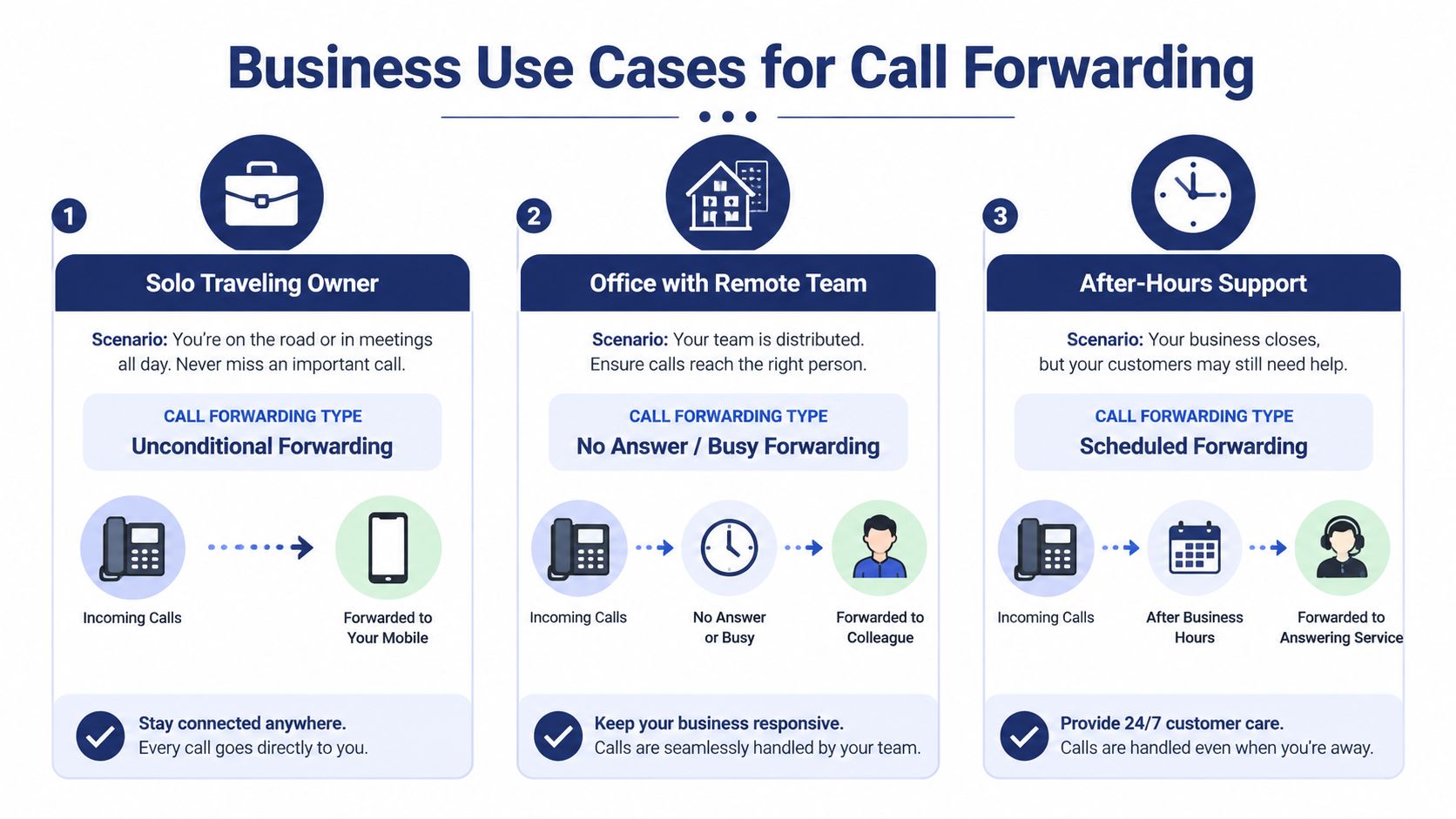
A visual example of these workplace patterns appears below.
Forwarding can also support distributed teams where employees work from home, from branch offices, or from mobile devices. The customer-facing number stays stable while the business changes who is available to answer.
Where to Configure Call Forwarding and What to Watch
A forwarding rule can be simple to activate and difficult to troubleshoot if nobody knows where it lives. Start by identifying the control layer.
Carrier settings
Carrier-level forwarding is applied by the telephone provider. You may manage it through a carrier app, account portal, or feature code. Because the rule belongs to the network service, it can continue working when the user changes phones.
The trade-off is limited logic. Carrier settings may not understand your company's queue, department schedule, escalation path, or caller-specific policy. A global rule can also redirect calls farther than intended, especially if voicemail is configured at both ends.
Device settings
A smartphone or desk phone can expose forwarding controls directly. This gives an employee a quick way to send calls to a temporary destination, but the rule may be easy to forget and difficult for an administrator to audit.
Device settings also depend on the user's handset profile and carrier support. A personal phone change, reset, or account change can affect the setting. Review the manufacturer and carrier instructions before relying on a device toggle for company-wide coverage.
Hosted VoIP portals
A cloud PBX dashboard usually treats forwarding as one part of a broader routing policy. An administrator can assign destinations to users, create schedules, route calls to groups, and inspect call logs or rule changes from a central system.
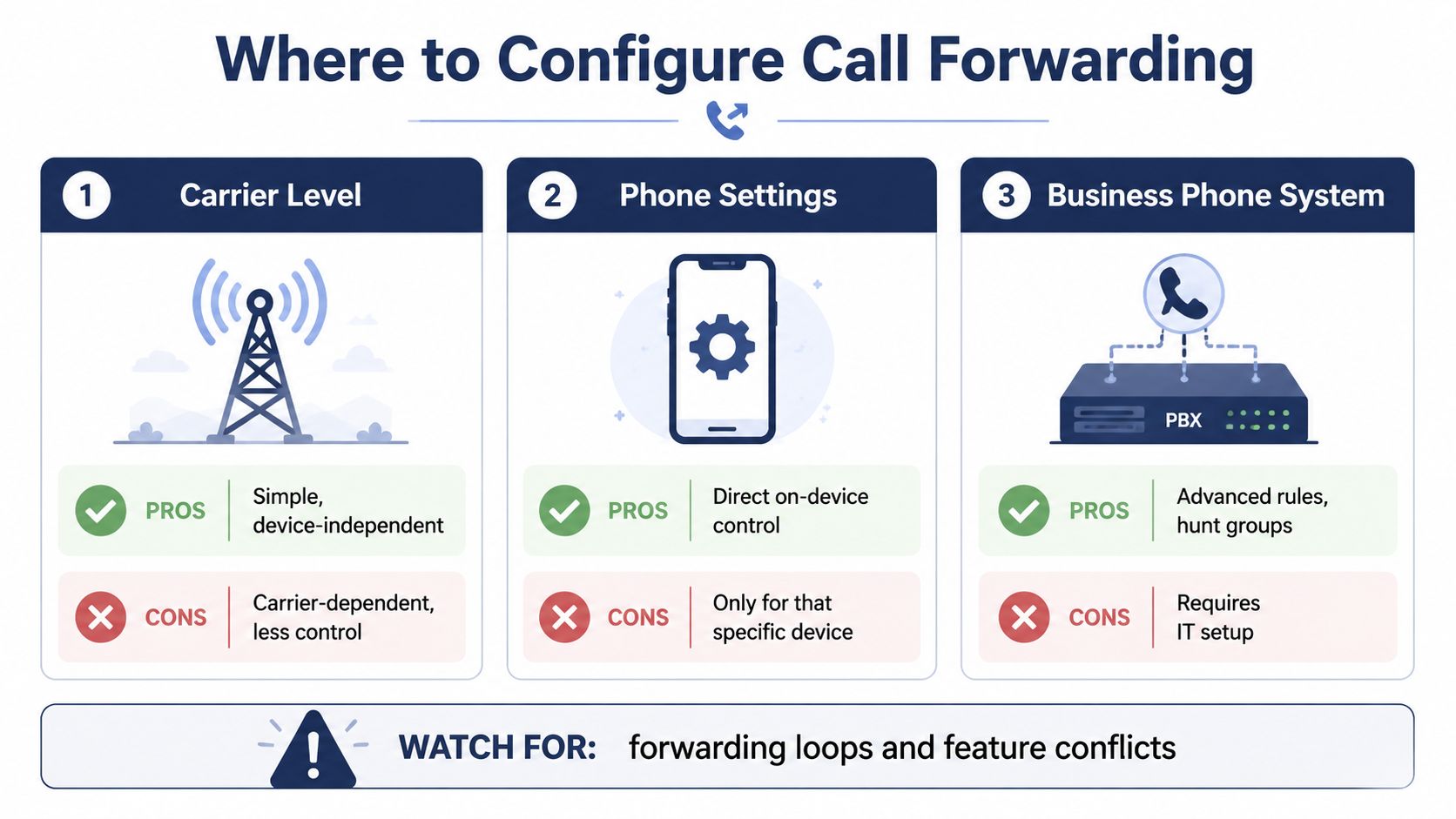
Avoiding feature conflicts
The most common operational problem is not the forwarding feature itself. It's an ownership problem. A personal phone rule can override a business policy, a carrier rule can send a call into another voicemail system, and two active rules can create a loop.
Before changing anything, record the current destination, trigger, voicemail owner, and person responsible for the rule. This call forwarding setup guide can help users distinguish basic phone controls from business-system configuration.
Configuration discipline: One team should own the production rule, and every temporary change should have a clear reason and removal plan.
Security, Compliance, and Robocall Risks
Forwarding can improve reachability, but blind forwarding can also move risk to an unmanaged endpoint. That concern matters in a robocall environment. The FTC recorded more than 2.6 million Do Not Call complaints in fiscal year 2025, and consumer reporting recorded 2.6 billion scam and telemarketing robocalls in July 2025 (FTC National Do Not Call Registry Data Book).
A business that forwards every inbound call to a personal mobile may expose employees to spoofed caller IDs, aggressive robocalls, and social-engineering attempts. The mobile device may not apply the same screening, recording, authentication, or access controls as the company phone system.
Use controls that match the risk
- Prefer conditional rules for live operations: Let busy, no-answer, or unreachable conditions activate the backup path instead of sending every caller to a personal device.
- Verify destinations: Restrict forwarding targets to approved numbers and confirm that the destination can receive business calls.
- Protect sensitive workflows: Require administrative authentication or a PIN where the phone system supports it, especially before changing external destinations.
- Review call records: Forwarded traffic should remain visible in logs so operators can identify unusual destinations, missed calls, and unexpected call-leg behavior.
- Separate business and personal handling: Use a managed business endpoint when calls may contain customer information, payment details, health information, or recorded conversations.
Caller identity can be preserved or changed across the forwarded leg, depending on carrier policy and local regulation. Treat the displayed number as useful context, not automatic proof that the caller is legitimate.
For teams that combine voice with browser-based collaboration, AONMeetings browser-based features may be worth reviewing alongside the phone system. The central principle is the same: keep access, identity, and handling rules under business control rather than assuming a redirected call is harmless.
Choosing the Right Setup and Troubleshooting Common Issues
Use unconditional forwarding for a planned absence, after-hours coverage, or a deliberate decision to bypass the original line. Use busy and no-answer forwarding for everyday operations where staff should get the first opportunity to answer. Reserve selective or schedule-based rules for specific departments, VIP routes, escalation paths, and service windows.
| Scenario | Recommended Forwarding Type | First Check If Calls Don't Get Through |
|---|---|---|
| Owner is away from the office | Unconditional | Confirm the temporary destination is correct and reachable |
| Receptionist is busy | Busy | Check whether the secondary line accepts simultaneous inbound calls |
| Staff may miss a call | No answer | Verify the ring duration and destination rule were saved |
| Phone has no signal or is offline | Unreachable | Confirm the carrier or PBX has an unreachable rule active |
| After-hours support | Scheduled or conditional | Check the time zone, schedule, and final voicemail owner |
| Queue overflow | Conditional or hunt-group routing | Confirm agents and overflow destinations are available |
A practical fault-finding sequence
- Call the destination directly. If the mobile, extension, answering service, or queue can't accept a normal inbound call, forwarding won't solve the problem.
- Confirm the rule was saved. A dial code, device toggle, or portal change may have failed, expired, or remained unsaved.
- Check competing controls. Review do-not-disturb settings, voicemail, call-blocking apps, business hours, and queue status.
- Test externally. Call from an outside line with caller ID visible. An internal test may follow a different route.
- Inspect logs. Carrier records and SIP logs can show whether the system attempted a redirect, including a SIP 302 response in a SIP environment.
- Look for loops. Make sure the destination doesn't forward back to the original number or another rule in the chain.
A modern cloud PBX can turn forwarding from a hidden handset toggle into a managed routing policy with centralized administration, call records, and auditable changes. That model is more suitable when several people, locations, or queues share responsibility for answering customers.
SnapDial provides cloud-based business calling with call routing, mobile-ready access, voicemail, call logs, and administrative controls for managing forwarding across users and destinations. Visit SnapDial to review a business phone setup that keeps forwarding rules organized instead of leaving them scattered across personal devices and carrier menus.