
You've inherited a phone system where the main number rings the wrong team, the after-hours greeting still mentions last year's closure, and callers press zero only to reach an unattended desk. The admin portal may show every field as complete, but a completed form isn't the same as a usable caller experience.
Auto attendant configuration is a service design exercise before it's a software task. You're deciding how people describe their needs, which team owns each request, what happens when nobody answers, and how the system behaves across locations, languages, holidays, and changing schedules. The settings matter, but the decisions behind them matter more.
What Auto Attendant Configuration Actually Involves
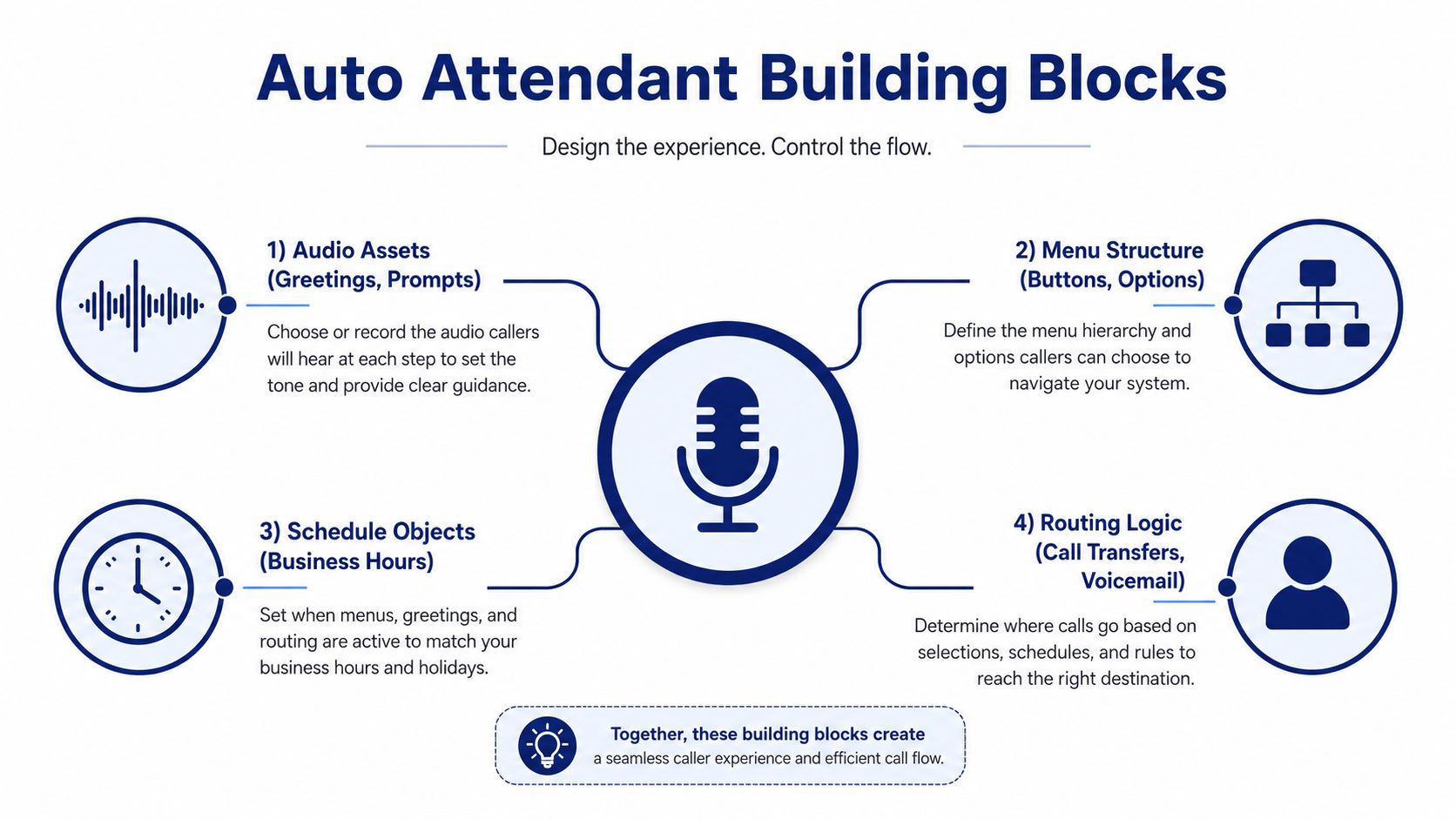
An auto attendant has a simple outward purpose, greeting callers and directing them to a person, team, voicemail box, or message. Underneath, a reliable deployment depends on four connected building blocks: audio assets, menu structure, routing logic, and schedules. That basic model has remained consistent since automated attendants emerged in the late 1970s and early 1980s, with a key automated-attendant patent milestone arriving in 1989 after related PBX-streamlining work began in 1984. The history of automated attendants helps explain why modern systems still revolve around greetings, menus, destinations, and fallback behavior.
Start with the design, not the portal
Draft the caller journey on paper first. Write the opening greeting, list the reasons people call, assign each reason to a destination, and document what should happen if that destination is busy, unavailable, or unmanned.
The four components should answer different questions:
- Audio assets: What does the caller hear, and which prompt applies during business hours, closures, or language selection?
- Menu structure: Which keys or spoken commands does the caller use, and how many choices appear at each stage?
- Routing logic: Does a selection reach an extension, hunt group, shared voicemail, operator, external number, or recorded message?
- Schedule layer: Which branch is active at a particular location and time?
A common mistake is adding extensions one at a time until the menu reflects the org chart. Callers don't think in org charts. They think, “I need billing help,” “I want an appointment,” or “I'm calling about an order.” Build around those top call reasons, then map each reason to an owner.
Keep the tree understandable
A broad first menu can overwhelm callers, while a nested tree makes them work for a basic transfer. Practical configuration guidance recommends keeping the first menu to three options, limiting depth to two or three levels, and providing a zero-out route to a live person. Small-business automated phone system guidance also recommends testing from mobile, landline, and noisy environments.
Treat the first version as a draft. Real call data will show which choices are misunderstood, which destinations have no owner, and where the fallback path needs adjustment.
Building the Menu Tree and Routing Rules
Build the live configuration in this order: greeting, menu tree, destinations, then fallback behavior. That sequence prevents a common failure where an administrator creates a polished prompt before deciding who owns each option.
Start with a plain greeting: identify the business, state the main action, and present options at a measured pace. A multi-department small business might use:
“Thank you for calling Northside Services. Press 1 for sales, 2 for support, 3 for billing, 4 for appointments, or 5 for our company directory. Press 0 for the operator.”
A single-location clinic may need only:
“Press 1 to schedule or change an appointment. Press 2 for all other calls. Press 0 for the front desk.”
The second example is usually better than forcing a clinic into separate options for insurance, records, directions, and billing before a caller has reached a human. Group related needs behind a staffed destination, then let that team handle the detail.
Choose input and destinations deliberately
DTMF menus are predictable and work well for callers using any phone. Speech recognition can sound more natural, but background noise, accents, overlapping speech, and recognition latency create additional failure points. For critical paths, keypad input remains the safer default. Speech can supplement it rather than replace it.
Each option needs a defined destination:
- Direct extension: Use it when one person owns the call type and has dependable coverage.
- Hunt group or queue: Use it for teams that share responsibility, such as sales or support.
- Shared voicemail: Use it when staff can return messages reliably and the issue doesn't require immediate handling.
- External transfer: Use it for an outsourced answering service or on-call provider, but confirm the number and fallback independently.
- Conference bridge: Use it for recurring meeting access, not as a substitute for a staffed service path.
- Operator queue: Use it as the safety net for callers who don't know which department they need.
Routing choices involve trade-offs. A direct extension is efficient but fragile. A queue provides coverage but may introduce wait time. Voicemail protects staff capacity but shifts work to callbacks.
You can compare the choices in this matrix:
| Destination Type | Best For | Trade-Off | Typical Timeout |
|---|---|---|---|
| Direct extension | A clearly assigned owner | Fails when that person is unavailable | Short |
| Hunt group | Shared departmental coverage | Can ring too many people or create delays | Moderate |
| Shared voicemail | Non-urgent requests | Requires disciplined callback handling | Moderate |
| External transfer | Outsourced or on-call coverage | Depends on another service or number | Moderate |
| Conference bridge | Scheduled group calls | Offers little help for general callers | Short |
| Operator queue | Unclear or exceptional requests | Requires live staffing | Longer |
Set a timeout-to-operator value that gives callers enough time to choose without leaving them in silence. Define how many times the menu repeats after no input, how invalid entries are handled, and where the caller goes after the final retry. If dial-by-name is enabled, decide whether it works at the top level or only after a directory choice. Guidance from call routing fundamentals is useful here because the destination is only one part of the route. The system also needs a clear response when the destination can't accept the call.
Practical rule: Every menu option must end at a real destination, and every destination must have a fallback.
Recording Greetings That Sound Professional
Callers judge the system before they reach a person. A rushed greeting, uneven volume, or unfamiliar jargon makes the menu feel harder than it is. Record the primary greeting as a customer-facing message, not as an internal script read into a microphone.

Get the audio technically clean
A practical recording target is 16-bit, 44.1 kHz, mono WAV, with peaks around -3 dB, no clipping, and no audible hiss. Keep levels consistent across the greeting, menu prompts, holiday message, and after-hours recording. If the platform accepts WAV, keep that format for upload. If it requires compression, 128 kbps mono MP3 is an acceptable alternative for a voice prompt.
The recording environment matters more than expensive equipment. Use a quiet room, disable notifications, keep the microphone position consistent, and record several takes. Listen through a desk phone, mobile handset, and headset because a file that sounds clean in a studio can become muddy on a narrowband call.
Write for the caller's next action
A useful script answers three questions quickly:
- Who did the caller reach?
- What can the caller do next?
- Which option should the caller select?
Read the most common option early. Avoid internal labels such as “Tier Two Resolution” if callers know the service as “technical support.” Don't bury the operator route, and don't read keys so quickly that someone calling from a noisy environment has to guess.
Text-to-speech can help with temporary announcements or frequently changing details. It often sounds flat on longer greetings, so voice talent, whether professional or in-house, is usually a stronger choice for the primary welcome. Keep each prompt focused, and record a separate file when a schedule, department, or language path needs a different message.
Listen to the complete prompt set as one caller would hear it. Check pronunciation, silence between options, volume matching, and whether the menu still makes sense when the caller hears it without seeing a written script.
Use the auto attendant recording walkthrough as a practical reference before uploading the final files.
Handling Time Zones, After-Hours, and Holidays
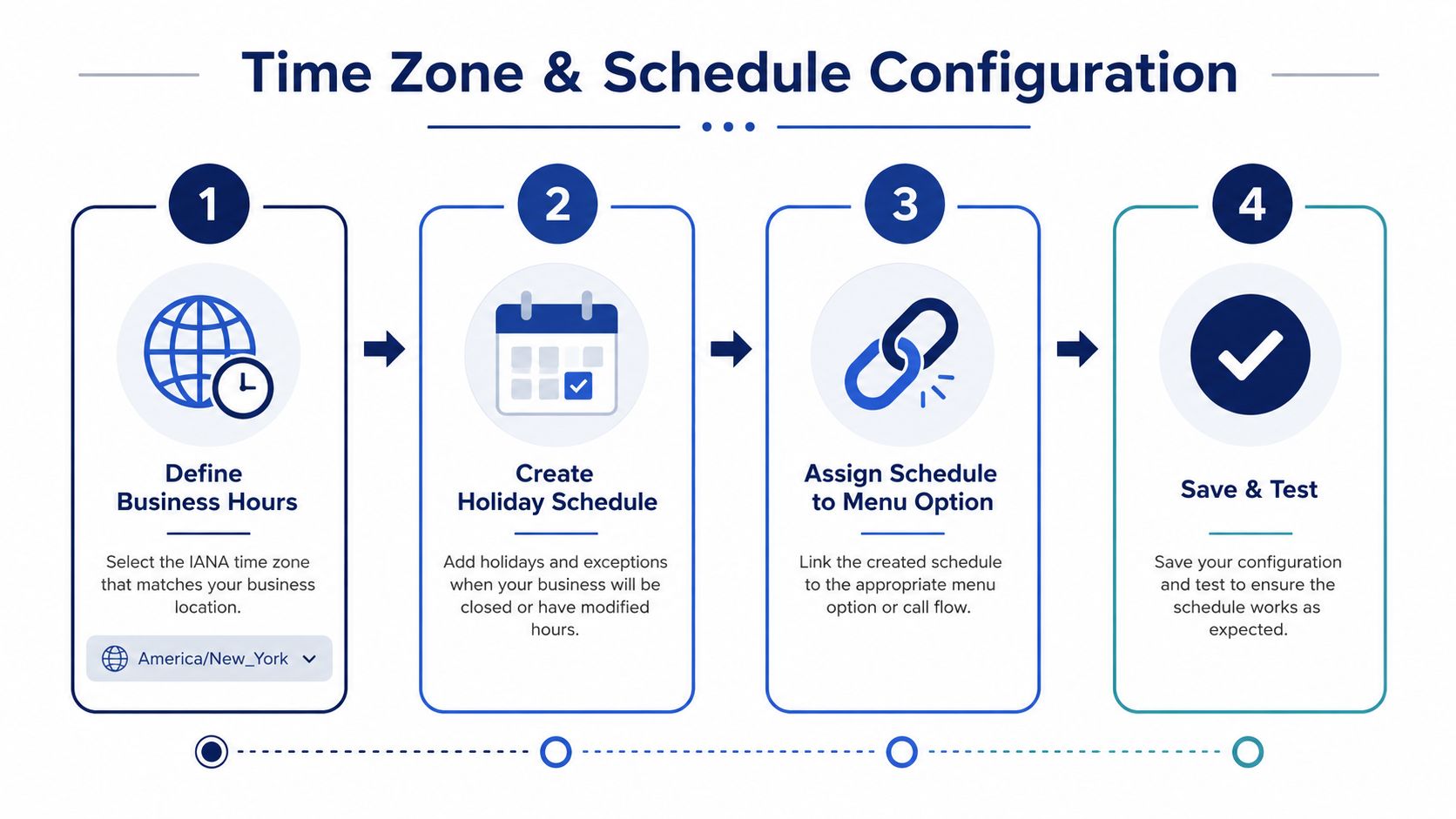
Schedules are where otherwise sensible auto attendant designs fail. Configure the schedule objects before attaching them to menus, and assign each location its actual local time zone. Use an IANA time zone identifier rather than a fixed offset so daylight-saving changes don't shift the business-hours boundary unexpectedly.
Build the schedule layers
Create a regular weekly schedule for each operating location. Then create a separate after-hours attendant rather than letting the business-hours menu time out into an unstaffed extension.
An after-hours path might:
- Send general calls to a shared voicemail box.
- Route urgent calls to an on-call rotation.
- Play an emergency-only menu.
- Direct callers to a recorded message with clear next steps.
The destination must be active and owned. A silent forward to a desk that nobody monitors is not after-hours coverage.
Holiday schedules should sit above the weekly schedule. A holiday override can change the greeting, route to voicemail, or activate a limited emergency path. Vendor setup guidance commonly includes regular schedules, holiday schedules, time zones, business-hours menus, and after-hours menus as separate configuration elements. Microsoft's auto attendant setup documentation shows why these aren't optional administrative details.
Design for multiple sites and languages
Don't centralize every schedule around headquarters if callers reach offices with different local hours. Map each DID or location-specific entry point to the appropriate schedule. Caller area code can provide a routing signal, but a published number, location selection, or dedicated attendant is often more reliable than assuming the caller's physical location from the number.
For multilingual service, bind language selection to a parallel menu and schedule structure. If a caller presses 2 for Spanish, that branch should have its own business-hours, after-hours, and holiday behavior. Translating only the opening greeting leaves callers stranded when the schedule changes.
Maintain holiday dates in a calendar owned by a named administrator. Holiday routing configuration guidance can support the implementation, but the business still has to decide which closures apply to which site. Test each schedule at the exact rollover minute, including the return to regular hours.
Testing and Optimizing Caller Paths
A configuration isn't ready because the administrator can complete it. It's ready when callers can reach the right destination from different networks, devices, and entry points.
Call every branch from an internal extension, an outside line, and a softphone on a metered connection. Desk-phone testing alone can hide latency, codec behavior, or audio problems that appear on mobile and external calls. Test valid digits, invalid digits, no input, repeated no input, operator selection, voicemail, external transfers, and unreachable destinations.
Independent IVR testing guidance identifies structural failures that manual testing can miss. Cyara's end-to-end IVR testing guidance reports that 1 in 3 IVR failures involve a misrouted or dropped call that manual testing doesn't detect. The same source reports that 15% of failures were routing errors where calls were accepted by the ACD but never connected to the voice application. Treat those findings as a reason to trace complete call paths, not as a substitute for testing your own system.
Read the operational data
Modern platforms expose more than total call volume. Microsoft Teams documentation describes reporting for accepted callers, internal and external accepted callers, average time spent in the auto attendant, selected menu options such as **8, 9, *, and #**, call duration, and caller actions. Teams real-time auto attendant reporting shows how administrators can use menu behavior to find design problems.
A high volume of calls selecting an option that no team owns indicates a routing defect or a confusing prompt. A repeated invalid-input pattern may point to wording, timing, or a digit that callers don't associate with the service.
Test with people outside the project
Give the script to someone who didn't design the menu and ask them to call without coaching. Record where they hesitate, what they call each department, and which words they don't understand. Then compare that feedback with call-detail records and queue analytics during the first operating period.
Run a simple review cycle:
- Path review: Confirm every destination still resolves.
- Prompt review: Check pronunciation, pace, silence, and terminology.
- Schedule review: Test location, after-hours, holiday, and language branches.
- Analytics review: Look for unusual digit selections, hang-ups, transfers, and voicemail volume.
For repeatable external testing, use a controlled test number for auto attendant calls and document the expected result for every key press.
Troubleshooting Configuration Problems
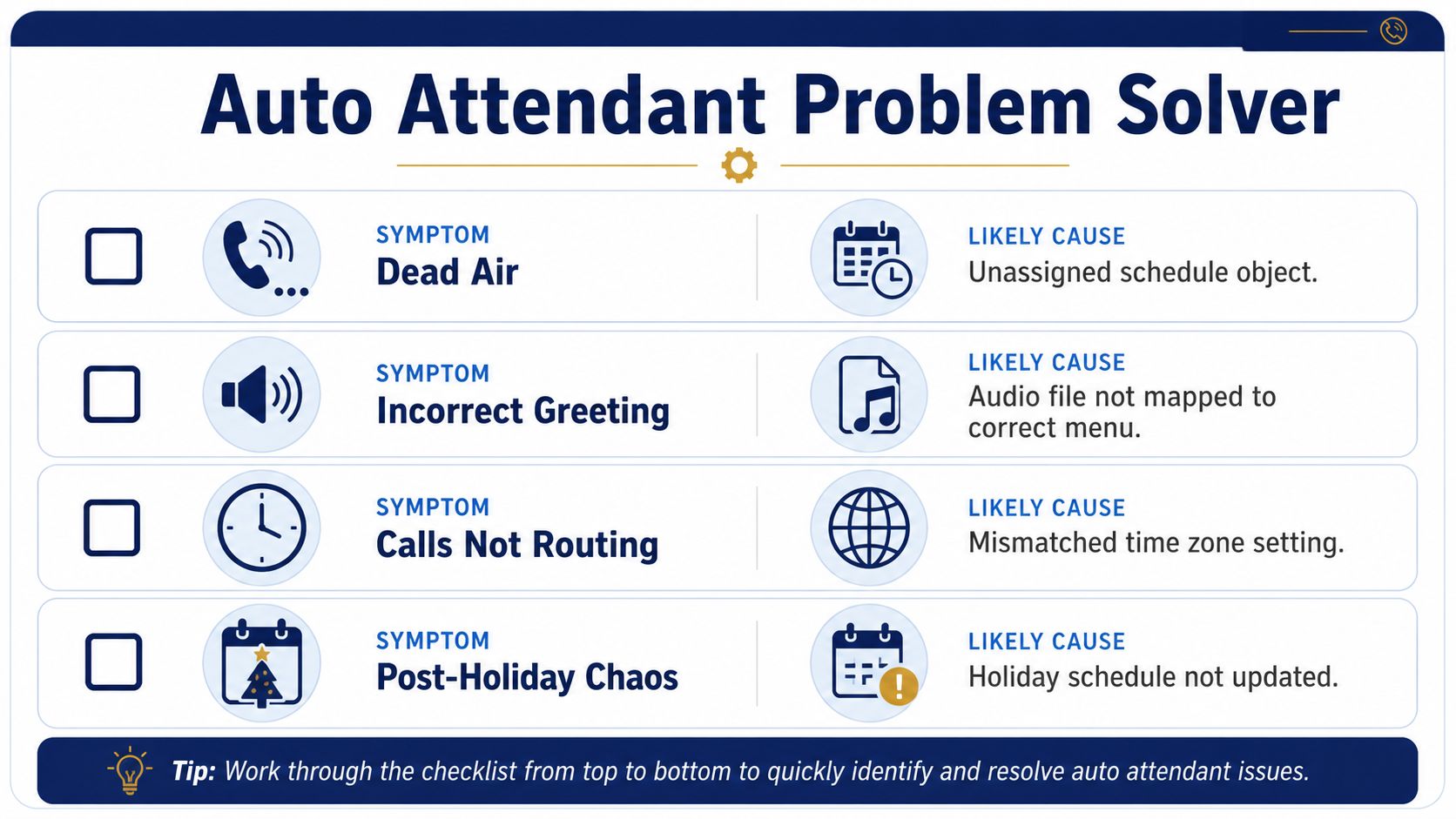
When callers report dead air, the carrier often gets blamed first. In practice, the fault is frequently closer to the design: a schedule object wasn't assigned, a fallback points to an empty hunt group, or the greeting file is mapped to the wrong menu.
Start with the caller's exact path. Find the call record, note the entry number and time, list every digit pressed, and draw the route the platform should have taken. Then compare that route with the actual menu object, schedule, destination, and fallback. Don't reset phones or rebuild the attendant until you've reconstructed the failure.
Match the symptom to the setting
Dead air usually points to an audio mapping problem, an unsupported file, or a branch with no valid next action. Confirm that the greeting is attached to the active menu and that the uploaded format is supported by the platform.
An incorrect greeting often means the caller reached a different schedule than expected. Check the location, time zone, weekly hours, holiday override, and language branch before replacing the recording.
Calls that don't route require destination verification. Confirm that the extension, queue, voicemail box, external number, or operator endpoint still exists and can receive calls. A destination that worked during deployment may have changed with staffing or system updates.
Check signaling and schedule behavior
DTMF problems can occur when the caller's tones and the PBX expect different signaling methods, such as in-band DTMF versus RFC2833. The caller may hear the tone while the attendant never receives the digit. Compare internal and external tests, inspect the call trace, and involve the voice platform provider if only certain endpoints fail.
After-hours complaints commonly come from a schedule bound to UTC while the business operates on local time. Holiday issues can persist when an old closure remains active or the new calendar wasn't assigned to the attendant. Keep a change log for schedule edits so you can identify who changed the rule and which menu it affects.
Reconstruct the caller's journey before changing the infrastructure. The configuration usually reveals more than a device reboot does.
Your Configuration Checklist and Next Steps
A launch-ready auto attendant connects four working parts: audio, menu structure, routing, and schedules. Review them as one design. A complete setting on its own does not help if the caller still reaches the wrong branch or an unavailable destination.
Verify the launch path
Before moving the number into production, run through these checks:
- Greeting timing: Call from outside the system and listen to the full prompt. The first available action should be clear.
- Menu depth: Keep the structure within the practical limit of two to three levels, as described in the small-business configuration guidance linked earlier.
- Destination ownership: Confirm that each option reaches an active person, queue, voicemail box, message, bridge, or approved external number.
- Fallback behavior: Test no input, invalid input, maximum retries, operator transfer, and unreachable destinations.
- Schedule alignment: Verify every site's local time zone, business hours, after-hours menu, and holiday override.
- Language coverage: Confirm that translated branches have their own prompts and closure behavior.
- Reporting visibility: Check that call actions, menu selections, duration, and accepted caller details are available for review. Microsoft documents these operational fields in the auto attendant reporting reference.
- Change ownership: Assign a person to maintain prompts, schedules, destinations, and holiday dates.
Go-live starts the review cycle. Examine missed calls, hang-ups, transfers, and voicemail patterns on a regular schedule. Re-record greetings when the business changes, audit menus after staffing or location changes, and give frontline staff a clear way to report confusing caller paths.
Put the work in your tracker
Create tasks to:
- Map the top call reasons.
- Draft the menu and fallback tree.
- Assign schedule objects by location.
- Record and level every prompt.
- Test internal, external, mobile, and noisy-line paths.
- Validate holidays and after-hours behavior.
- Review call data and caller feedback after launch.
- Schedule recurring menu and destination audits.
A well-configured attendant gives callers a short, predictable route to the right outcome. Keep that route aligned with changes in teams, sites, hours, and responsibilities.
If you are ready to apply this checklist, SnapDial provides tools for configuring auto attendants, IVR paths, schedules, routing, fallback behavior, and greetings in a cloud phone system. Explore the platform at SnapDial.