
A new phone system usually fails in quiet ways first. The main number rings on one carrier but not another. The auto attendant answers, but one menu path drops into nowhere. A sales call reaches a voicemail box that nobody monitors. You don't see those problems during install because the easy tests pass.
That's why a test number to call matters, but not in the casual sense many adopt. You're not trying to prove that one handset can call another. You're trying to certify that the business can receive, route, answer, transfer, and document real calls without surprises on go-live day.
The practical approach is simple. Start with public test numbers for a quick baseline. Then run controlled internal testing across every critical call path. Verify call quality with objective data, not hallway feedback. Finally, treat failures as diagnostics, not disasters. That's how you catch the misroutes, audio problems, and compliance gaps before customers do.
Why "Dialing a Friend" Is Not a Real Phone System Test
A single successful call proves almost nothing.
If someone dials the new number from their mobile, hears ringing, and reaches a receptionist, that only confirms one route worked once. It doesn't prove calls from other networks will complete. It doesn't prove the IVR accepts keypad input. It doesn't prove hunt groups, voicemail fallback, transfers, or after-hours rules behave correctly.
Business telephony breaks at the edges. Those edges are where rushed go-lives usually hurt.
What casual testing misses
A real validation plan checks whether the system behaves correctly under ordinary business conditions. That means more than answer supervision. It means confirming that callers land on the intended destination, audio works both ways, and features tied to live operations function.
Common examples that a friend-to-friend test won't catch:
- Carrier-specific inbound issues: A mobile-originated call may work while a landline-originated call fails or routes oddly.
- Misrouted DID numbers: The published sales number may ring, but land on the wrong user or an old destination.
- Broken IVR paths: The greeting plays, yet menu choices don't route correctly.
- Voicemail defects: The mailbox answers, but notification or retrieval doesn't work as expected.
- Transfer failures: The front desk can answer calls, but warm transfers or blind transfers break midstream.
Practical rule: If the test doesn't reflect how customers actually call you, it isn't a go-live test.
What a real test should prove
Treat go-live validation like acceptance testing. Each important phone number and each important call flow needs a pass or fail result. That includes the main number, departmental DIDs, queue entries, direct extension dialing, after-hours treatment, and outbound presentation.
A disciplined process does two things. First, it reduces the chance of silent failure on day one. Second, it gives IT and operations a shared checklist, so nobody confuses “installed” with “ready.”
That difference matters. A phone system can be fully provisioned and still be operationally unsafe.
Using Public Test Numbers for a Quick Diagnostic
Before you test your own call flows, use a public number to get a fast external baseline. This is the simplest place to start because it removes your internal routing logic from the equation. You're checking whether the call can get out, connect, and return usable audio.
A test number to call is often implemented as a dedicated IVR or loopback line. Long-running public examples include +1 416 342 9562 in Toronto and +44 20 3026 4621 in the UK, which have been used for years across major markets as practical tools for checking voice quality and call setup behavior, as listed by The Test Call public test numbers.
What these numbers are good for
Public test services are useful for quick diagnostics because they're neutral. They don't depend on your receptionist answering, and they don't rely on your IVR logic being correct.
Use them to answer questions like these:
- Can the system complete a basic outbound call?
- Is there two-way audio, or only one-way audio?
- Do DTMF button presses register cleanly?
- Does SIP calling work to a known test endpoint?
If you're collecting a short list for technicians, SnapDial keeps a practical reference of numbers for testing that's useful during turn-up and troubleshooting.
Public VoIP and PSTN test numbers for diagnostics
| Service | Number / SIP URI | Test Type |
|---|---|---|
| The Test Call | +1 416 342 9562 | PSTN voice test |
| The Test Call | +1 631 791 8378 | PSTN voice test |
| The Test Call | +1 250 412 5922 | PSTN voice test |
| The Test Call | +353 1 687 7776 | PSTN voice test |
| The Test Call | +44 20 3026 4621 | PSTN voice test |
| The Test Call | +52 55 9317 0592 | PSTN voice test |
| The Test Call | sip:thetestcall@sip2sip.info | SIP test URI |
| The Test Call | sip:thetestcall@openrcs.com | SIP test URI |
What to listen for during the call
Don't just place the call and hang up. Stay on long enough to evaluate the media path.
Listen for:
- Delayed audio start: The call answers, but speech takes a moment to pass.
- Missing return audio: You speak, but the loopback or test response never comes back.
- Choppy playback: Audio is present but unstable.
- DTMF misreads: Menu selections fail or trigger the wrong option.
The best quick diagnostic is boring. The call connects promptly, audio is immediate in both directions, and keypad input behaves exactly as expected.
What public numbers do not prove
They're a baseline, not a certification.
A public loopback test won't tell you whether your main number points to the correct hunt group. It won't verify whether the accounting option in your auto attendant reaches accounting. It won't prove your published caller ID is right on outbound calls. And it definitely won't certify emergency calling behavior.
Use public numbers to answer one question first: Is the system able to place and sustain a clean call to the outside world? If yes, move on quickly to your own environment.
Building a Comprehensive Internal Test Call Strategy
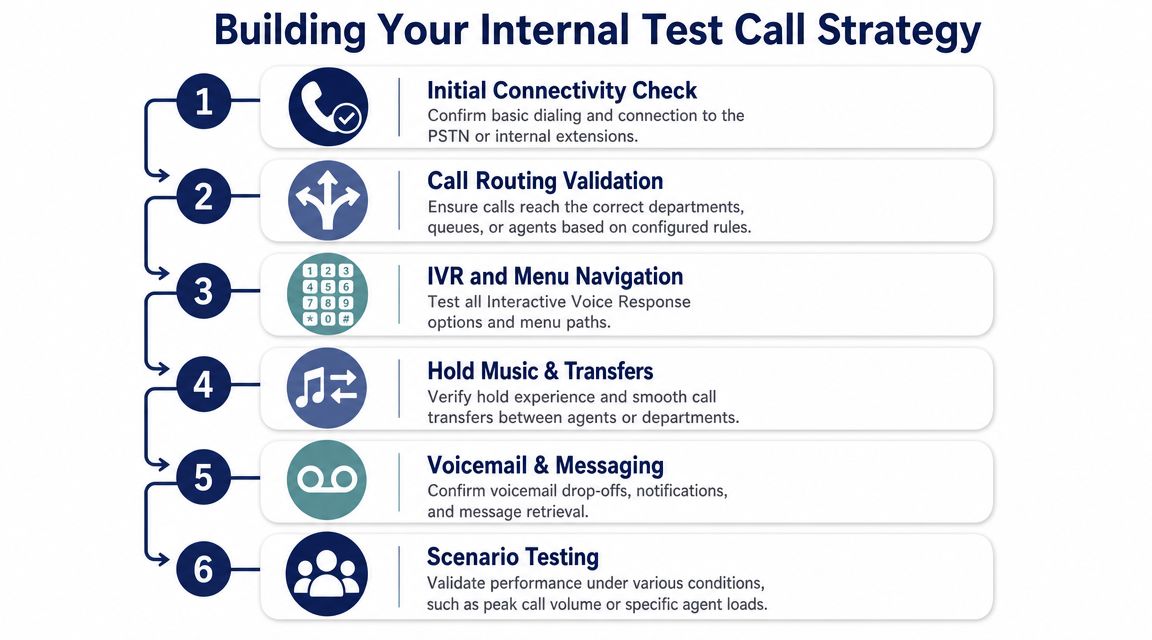
The internal phase is where real phone system validation happens, proving that business logic, user assignments, and failover behavior match the design on paper.
A practical testing methodology starts with validating basic call completion under controlled conditions. That means placing repeated inbound test calls from multiple originating networks, confirming the number rings and answers, and then verifying that the call lands on the intended destination. Cyara also notes that this matters because failures such as accidental redirection of key inbound numbers can go unnoticed until customers call, which is exactly why their phone number testing methodology is worth following at a process level.
Start with a route inventory
Before anybody places calls, write down every route that matters. Organizations often skip this and then realize too late that nobody tested the CFO's direct number, the after-hours auto attendant, or the overflow queue.
Your route inventory should include:
- Public entry points: Main number, local numbers, department DIDs, campaign numbers, and any numbers printed on websites or trucks.
- Call treatment paths: Business hours, after-hours, holiday routing, queue overflow, voicemail fallback, and failover destinations.
- User-level functions: Direct extension dialing, ring groups, transfer behavior, voicemail access, and outbound caller ID.
If you're evaluating platforms with more advanced queue logic, this is also where it helps to compare workflow capabilities in resources like this overview of best inbound call center software, because queue callback, reporting, and routing depth all affect how you build your test plan.
Run the calls like customers would
Don't test from one desk phone only. Use different call origins and different situations.
A solid internal certification run usually includes:
Inbound from mobile and landline
Call each published number from more than one originating network. Confirm ringback, answer behavior, and final destination.Main IVR navigation
Press every menu option. Then test invalid input, no input, and timeout behavior.Direct extension and DID dialing
Call individual users directly. Verify the right device or app rings and voicemail answers correctly if unanswered.Transfers and hold treatment
Test blind transfer, attended transfer, hold music, and recall behavior if a transfer target doesn't answer.Outbound presentation
Place outbound calls from front desk, general users, and shared call paths. Confirm the presented caller ID is appropriate for the business use case.
The system passes only when the route, the destination, and the in-call behavior all match the design.
Include edge cases that cause real complaints
Most go-live pain comes from exceptions, not the happy path. Test what happens when the receptionist is busy, when a queue agent is unavailable, when voicemail should intercept, and when a user answers on mobile instead of desk phone.
A few checks save a lot of cleanup later:
- Busy and no-answer logic: Confirm the call goes where you intended.
- Duplicate ring paths: Make sure one user isn't accidentally receiving calls meant for another department.
- Shared mailbox ownership: Verify someone receives and reviews missed-call messages.
- Call recording or logging behavior: Confirm records exist where policy expects them.
Treat emergency calling as its own workstream
Emergency validation is not a side note. It's a separate test with coordination and documentation.
Public guidance shows that test procedures for safety or compliance commonly require calling a designated non-emergency number first and notifying dispatch because 911 testing differs by jurisdiction. It also highlights a key operational gap: a generic test number doesn't prove emergency routing, caller location, or the right PSAP will work after a move or migration, as discussed in this community guidance on testing emergency calls.
For business environments, the practical process is:
- Call the designated non-emergency contact first: Ask whether they allow scheduled test calls and what script they want used.
- Identify the exact location being tested: Suite, floor, and callback number matter.
- Document the result: Record who confirmed the test, what location data they received, and whether anything needs correction.
- Repeat after major changes: Moves, WAN changes, number porting events, and PBX migrations all justify re-validation.
Emergency calling should never be “assumed good” because the rest of the system looks fine.
Decoding Call Quality Metrics Beyond "It Sounds OK"
Human feedback helps, but it's unreliable. One person says the call sounded fine because they tolerated a short delay. Another says it was bad because they heard a brief click on a Bluetooth headset. Neither gives you a usable engineering baseline.
A robust test plan must validate more than simple ringing. It should exercise SIP signaling, media flow, and DTMF behavior, because a test that only checks answer supervision can miss defects that affect IVR navigation, voicemail, or call routing. AudioCodes describes this directly in its documentation for configuring test call endpoints.
What the core metrics actually tell you
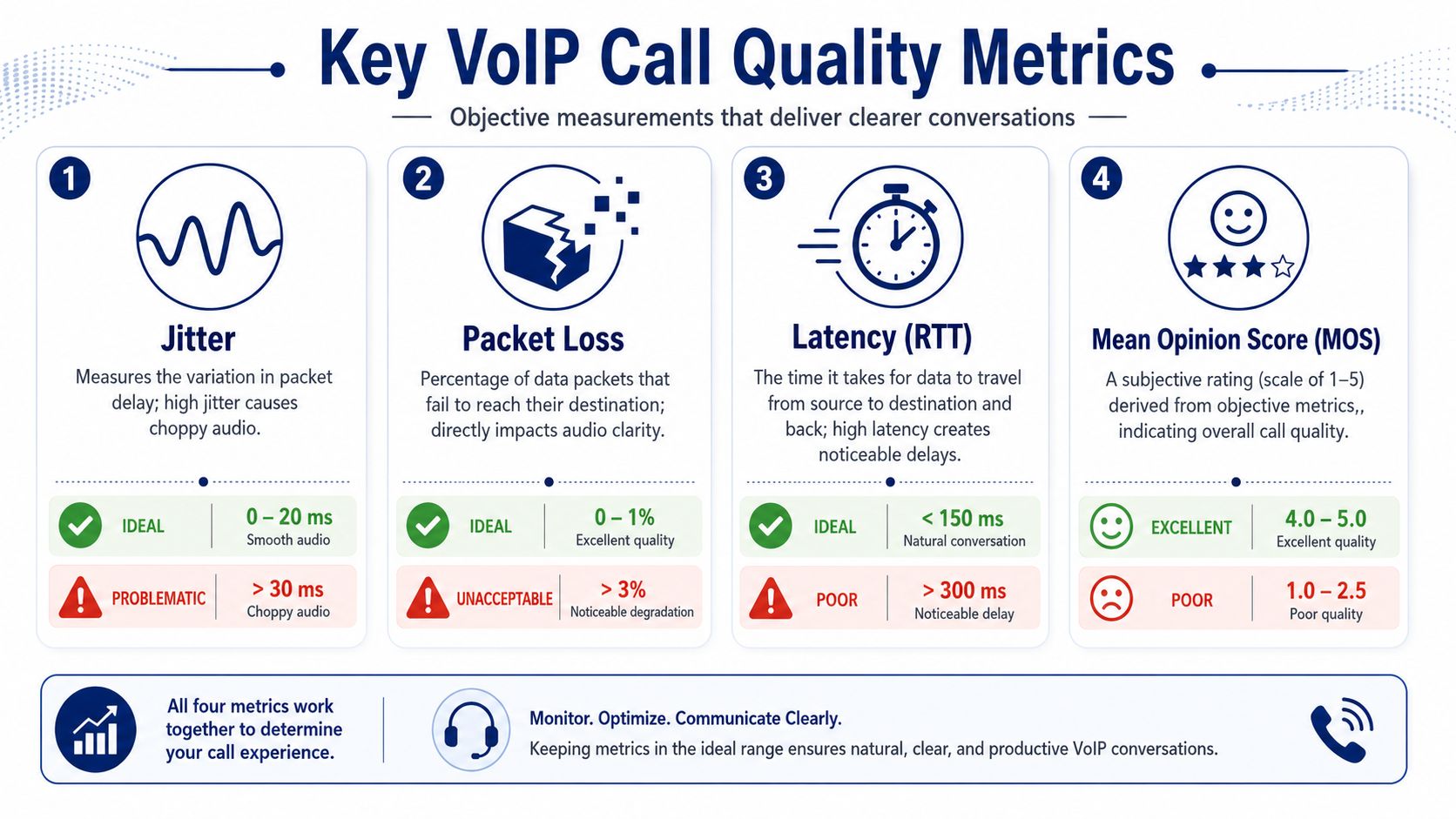
These are the four terms most admins need to understand:
- Jitter: Variation in packet arrival timing. High jitter usually sounds like uneven, warbling, or choppy speech.
- Packet loss: Audio packets that never arrive. This causes clipped words, missing syllables, or robotic speech.
- Latency: Delay between speaking and hearing the far end. Too much delay makes natural conversation awkward.
- MOS: Mean Opinion Score. It's a shorthand quality indicator derived from call conditions, often used to summarize overall voice experience.
If jitter is unfamiliar, this short explanation of what jitter means in networking is worth handing to anyone who has to interpret call-quality logs.
How to use the metrics in practice
Don't stare at one number in isolation. Correlate the metric with the symptom.
If users report that calls feel delayed, look first at latency. If they say speech breaks up in bursts, jitter and packet loss are the better suspects. If IVR input fails even though the audio sounds acceptable, look beyond broad “quality” scores and check signaling and DTMF behavior.
“It sounds OK” is a user impression. A pass result needs a call record, a route result, and media evidence.
Where Wi-Fi often creates false telephony problems
A lot of “phone system issues” are local network issues. This shows up constantly on softphones and mobile apps, especially in offices where users move between access points or work from home on crowded wireless networks.
If audio is unstable mostly on wireless endpoints, stop blaming the PBX first. Review client-side conditions and basics like signal consistency, roaming behavior, and congestion. This practical guide to reliable Wi-Fi is useful for non-network specialists who need to connect poor wireless conditions to voice symptoms quickly.
The useful habit is simple. When a call fails quality review, note the endpoint type, network type, and symptom together. That gives you an actual pattern to troubleshoot instead of a vague complaint.
Troubleshooting Common Test Call Failures
A failed test is good news if you catch it before cutover. It means your process worked.
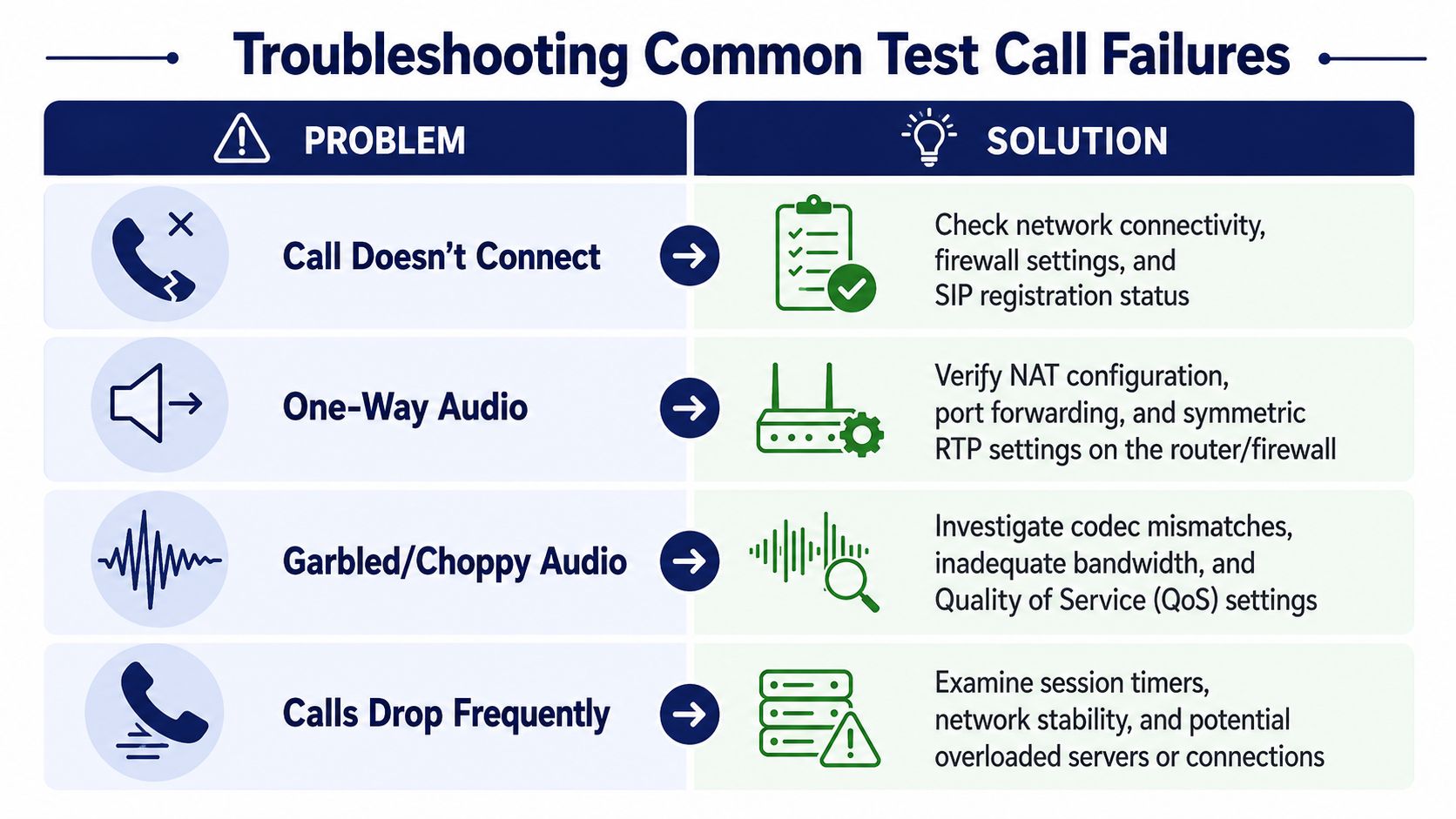
What wastes time is random troubleshooting. Someone changes a codec setting, someone else reboots a phone, a third person edits a route, and now nobody knows which action mattered. The faster path is symptom-first diagnosis.
Start where the call breaks. Is it failing before answer, at answer, during media, or during feature use? That narrows the field immediately.
When the call doesn't reach the right destination
Misrouting is one of the most damaging issues because it often looks like success at first. The call rings, somebody answers, and the team assumes the number works. Meanwhile the call is landing on the wrong user, old forwarding path, or an unintended external line.
Check these first:
- Number assignment: Confirm the DID is mapped to the intended destination.
- Time condition logic: Verify business hours, after-hours, and holiday rules.
- Fallback paths: Review what happens on busy, no-answer, and unreachable states.
- Porting and published numbers: Make sure the tested number is the actual production number customers will use.
This is exactly why repeated inbound testing from multiple networks matters. Cyara's guidance stresses validating that a number rings, answers, and lands on the intended destination under controlled conditions. That catches errors like accidental redirection before customers find them through trial and error.
When you get one-way audio
One-way audio usually means signaling succeeded but the media path didn't behave. You can place the call, the far end answers, and then one side hears silence.
Most likely causes include:
- NAT or firewall behavior: Media isn't returning correctly.
- Endpoint network changes: A phone or app moved to a different network condition.
- Session border or trunk configuration issues: Signaling looks healthy while RTP handling does not.
The right response is disciplined isolation. Test the same path from a different endpoint. Then test the same endpoint on a different network. If the symptom follows the endpoint, investigate that device path. If it follows the route, inspect the trunk or border behavior.
For teams dealing with user-facing ringing issues at the same time, this troubleshooting guide on why a phone doesn't ring is a useful operational reference.
When DTMF or IVR input fails
This problem frustrates users fast because the call appears connected. They hear the menu, press an option, and nothing useful happens.
Look for these patterns:
- Only some menu options fail: Often a routing or IVR logic issue.
- No keypresses register at all: More likely a DTMF handling problem.
- DTMF works on one endpoint type but not another: Compare device, app, and path behavior.
A test number to call is useful here only if it checks keypad behavior in addition to answer. If your team only verifies that the call connected, it can miss the exact defect customers will notice first.
When audio is choppy or calls drop
People start guessing, and that's expensive. Missed or degraded calls have direct business impact, especially in high-response environments. For service businesses, the operational side of that problem is well explained in this look at the impact of missed calls on contractors. The lesson applies beyond contractors. If inbound calls are unstable, the phone system isn't just inconvenient. It's interfering with revenue and customer trust.
Use a short sequence:
Reproduce the symptom consistently
Don't chase a one-off complaint unless you can place it in a pattern.Compare wired versus wireless
If wireless calls degrade and wired calls don't, the network edge deserves attention first.Review codec and bandwidth assumptions
Choppy audio can come from poor network conditions, but also from mismatched media handling.Check session stability
If calls drop at similar points, review session handling and timeout behavior.
Here's a concise walkthrough that pairs well with a structured troubleshooting session:
Don't “fix” five things at once. Change one variable, retest, and log the result.
That discipline is what turns a failed call test into a clean root-cause analysis instead of a long afternoon of guesswork.
Your Go-Live Checklist and Continuous Testing with SnapDial
By go-live week, the goal isn't to keep testing forever. It's to decide whether the system is operationally safe to hand to the business.
Use a final checklist that answers yes or no:
- Published inbound numbers work: Main line, departmental numbers, and direct numbers reach the right destination.
- IVR paths are complete: Every menu option, timeout, and invalid-entry path behaves correctly.
- Transfers and voicemail work: Calls can move between users and land in the right mailbox when unanswered.
- Outbound identity is correct: Users present the right business number where expected.
- Emergency validation is documented: The location-specific test process has been completed and recorded appropriately.
- Call quality is acceptable across endpoint types: Desk phones, apps, remote users, and office users have all been checked.
After cutover, keep a lightweight routine. Spot-check call recordings for clarity. Review voicemail transcription quality against the original message. Confirm a user can move between desk phone and mobile app without confusion. Watch call logs after routing changes, staff moves, or office relocations.
That last part matters. Telephony drift is real. A system can pass every test at launch and still break later because a schedule changed, a number was reassigned, or a network condition shifted. Continuous validation is what keeps the go-live win from decaying into a support ticket backlog.
If you want a cloud phone system that's easier to validate and easier to run after cutover, SnapDial is worth a close look. It gives SMBs and multi-location teams the calling, routing, mobile access, voicemail, recordings, and admin controls needed to replace legacy PBXs without turning every change into a project.