

Organizations commonly reduce communications spending by approximately 30% to 50% after switching to VoIP, while international calling costs can fall by as much as 90% in some cases (Findstack's VoIP statistics summary). Those figures matter to a small business, but the key advantage is broader: hosted VoIP replaces a phone system that requires hardware, specialist maintenance, and physical lines with a service a lean team can administer through software.
That shift can improve cash flow, support hybrid work, simplify expansion, and deliver features that once required enterprise contracts. It also creates responsibilities around network quality, identity security, fraud prevention, and continuity. The best benefits of VoIP for small business appear when the phone service is treated as part of the company's IT environment, not as a magical subscription that works without planning.
What Hosted VoIP Actually Replaces
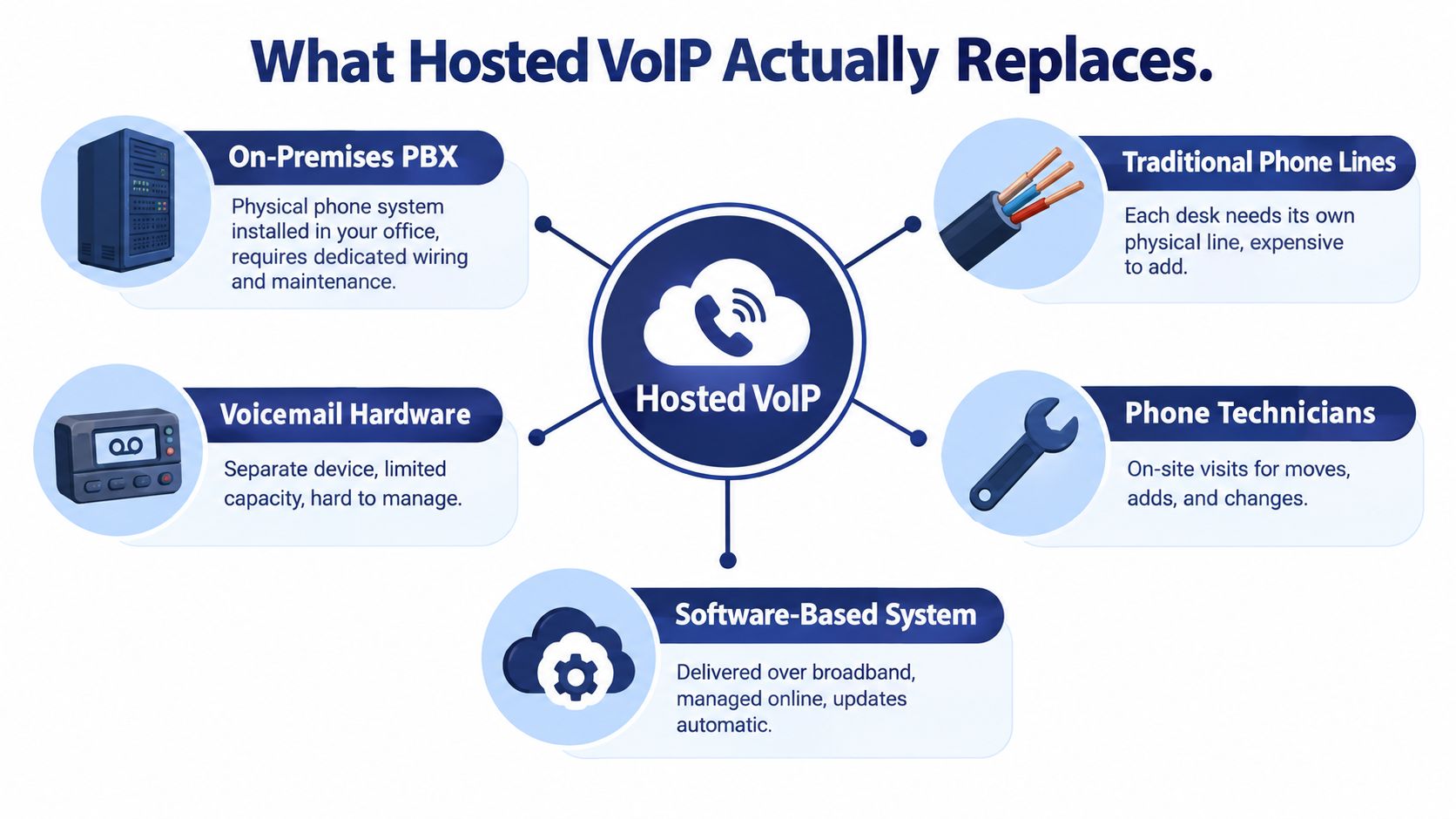
Hosted VoIP is a software-based phone system delivered over broadband. Call control runs in the provider's cloud instead of an on-premises private branch exchange, or PBX. Employees use IP desk phones, computers, mobile apps, or other supported endpoints.
The practical shift resembles replacing a fax machine with email. A fax machine is a dedicated device with a physical process. Email follows users across devices and locations. Hosted VoIP applies that service model to business calling.
A traditional small-business setup may contain:
- An on-premises PBX: Office hardware that requires local maintenance and upgrades.
- Dedicated phone lines: Physical circuits connected to desks, departments, or locations.
- Separate voicemail equipment: A standalone system with its own administration and capacity limits.
- Specialist support: Technician visits for moves, adds, changes, troubleshooting, or expansion.
- Individual wiring dependencies: New desks may need physical work before users can place calls.
Hosted VoIP replaces much of this stack with online configuration. An administrator can create a user, assign an extension, set routing rules, and register a softphone without installing a PBX port. Voice, signaling, messaging, conferencing, and business applications can share an IP network, leaving a small company with fewer separate systems to maintain.
Practical rule: Buy hosted VoIP as a managed communications service, not as a cloud-based copy of the same old hardware habits.
The service still needs disciplined setup. Before porting numbers, document extensions, auto attendants, call groups, emergency-calling requirements, fax dependencies, analog devices, and after-hours rules. Record this inventory in the provider portal so routine moves and changes do not depend on a technician visit. For background on the older architecture, read this overview of what a PBX system does.
Hosted does not mean hardware-free. A small office may reuse compatible handsets, purchase IP phones, or issue computers and mobile apps. Check device compatibility before migration, and replace only endpoints that create support problems. Teams assessing refurbished options can review Beyond Surplus used equipment rather than assuming every phone must be bought new.
The replacement is administrative as much as physical: fewer cabinets, line changes, and site visits, with more work handled through a browser by the person already responsible for IT.
Cost Predictability and Real Savings
The strongest financial case for VoIP is a clearer cost structure, not a vague promise that cloud services cost less. Independent summaries report that organizations commonly reduce communications spending by approximately 30% to 50%, while international calling costs can fall by as much as 90% in some cases (Findstack's VoIP cost data). Those figures are benchmarks, not guarantees. Your result depends on call volume, destinations, locations, devices, broadband, contract terms, and migration work.
The cost lines that change
Hardware takes a smaller role in the budget. Hosted delivery reduces the need for a PBX cabinet, expansion cards, local voicemail hardware, and related maintenance. You may still buy phones, switches, backup connectivity, or power protection. The difference is that each purchase has a specific operational purpose instead of supporting an entire on-site telephone platform.
Physical line capacity becomes less rigid. Traditional systems often tie growth to circuits, ports, and wiring. IP-based calling lets an administrator provision users and endpoints through software, although the network still needs enough capacity for concurrent calls. A lean IT team should check bandwidth and call quality before migration, rather than treating the provider's subscription as the whole solution.
Maintenance becomes easier to forecast. Instead of paying for specialist visits for every move or change, the business pays for a managed service and handles routine administration online. That shifts the work from physical intervention to configuration, testing, and governance. It does not remove support responsibilities, so assign ownership for user changes, permissions, call flows, and troubleshooting.
International calling deserves a separate calculation. If employees regularly call overseas customers, suppliers, or offices, compare destinations and usage rules instead of accepting an “unlimited” label. The potential reduction can be significant, but included destinations, fair-use terms, and fraud controls matter more than the plan name.
Capex becomes an operating decision
Per-user pricing converts irregular capital expenses into a more manageable operating expense. That gives a small company a clearer forecast and lets it add capacity without waiting for a hardware refresh or approving a large installation project.
Advisor's view: Calculate total cost of ownership, not just the monthly seat price. Include devices, network work, number porting, training, backup connectivity, recording storage, and administration.
Build the comparison from current monthly bills, maintenance invoices, line charges, international usage, and internal IT time. Test those costs against hosted VoIP pricing and the provider's contract terms. A low subscription price is not a saving if it excludes features the business already depends on. The right benchmark is the cost of running the complete service, with enough administration capacity to keep it reliable.
Scaling Without a Construction Crew
Growth should not turn into a construction project. Hiring one employee can otherwise mean adding a phone, line, extension, voicemail box, and technician. A new branch may require circuits, PBX capacity, cabling, and another support arrangement.
Hosted VoIP changes the unit of growth from hardware installation to configuration. An administrator can add a user, assign an extension, create a call group, or register a softphone through a web portal. A branch can follow the main office's call-handling rules without installing a separate phone system.
For a 25-person team, role templates can add a user, extension, and queue membership in minutes. The administrator can then test peak concurrent calls before rollout. That is the practical scaling advantage: repeatable changes that a lean team can administer without waiting for a telecom contractor.
Voice, signaling, messaging, conferencing, and business applications can share an IP network. The company manages one coordinated communications environment instead of isolated telephone services. Seasonal hiring, remote onboarding, and multi-location routing become easier to configure and review.
Speed still depends on engineering. Research on VoIP adoption identifies network reliability, voice quality, and security as the three most important selection criteria, reported by 91%, 84%, and 75% of respondents respectively (VoIP adoption research).
Use that ranking to evaluate providers. Require a network-readiness process, not just a feature list. Separate voice traffic logically where possible, prioritize real-time media with QoS, and test peak concurrent calls instead of relying on average bandwidth.
A lean team should standardize provisioning:
- Create a role template: Define extensions, permissions, queues, recording rules, and devices for common jobs.
- Use named administrators: Shared credentials make changes difficult to audit.
- Document offboarding: Disable access, reclaim numbers, remove forwarding, and review mobile sessions immediately.
- Test every location: Include branches, VPN paths, home offices, and mobile connections before a broad rollout.
Scaling is fast only when these controls exist. Without them, the company replaces a construction project with recurring troubleshooting.
Mobility and the Real Mobile Office
A mobile office isn't created by installing an app. It works when customers experience one coherent business regardless of where employees sit.
Take a representative 25-person company with a main office, a satellite branch, and remote staff. A customer calls the main number. The auto attendant routes the call to the right department, a queue distributes it to available employees, and the assigned worker answers from a desk phone, laptop softphone, or mobile app using the business identity.

If that employee leaves the office, the call can follow the configured call-handling rules. A visual voicemail inbox with transcription can keep messages visible across devices. A handoff can move an active call from a computer to a mobile device without forcing the customer to redial.
The legacy alternative is familiar. Each location has separate numbers, staff forward calls manually, voicemail boxes go unchecked, and customers repeat their story after being transferred. That arrangement can function, but it depends heavily on individual habits and local knowledge.
A real mobile-office design needs policy, not just endpoints:
- One business identity: Employees use the company number or assigned business caller ID, not personal mobile numbers.
- Shared routing rules: Calls follow department, availability, time-of-day, and escalation logic.
- Visible messages: Voicemail and transcription appear where the responsible employee already works.
- Controlled handoffs: Staff can transfer or move calls without exposing internal complexity to customers.
- Fallback destinations: Calls can route to another site, a mobile device, or a monitored answering process.
This is why mobile office calling should be evaluated as a workflow. Ask someone to describe what happens when a remote employee is unavailable, a branch closes early, or a customer returns a call outside normal hours. If the answer depends on forwarding numbers by hand, the system isn't mobile enough.
The business benefit is consistency. Customers reach the same company, teams share the same rules, and managers can change routing without rebuilding the phone environment at each location.
Advanced Features That Used to Cost Extra
Small businesses should be suspicious of any provider that presents basic call handling as an expensive add-on. Hosted platforms can deliver capabilities that historically sat behind enterprise contracts, separate modules, or specialist configuration work.
The meaningful comparison is not “feature-rich versus feature-poor.” It is built-in versus bolt-on.
Reception and routing
An Auto Attendant or IVR can greet callers, offer department choices, accept extensions, and apply business-hour rules. Call routing can send calls to users, groups, locations, mobile apps, or fallback destinations. These functions reduce dependence on a single receptionist and give a small company a more controlled customer entry point.
Unlimited lines can also remove the busy-signal mindset associated with fixed line capacity. The business still needs adequate network and service capacity, but callers shouldn't be forced into a physical-line calculation every time the company grows.
Queues and customer service
A queue should do more than play hold music. Useful capabilities include smart queue management, callback requests, wait-time announcements, real-time statistics, and detailed reporting. These functions help a manager see whether calls are being answered, abandoned, redirected, or concentrated on one employee.
Call recording can support training, quality review, and dispute resolution, but it creates retention and access obligations. Treat recordings as business data, not as an unlimited archive.
Visual voicemail with transcription is another practical upgrade. Staff can scan messages, search for key details, and respond without dialing into a shared mailbox. The time savings are operational, not glamorous, and they're more valuable than decorative dashboard features.
Replacing adjacent hardware
Cloud faxing can remove another standalone device from the office. Collision-avoidance matters because simultaneous inbound and outbound fax activity shouldn't create the same conflicts associated with a single physical fax line.
The right purchasing question is simple:
Ask for the complete feature map: Which capabilities are included, which require a higher tier, and which incur usage, storage, device, or support charges?
All-inclusive pricing can make sense when it covers the functions the business would otherwise buy separately. SnapDial, for example, offers hosted business calling with Auto Attendant and IVR, call recording, visual voicemail with transcription, mobile applications, call routing, queue capabilities, and cloud faxing. Compare those inclusions against your current provider's separate quotes, then verify recording retention, reporting depth, support boundaries, and contract language.
Security and Administration You Still Own
Cloud administration isn't the same as secure administration. A hosted provider may manage the platform, but your business still controls identities, permissions, devices, recordings, voicemail, forwarding rules, and dialing policies.
The attack surface is concrete. A compromised administrator account can alter routing. A stolen user credential can expose voicemail or recordings. Misconfigured international dialing can create fraudulent charges. Sensitive transcriptions can remain accessible long after the original business need has ended.
The FCC includes cybersecurity planning and tools for small businesses within its network-reliability resources, connecting communications resilience with protection of the business and its customers (FCC small-business network reliability resources). That framing is correct. A phone system is part of the company's operational and information-security environment.
Minimum controls for a lean team
Multifactor authentication should protect every administrator account. Don't allow the convenience of a shared login to outweigh accountability.
Role-based access should match job duties. A receptionist may need queue visibility, while an office manager may need routing control. Neither necessarily needs unrestricted system administration.
Offboarding should happen immediately. Disable accounts, revoke sessions, remove forwarding destinations, recover devices, and review shared voicemail access when someone leaves.
PINs and devices need policy. Require strong voicemail and device credentials, protect mobile applications, and avoid storing access details in shared documents.
Recording retention must have a purpose. Define who can access recordings, how long the business retains them, and when the system deletes them.
Fraud monitoring needs active ownership. Review international-dialing permissions, forwarding changes, unusual call activity, and destinations that employees don't normally use.
Vendor response must be clear. Ask how the provider reports incidents, handles abuse, restores service, and supports investigations.
The administration burden is smaller than managing an on-premises PBX in many environments, but it isn't zero. Budget time for training, periodic permission reviews, audits, backup connectivity, and incident response. “Easy to manage” should mean fewer physical tasks and clearer controls, not permission to stop paying attention.
Disaster Recovery and Always-On Support
A phone system earns its keep during disruption. Ask what happens when the office loses power, the broadband connection fails, a firewall misbehaves, or the employee responsible for a key queue is unreachable.
Hosted VoIP gives you more recovery options than a fixed PBX, but you must configure them before the incident. Route calls to another location or approved mobile destination, send voicemail to monitored inboxes, define after-hours coverage, and document who can change routing during an emergency.
Start with the network. NIST identifies approximately 150 milliseconds as the upper bound for one-way voice latency and notes that packet loss as low as 1% can garble communications (NIST voice-over-IP guidance). Those thresholds explain why a backup plan cannot rely on a congested connection or an untested mobile hotspot.
Design continuity deliberately
- Prioritize real-time traffic: Apply QoS where appropriate and confirm that voice packets receive consistent treatment.
- Provide a second path: Evaluate backup broadband or cellular connectivity so a single provider failure doesn't isolate the office.
- Protect power: Keep network equipment, phones where necessary, and connectivity devices running during short outages.
- Test remote routes: Call the main number from outside the office and verify that the fallback destination answers correctly.
- Assign emergency ownership: More than one trained person should know how to modify routing and communicate status.
Businesses that need to stay online during outages should evaluate backup internet as part of the phone project, not as an unrelated networking purchase. A backup connection is useful only if the firewall, service configuration, power, and user procedures work together.
Support also matters. A small company without telecom staff needs a provider that can help diagnose call quality, routing, registration, and service incidents when internal knowledge runs out. Ask whether support is available outside office hours, whether escalation is included, and whether the provider will help test failover instead of waiting for a real emergency.
A Practical ROI Checklist Before You Switch
Gather the facts before asking for quotes:
- Current spend: Include lines, maintenance, hardware replacement, international calls, and internal IT time.
- Business shape: Record locations, users, remote workers, queues, seasonal staff, and future hiring plans.
- Number inventory: Identify numbers that must be ported, published, retained, or retired.
- Critical workflows: Document IVR, hunt groups, voicemail, recording, faxing, emergency calling, and after-hours routing.
- Network readiness: Test peak concurrent calls, remote paths, packet loss, jitter, and failover.
Then question every provider about white-glove setup, porting responsibility, contract terms, device choices, support hours, multifactor authentication, administrator roles, recording retention, fraud monitoring, and outage procedures. Demand a live demonstration of the workflows your staff uses.
VoIP is the default choice for most growing small businesses because it combines predictable costs, software-based scaling, mobility, and mature business features. I wouldn't rush a single-location company with reliable legacy service, no growth plans, and no need for remote access, but that is a narrow exception. For everyone else, compare the full operating model, test the network, and migrate with a documented fallback plan.
SnapDial provides hosted VoIP with predictable pricing, white-glove setup, mobile and desktop calling, routing, conferencing, advanced queue tools, and 24/7 support for teams replacing legacy PBXs. Review the platform and request a migration conversation through SnapDial before you approve another hardware refresh.