
Your old fax machine probably worked for years without drama. Then the office switched to a hosted phone system, the analog lines disappeared, and suddenly the same machine started sending half pages, stalling on page two, or reporting success when the other side never got a readable copy.
That's the moment most departments start hearing oversimplified advice. “Just use T.38.” “Just plug the fax into an ATA.” “Just move everything to cloud fax.” Those suggestions aren't always wrong, but they skip the part that decides whether voice over IP fax will work in your office, the full path the fax has to survive.
If you're replacing a PBX, the question isn't only which protocol sounds more modern. It's whether your fax machine, adapter, PBX, carrier path, destination device, and document workflow all line up well enough to get a complete page from one end to the other. Once you look at it that way, the failures start making sense, and so do the fixes.
Why Your Fax Broke After Switching to VoIP
The common story goes like this. Monday morning, someone sends a signed form to a vendor, a clinic, or a bank. The fax machine dials. It screeches. It seems to connect. Then one of three things happens. The call drops early, the remote side gets a blank or partial page, or your machine prints a cheerful confirmation while the recipient calls back saying it never arrived.
That doesn't mean your new phone system is “bad at fax.” It usually means fax was moved from a stable analog path onto a network path that was designed mainly for voice. Voice can survive a little distortion and still sound fine to a human ear. Fax can't. A fax call is really two machines trying to maintain a precise modem conversation long enough to transfer image data.
A fax that sounds connected isn't the same as a fax that completed cleanly.
Why the old setup felt easier
Analog fax had one big advantage. The signal path was simple. The machine talked over a plain phone line, and there were fewer moving parts. When you replace that with a cloud PBX, you often add an ATA, SIP signaling, firewall behavior, codec choices, and provider routing decisions. Any one of those can change how the fax behaves.
A lot of offices also discover that router features interfere with signaling. If you're troubleshooting strange call behavior after a PBX migration, one practical item to check is whether SIP ALG is active on the firewall or router. This plain-English guide on what SIP ALG is and how to disable it is worth reviewing before you blame the fax machine itself.
The practical promise
The good news is that fax over IP usually becomes more predictable once you stop treating it as a mystery box. You need to answer three plain questions:
- What transport is the call using: Is it trying T.38 or G.711?
- What path does it take: Are there gateways, ATAs, or carriers that might force a fallback?
- What happens when it fails: Do you retry, switch channels, or keep a backup method for critical documents?
That last question matters more than many buyers expect. Reliable faxing isn't only about transmission. It's also about whether your team knows what to do when transmission doesn't behave the way the brochure promised.
How Faxing Over the Internet Actually Works
A traditional fax machine doesn't understand email, PDFs, or cloud storage. It understands tones. It listens, answers, negotiates, and sends page data as modem signals over what it assumes is a phone call. Voice over IP fax works by carrying that process across an IP network instead of a plain analog line.
The simple mental model
Think about two ways to deliver the same message.
One way is to read the message out loud over a shaky phone call. If words cut out, the listener may guess wrong. The other way is to send the message as structured data so the receiving side can rebuild it accurately. Faxing over IP lives somewhere between those two ideas, and the difference matters.
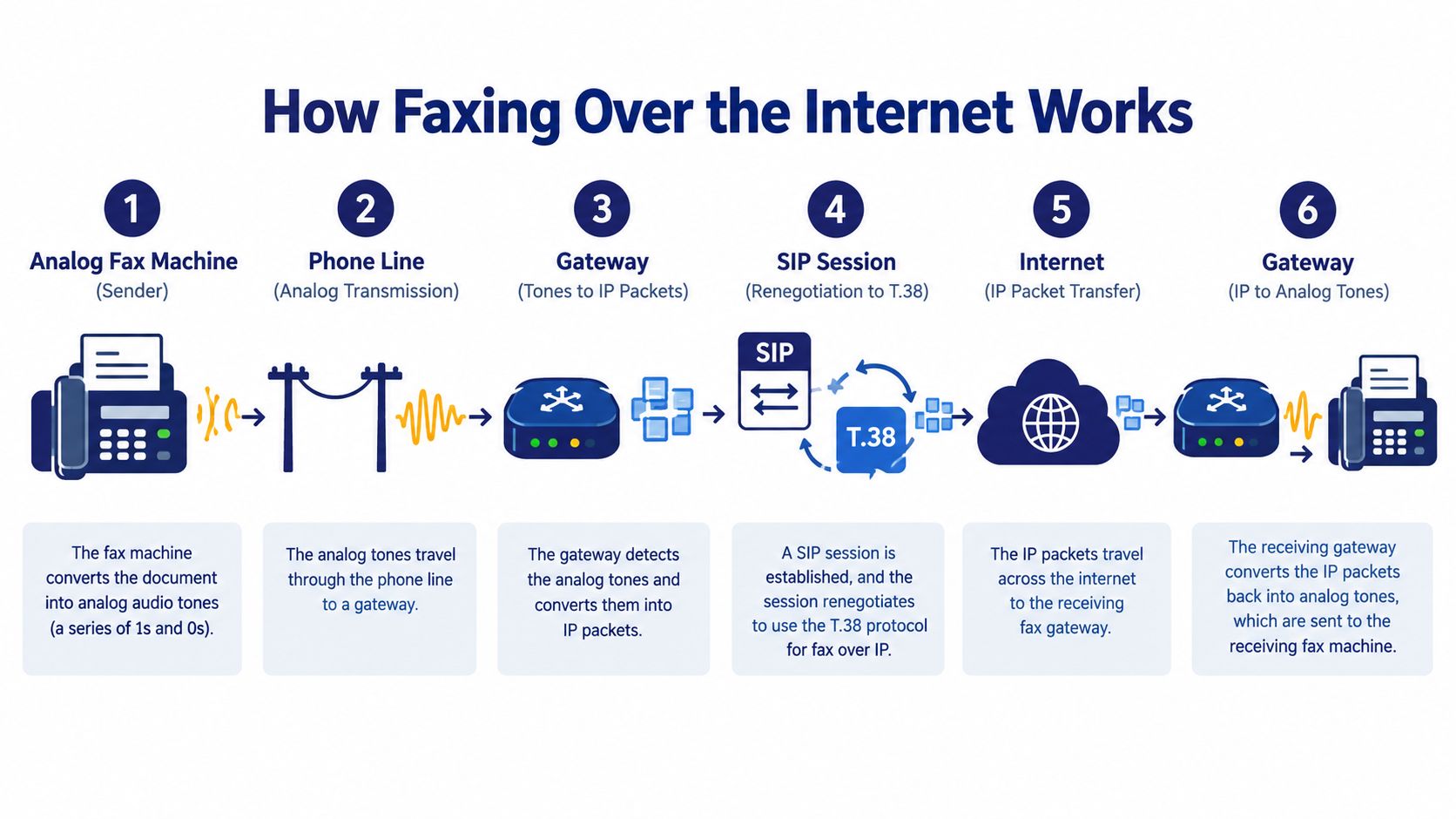
With a physical fax machine, the paper is scanned, converted into tones, and sent into the phone connection. If your office uses VoIP, an ATA or gateway sits between the fax machine and the IP network. That device either passes the tones through as audio or converts the fax exchange into a different transport method better suited to packet networks.
Where people get confused
Many office managers hear “it's all digital now” and assume that means the fax is sent like an attachment. Usually, it isn't. If you still have a physical machine on a phone jack, the fax often begins as an analog modem session, even if part of the route is internet-based.
Another confusing step is SIP renegotiation. A call may begin as a normal voice session. Then, if the equipment recognizes fax tones, the devices may renegotiate how the media is handled. If that renegotiation works, the fax may shift into a transport designed for faxing. If it doesn't, the call may stay on a voice-style path.
Why “enough bandwidth” isn't enough
Fax cares about timing, order, and completeness. A voice call can tolerate small gaps because people can fill in missing sounds. A fax machine can't improvise missing modem information. Packet loss, jitter, delay spikes, and mis-timed delivery can all break the conversation even when the internet connection feels fast for browsing and video meetings.
That's one reason many businesses choose a browser-based option instead of attaching a machine to the new phone system. A service like cloud fax for business workflows avoids a lot of the analog-to-digital conversion issues because users send documents from a portal rather than from a legacy fax modem.
When a fax fails on VoIP, the problem often isn't raw speed. It's that the network treated a modem conversation like ordinary voice.
The pieces in the path
Here's the plain-language chain for a typical office fax over IP setup:
- Fax machine scans the page and creates modem tones.
- ATA or gateway receives those tones and prepares them for the IP network.
- SIP signaling sets up the session and may renegotiate media handling after fax tones are detected.
- Packets cross your network and provider path where loss, jitter, and carrier compatibility matter.
- The far-end gateway or fax device reconstructs the session and prints or stores the page.
If you understand those five stages, you can usually stop guessing. You can ask where the break happens, instead of asking why faxing over VoIP feels random.
T.38 Versus G.711 and When Each One Wins
After a PBX replacement, an office may hear a fax connect successfully, then receive a partial page or a failed transmission. The transport method often explains the difference. T.38 is usually the safer choice for fax over IP when the network shows measurable packet loss or jitter, because it is designed for fax relay rather than ordinary voice transport. The T.38 versus G.711 fax relay guidance explains that G.711 pass-through carries fax tones as audio, while T.38 terminates the fax protocol at the gateway, packetizes fax data, and can repeat previously transmitted packets so the receiving side can reconstruct missing information. It also reports that packet loss above about 3 to 5% causes consistent failures when ECM stays enabled. Some calls may succeed near 9% with fax-relay packet-loss concealment, but that is not a sensible operating target.
What each method is really doing
G.711 pass-through carries the fax tones in the same general way a voice call carries speech. The receiving modem must interpret those tones correctly as they arrive. A late or missing packet can change the modem conversation enough to stop the page.
T.38 fax relay gives the gateway a different job. It interprets the fax exchange and sends fax data in a format intended for that exchange, rather than treating every tone as audio. It can also use redundancy, which helps recover information but consumes additional bandwidth.
| Feature | T.38 Fax Relay | G.711 Pass-Through |
|---|---|---|
| Transport method | Fax data is relayed by the gateway | Fax tones are carried as audio |
| Tolerance to loss and jitter | Better suited to imperfect networks | Sensitive to dropped or delayed packets |
| Redundancy | Can repeat prior packets for recovery | Generally lacks packet-recovery redundancy |
| Best use case | Measurable packet loss or jitter, supported on both sides | Tightly controlled, low-loss path |
| Operational caveat | Needs support and configuration across the path | Requires stable codec clocks and voice features like VAD disabled |
When G.711 still makes sense
G.711 can work when the entire route is predictable. If T.38 cannot be negotiated, G.711 should only be used on a tightly controlled, low-loss path with stable codec clocks, with VAD disabled and other voice features prevented from altering the modem audio.
That explains why one office may report reliable G.711 faxing while another sees repeated failures. A single-site network with little congestion presents a different risk than a busy office, a multi-site WAN, or a provider route with several handoffs. The method is less important than the conditions across the complete path.
The rule I'd use during a PBX replacement
Test the real fax path, not only the internet connection used for browsing or meetings. Measure packet loss, jitter, and delay on the route carrying fax calls. Confirm that the gateways on both ends support T.38, then enable T.38 and packet redundancy on both ends. Reduce congestion as well, because redundancy improves recovery while using more bandwidth.
Keep a backup channel for workflows that cannot wait for troubleshooting. Cloud fax can remove the physical fax modem from the call path, while a separate phone, portal, or alternate fax route can protect urgent documents when a carrier or gateway fails. Use cloud fax for routine, trackable document exchange when the service handles the end-to-end route. Retain a backup channel for time-sensitive forms, repeated delivery failures, or destinations with uncertain compatibility.
For businesses comparing trunks and PBX options, business SIP trunking requirements also affect fax reliability. Voice support alone does not show how fax will behave across every gateway, carrier handoff, and network segment.
Hidden Reasons Cloud Fax Still Fails End to End
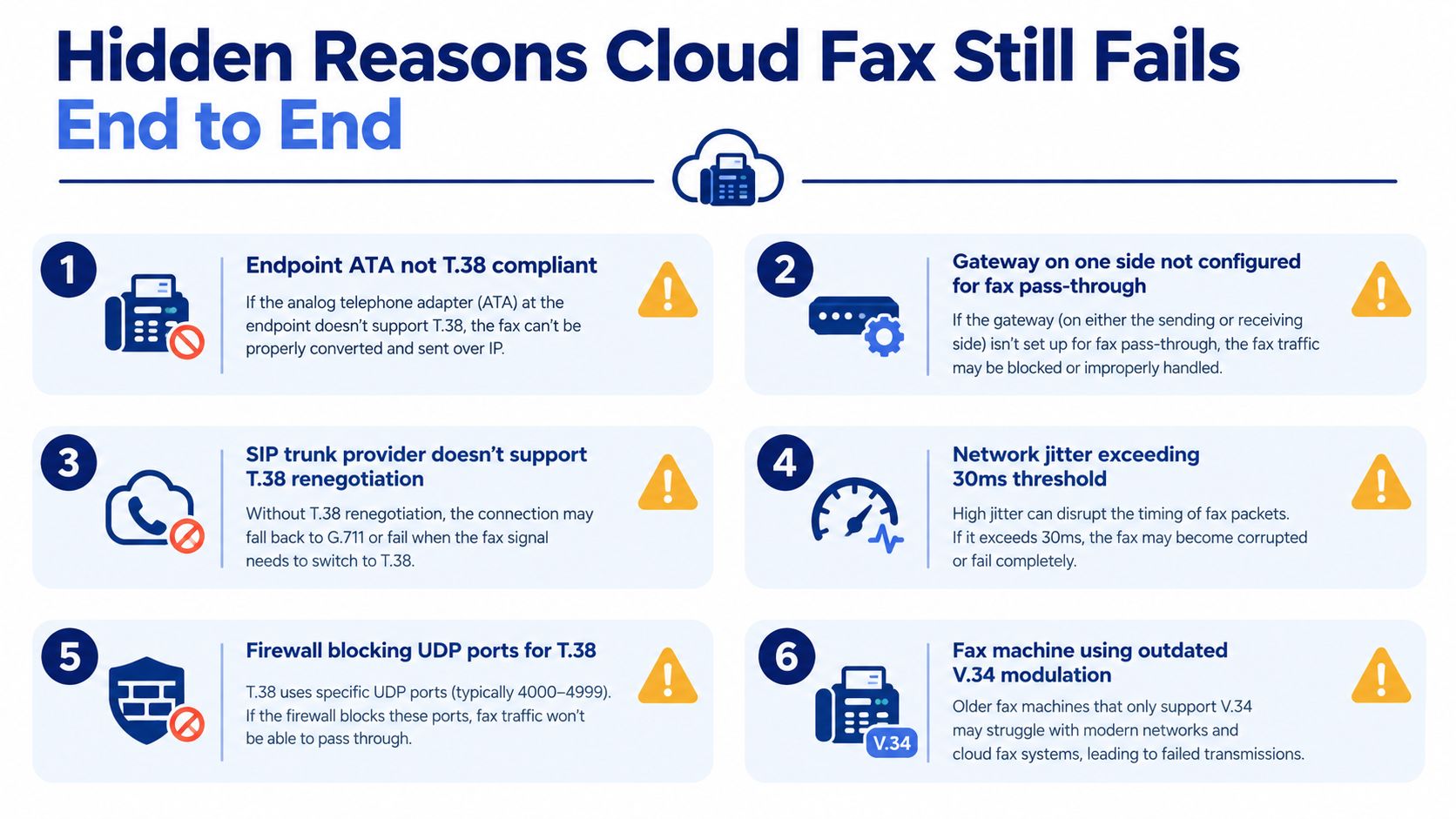
A provider can say “we support T.38” and still leave you with failed faxes. That's because end-to-end faxing depends on more than one box having the right checkbox enabled. A current technical guide explains that T.38 requires successful SIP renegotiation and a fax handshake, and if renegotiation fails the call may fall back to G.711. It also warns that multi-carrier routing can break the plan when even one carrier in the path doesn't support T.38, and that packet loss and jitter can cause incomplete pages, according to this T.38 support and fallback guide.
Five places the fax can break
The trouble usually shows up in one of these failure domains:
- At the sending edge: A physical fax machine and ATA may behave differently from a browser-based sender.
- During renegotiation: The call starts, hears fax tones, then fails to switch cleanly into the intended mode.
- At a carrier handoff: One carrier supports the method, the next one doesn't, and the call downgrades without warning.
- Inside the network: Jitter or loss creates pages that stop halfway or arrive corrupted.
- At the destination: A hospital fax server, legacy machine, or branch-office device may react differently even when your side looks correct.
Why testing one destination proves very little
Office teams often get trapped here. They test one local number, one branch office, or one vendor and declare victory. Then a legal office, insurer, or clinic gets unreadable pages because that route traverses different carriers or lands on a different kind of receiving equipment.
Support for fax on your provider does not guarantee support for fax on your entire call path.
A practical failure-domain checklist
When you're replacing a PBX, document the path like an engineer, even if you're an office manager:
- Identify sender type: Is the user sending from a physical machine, MFP, ATA, or web portal?
- Test destination types: Try a local analog fax, a remote business fax, a fax server, and your most critical partner.
- Record fallback behavior: Does the call renegotiate, downgrade, retry, or fail?
- Watch for partial-page failures: A successful dial isn't enough. Confirm complete documents.
- Define backup rules: For legally critical or multi-page documents, decide when staff must use an alternate channel or a retained analog line.
The guide above also notes practical tuning options such as uncompressed G.711 on high-bandwidth circuits, lower fax baud rates, and disabling ECM, while acknowledging that heavy fax users may keep an analog line for consistency. That's not old-fashioned thinking. It's risk management.
Best Practices for Reliable VoIP Fax Compatibility
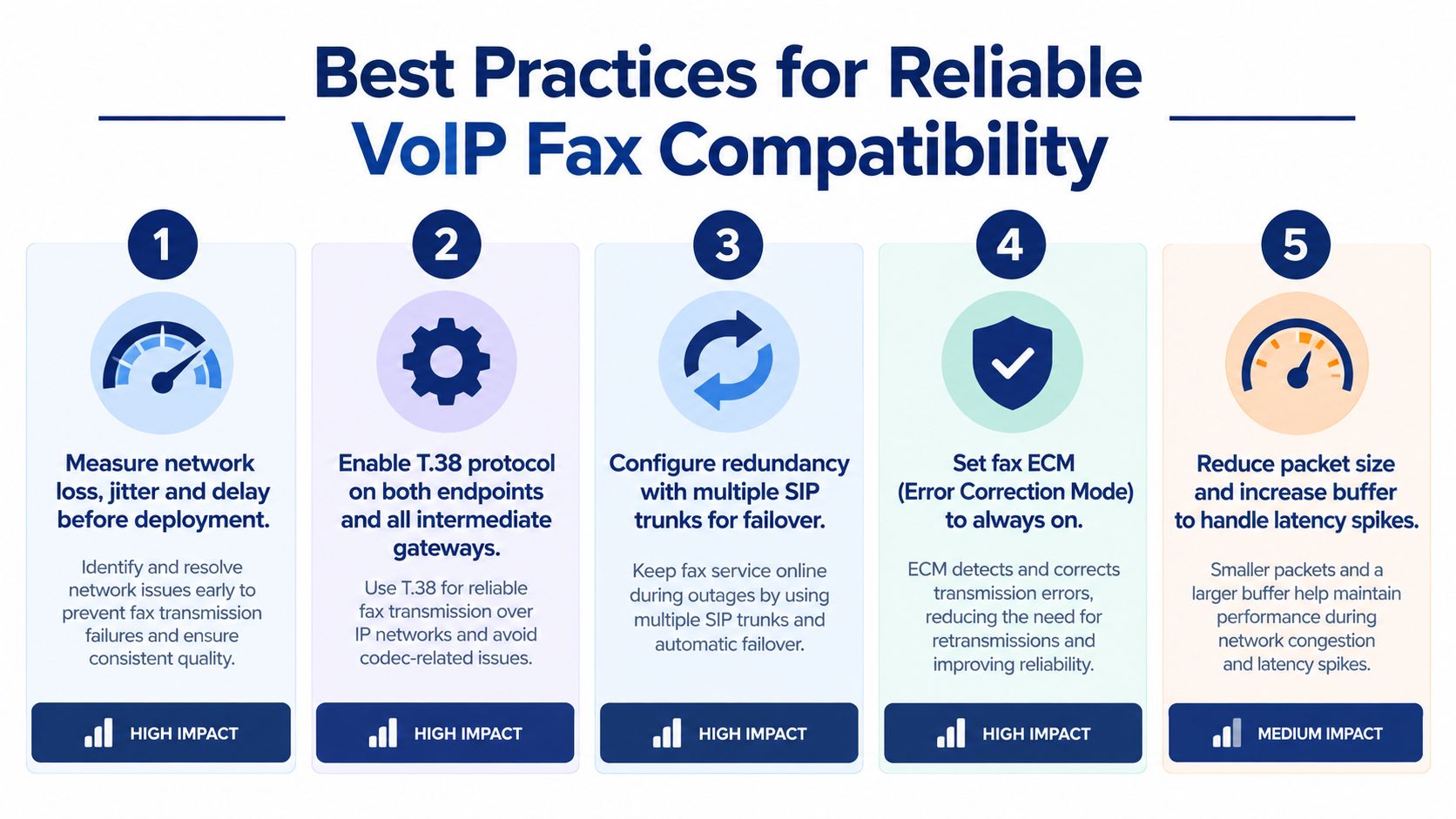
Most fax problems don't need heroic troubleshooting. They need a disciplined setup order. If you apply the highest-impact checks first, you can avoid the endless cycle of “it worked yesterday” support tickets.
Start with the path, not the machine
Before changing baud rates or swapping hardware, measure the actual fax route your office uses. Don't assume the general internet connection tells the story. A fax path may cross a different provider segment, a different gateway, or a different WAN condition than ordinary calls.
If the path shows instability, fix congestion first. Don't treat protocol settings as a substitute for a healthy route.
Then tune the transport
The next layer is transport choice and configuration. In practice, that means making sure both sides that you control are set up intentionally.
- Enable T.38 where supported: It gives fax data a transport better suited to packet networks.
- Use redundancy carefully: It can help recovery, but it also consumes more bandwidth.
- Use G.711 only on controlled paths: If you must rely on pass-through, keep the route low-loss and stable.
- Disable voice features that interfere: Features designed to optimize voice can disrupt fax tones.
- Lower the fax baud rate when needed: Slower settings often improve consistency on touchy routes.
Test like an office, not like a lab
The final step is operational testing. Don't just send one page to your own branch office and stop there. Test the things your staff sends every week.
Try signed forms, multi-page packets, and the destinations that matter most. Include the scanner-MFP in accounting, the legacy device at reception, and any remote staff who might send from a portal instead of a machine.
Practical rule: If a fax route matters to payroll, patient care, contracts, or compliance, test the exact destination type before cutover and keep a written fallback method.
Keep voice and fax from colliding
Some failures aren't transport problems at all. They're workflow problems. A shared line, a multipurpose device, or an office process that mixes voice calls and fax attempts on the same resource can create intermittent confusion.
That's why many organizations simplify by separating use cases. Physical machines stay only where they're still operationally required. Everyone else sends through a web workflow, receives documents digitally, and uses manual fallback only when the document or recipient justifies it.
Why Businesses Still Need Fax in Daily Workflows
A lot of articles talk about fax as if it survives only because offices are stubborn. That's not what daily operations look like. Fax often remains because one organization can't choose the communication stack of every clinic, supplier, insurer, law office, or government partner it deals with.
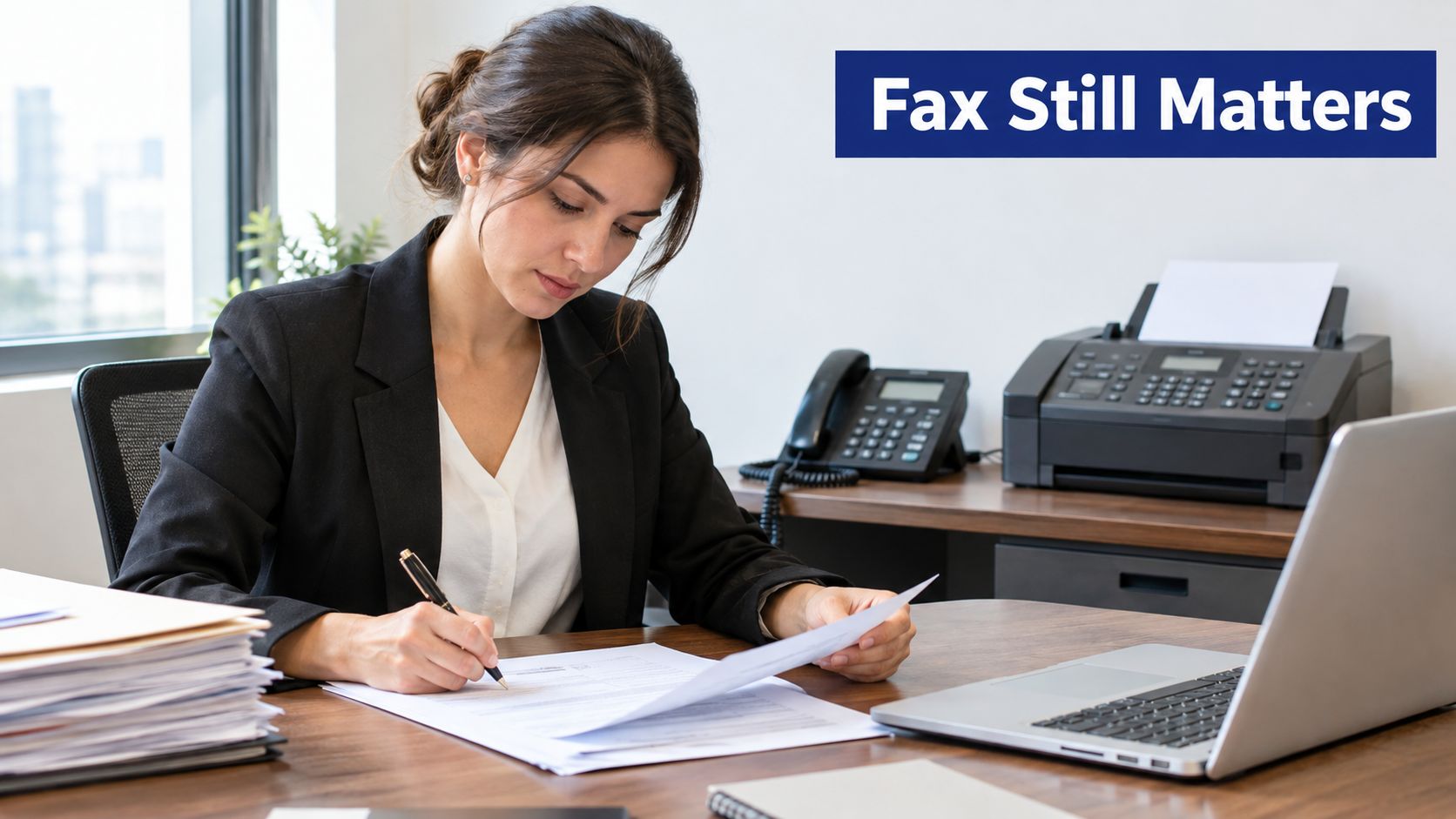
A 2025 Japanese survey of 4,629 employed adults found that 37.9% still used fax for work, down only 2.2 percentage points from 2023, and 57.8% primarily used floor-standing fax equipment. The same source highlights why this isn't just nostalgia, especially in healthcare settings where more than one-third of documents sent to facilities still arrived by fax, 52% of teams manually processed incoming faxes, and 88% of practitioners said fax-related delays harmed patient care, according to the 2025 fax usage and workflow survey.
Fax transport isn't the same as fax workflow
That distinction matters. A business can modernize the transport layer and still leave the true bottleneck untouched. Someone still has to verify the sender, route the document, attach it to the right record, review exceptions, capture consent, and maintain an audit trail.
If you replace a fax machine with email alone, you may remove one device but create a messier inbox problem. The document still needs indexing, routing, and human review when something doesn't match.
Where this shows up in real offices
Healthcare is the obvious example, but it isn't the only one. Multi-location businesses see it too. A branch receives a signed vendor form, finance needs it logged, operations needs it routed, and the original sender expects confirmation. The workflow around the document often matters more than whether the bits traveled by analog line, T.38, or a portal.
This short video gives a broader look at why fax still shows up in business communication stacks:
When coexistence is the smart move
For many teams, the sensible answer is coexistence. Use digital routing, OCR, portal delivery, or system integration where those tools reduce manual work. Keep a manual fallback for counterparties and situations that still depend on fax-like behavior.
That's especially true when the document is sensitive, the recipient controls the workflow, or a missed transmission creates immediate operational harm. In those cases, replacing the transport is useful. Replacing the entire process takes longer.
How SnapDial Cloud Faxing Prevents Missed Faxes
The easiest way to reduce fax trouble is often to stop asking a voice network to impersonate an old fax line for every user. A portal-based cloud fax workflow removes the machine, the ATA, and a lot of the line-sharing issues that cause busy signals, missed pages, and confusing confirmations.
For offices replacing a PBX, that changes the day-to-day experience. Staff can send documents digitally, receive faxes without standing next to a machine, and review activity inside the same communications environment they already use for calls, voicemail, and routing. That doesn't make every destination perfect, but it does remove several of the fragile points that physical fax machines introduce.
Where a managed cloud workflow helps most
This kind of setup is usually a strong fit when your team:
- Sends routine business documents: forms, signed PDFs, confirmations, and standard packets
- Works across locations: staff need access without being tied to one office machine
- Needs visibility: admins want call logs, message history, and user-level management in one place
- Wants fewer collisions: incoming calls and outgoing fax attempts shouldn't compete for the same device
One option in that category is SnapDial, which includes built-in cloud faxing as part of its hosted communications platform. In practical terms, that means teams can manage users, routing, logs, and fax activity through a web portal instead of tuning an ATA on a desk phone circuit.
The decision rule I'd use
Use a cloud fax workflow for ordinary office faxing whenever you want less hardware, cleaner routing, and easier administration. Keep a backup analog line or alternate electronic channel only when the destination is unusually fragile, the document is legally critical, or your staff regularly sends large multi-page documents to organizations with inconsistent receiving setups.
That's the part many buying guides skip. You don't have to choose between “all old fax” and “all cloud fax.” You can simplify most of the office while keeping a narrow fallback path for the few transmissions that warrant it.
If you're replacing a PBX and don't want fax reliability to become a hidden project, SnapDial offers hosted VoIP with built-in cloud faxing, portal-based administration, and white-glove setup for business phone migrations. It's a practical fit if you want to reduce fax hardware, keep teams reachable across locations, and still define clear backup rules for the documents that can't afford a failed send.