
The fax machine usually becomes a problem at the worst possible moment. A signed contract needs to go out before close of business. A medical record has to reach another office. A lender is waiting on one missing page. Then the old routine starts. Someone walks to a shared machine, checks for paper, waits through a busy signal, and hopes the confirmation page means the document arrived where it should.
That's why fax hasn't disappeared. The machine should have. The workflow shouldn't have.
A modern cloud fax solution keeps the interoperability that many industries still need, but removes the hardware, phone-line dependency, and office-only bottlenecks that make traditional faxing such a drag on a business that otherwise runs on software. If you're already replacing an aging PBX, moving to Hosted VoIP, or trying to support remote staff without duct-taping old systems together, cloud fax belongs in that same modernization decision.
Why Are We Still Talking About Fax Machines in 2026
A lot of businesses are in an awkward middle state. They've moved accounting to the cloud, switched file storage to Microsoft 365 or Google Workspace, and probably have staff working from home at least part of the week. But one document process still depends on a beige box in a hallway.
That setup fails in predictable ways. Sensitive pages sit on a tray where anyone walking by can see them. A receptionist becomes the unofficial traffic controller for documents that should go straight to the right user. Multi-location teams end up asking one office to fax on behalf of another because that's where the working machine is. None of that fits how a modern business operates.
The machine is not the requirement
In many organizations, fax survives because the outside world still uses it. Courts, clinics, insurers, lenders, suppliers, and government offices may still expect faxed documents. That doesn't mean your internal workflow has to stay stuck in the analog era.
A better approach is to retire the machine while keeping the ability to send and receive fax. If you're physically removing old devices, it's worth following Reworx Recycling's secure fax disposal guide so you don't overlook stored data, internal memory, or documents left in trays during disposal.
Old fax hardware creates two problems at once. It slows the work down, and it leaves too many opportunities for the wrong person to touch the document.
This is a real market shift
Cloud fax isn't some niche workaround for a few regulated offices. The market has become a meaningful global segment. Market Research Future says the cloud fax market was valued at USD 3.15 billion in 2023 and is projected to reach USD 6.7 billion by 2032, which shows sustained demand tied to digital transformation and compliance needs.
That growth makes sense. Businesses don't want another single-purpose device, another analog line, or another office-only process. They want one communications environment where voice, messaging, document delivery, and user administration work together.
The companies that handle this well don't treat fax as a relic. They treat it as one more business-critical communication channel that needs to be secure, reachable, and easy to manage.
What Exactly Is a Cloud Fax Solution
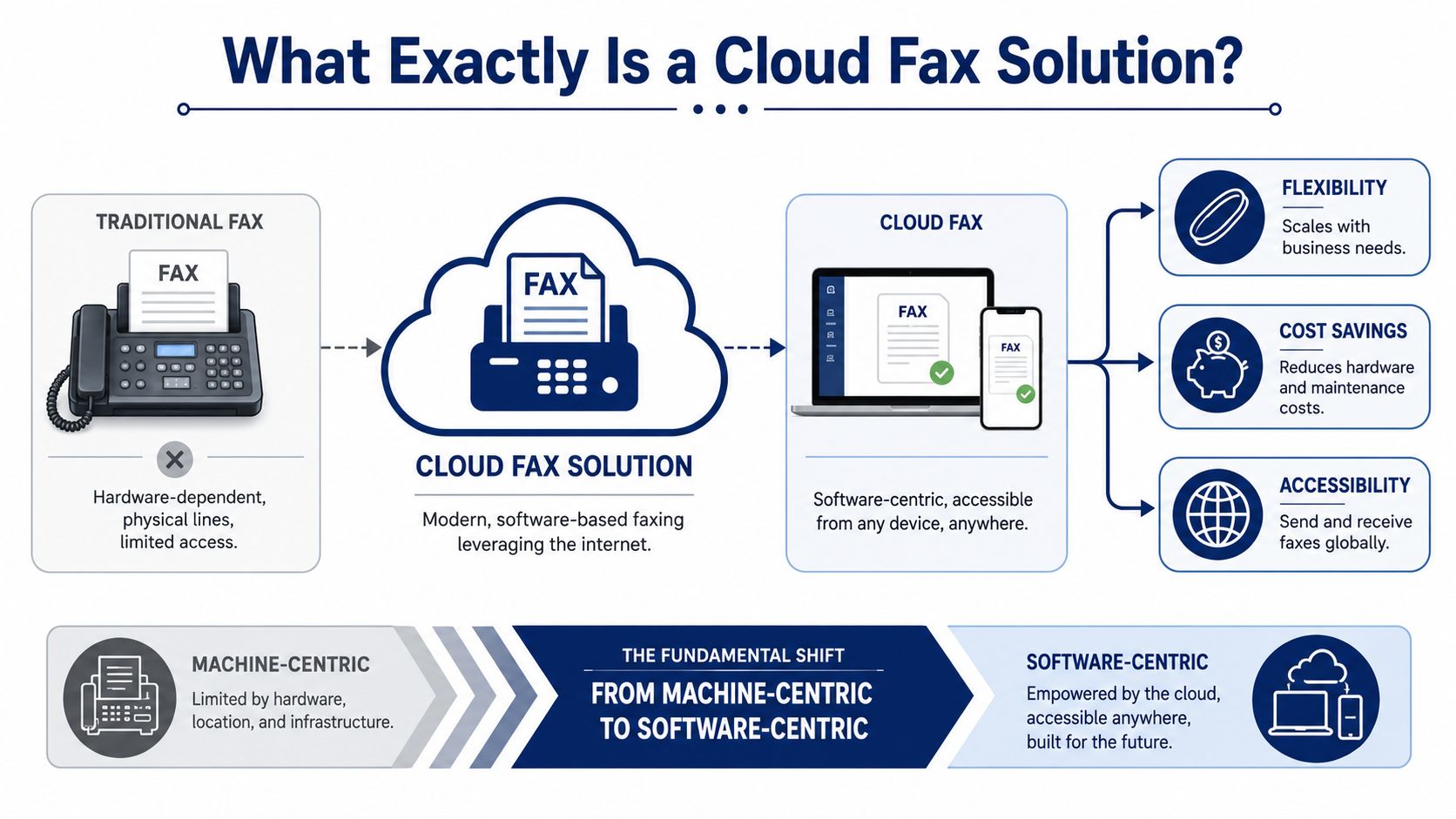
A cloud fax solution turns faxing into software. Instead of feeding paper into a machine connected to a phone line, you send a document from email, a browser portal, a mobile app, or a business application. The platform converts that document into an encrypted electronic payload and transmits it over the internet rather than through a traditional analog setup, which removes dependence on physical fax hardware and dedicated phone lines, as described by EO Johnson's overview of cloud faxing.
Think software, not machine
The simplest way to understand it is this. Traditional faxing is like needing a dedicated mailroom with one clerk and one chute. Cloud fax is like giving authorized staff a secure digital mail function inside the tools they already use.
The important part is what doesn't change. You can still exchange documents with organizations that use legacy fax endpoints. Your customer, patient referral source, vendor, or legal contact doesn't have to modernize on the same day you do. That interoperability is the reason cloud fax works as a practical replacement instead of a theoretical upgrade.
What changes day to day
For users, the shift is immediate:
- No machine to stand beside: Staff can send or receive from their laptop or phone.
- No dedicated analog line to maintain: Fax rides on your existing internet-connected environment.
- No paper tray exposure: Documents can route directly to the intended user or shared queue.
- No location lock-in: A team member can work from another office or from home without losing access to fax traffic.
A good cloud fax setup also changes who owns the process. Fax stops being “the front desk thing” or “the back office machine.” It becomes part of your normal software stack, with permissions, records, and consistent administration.
Practical rule: If a business process still depends on one physical machine in one room, that process is already overdue for modernization.
That's why cloud fax isn't about preserving nostalgia for fax. It's about preserving compatibility while removing the weakest parts of the old workflow.
Understanding the Technology Behind Cloud Faxing
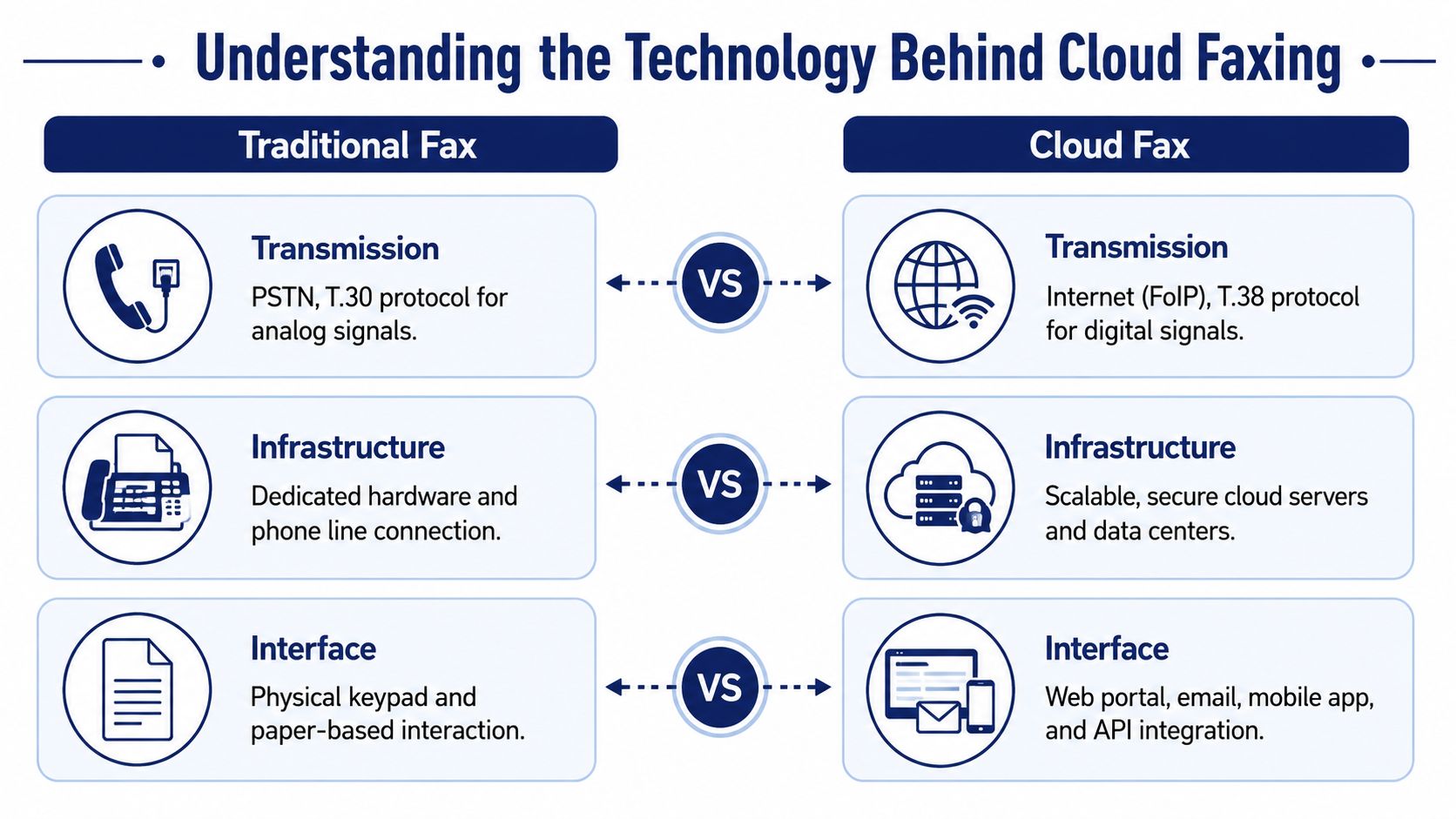
When people evaluate a cloud fax solution, they often lump everything together as “internet fax.” That's too broad to be useful. In practice, there are three common technical approaches, and each fits a different kind of business.
Fax to email and email to fax
This is the easiest entry point. An incoming fax arrives as a digital document in an inbox. An outgoing fax starts as an email with an attachment and a destination fax number.
This model works well for small offices, professional services firms, and teams that don't need deep application integration. It's familiar. If your staff can handle email, they can usually handle this. A practical example is using a service that lets you send a fax by email, which removes the need to train users on a separate hardware workflow.
Best fit:
- Low training overhead: Staff already understand email.
- Light to moderate volume: Good for routine document exchange.
- Remote work: Users can work from anywhere with inbox access.
Trade-off:
- Less automation: It's efficient, but it still depends on a person initiating many tasks manually.
To see the mechanics in action, this video gives a helpful visual overview.
API-based faxing
Fax becomes part of a business system instead of a separate user task. A CRM, case-management platform, EHR, or document workflow can generate a file, trigger a fax automatically, and record delivery status inside the same process.
This approach is the right choice when speed, consistency, and auditability matter more than manual flexibility. Staff shouldn't have to download, rename, attach, and send if the originating application already knows what document needs to go where.
Best fit:
- Healthcare and legal workflows: Documents often need traceable handling.
- Multi-step approvals: Systems can trigger sending at a defined point.
- Higher-volume operations: Automation reduces repetitive clicks.
Trade-off:
- Implementation work: Someone has to map the workflow properly. A weak integration creates confusion faster than a manual process ever did.
T.38 and real-time fax over IP
T.38 matters most when you're dealing with fax over IP in a telephony environment. It's commonly discussed in connection with VoIP and digital transmission because it's designed to support fax signaling more reliably than trying to push analog-style fax behavior through a voice path that wasn't meant for it.
Best fit:
- Businesses with VoIP environments: Especially during broader phone-system modernization.
- Organizations still handling real-time fax traffic with telephony considerations: Often relevant in hybrid transitions.
Trade-off:
- Not a complete strategy by itself: T.38 is a transport consideration, not the whole user and workflow experience.
If you're buying for the business, not the lab, the decision usually comes down to this: email-based faxing for simplicity, API-based faxing for workflow automation, and T.38 awareness for telephony reliability where voice and fax intersect.
The Core Business Benefits of Going Digital
The strongest case for a cloud fax solution isn't convenience. It's operational control.
When a business keeps fax tied to a machine, every document inherits the limitations of that machine. Office hours matter. Physical access matters. Paper handling matters. If the right employee isn't in the building, the process slows down or stops.
Security and compliance become more workable
A paper fax sitting in an output tray is simple, but it's not controlled. Anyone nearby can pick it up. A digital fax workflow can route documents directly to authorized users, preserve delivery records, and keep handling inside managed systems rather than shared office space.
That's one reason regulated sectors have moved beyond treating cloud fax as experimental. In healthcare, HealthManagement.org reports that 40% of hospital and health system leaders say their organization has already adopted a cloud-based fax solution. That's a strong signal that cloud fax is already trusted where secure document exchange matters most.
Daily work gets faster in boring but important ways
Most productivity gains here aren't flashy. They show up in reduced friction.
- Reception stops acting as a document relay point: Incoming faxes can route to the right team directly.
- Remote staff stay fully functional: They don't need someone in the office to “watch the machine.”
- Confirmations are easier to track: Users can verify status without digging through printed reports.
- Scaling gets simpler: Adding users or locations is easier than provisioning another physical setup.
Cost is part of it, but not the whole story
Yes, eliminating machines, toner, paper handling, and line maintenance can reduce overhead. But cost alone usually isn't the deciding factor in a well-run business.
The gain is that fax stops being a fragile exception to your normal operating model. It starts behaving like your other managed communication tools. That matters more than shaving a little off a supplies budget.
The best modernization projects remove hidden labor first. If staff have to babysit a process, the process is costing more than the invoice suggests.
For owners and IT managers, that's the shift worth focusing on. A digital fax workflow doesn't just make sending easier. It makes the business less dependent on one room, one machine, and one workaround.
Integrating Cloud Fax with Your Hosted VoIP Phone System
A standalone cloud fax service can work. An integrated one usually works better.
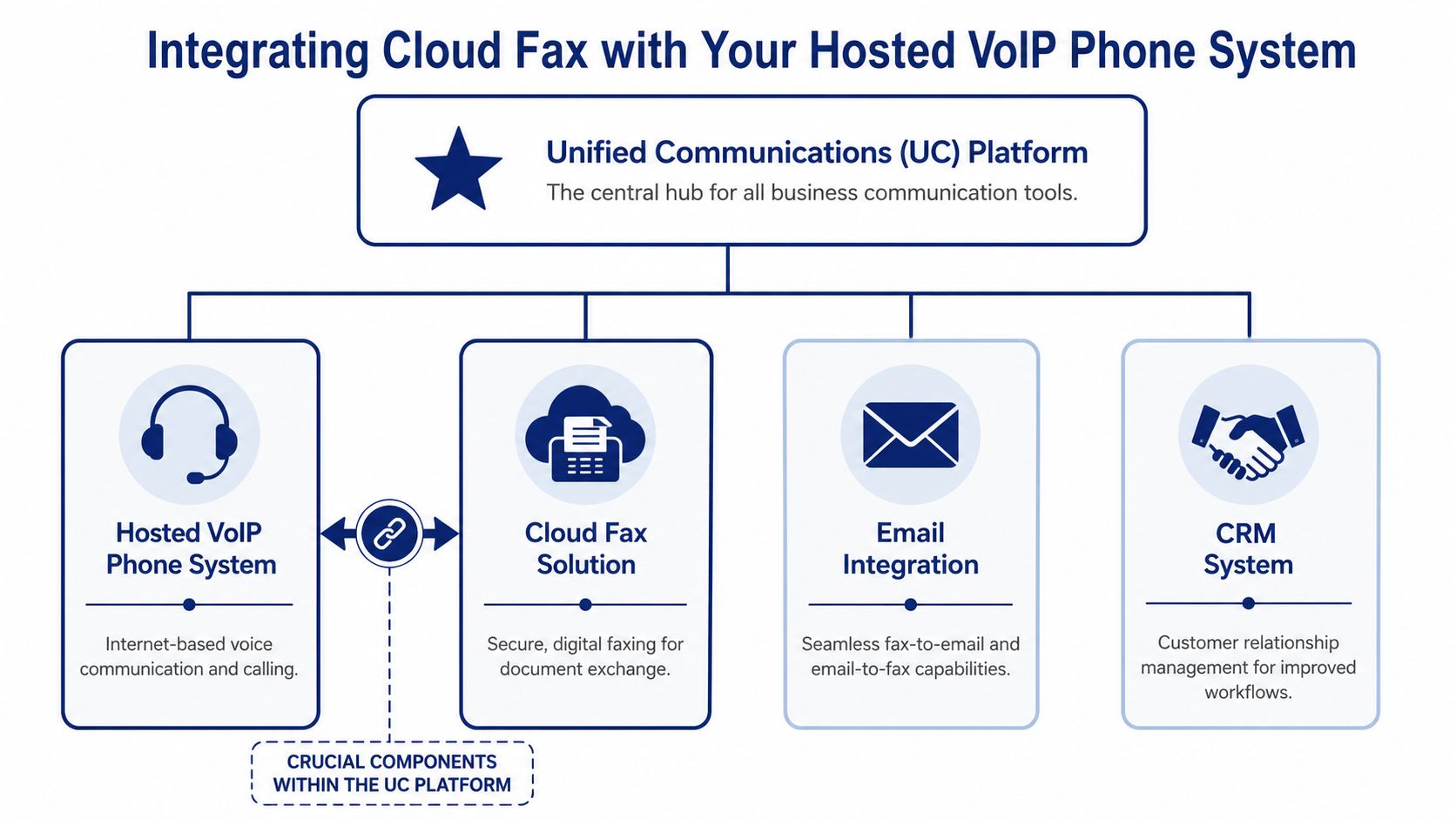
That distinction matters most when a business is already moving to hosted telephony. If your phone system, user directory, routing policies, and admin controls live in one environment, fax should be part of that same architecture whenever possible. Otherwise, you end up with two separate systems that both touch the same people, numbers, and workflows but don't share administration cleanly.
Why unified communications changes the value
Cloud fax becomes more useful when it's treated as one channel inside a broader communications stack. Businesses that already understand what a cloud phone system is usually see the logic quickly. Voice, voicemail, call routing, conferencing, mobile access, and fax all benefit from the same design principles: centralized management, location independence, and cleaner administration.
The operational advantages are practical:
- One admin experience: Add or remove users, numbers, and permissions in one place.
- Cleaner billing: Fewer vendors means fewer surprises during renewals or troubleshooting.
- Less support finger-pointing: When voice and fax touch the same environment, one provider can own the issue.
- Better user adoption: Staff don't need separate logins and disconnected workflows.
Workflow integration matters more than feature checklists
Enterprise cloud fax platforms commonly support APIs and email gateways, which allows faxing to be embedded directly into business systems like CRMs and EHRs instead of remaining a standalone task, as noted in Ricoh USA's discussion of cloud fax integration flexibility.
That point is easy to underestimate. If a customer record, patient chart, or service ticket already exists in a system, the best fax workflow starts there. Staff shouldn't have to leave the application, recreate the context, and manually stitch records back together later.
A few examples:
| UC integration point | What it improves | What to watch |
|---|---|---|
| Shared user directory | Faster onboarding and cleaner permissions | Make sure role-based access is supported |
| Email gateway | Familiar sending and receiving | Verify attachment handling rules |
| CRM or EHR integration | Less manual re-entry and better records | Test routing logic before rollout |
| Central number management | Easier support across locations | Confirm how number porting is handled |
Reliability gets better when design is intentional
Integration with hosted VoIP can produce benefits a standalone service often misses. In a well-designed unified environment, voice and fax aren't competing blindly for the same path. Features such as collision avoidance can prevent incoming fax traffic and voice calls from interfering with each other, which is one of the most common causes of busy signals and failed attempts in legacy setups.
If your business is replacing analog phone lines, don't modernize voice and leave fax behind as a side project. That usually creates the next support problem.
A cloud fax solution delivers more value when it's part of a coordinated communications strategy, not an isolated patch.
How to Choose the Right Cloud Fax Solution Provider
Most buyers start with pricing. That's understandable, but it's not where the important decisions live. A cheap provider that mishandles number porting, weakens access control, or leaves you guessing during an outage becomes expensive very quickly.
The better way to compare vendors is to ask direct operational questions and listen for precise answers.
Start with continuity, not marketing
A cloud fax service has to be trusted during normal operations and during disruptions. That's the part many comparisons skip. EtherFAX's discussion of cloud fax continuity highlights that a robust solution needs a clear plan for internet, carrier, or provider outages if it's going to be trusted for regulated workflows.
If a provider can't explain what happens when one link in the chain fails, keep looking.
Ask the outage question early: Where do inbound faxes go if my office internet is down, and what happens if your upstream path has a problem?
Use a real selection checklist
| Criteria | What to Ask | Why It Matters |
|---|---|---|
| Security and compliance | Which compliance-oriented controls do you support, and how is access managed? | Sensitive documents require controlled handling, not just transmission |
| Number porting | Can we keep our existing fax numbers, and who manages the process? | Changing numbers creates business disruption and missed documents |
| Workflow integration | Do you support email-based faxing, APIs, or both? | The right model depends on how your staff actually work |
| Administration | Can we manage users, permissions, and routing without opening support tickets for every change? | Daily operations become cumbersome if simple changes are hard |
| Continuity planning | What is your failover and outage handling approach? | Fax often supports time-sensitive, regulated workflows |
| Support quality | Who answers when delivery fails or a port stalls? | The service is only as good as the support during edge cases |
| Pricing model | How are pages, users, numbers, and overages billed? | Low headline pricing can hide operational costs |
Security deserves broader scrutiny
If cloud fax will connect to line-of-business applications, evaluate the surrounding software posture too. Buyers often focus on the fax provider and ignore the systems feeding documents into it. A useful companion read is this guide on how to secure your SaaS application quickly, especially if your fax process will tie into customer portals, intake forms, or internal apps.
A few practical buying rules help:
- Demand a porting plan in writing: Don't assume “we handle it all” means there's a documented sequence.
- Test real workflows, not demos: Send the kinds of files your team uses.
- Verify admin roles early: Front-desk staff, managers, and IT rarely need the same access.
- Review support hours carefully: Problems don't always happen during procurement-friendly hours.
The right vendor won't just promise secure digital faxing. They'll explain how the service behaves when things go right, when they go wrong, and when your staff are under pressure.
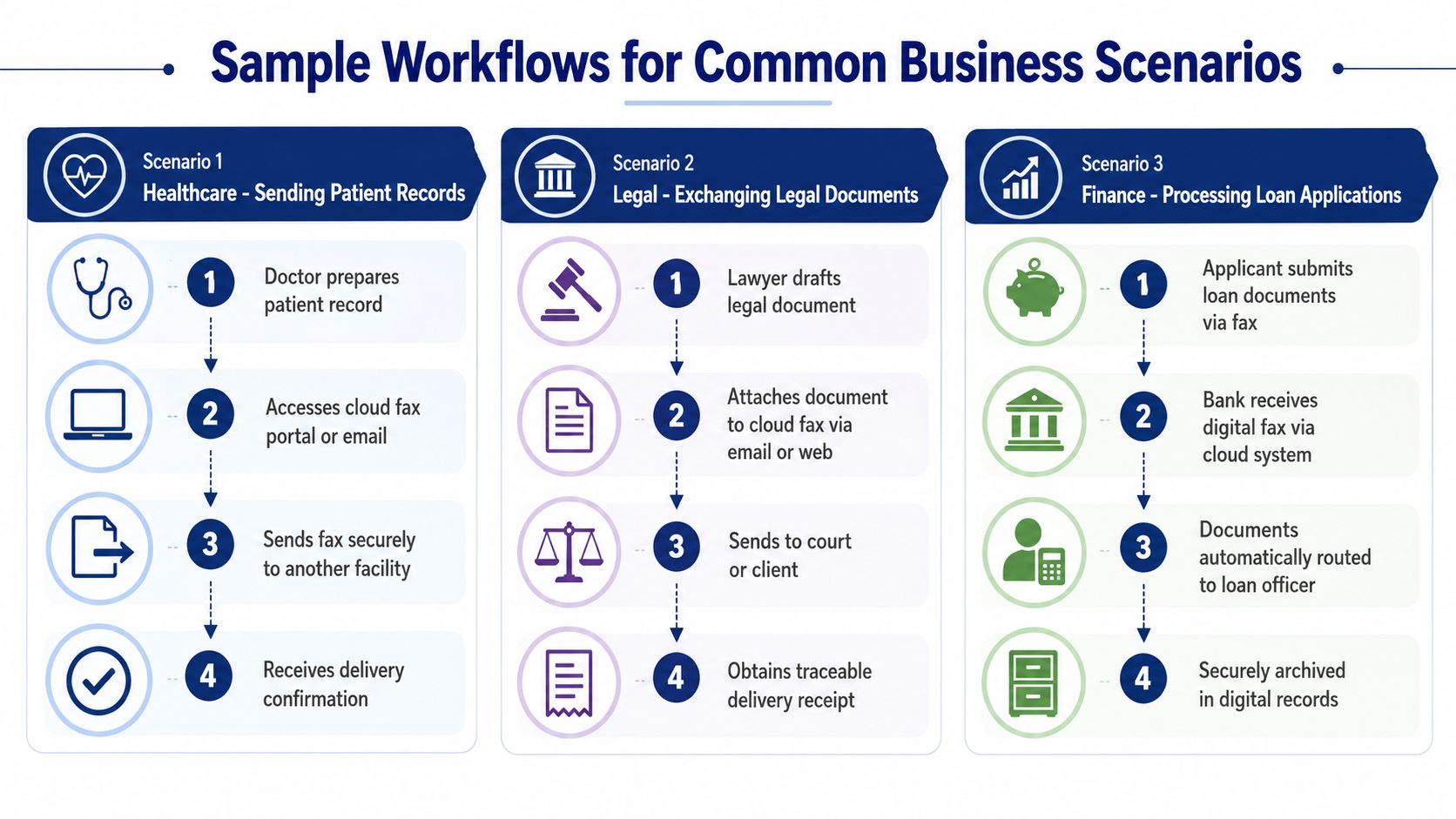
Sample Workflows for Common Business Scenarios
The easiest way to evaluate a cloud fax solution is to picture where it fits into work people already do. Not abstractly. Specifically.
Multi-location healthcare clinic
A referral coordinator opens the EHR, selects the patient record package, and sends it to a specialist office without printing anything. The fax event is logged alongside the patient workflow, and the receiving document can be tracked without calling another office to ask whether pages came through.
That setup works best when fax is integrated directly into clinical workflows instead of being handed off to a front desk. The less often staff leave the originating system, the fewer mistakes they make.
Remote consulting firm
A consulting team receives signed client paperwork through fax-to-email while employees are working from home, on the road, or at a client site. Nobody needs to drive to an office to check a tray or forward pages manually.
Location independence is paramount. A digital fax inbox turns a once-physical process into a normal business communication stream, much like email or voicemail.
Support center with document-heavy cases
A customer service team handles cases that require forms, authorizations, or supporting records. The incoming fax lands in a monitored queue, and the team routes it into the support workflow alongside calls and emails. If the business already uses VoIP CRM integration, fax can become part of the same customer record rather than a disconnected side channel.
Here's what that changes in practice:
- Agent visibility improves: Staff can see customer communication in one place.
- Hand-offs get cleaner: Documentation doesn't depend on a shared office machine.
- Case records stay tighter: Supporting documents tie back to the actual account or ticket.
Good fax workflows are boring in the best way. The document appears where staff already work, and nobody has to think about the transport method.
That's the true measure of success. A cloud fax solution should disappear into the process and remove friction, not create a new task people have to remember.
Frequently Asked Questions About Cloud Fax
Is cloud fax secure enough for contracts and sensitive documents
Yes, when the provider uses managed digital delivery, access controls, and an architecture built for secure document handling. In many offices, cloud fax is more controlled than paper-based faxing because documents don't sit unattended on a shared machine.
Can I keep my existing fax number
Usually, yes. The process is commonly called porting. What matters is how well the provider manages it, how they schedule the cutover, and whether they give you a clear transition plan.
Do I need a fax machine, adapter, or special phone line
No physical fax machine is required for a true cloud fax workflow. If your users can access email, a browser portal, or a supported business app, they already have what they need in most cases.
Will cloud fax still work if some partners use old fax machines
Yes. That's one of the main reasons businesses adopt it. Your side becomes digital, while the service preserves compatibility with organizations that still rely on legacy fax endpoints.
What should I ask about outages
Ask exactly how inbound and outbound fax traffic is handled if your office internet fails, if the provider has an issue, or if there's a carrier interconnect problem. A serious provider should answer that without vague language.
Is standalone cloud fax enough, or should it be tied to our phone system
If you already use hosted VoIP or plan to replace a legacy PBX, integration usually gives you cleaner administration and a more reliable operating model. Separate services can work, but they often create duplicate management and slower support resolution.
How hard is training
For email-based faxing, training is usually light because the workflow feels familiar. API-based or routed workflows take more planning on the admin side, but they often reduce end-user training because the fax step becomes part of the existing system.
If your business is replacing analog lines, retiring an old PBX, or trying to stop one hallway fax machine from bottlenecking document workflows, SnapDial is worth a look. It combines hosted VoIP, unified communications, and built-in cloud faxing in one managed platform, so you can modernize voice and fax together instead of stitching separate services together later.