
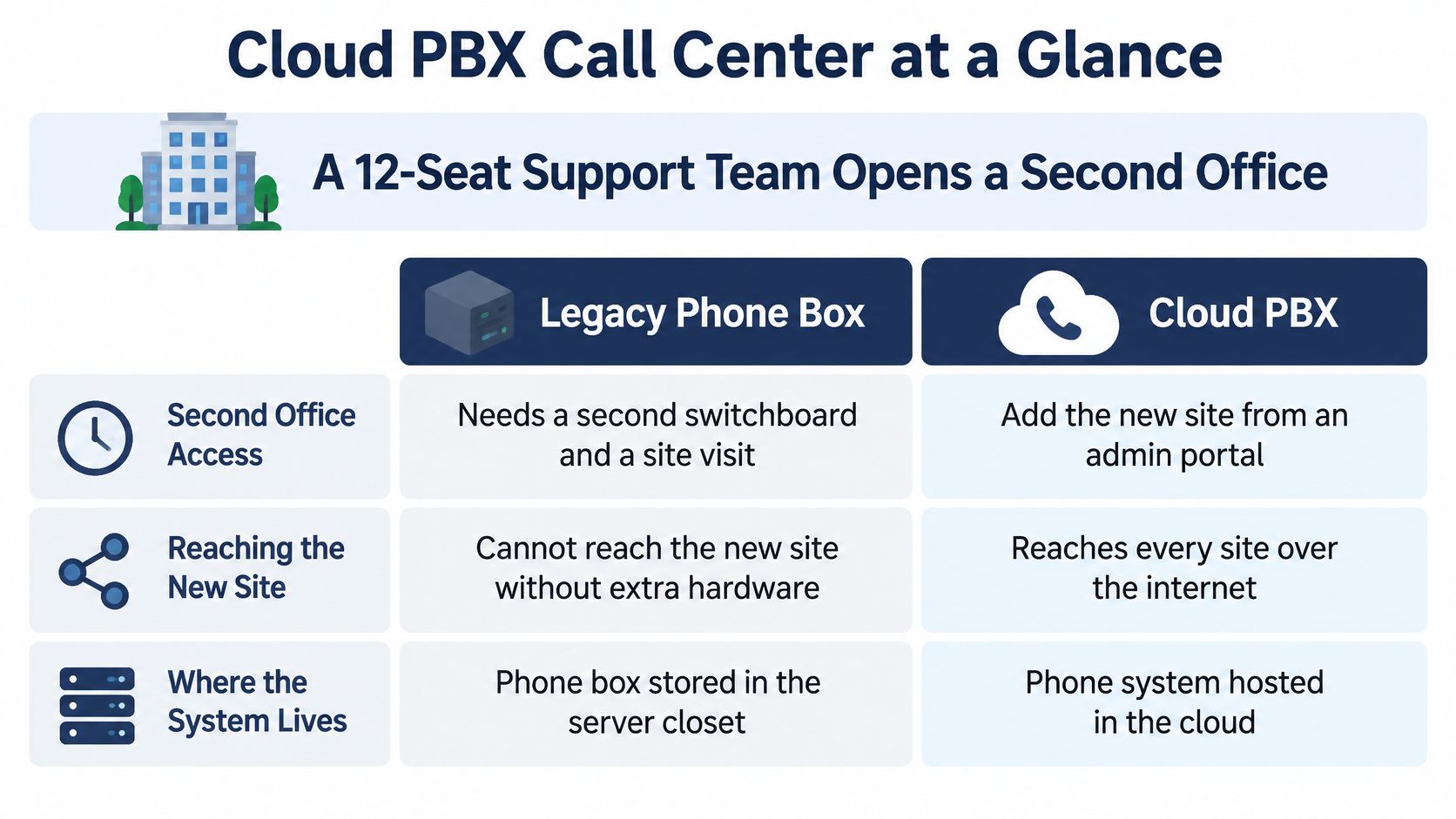
Your support team opens another office, but the phone system is still a box in the original server closet. The installer proposes more hardware and another site visit. Meanwhile, callers don't care which office answers. They want someone who can solve their problem without another transfer.
A cloud PBX call center can remove that location constraint, but moving the phone system doesn't automatically improve service. The useful gains come from better queue design, measurable voice quality, tested recovery procedures, and a cost comparison that includes more than seat licences.
Cloud PBX Call Center at a Glance
A cloud PBX puts the phone system's brain, extensions, routing, queues, and voicemail, in a provider's data center. Agents connect through desk phones, computer softphones, or mobile apps. Administrators manage the system through a web portal rather than configuring a switchboard at each office.
Think of the difference as owning a generator versus buying electricity from the grid. With an on-premise PBX, you own, maintain, and eventually replace the equipment. With cloud PBX, you subscribe to capacity someone else operates. You still need suitable connectivity, devices, and operating procedures.
Cloud PBX and a full contact-center platform aren't identical. The PBX supplies business telephony. Skills-based routing, supervisor monitoring, detailed wallboards, and digital channels sit above that foundation, sometimes bundled and sometimes separately licensed.
For teams coordinating phone calls with messaging and other channels, SupportGPT's multichannel contact center guide for 2026 helps distinguish channel management from the underlying phone system.
Legacy PBX versus cloud PBX call center
| Criterion | Legacy PBX | Cloud PBX Call Center |
|---|---|---|
| Adding a new location | Arrange equipment, wiring, and site configuration | Provision the site, numbers, and devices through the portal |
| Adding an agent | Assign an extension and licence; check switch capacity | Create a user, assign a licence, and join the appropriate queue |
| Failover during outage | Requires designed carrier or hardware redundancy | Configure alternate destinations supported by the service |
| Queue reporting | May require additional software | Confirm which live and historical reports the plan includes |
| Remote agents | May require a VPN or gateway | Use supported apps or phones over an approved connection |
| Cost model | Upfront equipment plus maintenance and support | Recurring subscription plus applicable usage and extras |
| Upgrades | Customer or installer manages equipment updates | Provider manages platform updates centrally |
The location difference is easiest to see side by side.
Global call-center employment peaked in December 2023 and subsequently fell 5.3%, according to Revelio Labs, which links the reversal to AI chatbots and digital self-service.
That context favors systems managers can reconfigure as work changes. Read the comparison by asking which tasks recur as your team grows, not which installation looks easier.
Core Features That Keep Callers Moving
A good restaurant host doesn't seat every party strictly by arrival order. The host considers party size, available tables, and which tables are about to clear. Smart queue management applies similar judgment to incoming calls.
The host analogy captures the job: match each arrival with an appropriate available resource.

A caller with a billing dispute should reach someone authorized to resolve it. Skills-based routing makes that assignment; priority rules determine whether urgent or repeat callers move ahead. Overflow rules send unanswered demand to a trained backup group rather than letting the queue grow indefinitely.
Be careful with priority. If every customer category becomes urgent, ordinary callers can wait without a meaningful limit. Set an aging rule so callers gain priority as they wait, and make sure overflow agents can handle the work in practice.
Give callers a useful alternative to waiting
Queue callback should preserve the caller's position and create a return-call task when capacity becomes available. Confirm how the platform handles unanswered callbacks, retries, duplicate requests, and calls that reach voicemail. A callback button without ownership of the resulting task merely moves the backlog.
Wait-time announcements help callers decide whether to remain connected. Test whether estimates remain credible during sudden spikes. An honest position announcement is better than an optimistic estimate that repeatedly changes.
Supporting tools need equally deliberate configuration:
- IVR and auto-attendant menus: Use customer language, keep destinations distinct, and provide a route to a person.
- Call recording: Set a retention period, access permissions, and a process for finding and deleting recordings.
- Visual voicemail: Assign missed messages to an owner; transcription isn't a substitute for listening when details matter.
- Real-time wallboards: Display calls waiting, longest wait, and agents available, with a named supervisor responsible for intervention.
For appointment-heavy businesses, Med Spa Scalers' explanation of how to automate med spa appointment booking provides a useful workflow comparison. Appointment automation should hand off exceptions cleanly rather than trap callers in repeated prompts.
This video provides another reference for evaluating the calling workflow.
Say a dental group receives a rush of scheduling calls after school. It could enable callback during that window while retaining its public number, then compare repeat dialing and completed callbacks against its baseline. That's a testable operating change, not an assumed performance improvement.
Reporting Numbers Every Call Center Should Track
Real-time reporting tells a supervisor when to intervene. Historical reporting tells a manager what to change. A wallboard can expose a growing queue while there's still time to move staff. Historical reports reveal whether the same queue builds after shift changes, during lunch coverage, or following campaigns.
Start with consistent definitions. Platforms can treat short abandons, transfers, callbacks, and after-call work differently. Export sample call records and reconcile them with the dashboard before using the figures for staffing or performance reviews.
Core call center metrics and small-team target rules
Universal numerical targets would hide important differences between appointment scheduling, technical support, and sensitive complaint handling. Set targets against your service promise and verified baseline instead.
| Metric | How it is measured | Typical target rule for small teams |
|---|---|---|
| Service level | Calls answered within the agreed interval divided by calls offered | Meet the published answer-time commitment |
| Average speed of answer | Total answered-call waiting time divided by answered calls | Keep waits consistent with the service promise |
| Abandonment rate | Callers who leave the queue divided by calls offered | Reduce avoidable abandonment against baseline |
| First-call resolution | Issues resolved without another contact or transfer | Improve verified resolution without premature closure |
| Average handle time | Talk, hold, and after-call work divided by handled calls | Track by call type; don't impose one blanket target |
| Agent occupancy | Handling time divided by available handling time plus idle time | Preserve enough capacity for demand swings |
| Callback completion | Answered callbacks divided by callback requests offered | Track completion alongside successful resolution |
Reporting rule: A metric is useful only when someone knows which action to take when it changes.
Suppose abandonment rises immediately after shift start while answer time deteriorates. Check whether agents are logged in but unavailable, whether opening tasks delay readiness, and whether the overflow group is active. Adjust coverage or callback availability, then compare equivalent operating windows rather than unrelated daily averages.
Don't treat short calls as proof of good service. Customers may be calling again because the previous interaction didn't resolve anything. Formbricks' guidance on using effort scores to improve experiences can help connect operational reports with the work customers must do to get an answer.
Read occupancy alongside service level and agent feedback. Sustained high occupancy leaves little room for unexpected demand, coaching, or difficult cases. An apparently efficient staffing plan can therefore produce slower answers and rushed conversations.
Voice Quality Targets for Cloud Calls
Voice quality is a measurable network problem, not a vote on whether agents think the phones sound acceptable. The FCC's VoIP testing methodology measures delay, jitter, and packet loss using bidirectional traffic, including a reference stream of 64 kbps with 160-byte packets, matching G.711 characteristics.
That reference stream isn't the complete bandwidth budget for a production call. Packet headers, encryption, access technology, and other traffic must be included when sizing the connection.
Voice quality acceptance thresholds
Use the following as acceptance rules, then require your provider to document numerical limits for the actual codec, devices, and network path. Don't mistake a codec payload rate for a complete deployment specification.
| Metric | Target | What callers experience when quality deteriorates |
|---|---|---|
| One-way latency | Stay within the agreed conversational-delay limit under load | Talk-over, awkward pauses, repeated questions |
| Jitter | Keep variation within the receiver's supported buffering range | Uneven, choppy, or robotic audio |
| Packet loss | Meet the agreed loss limit throughout peak testing | Clipped words and missing syllables |
| Mean opinion score (MOS) | Remain above the agreed acceptance floor | Noticeably degraded speech or difficult conversations |
| Bandwidth per call | Reserve measured media traffic plus protocol overhead | Degradation when other applications congest the link |
A clean-looking office doesn't guarantee a clean media path. Measure the connection serving the agent.
Test the path callers actually use
- Instrument every path. Collect per-call RTP or RTCP statistics for offices, VPN routes, Wi-Fi segments, and remote-agent connections.
- Apply realistic load. Test while the team is working, with normal video meetings and application traffic present.
- Prioritize voice. Configure QoS on equipment you control, and confirm where that prioritization stops.
- Separate competing traffic. Keep guest Wi-Fi and bulk backups away from the voice path where practical.
- Create actionable alerts. Include the affected site, device, carrier leg, and call identifier.
- Document recovery. Specify where calls go when the preferred media path becomes unusable.
Bandwidth is like road capacity: a clear lane helps, but a bottleneck farther along can still stop traffic. Local QoS won't repair a congested external connection.
Correlate degraded calls with abandonment, repeat contacts, and escalations. That lets IT and operations investigate the same incident instead of arguing over whether the problem belongs to the network or the queue.
Sizing Concurrent Calls Before Go-Live
Registered users aren't simultaneous calls. An extension is an identity; concurrency is the number of active sessions the system must carry. Inbound callers waiting in queues, outbound callbacks, transfers, and supervisor participation can consume capacity beyond the agents currently speaking.
Build the forecast from call-detail records and queue events. Examine overlapping calls during the busiest operating windows, separating normal demand from campaigns and unusual incidents. Add explicit headroom for the events your business expects rather than applying an unexplained allowance.
An Asterisk SIP PBX capacity study reported support for more than 160 concurrent voice calls while keeping blocking probability below 5%. That's a test reference, not a production guarantee for another platform.
Load-test the complete call journey
Codec selection, encryption, transcoding, recording, and IVR complexity all change the work the system performs. Review the bandwidth requirements for business calling alongside the provider's session limits so neither network capacity nor call admission becomes an overlooked constraint.
Include these functions in the test:
- SIP registration: Simulate devices reconnecting after a site restart, not just an orderly login sequence.
- IVR and queue media: Play prompts and announcements while callers arrive and leave.
- Agent bridging and transfers: Exercise the transfer methods your team actually uses.
- Recording and transcription: Keep production recording policies enabled; don't benchmark an artificially stripped-down service.
- Reporting: Confirm that queue events and completed-call records remain accurate during the load.
Record accepted and rejected sessions, delayed calls, setup time, media quality, and recording completeness. For infrastructure you manage, also capture CPU, memory, and recording throughput; for a hosted service, request the equivalent capacity evidence from the provider.
A system that accepts calls but cannot carry intelligible conversations has failed the capacity test.
Write the pass criteria before testing. Include peak-load voice quality, reporting integrity, and recovery after the spike subsides. Call admission alone doesn't prove that the team can deliver service.
Calculating ROI for a Small or Mid-Sized Team
Build year-one ROI from written quotes and your own operating records. For a team split across offices, compare the full legacy ownership cost with the full cloud delivery cost. Don't invent subscription prices or attach a revenue value to every answered call.
The wage context matters: BLS figures summarized by CloudTalk's call-center statistics guide put U.S. customer service employment at approximately 2,666,000 jobs, with median pay of $21.53 per hour. However, recovered agent time becomes financial savings only when you reduce paid hours, avoid hiring, or redirect that time into measurable productive work.
Year-one cost lines for a small team
| Cost line in year one | Legacy on-premise PBX | Cloud PBX call center |
|---|---|---|
| Hardware and licences | PBX equipment, phones, licences, replacement parts | Seat licences plus purchased or rented endpoints; no customer PBX server |
| Installation and cabling | Site wiring, equipment installation, configuration | Provisioning, endpoint setup, and any required network remediation |
| Maintenance or subscription | Maintenance agreement and carrier service | Recurring seats, carrier usage, and contracted services |
| IT administration time | Firmware, backups, equipment faults, configuration | User administration, endpoint support, network troubleshooting |
| Reporting and recording add-ons | Separate software, integration, storage | Confirm included features, storage, retention, and export charges |
| Year-one total | Sum the applicable quoted costs and internal labor | Sum the applicable quoted costs and internal labor |
Use a cloud PBX pricing checklist to identify what sits outside the advertised seat price. Include number porting, temporary service overlap, headsets, remote-agent setup, training, connectivity changes, and early termination charges.
Calculate savings without inflating revenue
Use a transparent worksheet:
- Direct cost saving: Legacy year-one cost minus cloud year-one cost.
- Recovered calls: Monthly offered calls multiplied by the reduction in abandonment.
- Recovered contribution: Recovered calls multiplied by the share that produce incremental business, then by contribution per transaction.
- Net year-one benefit: Direct savings plus validated contribution and realized labor savings, less migration costs not already counted.
Divide net benefit by the migration investment to calculate migration ROI. State exactly which costs are in the denominator, otherwise competing proposals can show different returns using the same underlying assumptions.
Recovered calls aren't automatically recovered sales. Some callers would have tried again; others were seeking support rather than buying. Use conversion and margin records instead of multiplying every answered call by average order value.
For a low-volume team, a hosted business line with basic routing may be more economical than a contact-center package. Conversely, complex support may justify stronger reporting even without large call volumes. Buy the capabilities that change an operating decision, not the longest feature list.
Keeping Queues Live When the Internet Fails
Moving to the cloud doesn't create resilience by itself. In the 2025 Windstream SMB survey, 26% of businesses cited network outages as a pain point, while 33% were concerned about business continuity.
A cloud-hosted queue may remain available when an office disconnects, but active agent conversations can still drop. Get the provider to demonstrate both behaviors.
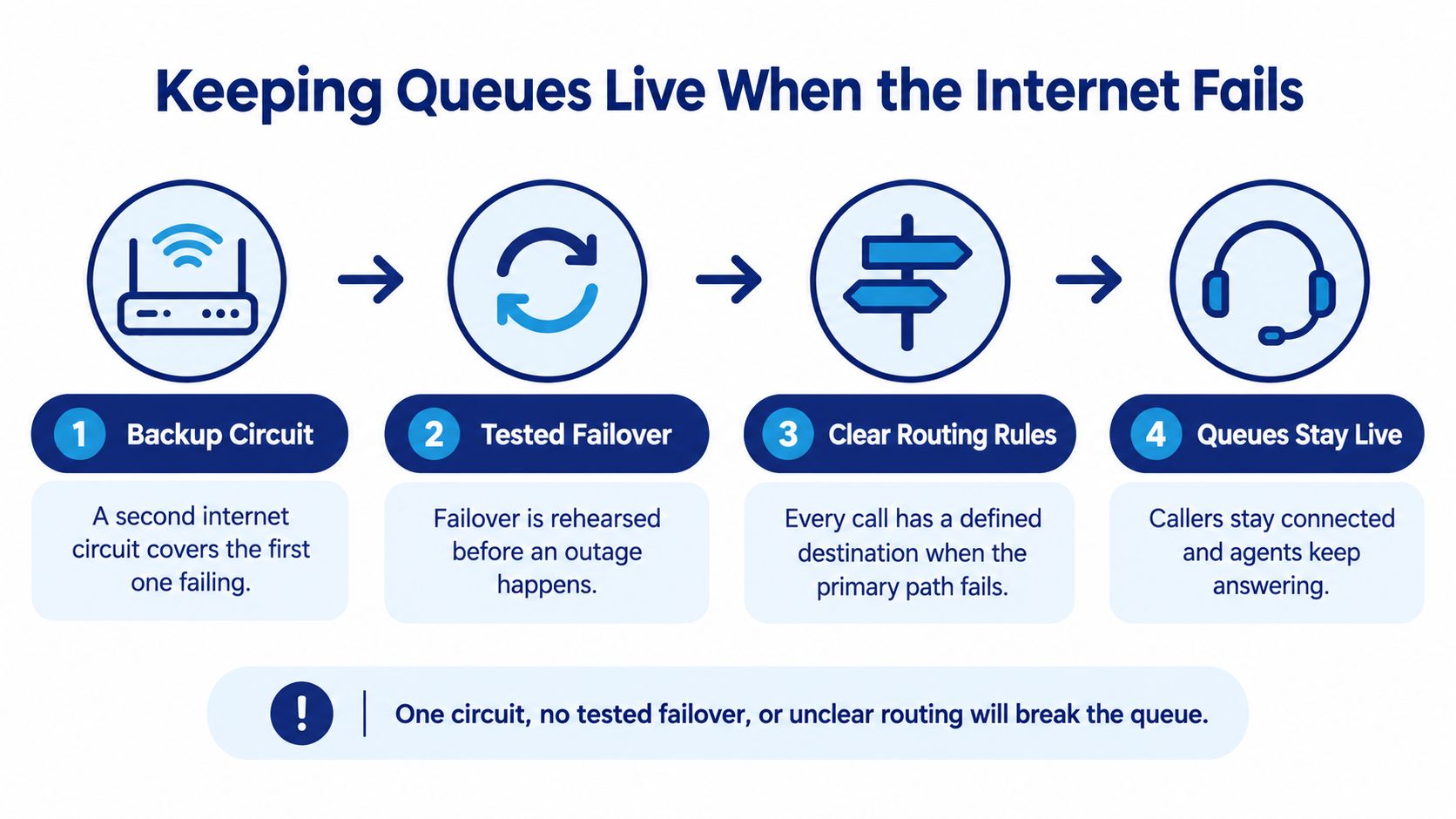
The continuity design needs an alternate connection and a defined destination for every affected call.
Rehearse the recovery sequence
- Provide another path. Choose a backup internet connection with attention to shared infrastructure and power dependencies.
- Define emergency routing. Send calls to an alternate site, supported mobile app, or approved forwarding destination.
- Protect caller identity. Use provider-supported business calling on mobiles. Ordinary personal dial-back can expose an agent's number.
- Specify queue behavior. Decide whether disconnected agents trigger overflow, callback, or voicemail.
- Reconcile after recovery. Assign ownership of pending callbacks and messages; verify recording completeness and flag gaps.
- Keep escalation details accessible. Store support contacts and status-page access outside the affected office network.
- Test quarterly. Disconnect the primary path deliberately and verify inbound, outbound, queued, and recovery behavior.
Define recovery objectives in operational terms: who can answer, which services remain available, and what must be reconciled afterward. Provider availability isn't end-to-end availability. Power, identity services, local networks, and agent devices remain your responsibility to account for.
Choose Your Migration Path and Start a Pilot
Choose the migration path using monthly volume, agent count, site count, remote-work patterns, recording requirements, CRM integration, and number-porting dependencies. Require written confirmation of features and porting prerequisites before committing to a cutover.
- A straightforward single-site team: Consider a coordinated migration when routing and integrations are uncomplicated.
- A multi-site or remote-heavy team: Start with a representative queue or location, including its overflow destination.
- A low-volume team: Compare basic hosted calling against a contact-center plan before buying advanced features.
Make the pilot a decision test
Capture baseline service level, abandonment, answer time, resolution, and MOS over representative operating periods. Run the pilot across comparable demand conditions, including a busy window and a planned connectivity failure. Avoid duplicate live routing that makes responsibility for answering unclear.
Have agents test transfers, callbacks, voicemail ownership, recording retrieval, and CRM matching. Have supervisors verify that reports reconcile with actual call records, and have the porting owner confirm the rollback procedure.
Migrate the remaining queues only when service level, abandonment, and voice quality hold or improve. Treat unresolved recording gaps, failed recovery, and inaccurate reporting as reasons to pause, even if ordinary calls appear to work.
SnapDial offers managed cloud PBX with queue callback, wait-time announcements, real-time statistics, detailed reporting, and setup assistance. Visit SnapDial to discuss a pilot built around your busiest queue, your continuity requirements, and a complete year-one cost comparison.