
Too many IVRs are graded on the wrong test. Containment looks good on a dashboard. It tells you how few calls reached an agent. It says nothing about whether the caller got help.
Judge the system on resolution instead. Does your IVR solve the caller's problem, or just keep the call out of a queue? That check changes how you design menus, prompts, and exits. Short tasks like order status or hours should finish in the IVR. Complex or sensitive issues should route fast to the right person, with context attached.
For a small business, call center IVR software should make routine calls easier to handle and send complex questions to the right person. A lower agent-handled call count is not proof customers are better served. Resolution, supported by routing, self-service, escalation, and follow-up data, is the practical measure.
What Call Center IVR Software Does for Your Phones
An interactive voice response (IVR) system is a digital receptionist. It greets callers, accepts keypad selections or spoken input, sorts calls by need, and either completes a task or transfers the caller to the right person. A good IVR works like a hotel concierge who checks your booking, answers a straightforward question, and points you to the right desk. A bad one reads a list of options and makes you work out where you belong.
The difference between a basic phone tree and call center IVR software is what happens around the menu. More capable systems can identify a returning caller, look up a customer record, route by agent skill, manage queues, offer callbacks, handle simple self-service transactions, and report what callers did. CRM and other service-system integrations can also carry relevant context to the agent, so callers don't have to start over at each handoff.

IVR rests on two practical building blocks: synthesized or recorded speech and telephone keypad signaling. Bell Labs demonstrated its early speech-synthesis system, The Voder, at the 1939 World's Fair. In 1962, the Bell System presented dual-tone multi-frequency dialing, which let callers send commands through combinations of audible tones. Together, voice prompts and dependable touch-tone input made automated telephone menus technically practical. Organizations began automating routine phone tasks in the 1970s, and IVR expanded through the 1980s as banks, airlines, utilities, and government services used it for routing and basic self-service. Speech recognition later let callers answer aloud instead of relying only on keypad choices. (Peer-reviewed overview of IVR technology and its development)
That history explains the system's real job today. IVR isn't just an automated greeting. It's the operational layer connecting phone input, business rules, queues, and agent escalation. If a caller's request falls outside what the system can reliably handle, the flow should get them to a person without making them repeat a maze of choices.
The CFI Group findings are old enough that they shouldn't be treated as a present-day performance target. They're useful as a reminder that an automated interaction is not a successful outcome just because no agent answered the call. Automate predictable requests, and keep a fast, clear path to a person.
Core Features to Check Before You Buy
Ask for a live demo, not a feature slide. Have the vendor place a test call, change a prompt on the spot, and show where managers inspect results. If staff cannot edit the flow without paid help, the tool will slow you down during holidays and staff shortages.
| Feature | What It Does | Verify in a Demo |
|---|---|---|
| Visual menu builder | Lets staff edit the greeting and menu tree | Change a prompt and publish it without vendor help |
| Speech recognition with keypad fallback | Accepts spoken intent and falls back to touch-tone input | Adjustable timeouts, keypad backup, and immediate agent exit |
| Caller ID and CRM lookup | Identifies returning callers and passes their record to the agent | Screen-pop of account data during the call |
| Skills-based routing | Sends each call to the agent group with the matching skill | Skill tags, overflow rules, and what happens when a group is empty |
| Time-of-day and holiday routing | Switches greeting and destination by hours and calendar | Holiday calendar that works without manual edits |
| Queue management and wait announcements | Holds callers and announces position or estimated wait | Position updates at set intervals |
| Queue callback | Takes the caller's number and calls back in turn | Eligibility thresholds, duplicate suppression, and callback reporting |
| Real-time dashboards and call recording | Shows live queue status and stores recordings | Export options and retention controls |
Speech routing needs a narrow job
Speech routing can shorten the first choice when the choices are clear. A human-factors newsletter summary of a natural-language speech routing comparison reports faster routing with speech than with keypad in that test, alongside more reprompts when callers used words the system did not recognize. Here first-decision accuracy means the share of calls the system sent to the correct destination on the first routing attempt, before any correction or agent transfer.
Judge that result by resolution, not by containment. A fast first choice helps only if the caller lands with the right team and gets the issue finished.
Keep the job narrow at first. I usually start with four intents, such as sales, billing, support, and appointments. Keep keypad input active on every speech prompt. Confirm the recognized intent in plain words before transfer, for example, “Billing, correct?” Track correct first routes, reprompts, and transfers separately. Speed without correct routing creates repeat calls.
How a Call Flow Moves a Caller from Greeting to Agent
A dental clinic running appointment bookings, billing questions, and urgent calls through one main number lives or dies on its first 30 seconds. If the greeting points each caller to a clear next action, problems get solved. If it contains callers without solving anything, repeat calls pile up. That containment versus resolution check should guide every step below.
1. Greet the caller and offer a language choice. A prompt like “Press 2 for Spanish, or say Spanish” works when it plays first. Callers should not work through an unfamiliar menu before they understand it. Keep it short. One language option, then move on.
2. Look up the caller when it is safe and useful. Caller ID can pull up a returning patient and play back an appointment time before asking for anything else. That saves a round trip. Treat a partial or ambiguous match as a hint only. Ask for confirmation before sharing details or changing anything on the account.
3. Ask for the main reason for the call. Booking, billing, or emergency belongs in one short prompt. Long menus with several layers push the routing work onto the caller, and misroutes climb. Limit the first decision to the clinic's main service lines, then branch only where volume justifies it. Good call routing software makes that first branch easy to adjust as call reasons shift.
4. Confirm the intent before transferring. A short check such as “You want billing, is that right?” lets the caller catch a speech error before it becomes a wrong transfer. Uncertain matches need an easy retry or a path to a person. Faster recognition means little if the call lands on the wrong team.
5. Offer self-service only for tasks the system can finish. A reliable booking integration that lets a patient reschedule without staff help qualifies. A flow that ends with “call back to confirm” does not. Label it accurately. Callers judge the IVR on whether their problem closed, not on whether they stayed out of the queue.
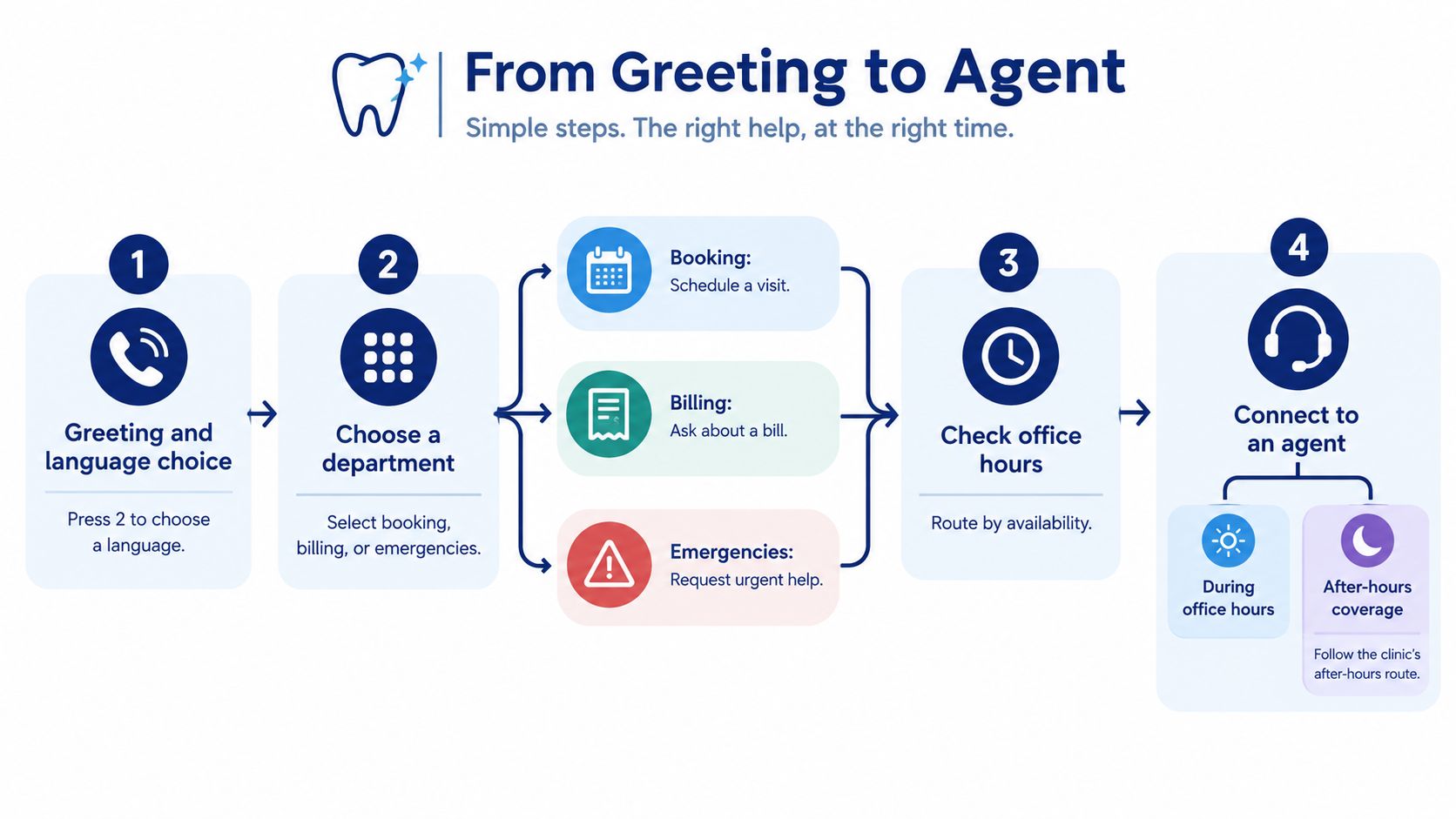
6. Route calls needing a person by skill. Billing questions go to staff who can discuss charges. Appointment problems go to someone with access to the schedule. Define where each skill group overflows when no one is free. Calls should never sit with no destination. An explicit overflow keeps wait times predictable and gives supervisors a lever to pull on busy mornings.
7. Explain the queue while the caller waits. Announce position or estimated wait, then refresh it at an interval that fits the practice. Vague messages repeated on a loop frustrate people. Tell callers what to expect and what they can do, including pressing a key for a callback or staying on the line.
8. Offer a callback when the wait crosses a defined threshold. A peer-reviewed financial institution simulation used a three-minute waiting threshold for private customers and a two-minute threshold for business customers. Those settings show eligibility can differ by service class, not that those numbers fit every business. Validate the number, hold the caller's place, suppress duplicates, and track requested callbacks against completed ones separately. (Peer-reviewed queue-callback simulation)
9. Set an explicit after-hours route. In this example, urgent calls go to the on-call number. Other calls reach voicemail with transcription. Tell callers what happens to the message and when to expect a response. Emergencies should never land in an inbox nobody checks overnight.
Small offices can borrow routing habits from specialist practices. A firm comparing law firm receptionists against an automated greeting, for example, can sort inquiries into two groups: matters that need a live person and routine requests a short menu can direct. Define that fallback before launch so stuck callers always have somewhere to go.
Metrics That Prove the IVR Is Working
Many teams judge an IVR by how many calls stay out of the queue. That test is incomplete. A menu can hold calls back and still leave problems unsolved. Judge it by whether callers finish the task in one try.
Recent ICMI contact-center measurement data found 14% of organizations reported measuring deflection rate and 13% reported measuring self-service accessibility. When those two rates go unmeasured, fewer transfers get mistaken for better service.
Track containment next to resolution. This pairing of essential call center KPIs keeps the report honest.
| Metric | What It Measures | Healthy Direction | Warning Sign |
|---|---|---|---|
| Containment rate | Calls finished in the IVR without an agent | Rising for each intent | Rising while repeat contacts rise |
| Transfer rate | Share of calls sent to an agent | Falling for simple intents | Spike at one menu node |
| Abandonment rate | Callers who hang up while queued | Falling | Rising after a queue or callback change |
| First-contact resolution | Issues solved on the first contact | Rising | Flat while containment climbs |
| Seven-day repeat contact rate | Same caller returns within a week | Falling | Rising after a menu change |
| Reprompt rate | Menu repeats after unrecognized input | Falling | Rising after a speech change |
| Callback completion rate | Requested callbacks completed in the promised window | Near complete | Gaps by queue or time of day |
| Post-IVR satisfaction | Survey score after self-service | Stable or rising | Drop after launch |
Treat containment as an outcome to investigate, not a score to maximize. Fewer transfers plus more callbacks about the same issue means the system stopped escalation without solving anything. Lower abandonment can also mislead when callers leave the phone queue and complain through chat or email instead.
First check: Compare containment and repeat contacts for each intent. A blended total can hide a menu that helps one group of callers while frustrating another.
That check works in practice. Say billing containment climbs from 30% to 45% after a menu change. Good news, until seven day repeat contacts for billing climb from 12% to 19% in the same period. Listen to 20 to 30 failed billing calls. You will often hear one broken prompt, a missing account lookup, or a transfer that drops the context the caller already entered. Fix that intent before calling the change a success.
Review a sample of automated calls each week, and have a person examine failed intents instead of relying only on the dashboard. If an AI voice handles the interaction, disclose that clearly. Keep a rollback path to a simpler keypad menu or a direct agent route for any intent where containment improves while resolution deteriorates. Plain menus with working integrations beat clever voice flows that strand callers.
For businesses where phone calls create or qualify work, attribution matters too. A practical guide to setting up call tracking for plumbers shows how owners connect incoming calls to service and marketing operations. Apply that same discipline to IVR. Tag the reason for each call, track what happens after the menu, and count a call as contained only when the caller got what was needed without agent help.
If containment rises and repeat contacts also rise, the menu is hiding problems. Inspect the affected intent, listen to the interactions, and repair the prompt, integration, or transfer route first.
Cost Savings and ROI Math with Real Numbers
Start with completed fixes, not with calls that never reached an agent. A contained call saves money only when the caller got what they needed and did not call back.
Take 10,000 inbound calls per month as an example. Assume an agent-handled call costs $6 and an IVR-only call costs $0.50. Each call kept off an agent then shows a gross saving of $5.50, before software fees, setup work, or callbacks.
| Containment Rate | Calls Kept Off Agents | Gross Monthly Savings |
|---|---|---|
| 4% full self-service benchmark, as noted earlier | 400 | $2,200 |
| 20% | 2,000 | $11,000 |
The 4% row is a historical benchmark for callers who got what they needed entirely through automation. Treat it as context for the math, not as a target for a small business IVR today.
Gross savings overstate the result. Subtract the monthly software fee and the share of setup cost assigned to that month. Then adjust for resolution. I have seen teams claim full credit for deflected calls while repeat contacts ate into the gain. The finance question is simple: Did the caller's issue stay resolved?
That is why a 30% containment rate paired with callbacks can be worth less than a lower rate with clean first-contact resolution. Run the check by intent. Compare containment against repeat contacts before you book any saving. Fix the prompt, the data lookup, or the transfer path first, then rerun the numbers.
Scale the same arithmetic down for a smaller shop. A five-person support team handling 2,000 calls per month at 20% containment keeps 400 calls off agents. That equals $2,200 in gross monthly savings before software and setup costs. At this volume the margin is thin, so better routing, accurate hours and location answers, and callback instead of hold time often beat chasing a higher deflection number.
Use this formula for planning:
(calls per month × containment rate × (agent cost − IVR cost)) − software fee − setup cost amortized monthly
Use only resolved contacts as the containment input. Calls that ended in the menu without an answer are not savings. They are delayed agent work plus a second interaction to staff.
Setting Up IVR on Cloud PBX and Hosted VoIP
For a small or midsized business, the deployment choice usually comes down to what's already in place, who will maintain it, and how much integration work the team can support.
| Setup | Best Fit | IVR Included | Integration Effort |
|---|---|---|---|
| Hosted VoIP or cloud PBX with built-in IVR | Small and mid-sized teams, multi-location firms | Yes, auto attendant and queues | Low, vendor-managed over SIP |
| On-premise PBX with IVR add-on | Sites with existing hardware investments | Often a separate license | Medium to high, hardware and maintenance |
| Contact-center IVR platform with CRM connector | High-volume teams with CRM-driven scripts | Yes, with advanced routing | High, API work and field mapping |
| Separate SIP trunk with self-hosted IVR | Engineering-led teams with telephony skills | Yes, custom build | High, needs in-house telephony expertise |
A hosted setup puts the phone system in the provider's cloud and connects calls over SIP. The IVR, queues, and reporting can then live in one administration portal rather than being split between a physical PBX, separate add-ons, and local management tools. For a team replacing older phone hardware, a cloud PBX system is one deployment model to compare with an on-premise system or a standalone contact-center platform.
Before choosing hosted VoIP, check the integrations the flow depends on:
- SIP trunking and number porting: Confirm how the provider will connect calls and move existing business numbers.
- CRM lookup: Ask which caller fields appear to agents and whether the integration supports the lookup your team needs.
- Calendar or booking system: Verify that callers can complete supported self-service tasks, not just hear appointment information.
- Helpdesk handoff: Check whether a transfer can create or update a ticket with the caller's context.
- Administrator sign-in: Confirm how your team manages access to the portal.
Multi-location businesses need to test local routing rather than assume one shared menu will fit every site. Each location may have different hours, holiday calendars, and greetings, so confirm that the portal can manage those settings without requiring staff to duplicate and manually maintain menus.
SnapDial is one hosted VoIP option that bundles an auto attendant, queues, callback, and real-time statistics in a single portal. That configuration can fit teams looking for phone service and queue tools under one administration layer. Judge it alongside alternatives by the same measures: how easily staff can change a flow, how caller context reaches agents, and whether reporting shows completed outcomes.
A hosted platform can reduce the burden of maintaining local phone hardware, but it doesn't remove the need to test the migration plan, call routing, integrations, and recovery process. Ask the vendor to demonstrate the call flow your customers will use.
To see how hosted phone service fits into a business setup, watch this overview.
Evaluation Checklist Before You Sign
Accessibility is a buying issue, not a setting to leave until after launch. A 2025 survey of 356 people who stammer found that 65% experienced at least one barrier during phone calls, while 24% identified IVR problems. Respondents reported systems interrupting callers, demanding repeated answers, or trapping them in recognition loops. (2025 survey on phone accessibility and stammering)
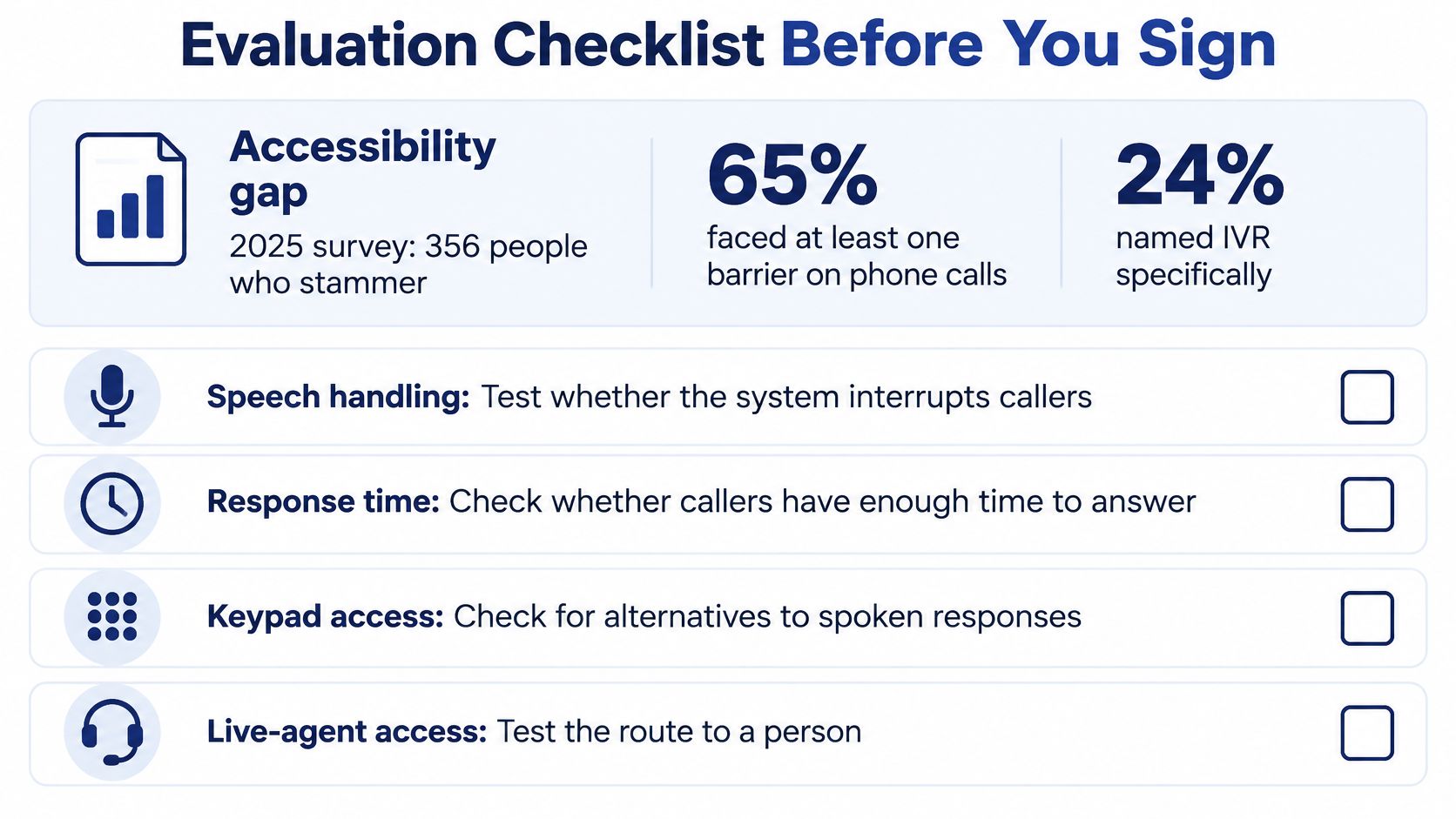
Bring these questions to a vendor demo, and pay attention to what the system does rather than relying on a feature label.
Accessibility
- Can we set response timeouts, offer keypad fallback, and give callers an immediate way to reach an agent?
- Are prompts understandable when heard over a phone connection, and can callers repeat or bypass an instruction?
- How do you compare speech-recognition error rates for people who stammer and people with fluent speech?
Warning answer: “It's voice-enabled” or “it's compliant” without a practical demonstration of how callers can recover from recognition errors.
Integration
- Can the system support our SIP connection and business-number porting?
- Which CRM, calendar, and helpdesk connections are available?
- What exact data passes between the IVR and the agent when a call transfers?
Warning answer: The vendor can't provide a field-mapping list or show the caller information that will appear on the agent's screen.
Reporting
- Can we see containment, repeat contacts, callback records, and transfers by intent?
- Can we export call and outcome data for review?
- Does the dashboard distinguish a completed self-service task from a call that didn't reach an agent?
Warning answer: The report offers one blended containment figure with no way to inspect the intents behind it.
Governance and commercial terms
- How are call recordings retained and controlled?
- How does the system disclose that a caller is interacting with an AI voice?
- Can we roll back to the keypad menu or a direct agent route if the new flow performs poorly?
- Does the written price explain what's billed per seat, per minute, or per phone number?
Warning answer: The vendor won't provide a clear written rollback path or explain what the quote includes.
Don't treat a general accessibility statement as evidence that the system works for your callers. Demo your own menu with one real caller who has a speech impairment, and check whether they can finish the flow, switch to keypad input, or reach a person without being interrupted or trapped.
Confirm the Pilot Scope Before You Commit
Keep the pilot small enough that the team can understand what went wrong. Start with two or three intents, such as booking, billing, and support. Give every menu a keypad fallback and a clear agent exit.
Use three practical checks:
- Run the new menu alongside the existing line for a week and compare the same call intents.
- Review failed intents and a sample of automated calls each week.
- Expand only when containment rises and seven-day repeat contacts stay flat.
If reprompts or repeat contacts rise, fix the prompt, route, or integration before adding more intents. The first month may not reflect a stable pattern, so compare equivalent weekdays and hours from the prior period rather than treating a raw monthly total as a fair test.
Pick one high-volume intent today. Map its call flow on paper using the nine steps above, choose a deployment setup from the comparison table, and ask vendors to demo your actual menu with your own escalation and accessibility requirements.
SnapDial offers hosted VoIP with auto attendant and IVR, queue management, callback, wait-time announcements, and real-time statistics. If you're replacing a legacy phone system or tightening how calls reach your team, visit SnapDial to review the platform and request a demo built around your call flow.