

The most popular advice tells you to pick VoIP or a PBX from a feature checklist. Don't. VoIP and a PBX aren't rival products, they're different layers, and a checklist can't tell you who should own the switch, what five years will cost, or whether a remote worker's emergency location is right. Decide those three things first.
What VoIP and a PBX Each Do
A buyer asks for quotes on VoIP and a PBX, gets three proposals that all say VoIP, and assumes they're comparable. They aren't. One may keep a server in your closet, one may replace only your phone circuits, and one may move the whole switch to a provider.
A PBX, or private branch exchange, is the private switch. It assigns extensions, routes internal calls, holds voicemail, runs the auto attendant, and decides how a call reaches the public phone network. Say extension 204 dials 205, that's the PBX working inside your business. When 204 dials a customer, the PBX hands that call to an outside circuit or trunk.

VoIP, or Voice over Internet Protocol, is transport. It carries voice as packets over broadband instead of reserving a copper circuit for the call. The International Telecommunication Union methodology defines fixed VoIP as a subscription that enables users to place and receive calls through fixed broadband infrastructure without requiring a computer, including DSL, cable modem, fiber-optic, and fixed-wireless networks. It excludes purely software-based, computer-to-computer applications such as Skype or WhatsApp.
That boundary matters because it separates managed business telephony, including hosted VoIP and cloud PBX, from consumer calling apps. A desk phone that works without a PC, keeps your business number, and follows your dial plan is business telephony even if the voice travels over the internet.
A traditional PBX can still use analog lines or a PRI. An on-premises IP-PBX already uses VoIP inside the building. A hosted or cloud PBX moves the PBX software to the provider, while you keep your numbers, desk phones, and apps.
So you've really got three choices. Keep the on-premises PBX, add SIP trunks to it, or replace it with hosted cloud PBX. Judge them by who owns the switch, who owns uptime at 2 a.m., and whether people answer from one building or from anywhere.
VoIP and PBX Side by Side
Use this table as your buying shortlist for VoIP and a PBX, not as a feature catalog. Features converge quickly. Ownership, maintenance, and site growth don't.
| Option | Where the PBX runs | Outside calls | Who maintains it | Remote and extra sites | Planning fit |
|---|---|---|---|---|---|
| Traditional on-premises PBX | Phone closet in your building | Analog lines or PRI | Your technician or telecom vendor | Poor; each site needs gear or a private link | One stable site with someone who already maintains telecom |
| On-premises IP-PBX with SIP trunks | Still your server | SIP trunks over business broadband | You own the PBX; the carrier owns the trunk | Possible if you engineer VPN or session border control | A mid-life PBX whose main pain is the PRI bill |
| Hosted or cloud PBX | Provider data centers | Provider VoIP network | Provider runs the platform; you manage users | Native apps and new sites without another server | Hybrid teams, multi-site firms, and growing SMBs |
The Traditional Box in the Closet
The traditional PBX gives you direct control and keeps internal calling local. It also makes growth physical. Adding people can mean cards, licenses, cabling, and a technician visit, and a second office usually means a second system or a private link tying the two together. If that box fails on a Friday night, your maintenance arrangement is the recovery plan.
The Bridge Option Most Buyers Miss
An on-premises IP-PBX with SIP trunks keeps your server but sends outside calls over broadband. That's often the smartest move when the PBX itself still works and the PRI bill is the main problem. You cut circuit cost without retraining everyone. You don't remove hardware refresh, software patching, backups, or dial-plan administration, and remote phones still need deliberate network design rather than a hopeful plug-in at home.
I would start here if your complaints are about the carrier invoice, not about missed mobile calls or adding sites.
Hosted PBX Is What Most People Mean by VoIP
Hosted and cloud PBX runs extensions, auto attendant, queues, recording, and the dial plan in the provider's data centers. A new site becomes more users on the same system, and a laptop or cell phone can act as an extension without pretending to be in the office. For regional context on how local businesses frame this same choice, you can compare PBX and VoIP options alongside the table above.
This model dominates new proposals for a clear reason. Hosted and cloud PBX accounted for 52.3% of global VoIP services market share in 2024, according to Mordor Intelligence. Vendors lead with subscriptions because that's where the market has moved.
Do not accept the word VoIP as an answer. Ask where the PBX software runs and who gets paged when it stops.
Every quote can truthfully say VoIP, because all three rows can carry voice as packets somewhere. Require each vendor to specify the row they're selling. Then hold the cost questions until you've priced five years, and hold the fit questions until you've matched each row to how your people work.
Five-Year Cost of Owning the Switch
Price VoIP and a PBX over five years, not from the headline. For example, take a hypothetical 25-user business in 2026 and price both models with the same seats, concurrent calls, and recording needs. The bands below are planning examples for that exercise, not a quote for your building.
In that worked example, on-premises cash might land around $25,000 to $60,000 over five years before internal labor, while hosted subscriptions might total roughly $30,000 to $67,500 with no server refresh. Those ranges overlap on purpose. The winner depends on what you already own, how many sites you add, and whether anyone cleans up unused seats.
| Cost line | On-premises PBX | Hosted or cloud PBX |
|---|---|---|
| Phones and system | Example band of about $400 to $1,500 per user, or $5,000 to $50,000 for a small system | Desk phones from $0 with softphones to about $200 each in the example |
| Monthly run cost | Maintenance near 10% to 20% of hardware cost yearly, plus trunks around $15 to $40 per concurrent call path | Example band of about $20 to $45 per user per month |
| New location | New circuits, gear, and weeks of work | Users and numbers added in a portal, usually days |
| Recording, queues, mobility | Often separate licenses on older PBXs | Usually included or a small add-on |
| Local outage | Phones die with power or the PRI unless batteries and failover were added | Desk phones need power and internet; mobile apps can use cellular data |
Where the Cheap Headline Loses
An on-premises system looks cheap after the hardware is paid off, until you count idle capacity you still maintain. You bought ports for peak headcount, licensed features nobody uses, and kept a maintenance contract on all of it. A replacement around year seven to ten also sits just outside a five-year view, which flatters the box if you stop counting too early.
Hosted billing loses differently. A departed employee's seat stays active because nobody removed it. Seasonal staff become permanent line items. International and toll-free usage outside the bundle lands on top of the per-user price. Audit seats quarterly or the subscription slowly becomes the expensive option.
Before you compare totals, check which handsets you can reuse and what replacements cost using a current equipment cost breakdown for your own inventory. Reusable IP phones can move a hosted proposal down materially. Proprietary phones tied to an old PBX can erase the apparent saving from keeping that PBX.
The Second Site Changes the Math
One stable building can justify owning hardware. A second address usually flips the result toward hosted because it avoids another appliance, another trunk arrangement, and another maintenance problem. You also avoid building inter-site dialing as a special project.
Compare invoices, not brochures. Put your current trunk bill, maintenance contract, license renewals, and a realistic handset count beside a hosted quote for the same users. Add recording, queues, and mobile clients to both sides, since older PBXs often price them separately while hosted bundles commonly include them.
Planning rule: Price seats, concurrent call paths, sites, and reusable handsets. Any quote that prices only users is hiding part of the decision.
Call Quality and Fraud Controls to Demand
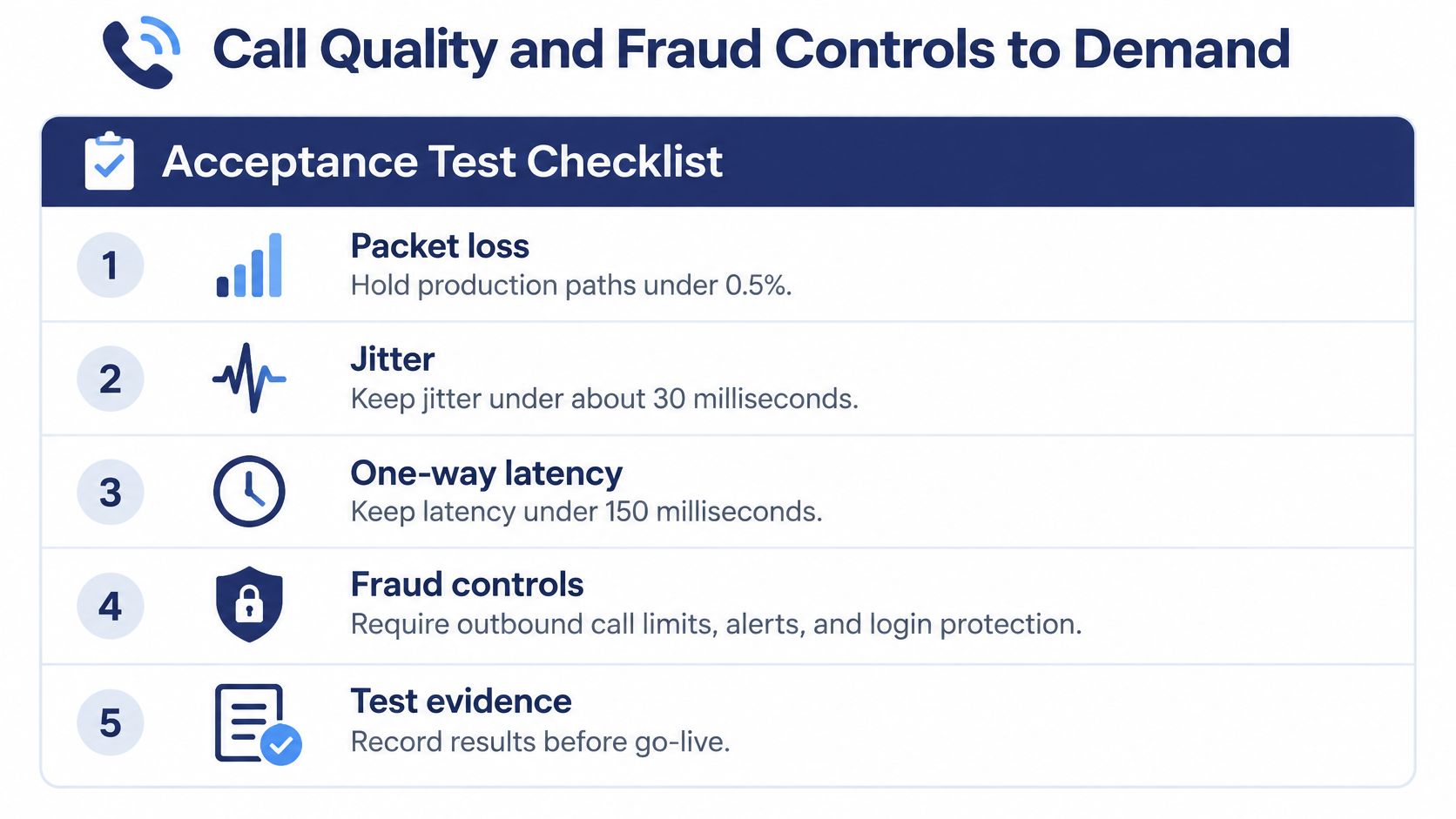
Never accept "sound is fine" as acceptance testing for VoIP and a PBX. Put four numbers in writing and test them at peak hour. The Kital VoIP performance validation framework supports an operational policy of packet loss under 0.5%, jitter under about 30 ms, one-way latency under 150 ms, and MOS at or above 4.0 on production paths. It also notes that G.711 calls become noticeably degraded at approximately 1% packet loss.
Use the checklist below as your pass or fail record before numbers port.
Measure the Path That Actually Carries Voice
Packet loss hurts voice more than web traffic because retransmitting a late packet is usually useless. Measure loss separately for inbound and outbound RTP streams, by site, VLAN, and access type. A single speed test from your desk won't tell you whether the warehouse Wi-Fi, a switch queue, or the carrier route is breaking calls.
That's how you separate a LAN problem from a carrier problem. If only one VLAN fails, look at local switching and Wi-Fi. If every site degrades on the same carrier path at the same hour, escalate the route. If home users fail while office users don't, don't replace office phones.
Codec choice belongs in the same test. G.711 gives high voice quality but uses substantially more bandwidth than compressed codecs, so size links for codec payload plus RTP overhead, encryption overhead where it applies, and burst headroom. If you're comparing how different tools estimate that load, compare bandwidth measurement methods before you trust a single calculator.
A jitter buffer can hide moderate delay variation, but it does it by adding delay. It isn't a substitute for traffic priority, traffic shaping, or a clean WAN path.
Watch a short walkthrough of these checks before you run your own peak-hour test.
Your acceptance run should include concurrent-call load, codec selection, failover behavior, and peak-period measurements. Test from desk phones and apps. Record the results per site, not as one company average that hides the failing location.
Fraud Is an Operating Control, Not a Feature
Cloud voice isn't automatically safe, and an on-premises PBX isn't automatically private. Exposure follows architecture and administration. Before launch, confirm which ports and services must be reachable using a precise SIP and IP port reference, then restrict everything else.
Demand these controls in writing:
- Unique SIP credentials: No shared extension secrets, and no default passwords on phones or admin accounts.
- Restricted SIP access: Accept SIP traffic only from trusted providers or locations where the design allows it.
- Dialing limits by default: Block international and high-risk destinations until a named person approves them.
- Admin protection: Require multi-factor authentication for administrators and review privileged users monthly.
- Spend alerts with an owner: Set outbound spend limits and name who acts when an alert fires overnight.
- Tested recovery: Back up configuration and prove you can restore it before go-live.
Settle responsibility before an incident. The provider secures its platform and flags anomalous traffic it can see. You own SIP credentials, dialing limits, alert response, and user administration. If neither side owns detection in the contract, the fraud bill becomes the first real test of the relationship.
Do not port numbers until a peak-hour test meets the four targets.
Keeping Emergency Location Accurate for Mobile Staff
A registered address often doesn't match where an employee is working. That's the failure most buyer guides skip when they discuss VoIP and a PBX. A desk phone moved to a home office, a softphone used from a hotel, or a worker floating between branches can send responders to the wrong place if the record still points to headquarters.
In the United States, interconnected VoIP providers must obtain a physical location and transmit the caller's number and location to emergency services. Fixed services must provide automated dispatchable location. Non-fixed services must provide it when technically feasible or use registered or alternative location data. For service-specific details, review how E911 works with VoIP service before you assign users.
The useful question isn't whether the system supports 911. It's how location is kept accurate, verified, and tested for every user and device.
Four Checks to Run for Every User
- Onboarding: Confirm the physical address before the first call, and tie it to the specific user and endpoint, not just the account.
- Address changes: Require a location update whenever someone moves offices, starts working from home, or travels for an extended assignment, then audit the full list monthly.
- Device limits: Treat desk phones, softphones, and mobile apps separately, because an app on Wi-Fi or cellular data may not present location the same way as a fixed phone.
- Outage behavior: State what happens during internet or power loss, who gets notified after an emergency call, and what backup device staff should use.
Run test calls only through the provider's test process. Never test by calling public emergency services. Document who verified each address, when it was checked, and which endpoint was used.
A cloud platform can support dynamic locations and still dispatch to the wrong address if your records are stale.
Cloud migration improves routing flexibility, but it shifts administrative responsibility to you. The platform can prompt for an address, store multiple locations, or detect a network change. It can't know that an employee moved apartments last month unless your process catches it.
Don't copy United States E911 practice into other countries. Emergency numbers, location duties, and provider obligations differ by jurisdiction. Review each country where staff will use the system, and give traveling employees local instructions that don't depend on the office dial plan.
Make location accuracy part of hiring, moving, and termination workflows. If it's a one-time setup field, it will decay.
Stay On Premises or Move to Hosted Cloud PBX
Match VoIP and a PBX to the shape of the business, not to the vendor's default proposal. Each pattern below gets one pick and the condition that reverses it.
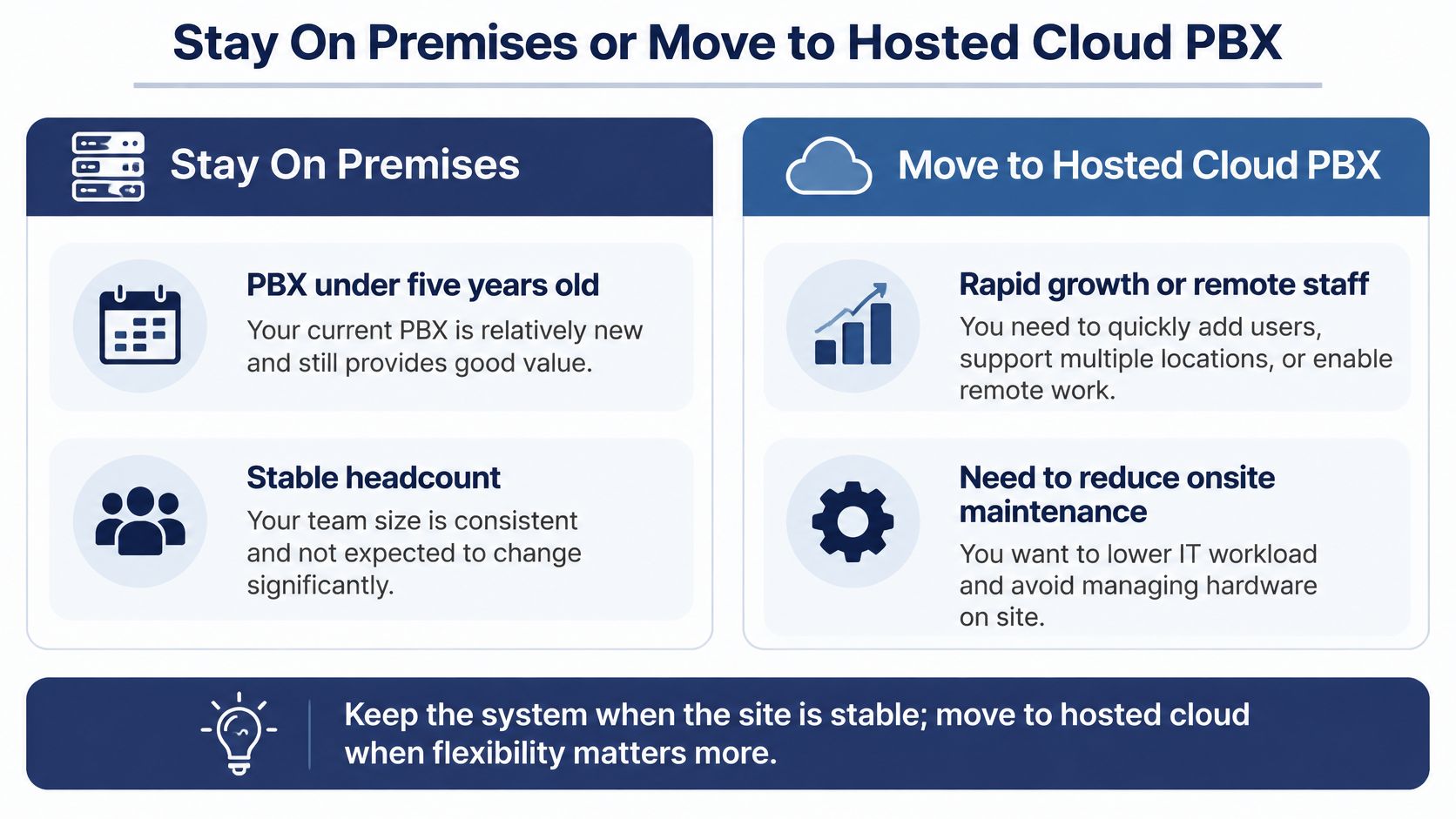
Keep the PBX and swap the PRI for SIP trunks if you're in one building, the PBX is under five years old, headcount is stable, and a contracted technician already maintains it. Reverse that pick if the maintenance contract is lapsing at a higher price or your next hire won't sit in that building.
Budget LTE failover before you move anything if you're a clinic, plant, or warehouse that must keep dialing during a broadband failure. A local switch doesn't help if its trunks are dead, and a cloud switch doesn't help if desk phones have no path out. Reverse the stay-local instinct only when failover, battery backup, and cellular routing for key extensions are tested, not promised.
Move to hosted cloud PBX if you're a retailer, professional firm, or contractor with two or more addresses, hybrid staff, or seasonal hiring. The extension follows the person, and a new location doesn't need another server. Reverse it only if a site has unreliable connectivity you can't fix and no workable cellular backup.
Pick hosted with proper queue tooling if you run a support desk that lives in queues. You need live queue stats, callback, and wait announcements working on day one, not as a later integration. When you're building that shortlist, you can compare cloud phone systems for business against those queue requirements rather than headline seat prices.
The Three Verdicts
Stay on premises when the PBX is modern, one building suffices, someone maintains it, and backup connectivity is weak. Choose SIP trunks when only the PRI bill hurts. Choose hosted cloud PBX when people work in several places, headcount changes often, or nobody wants to own a server in the closet.
Location duty can also change the answer for mobile teams. A cloud phone system overview from Nutmeg Technologies notes that a user's registered address may not match the employee's current location, especially when staff work from home, travel, or move between offices. If you can't run the monthly location audit, don't pretend a mobile rollout is ready.
For the hosted path, SnapDial is a hosted cloud phone service that replaces a legacy system, with technicians handling setup, configuration, and replacement from start to finish at no cost to the customer. Its all-inclusive pricing covers a unified communication solution, call statistics, and call recordings. You can request a quote or schedule a call, and you should bring your seat count, current trunk bill, analog device list, and recording needs.
Use this final test. If your next hire must be reachable on day one without a technician visit, rent the PBX. If the building must keep dialing through an internet outage and someone can staff that resilience, keep the box you have.
How to Migrate Without Dropping Calls
Migrate VoIP and a PBX in sequence, after the system choice is settled. Most dropped calls during a cutover come from missing numbers, untested routing, or analog leftovers nobody inventoried.
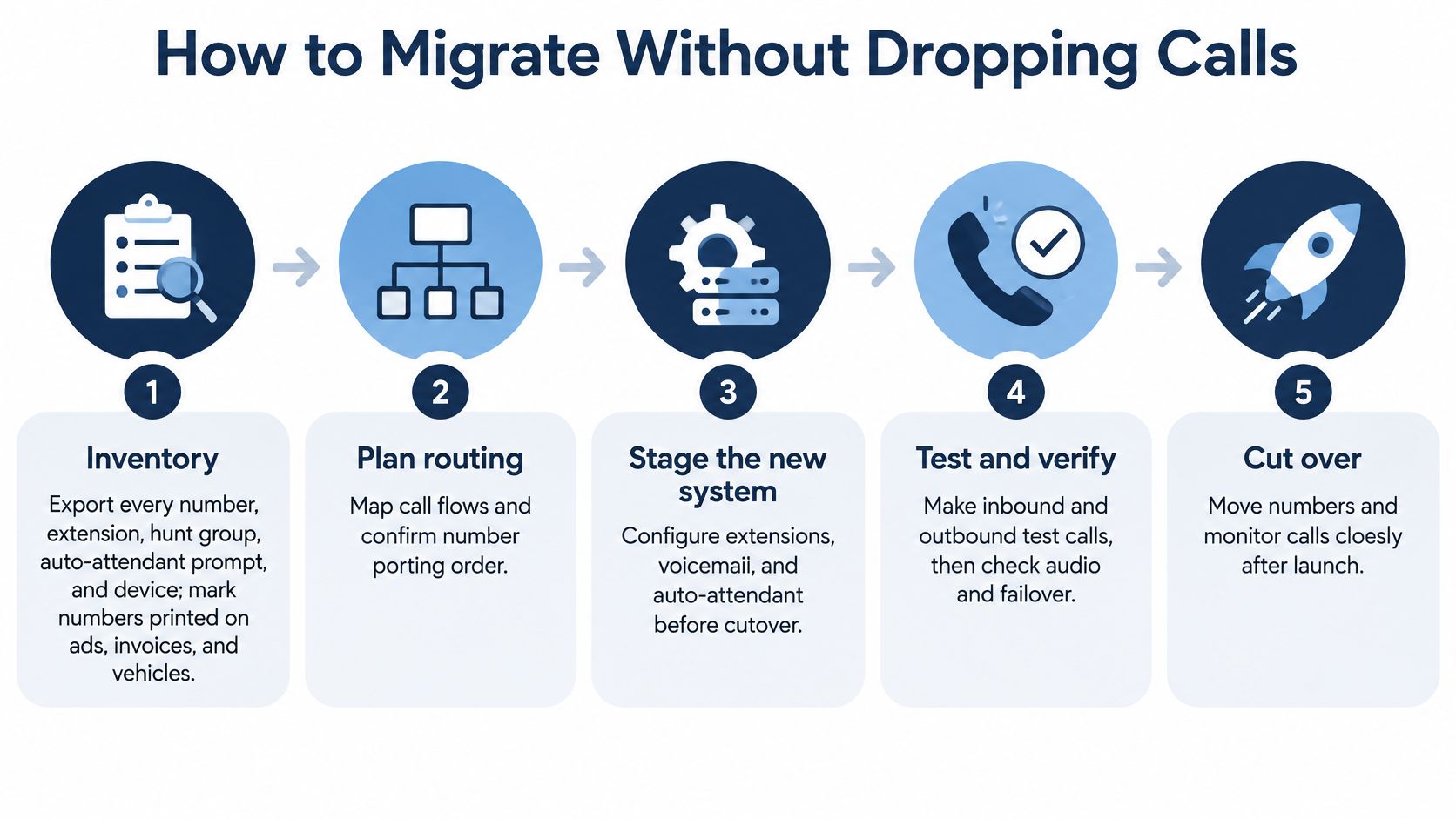
- Export the full inventory first, including every number, extension, hunt group, auto-attendant prompt, and device, because the number printed on a vehicle or invoice is the one someone forgets to port.
- Record concurrent-call peaks and check bandwidth and power at every site, including homes that will use an app, because a site that can't carry peak voice won't be fixed by new phones.
- Rebuild the dial plan on the new platform and place test calls from desk phones and mobile apps before any port, because routing errors are cheap before customers hit them.
- Run old and new systems in parallel for at least one business week, moving a pilot group first, because real callers expose menu and voicemail problems that internal tests miss.
- Port numbers in batches, with the busiest published numbers last and a rollback contact at the losing carrier, because a failed main number is the outage everyone remembers.
- Staff one channel for failed calls on cut day and verify voicemail, fax, alarms, and door or elevator phones, because analog devices often fail after the voice cut looks successful.
- Clean up after 30 days by removing unused seats and shutting old SIP exposure, because a retired PBX left reachable can still place fraudulent calls.
The Leftovers That Break Cut Day
Fax machines, postage meters, alarm panels, and elevator phones don't care about your new dial plan. Each one needs an adapter, a cloud fax replacement, a cellular communicator, or a remaining copper pair, decided before porting starts. Walk the building with the inventory in hand and open every closet.
A provider can configure the new platform, port numbers, and set up phones. You still own the number inventory and emergency-location records, because only you know which number is on the trucks and which employee moved home last month.
- Go-live test calls: Make ten calls, one from each department, covering inbound, outbound, transfer, voicemail, and queue routing.
- Emergency test: Complete one emergency-calling test through the provider's test process, never to public emergency services.
- Failure test: Pull the primary internet connection for the pilot group and confirm calls follow the planned failover.
Don't declare success when dial tone appears. Declare it when customers reach the right people, analog leftovers work, and the old system can be switched off without anyone noticing.
If you're replacing a legacy PBX and want the hosted path handled without owning another switch, SnapDial can set up and configure your cloud phone system end to end with all-inclusive pricing that covers call statistics and recordings. Bring your seat count, trunk bill, and analog device list, request a quote or schedule a call, and start at SnapDial.