

You're parked outside the next job when a missed call appears. The voicemail text says the customer wants you there Friday, but you thought the appointment was Thursday. You could copy the date into the schedule and drive on. Or you could press play and discover the caller said they can't do Friday.
That's the trade-off with visual voicemail transcription. It makes messages easier to scan and route, but a tidy sentence can hide the detail your team most needs to get right.
What Visual Voicemail Transcription Is
Visual voicemail transcription is the text rendering of a stored phone message, displayed beside its audio so you can scan it like email. For a technician between sites, that means checking whether a missed call concerns access, a cancellation, or an urgent repair without dialing a mailbox and sitting through earlier messages.
The visual inbox and the transcript are separate features. As described in this account of visual voicemail's origins, Apple and Cingular announced the original iPhone's visual voicemail on January 9, 2007, allowing users to select individual messages rather than listen sequentially. Transcription adds another layer by turning those recordings into readable words.
A field worker needs the message and its controls together, not text stranded in a notification.

The recording and the typed copy
Think of the audio as the signed letter and the transcript as its typed copy. The copy is quicker to skim, but it's easier to mishandle when someone types a digit incorrectly.
A useful business inbox should show:
- Caller identity, with the originating number available even when a contact name appears.
- Message time and mailbox, so colleagues know where the call landed.
- Readable text and playback, without making the employee hunt for the recording.
Hybrid staff can check messages between meetings. Front-desk employees can sort requests while helping someone at the counter. Managers can identify which customer needs attention without playing every recording aloud.
For a focused extraction workflow, AIDictation's guide to extract callback details from voicemails is a useful companion. The important distinction is between finding a detail and verifying it.
The typed copy helps sort the day. It isn't automatically a verified customer record.
How a Voicemail Becomes Text
A voicemail transcript usually comes from automatic speech recognition, not a person typing in the background. The software processes the saved telephone recording, then presents its interpretation in the inbox.
This flow shows where the recording becomes readable text and where employee review still belongs.
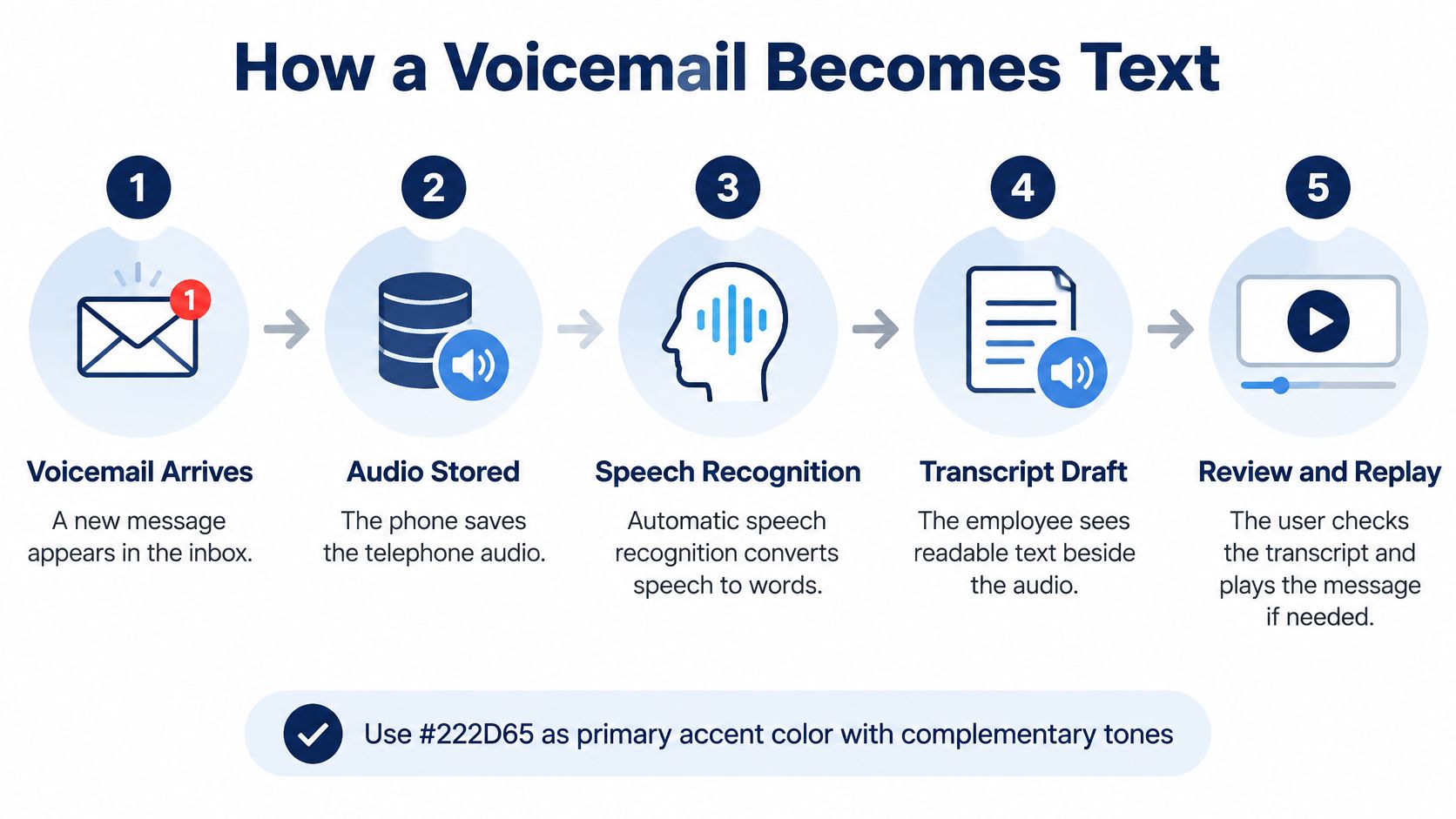
What happens behind the inbox
The phone system saves the message. After the greeting, the caller's speech becomes a stored audio file. The employee sees a new voicemail, sometimes before the text is ready.
The recognizer decodes the audio. Telephone bandwidth and compression can remove useful sound detail before recognition begins. A recording that sounds muffled to you doesn't become clear merely because software processes it.
A formatting pass makes the words readable. Capitalization and punctuation turn a stream of recognized words into sentences. That improves scanning, but punctuation is an interpretation too, especially when callers hesitate or restart.
Confidence controls identify uncertain words. Where supported, the interface marks questionable tokens. Look particularly for uncertainty around unfamiliar names, spelled addresses, and digit strings, rather than assuming a clean-looking paragraph is reliable.
The inbox combines text with message metadata. Caller details, time, mailbox, and playback controls appear together. Search can then use the transcript and those identifying fields to locate the message.
Voicemail isn't clean dictation. Callers leave unfinished phrases from trucks, kitchens, and busy lobbies, often correcting themselves halfway through the detail you need.
The distinction matters in other transcription settings too. PatientNotes' explanation of transcribing patient consultations provides context for workflows where spoken information needs careful review before becoming documentation.
Inspect the controls, not just the paragraph
Use the speech-to-text configuration guide when checking setup. During evaluation, look for visible playback, useful uncertainty markings, and search that includes caller information rather than transcript words alone.
The video below offers an additional visual reference for the voicemail workflow.
Processing timing doesn't tell you where files live. A service can display text quickly while still retaining audio elsewhere, so check storage behavior separately from delivery speed.
Accuracy Numbers Behind the Text
Word Error Rate, or WER, is substitutions plus deletions plus insertions, divided by the number of words in a correct reference transcript. It counts word-level mistakes. It says nothing about whether an employee can safely act on the message.
The Columbia University speech-recognition lecture summarizes benchmark WERs of 1.4% for clean LibriSpeech audio, about 5.8% for Switchboard conversations, and about 11.0% for CALLHOME telephone speech. These are results under particular evaluation conditions, not accuracy promises for your mailbox.
Speech benchmarks versus voicemail error rates
| Speech condition | Reported WER | What was measured | Reading for voicemail |
|---|---|---|---|
| Clean read speech, LibriSpeech | 1.4% | Columbia benchmark summary | Too clean to judge a phone mailbox |
| Switchboard conversations | About 5.8% | Columbia benchmark summary | Conversational, still easier than many voicemails |
| CALLHOME telephone speech | About 11.0% | Columbia benchmark summary | Closer to real handset audio |
| IBM voicemail sample | About 9% | 78 messages from a roughly 2,200-message, 19.4-hour corpus | Useful for triage, not proof that numbers are correct |
| 2001 multi-pass voicemail system | 28.7% final | Result after six recognition passes | Illustrates the difficulty of voicemail recognition |
The IBM voicemail corpus documentation describes approximately 2,200 messages totaling 19.4 hours, with an estimated 9% WER in a 78-message sample; the accompanying historical voicemail-recognition findings include a 2001 system's final 28.7% WER after six recognition passes. Neither historical result establishes what a current product will achieve.
The spread in that table is the point. Read speech and voicemail are different inputs, so a vendor quoting a clean-audio number is answering an easier question than the one your mailbox asks.
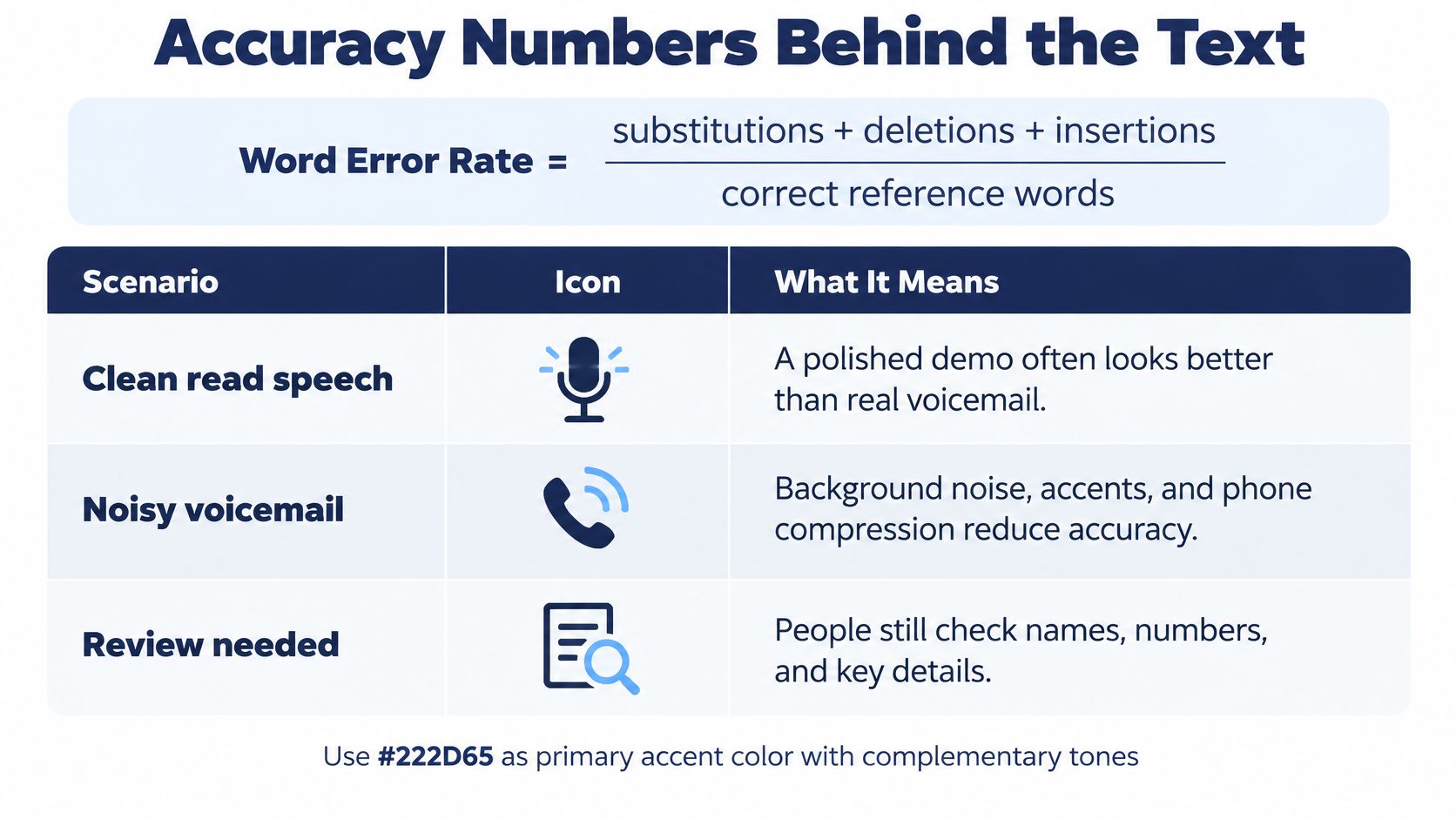
Measure whether employees get the action right
A transcript works like a typed copy of a phone message: quick to scan, easy to search, and more dangerous than the audio when a polished error changes a name, a digit, or a private detail. WER treats every word equally. Your callers don't. A transcript that mangles small talk still gets the job done; one that renders “extension 412” as “extension 418” reads cleanly and sends the callback to the wrong desk.
Voicemail-specific evaluation summarized in Ody's voicemail guidance found that a dedicated perceived-accuracy measure correlated with human judgment at r = 0.91, compared with r = 0.65 for ordinary WER. Word counting alone doesn't capture usability.
Test actual mailbox conditions: different handsets, mobile and office connections, accents, background noise, and short messages. Track task success alongside WER: did the employee correctly identify the caller and the required action? A low average error rate should never outweigh a failed callback.
When to Trust the Transcript
Use text to decide what needs attention. Use verified audio before saving a consequential name, number, date, amount, or health detail. If the recording is unclear too, contact the caller rather than choosing whichever interpretation looks most plausible.
A routine request to call back and a payment instruction shouldn't follow the same approval path. The consequence of an error matters more than how polished the transcript looks.
When voicemail text is safe to act on
| Message detail | Act from text? | Main risk | Safer move |
|---|---|---|---|
| Routine status or please call me | Yes, for triage | A wrong word may not change the action | Skim and use caller ID when it's the appropriate return number |
| Callback, account, or spelled address | No | Digit and letter strings can be misrecognized | Replay before dialing or saving |
| Unfamiliar name or company | Only with independent confirmation | Proper names can look convincing when wrong | Listen, then confirm spelling if needed |
| Date, deadline, or amount | No | A wrong day or figure changes the commitment | Listen before updating the calendar or invoice |
| Noise, accent, or a second speaker | Not without checking | Recognition may misinterpret speech or attribution | Treat text as a hint and play the message |
| Short, urgent, or emotional message | Partially | Text may omit tone and context | Review promptly and escalate uncertainty |
| Health, payment, or legal detail | No | Errors and wider search access create additional risk | Verify the content and restrict access |
Say a customer leaves a routine job-status request. The transcript gives the dispatcher enough information to assign a callback, and the originating number matches the existing customer record. There's no need to transcribe every hesitation before assigning the task.
Now consider a message asking you to call an alternate number. Caller ID no longer supplies the requested return path. Copying the transcript without listening could send the callback to someone else, potentially exposing the reason for the call.
Escalate the uncertain detail
Names need a separate check. A familiar-looking company name may be the recognizer's interpretation of an unfamiliar one, not evidence that the caller belongs to that company. Playback may establish pronunciation, but it won't always establish spelling.
Dates and amounts deserve the same caution. A caller who says they can't attend Thursday shouldn't become a Thursday booking because the transcript dropped the negative. Don't let software populate calendars, invoices, or customer records from uncertain wording.
Fast text for triage, original audio for confirmation, and a person for low-confidence or high-impact messages.
The Spanish Data Protection Agency's guidance on AI voice transcription treats transcription as a representation requiring accuracy controls, human oversight, and review and correction mechanisms. A readable transcript isn't a neutral substitute for everything the caller communicated.
Background speakers, code-switching, emotional speech, and noisy sites all warrant closer review. An accent isn't evidence that a message is unusable, but the team should check how its system handles the callers it serves.
For deaf or hard-of-hearing employees, provide a review route that doesn't depend solely on personal listening. An authorized colleague can verify ambiguous details and return a corrected, clearly labeled record.
Keep the play control one tap from every transcript, and make the escalation owner just as easy to find.
Where Teams Gain From Searchable Messages
A dispatcher opens the overnight inbox before assigning routes. In a typical scenario, messages mentioning failed equipment go to the service lead, while routine progress questions go to the office callback list. The benefit is better sorting, not permission to skip verification of the job address.
Later, a manager searches a customer's name to find a message about a delivery window. Searching narrows the candidate messages; the manager checks the selected recording before deciding what the customer requested.
These are practical gains when the inbox makes ownership and message context visible.
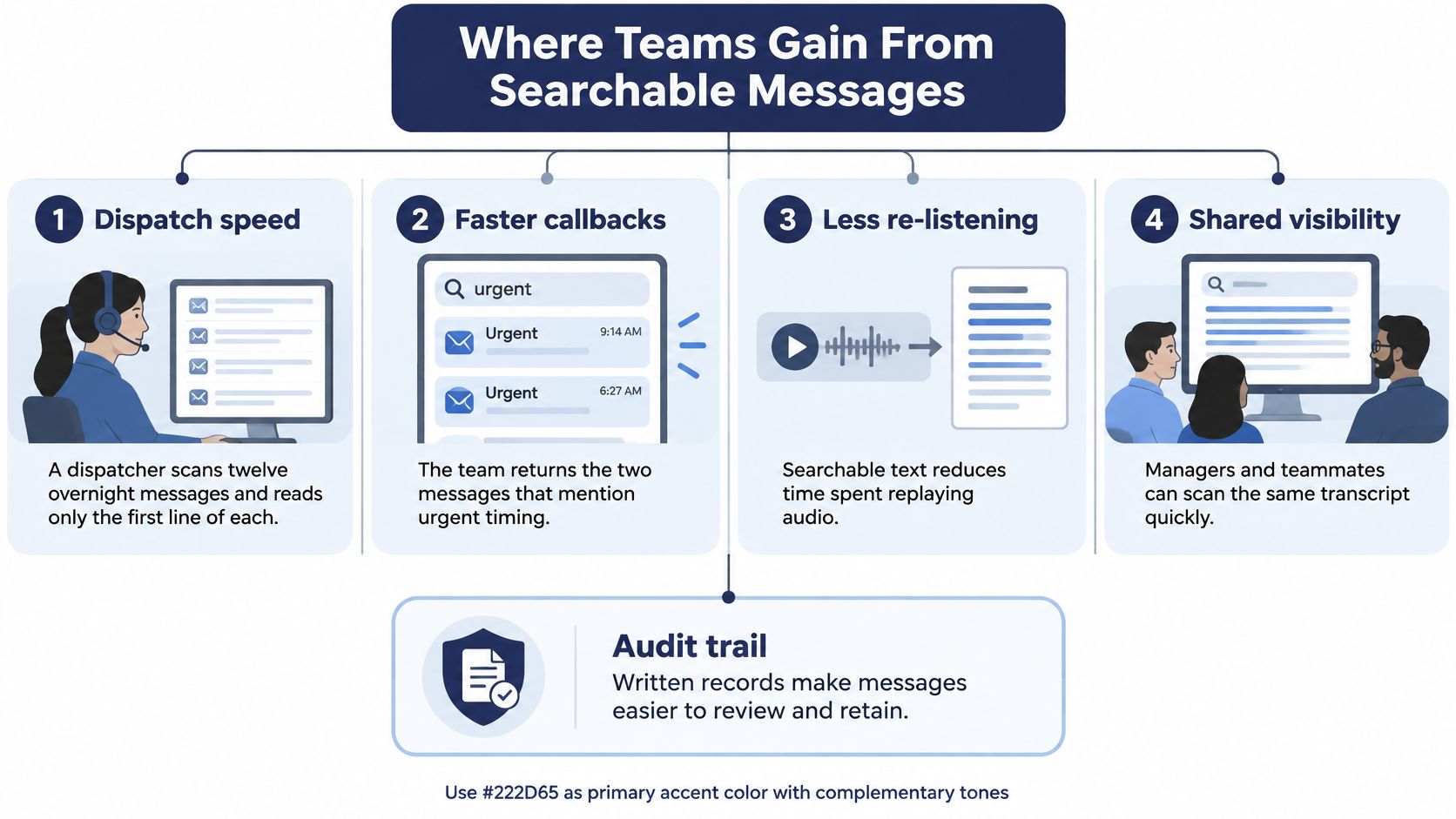
Access without passing the phone around
A deaf or hard-of-hearing employee can read the message with caller and time attached, rather than wait for someone to relay the whole request. When a detail is unclear, the review process should provide a corrected version without excluding that employee from the work.
A billing administrator can also locate a customer's disputed request beside the call log. If the amount has been checked and the reviewer is identified, a colleague can understand why an adjustment was made without reconstructing the conversation from scattered notes.
Search helps find the message. Verification establishes what the business can responsibly treat as fact.
Shared visibility needs boundaries
A supervisor can scan requests and follow-up notes to see whether employees assigned callbacks appropriately. But tone still requires listening, and broader search permissions shouldn't come automatically with a management title.
A dated record with a named owner can support complaint reviews and internal audits. It doesn't prove compliance by itself: the business still needs appropriate notice, access controls, and a retention policy.
Practical rule: Give employees access to the messages they need to handle, not every transcript they could conceivably search.
Measure usefulness through work outcomes rather than inbox activity:
- Callback delay: How long messages wait before someone returns them.
- Retrieval success: Whether staff can locate the relevant message without repeated browsing.
- Correct handoff: Whether the assigned employee receives the caller's actual request and verified details.
A searchable archive is useful when people can retrieve a message, understand its status, and identify who owns the next step. An unassigned transcript is still an unanswered call.
Retention Rules and Transcript Failures
Treat the transcript as a separate business record, not an attachment guaranteed to disappear with the recording. Before enabling transcription broadly, get explicit answers to these questions:
- Where are audio and text stored? Include provider systems, business storage, and exported copies.
- Who can open each representation? Check employee, administrator, support, and third-party access.
- Can either be used for training or speaker identification? Establish whether voiceprint processing is involved.
- Can retention differ by department? Document who approves those differences.
- How do deletion and legal holds work across copies? Include email, backups, exports, and search indexes.
Goodwin's analysis of transcription-tool scrutiny highlights risks involving retention, third-party sharing, model training, and voiceprints when speaker identification is used. These are questions about specific processing arrangements, not reasons to assume every transcription service behaves alike.
Follow every copy
Real-time recognition may avoid retaining a provider-side copy, while batch processing may store both recordings and text. Don't infer the storage arrangement from how quickly a transcript appears.
Healthcare, financial, legal, and multijurisdictional teams should pay particular attention to search access. An employee can discover a private account or health detail through text search without ever opening the audio.
Keep the recording available while consequential values are checked, subject to the approved retention policy. Let employees flag incorrect text, and keep uncertain digits out of automated customer-record fields.
Voicemail transcript failures and fixes
| Symptom | Likely cause | Fix |
|---|---|---|
| Blank or nonsense transcript | Noise, clipped audio, or a difficult network path | Play the recording; ask the caller to repeat unclear numbers slowly |
| Wrong digit string that looks tidy | Misrecognized spoken digits | Don't dial or save it until verified |
| Name spelled wrongly in fluent text | Proper-noun recognition error | Flag and correct it while keeping the audio linked |
| Email copy never arrives | Notification or delivery fault if the message exists in the inbox | Check the app and web mailbox for the audio |
| Text still searchable after delete | Email, backup, or index copy may remain | Check deletion propagation and documented backup handling |
| Urgent message buried in a long inbox | Weak review or prioritization controls | Assign prompt human review to uncertain or potentially urgent messages |
A blank transcript is visible failure. A fluent wrong name is easier to overlook because it appears complete.
Don't overwrite a disputed transcript and lose the review history. Preserve an appropriate correction record, identify who verified the change, and distinguish the original machine output from the approved business note.
Rollout Plan for a Pilot Team
Start with a bounded pilot, not company-wide automation. A proposed month-long trial gives a team time to establish its normal callback workflow, try transcript-first handling, and review errors before broader adoption.
Set a start date, end date, and named owner. Before launch, give staff and callers appropriate notice, document the provisional retention arrangement, and confirm who can administer voicemail, logs, and routing. Use the visual voicemail setup guide to organize the configuration check.
Establish the baseline
During the opening week, keep the existing handling method and record when each message arrives, when someone claims it, and when the callback happens. Separate business-hours messages from overnight messages so the comparison doesn't confuse staffing with transcription performance.
Then introduce transcript-first triage while retaining mandatory review for consequential fields. Have employees record each error caught before a callback or record update, including mistakes that seemed harmless.
Use a compact scorecard:
- Response timing: Time from message arrival to callback.
- Playback avoided: Messages handled without listening to the full recording.
- Search usefulness: Cases where search located a request needed for follow-up or a dispute.
- Task success: Whether a reviewer correctly identifies the caller and required action.
- Prevented errors: Incorrect fields caught before they reached a customer record.
Make the go or no-go decision
Review a regular sample that includes short, noisy, accented, and number-heavy messages. Don't let long, clear recordings dominate the assessment just because they're easier to score.
Pilot decision: Expand only when employees can handle the difficult messages correctly, not merely when they report that reading feels faster.
In the final review, compare outcomes with the baseline and examine every consequential miss. If one group struggles with its message mix, keep audio-first handling for that group while testing a narrower use, such as keyword search.
Keep an exit path for related recording features that aren't appropriate. We can disable call recording upon request when it isn't a fit; that is separate from deciding how voicemail transcription should operate.
Finalize the broader retention policy only after the team has mapped the copies and tested the deletion workflow.
Confirm Audio and Text Stay Together
Buy against the work your team needs to perform, not the quality of a demonstration paragraph. A useful buying check covers access, administration, data handling, and controls.
- Message access: Confirm how text and audio appear through email, mobile, and online access. Test the route from a notification to playback.
- Remote administration: Check that authorized staff can manage voicemail and routing without returning to a desk phone.
- Explainable retention: Require clear answers for audio, text, mail copies, backups, and search.
- Recording controls: Establish who can request changes when related recording isn't appropriate.
Match the inbox to the workflow
Our visual voicemail transcribes messages into text and provides real-time voicemail access through email, the mobile app, or online access. Our Web Portal lets businesses manage voicemails, call logs, call recordings, and routing changes from anywhere.
For email delivery, use the voicemail-to-email guide to plan the handoff. Then test actual access and playback rather than assuming every delivery channel behaves identically.
There's no published product WER established here. Your own noisy, accented, and number-heavy messages are the meaningful buying test.
Pull a small sample of real voicemails, compare every phone number and date against the audio, and document where copies live. Request a quote or schedule a call only when the inbox, administration, and retention answers fit your team's requirements.
SnapDial offers visual voicemail transcription with email, mobile app, and online access, alongside a Web Portal for managing business calling. Visit SnapDial to request a quote or schedule a call, and bring representative messages plus your storage and deletion questions so you can assess the workflow before committing.