

If your business number rings your cell, have you preserved your business phone system, or just moved the conversation? Customers may still reach you while callbacks, recordings, voicemail, and emergency location behave differently than you expect.
A business phone number that forwards to cell can be a practical way to stay available without sitting beside a desk phone. The important decision isn't where to find the forwarding toggle. It's which parts of your business calling setup must keep working after the call leaves the office.
Forwarding Options Compared at a Glance
A business number can reach a cell through carrier unconditional forwarding, carrier conditional forwarding, simultaneous ringing, a provider mobile app, or provider failover routing. Choose according to whether the office line must stay primary, whether business identity and records must survive, or whether you need a backup during an outage.
These options aren't interchangeable. Traditional forwarding sends an incoming call to another telephone number. App-based calling makes the mobile device an endpoint of the business system. Failover is a backup route whose usefulness rests on what failure the provider can detect.
Forwarding methods compared
| Method | How calls reach your cell | Caller ID the customer sees | Best fit |
|---|---|---|---|
| Carrier unconditional forwarding | Every call goes to the cell immediately | Callbacks use the cell's identity unless placed through a business service | One person, no app needed |
| Carrier conditional forwarding | Primary line is tried first; qualifying calls move to the cell | Callback identity follows the outbound service used | Keeping the office line primary |
| Simultaneous ringing | Office line and cell ring together | Business identity requires a configured business outbound route | Staff answering from either device |
| Provider mobile app over cellular data | Business number rings the app on the phone | Configured business caller ID | Recording, call logs, and business identity |
| Provider failover routing | Calls move to a backup destination when a detected failure occurs | Backup callbacks need a business-controlled outbound route | Continuity during outages |
The caller-ID column describes what customers see when you call them back, not what appears on your screen when they call you. Receiving a forwarded call doesn't automatically configure your next outgoing call.
For a fuller breakdown of routing choices, compare the available call forwarding options against your actual answering routine. Start with a practical question: should the desk ring first, alongside the cell, or not at all?
Decision rule: Prefer an app-based business endpoint when identity and centralized records matter. Prefer carrier forwarding when you need a simple fallback for an individual and can accept its limitations.
Don't assume failover covers every outage. A backup route configured inside equipment that loses power may never run; confirm where the rule lives and which failures activate it.
How a Business Number Reaches Your Cell
Carrier forwarding is a network-level diversion rule, not a copy of the call that automatically rings another phone. The network stores the forwarding destination and evaluates the condition attached to it. The 3GPP call-forwarding specification published by ETSI defines unconditional, busy, no-reply, and unreachable forwarding, including a configurable no-reply timer.
Think of the network as a receptionist with different instructions. The receptionist can send every caller elsewhere, step in when the line is engaged, wait for an unanswered call, or cover when the original endpoint can't be reached.
Forwarding triggers and what they mean
| Condition | Fires when | What it means for you |
|---|---|---|
| Unconditional | Every incoming call covered by the rule | The primary endpoint doesn't ring; delivery still requires a working destination |
| Busy | The primary line is reported busy | Calls can move elsewhere while the primary line is occupied |
| No reply | Nobody answers before the configured timer expires | Forwarding must occur before unwanted voicemail pickup |
| Unreachable | The original mobile endpoint is off or outside coverage | The network can divert calls without instructions from that handset |
Identify which phone is unreachable
The distinction between the original endpoint and the forwarding destination matters. If your business mobile line forwards to a colleague when your handset is off, the network can perform that diversion without your handset being available.
But if your desk number forwards to your cell and that cell has a dead battery, forwarding doesn't make the cell reachable. The call needs another destination or the intended voicemail service. A rule stored only on unavailable local equipment can't provide the same protection as a rule executed upstream.
Check the scope and the forwarded leg
A forwarding subscription can cover particular services rather than everything associated with the number. Don't assume a voice rule also delivers texts or other services to the same destination.
There may also be a charge for the forwarded leg, meaning the connection from the forwarding service to your cell. Check the applicable plan before enabling a route, especially when the destination is abroad.
Choose the trigger that matches your missed-call pattern, then verify its timer and service scope. If you miss calls while speaking, investigate busy forwarding; if you miss them while away from the desk, no-reply forwarding may fit better. Also check whether call waiting prevents the network from reporting the line as busy.
How to Set Up Forwarding Step by Step
Make changes at the service that controls your business number, not automatically in your cell phone's settings. Changing forwarding on your personal mobile line can redirect your personal incoming calls without changing the office number at all.
Before editing anything, save the current destination, schedule, and voicemail settings. That gives you a rollback path if your new rule sends callers somewhere unexpected.
Activate the intended route
The setup begins with choosing the route and identifying who controls it.
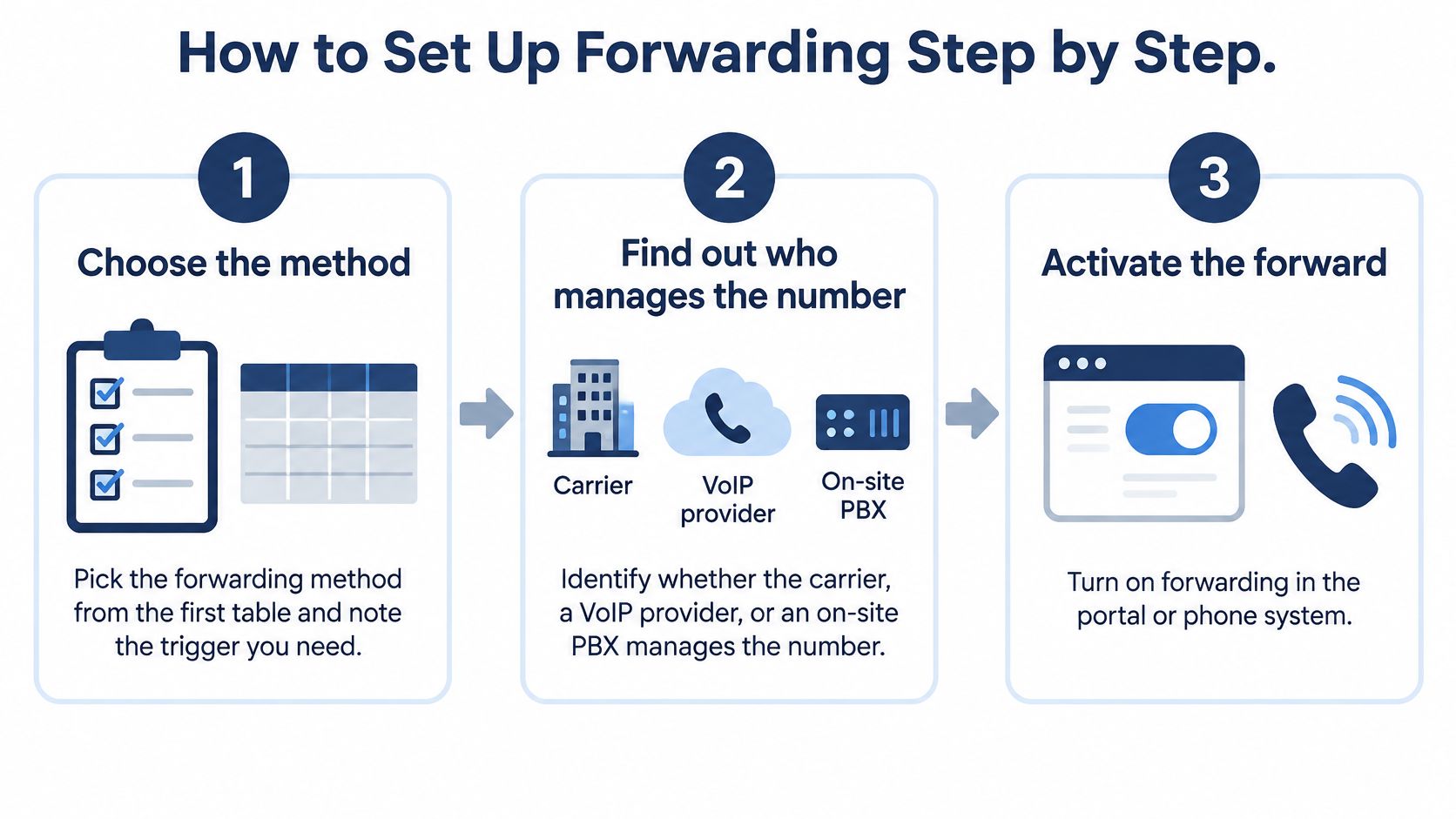
Choose the method and trigger. Write down whether you want immediate diversion, overflow, simultaneous ringing, app delivery, or outage backup. The common mistake is enabling unconditional forwarding when you meant to give the office first refusal.
Identify the number's administrator. Determine whether the carrier, hosted VoIP provider, or on-site PBX controls incoming routing. An extension setting may affect only that employee, while the published main number still follows an auto attendant or group rule.
Activate the correct forwarding control. Use the service's portal or its documented dialing procedure, and read the confirmation message. Don't borrow activation codes from another carrier or country; obtain activation, cancellation, and status instructions from your carrier's current documentation.
Enter the destination in the required format. Use the full cell number, including the country code where required, and follow the portal's formatting instructions. Missing digits or an incorrect country code can cause rejection or misrouting, so read the saved number back carefully.
Verify before leaving it enabled
For a broader hosted-phone deployment, Blowfish Technology's VoIP setup tips for North West SMEs provide additional setup context. Keep the immediate forwarding change narrow enough that you can test and reverse it independently.
Set the no-answer timer deliberately. Give the primary endpoint enough time to answer without making callers wait through an excessive delay. The frequent mistake is letting office voicemail answer before forwarding can begin, so check both settings together.
Call from an outside line. Leave the primary endpoint unanswered and observe when the cell starts ringing, then answer and check audio in both directions. Calling only from an internal extension can miss problems affecting public callers.
Confirm the saved rule and rollback procedure. Reopen the portal or use the carrier's supported status check to verify the active destination and condition. Record how to disable the rule, because a successful test doesn't help the next administrator undo it safely.
Success means the intended endpoint rings at the intended stage, the caller hears the expected greeting or routing, and the saved settings match what you tested. Assign someone to maintain the rule when schedules or staff responsibilities change.
Caller ID, Recording and Privacy on a Personal Cell
Forwarding preserves reachability, but it can remove the business layer from a conversation. An independent technical discussion of mobile failover describes the distinction between direct cellular delivery and app-based calling that can preserve business identity and call history.
Check these boundaries before using a personal handset:
- Caller ID: A callback through the native dialer can reveal the employee's personal number. Confirm the outbound identity rather than assuming it follows the inbound call.
- Recording: Business recording and retention settings may not cover an external forwarded leg. Verify coverage and any applicable consent requirements.
- Voicemail: Messages may land in personal carrier voicemail, outside company retention and transcription.
- Call logs: The business system may record the diversion without capturing the complete conversation or subsequent callback.
- SMS: Voice forwarding doesn't establish a text-message route. Confirm where business texts arrive and who retains access.
Keep business access separate
Our SnapDial app lets users answer office calls from anywhere and place outgoing calls from a cell that appear to come from the office. This supports the privacy goal expressed by website reviewer Jansen A.: “I do not have to give out my personal number for making and receiving calls.”
Use business caller ID services to evaluate identity separately from delivery. For any app, verify recording, logs, and voicemail coverage rather than treating installation as proof.
Remove forwarding destinations, revoke app access, and reassign responsibility when someone leaves. A lost phone also requires prompt access review and revocation.
Before approval, establish which outbound number appears, which recording and logging policies apply, and who can remove forwarding.
Fix Forwarding Failures Before Customers Notice
Find forwarding failures with controlled tests rather than waiting for customer complaints. Start with a call that goes straight to voicemail: determine which mailbox answered before changing a timer.
Forwarding adds another call leg. The ETSI specification for communication diversion describes forwarding signaling and notifications, which is why caller-ID presentation and records shouldn't be assumed identical across networks.
Match the symptom to the route
Forwarding symptoms, causes and fixes
| Symptom | Likely cause | Fix |
|---|---|---|
| Calls go straight to voicemail | Destination is silenced, unavailable, or already diverting; voicemail timing conflicts | Identify the mailbox, check availability, and coordinate forwarding and voicemail timers |
| Customer sees a personal number | Employee returned the call through the native cell dialer | Use a business app or business-controlled outbound presentation number |
| Forwarded calls never arrive | Incorrect destination or number format | Re-enter the complete number and test externally |
| Forwarding stops after a few days | A service change may have altered provisioning or cleared the rule | Check activation with the carrier and restore the intended configuration |
| Calls loop between numbers | Forwarding destinations point back to each other | Remove the circular route and define a final destination |
| Voicemail is missing or not transcribed | The answering mailbox isn't covered by the business voicemail service | Correct the mailbox route and leave a fresh test message |
A short no-answer timer usually makes forwarding happen sooner. Lengthening it won't repair an unavailable destination. First distinguish office voicemail answering too early from cell voicemail answering immediately.
Run an end-to-end test
Have an outside caller place the call while a colleague watches the destination and available call logs. Test original caller-ID display, business-hours schedules, busy and unanswered conditions, an unreachable endpoint, voicemail, and a return call.
Use the mobile networks your staff use. An answer on one carrier doesn't confirm behavior on another, and a successful inbound call doesn't prove the callback uses the intended identity.
For each change, repeat the specific failure case and record the outcome. Rerun the complete check after a carrier-plan change, SIM swap, replacement handset, or routing edit.
Emergency Calls and Location When You Are Away
Inbound continuity and outbound emergency calling are separate systems. Forwarding a business number to a cell doesn't set the location transmitted when someone places an emergency call from that device.
For covered U.S. multi-line telephone systems, the FCC's emergency-calling guidance addresses direct 911 dialing, notification, dispatchable location, and off-premises devices associated with those systems. Applicability depends on the system and relevant requirements; these aren't universal rules for every phone worldwide.
Consider an employee visiting a customer site. If they call through a business app whose emergency-location configuration still identifies the main office, they shouldn't assume the dispatcher receives their current address. A call through the handset's native cellular dialer follows a different emergency-calling path, so don't treat the app and cellular service as equivalent.
A customer successfully reaching an employee says nothing about whether emergency services can locate that employee.
Document the emergency route
Include emergency calling in the deployment checklist:
- Verify direct access where applicable. Confirm the required dialing behavior through your administrator's and provider's approved verification procedure. Don't place an uncoordinated live emergency test call.
- Maintain dispatchable locations. Keep site addresses and necessary location details current, including relevant suite or floor information.
- Document app and cellular behavior. Specify what employees should use during an office outage and how location is handled for each route.
- Train staff to state their location. Employees working away should be ready to give the current address and explain where help is needed.
Use the E911 VoIP service information as a starting point for reviewing your business setup, not as a substitute for confirming each endpoint's configuration. For international teams, check local emergency numbers, location requirements, and telecom obligations rather than applying U.S. guidance everywhere.
Three Forwarding Setups in Practice
Say Maya, a solo consultant, wants client calls on her cell while she's away from her desk. She chooses unconditional carrier forwarding during client hours and documents how she'll switch back afterward.
A desk-to-mobile routine should work without requiring her to sit beside the office phone.
Her acceptance test includes an outside call during client hours and another after the planned switch. Before going live, she also checks the callback identity; simplicity is useful only if she's comfortable with the privacy trade-off.
A hybrid office and an on-call team
In another hypothetical setup, Cedar Design's staff work between home and the office. They choose business-app delivery, configure a shared outbound identity, and verify an answered home-working call and its required recording in the portal. Their trade-off is dependence on working data connectivity and whatever user licensing their chosen service requires.
A support team, Harbor Support, needs the desk answered first and an on-call destination afterward. It uses no-reply forwarding with supported scheduling, then tests an unanswered call after closing. The important result isn't merely that the cell rings, but that the designated business mailbox handles the final unanswered call.
For a visual companion to these routing examples, watch the following video.
A practical setup can combine methods: app delivery for everyday work, conditional routing for overflow, and an independently configured backup for outages.
Confirm Your Setup Before Your Next Missed Call
Approve the entire call path, not just a successful ring. An accountable administrator should be able to identify where each call goes, what gets retained, and how access is removed.
Use this final acceptance checklist:
- Select the route that matches the missed-call pattern and the office's answering priorities.
- Verify callback identity from the customer's receiving phone, not just the employee's app screen.
- Confirm records for the actual route, including recording, logs, and the final voicemail destination.
- Complete outside-line testing across normal operation and the failure conditions your team needs covered.
- Review emergency configuration for each site and relevant mobile endpoint, including direct access where applicable.
- Assign offboarding ownership for forwarding removal, app deactivation, and number reassignment.
If the service administrator can't explain outbound identity, recording coverage, and forwarding removal, don't approve the configuration unchanged. Resolve those gaps or choose a route with clearer controls.
Confirm the method and its trade-offs first, then activate forwarding and test it before the next missed call.
Our technicians handle setup, configuration, and replacement of your existing business VoIP system from start to finish, at no cost to you. Visit SnapDial to discuss a mobile-ready calling setup, or contact our support team at (888) 881-7495 or help@snap-dial.com with your routing, caller-ID, and recording requirements.