
Your phone system is probably a beige cabinet in a closet, and the one person who knew how to program it left the company two years ago. A vendor has told you it's time to move to the cloud, the quote looks reasonable, and nobody has explained what you'd be depending on after the switch. That gap is where most phone migrations go wrong.
An IP private branch exchange isn't a feature list. It's a set of dependencies: electricity, your internet link, your phone numbers, your recordings, your emergency calling path, and your right to walk away. Understand those six things and the sales conversation gets much shorter.
What an IP Private Branch Exchange Really Is
Say a 40-person accounting firm runs every call through a receptionist and a cabinet in a closet. Internal calls never leave the building. Outside calls go out over a handful of shared lines. When that cabinet becomes software running on the same network as the file server and the printers, the daily behaviour barely changes, but the plumbing underneath it changes completely.

Think of a building's mail room. Internal envelopes move between offices without ever reaching the post office. Outside letters get sorted and handed to the postal service. A PBX does exactly that with calls, and a technical study from India's Department of Telecommunications describes a PABX as an in-house switching system that connects an organization's internal telephones and links them to the public telecom network through external interfaces.
The lineage matters more than the label
The IEEE Communications Society's history of the PBX traces the origin to the first private switchboard service in Richmond, Virginia, where operators manually connected calls for attorneys. During the 1930s, smaller offices increasingly replaced manual switchboards with key telephone systems, and by the 1970s private automatic branch exchanges had replaced many human operators. The major shift toward IP-PBX came in the 1990s, when voice processing began moving onto Internet Protocol networks.
That same history explains why the core functions survived: extension dialing, call transfer, routing, and access to the public telephone network. What changed is transport (packets instead of dedicated circuits) and control (software instead of wiring). The Department of Telecommunications study notes the progression from analog to digital to IP technology, with IP terminals supporting conference bridging, automated directories, centralized messaging, multi-location operation, instant messaging and application sharing.
An IP PBX is a software-controlled version of a PBX, not a new category of telephone.
Because voice now rides your data network, the quality of that network becomes part of the phone system. If your sites are still waiting on fibre or fixed wireless, it's worth checking regional directories to find broadband infrastructure builders before you commit to a migration date, since the carrier's build schedule will set your timeline, not the phone vendor's.
IP PBX Compared With Traditional and Cloud Phone Systems
| Criteria | Traditional PBX | On-premise IP PBX | Hosted cloud PBX |
|---|---|---|---|
| Core hardware | Dedicated PBX cabinet and proprietary phones | Server or appliance on your network plus IP phones | Provider data centre plus IP phones or softphones |
| Upfront cost | High hardware and installation cost | Moderate to high server and licence cost | Low, mainly a monthly subscription |
| Maintenance | On-site technician for most changes | Your IT team handles patches and backups | Provider manages updates and infrastructure |
| Adding a new site | Physical lines and equipment at the site | Network link and local configuration | New users added in the admin portal |
| Remote workers | Limited, usually through call forwarding | Possible through VPN and softphones | Native through apps and cloud call routing |
| Outage exposure | Local power and copper lines | Local power, internet link and server | Internet link and provider uptime, so failover planning matters |
Read the maintenance row first, because it's the one that decides your total cost. A traditional cabinet ties most changes to a technician visit. An on-premise IP PBX hands your IT team a server that needs patching, backups and monitoring, which is real work even when the licence is paid for.
The adding-a-site row is where multi-location companies feel the difference. Physical lines and equipment take weeks. A network link and local configuration take days. A new user in an admin portal takes minutes, and that's the practical reason hosted systems spread fastest among businesses with several offices or staff working from home.
The market has moved that way for a while. Astute Analytica valued the global hosted PBX market at USD 14.3 billion in 2024 and projects USD 39.4 billion by 2033, an 11.9% CAGR, according to a 2025 roundup of cloud PBX statistics.
The outage row deserves the most suspicion. Copper lines carried their own power, so an old cabinet often kept working through a broadband failure. Once voice depends on your internet link and a provider's uptime, you've traded one failure point for two.
Rule of thumb: the more sites and remote staff you run, the more the cloud model's administration advantage outweighs the loss of local control. A single office with a strict on-site data policy may still be better served on-premise.
How a Call Travels Through an IP PBX
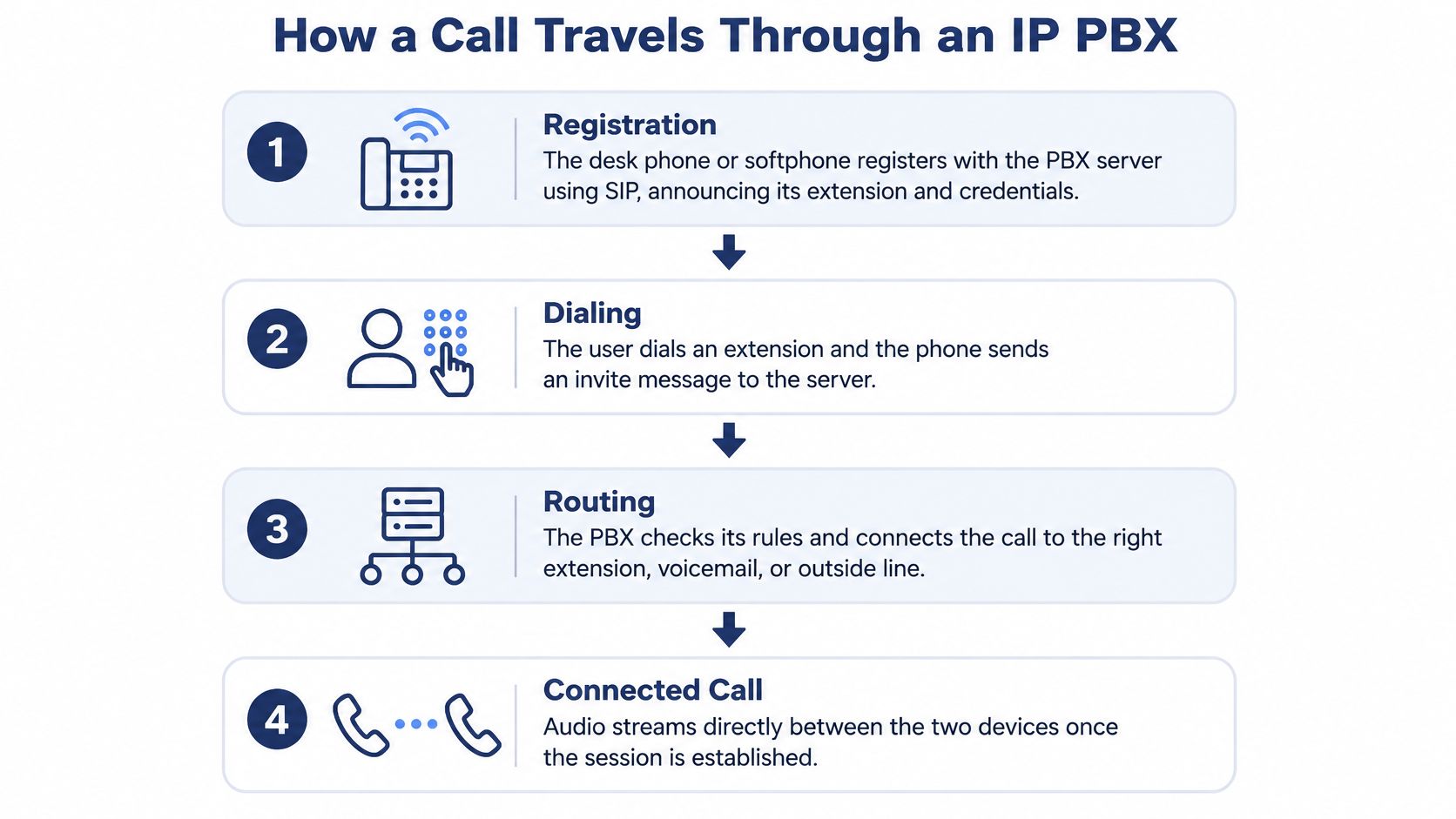
The server acts as a dispatcher. It decides where a call goes and sets up the session, then steps back while the audio packets travel between the endpoints. Keeping those two jobs separate in your head makes troubleshooting far easier.
The six steps, and what each one breaks like
- Registration. The desk phone or softphone registers with the PBX server using SIP, announcing its extension and credentials. If registration fails, the phone shows "unregistered" and can't ring at all, even though the network cable is fine.
- Dial plan lookup. The user dials, and the server checks its dial plan to decide whether the number is internal, an emergency call, or an outside call. A missing prefix rule here is why some users can dial out and others can't.
- Internal routing. For an internal call, the server signals the destination extension, that phone rings, and voice then flows as RTP packets. One-way audio on internal calls usually points to a network path problem, not a server problem.
- Trunk handoff. For an outside call, the server sends signaling through a SIP trunk to the carrier, which connects the call to the public telephone network. When every internal call works but no outside call does, the trunk is the suspect.
- Codec negotiation. The codec compresses voice before packetization. G.711 gives clearer sound and uses more bandwidth, while G.729 uses less bandwidth at some cost in quality. Mismatched codec settings between phone and trunk produce calls that connect and then drop.
- Teardown and logging. When the call ends, signaling closes the session and the server writes call logs and any recording. Missing recordings after an otherwise normal call usually mean the recording rule wasn't applied to that route.
Reading the symptoms
Registration failures are per-device. Trunk failures are system-wide. Audio failures are network-wide but often intermittent, which is why they're the hardest to reproduce on a support call.
Write down which of those three patterns you're seeing before you phone your provider. "One extension shows unregistered" gets a different fix from "nobody can dial out", and saying "the phones are down" gets you a callback queue instead of an answer.
One more distinction worth holding onto: the server can be perfectly healthy while calls sound terrible. Signaling and media take different paths, so a working dial tone tells you nothing about audio quality.
Core Features That Replace Hardware
The features that used to require cards, cabinets and wiring are now settings. Group them by how staff use them, and the list stops feeling overwhelming.

Identity and reachability
Every person can have an extension and a direct dial number, so callers reach them without a receptionist, while outbound calls can share one company caller ID. Call routing and mobile forwarding send a desk line to a cell phone or another site, and softphone apps let a staff member make calls that appear to come from the office number rather than their personal mobile.
Greeting and distributing calls
The auto attendant answers with a recorded greeting, and IVR menus route callers by department or by hour. Support teams add queue management, queue callback and wait-time announcements, so a caller in line hears something useful instead of silence. Our own hosted service handles this side through unlimited IVRs, smart queue management, real-time queue stats and queue callback.
Messages, records and self-service
Visual voicemail delivers messages by email, app or web portal, often with transcription, so a message becomes something you can skim in a meeting. Call recording and a self-service web portal let a manager change routing, review call logs and pull recordings without opening a ticket.
A dental practice with three sites shows how these combine. During opening hours the main number hits an auto attendant that offers appointments, billing and emergencies, and each option rings a queue at the right site. After hours the same number routes to a clinician's mobile through the app, so the caller sees the practice number and the clinician's personal number stays private.
The catch is ownership. Every one of those behaviours is a software setting somebody has to maintain, review after a staffing change, and document. Fast changes are the benefit. Undocumented changes are the risk, and they arrive together.
Voice Quality, Security and Network Requirements
A new PBX can pass every bandwidth check at installation and still deliver clipped, robotic audio three months later. Voice is unforgiving in a way email and file transfer are not. A packet that arrives late is worthless, a packet that arrives out of order gets discarded, and neither can be retransmitted before the caller notices. Call quality is therefore a property of the whole network path, every hop between handset and far end. Each row below is a dependency the PBX inherits from that path, and a hosted provider can run the server perfectly while your LAN, WAN links or ISP ruin the calls crossing them. Measure each site's path before you migrate, because post-cutover complaints are far harder to diagnose.
| Requirement | Typical target | Why it matters |
|---|---|---|
| One-way end-to-end delay | Below 150 ms | Longer delay makes conversation awkward and interrupts turn-taking |
| Packet loss | Below about 1% | Higher loss causes clipped or robotic audio, even with efficient codecs |
| Jitter | Under 30 ms | Uneven packet arrival causes choppy speech |
| Bandwidth per G.729 call | About 31 kbps | Saves bandwidth with some quality trade-off |
| SIP signaling protection | TLS | Stops eavesdropping on registration and call setup |
| Voice media protection | SRTP | Encrypts and authenticates audio streams |
| Remote administration | IPsec or SSH only | Blocks plaintext admin access |
Fix the network in the order it fails
Start with delay. Cisco's QoS for VoIP design guidance cites ITU-T G.114 in recommending one-way end-to-end delay below 150 ms for high-quality conversational voice, and it holds packet loss to below approximately 1% because even bandwidth-efficient codecs such as G.729 produce audible errors above that level.
Jitter confuses people because extra bandwidth does not fix it. A wide link with erratic queuing works like a wide road with a broken traffic light: plenty of capacity, unpredictable arrivals. The phone's jitter buffer smooths small variation, and anything beyond it becomes choppy speech.
Then protect the packets once they are marked. Classify SIP signaling and RTP media separately, mark RTP with an appropriate DSCP value, and enforce priority queuing on WAN links, VPN tunnels and inter-site routers. Size each site's capacity for its peak simultaneous-call count using the per-call budget in the table, and run a bandwidth requirements calculation per site so a branch office does not inherit a head-office estimate it never matched.
Validate markings end to end. A single switch or provider that resets DSCP silently undoes the entire design.
Then lock down the signaling
SIP puts registration, authentication and call control on an IP network, so good practice for SIP-based VoIP is TLS for signaling, SRTP for media, and IPsec or SSH for remote administration and auditing. Around that core, disable plaintext admin access, place phones and PBX components in a voice VLAN, require strong per-device credentials, and restrict management interfaces to approved networks.
Encryption changes how calls negotiate, so test SRTP through session border controllers, NAT, call recording, conferencing and fax gateways before rollout. Incompatible media negotiation surfaces as failed calls or, worse, silent fallback to unencrypted audio. Log registration attempts, failed authentication and configuration edits, since those logs are how you catch credential theft and toll fraud early. Teams mapping these controls into a wider security programme can use ISO Security's satellite and telecoms resources as a reference for how telecom controls fit an information security management system.
Emergency Calling and Failover Testing
Emergency calling is an operations task with a test plan, not a line in a contract. Run these steps at every site before you sign, and record the results as you go.
- Dial direct from everywhere. Confirm that every desk extension, softphone and remote user reaches emergency services with no prefix and no menu step. Test from the receptionist's phone and from a laptop on the guest network, because those two paths often behave differently.
- Verify the dispatchable location. Check that the system sends an address responders can act on for mobile and remote workers, not just the head office billing address. Ask what the dispatcher sees.
- Test the roaming case. Have someone log in from a second site and confirm the emergency call carries that worker's local address. This is the scenario most systems get wrong by default.
- Pull the broadband at your largest office. Disconnect the primary link during a quiet hour and confirm cellular or secondary-link failover keeps calls working, then time the recovery.
- Pull the power. Confirm a UPS keeps phones, the switch and the local gateway alive, and write down how many minutes you got. Cloud PBX emergency-calling disclosures are explicit that service depends on power and network availability, which makes UPS protection and cellular failover operational requirements rather than upgrades.
- Get the results in writing. Ask for dated failover test results with measured recovery times, and keep them in your business continuity file alongside your own E911 VoIP service checks.
A cheaper IP PBX can be riskier than the cabinet it replaced if nobody documented location ownership, outage procedures and site-by-site testing.
Repeat the broadband and power tests after any change to routing, hardware or carrier. A system that passed in March tells you nothing about the firewall rule someone added in June. Assign a name to each test, not a department, and put the retest date in the same calendar as your fire alarm inspection.
Business Benefits and Trade-offs to Weigh
The benefits are real, and they're conditional. Cost per extension tends to fall as headcount grows because you avoid cabinet replacement and per-site hardware. Adding a site needs a network link and configuration rather than new physical lines. Remote staff get the same call handling through softphones, and managers get one set of reports across every location.
This isn't a fringe pattern. Forrester Research figures reported by No Jitter's analysis of North American business IP telephony adoption show that 23% of North American enterprises had deployed IP-PBX systems in 2007, compared with 14% in 2006, and that 63% of North American enterprise technology budgets included increased year-over-year spending on IP-PBX or hosted IP telephony in 2007, up from 52% in 2006. Organizations weren't just trialling it, they were budgeting for it.
The trade-offs sit on the other side of the same ledger. Your internet connection becomes part of the phone system. Power outages take phones down unless a UPS and cellular failover are in place. Somebody has to own QoS settings, backups and configuration, and that person's time isn't free.
A three-site worked example
Say a company with three offices retires its cabinet and stops paying for hardware at each site. The subscription looks like a clear saving until you add the second internet link at the largest office, the UPS that keeps the switch and phones alive, and the hours your IT contractor spends on priority queuing and quarterly failover tests.
The savings are still there, but they net out only after those costs are paid. Present the comparison to your finance lead that way, with the resilience line items included, rather than comparing a monthly subscription against a hardware quote.
The benefit holds only when someone is named after the sale, with authority over routing, backups and vendor escalation. Write that person's duties into a one-page responsibility sheet and have them sign it.
Check These Points Before You Choose an IP PBX
Cloud doesn't remove dependency, it relocates it. Instead of a cabinet you own, you depend on provider-controlled numbers, recordings, APIs and routing logic. Take these questions into the vendor call and write the answers down.
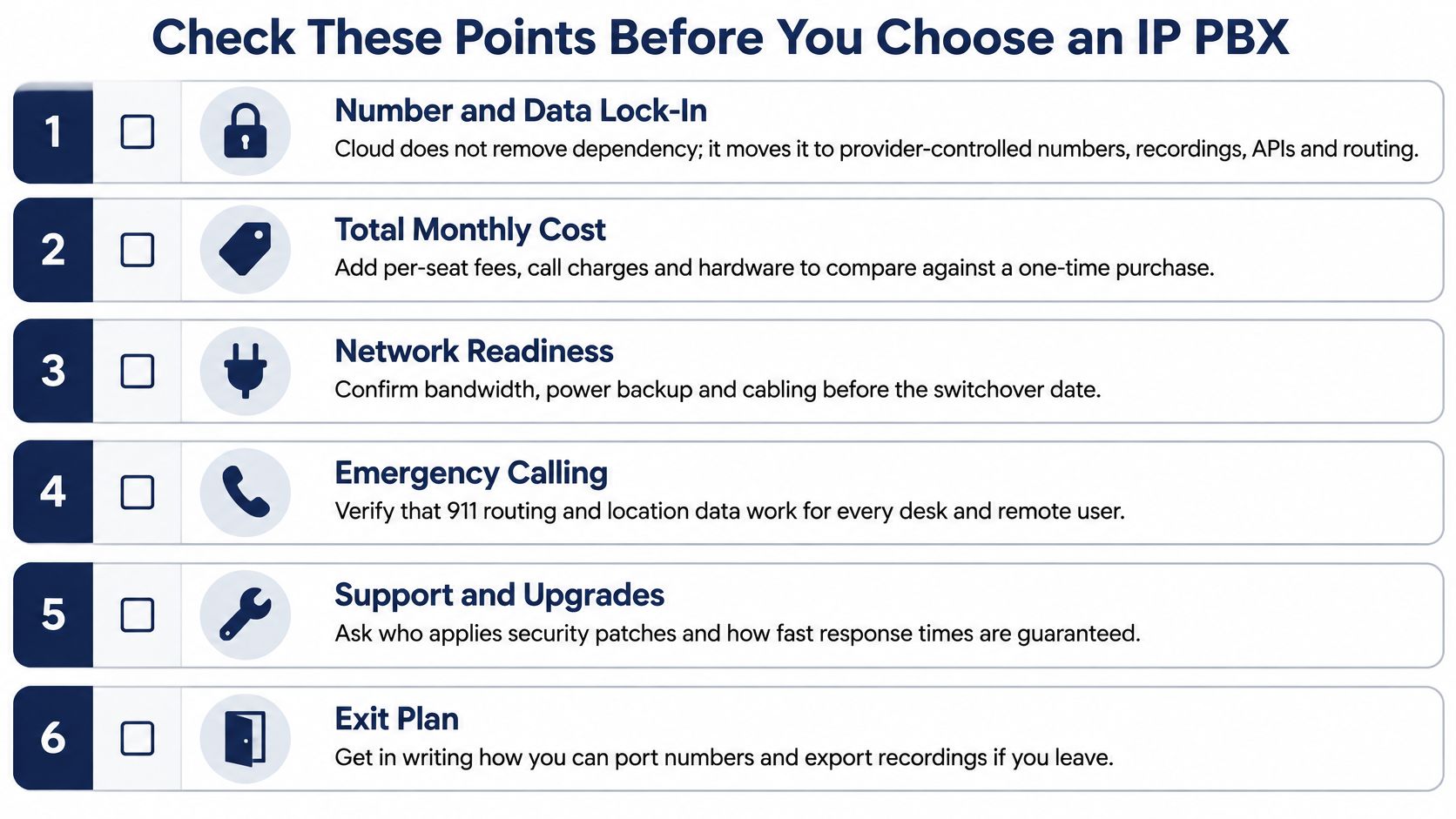
- Export and exit: Can you export configuration and recordings in a usable format, and what's the tested number-porting timeline? Ask for a real example with dates, not a policy statement.
- Backup ownership: Who holds the configuration backup, and can you restore from it independently? The UK National Cyber Security Centre's PBX best practice guidance recommends regularly backing up PBX configuration and data to support recovery after hardware failure or cyberattack.
- Interoperability: Will the system work with your existing SIP phones, trunks, CRM and identity provider, and which integrations depend on undocumented APIs?
- Data residency: Where are recordings and call logs stored, and how are local telecom requirements met for each country you operate in?
- Uptime and incident roles: Is the uptime architecture described in writing, and who does what during an outage or a cyberattack, at what hour?
- Measured failover: Will the provider run a failover test with results before you sign a long-term contract?
On the migration itself, you shouldn't have to assemble this alone. Our techs handle setup, configuration and replacement of your existing VoIP phone system from start to finish at no cost to you, which means the cutover plan and the routing map get built by people who do it weekly.
Run this checklist against your two shortlisted providers this week and request the failover test in writing. Put the answers side by side. Vague answers on exit rights are a disqualifying signal, not a negotiating point.
If you're replacing a legacy cabinet and want the dependencies handled rather than handed to you, we can help. SnapDial provides a hosted cloud VoIP phone service for calling and conferencing, with our techs managing setup, configuration and replacement of your existing system end to end at no cost. Visit SnapDial to request a quote or schedule a call, and bring your checklist so we can answer the exit, backup and failover questions on the first conversation.