
You're probably dealing with one of two situations right now. Either your team likes their desk phones and doesn't want to give them up, but they also want wireless headset mobility. Or someone searched for a “Bluetooth adapter for telephone,” bought the first thing that looked plausible, and discovered too late that consumer landline gadgets, office-phone dongles, and headset bridges are not the same product.
That confusion is normal. The market lumps several very different tools under one phrase, and most product pages don't help. They jump straight into pairing steps or marketing claims without answering the first practical question: what kind of telephone are you trying to modernize?
For IT managers, that question matters more than the Bluetooth logo on the box. A Bluetooth adapter can be a clean, low-disruption upgrade. It can also be a dead-end accessory that adds one more point of failure to a phone deployment. The difference comes down to choosing the right adapter type, matching it to the phone system, and being honest about where Bluetooth helps and where it creates friction.
Untether Your Desk Phone with Bluetooth
A wired handset still works well for a lot of businesses. Reception desks, front offices, exam rooms, small support teams, and executive offices often prefer a physical phone on the desk because it's familiar and dependable. The problem starts when the user needs to move.
A receptionist answers a call, then has to sign for a delivery. A manager is on a long conversation but needs to grab a file. A support rep wants to ask a coworker a quick question without putting the caller on hold. In those moments, the phone itself isn't the issue. The lack of mobility is.
That's where a Bluetooth adapter for a telephone earns its keep. Used correctly, it lets you keep an existing phone workflow while adding wireless freedom through a headset or, in some cases, by using a mobile phone as the call source for existing handsets.
The Three Adapter Types That Get Mixed Together
Most buying mistakes happen because these products are sold under nearly identical names.
| Adapter type | What it connects | Best fit |
|---|---|---|
| Desk phone Bluetooth dongle | An IP phone or office desk phone to a Bluetooth headset | Offices using Yealink-style or similar business phones |
| Landline-to-cell Bluetooth adapter | A mobile phone to existing wired home or small-office telephones | Small offices that want calls to ring on connected handsets |
| Headset bridge with accessories | A phone, base unit, dongle, and sometimes an EHS cable | Enterprise headset workflows with remote call control |
Where Bluetooth Helps Most
Bluetooth is most useful when you want to extend the life of existing telephony hardware without replacing the whole phone estate.
- Keep familiar desk phones: Users don't have to relearn call handling.
- Add mobility selectively: You can enable wireless use for the people who need it most.
- Avoid broad rip-and-replace projects: A targeted accessory is often easier to pilot than a full telephony redesign.
Practical rule: If the user likes the phone but hates being physically tied to it, Bluetooth may be the right fix. If the user hates the phone workflow itself, Bluetooth won't solve the real problem.
The strategic point is simple. This isn't just a convenience purchase. It's a small telephony modernization decision. Done well, it improves daily call handling without forcing an immediate platform change.
How a Bluetooth Telephone Adapter Actually Works
A lot of people think an adapter is just a passive dongle. It isn't. A Bluetooth telephone adapter is a protocol bridge. It takes wired audio or phone-side signaling and converts it into Bluetooth wireless communication, then handles the pairing, authentication, encryption, and profile translation required for the connection to work.
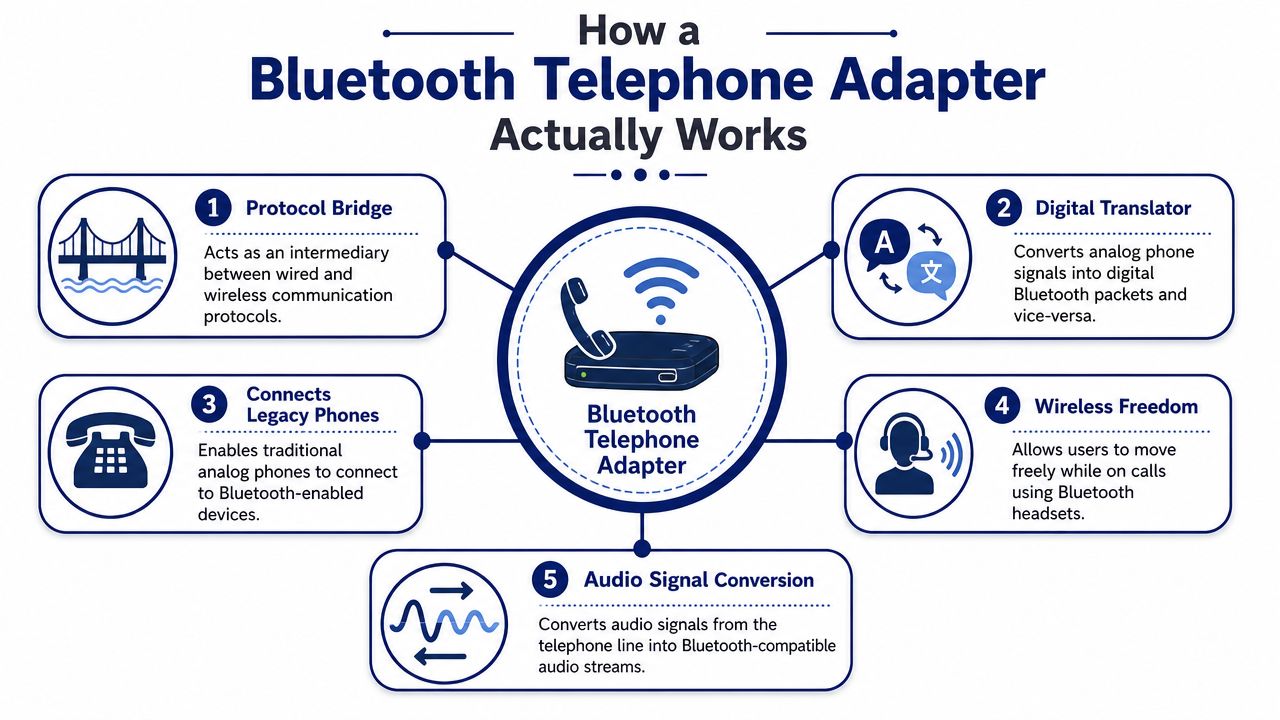
If you manage business telephony, think of it as a translator between two worlds. The phone speaks in one format. The headset or paired device expects Bluetooth behavior, profiles, and security. The adapter sits in the middle and makes both sides usable.
Why profiles matter
Many cheap adapters often fall short. Not every Bluetooth profile is built for telephone audio.
Adapters that support A2DP are centered on audio streaming. That's useful for media playback, but voice calling depends on telephony-oriented profiles such as HSP/HFP, as explained in Avantree's overview of how Bluetooth adapters work. If your goal is business calling, HSP/HFP support matters more than generic Bluetooth compatibility language on the package.
For IT teams working with IP telephony, that same protocol-translation logic applies at the phone level too. If you need a quick refresher on the phone side of the stack, this overview of how VoIP phones work is a useful companion.
Bluetooth itself is mature, but telephony still depends on implementation
Bluetooth was first defined in the late 1990s, operates in the 2.4 GHz band, and had evolved to version 6.0 as of 2024, with data rates progressing from about 1 Mbit/s to 3 Mbit/s with EDR and a practical maximum transfer rate of 2.1 Mbit/s after protocol overhead, as summarized in the Bluetooth technical history. For telephone adapters, the important part isn't raw throughput. It's that the device relies on Bluetooth's own pairing, authentication, PIN-based key generation, and encryption mechanisms.
A Bluetooth adapter isn't adding magic to a phone. It's exposing the phone to Bluetooth's strengths and weaknesses.
Range in the real office
Theoretical range numbers mislead buyers. In practice, a consumer or office adapter often behaves like a Class 2 device, with real-world use commonly limited to around 10 meters, while some devices are Class 1 with longer line-of-sight potential, according to the same Avantree explanation. Office walls, cabinets, metal furniture, neighboring wireless gear, and where the user wears the headset all matter more than the number printed on the box.
That's why two installations with the same adapter can behave very differently. One office gets stable call audio. Another gets random drops whenever the user walks toward a conference room or copier area.
Boosting Productivity with Business Use Cases
The best Bluetooth deployments solve a daily nuisance that keeps repeating. They aren't impressive on a spec sheet. They're useful at 10:15 on a Tuesday when a user needs to stay on a call and keep moving.

Reception and front desk roles
Front-desk users benefit first because their work is never fully stationary. They answer calls, greet visitors, handle deliveries, and coordinate with staff. A wireless headset tied to the desk phone lets them keep the call active while doing the rest of the job.
That matters less for “mobility” in the abstract and more for reducing awkward call handling. The caller doesn't hear fumbling, hold music, or repeated transfers while the receptionist physically reaches for something across the room.
Managers and power users
Executives and supervisors often spend long stretches on calls. Many pace while thinking. Some need to pull paperwork, check a second screen, or step to a whiteboard. For them, a Bluetooth adapter can make the desk phone less rigid without changing the calling habit they already trust.
A similar pattern shows up with support teams. One agent is on a customer call and needs a quick answer from a nearby specialist. Walking a few steps with the conversation still active is often faster than putting the customer on hold, messaging someone, and restarting the explanation.
The strongest Bluetooth use case is short-distance movement during live calls. It's not replacing a mobile-first workflow. It's smoothing the one you already have.
Turning a mobile phone into the office line
There's another class of use case that's easy to miss. Some Bluetooth telephone adapters pair a mobile phone to existing household or small-office telephones, allowing connected phones to make and receive calls much like a traditional landline setup. A demonstration of a Cell2Jack-style device shows calls working “the same way as if they were connected to a real landline,” and related guidance notes that this category can let users make and receive cell calls on connected phones in a home or small office through a paired telephone adapter setup.
For a very small office, that can be practical. One mobile line becomes the source for multiple familiar handsets. It preserves the feel of a wired phone system without maintaining a traditional landline.
Don't ignore the headset itself
An adapter only fixes part of the user experience. The headset still determines comfort, microphone quality, and how well the user can work through a full day. If you're standardizing accessories for office staff, it helps to compare purpose-built reliable business headsets instead of treating every Bluetooth headset as interchangeable.
Cheap consumer earbuds may pair. That doesn't make them suitable for all-day office telephony.
Ensuring Compatibility with VoIP and IP Phones
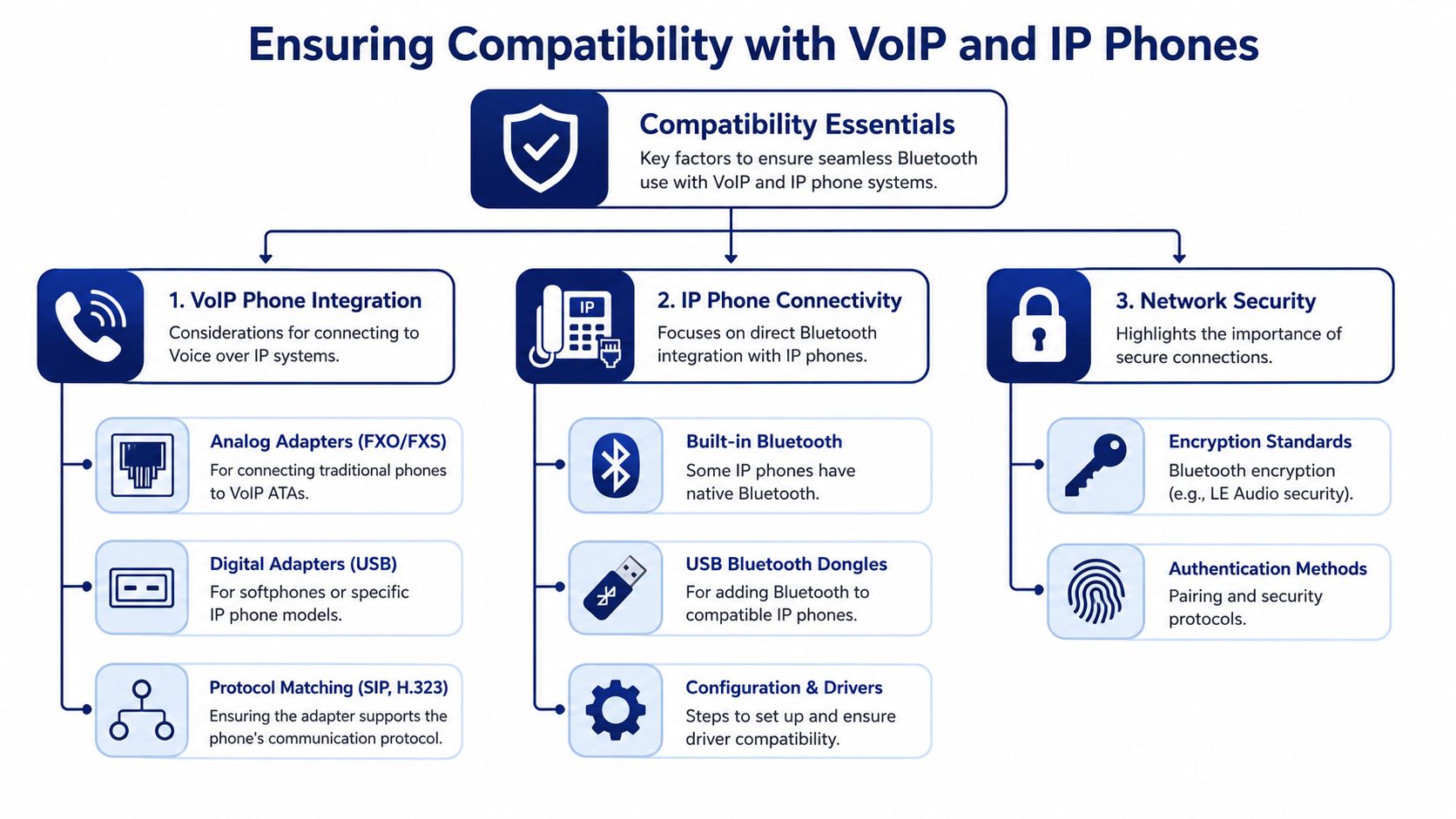
Compatibility is where most Bluetooth projects go sideways. Buyers search for one phrase, “Bluetooth adapter for telephone,” and assume the product universe is unified. It isn't. You need to match the adapter to the phone type, the port type, and the workflow the user expects.
Analog phones, IP phones, and cloud systems are different problems
An analog phone environment usually needs a different path than an IP phone environment. If you're working with analog handsets and trying to integrate them into a newer voice setup, the phone-side conversion may be the bigger issue, not Bluetooth itself. In those cases, understanding the role of a VoIP to analog phone adapter is often more important than shopping for Bluetooth first.
An IP phone is more likely to support Bluetooth through a vendor-specific USB dongle, built-in radio, or headset integration path. That's common with business phones that expose accessory support through firmware and approved peripherals.
A cloud PBX doesn't automatically change the Bluetooth question. If the endpoint is still a desk phone, the compatibility decision happens at the handset and accessory layer. Cloud service doesn't erase hardware constraints.
A practical way to sort adapter classes
| Your environment | What to check first | Common outcome |
|---|---|---|
| Traditional analog handset | Whether you're actually solving analog-to-digital telephony before Bluetooth | Bluetooth may be secondary |
| IP desk phone | Approved USB dongles, firmware support, headset profile support | Most likely fit for office headset use |
| Small office using mobile phones | Whether a landline-to-cell adapter matches the number of phones and workflow | Good fit for simple setups |
The Yealink-style example
This is where vendor-specific details matter. A Yealink-compatible dongle sold for business VoIP use advertises Bluetooth 4.0+HS, EDR support at 2 Mbps and 3 Mbps, backward compatibility with Bluetooth 1.1 to 3.0, wideband audio, and an approximate 33-foot wireless range through the phone's USB port, according to the Yealink-compatible adapter listing.
Those details are useful, but they don't guarantee success by themselves. They tell you the dongle is built for a desk-phone environment and may improve compatibility and voice fidelity. Final performance still depends on the phone firmware, headset support, office RF conditions, and whether the phone's Bluetooth stack behaves well with the accessory.
Buy the adapter your phone vendor expects, not the adapter that simply claims broad Bluetooth support.
What to verify before ordering
- Phone model support: Check whether the exact desk phone model supports Bluetooth via USB, native radio, or not at all.
- Firmware path: Confirm the phone firmware supports the accessory. Hardware support on paper isn't enough.
- Voice profile fit: Make sure the workflow is for calling, not just audio streaming.
- Remote call control: If users expect answer and hang-up from the headset, check whether extra hardware is required.
- Deployment environment: Consider dense offices, RF noise, and user movement patterns before promising a wireless experience.
For SMBs, this is also where platform choice matters. If you're already evaluating a hosted phone system, one practical option is choosing a provider that supports managed cloud calling and curated IP phones rather than trying to bolt accessories onto unsupported endpoints. That doesn't eliminate Bluetooth trade-offs, but it does reduce guesswork around phone-side compatibility.
Setup Pairing and Security Best Practices
Once you've picked the right adapter class, setup is usually straightforward. Day-two reliability is the harder part. The teams that get good results treat Bluetooth like part of the voice environment, not like a disposable accessory.
A clean setup sequence
Start simple. Connect the adapter to the intended port, power on the phone or base if needed, and put the adapter into pairing mode according to the vendor instructions. Then pair the headset or mobile device in a quiet area, close to the phone, before testing live calls.
After that, test the actual business workflow. Don't stop at “paired successfully.” Verify inbound calls, outbound calls, mute behavior, hold behavior, and whether remote answer or hang-up functions work the way the user expects.
A short acceptance checklist helps:
- Confirm physical fit: USB, headset jack, or base connection must match the phone's design.
- Pair one device first: Avoid testing with multiple nearby Bluetooth endpoints at the same time.
- Run a real call: Internal test calls are useful, but external calls reveal more about actual audio behavior.
- Walk the workspace: Have the user move the way they normally move.
- Document the setup: Record the adapter model, headset model, firmware state, and any extra cabling.
Security and governance
Bluetooth uses pairing, authentication, and encryption mechanisms built into the standard, including PIN-based key generation in classic implementations, as noted earlier from the Bluetooth technical background. That doesn't make every deployment automatically secure. It means you still need sane operational discipline.
- Pair in a controlled space: Don't pair devices in a crowded open office if you can avoid it.
- Use prompted security steps: If the device asks for a PIN or confirmation, don't bypass the process casually.
- Limit ad hoc re-pairing: Users shouldn't constantly swap headsets and phones without IT oversight in shared environments.
- Keep firmware current: Phone firmware and accessory firmware both affect stability and compatibility.
Shared desks are where Bluetooth gets messy fastest. If multiple users rotate through the same station, define who owns pairing and who is allowed to change it.
Troubleshooting what usually goes wrong
Poor Bluetooth call quality usually comes from one of four places: wrong adapter type, incomplete compatibility, RF interference, or unrealistic movement expectations.
If the user reports robotic audio, clipping, or random disconnects, check the basics first:
- Interference nearby: The 2.4 GHz environment may be crowded with other devices.
- Obstructions: Metal shelving, walls, and workstation layout can cut practical range fast.
- Unsupported accessory behavior: The headset may connect but still not expose the telephony controls you need.
- Overcomplicated chains: A base, dongle, EHS cable, and phone combination creates more failure points than a direct supported pairing path.
A lot of “Bluetooth problems” are really design problems. The wrong device was chosen for the job, or the environment was never suited to Bluetooth in the first place.
A Purchasing Guide for IT Managers
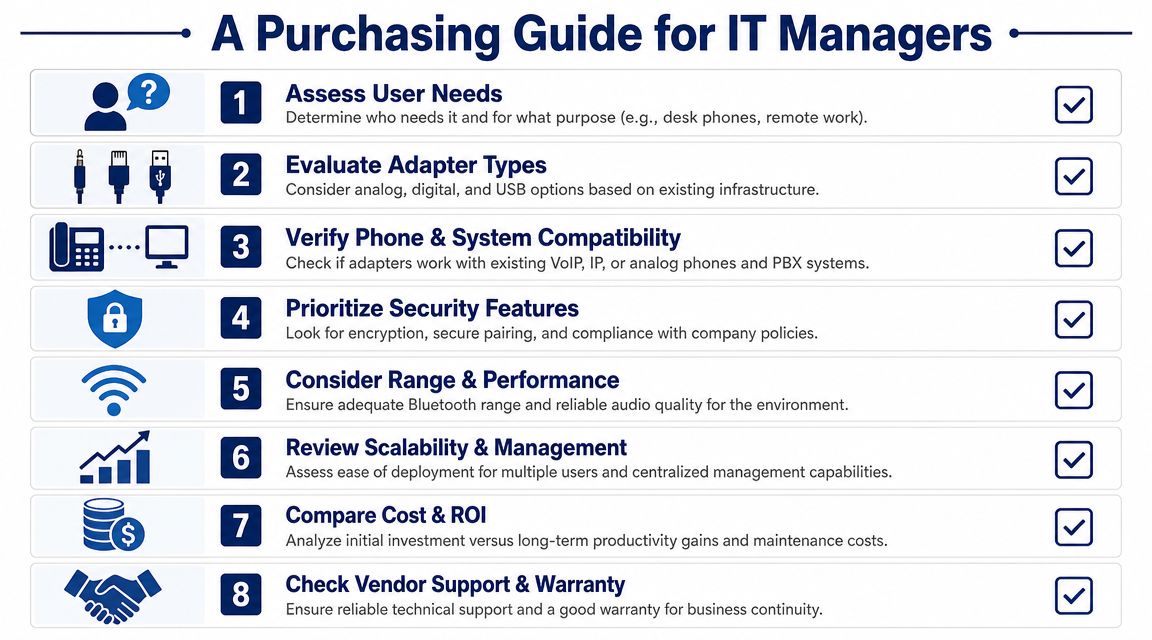
IT managers shouldn't buy Bluetooth telephone adapters as impulse accessories. They should buy them the same way they buy any endpoint component. Define the use case, verify compatibility, assess reliability risk, and decide whether Bluetooth is the right answer at all.
Start with the decision tree
The market confusion is real. A forum discussion around office-phone Bluetooth setups shows that buyers often have to sort through base units, dongles, phone-specific requirements, and EHS cable questions, and it explicitly notes that in the simplest setup “the phone needs to be a model that has a headset jack,” highlighting the wider confusion between consumer and enterprise product categories in real-world office phone adapter discussions.
Use this decision sequence before approving a purchase:
- If the goal is wireless headset use on an office IP phone, look for a vendor-supported desk-phone Bluetooth dongle.
- If the goal is making cell calls ring on wired household or small-office phones, look for a landline-to-cell Bluetooth adapter.
- If the goal is remote call control on enterprise headsets, expect a more involved setup that may include a base unit and extra cable.
Ask whether Bluetooth is the wrong answer
Bluetooth is convenient, but convenience isn't the same as operational fit.
For dense offices, shared seating, reception areas, and call-heavy support environments, I'd always compare Bluetooth against alternatives such as wired headsets, DECT systems, or moving users to a native desktop and mobile calling workflow on a modern cloud platform. If the organization is already reviewing endpoints, this guide to the best VoIP phones for small business helps frame the hardware side of that decision.
Use a business-grade checklist
Don't approve a purchase unless you can answer these clearly:
- Who is the user: A receptionist, executive, agent, or occasional caller all need different things.
- What phone is on the desk: Exact model matters. Generic “works with VoIP” language doesn't mean much.
- What behavior is required: Audio only, or answer and hang-up from the headset too?
- How stable must it be: Front-desk and support roles usually need less experimentation.
- What happens if it fails: If the answer is “calls stop getting handled cleanly,” choose the more predictable path.
Bluetooth should be the first choice only when it simplifies the user's day. If it adds extra accessories, uncertain range, and harder support, it's the wrong modernization path.
For many small and mid-sized businesses, the better long-term move is not adding more adapters to aging phones. It's standardizing on supported IP phones, mobile apps, or a managed cloud voice platform and then adding Bluetooth only where it fits the endpoint strategy.
If you're weighing whether to keep existing desk phones, bridge analog handsets, or move to a cloud calling model, SnapDial is one option to evaluate. It provides hosted business phone service, supports Yealink IP phones, and can help IT teams decide when it makes sense to modernize the phone system itself instead of layering more accessories onto legacy hardware.