
Most support problems don't start with rude customers or weak agents. They start with a broken system.
In 2024, 61% of customers said they preferred contacting brands through digital channels, up from 45% in 2023, according to Nextiva's customer service statistics roundup. That's a fast shift in a single year, and it changes the operating model for any business still relying on a phone-only service desk.
If you run an SMB, you've probably seen the symptoms already. Customers send a website message, then call because nobody answered fast enough. An employee opens email in one tab, texts from a mobile phone in another, and tries to remember what happened in the last call. Someone on your team asks the customer to repeat the order number, then repeats the same questions again after a transfer. The customer experiences that as disorganization. The team experiences it as chaos.
Digital customer care fixes that only when it's built as an operating system, not as a pile of channels. A chatbot alone won't solve it. A social inbox alone won't solve it. A better phone tree alone won't solve it either. What works is a connected setup where self-service, messaging, and voice all feed the same conversation history and route into the same service workflow.
That's why the phone system still matters so much. In a modern support model, voice isn't the opposite of digital. Voice is the escalation path when digital journeys need help. If that handoff breaks, your entire customer experience breaks with it.
The Irreversible Shift to Digital Customer Care
The old assumption was simple. Serious issues go to the phone, and digital channels handle the leftovers. That assumption no longer holds.
When 61% of customers prefer digital contact and that preference jumps sharply year over year, support leaders have to treat digital customer care as the default front door for routine service, not a side project. The practical meaning is straightforward. Customers want to start where it's convenient for them, often on a website, in chat, through messaging, or from a mobile device, and they expect the business to keep up.
Why phone-only support breaks under modern demand
A phone-only setup creates friction in places owners often underestimate:
- Queues hide simple work: Customers call for order status, appointment changes, password help, or billing questions that could have been handled faster through self-service or chat.
- Agents lose context: Staff bounce between voicemail, inboxes, spreadsheets, and memory.
- Escalations become expensive: Every issue enters the same pipe, whether it needs a human or not.
The result isn't just higher workload. It's a slower, less predictable experience for customers and a more fatiguing one for employees.
Practical rule: If customers keep switching channels to get one answer, you don't have a staffing problem first. You have a workflow problem.
What the shift means for SMB owners
Digital customer care means designing service around convenience, continuity, and speed. It also means treating your communications tools as one system instead of separate products. That's the logic behind unified communications for growing teams. When calling, messaging, routing, voicemail, and team availability live in one environment, customers stop feeling the seams between departments and channels.
A lot of businesses delay this shift because they think “digital” means expensive transformation. In practice, the bigger risk is staying fragmented. Every time a customer repeats themselves, waits for a callback that never comes, or abandons a support attempt because the handoff failed, the business absorbs the cost in missed revenue, lower retention, and staff time wasted on preventable rework.
What Digital Customer Care Really Means Today
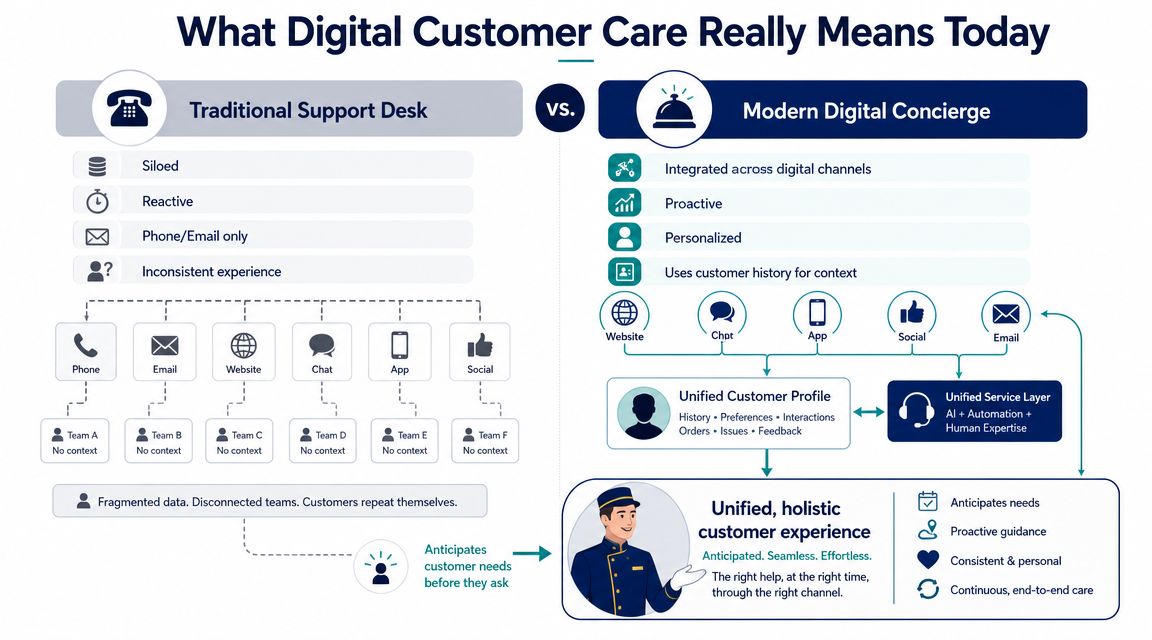
A traditional support desk works like a motel front counter with sticky notes taped to the monitor. One line rings. One inbox fills. One employee tries to keep everything straight. If a customer comes back later, the business starts over.
Modern digital customer care should work more like a hotel concierge. The concierge doesn't just answer one question. They know who the guest is, what happened earlier, what was promised, and what the next step should be. That's the difference between channel-based service and customer-based service.
The channels matter less than the continuity
Most businesses can list their channels. Fewer can explain how those channels work together.
A working digital customer care setup usually includes web chat, email, SMS, social messaging, self-service content, and voice. But its true value doesn't come from checking those boxes. It comes from preserving context as a customer moves between them.
Here's how those channels tend to play different roles:
| Channel | Best use | Common failure |
|---|---|---|
| Live chat | Fast pre-sale and support questions | Treated as a dead-end instead of a handoff path |
| Detailed issues and documentation | Slow response and poor ownership | |
| SMS or messaging | Updates, confirmations, simple back-and-forth | No tie-in to customer history |
| Self-service portal | Repetitive questions and basic tasks | Content is outdated or hard to search |
| Voice | Complex, urgent, emotional, or high-value issues | Agents receive no digital context |
A business doesn't need every channel on day one. It does need a clear role for each channel it offers.
Digital-first doesn't mean digital-only
Many guides falter at this point. They talk as if phone calls disappear once chatbots and portals are live. Service doesn't function that way.
Recent guidance says digital-first should not mean digital-only, and that self-service should be backed up by human support for complex or high-value interactions. It also stresses using journey analytics to find where customers abandon web or app flows and end up calling, as noted in VereQuest's guide for call center leaders.
That point matters because digital journeys fail in predictable ways. The bot can't authenticate the person. The portal article is close but not enough. The shipping issue needs judgment, not just information. When that happens, the phone call becomes the rescue path.
The goal isn't to eliminate human contact. It's to make sure human help starts with context instead of confusion.
What works and what usually doesn't
What works:
- A simple service map: Decide which issues belong in self-service, which belong in messaging, and which should route to live support immediately.
- Visible escalation paths: Give customers a clear next step when digital tools can't finish the job.
- Ownership across channels: One team should be accountable for the full journey, not just for answering “their” queue.
What usually doesn't:
- Channel sprawl: Adding chat, text, social, and email without staffing or process changes.
- Bot-first thinking: Forcing automation into situations that need empathy or judgment.
- Disconnected tools: Letting each channel create its own version of the customer record.
The Technology Stack That Powers Modern Care
Most SMBs don't need a giant enterprise architecture diagram. They need a clear mental model.
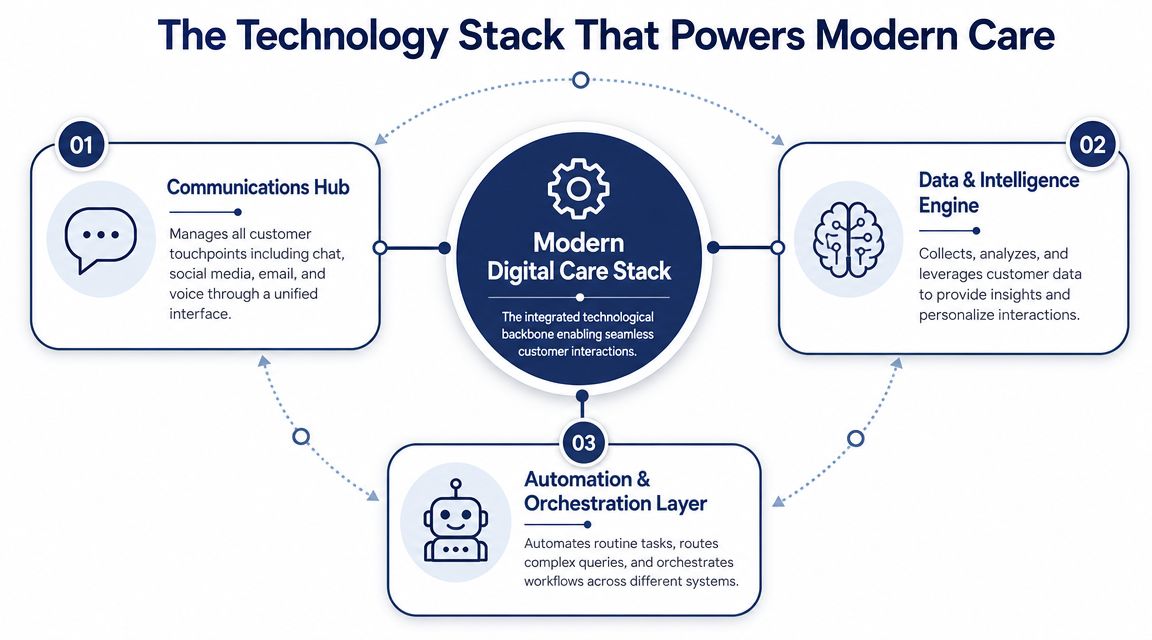
The easiest way to think about digital customer care technology is as three connected layers. One layer handles conversations. One layer handles data and insight. One layer handles automation and workflow. If any of the three is missing, service starts to feel stitched together.
The communications hub
Many teams make the wrong buying decision. They shop for chat software, then email software, then a phone system, then a scheduler. The result is a stack of tools that all “communicate” but don't coordinate.
The communications hub should unify voice with digital touchpoints and make routing, callback handling, voicemail, queue logic, and agent availability visible in one place. For SMBs, that often means a cloud phone platform tied closely to contact center functions and CRM data. In practical terms, the phone system becomes the central nervous system for escalations, overflow, and continuity.
That's where a platform like SnapDial fits. It's a cloud phone system with hosted VoIP, IVR, call routing, queue callback, visual voicemail, reporting, mobile apps, and call center features that can serve as the service backbone while digital channels and CRM workflows connect around it.
The data and intelligence engine
If the communications layer is the nervous system, the CRM and analytics stack is the memory.
You need one place where customer identity, recent interactions, case status, and relevant account details are accessible during service. Without that, agents are guessing. With it, the business can route more intelligently and respond with context.
A technically mature digital setup also relies on automation plus analytics to improve speed and quality, with chatbots, self-service portals, knowledge bases, and telemetry from digital interactions helping teams spot recurring friction and service bottlenecks, as outlined in NICE's overview of digital customer service.
The automation and orchestration layer
AI belongs here. Not as a novelty, and not as a replacement for support teams.
Salesforce reports that 79% of service leaders say investment in AI agents is essential to meet business demands, while 30% of service cases were already resolved by AI in 2025, with that figure expected to reach 50% by 2027, according to Salesforce service statistics. The useful takeaway for SMBs is that AI should handle intake, repetitive questions, summaries, routing support, and agent assistance first. That's where it removes drag without damaging trust.
Buy automation to remove low-value effort. Don't buy it to avoid talking to customers.
This is also the point where software sprawl can creep in. Help desk teams often over-license platforms and add-ons without cleaning up seat usage or overlapping features. If you're evaluating a service stack that includes Zendesk or similar tools, this piece on LicenseTrim on Zendesk optimization is useful for thinking through platform efficiency and software waste before costs harden into the budget.
Measuring What Matters for Success and ROI
A lot of businesses claim they want ROI from digital customer care, but then they measure the wrong things. They count tickets, watch response times in isolation, and celebrate containment even when customers feel frustrated.
That's not measurement. That's dashboard decoration.
Start with business outcomes, not vanity metrics
The stronger approach is to track customer satisfaction, resolution time, channel engagement, cost savings, and agent productivity, then combine those with customer feedback, agent feedback, and behavior data to tie service changes to outcomes like fewer missed calls and lower live-agent load, as described in McKinsey's take on digital customer care measurement.
For an SMB owner, that means asking better questions:
- Did digital channels reduce avoidable calls?
- Did agents spend more time on complex work and less on repetitive triage?
- Did customers get answers with less back-and-forth?
- Did service become easier to manage across locations or shifts?
The KPI set that actually helps operators
You don't need a giant scorecard. You need a usable one.
A practical measurement set often includes:
- Resolution time: Track how long issues take to close across different channels. If chat is fast but escalates too often, the headline number may hide friction.
- Channel engagement: See where customers choose to start. If no one uses your portal, the problem may be discoverability or poor content.
- Customer satisfaction: Use it after key interactions, especially after transfers and escalations.
- Agent productivity: Watch whether new tools reduce manual work or just move it around.
- Cost savings: Look for operational relief, not just lower spend on paper.
For teams that are formalizing service controls, this guide to call center quality monitoring is a helpful reference for building feedback loops around real conversations, not just queue stats.
How to interpret the numbers correctly
Metrics only help if you read them in combination.
A high self-service success rate looks good until phone calls spike from customers who got stuck halfway through. Faster handling time sounds efficient until first-resolution quality falls and repeat contacts increase. A lower live-agent load is good only if customers aren't forced into loops before reaching help.
Use a simple diagnostic lens:
| If this metric changes | Ask this next |
|---|---|
| Resolution time improves | Did satisfaction hold steady? |
| Channel engagement rises | Which issues moved channels, and why? |
| Agent productivity improves | Did quality stay consistent? |
| Live-agent load drops | Did customers still reach the right outcome? |
The point of digital customer care isn't to make support look cheaper while customers work harder. The point is to reduce effort on both sides.
A good ROI story sounds like operations getting cleaner. Fewer missed calls, fewer repeats, faster answers, better use of skilled staff.
A Practical Implementation Roadmap for SMBs
SMBs usually fail at digital customer care for one reason. They try to launch the finished version all at once.
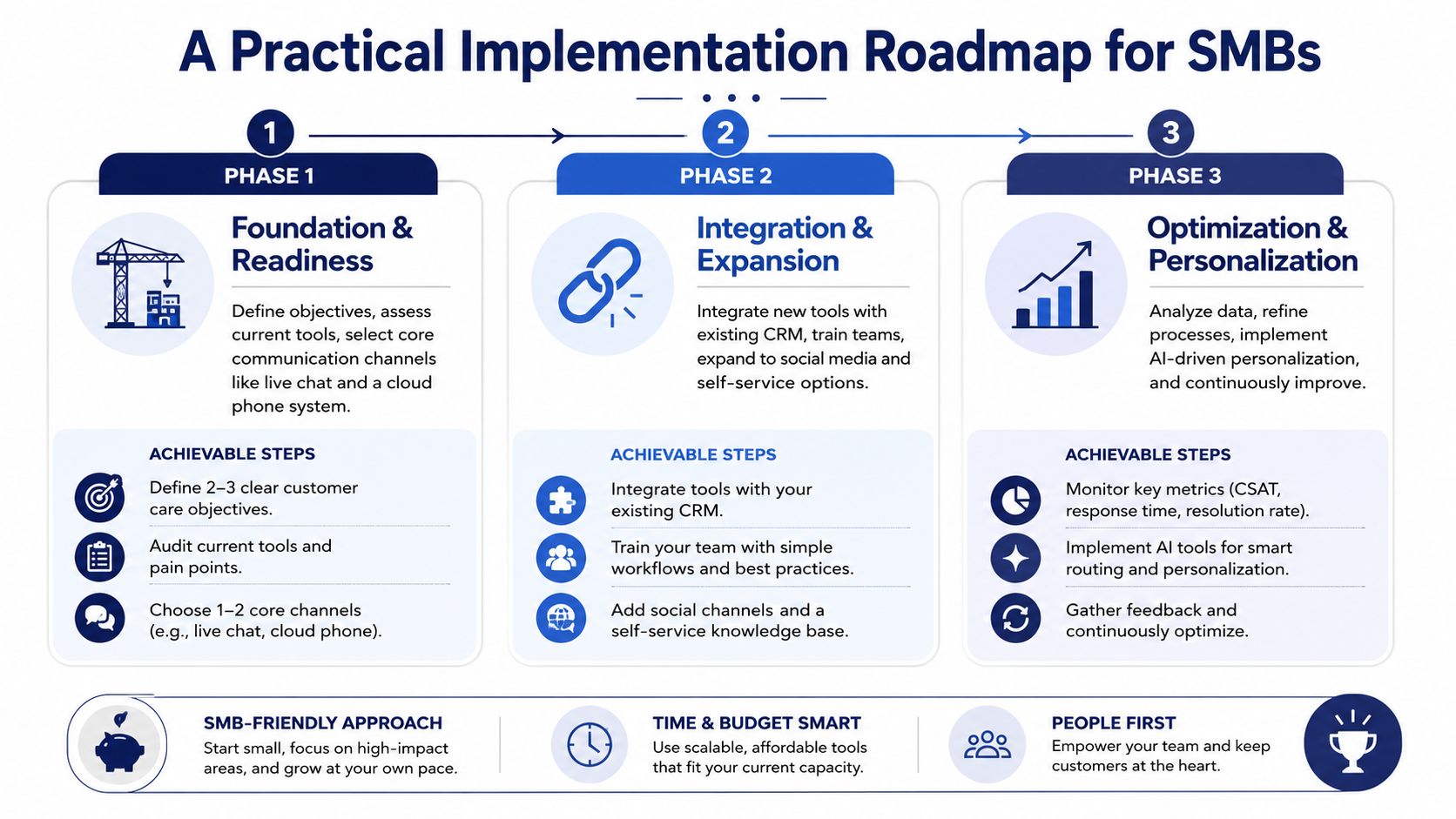
That creates too many moving parts, too much training demand, and too many broken handoffs. A staged rollout works better because each phase solves a different operational problem.
Phase one builds the foundation
Start by stabilizing the core service flow. Don't begin with AI. Begin with visibility.
Most SMBs need to answer four questions first:
- Where do customer conversations currently enter?
- Where does context get lost?
- Which issues should stay self-service or asynchronous?
- Which issues should route to live help quickly?
At this stage, the priority is unifying your main channels around a dependable phone and routing backbone, tying that into your CRM or help desk, and standardizing basic response ownership.
Focus on these actions:
- Map entry points: Website form, main phone number, direct lines, email inboxes, social messages, SMS.
- Consolidate routing rules: Decide who handles what, and when overflow or escalation should happen.
- Create one customer record habit: Agents should log and review the same interaction history, regardless of channel.
Phase two improves the handoffs
Once the basics are stable, fix the repeat work that slows everybody down.
At this stage, knowledge management, queue design, and channel rules start paying off. Build a small self-service library around your most common service questions. Add guided intake forms or pre-chat prompts that collect useful details before an agent ever gets involved. Tighten skill-based or issue-based routing so customers don't bounce between generalists.
A useful checkpoint in this phase is whether an agent can pick up a transferred issue and continue, not restart.
Common upgrades here include:
- Knowledge base cleanup: Short, searchable articles written from real customer questions.
- Routing refinement: Send billing to billing, scheduling to scheduling, urgent service issues to the right queue.
- Callback and voicemail workflows: Make missed contact recoverable instead of terminal.
Phase three adds targeted automation
Only after the underlying process works should you automate it.
That doesn't mean waiting forever. It means automating stable tasks first. Good candidates include order-status lookups, appointment confirmations, basic FAQs, after-hours triage, post-call summaries, and follow-up surveys.
Poor candidates are emotionally sensitive complaints, complicated billing disputes, or issues where policy exceptions are common.
Don't automate confusion. Standardize it first, then decide whether a bot should touch it.
The mistakes that slow adoption
Implementation problems usually come from management choices, not technology defects.
Watch for these traps:
- Buying too much software too early: A bigger stack won't fix unclear ownership.
- Launching channels without staffing plans: Fast channels create fast expectations.
- Skipping agent input: Frontline teams know where customers get stuck.
- Treating training as a one-time event: New routing, templates, and tools need reinforcement.
A practical roadmap is less about maturity models and more about sequencing. First make service visible. Then make it consistent. Then make it lighter.
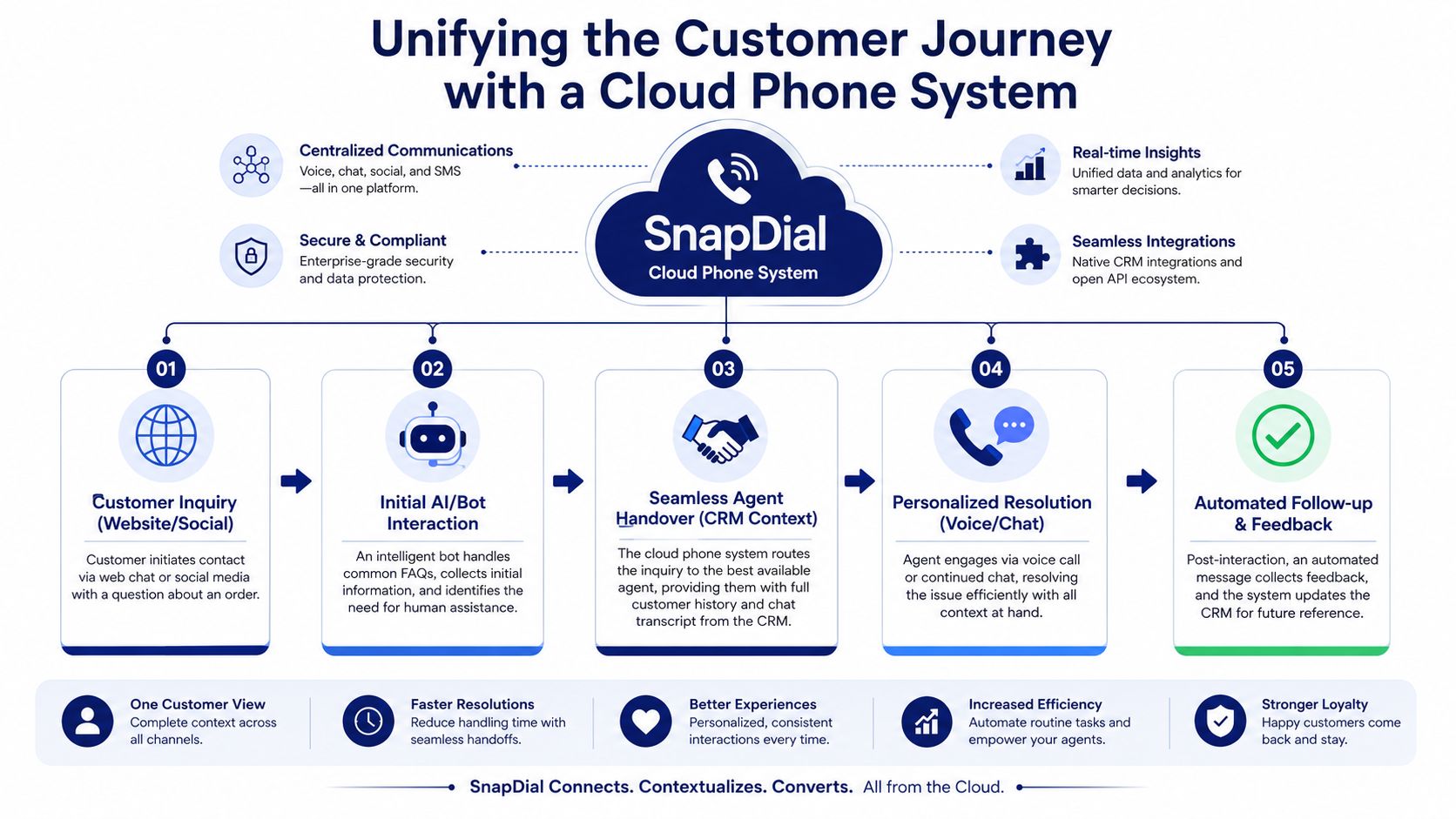
Unifying the Customer Journey with a Cloud Phone System
Digital customer care becomes real not in a feature checklist, but in the moment a customer moves from self-service to human help and doesn't have to start over.
That handoff is the job of a cloud phone system tied into the rest of the service environment. Voice is where complex issues land. If the voice layer lacks context, every digital improvement upstream gets erased.
Scenario one from abandoned cart to informed callback
A customer browses your site, starts checkout, and hesitates over shipping timing. They open chat. The bot answers the basic policy question but can't address a delivery exception for a specific ZIP code. The customer requests help.
At that point, a connected cloud phone system can trigger a callback workflow or route the issue to the right queue, while the agent sees the chat transcript and customer details before speaking. The call starts with, “I see you had a shipping question on the item in your cart,” not “Can you explain the issue again?”
That's the operating value of stateful service. Digital customer care works best when identity and interaction history persist across channels so agents don't have to re-collect data or restart troubleshooting, as explained in Talkdesk's overview of digital customer service.
Scenario two from failed self-service to direct specialist access
A customer tries to solve a billing issue through your knowledge base late in the evening. The article helps partially, but not enough. Instead of forcing them back to the main number and a generic menu, your portal offers click-to-call or a routed callback option.
The cloud phone layer recognizes the issue category, sends the call to the billing queue, and preserves the page path or form details attached to the request. The customer reaches someone equipped to handle the issue without going through first-line triage that adds no value.
This is one reason cloud telephony matters so much in digital customer care. If you need a plain-language explainer, this overview of what a cloud phone system is is a useful starting point.
Scenario three from social complaint to retained account
A customer posts publicly about a service failure. Your team replies and moves the conversation into a private channel. The issue turns out to be serious enough for a live call. With the right setup, the agent who receives the call can see the social exchange, any prior tickets, and the account history before opening the conversation.
That kind of continuity also improves analysis beyond support itself. Teams trying to connect service interactions with acquisition and retention can learn a lot from thinking about marketing attribution and customer experience together, especially when customer journeys span campaigns, web activity, chat, and voice.
Why the phone system becomes the linchpin
A cloud phone system isn't just a replacement for desk phones. In a digital service model, it acts as the control point for:
- Routing: Send customers to the right team based on issue, time, or priority.
- Recovery: Use callbacks, voicemail transcription, and mobile access so missed contact doesn't become lost business.
- Continuity: Keep voice connected to digital history and CRM records.
- Flexibility: Support remote staff, multi-location teams, and overflow handling without rebuilding the service desk.
When owners say they want digital customer care, they often picture chatbots or self-service pages. Those matter. But when a high-value or frustrated customer needs a human, the phone system decides whether that transition feels smooth or sloppy.
If you're replacing a legacy PBX or trying to connect voice with a more digital support model, SnapDial is one option to evaluate. It provides cloud phone system features such as IVR, call routing, queue callback, visual voicemail, mobile apps, reporting, and call center functions that can help SMBs turn scattered service touchpoints into a more unified customer journey.