
Fiber optic broadband rose from 34% of global fixed broadband connections at the end of 2015 to 60% by the end of 2020, while DSL fell from 39% to 10%, according to TeleGeography's analysis of fiber's rise. That shift isn't just a story about faster downloads. For a business, it signals that copper-based internet is becoming a poor foundation for hosted PBX, video collaboration, cloud applications, and reliable customer communications.
The practical DSL vs fiber optic decision comes down to workload readiness. A slow download test may be tolerable, but unstable uploads, variable latency, jitter, packet loss, and uncertain repair timelines can disrupt calls even when the advertised speed looks adequate. My recommendation is straightforward: choose fiber whenever your business depends on real-time voice, cloud systems, multiple locations, or continued growth. Keep DSL only when the workload is light and the line is available at a meaningful cost advantage.
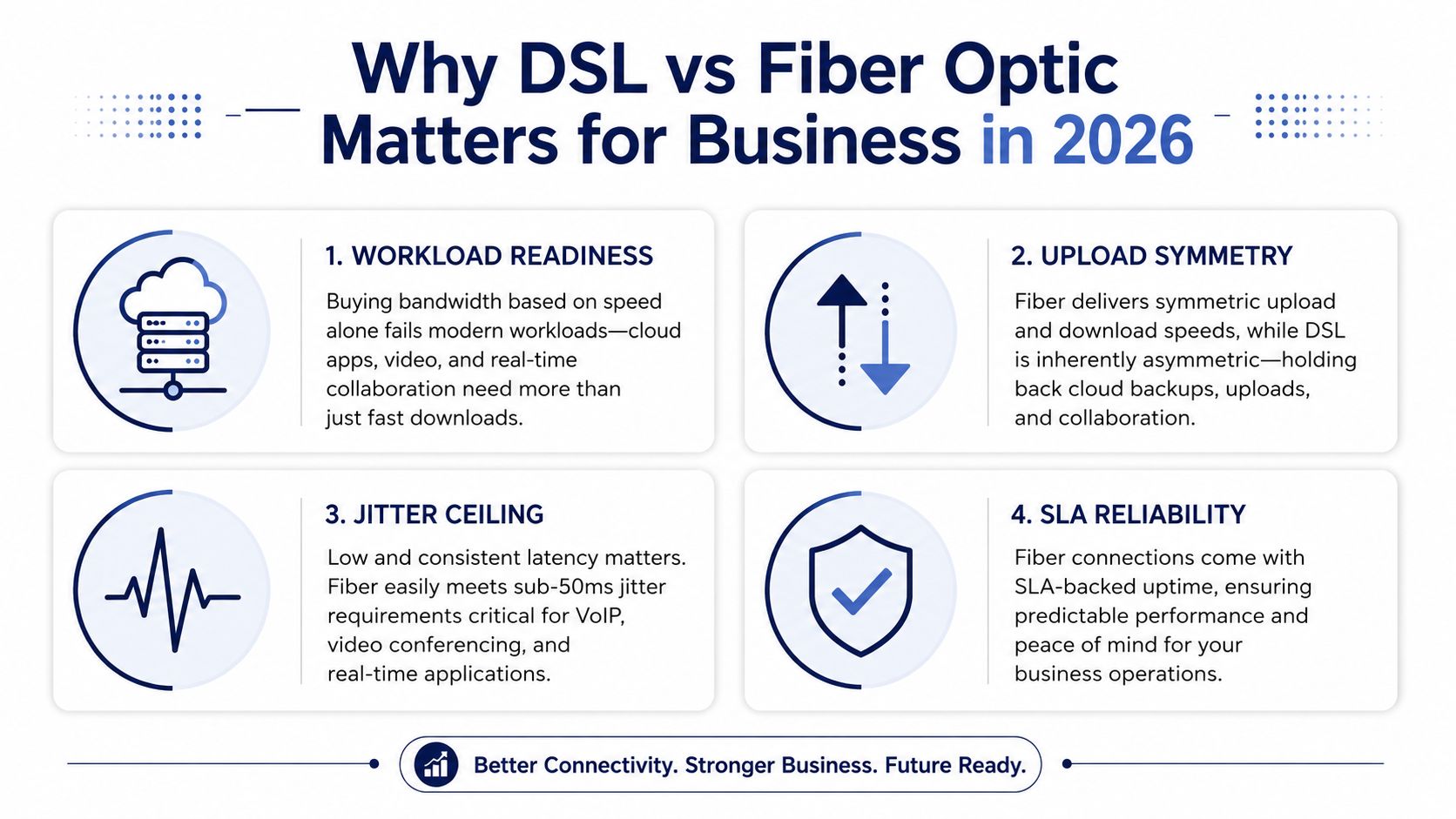
Why DSL vs Fiber Optic Matters for Business in 2026
Most small businesses still compare internet plans by download speed. That's the wrong starting point for hosted communications. The better question is whether the connection can carry voice, video, cloud applications, backups, and normal browsing at the same time, without allowing one busy upload to damage every phone call.
Hosted PBX platforms, Microsoft Teams Voice, cloud CRMs, electronic health record systems, point-of-sale applications, and remote desktops all depend on a stable connection in both directions. Download speed matters when employees retrieve data, but upload capacity matters when they send call recordings, synchronize files, transmit video, or place voice traffic into the provider's network. DSL was designed around an older usage pattern, with customers downloading more than they uploaded. Modern business traffic is far less one-sided.
Start with the workload
Audit the business before comparing plans:
- Concurrent calls: Count the calls that may occur during your busiest period, not the average hour.
- Cloud dependence: Identify whether your CRM, accounting platform, file storage, phone system, or medical software runs online.
- Upload pressure: Include cloud backups, call recording, video meetings, camera feeds, and large file transfers.
- Failure tolerance: Decide how long the business can operate if internet service becomes unstable.
- Growth plans: Include new staff, remote workers, additional branches, and larger call queues.
Latency deserves equal attention. In the FCC's broadband measurements, fiber services showed idle latency of about 7 to 14 milliseconds, compared with about 20 to 61 milliseconds for DSL in the 13th report, as documented in the FCC Measuring Broadband America report. Lower, tighter latency gives voice traffic more room to remain conversational when other applications compete for capacity.
Practical rule: If a poor upload or unstable connection can make employees miss calls, the cheaper plan isn't cheaper. It has simply moved the cost into lost productivity and customer frustration.
Businesses evaluating hosted calling should also review the broader requirements for business internet phones, including quality of service, failover, and support responsibility. The connection isn't a background utility anymore. It's part of the phone system.
How DSL and Fiber Optic Actually Work
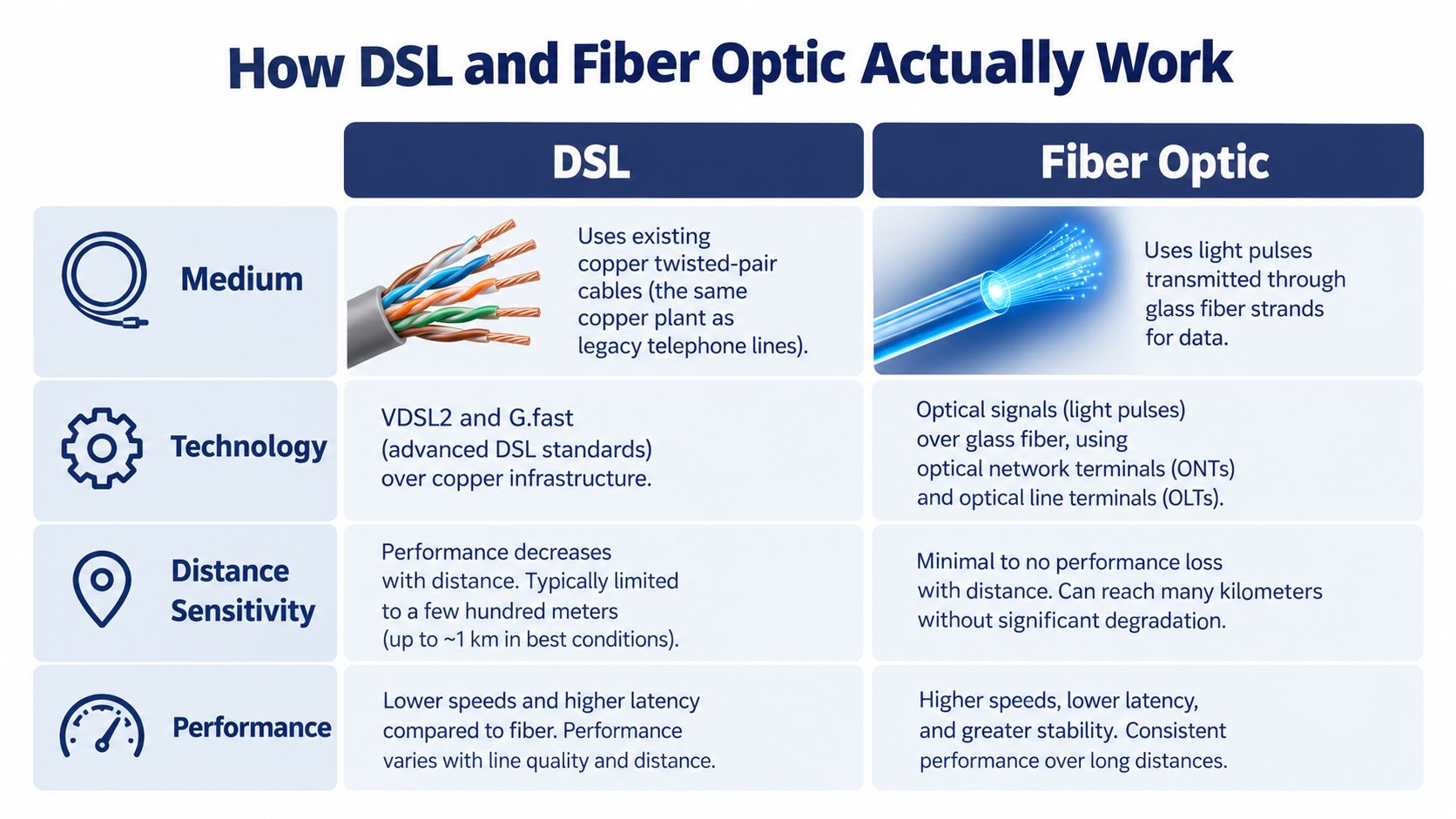
DSL uses the existing copper twisted-pair telephone network. Technologies such as VDSL2 and G.fast place higher-frequency signals on that copper, allowing the provider to deliver more capacity than older DSL services. The trade-off is physical. Signal quality changes with distance from the DSL access multiplexer, copper condition, interference, and crosstalk from nearby lines.
That architecture explains why two businesses can buy similar DSL products and experience different results. A location close to the provider's equipment may perform acceptably, while another location farther away may receive lower throughput and more variation. Copper also carries electrical signals, so the line remains more exposed to the limitations of the surrounding plant.
Fiber optic service uses pulses of light through glass strands. The medium doesn't depend on electrical conductivity in the same way copper does, and it isn't affected by electromagnetic interference like a copper pair. Providers may use GPON, XGS-PON, or active Ethernet, but the central advantage remains the same: the access network has a much larger capacity ceiling and supports more consistent performance.
The physical medium sets the operating limits
DSL's distance sensitivity affects more than the speed shown in a sales brochure. It can influence upload capacity, latency variation, resilience under load, and the provider's willingness to offer business-grade service guarantees. Fiber's larger capacity makes upgrades more practical because the provider can often change the service tier or network optics without replacing the fundamental access medium.
The distinction is important for procurement. Fiber isn't DSL with a larger number attached to the plan. It's a different transport architecture, and that architecture supports a more predictable foundation for cloud applications and real-time communications.
Fiber networks still need competent engineering. Shared PON capacity, poor inside wiring, damaged termination equipment, and overloaded provider infrastructure can create problems. However, those issues don't erase the medium's advantage. They mean the buyer should evaluate the complete service, including demarcation, equipment, support, and service-level terms.
Speed, Latency, and Reliability Compared
The most useful comparison doesn't ask which service has the higher advertised speed. It asks which connection keeps a 30-seat business productive when calls, meetings, cloud systems, and uploads overlap.
The FCC found a substantial latency gap during peak-period testing. Fiber-to-the-home averaged 17 milliseconds of round-trip latency, compared with 44 milliseconds for DSL, with DSL reaching roughly 75 milliseconds at the high end, according to the FCC peak-period broadband measurements. The FCC noted that both levels remained adequate for common applications such as VoIP, but fiber leaves more operating headroom.
| Metric | DSL, VDSL2 or G.fast | Fiber, GPON or XGS-PON | Business impact |
|---|---|---|---|
| Download capacity | Variable and distance-sensitive | High capacity with a broader upgrade path | DSL may handle basic browsing, while fiber better supports busy offices |
| Upload behavior | Usually asymmetric and more constrained | Commonly designed for stronger two-way service | Fiber is better for cloud backups, recordings, video, and remote work |
| Latency | Higher and more variable | Lower and tighter in regulator measurements | Fiber gives voice and interactive applications more room under load |
| Jitter | More exposed to line conditions and congestion | Typically easier to control through a cleaner access path | Fiber reduces the risk of clipped or uneven conversation |
| Packet loss | Copper faults and congestion can affect quality | Lower-loss performance is more achievable with managed service | Fiber is the safer choice for voice-heavy and multi-site operations |
| Reliability | Depends heavily on copper condition and repair practices | Better suited to business-grade support and capacity planning | Fiber reduces operational exposure, but the SLA still matters |
| Symmetry | Inherently oriented toward heavier downstream use | Better aligned with two-way business traffic | Fiber supports simultaneous calls, meetings, and uploads more comfortably |
Latency isn't the same as jitter. Jitter is variation in packet arrival time, and that variation can damage a voice conversation even when average latency looks acceptable. Businesses that need a plain-language explanation can review what jitter means in networking before testing their connection.
A speed test measures a moment. A business connection must perform during the busiest hour, while people are actually working.
The recommendation is clear for communications-heavy offices. If employees use hosted PBX, collaboration platforms, cloud desktops, call recording, or site-to-site applications, fiber's consistency is more important than the headline download number. For a deeper evaluation of service classes, compare a leased line and broadband while checking whether your business needs an SLA-backed circuit rather than a standard broadband product.
Cost, ROI, and Total Ownership
Fiber usually costs more than DSL at the monthly service level, and installation can involve additional planning. That doesn't make DSL the lower-cost option automatically. The correct comparison includes downtime exposure, technician visits, failed calls, slow cloud synchronization, employee idle time, and the cost of delaying a needed upgrade.
A business can model the decision without inventing a false precision. Start with the monthly recurring charge, then add one-time installation, equipment, static IP service if required, inside wiring, backup connectivity, and support fees. Next, estimate what an unstable connection costs when employees can't complete calls or cloud work. The result is a practical total-cost view rather than a plan-price comparison.
| Cost component | DSL, 3-year view | Fiber, 3-year view |
|---|---|---|
| Monthly service | Lower recurring commitment in many markets | Higher recurring commitment in many markets |
| Installation | Often simpler where copper already terminates | May require a site visit, building coordination, or new fiber extension |
| Equipment | DSL modem rental or replacement may apply | Optical network equipment and managed router terms vary |
| Upload-related productivity | Greater risk when backups, recordings, or meetings compete with voice | More capacity for simultaneous two-way traffic |
| Outage exposure | Copper condition and aging plant can increase operational risk | Better platform for managed business service, subject to provider quality |
| Upgrade cost | May require a technology change when the line reaches its limit | Often supports tier changes without replacing the access medium |
| Three-year conclusion | Appropriate for light workloads and strict budgets | Usually stronger for growth, cloud dependence, and hosted voice |
The biggest mistake is to assign a speculative dollar value to every missed call. Instead, measure your own business for a working week. Record dropped or distorted calls, delayed uploads, employee complaints, backup overruns, and support tickets. Then compare those incidents with the fiber quote.
When the premium makes sense
Fiber earns its premium when it protects revenue-producing work. A customer support team, medical office, professional services firm, or distributed company may recover the difference through fewer interruptions and better call quality. The financial benefit also includes option value. A company can add users, increase cloud usage, or expand call recording without immediately reopening the access question.
DSL remains financially rational when the workload is small, the line is stable, and the business can tolerate slower uploads. Don't buy fiber because the technology is newer. Buy it when the connection's operational value exceeds the additional service and installation cost.
Installation, Availability, and Scalability
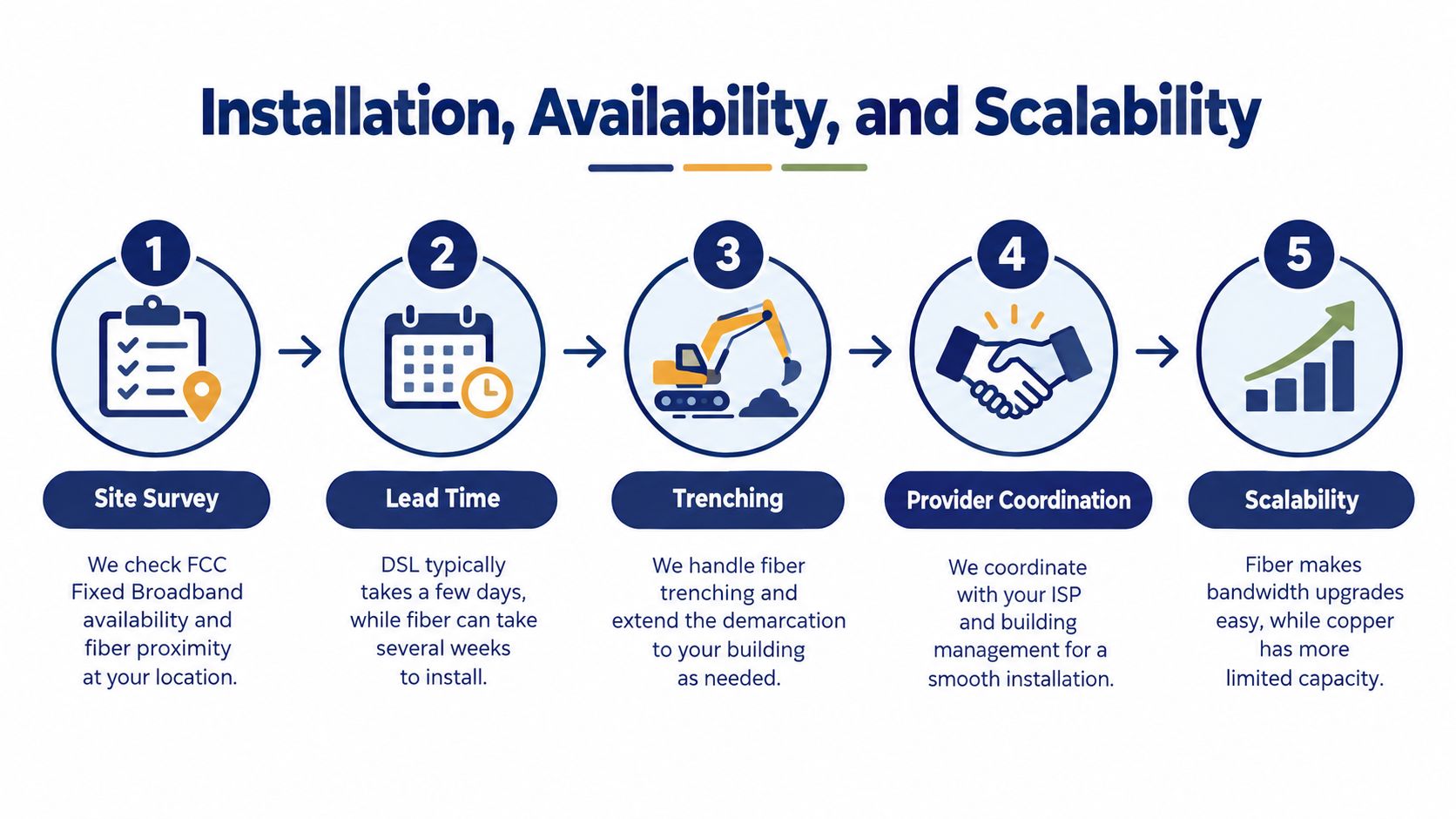
Availability must be checked at the exact business address. A fiber provider may serve the street, the neighboring building, or only one side of a multi-tenant property. Sales maps can show broad coverage while the required entrance, suite, conduit, or building demarcation remains unavailable.
DSL is often easier to order because the copper plant is already present. That convenience can be misleading if the provider is no longer investing in the network or has started retiring the service. Fiber may require a survey, construction approval, conduit work, building access, and coordination between the carrier and property manager.
Use this pre-order checklist
- Confirm the address: Check the FCC broadband availability information and the carrier's own qualification tool. Treat both as starting points, not final proof of installability.
- Ask about the serving network: Find out whether the building connects to a PON node or another fiber architecture, and ask what service tiers are available.
- Inspect the building path: Confirm whether conduit, risers, a communications room, and a usable demarcation point exist.
- Clarify construction responsibility: Ask who pays for trenching, extensions, permits, access work, and restoration if the carrier must build.
- Get the timeline in writing: Separate order acceptance, survey, construction, installation, testing, and service activation.
- Verify upgrade rules: Ask whether future bandwidth changes require a new installation, a new optical terminal, or only a provider-side service change.
Fiber scales better because the provider can use different optical tiers and network capacity without rebuilding a copper pair. That doesn't guarantee unlimited service. Shared access, provider port limits, and contract restrictions still matter, so ask whether the business receives a fixed tier or a more flexible enterprise circuit.
For projects involving new cabling, a directory focused on fiber optic installers near me can help identify local specialists for pathway inspection, termination, and inside-plant work. Keep the installer separate from the carrier in your planning. The carrier owns the service commitment, while the installer may handle only the physical path.
VoIP and Hosted PBX Readiness
VoIP exposes weaknesses that ordinary browsing can hide. A web page can load after a delay. A phone conversation cannot pause while a DSL upload finishes. Voice packets need adequate bandwidth, consistent delivery, controlled jitter, and a sensible quality-of-service policy.
For capacity planning, a concurrent G.711 call requires 100 kilobits per second, while a G.729 call requires 32 kilobits per second, according to the deployment requirements provided for this comparison. Ten simultaneous G.711 calls therefore require at least 1 megabit per second of committed upload capacity before adding protocol overhead or other business traffic. That can fit within some DSL products on paper, but the question is whether the upload remains available during backups, video meetings, and file transfers.
Match the connection to the phone deployment
- Five-user law firm on DSL: This can work when call volume is modest, the router supports traffic shaping, voice receives priority, and cloud backups run outside business hours. Verdict: viable but conditional. Risk comes from upload saturation and copper variation. Safeguard the deployment with monitoring and a tested failover path.
- Twenty-user retailer on fiber with 4G backup: Fiber provides the primary path for calls, payment systems, and cloud applications, while cellular connectivity protects the store during an outage. Verdict: strong practical design. Test failover rather than assuming it works.
- Fifty-user clinic on dedicated fiber with redundant carriers: A clinic with significant voice, cloud records, and operational continuity requirements should use diverse connectivity where feasible. Verdict: appropriate for a high-consequence environment. Require documented escalation, monitored backup service, and clear responsibility for the demarcation.
Jitter below 30 milliseconds is generally acceptable for voice, while below 10 milliseconds is preferable. Packet loss should stay below 1%, and the one-way latency ceiling commonly used for conversational voice is 150 milliseconds, based on the deployment guidance in the brief. These thresholds are not a substitute for testing at the actual site. They're guardrails for deciding whether a connection has enough margin.
A DSL deployment can improve with a dedicated voice VLAN, traffic shaping, queue management, and separation of large uploads from call traffic. Those measures don't create additional capacity. They protect voice by controlling contention. Fiber remains the better default because it combines stronger two-way capacity with lower measured latency and more room for growth.
Use this VoIP bandwidth planning guide before ordering service, and review what VoIP is and how it works if nontechnical stakeholders need a clear explanation of packetized voice.
When DSL Still Wins and When Copper Retirement Changes Everything
Fiber isn't automatically the right purchase for every business. DSL remains defensible for a micro-business with very light cloud use, few simultaneous calls, no demanding uploads, and a stable local line. If the business mainly uses email, browser applications, and occasional voice calls, paying for fiber may divert money from more urgent priorities.
The best DSL use case has four characteristics:
- Small user count: Few people compete for the connection at the same time.
- Light communications demand: Call volume and video meetings remain limited.
- Low upload pressure: The business doesn't constantly synchronize large files or recordings.
- Short planning horizon: The owner understands that the line may be transitional.
Bonded DSL or improved VDSL service can serve static workloads adequately where fiber isn't available. The decision changes once the business depends on cloud applications, runs a busy hosted PBX, adds branches, or expects staff growth. At that point, DSL's asymmetric design becomes a recurring operating constraint rather than a minor inconvenience.
Copper retirement changes the timing
DSL is also becoming a migration issue. OECD data shows fiber accounted for 44.6% of fixed broadband subscriptions across OECD countries in June 2024, up from 41% the year before, while DSL represented 20.3% on average at the end of 2023, according to the OECD's fiber and 5G update. In the United States, DSL has become a small minority of subscriptions, and some providers have stopped installing new DSL.
That matters because a copper retirement can force the timetable. If fiber already reaches the building, keeping DSL may postpone an upgrade, not avoid it. Ask the incumbent about retirement notices, migration options, installation lead times, replacement equipment, and whether the current phone or security systems depend on the copper line.
DSL is acceptable as a controlled bridge. It's a weak long-term strategy for a business that already knows it needs better uploads and more reliable real-time traffic.
SMB Decision Checklist and Final Recommendation
Make the decision with five questions, then score the answers. Give your business 0 to 3 points for each area:
| Decision area | Low score | High score |
|---|---|---|
| Concurrent voice use | Occasional calls | Busy queues or multiple simultaneous calls |
| Upload requirement | Email and light browsing | Backups, recordings, video, or large file movement |
| Cloud dependency | Few cloud systems | Core operations run through cloud platforms |
| Growth trajectory | Stable and small | Hiring, expansion, or new branches expected |
| Remote workforce | Mostly local and occasional remote work | Regular remote or hybrid collaboration |
A total of 10 or more points mandates fiber. A score from 5 to 9 makes fiber strongly preferred. A score of 0 to 4 leaves DSL viable for now, but only with a documented migration plan covering the next 12 to 18 months.
Use the score alongside three hard triggers. Fiber wins decisively if you run more than four simultaneous VoIP calls, depend on latency-sensitive SaaS such as CRM, EHR, or collaboration software, or connect multiple sites. It also wins when an upload-heavy workload regularly runs during business hours. A business with fewer than 10 employees and fewer than three concurrent hosted-PBX calls can function on bonded DSL when cost is the primary constraint, provided the router supports QoS and the line performs reliably.
The final recommendation
Choose fiber as the default for any business that expects to grow, hire remote workers, add locations, record calls, or rely on real-time voice. Ask for symmetric capacity, monitored service, a clear repair commitment, and a tested failover design. If fiber isn't available, deploy DSL deliberately, isolate voice traffic, monitor quality, and treat the service as a bridge rather than a destination.
SnapDial helps businesses move hosted PBX and unified communications onto a managed platform with white-glove setup, mobile calling, call routing, recording, queue management, and 24/7 support. Review your internet readiness and see how SnapDial can help you modernize business calling by visiting SnapDial.