

You’re probably dealing with one of two situations right now. Either calls are landing in the wrong mailbox and no one knows why, or your team has the basics working but the edge cases keep breaking. A receptionist forwards a call to sales, sales doesn’t answer, and the voicemail ends up with the wrong person. An employee dials the main number plus an internal extension, and the forwarding rule never triggers at all.
That’s where “forward to voicemail” stops being a simple phone setting and becomes a call-flow problem.
From a support desk perspective, most voicemail issues don’t come from voicemail itself. They come from routing logic. The phone system is doing exactly what it was told to do, but not what the business expected. The fix is usually straightforward once you separate the forwarding type, the trigger condition, and the final mailbox destination.
The Foundations of Voicemail Forwarding
Most businesses mix up two different behaviors under the same label. They say “forward to voicemail,” but they may mean send every call straight to voicemail or send only missed calls to voicemail. Those are different rules, and they serve different purposes.
Unconditional forwarding
Unconditional forwarding sends the call away immediately. The desk phone never rings. The mobile app doesn’t ring. The caller goes straight to another destination, which can be a user mailbox, a general department mailbox, or another number.
Use it when someone is out all day, when a temporary line should never ring live, or when after-hours calls should go directly to a shared voicemail box. It’s clean and predictable. It’s also easy to misapply. If you turn it on when you really needed a no-answer rule, callers lose the chance to reach a live person.
Conditional forwarding
Conditional forwarding waits for something to happen first. That trigger is usually one of three conditions:
- Busy state when the user is already on another call
- No answer after the configured ring time
- Unreachable device when the phone or app is offline
This is the right fit for normal business hours. Let the user try to answer first, then send the call to voicemail if they can’t.
Here’s the quick comparison I give admins when they’re trying to choose the right rule.
| Forwarding Type | When It Activates | Common Use Case |
|---|---|---|
| Unconditional | Immediately on inbound call | Vacation coverage, after-hours mailbox, temporary direct-to-voicemail routing |
| Conditional | Only when busy, unanswered, or unreachable | Standard employee call handling during business hours |
Practical rule: If you still want the phone to ring, don’t use unconditional forwarding.
A lot of SMB teams also benefit from thinking about forwarding as part of a larger automation flow instead of a one-off phone setting. If you want a broader look at how routing, attendants, and call handling fit together, Voicedial.ai's guide to phone automation is a useful companion read.
If you’re still at the stage of getting the basics in place, SnapDial’s own walkthrough on setting up call forwarding is a practical starting point before you layer on more advanced logic.
Setting Up Forwarding on Your Desk Phone and Mobile App
A missed call should end in the right mailbox on the first try. In practice, small mistakes often show up fast. A sales rep forwards to the wrong destination and callers hear a generic system prompt. A branch manager uses the mobile phone’s native forwarding and calls land in personal carrier voicemail. A front desk line forwards correctly for outside callers, but internal extension dialing breaks and coworkers can no longer reach the user the normal way.
On a desk phone
Desk phones usually give users two ways to set forwarding. There is a phone menu, and there may also be a system star code configured by your provider or PBX. Either method can work. The important question is whether you are sending calls to a live extension, a user mailbox, or a shared department mailbox. Those are not interchangeable on every system.
On Yealink-style phones, the menu usually lives under call features or forwarding. Choose the condition your admin expects, enter the destination carefully, save it, and test from another device. If your system uses mailbox access codes or a pilot number for voicemail routing, enter that exact target. Do not assume your extension number automatically means “send to my voicemail.” On many hosted systems, it does not.
Use this workflow:
- Open the phone’s forwarding menu, or use the approved star code for your system.
- Select the right forwarding mode for the situation.
- Enter the correct destination. That might be your own mailbox route, an extension tied to voicemail, or a team mailbox.
- Save the setting.
- Place one internal test call and one external test call.
- Confirm the greeting, mailbox, and caller experience are all correct.
That last step catches the problems that basic setup misses. Internal and external calls do not always follow the same path. In multi-office setups, I also check whether forwarded calls still support extension dialing, because some routing choices break direct transfer or send callers into a dead end.
Keep business voicemail separate from personal voicemail
Hybrid staff run into this constantly. They turn on forwarding from the mobile device itself, the carrier answers first, and now customer messages sit in a personal inbox outside the company phone system.
Keep forwarding inside the business phone system whenever possible. That preserves the business caller ID, the business greeting, message ownership, and the call log your team may need later. If users need help retrieving messages after forwarding is active, point them to SnapDial’s instructions for accessing business voicemail.
A short video can help if your team prefers to see the flow in action.
On a mobile app
Mobile app forwarding works well if the app is controlling the business number. That is the detail to verify first. If the app is only ringing your mobile device and the phone’s native settings take over, voicemail handling can slip outside the PBX without the user realizing it.
For individual users, the safest setup is usually no-answer forwarding during working hours and always forwarding only when they are unavailable. For team leads and shared numbers, test one more thing. Make sure calls that bounce from one teammate to another still land in the intended mailbox, not the last device that rang. That “last mile” behavior is where teams lose messages.
I usually recommend this checklist for mobile users:
- Route missed calls to a business mailbox, not a personal carrier mailbox.
- Use no-answer forwarding during active hours so callers still have a chance to reach you live.
- Use always forwarding for travel, training, PTO, or any period when you do not want the app to ring.
- Test from an outside number, not just another company extension.
- Verify the greeting matches the destination mailbox, especially if the call can bounce through a hunt group or team line.
If a user says, “My calls are forwarding, but the voicemail sounds wrong,” check the call path before you change the greeting. In a lot of cases, the wrong voicemail system answered the call.
Building Automated Rules in the SnapDial Portal
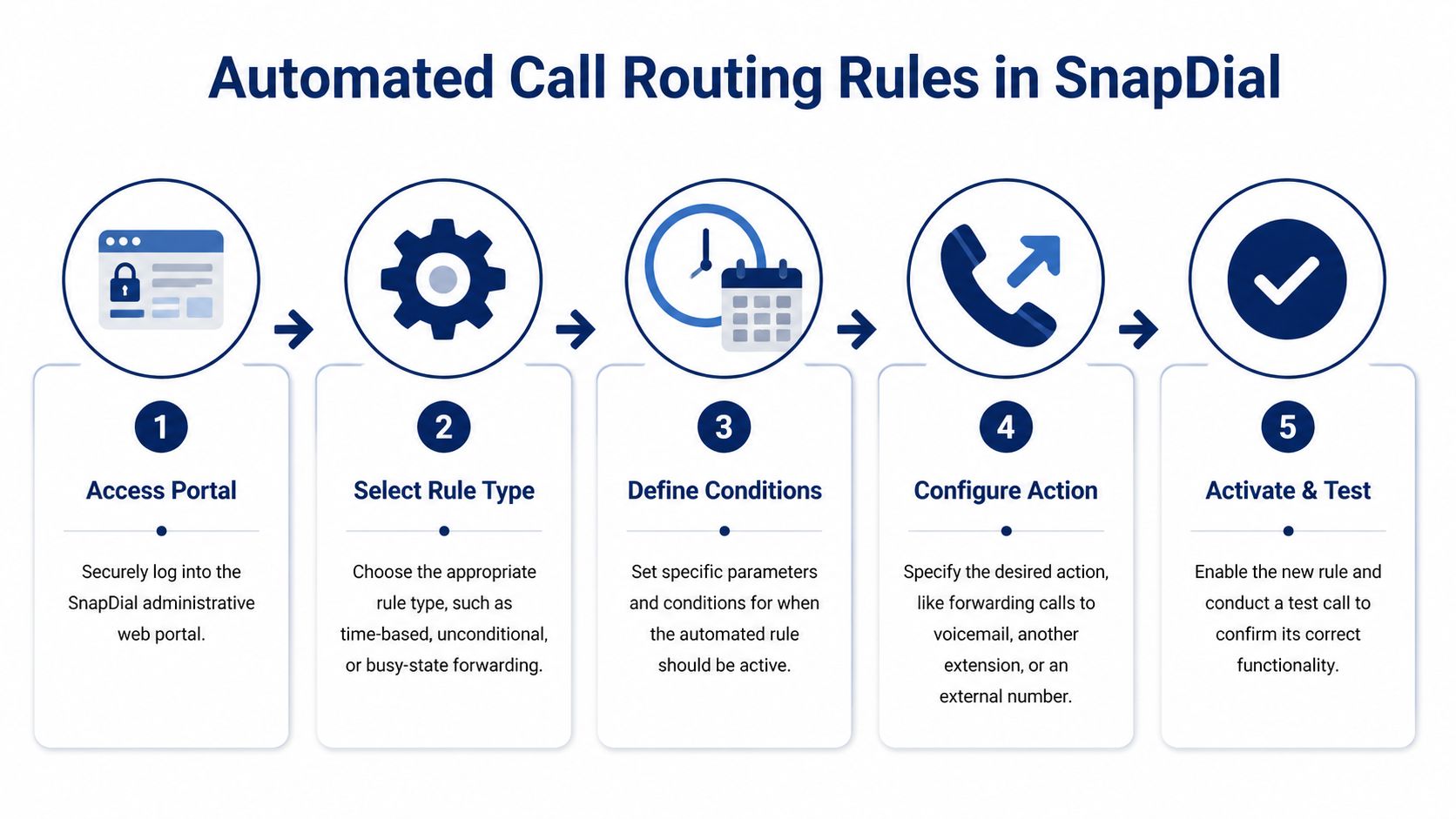
The portal is where forwarding stops being a user habit and becomes a system rule. That matters once calls need to reach the right mailbox every night, every weekend, and every time a front-desk pattern changes.
A good rule set does more than send unanswered calls to voicemail. It decides which mailbox should answer, when it should answer, and what should happen if the call arrived through a main number, an auto attendant, or a team line. Those last-mile details are where many setups break.
Start with time-based rules
Time conditions are usually the first automation to build because they remove the most common failure. Someone leaves at 5:30, forgets to change anything, and callers hit endless ringing or the wrong mailbox.
Set the schedule first, then assign destinations:
- Weekday open hours: Ring users, call groups, or queues
- Weekday closed hours: Send calls to voicemail
- Weekend schedule: Route directly to the right department mailbox
- Holiday schedule: Override the normal schedule with a holiday greeting and the correct mailbox
For a small office, one after-hours mailbox may be enough. For a service business, split it by function. Sales, billing, and urgent support usually need different greetings and different response expectations. If all three roll into one box, the caller leaves a message, but the team still wastes time sorting it out Monday morning.
Give callers a direct voicemail path
Auto attendants should not force every caller through a ring cycle before they can leave a message. If someone already knows they need billing or wants to leave a note for sales after hours, let them choose that path from the menu.
A clean setup usually works like this:
- The caller hears the main greeting.
- The menu offers a direct voicemail option such as “Press 3 to leave a message for sales.”
- The system routes that selection to the correct mailbox.
- The team receives the message through its normal workflow.
This also helps with extension-dialing edge cases. If a caller reaches the company through the main menu instead of trying an extension that may follow a different routing path, the voicemail destination is more predictable. In support, I see that reduce a lot of "the call got there, but the message landed in the wrong box" complaints.
Set rule priority before you test
Rule order decides what happens. A broad forward-all rule placed too high can swallow a holiday override, bypass a no-answer path, or send a team call to a personal mailbox.
Use a clear priority order:
- Top priority: Holiday and emergency overrides
- Next: Time-based business-hours routing
- Then: User, extension, or department-specific logic
- Last: Failover to voicemail
Keep each rule narrow enough to explain in one sentence. "Forward calls to the service line after 5 PM to the service mailbox" is easy to verify. "Forward all calls" creates cleanup work later, especially in accounts with shared numbers and call bouncing between teammates.
After you save the rules, test from outside the system and test more than one path. Call the main number. Dial an extension. Choose an auto attendant option. Let a hunt group timeout. In a multi-user setup, those paths do not always behave the same way, even when they look identical in the portal.
Solving Complex Forwarding for Multi-Location Teams
Basic forwarding guides usually assume one number, one user, one mailbox. Real businesses don’t work that way. They have a main number, internal extensions, shared lines, receptionist transfer patterns, and users covering for each other across offices.
That’s where the last mile breaks.

When extension dialing bypasses your forwarding rule
One of the most frustrating hosted PBX issues is also one of the least documented. A user dials the main number plus a 4-digit extension, and the unconditional forwarding rule doesn’t fire because the platform is checking for a direct 10-digit number match instead. That mismatch has shown up repeatedly in support discussions since 2023, and it’s a persistent source of missed customer voicemails in systems with internal dialing (RingCentral community discussion on extension-based forwarding failures).
The common assumption is wrong. Admins often assume, “If calls to the direct number forward correctly, extension-dialed calls will behave the same way.” They often won’t.
Here’s what to check:
- Match the called pattern correctly: If your rule only watches the full DID, it may ignore calls addressed as main number plus extension.
- Review caller ID and number checks: Overly strict matching can block legitimate internal or transferred calls from triggering the forward.
- Verify date and time conditions: Some systems won’t apply the rule unless the schedule condition is active all day.
- Test both call paths: Call the user directly from outside, then call the main number and enter the extension. Those are not always the same route.
Fixing the extension route
The fix is usually to create a separate rule for the extension-based pattern or to relax the rule conditions so the system evaluates more than one called-number format. In practical terms, that means the call flow must recognize both the direct external number and the internal extension path as valid triggers for the same mailbox destination.
In multi-office environments, I prefer explicit rules over clever ones. If the Dallas office receptionist transfers to extension 214 and the Austin office dials the same user through the main number menu, account for both patterns directly. Hidden assumptions are what create ghost voicemail problems.
Don’t trust a forwarding rule until you’ve tested every real call path your staff actually uses. Main number, direct number, internal extension, receptionist transfer, and mobile app transfer can all hit different logic.
The forward-back problem
The second issue is what I call the voicemail bounce. User A forwards calls to User B. User B doesn’t answer. The caller expects to leave a message for User A, but the system sends the call to User B’s voicemail or nowhere useful.
That confusion shows up in a lot of team environments because there’s no universal behavior across VoIP platforms. Some systems route unanswered forwarded calls to the forward recipient’s mailbox. Others only return to the original mailbox under limited internal-transfer conditions. If the call leaves the original route and becomes an external forward, voicemail fallback may disappear entirely.
The practical fix is to design the fallback on purpose.
How to keep voicemail ownership with the original user
Use this decision model:
Internal coverage within the same phone system
Forward to the covering user for live-answer attempts, but keep the final no-answer destination tied to the original user’s mailbox where possible.External forwarding to a mobile or outside number
Don’t assume the call can route back to the original mailbox. In many systems, it can’t. Use a time-based or no-answer rule at the original layer before external forwarding becomes the only path.Department or queue coverage
If multiple people may answer, route failures to a shared departmental mailbox instead of an individual mailbox. That preserves accountability and makes response ownership visible.
For multi-location teams, this is less about features and more about intent. Decide whose voicemail should own the missed call before you build the route. If you skip that step, the phone system will make the decision for you.
Pro Tips and Troubleshooting Common Issues
A missed voicemail usually is not a phone problem. It is a workflow problem.
The setup may be forwarding calls correctly, but the message still dies in the last mile. It lands in one inbox no one watches, reaches a team mailbox with no owner, or arrives as a transcript that is too messy to act on. Those are the failures that cost time.
One practical fix is voicemail-to-email. If your system supports it, send the recording and transcript to the person or group that is expected to respond. If you need that workflow, SnapDial’s voicemail-to-email setup guide walks through how to route messages into an inbox people already monitor.
What improves response time
The biggest gain usually comes from speed and clarity, not from adding more routing steps. A clear greeting, a fast alert, and a defined owner beat a complicated call flow in most small and mid-sized business setups.
Research cited by Drop.co’s voicemail performance analysis found better reply rates when voicemail was paired with a follow-up email. That lines up with what we see in support. A voicemail gets heard. An email gives the team something visible to assign, search, and track.
Use a few habits that hold up in daily use:
- Keep greetings short and specific: State the person or department, business hours if relevant, and exactly what the caller should leave.
- Ask for one useful detail: An order number, site location, extension, or callback number is usually enough.
- Assign mailbox ownership fast: Shared mailboxes help coverage, but they also create duplicate callbacks if nobody claims the message.
- Match the route to the team: Sales, service, and after-hours support should not all dump into the same inbox.
- Test extension behavior: In multi-office setups, forwarded calls can lose extension context, which changes who gets the message and whether anyone can return it cleanly.
Troubleshooting the failures that show up most
If calls ring but never reach voicemail, check the trigger first. The common issue is the wrong forwarding condition, or a ring timeout that is longer than the user expects. On desk phones, I also see users enable forwarding on the handset while an admin rule in the portal is already controlling the call, and the two settings fight each other.
If calls are forwarding to the wrong number or mailbox, check rule order before you change the destination. Time schedules, user-level forwarding, hunt group coverage, and failover rules can all intercept the call earlier in the path. In team environments, that is how calls start bouncing between users and end up in the wrong mailbox.
If extension dialing stops working after a forward, review whether the system is treating the call as an internal handoff or as an external redirect. That detail matters. Internal transfers usually preserve more context. External forwarding often strips it, which is why callers cannot reach a person by extension once the call leaves the original route.
If voicemail transcription is poor, start with the recording itself. Fast greetings, speakerphone audio, background noise, and callers who ramble through names or numbers all reduce transcript quality. Transcription is useful for triage, but audio should remain available for anything tied to orders, scheduling, billing, or legal details.
Forwarding problems usually come from three places: the trigger, the rule order, or the mailbox that owns the final miss.
Run one test per scenario and document the exact path. Test a direct call to one user, a call during business hours, an after-hours call, and a call that should bounce to a team. That process finds bad assumptions faster than changing five settings at once.
Conclusion
Forward to voicemail sounds simple until real business workflows get involved. Then the details matter. Which calls should bypass ringing. Which ones should try a live answer first. Which mailbox should own the message after a transfer or team handoff.
Get those rules right, and voicemail becomes a reliable part of your customer response process instead of a black hole. Get them wrong, and you end up with missed leads, confused staff, and messages sitting in the wrong inbox.
The businesses that handle this well don’t treat voicemail as an afterthought. They treat it like routing logic. That means testing every call path, building time-based automation, and planning for edge cases like extension dialing and forwarded-call bounce.
If your team is replacing a legacy phone setup or untangling messy voicemail routes, SnapDial provides a cloud phone system with call routing, visual voicemail, mobile access, and a self-service admin portal, along with Texas-based support that can help sort out the hard call-flow cases.