

The warning signs usually show up long before a business decides to replace its phone system. Calls ring at the front desk while the right person is away from their desk. Remote staff use personal cell phones because the office system can’t follow them. Customers sit on hold, hit the wrong menu option, or hang up when nobody can see the queue building in real time.
Most owners treat that as an annoyance. It’s usually a growth problem in disguise. When the phone system can’t route, report, scale, or fail over cleanly, it starts slowing down sales, service, and day-to-day operations.
Is Your Old Phone System Holding Your Business Back
If your current setup still depends on aging PBX hardware, extension cards, a closet full of telecom gear, or a vendor visit every time you need a change, you’re not running a communication system. You’re babysitting one.
That worked when everyone sat in one office and calls followed a simple pattern. It breaks down fast when you add a second location, a hybrid team, after-hours coverage, or a support desk that needs smarter call handling.

The bigger shift is already happening across the market. The hosted PBX market, which powers cloud phone systems, was valued at over $11 billion in 2023 and is projected to reach $42.55 billion by 2030, growing at a 17.6% CAGR according to Brightlio’s hosted PBX market summary. Businesses aren’t moving away from legacy phone systems because it’s trendy. They’re doing it because the old model is expensive to maintain, hard to scale, and a poor fit for how teams work now.
What owners usually notice first
A failing phone system rarely announces itself with one dramatic outage. It shows up in small operational leaks:
- Missed handoffs: Calls land with the wrong person, then get transferred again.
- Remote work friction: Staff can answer from mobile devices, but not as their business extension.
- Slow changes: Adding users, holiday hours, or new call routes turns into an IT project.
- Limited visibility: Nobody can quickly answer simple questions like which queue is overloaded or which calls went unanswered.
If call quality is already a problem, it’s worth understanding the network side before blaming the provider. This guide to common VoIP sound quality issues is useful because it breaks down the causes of jitter, dropped audio, and choppy calls in plain language.
Your phone system is the front door to your business. When it sticks, customers notice before management does.
A lot of owners also don’t realize how much of their pain is tied to the PBX itself. If you want the simple version of what that system does, this overview of what a PBX system is is a good starting point.
What Exactly Is Hosted Business VoIP
Hosted business VoIP means your business phone system runs over the internet, and the core phone system infrastructure is managed off-site instead of living in your building.
That sounds technical, but the easiest way to think about it is this. An on-premise PBX is like owning a server room just to watch movies. A hosted system is like streaming. You still get the experience you need, but you’re not maintaining the machinery behind it.

Break the term into plain English
Three pieces matter.
- VoIP means Voice over Internet Protocol. In practice, that means calls travel through your internet connection instead of traditional phone lines.
- PBX means Private Branch Exchange. That’s the call control layer. It handles extensions, routing, voicemail, ring groups, menus, transfers, and rules.
- Hosted means the provider runs and maintains that PBX for you.
If you’ve ever used a business phone app on a laptop, desk phone, or mobile device and signed in with your work extension, you’ve already seen the model. The intelligence is centralized. The endpoints are flexible.
What changes for the business owner
The biggest change isn’t just technical. It’s operational.
With a traditional PBX, your business owns the burden. Hardware ages. Capacity is fixed until you buy more. Changes require expertise. If something breaks, your office feels it immediately.
With hosted business VoIP, your team works from managed software and cloud infrastructure. That usually means:
- Fewer hardware headaches: You may still use desk phones, but you’re not maintaining a full PBX stack on site.
- Easier administration: Moves, adds, routing changes, voicemail settings, and user permissions can be handled from a web portal.
- Location flexibility: A user in the office, at home, or on the road can still answer as the business.
- Access to modern features: Call recording, mobile apps, voicemail transcription, queue tools, and reporting become far more practical to deploy.
Simple test: If you need a specialist visit for every routine phone system change, you’re dealing with infrastructure that no longer fits the business.
There’s also a terminology issue that confuses a lot of buyers. Hosted VoIP and cloud phone system are often used almost interchangeably in the SMB market. If you want a clean explanation of that cloud model, this page on what a cloud phone system is lays it out clearly.
What hosted does not mean
It doesn’t mean the internet magically fixes every communication problem.
A bad call flow is still a bad call flow. Poor training still causes missed calls. Weak local networking still hurts audio. Hosted business VoIP gives you a stronger platform, but the result depends on setup, routing logic, network readiness, and support.
That’s why I usually tell owners to stop asking, “Do we need VoIP?” and start asking, “Do we want to keep owning a phone system problem that someone else can manage better?”
The Features That Modernize Your Operations
Most businesses don’t switch phone systems for the phrase “cloud PBX.” They switch because they want fewer missed calls, smoother coverage, better visibility, and less friction between locations.
That’s where hosted business VoIP earns its keep. The right platform doesn’t just replace dial tone. It changes how your business receives, routes, escalates, records, and follows up on conversations.

Auto attendants and routing that actually help callers
A lot of old systems have an IVR. That doesn’t mean they have a good one.
Modern hosted systems let you build call flows around how customers contact you. Sales can ring one group during business hours and another after hours. Service calls can route by location. VIP callers can be treated differently from general inquiries. Holiday schedules can be handled without rewriting the entire system.
Done well, this removes front-desk bottlenecks and cuts down on blind transfers.
Done badly, it becomes a maze. That’s why the best systems make call routing easy to visualize and easy to change.
Mobility without losing the business identity
This is one of the most practical upgrades for SMBs.
Your staff shouldn’t have to choose between being reachable and looking professional. With a hosted platform, employees can answer on desk phones, laptops, or mobile apps while still presenting the company caller ID, extension logic, voicemail, and transfer options.
For a multi-location business, that matters more than people realize. One system can cover headquarters, branch offices, field staff, and home offices without making the customer guess who’s where.
Call center tools that SMBs can finally use
The feature gap between enterprise contact centers and smaller businesses has narrowed. Hosted platforms now give SMBs access to queue management that used to require much heavier systems.
According to Smargasy’s hosted VoIP PBX feature overview, smart queue management and callback options can reduce call abandonment rates by 40 to 60%. That matters because hold frustration is one of the fastest ways to lose a customer who was already trying to buy or get help.
Here’s what those tools do in practice:
- Smart queues: Calls go to the best available destination based on logic you define, instead of just ringing desks in order.
- Callback options: A caller keeps their place without sitting on hold.
- Wait-time messaging: Customers get context instead of dead air.
- Real-time stats: Supervisors can see when a queue is backing up and react before service slips.
If your team says, “We’re slammed on phones,” but nobody can see the queue in real time, you have a staffing and tooling problem, not just a volume problem.
A platform like SnapDial puts those functions into a managed hosted environment with white-glove setup, queue callback, call recording, visual voicemail with transcription, mobile apps, and a self-service portal. For a growing business, that’s often a more practical route than trying to bolt modern workflows onto aging PBX hardware.
A quick product walk-through helps if you want to see how modern hosted calling is typically presented in practice:
Visibility changes behavior
A surprising number of businesses run their phones with almost no reporting. They know the system rings. They don’t know what happens after that.
Hosted business VoIP platforms often expose data that helps managers coach better and staff more intelligently:
| Operational area | What modern features help you see |
|---|---|
| Incoming demand | Which times of day generate the most call pressure |
| Team responsiveness | Which groups answer quickly and which don’t |
| Missed opportunities | Unanswered calls, abandoned calls, and voicemail patterns |
| Training needs | Repeated transfer paths, long handle times, and call recordings |
That kind of visibility is operationally useful even outside a formal call center. A medical office, HVAC company, law firm, distributor, or multi-site retailer can all use the same signals to tighten service.
Features that sound small but save time
Some of the best improvements are unglamorous.
- Visual voicemail with transcription helps managers triage messages fast.
- Call recording gives teams a clean training and accountability tool.
- Web portals let admins make routine changes without opening a support ticket.
- Unlimited lines prevent busy signals during spikes.
- Cloud faxing is still relevant in industries that can’t fully ditch document workflows.
None of these features matter in isolation. Together, they remove friction. That’s usually what owners are really paying for.
Hosted VoIP vs On-Premise PBX A Clear Comparison
There was a time when on-premise PBX was the default serious-business option. If you wanted control, that’s what you bought. You installed the hardware, paid for the handsets, configured the cabinet, and accepted that telecom changes would remain an internal responsibility.
That logic has weakened. For most SMBs and multi-location teams, the better question now is not which system feels more traditional. It’s which one creates less drag on the business.
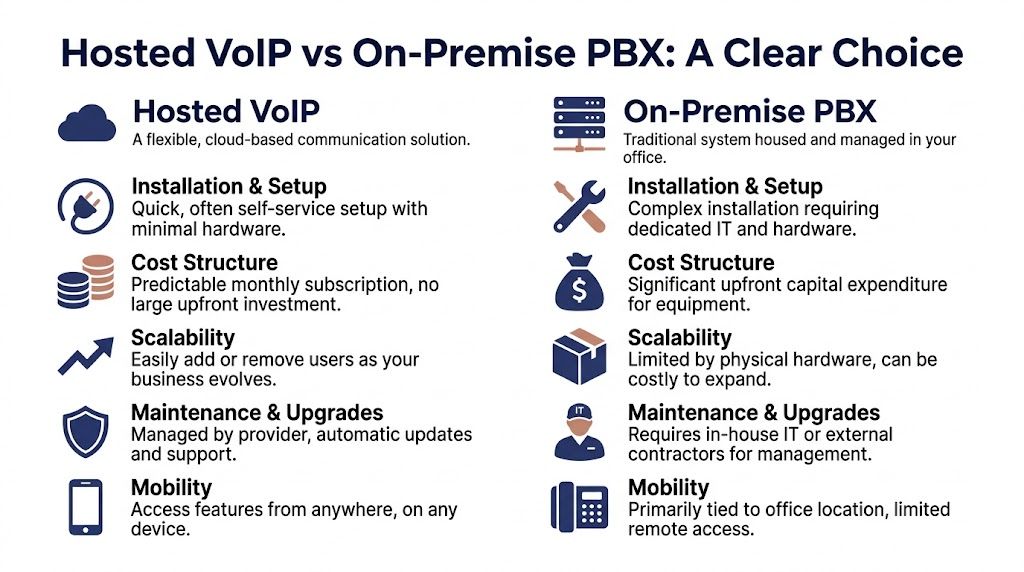
Hosted VoIP vs. On-Premise PBX at a Glance
| Criterion | Hosted Business VoIP | On-Premise PBX |
|---|---|---|
| Installation | Faster to deploy, lighter on-site footprint | Heavier setup with dedicated hardware |
| Cost structure | Ongoing operating expense with predictable billing | Larger upfront capital expense |
| Scalability | Add users and locations more easily | Expansion depends on hardware capacity |
| Maintenance | Provider-managed updates and support | Internal IT or outside vendor handles upkeep |
| Remote work | Built for mobile apps and distributed teams | Often possible, but usually more awkward |
| Feature rollout | New capabilities are easier to adopt | Upgrades can require projects or replacements |
| Administration | Web-based management is common | Changes often depend on specialized access |
| Risk profile | Less hardware ownership, more provider dependence | More direct control, more in-house burden |
Cost is more than the phone bill
Owners often compare only monthly service costs. That misses the complete comparison.
An on-premise PBX carries hardware purchase costs, installation complexity, maintenance responsibility, replacement cycles, and the cost of waiting when changes can’t be made quickly. Hosted business VoIP moves more of that into an operating model where the provider carries the infrastructure burden.
That doesn’t mean hosted is automatically cheaper in every scenario. It means the costs are easier to predict and usually easier to align with actual headcount and usage.
Buying a PBX is like buying a building system. Buying hosted VoIP is like buying the service outcome.
Scalability is where the gap gets obvious
Older systems start to look brittle.
If your business adds locations, opens temporary offices, hires seasonal staff, or shifts people between home and office, hosted systems fit better because the user model is more flexible. You can provision around people and workflows instead of around a fixed box in one closet.
With on-premise PBX, scaling often means checking licenses, line capacity, cards, physical phones, and the labor needed to tie it all together. That’s manageable. It’s just slower and less forgiving.
Maintenance and support are strategic issues
A lot of companies underestimate how much they dislike owning telecom until they stop owning it.
With on-premise, your business is responsible for more of the stack. Someone has to coordinate updates, troubleshoot hardware, manage carriers, and deal with failures. If your internal IT team is small, that becomes a distraction from higher-value work.
Hosted business VoIP changes the support model. The provider takes on the core system upkeep, and your internal team focuses more on user setup, policy, and local network readiness.
Where on-premise still makes sense
There are still cases where on-premise can be justified.
A business may have strict internal control requirements, a large legacy telecom investment, unusual line-of-business dependencies, or an environment where internet reliability makes cloud adoption more complicated. Those cases exist.
But most SMBs aren’t choosing between two equally convenient options. They’re choosing between keeping an aging system alive and moving to a model that matches modern operations better.
Calculating the Real ROI of a Modern Phone System
The fastest way to understate the value of hosted business VoIP is to reduce the decision to “What’s our monthly bill now versus what will it be after the switch?”
That’s part of the math, but it’s not the business case.
ROI shows up in fewer missed calls, less admin friction, cleaner customer handoffs, easier support for remote staff, and less time spent fighting a phone system that should have faded into the background years ago.
Where the return usually comes from
Some gains are direct and easy to explain to finance.
- Predictable spend: Subscription pricing is usually easier to budget than surprise hardware work.
- Lower support burden: Internal IT spends less time coordinating telecom fixes and routine changes.
- Fewer workarounds: Staff stop bouncing between desk phones, cell phones, and personal voicemail.
Other returns are softer, but they’re still real.
- Better customer experience: Calls get to the right person faster.
- Faster response loops: Voicemail transcription, recordings, and routing rules remove delays.
- Improved manager visibility: Reporting makes service problems visible before they become complaints.
CRM integration only pays off if you operationalize it
Many deployments disappoint. Businesses buy the promise of integrated calling, but they don’t account for setup friction, user training, or workflow design.
According to Nextiva’s hosted VoIP overview, 40% of SMBs report sync delays and setup complexities with CRM integrations. The same source notes that teams that implement and train properly on analytics and related workflows can achieve 15 to 20% gains in call efficiency and an 18% boost in issue resolution rates.
Those numbers matter, but the practical lesson matters more. Integration by itself doesn’t create ROI. Adoption does.
If you’re trying to connect phone performance to business outcomes, it helps to anchor the discussion around service metrics your team already understands. This guide to key performance indicators for customer service is useful because it ties call handling back to response quality, resolution, and customer experience instead of treating telecom as a standalone tool.
The phone system becomes valuable when it improves workflows people already use, not when it adds another dashboard nobody opens.
A hosted seat model also makes planning easier because you can map users, departments, and feature needs more cleanly. If you’re comparing service structures, reviewing how a hosted VoIP seat works helps clarify what you’re buying per user.
How to explain the investment internally
When I talk owners through ROI, I usually frame it in operational terms first.
Ask a few blunt questions:
- Are calls being missed because the system can’t route flexibly?
- Are managers making staffing decisions without queue visibility?
- Are remote employees using workarounds instead of the business line?
- Does IT spend too much time on something that should be managed service infrastructure?
If the answer is yes to several of those, the ROI case is already there. The old phone system isn’t just a legacy asset. It’s a small recurring tax on productivity.
Your Migration Checklist and Common Pitfalls to Avoid
A hosted business VoIP migration doesn’t fail because the idea is flawed. It usually fails because someone treated it like a phone swap instead of an operations project.
The smooth migrations all follow the same pattern. They inventory what exists, verify the network, clean up call flows, plan number porting carefully, and define who owns each step.
Start with an audit, not a quote request
Before you compare providers, document your current environment.
Create a working list that includes:
- Phone numbers: Main lines, direct numbers, fax numbers, toll-free numbers, and anything published online.
- Users and devices: Who needs a desk phone, who can use a softphone, and who needs both.
- Call flows: Business hours, after-hours routing, holiday schedules, hunt groups, ring groups, and voicemail rules.
- Special dependencies: Door phones, paging, alarm integrations, fax workflows, or line-of-business tools tied to the old system.
This is the part many businesses rush through. Then they discover after cutover that a rarely used number was tied to a vendor portal, or that after-hours calls still route to a former employee.
Check the network before blaming VoIP
A hosted platform can only sound as good as the connection carrying the calls.
A single uncompressed VoIP call needs 64 to 100 kbps of dedicated upstream bandwidth, and 20 simultaneous calls translate to about 1.5 Mbps of stable, prioritized bandwidth according to Great Lakes Computer’s business VoIP bandwidth guide. The same source notes that without Quality of Service (QoS), voice traffic competes with normal data traffic, which leads to jitter and dropped calls.
That’s why I tell clients to stop looking only at download speed. Voice pain usually shows up in the upstream path and in how traffic is prioritized.
Practical rule: Don’t approve a migration until someone has verified bandwidth, upload stability, and router QoS at each site that will carry live calls.
A clean rollout follows a sequence
You don’t need a giant enterprise methodology, but you do need order.
Define the future call flow
Fix broken routing before migration day. Don’t recreate years of bad habits in a new system.Choose endpoints intentionally
Some users need Yealink desk phones. Some need only a laptop headset and mobile app. Don’t overspend by giving every user the same setup.Plan number porting carefully
Porting is manageable, but it needs timing, carrier coordination, and a fallback plan for the transition window.Pilot with a small group
Test reception, transfers, voicemail, mobile app behavior, and remote use with real staff before full cutover.Train by role
Reception, supervisors, general users, and admins need different training. A one-size-fits-all session doesn’t stick.
The most common mistakes
Most avoidable issues fall into a short list.
- Treating all locations the same: A headquarters fiber connection and a rural branch office may need different planning.
- Ignoring outage behavior: If the office internet fails, everyone should already know how calls reroute.
- Keeping a bad menu tree: New platform, same confusing IVR.
- Skipping admin ownership: Someone internally must own users, routing, and policy after go-live.
- Choosing price over support: Cheap service gets expensive when number porting stalls or cutover day goes sideways.
This is where white-glove onboarding matters. A provider that handles setup, port coordination, endpoint prep, and post-cutover support reduces the odds of a messy handoff. For a small business with limited internal telecom experience, that support model is often the difference between a controlled migration and a week of avoidable disruption.
Your Hosted Business VoIP Buyer's FAQ
Can I keep my current business numbers
Usually, yes. That process is called porting.
The important part is administration, not theory. Your business should verify exactly which numbers are active, who owns them, whether any are tied to old contracts, and what the cutover timeline looks like. Number porting is routine, but sloppy records slow it down.
What happens if the internet goes down
This is one of the most important buyer questions, and many providers gloss over it.
According to TechnologyAdvice’s hosted VoIP guidance, unreliable internet affects up to 30% of US SMBs, and businesses should ask about automatic call forwarding to mobile numbers during an outage while also confirming the provider offers at least 99.99% uptime for the service itself. That’s the right way to think about it. Your provider can keep the platform available, but you still need a failover plan for your local connection.
Is hosted business VoIP secure
It can be, if the provider takes security seriously and your business handles user access properly.
What I look for is straightforward: controlled admin permissions, strong authentication practices, clear device management, and a provider that can explain how they protect call traffic and account access. Security problems often come from weak operational habits, not just weak software.
Ask the provider what happens when an employee leaves, who can change routing, and how admin access is controlled. The quality of that answer tells you a lot.
How does E911 work with VoIP
E911 still matters. It just needs to be managed intentionally.
Because users may work from different locations, the business has to keep location information current for the people and devices using the system. If your team moves between offices, home, and mobile use, make sure your provider explains how location registration works and what your responsibilities are.
Do we need desk phones anymore
Some users do. Some don’t.
Front-desk staff, shared common areas, executives, and heavy phone users often still prefer dedicated desk phones. Mobile employees, managers, and hybrid users may be fine with apps plus a headset. The best answer is role-based, not ideological.
Is hosted VoIP only for call centers
No. Call centers benefit from queue tools and reporting, but many of the biggest wins happen in ordinary SMB environments.
Medical offices need cleaner routing. Contractors need calls to follow the scheduler and field staff. Multi-location companies need one system across branches. Professional services firms need voicemail, transfers, mobile access, and better coverage after hours. Hosted business VoIP fits all of those.
What should I ask providers before I sign
Keep the list practical.
- How will you handle onboarding and number porting?
- What happens during an internet outage at one office?
- Who helps us configure call flows and auto attendants?
- What admin tools do we get after launch?
- What support is available after hours?
- Which devices and mobile options fit our team?
Good providers answer clearly. Weak providers hide behind sales language.
If your current phone system is limiting growth, creating support headaches, or making remote work harder than it should be, it’s worth looking at SnapDial. The platform provides hosted business VoIP with white-glove setup, predictable pricing, mobile-ready calling, call routing, call center features, and 24/7 Texas support, which is the kind of support model many SMBs need when replacing a legacy PBX.