

Monday morning starts the same way for a lot of small businesses. A customer calls while your receptionist is already on the line. The caller hits a busy signal, gives up, and calls a competitor. Your sales manager is out meeting a client, but the office line can't follow her to her mobile. Someone new joins the team, and adding an extension turns into a service ticket, a wait, and another bill.
That's usually the moment owners realize the phone system isn't just old. It's slowing the business down.
A modern phone setup should help you answer faster, look more professional, and keep your team reachable whether they're at a desk, at home, or on the road. That's where hosted PBX for small business has become the practical replacement for legacy systems. It gives smaller teams the kind of call handling that used to be reserved for larger companies, without forcing you to maintain a hardware box in the office.
Is Your Old Phone System Holding Your Business Back
A legacy phone system rarely fails all at once. It chips away at the business in small, expensive ways.
One missed call here. One awkward transfer there. One employee using a personal cell because the office line can't reach them outside the building. It all adds up to a customer experience that feels clunky, even when your team is doing good work.
For very small offices, a basic setup can still be enough for a while. If you're comparing a simple 2-line telephone system against a more flexible business phone platform, the key question isn't just line count. It's whether your phone system can keep up with how your team works now.
The signs show up in daily operations
A restaurant owner hears voicemail hours late because nobody checked the desk handset.
A law office can't route calls cleanly between intake, billing, and attorneys.
A home services company misses after-hours leads because the system stops at the front desk.
None of those problems sound dramatic on their own. Together, they limit growth. Customers don't care whether the issue is wiring, a PBX cabinet, or an old carrier contract. They only know they couldn't reach you.
Old phone systems create friction in places owners don't immediately measure. Lead response time, staff coordination, and the first impression a caller gets.
If you're still sorting out the basics, it helps to understand what a PBX system is before comparing providers. Once owners see the phone system as the traffic controller for every inbound and outbound call, the weakness of older setups becomes obvious.
What modern buyers expect
Customers expect simple things:
- Reachability: They want someone to answer or at least route them properly.
- Continuity: They don't want to repeat the same issue to three people.
- Professionalism: They expect a main number, clean menus, and quick transfers.
- Mobility: They assume your team can pick up business calls without being chained to one desk.
That's where hosted PBX earns its keep. It replaces the old “phone closet” model with a service that can send calls to desk phones, laptops, and mobile apps. The result is straightforward. Fewer missed calls, fewer bottlenecks, and a business that sounds organized even when the day gets messy.
What Exactly Is a Hosted PBX System
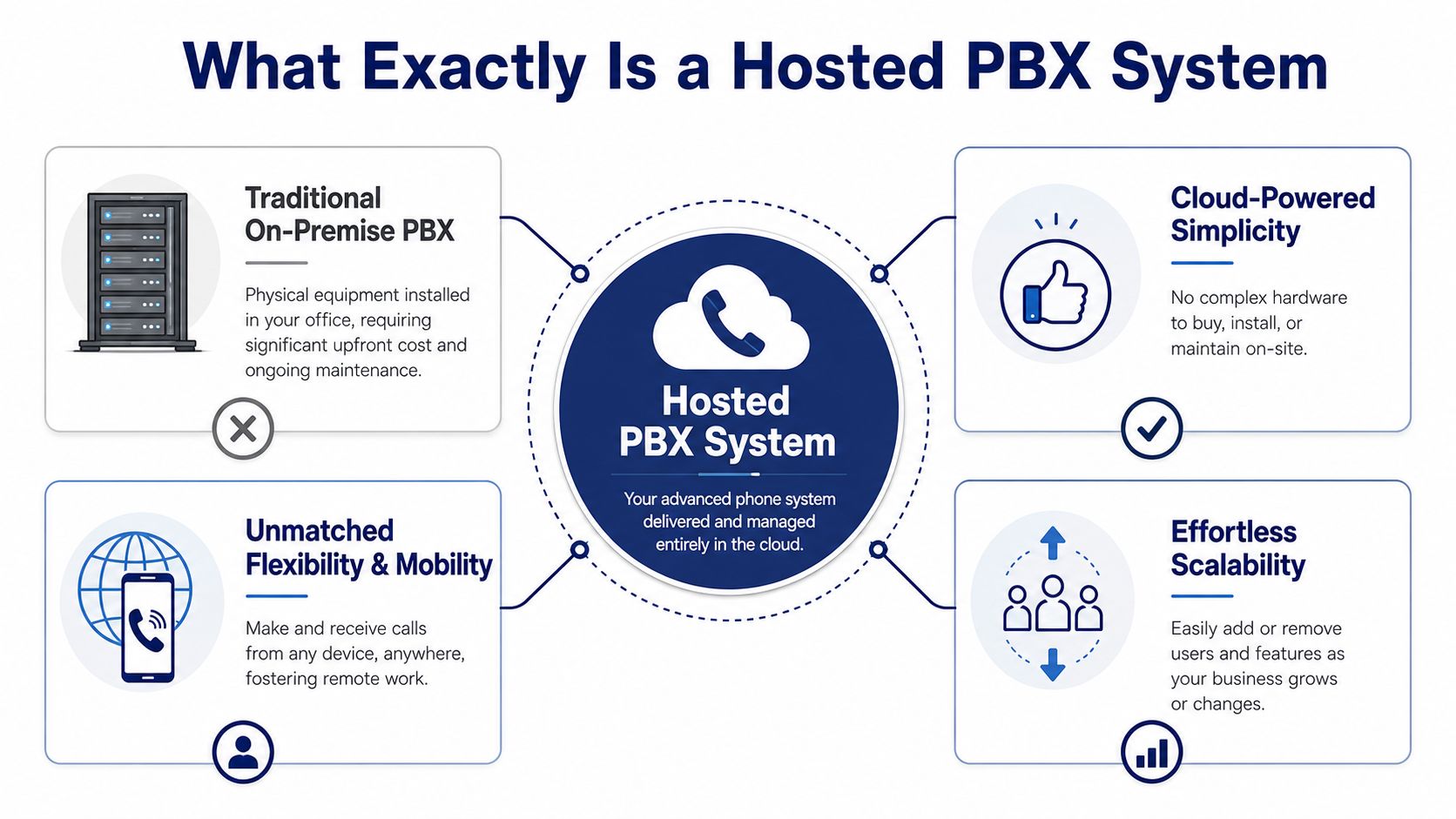
Think of a traditional PBX like running your own email server in a back room. It works, but someone has to maintain the hardware, handle upgrades, and fix problems when they happen.
A hosted PBX is closer to using a cloud email platform. The core system lives in the provider's environment, and your team connects to it over the internet. You still get extensions, call routing, voicemail, and business numbers. You just don't have to own the machinery that makes it all work.
What “hosted” and “VoIP” really mean
Hosted means the PBX itself is managed off-site by your provider.
VoIP means voice travels over the internet instead of old copper phone lines. According to Market Growth Reports on hosted PBX adoption, over 61% of SMBs have adopted hosted PBX solutions specifically to support remote working environments and unified communications needs.
That stat tracks with what small businesses need now. Staff move between office, home, job sites, and travel. A phone system tied to one physical location doesn't fit that reality well anymore.
If you want a plain-English look at the delivery model, this overview of hosted VoIP is a useful companion.
What your team actually uses
Most small businesses don't interact with the “PBX” directly. They use the endpoints:
- Desk phones for front desks, shared workspaces, and staff who prefer a handset
- Desktop softphones for users working from a laptop
- Mobile apps for owners, sales reps, and field staff
- Admin portals for changing users, greetings, routing rules, and voicemail settings
The system in the cloud handles the logic behind the scenes.
Why it feels simpler in practice
With on-premise equipment, even basic changes can require hardware limits, licenses, or a technician. Hosted PBX removes most of that burden. Your provider manages the platform. Your team uses the features.
Practical rule: If your current phone system needs a site visit for routine changes, it's acting like infrastructure. A hosted PBX should feel more like software.
For a small business, that shift matters. You stop treating telephony like a hardware project and start treating it like an operating tool. That's the primary appeal of hosted PBX for small business. It delivers the control and call handling of a larger system without forcing you to become a telecom shop.
The Core Features That Drive Business Growth
Features only matter if they solve an expensive problem. Small businesses don't need a longer checklist. They need tools that help staff answer faster, route smarter, and avoid dropping the ball when the day gets busy.

The features that change how you operate
An auto attendant is the classic example. On paper, it's just a call menu. In practice, it acts like a 24/7 front desk that never forgets the script. Callers reach sales, support, billing, or an on-call number without waiting for one person to manually redirect every call.
Mobile apps and softphones matter just as much. They turn a mobile phone or laptop into a proper business extension, which is what makes remote work and field work usable instead of chaotic.
Then there are ring groups and call queues. These help teams answer as a unit rather than relying on one heroic employee at the front desk. If you run a clinic, repair shop, agency, or service company, that can be the difference between a manageable rush and a pile of missed opportunities.
Features tied to business outcomes
Here's where small businesses usually see the practical lift:
| Feature | What it fixes | Business result |
|---|---|---|
| Auto attendant | One person answering every call | More consistent routing and a stronger first impression |
| Mobile app | Staff missing calls away from the office | Better responsiveness from anywhere |
| Call queue | Calls piling up during busy windows | Fewer abandoned callers and smoother peak handling |
| Voicemail transcription | Slow callback workflows | Faster triage of missed calls |
| Call recording | “Who said what?” confusion | Better coaching, accountability, and documentation |
CRM integration also matters more than many owners expect. When the phone system and customer records connect, the team spends less time hunting for context and more time helping the caller. If that's on your shortlist, this guide to VoIP CRM integration is worth reviewing.
Where AI helps and where it can annoy people
AI in phone systems is useful when it removes routine work. It's less useful when it tries to impersonate judgment.
According to SourceForge's hosted PBX overview for small business, modern hosted PBX platforms with AI-driven call transcription and CRM screen pops can reduce agent handling time by 18–22% in small call centers by cutting manual note-taking and surfacing customer context.
That's a strong use case. Transcription, summaries, and screen pops save time after the call and during it.
Where businesses get into trouble is over-automating the front end. AI reception can help with simple routing, hours, or common questions. But if customers have layered issues, unusual requests, or emotional complaints, many still want a person.
Don't buy AI because it sounds modern. Buy it if it removes repetitive admin work without making callers work harder.
The best setup is usually hybrid. Let automation handle the predictable parts. Give people a clean path to a human when the call needs nuance.
The Business Case Cost Scalability and Reliability
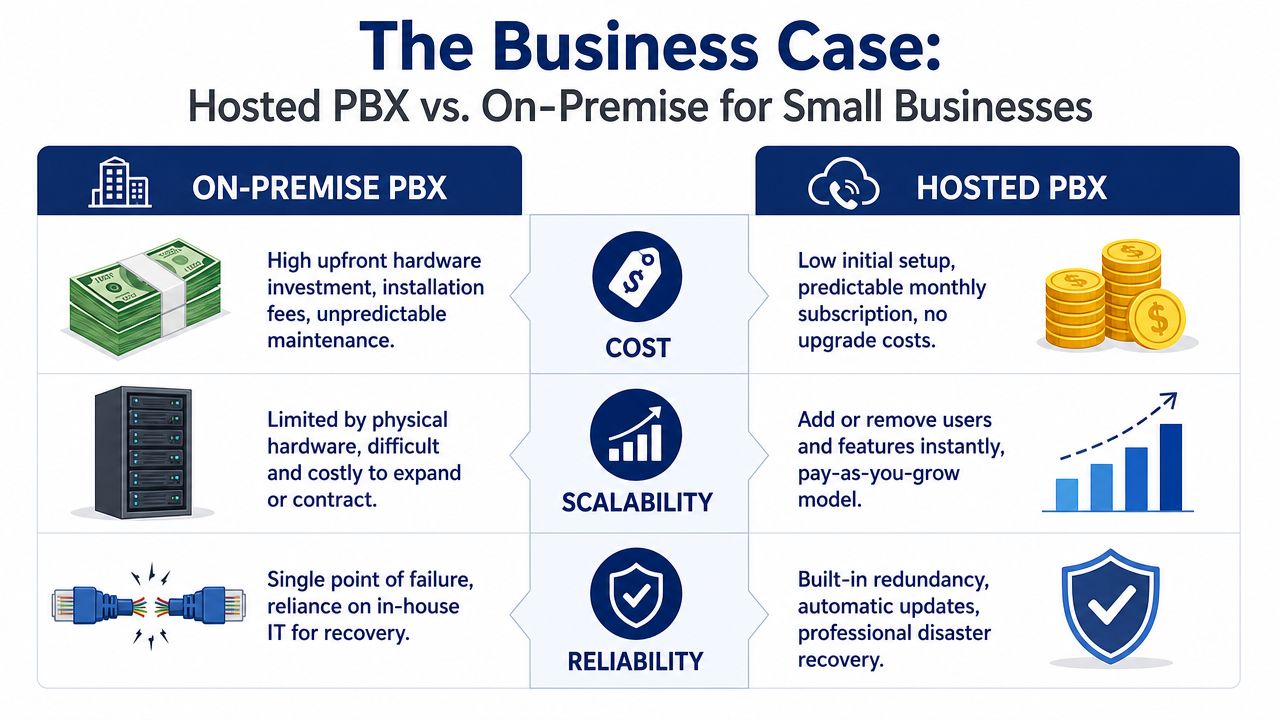
When owners compare phone systems, they often focus on monthly price first. That's understandable, but it's incomplete. A complete decision rests on three pillars: what you pay, how easily you can grow, and how much operational burden lands on your team.
Cost looks different when you include maintenance
Hosted PBX shifts the phone system away from upfront hardware buying and toward a predictable service model. The global market is expected to keep expanding, with Grand View Research projecting the hosted PBX market to reach USD 31.07 billion by 2030, and SMBs are a key part of that demand because they want enterprise-grade calling without physical hardware.
The monthly cost range matters too. Based on the verified market data, cloud-based hosted PBX systems typically run $15 to $40 per user per month, and small teams of 10 to 50 employees generally land between $200 and $2,000 per month, depending on features. That's a very different budgeting model from buying and maintaining on-site gear.
A useful way to frame it is the same way you'd think about staffing overhead. If you already evaluate total labor cost with a guide for startup hiring costs, apply the same mindset to telephony. The sticker price isn't the whole cost. Support time, maintenance, change requests, and downtime all belong in the calculation.
Scalability is where cloud systems usually pull ahead
On-premise systems can work well in stable environments. But many small businesses aren't stable in that sense. They hire seasonally, add locations, open departments, or support remote staff.
Hosted PBX handles those shifts more cleanly:
- Adding users: Usually done in software, not through a hardware expansion project
- Opening a location: Easier to bring under one phone system and one main number
- Supporting hybrid teams: Staff can use the same business identity from multiple devices
- Changing call flows: Admins can update routing without waiting on a truck roll
This explainer is a helpful visual comparison before you evaluate options in detail:
Reliability is partly platform and partly planning
Hosted systems remove a lot of the “box in the closet” risk. The provider owns updates, redundancy, and backend maintenance. That's an operational advantage.
But reliability isn't magic. It depends on your provider, your network, and your fallback plan. If a business moves to the cloud and ignores internet resilience, it may trade one problem for another.
The strongest hosted PBX deployments aren't just cheaper to run. They're easier to recover, easier to expand, and easier for a small team to manage without telecom expertise.
Answering the Internet and Security Questions
The most common objection to hosted voice is fair. If calls depend on the internet, what happens when the internet has a bad day?
The honest answer is this: internet dependency is real, but it's manageable if the provider and network are designed properly. It becomes a serious problem only when businesses buy cloud calling and ignore the network underneath it.
Call quality is a network issue first
Hosted PBX systems rely on Session Border Controllers and Quality of Service policies to keep traffic stable. According to the verified technical source on VoIP hosted PBX infrastructure, these systems are used to maintain HD voice quality and keep latency under the 150 ms threshold needed to prevent echo and conversational delay.
That matters because bad voice quality usually doesn't feel like a technical defect to the caller. It feels like your business is hard to deal with.
A solid hosted setup should account for:
- Traffic priority: Voice packets shouldn't compete equally with every download and cloud backup on the network
- Secure session handling: SBCs help protect SIP traffic and manage connections correctly
- Device behavior: Phones, apps, and routers need to work cleanly together
- Failover logic: Calls should have somewhere else to go if the primary path has trouble
What happens when the internet goes down
Many buyer guides often get too vague. “Cloud” doesn't automatically mean resilient.
A practical business continuity plan usually includes call forwarding to mobile devices, alternate routing rules, and a backup connectivity option if voice is mission-critical. That can mean a secondary internet connection or a managed failover approach. The right design depends on how costly missed calls are for your business.
If every inbound call represents revenue, then internet backup isn't an optional accessory. It's part of the phone system.
Security isn't just encryption
Small businesses sometimes think phone security starts and ends with encrypted calls. That's only part of it.
Good security also means controlling who can access the admin portal, limiting configuration mistakes, protecting recordings and voicemail, and making sure the provider monitors the environment instead of leaving everything to your office manager and a generic router.
Hosted PBX can absolutely be secure. But “secure” comes from disciplined implementation, not from the cloud label alone. Ask detailed questions. How are calls routed during an outage? How are devices authenticated? What support do you get when call quality suddenly degrades? Providers that answer those questions clearly are usually the ones worth shortlisting.
Your Practical Migration and Setup Checklist
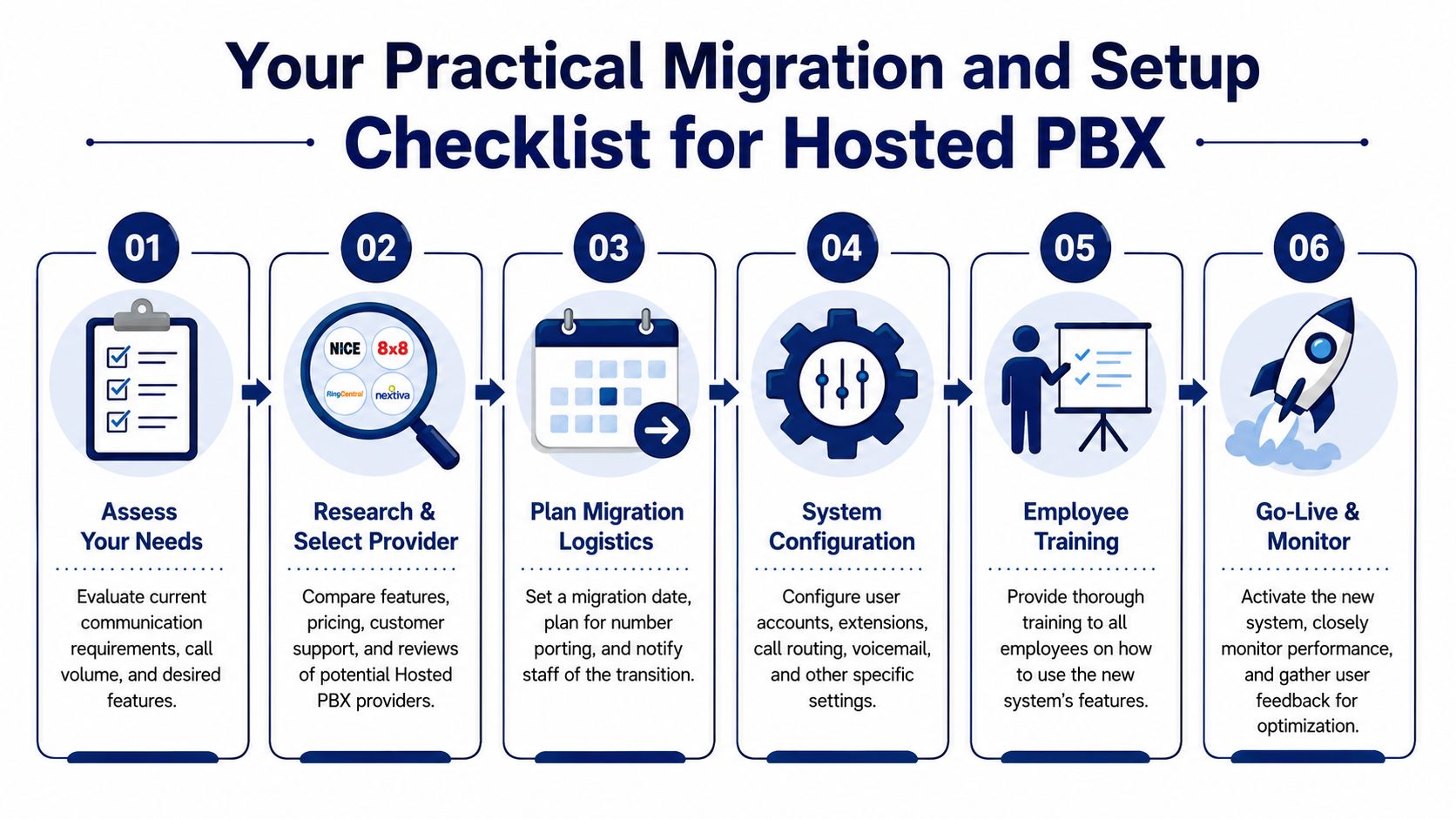
A phone system migration feels intimidating right up until you break it into decisions. Most troubled rollouts come from rushed planning, not from the technology itself.
The smoothest projects are boring in the best way. Everyone knows the number plan, call flow, device mix, and porting timeline before launch day.
Start with business needs, not feature catalogs
Before you compare vendors, write down how calls move through your business.
Who answers first? Which calls must ring multiple people? What should happen after hours? Which employees need desk phones, and which are better off with mobile apps or desktop softphones?
A short planning list helps:
- Map incoming call types: Sales, support, billing, scheduling, emergencies
- Define must-have routing: Ring groups, hunt paths, overflow destinations, after-hours rules
- List user types: Front desk, managers, field staff, remote users
- Identify critical numbers: Main line, direct numbers, toll-free lines, fax lines if still needed
Check the network before you sign
Many small businesses often under-plan. If the office internet is unstable, changing phone providers won't fix that.
The hidden cost issue deserves attention. The Broadconnect buying guide notes that many buyer guides overlook the fact that 70% of VoIP complaints stem from network issues, not PBX software, and that failover hardware or backup connectivity can add $300–$800 per year to a cloud-first setup, as covered in Broadconnect's strategic hosted PBX guide.
That doesn't mean hosted PBX is a bad fit. It means you should treat network readiness as part of the project.
A hosted PBX migration is two projects in one. A phone project and a network-readiness project.
Handle rollout in phases
A practical migration usually follows this rhythm:
- Choose the cutover window: Pick a low-risk date and avoid your busiest cycle
- Prepare number porting: Make sure account details match exactly to avoid delays
- Build the system first: Record greetings, create users, test routing, confirm voicemail behavior
- Train the team: Show staff how to answer, transfer, check voicemail, and use the mobile app
- Test failover paths: Don't assume forwarding rules work. Verify them
- Watch the first week closely: Gather issues quickly and adjust call flow based on real usage
Train for real scenarios
Training shouldn't stop at “here's your login.” Run through actual situations. A missed call after hours. A transfer to billing. A voicemail-to-email workflow. A mobile user answering from the road.
That's what makes the new system stick. The technology matters, but daily habits decide whether the migration pays off.
How to Choose the Right Hosted PBX Provider
Providers often sound similar in demos. The differences show up later, when you need support, when your internet hiccups, or when you discover the feature you assumed was included turns out to be an add-on.
The right buying process is simple. Ask harder questions earlier.
The questions that expose weak vendors
Start with pricing. Is the quote inclusive, or are core features separated into paid tiers and surprise fees? A provider can look affordable until you add recording, mobile apps, queue features, analytics, or implementation help.
Then ask about deployment. Who builds the call flow? Who handles number porting? Who trains your staff? If the answer is basically “you figure it out in the portal,” that may be fine for a technical team, but it's a poor fit for many small businesses.
Support is the next filter. When voice quality degrades, can you reach a real person who understands business telephony, or are you opening a ticket and waiting?
Don't skip the network questions
Many buyers get trapped. The verified industry guidance notes that 70% of VoIP complaints stem from network issues, not the PBX software, and hidden failover costs can add $300–$800 per year in some setups. If a provider talks endlessly about features but can't clearly explain backup options, router expectations, and outage behavior, keep looking.
Use this shortlist when evaluating vendors:
- What's included: Ask for a written breakdown of features, implementation, support, and any device-related costs
- What happens during an outage: Ask how inbound calls are rerouted if your office connection fails
- What networking do you require: Ask what kind of router, failover, and traffic prioritization the system expects
- Who supports the rollout: Ask whether setup is guided, partially guided, or self-service
- How easy is change management: Ask how users, call flows, greetings, and routing are updated later
- How AI is applied: Ask whether AI features help staff behind the scenes or push too much automation onto customers
The best provider isn't the one with the longest feature sheet. It's the one that answers operational questions clearly before you sign.
A good hosted PBX for small business should feel like a service partnership, not a software gamble.
If you're replacing an aging phone system and want a provider with predictable pricing, white-glove setup, and real support, take a close look at SnapDial. It's built for businesses that need cloud PBX simplicity without the usual migration headaches, hidden complexity, or do-it-yourself setup burden.