

Your current phone system probably isn't failing all the time. It's failing in the small ways that cost more.
Calls hit a busy signal when the front desk is swamped. A manager can't transfer a customer cleanly from one location to another. Remote staff use personal mobiles because the office system doesn't travel with them. Then something breaks in a back closet, and suddenly you're waiting on a vendor who still treats phone systems like fixed infrastructure.
That's usually the point when business owners start looking at a hosted PBX system. Not because it sounds modern, but because the old model stops fitting how the company works.
Why Businesses Are Moving Beyond Old Phone Systems
A legacy phone system was built for one office, one wiring plan, and one way of working. Most businesses don't operate that way anymore. Teams move between desks, homes, job sites, and branch locations. Customers expect a fast handoff, not a voicemail maze caused by old hardware and limited lines.
That mismatch is why the market has moved so hard toward cloud telephony. The global Hosted PBX market is projected to grow from $8.5 billion in 2023 to $22.68 billion by 2030, and cloud-based PBX deployments now account for over 70% of total enterprise use, up from 42% before the pandemic, according to this hosted PBX market outlook.
What pushes companies to switch
Most companies don't replace their phone system because of one headline feature. They switch because of a pile of practical issues:
- Old hardware creates friction: Moves, adds, and changes take too long.
- Maintenance gets expensive: You keep paying to preserve a system that doesn't improve.
- Remote work exposes limitations: Desk-bound calling breaks when staff aren't desk-bound.
- Customer experience suffers: Missed transfers, call bottlenecks, and poor routing make the business look smaller than it is.
A hosted setup changes the operating model. The phone system's core lives with the provider, and your team connects through IP phones, desktop apps, or mobile apps. That makes it much easier to support overflow routing, multi-location calling, and hybrid work without rebuilding your office every time the business changes.
Old PBX hardware is like insisting every employee work from one physical filing cabinet. It can function, but it fights the way modern teams actually move.
For companies also rethinking how they connect with customers online, practical tools like instant calls for customer support can help show how much buyers now value immediate access over rigid call flows.
The shift isn't about replacing phones with something trendy. It's about replacing fixed infrastructure with a service model that fits growth, mobility, and faster customer response.
What Is a Hosted PBX System Explained Simply
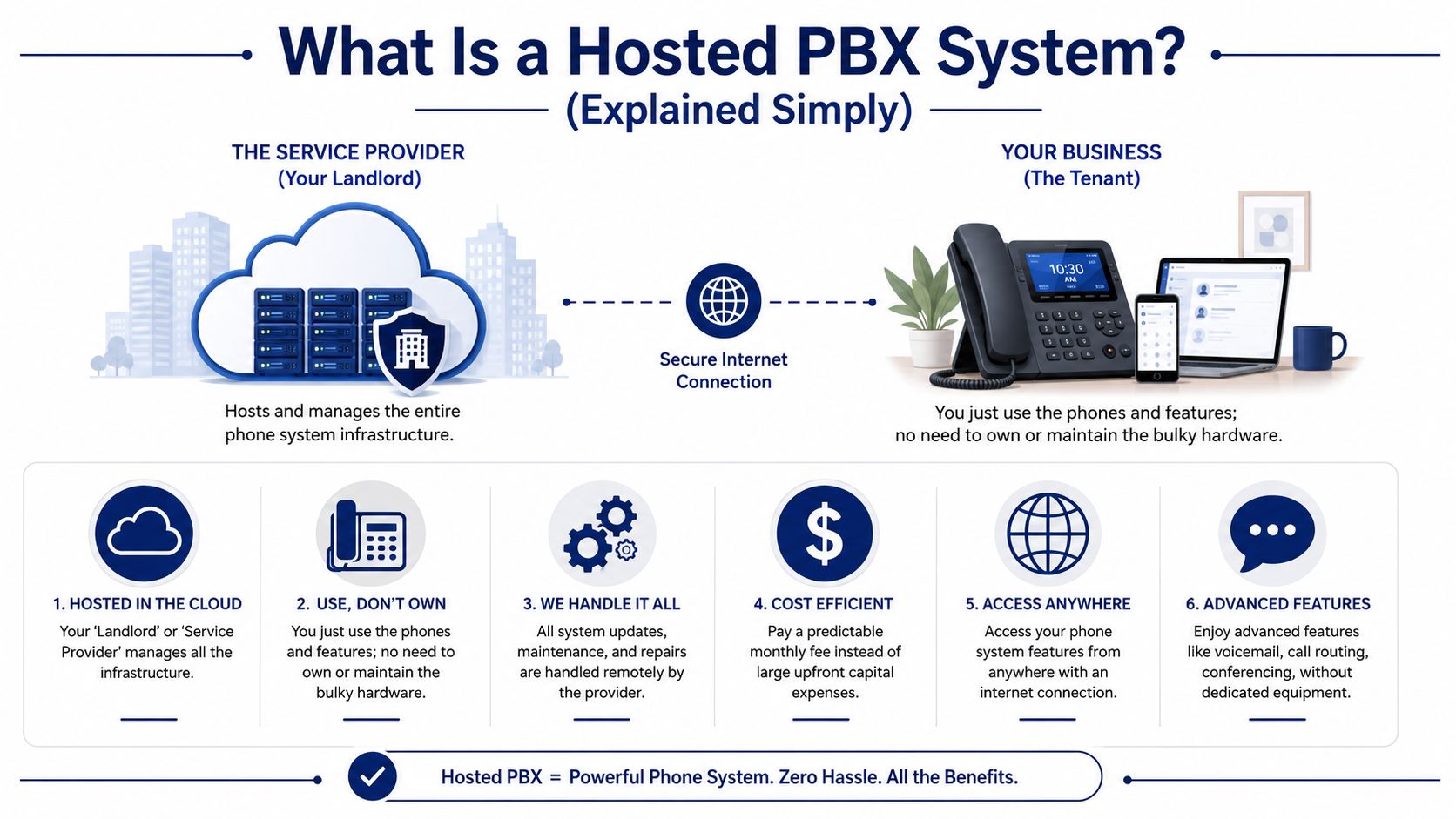
A hosted PBX system is your business phone system, except the switching and call-control equipment doesn't sit in your office. The provider runs it in the cloud, and your business uses it over an internet connection.
The easiest way to think about it is real estate.
An on-premise PBX is like owning and maintaining your own office building. You buy the structure, wire it, repair it, upgrade it, and deal with every problem that comes with ownership. A hosted PBX is like renting a fully managed office suite. You still use the space every day, but the landlord handles the building systems behind the walls.
If you want a broader primer on the model, this guide to what a cloud phone system is gives useful background on the category.
What the PBX actually does
PBX stands for Private Branch Exchange. In plain terms, it's the traffic controller for your calls. It decides what happens when someone dials your business, presses a menu option, reaches voicemail, transfers to another extension, or joins a queue.
With hosted service, the provider handles that logic and infrastructure remotely. Your team just uses endpoints such as:
- Desk phones: IP phones on your network
- Softphones: apps on laptops and desktops
- Mobile apps: business calling on smartphones
- Admin portals: web tools for users, routing, and features
Hosted PBX, Cloud PBX, and Hosted VoIP
In day-to-day buying conversations, these terms often overlap. That confuses people, but the difference is simpler than it sounds.
| Term | Practical meaning |
|---|---|
| Hosted PBX | A provider hosts and manages your PBX system off-site |
| Cloud PBX | Usually the same concept, with emphasis on cloud delivery |
| Hosted VoIP | Voice service delivered over the internet, often through a hosted PBX platform |
The useful question isn't which label a vendor uses. It's whether the provider is managing the phone system for you, or whether your team still owns the underlying complexity.
Simple test: If your business has to maintain the core phone server, it's not really hosted in the way most SMBs mean it.
A good hosted setup removes the burden of maintaining bulky telecom hardware while keeping the parts users care about: extensions, voicemail, call routing, ring groups, recordings, and mobile access. That's why many business owners find the technology less intimidating once they stop thinking about boxes and start thinking about outcomes.
The Enterprise Features Your Business Unlocks
The biggest advantage of a hosted PBX system isn't that it gives you more features. It's that it gives smaller companies access to the same communication discipline larger companies have used for years.
According to this overview of hosted PBX for business communications, hosted PBX systems give SMEs access to Fortune 500-level features such as Auto Attendants (IVR) and advanced call routing, and the Solutions segment is expected to hold a 65% market share in 2024, driven by SME adoption.
User productivity improves first
The first changes staff notice are usually operational, not flashy.
A salesperson can answer the business line from a mobile app without exposing a personal number. A service manager can see voicemail in email and respond faster. A remote employee can transfer a call to accounting as if they were sitting in the main office.
Useful productivity features usually include:
- Mobile and desktop calling: Staff can place and receive business calls wherever they're working.
- Visual voicemail and transcription: Messages become easier to scan and prioritize.
- Presence and extension dialing: Teams can find one another quickly without calling main lines.
- Conferencing and messaging: Internal coordination gets faster when communication tools live together.
Admin management gets easier
Hosted systems therefore save real administrative time.
With a modern platform, an office manager or IT admin can change call routing, add users, assign numbers, review call logs, or update holiday schedules from a web portal. You don't have to schedule a technician visit just to update a greeting or move an extension.
A good admin toolkit should cover:
- Call recording: Useful for training, dispute review, and process improvement
- Real-time dashboards: Supervisors can see queue activity and agent status
- Reporting: You can track call patterns, missed calls, and handling trends
- Routing rules: Time-based, department-based, and overflow logic become manageable
The best phone system changes are the ones your staff stops talking about after a week because the friction is gone.
Customer experience becomes more consistent
Customers don't care whether your system is cloud-based or on-premise. They care whether they reach the right person quickly.
That's where enterprise-grade features matter most:
- Auto Attendant: Gives callers a professional first touch
- Call queues: Prevents calls from dying when everyone is busy
- Smart routing: Sends callers to the right team instead of the nearest available extension
- CRM integrations: Helps staff answer with context instead of starting cold
For a growing business, these features don't just make the company sound bigger. They make it run tighter. The phone system stops being a utility and starts acting like an operating tool.
Hosted PBX vs On-Premise PBX a Clear Comparison
A business owner usually feels this choice during a change. The company adds a second location, hires remote staff, or outgrows the old phone closet. At that point, it's less about phone features and more about what kind of system your team can support without adding drag to the business.
If you want a quick refresher on the basics, this overview of what a PBX system is helps frame the difference between the two models.
The cost model is different
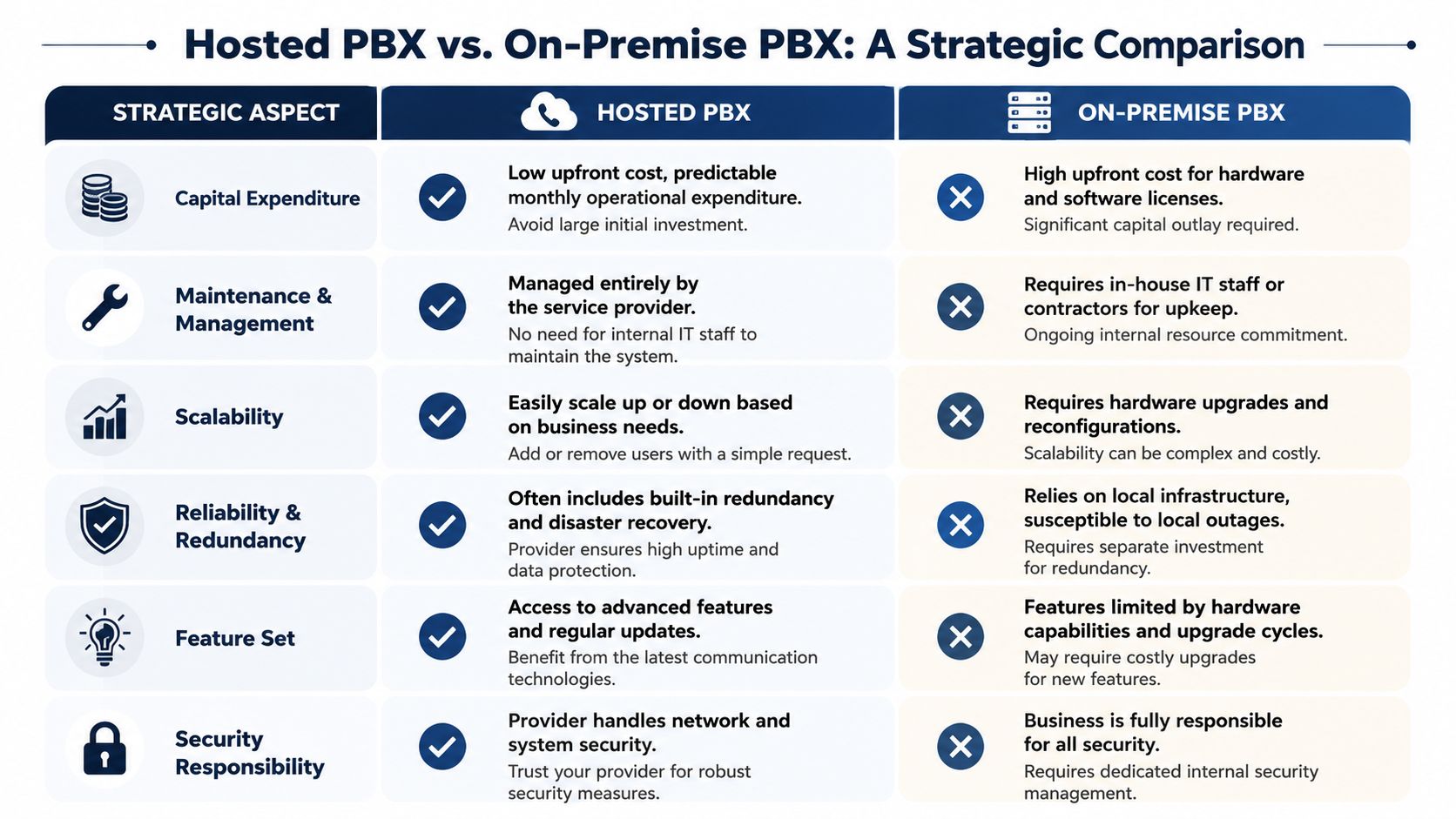
Hosted PBX usually fits companies that want phone service to behave like a monthly utility. On-premise PBX fits companies that are comfortable buying infrastructure, maintaining it, and planning for its replacement later.
Here is the practical comparison:
| Decision area | Hosted PBX | On-premise PBX |
|---|---|---|
| Upfront cost | Lower initial spend | Higher initial spend for hardware and setup |
| Ongoing maintenance | Provider-managed | Your team or contractor handles it |
| Upgrade cycle | Usually included as part of service | Often tied to hardware refreshes and licensing |
| Expansion | Add users and lines quickly | May require capacity planning and equipment changes |
The larger cost difference often shows up after year one. A hosted system shifts spending into a predictable monthly bill. An on-premise system can look cheaper on paper once it is paid off, but that math changes when you add support contracts, replacement parts, consultant time, and the cost of waiting on a hardware change.
Analysts at MarketsandMarkets projected the hosted PBX market to grow from USD 11.5 billion in 2023 to USD 24.9 billion by 2028, reflecting how many businesses now value speed and flexibility over owning phone infrastructure outright, as reported by MarketsandMarkets in its hosted PBX market forecast.
For a useful parallel outside telephony, this Splash Access Wi-Fi comparison shows the same broad trade-off businesses face when choosing cloud-managed versus server-based systems.
Where on-premise still earns its keep
On-premise PBX still has a place.
It can be the better fit for organizations with strict site-level control requirements, unusual integration needs, or internal telecom staff who already know the platform well. I also see it work in facilities where internet risk is taken very seriously and the business wants local call handling to stay in-house as long as possible.
There is a trade-off. Control sounds attractive until a failed power supply, aging gateway card, or expired support agreement turns a phone system into a repair project. Ownership gives you more say over timing, but it also gives you more to maintain.
Where hosted usually wins
Hosted PBX is usually the better business decision when growth, staffing changes, or location changes are likely over the next few years.
It works well when you need to open a branch quickly, support hybrid users, or stop tying internal IT time to phone administration. It also tends to simplify recovery after a local outage because call handling can be redirected without someone driving to the office and touching hardware.
Hosted is often the stronger choice when you need:
- Fast deployment: Service can be rolled out without a long hardware project.
- Flexible growth: New users, numbers, and call flows are easier to add.
- Lower admin burden: IT staff spend less time babysitting telecom gear.
- Better business continuity: Calls are easier to reroute during office disruptions.
A simple way to judge the options is to ask two questions. What will this system cost us to operate, not just buy? And if the office loses power or internet, how quickly can calls be recovered in a way customers barely notice?
That second question gets skipped too often. It should not. Reliability is not just a provider promise. It depends on whether your business wants resilience built into the service model or wants to assemble and maintain more of that protection itself.
Managing Security Reliability and Network Needs
Monday at 8:55 a.m., the phones sound fine in a quick vendor demo. By 10:15, the office VPN is busy, cloud backups kick in, Wi-Fi is crowded, and callers start hearing delay, clipping, and one-way audio. That is how hosted PBX projects go sideways. The platform may be solid, but call quality still depends on the network carrying the traffic.
Analysts and vendors often spend more time on features than on failure conditions. Mitel's overview of what a hosted PBX is is useful for the service model, but the practical question for IT is simpler. What happens to calls when your connection is congested, your firewall mishandles sessions, or a branch loses internet for an hour?
Start with bandwidth, then check call path health
Bandwidth is the first screen, not the whole answer.
If you are sizing a rollout, this practical VoIP bandwidth guide helps estimate capacity based on concurrent calls. That number matters because phone systems fail at peak usage, not at average usage.
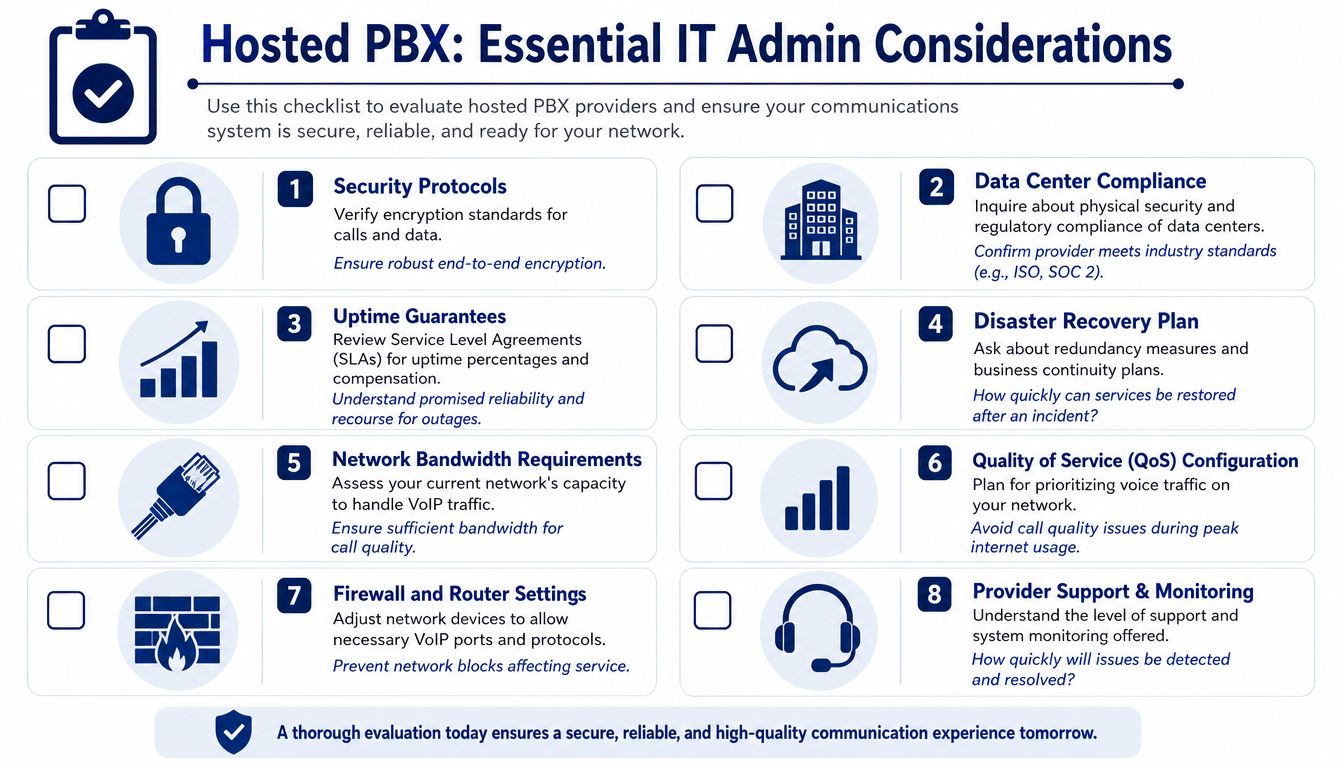
I tell clients to check four things before they blame the carrier or switch providers:
- Peak concurrent calls: Count the busiest 15 minutes of the day, not total headcount.
- QoS and traffic priority: Voice should not compete evenly with file sync, video meetings, and backups.
- Wi-Fi coverage and stability: Softphones and wireless handsets need consistent signal strength, not just internet access.
- Router and firewall behavior: SIP handling, session timeouts, and old edge gear cause many ugly voice problems.
A site can have plenty of raw bandwidth and still produce poor calls. Jitter, packet loss, overloaded access points, and bad NAT handling are the usual culprits. This is the part many buying guides skip, and it is where IT admins save or lose the project.
Ask providers how they handle bad days
Feature lists are easy to compare. Outage behavior is harder, and it matters more.
Ask direct questions:
- If the office internet fails, where do inbound calls go next?
- Can failover routing send calls to mobile phones, another branch, or a backup line automatically?
- Do you support local survivability options for critical locations?
- What do you monitor in real time, packet loss, latency, MOS, registration failures?
- What does support look like during an active incident, and who owns escalation?
Good providers answer these without dancing around the details. Weak ones pivot back to dashboards and mobile apps.
Buy hosted PBX based on recovery plans and call quality controls, not just the demo.
Security is shared between the provider and your team
The provider secures its platform. Your business still owns account hygiene, device policy, and the condition of the network inside the building.
Review these areas before rollout:
- Encryption for signaling and media
- Admin roles and least-privilege access
- Softphone and desk phone provisioning controls
- MFA for portals and user accounts
- VLAN segmentation and internal exposure
If your broader environment has not been assessed recently, a review that helps you discover internal network vulnerabilities can expose weaknesses that affect voice, remote access, and user accounts at the same time.
The practical takeaway is straightforward. Hosted PBX is dependable when the provider has real failover options and your network is ready for voice. Treat it like a simple app purchase, and small network flaws turn into dropped calls, frustrated staff, and customers who hear the problem before you do.
Real-World Use Cases for Hosted PBX
A hosted PBX system makes the most sense when you match it to how a business operates.
Multi-location retail
A retailer with several storefronts often wants one business identity, not separate phone islands. Hosted PBX lets calls hit a central menu, then route to the right store, department, or backup location. If one branch is short-staffed, another site can answer overflow without the customer feeling the handoff.
Cloud-hosted providers also support multi-site management and unified channels with negligible lag of less than 50ms and dropped-call rates below 1%, based on this overview of hosted PBX capabilities. That's the sort of performance profile that makes location-spanning service feel integrated.
Growing support team
A support desk usually outgrows a basic phone setup before management realizes it. Once call queues, recordings, reporting, and CRM visibility become necessary, an old key system starts to feel primitive.
Hosted PBX gives supervisors better control over queue behavior, staffing visibility, and routing logic. That doesn't just help answer more calls. It helps answer them with more consistency.
Remote-first startup
A distributed company needs one phone presence without one office. Hosted PBX fits that model because employees can use business numbers on laptops and mobile phones, transfer calls between teammates, and stay reachable without tying service to a single location.
In practice, that means the company can look stable and well-organized even when nobody works from the same building. For younger teams trying to look credible to customers, that matters as much as any cost benefit.
The IT Admins Hosted PBX Buying Checklist
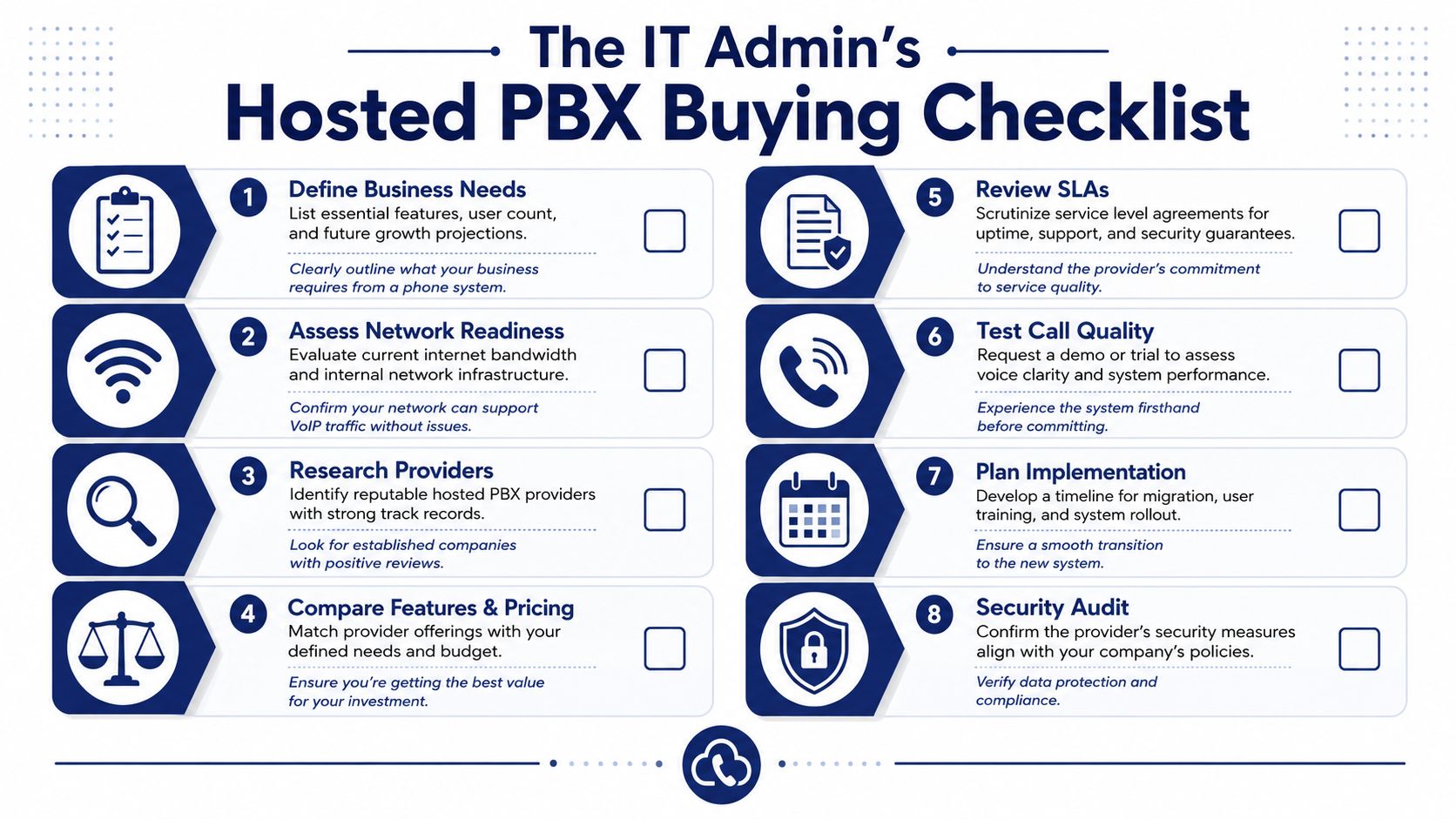
Buying a hosted PBX system gets easier when you treat it like an operations decision, not a shopping exercise. The shortlist should come from business requirements, network readiness, and support expectations.
Questions worth asking before you sign
- What do we need now? List must-have items such as IVR, mobile apps, recordings, call queues, and number porting.
- Will our network support voice cleanly? Confirm bandwidth, QoS, Wi-Fi coverage, and edge device health.
- How does the provider handle onboarding? A smooth migration depends on planning, not just licenses.
- What happens during an outage? Ask about forwarding, failover, and support escalation.
- Who manages day-to-day changes? Make sure your admins can update routing, users, greetings, and schedules without opening constant tickets.
- How are security and access handled? Review admin controls, device policies, and provider documentation.
- Can we test call quality first? A pilot with real users usually reveals more than a sales demo.
- What training is included? Adoption improves when front-desk staff, managers, and remote workers all know how to use the system properly.
The smartest way to evaluate vendors
Don't compare providers only on feature grids. Most modern systems can tick the same broad boxes. Compare them on implementation discipline, support quality, admin usability, and how clearly they answer resilience questions.
A phone system replacement goes well when the vendor can explain the migration in plain English and the fallback plan in even plainer English.
That's usually the clearest sign you're dealing with a team that understands business communications, not just software packaging.
If you're planning a move away from legacy phone hardware, SnapDial is worth a look. It's a cloud-based business phone system built for companies that want predictable pricing, white-glove setup, and reliable support without the burden of managing an old PBX themselves.