
You're probably here because you need to make a call without showing your number, and you need the answer fast. Maybe it's a manager returning a call from a personal cell after hours. Maybe it's a recruiter contacting a candidate and not wanting callbacks on a private mobile. Maybe it's a founder calling a vendor from home and trying to keep business communication separate from personal life.
That's a legitimate need. In practice, though, how to call from a block number depends on what you're trying to accomplish. Hiding caller ID for one quick call is easy. Getting the call to connect is harder. Modern phones, carriers, and business phone systems can all screen, silence, or reject private calls in different ways.
The useful question isn't just “How do I hide my number?” It's “What method fits this call, and what will the other side see?”
Why You Might Need to Hide Your Caller ID
Business owners usually don't ask about blocked calling because they're trying to be mysterious. They ask because they're trying to protect a boundary.
A common example is a manager using a personal cell for work outside normal hours. If that manager calls a client, candidate, or employee directly, the recipient now has a private number they may keep using. One urgent call can readily turn into weekend texts, return calls at odd hours, and personal contact details spreading beyond the original conversation.
Another common case is short-term outreach. A recruiter may need to call a candidate once. A doctor's office administrator may need to confirm a detail from a mobile phone while away from the desk. A small business owner may need to follow up on a sensitive account issue without exposing a personal line.
What businesses are usually trying to control
In most cases, the goal isn't anonymity. It's one of these:
- Personal privacy: Keep an employee's private mobile number out of circulation.
- Callback control: Route return calls to the front desk, shared inbox, or team line instead of one person.
- Professional presentation: Make sure outbound calls appear consistent, especially when several employees contact customers.
- Temporary discretion: Hide a number for a single conversation that doesn't justify sharing a direct line.
Practical rule: If you only need privacy for one call, use a temporary method. If you need repeatable control for a team, treat caller ID as a business system setting, not a phone trick.
The mistake I see most often is assuming every blocked call works the same way. It doesn't. Some methods suppress caller ID. Others rely on the carrier. Business platforms can manage outbound identity at the account or user level. And even when you hide your number correctly, the recipient may still never see the call ring.
The Per-Call Trick Using Star 67
You're away from the office, a customer needs a quick callback, and the only phone in your hand is your personal mobile. For that one call, a per-call blocking code is the fastest option.
In the U.S. and Canada, dial *67 before the number. In the U.K., use 141. In Australia, use 1831. If you need a quick reference for regional prefixes, this overview of star codes and calling features is a useful starting point.
When the code works, the recipient usually sees Private, Unknown, or a similar label instead of your number. That can still work for a true one-off call. It is less reliable than many people expect.
How to use it correctly
Enter the blocking code first, then dial the full number.
- Open your phone app.
- Enter *67 before the number if you're in the U.S. or Canada.
- Place the call normally.
Example format:
- U.S. and Canada: *67 5551234567
- U.K.: 141 07123456789
- Australia: 1831 0412345678
This method makes sense when the need is temporary and specific. A recruiter returning one candidate call from a personal phone can use it. A small business owner handling a sensitive account issue after hours can use it. An employee confirming a detail while away from the desk can use it.
A per-call code is a short-term privacy tool. It is not a reliable outbound calling strategy for a business.
Where Star 67 falls short
Here is the practical limitation. *67 only suppresses the number display. It does not make the call look verified. It does not improve answer rates. It does not bypass carrier spam filters, phone settings that silence unknown callers, or call-screening apps.
Many recipients now reject anonymous calls on purpose. Others never see them because the device sends private or unknown calls straight to voicemail. Modern call-blocking systems also look beyond the caller ID field, which is why hiding your number does not guarantee the call will ring through.
For personal privacy, *67 is still useful. For repeated customer outreach, collections, recruiting, or support callbacks, it creates as many problems as it solves. The call is hidden, but it is also easier to ignore.
Hiding Caller ID in Your Smartphone Settings
A common real-world case is an owner or manager using a personal cell for a week of customer callbacks, after-hours follow-up, or field work. Entering a prefix before every call gets old fast. Changing the phone setting is simpler if you need every outbound call to show as private for a limited period.
The trade-off is easy to miss. Once the setting is on, every call is affected until someone turns it back off. That includes routine calls where you want the recipient to recognize you.
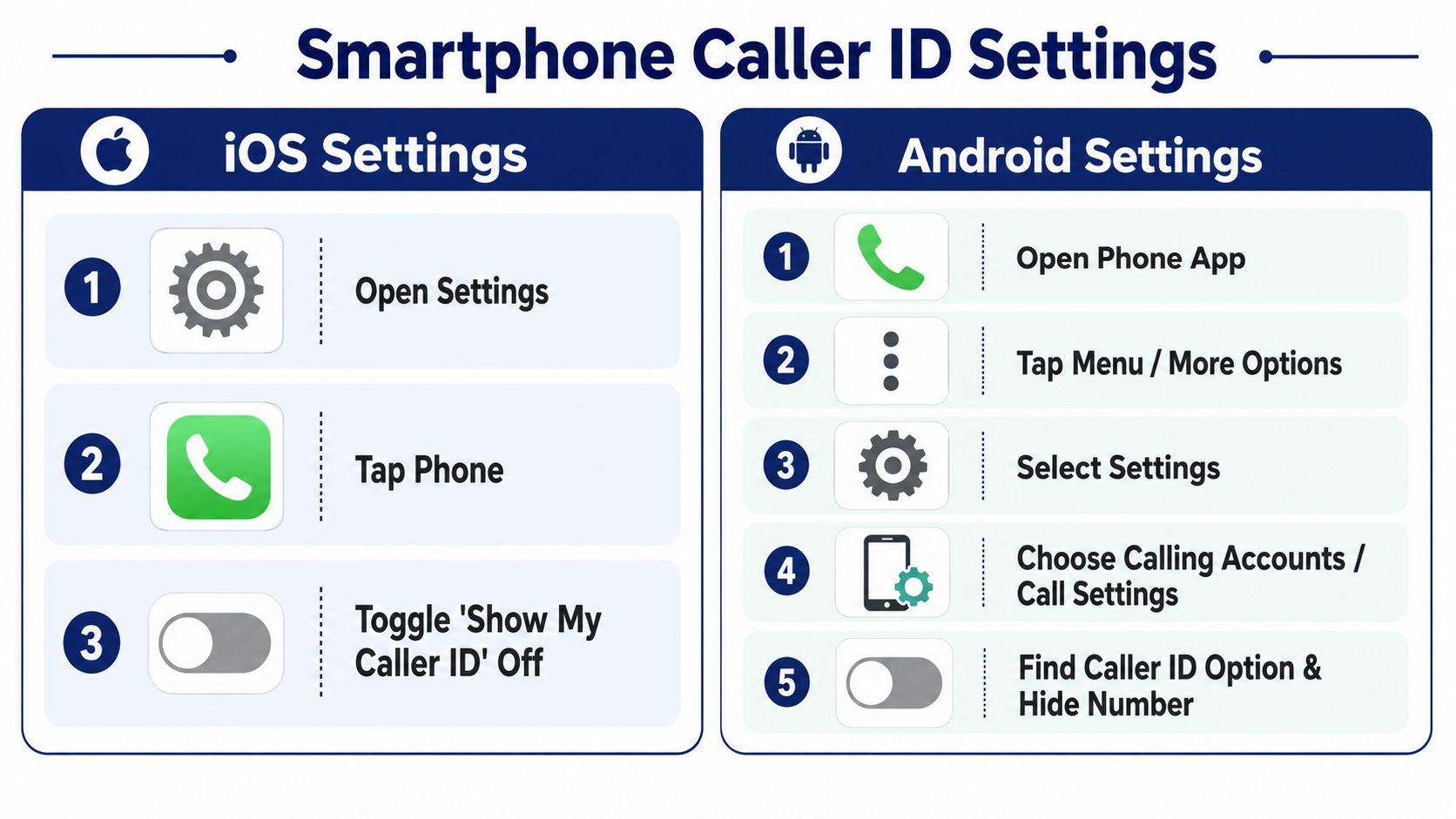
iPhone and Android compared
On iPhone, the path is usually:
- Settings
- Phone
- Show My Caller ID
- Turn it Off
On Android, the option is usually inside the Phone app:
- Phone app
- Menu or More Options
- Settings
- Caller ID or Call settings
- Choose Hide number
Menu names vary by carrier, manufacturer, and Android version. On some phones, the option is grayed out because the carrier controls caller ID at the network level rather than the handset level.
Which option is easier to manage
The choice comes down to duration and risk of user error.
| Method | Best for | Main drawback |
|---|---|---|
| Per-call code | One or two private calls | Easy to mistype under pressure |
| Phone setting | A short period of repeated private calling | Easy to forget and leave on |
For a personal phone covering temporary business use, the setting is faster. For occasional privacy, the per-call method creates fewer accidental hidden calls.
A quick visual walkthrough may help if you're checking menus on the fly:
The operational downside of making every call private
Hidden caller ID solves one problem and creates another. It protects the mobile number, but it also lowers recognition. Customers, vendors, and job candidates often ignore calls that show up as Private, Unknown, or No Caller ID. Some devices and carrier tools block those calls automatically.
The FTC explains in its guidance on blocking unwanted calls across phones, carriers, and apps that call blocking can happen at the device, app, or provider level. In practice, that means your hidden call may ring one person, go straight to voicemail on another phone, and get filtered entirely somewhere else.
This is the point many businesses miss. Hiding a number is only display suppression. It is not identity management, and it does not make the call look trustworthy to modern screening systems. If your team needs more control over what appears on outbound calls, these caller ID services for business phones are a better fit than leaving personal devices in permanent private mode.
A simple working habit
Use the setting with a clear start and stop point.
- Turn it on for a defined task: after-hours callbacks, a short field assignment, or a temporary coverage shift
- Turn it off when that task ends: avoid hiding the rest of the day's calls by accident
- Test it first: call a colleague and confirm what appears on their screen
- Use a business line for regular outreach: a recognizable company number usually gets better pickup and cleaner callback handling
If personal phones are becoming part of daily operations, the cleaner fix is usually a system that lets staff place mobile calls while presenting a company number. This guide to Business VoIP phone systems explains how hosted platforms handle that without exposing personal mobile numbers.
Professional Caller ID Control for Your Business
For a business, blocked calling is usually the wrong framing. The actual issue is outbound identity control.
A company rarely benefits from showing “Private” on every call. In most customer-facing situations, that creates doubt. People screen it, ignore it, or assume it's spam. What businesses need is a way to decide which number appears, who it belongs to, and where callbacks go.
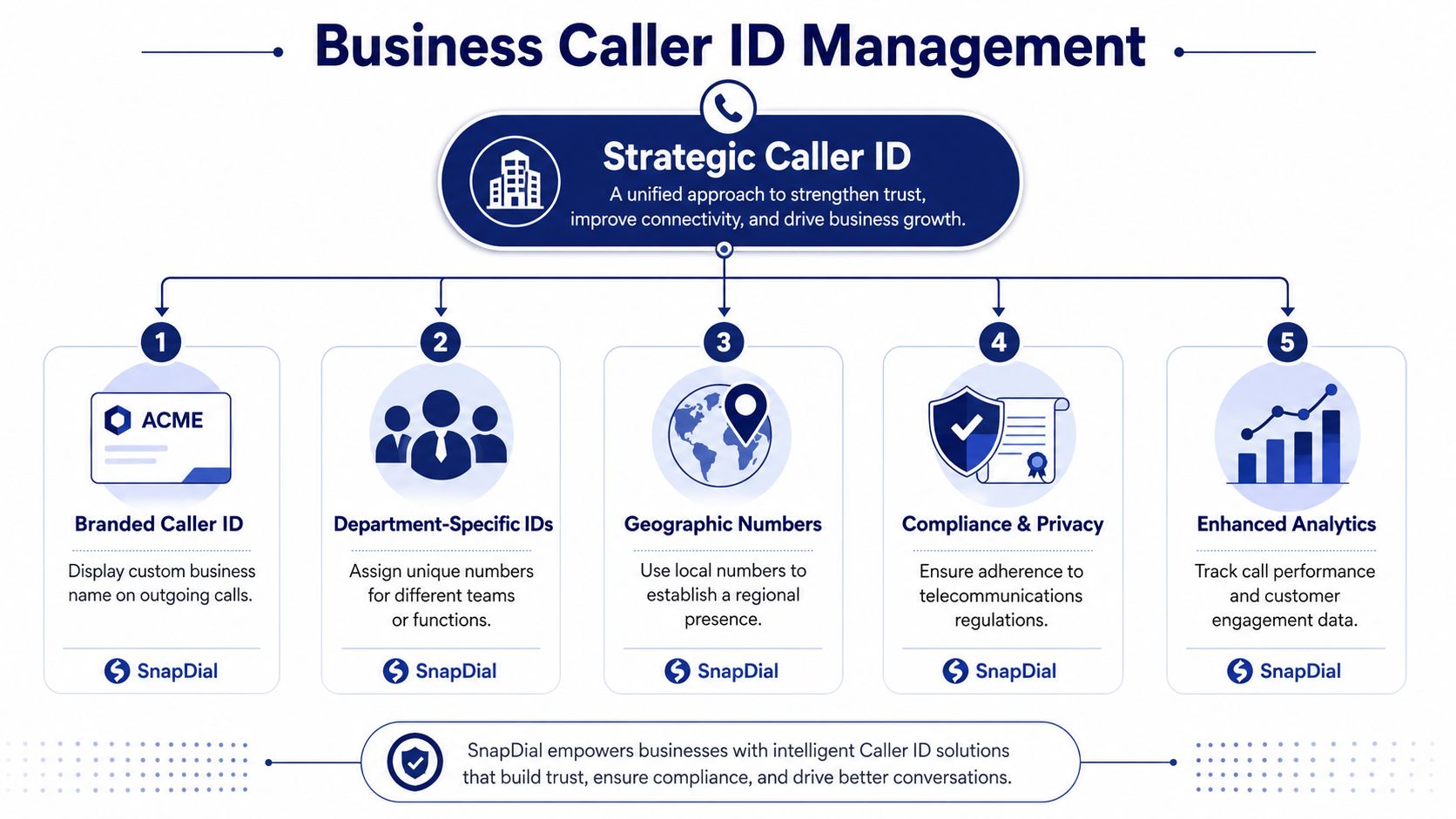
What professional control actually looks like
A cloud phone platform or hosted VoIP system lets a business manage outbound caller ID at the system level instead of relying on individual employees to hide or reveal numbers manually.
That changes the conversation:
- A sales rep can place calls that display the main office number.
- A support agent can present the support line instead of a direct extension.
- A regional team can use a local presence number that matches the area they serve.
- A manager using a mobile app can still show the company number rather than a personal cell.
If you're evaluating that model, this guide to Business VoIP phone systems is a useful primer on how hosted systems centralize business calling.
Why business systems handle blocking differently
Modern business telephony doesn't treat blocked calls as a simple handset setting. It treats them as call control logic.
Genesys Cloud documentation shows blocked incoming numbers being matched by ANI (Automatic Number Identification) in E.164 format, such as +18085551234, and then disconnected through routing logic or data table rules in this Genesys discussion of blocking a number. That matters because it shows how enterprise systems can identify, filter, and terminate calls before they ever reach a person.
If the organization you're calling uses this kind of logic, hiding your number with a consumer trick may not help. Their telephony stack may reject the call based on rules you never see.
Businesses don't just block numbers now. They apply routing rules, data lookups, and platform-level decisions before a phone ever rings.
Why this is better than hiding your number
A visible, controlled business number solves problems that blocked calling creates.
| Need | Hidden caller ID | Managed business caller ID |
|---|---|---|
| Protect employee privacy | Yes, sometimes | Yes |
| Keep callbacks centralized | No | Yes |
| Build recognition with customers | No | Yes |
| Support team-wide consistency | No | Yes |
| Reduce confusion on return calls | No | Yes |
This is why I usually advise owners to stop asking, “How do I block our outgoing number?” and start asking, “What number should each team present?”
For companies that need that kind of control, platforms such as SnapDial can assign numbers to employees and support outbound calling from a shared company number through a web portal and business phone system features. If you want more detail on the category itself, SnapDial's caller ID services resources are relevant to how business outbound identity is managed.
Good use cases for managed outbound identity
- Recruiting teams that call from mobile devices but want callbacks routed to the office
- Service businesses that want technicians to call customers without exposing personal cells
- Multi-location firms that need local numbers in different markets
- Support teams that want return calls to land in the right queue instead of one person's voicemail
For a business owner, that's the professional answer. Don't hide every call. Present the right number on purpose.
Why Your Blocked Call Still Gets Rejected
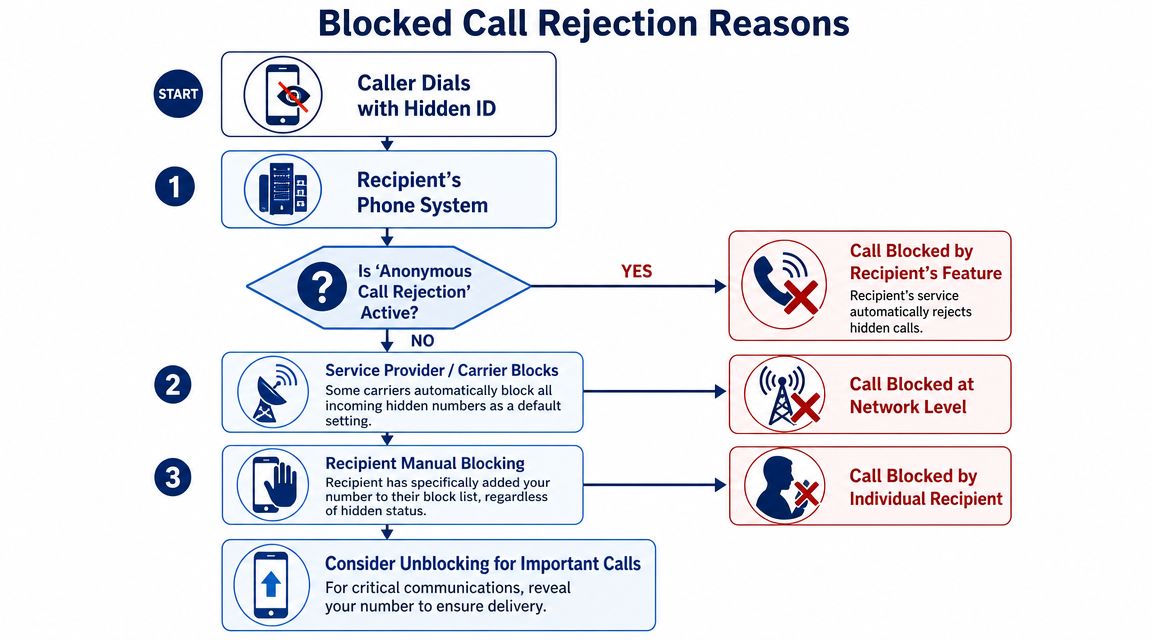
If you used a blocking code or hid caller ID in your phone settings and the call still didn't go through, the issue usually isn't that you did it wrong. The issue is that the recipient has stronger filtering than your method can bypass.
The three layers that stop private calls
A blocked call can fail at several points.
Device settings
Some users actively reject unknown callers. Google's Phone app lets users block Unknown numbers, as shown in Google's Phone app help for blocked numbers. If your caller ID is hidden, the phone may treat you as exactly the kind of call the user doesn't want.
Carrier filtering
The network may also screen a call before the device handles it. Carrier-level tools can mark, divert, or stop suspicious traffic. You may never know whether the call was rejected by the phone itself or by the provider upstream.
Third-party screening apps
Some people rely on screening apps that maintain their own rules and blacklists. A hidden call can look risky to those apps even if your intent is legitimate.
Why people block unknown callers in the first place
From the recipient's side, a private call often signals one of three things:
- Spam risk
- Sales outreach they didn't ask for
- A caller who doesn't want to be identified
That doesn't mean your call is bad. It means the screening tools were built to distrust the same pattern you're using.
If your goal is getting through for an important conversation, a recognized business number is usually stronger than a hidden one. If you're on the receiving side and trying to investigate suspicious calls, guides on how to identify unknown phone numbers can help explain why so many people are cautious about answering anonymous calls.
A blocked caller ID protects your privacy. It doesn't earn the recipient's trust.
What to do instead
When a private call keeps failing, try a different approach:
- Text or email first: Ask the recipient to expect your call from a visible business number.
- Call from the main line: Recognition often matters more than secrecy.
- Leave a voicemail from an official number: Give the recipient a safe callback path.
- Check for spoofing concerns: If your business numbers are being flagged or misidentified, review guidance on suspected spoofed DIDs.
In other words, don't keep retrying with hidden caller ID and expect a different result. If the call matters, change the presentation strategy.
The Legal and Ethical Line of Hiding Your Number
Hiding your number can be reasonable. Using it to mislead people is not.
There's a clear difference between protecting a private mobile number and trying to avoid identification while pressuring, harassing, or repeatedly contacting someone who doesn't want the call. Businesses should be especially careful here. If the reason for blocking caller ID is convenience or privacy, that's one thing. If the reason is to get around a recipient's clear preference not to be contacted, that crosses a line fast.
A simple test
Before placing a blocked call, ask:
- Is this for privacy, not deception?
- Would I be comfortable explaining why I hid the number?
- Does the recipient have a legitimate reason to know who's calling?
- Would a visible business number be more appropriate?
The better standard for businesses
For personal safety, temporary discretion, or protecting an employee's direct line, caller ID blocking has a place. For sales, service, recruiting, support, and account management, transparency usually works better.
If your intent is to protect privacy, use the least deceptive method available. If your intent is to avoid accountability, don't make the call.
A business should prefer a controlled, official outbound identity over anonymous calling whenever possible. That protects employees, gives customers a clear callback path, and avoids making legitimate calls look suspicious.
If your team needs to protect personal numbers while keeping outbound calling professional, SnapDial is worth evaluating as a cloud business phone system option. It gives organizations a way to manage business calling, routing, and shared outbound identity without relying on employees to juggle personal cell settings or per-call blocking codes.