
A sales rep steps into the back conference room to finish a client call. The office Wi-Fi is strong there. The cellular signal isn't. Halfway through pricing, the other side starts saying “you're breaking up,” then the call drops.
Most business owners have some version of that story. It happens in brick buildings, warehouses, older offices, medical suites, and even modern spaces with plenty of internet but poor indoor cellular coverage. That's why Wi-Fi calling gets attention. It promises a simple fix using the phones your team already carries.
The question isn't whether Wi-Fi calling works at all. It does. The question is is Wi-Fi calling good enough for business use, and if so, where does it fit without creating new problems?
That One Spot in the Office Where Calls Always Drop
Every office has a weak-signal map, whether anyone has drawn it or not. The front desk is fine. The warehouse corner is terrible. The meeting room by the elevator ruins calls. Somebody on your team already knows exactly where to stand to send a text.
That's where Wi-Fi calling starts to look attractive. On paper, it solves a very practical problem. If the mobile signal struggles indoors but the wireless network is solid, the phone can place the call over Wi-Fi instead. No extra app. No training session. No new number.

For a small business, that can feel like a quick win. Staff stop clustering near windows for a decent signal. Calls become possible in interior rooms. Remote workers in homes with weak cellular coverage get another way to stay reachable.
Why this matters more than most owners expect
A dropped personal call is annoying. A dropped customer call creates doubt. Clients don't care whether the failure came from the carrier, the building materials, or a dead spot behind the stockroom. They hear a business that sounds hard to reach.
That's why owners often start by trying to troubleshoot Wi-Fi connection problems when staff complain about call quality. That's a sensible first step, because weak Wi-Fi and weak cell coverage often get mixed together in everyday troubleshooting.
Practical rule: If your team already knows certain rooms kill cellular calls, Wi-Fi calling is worth testing. It just shouldn't be trusted blindly.
The mistake is treating it like a complete phone strategy. For convenience, Wi-Fi calling can be excellent. For critical communications, the answer depends on the network underneath it, the way your team works, and how much business risk you're willing to tolerate when a call can't fail.
What Exactly Is Wi-Fi Calling
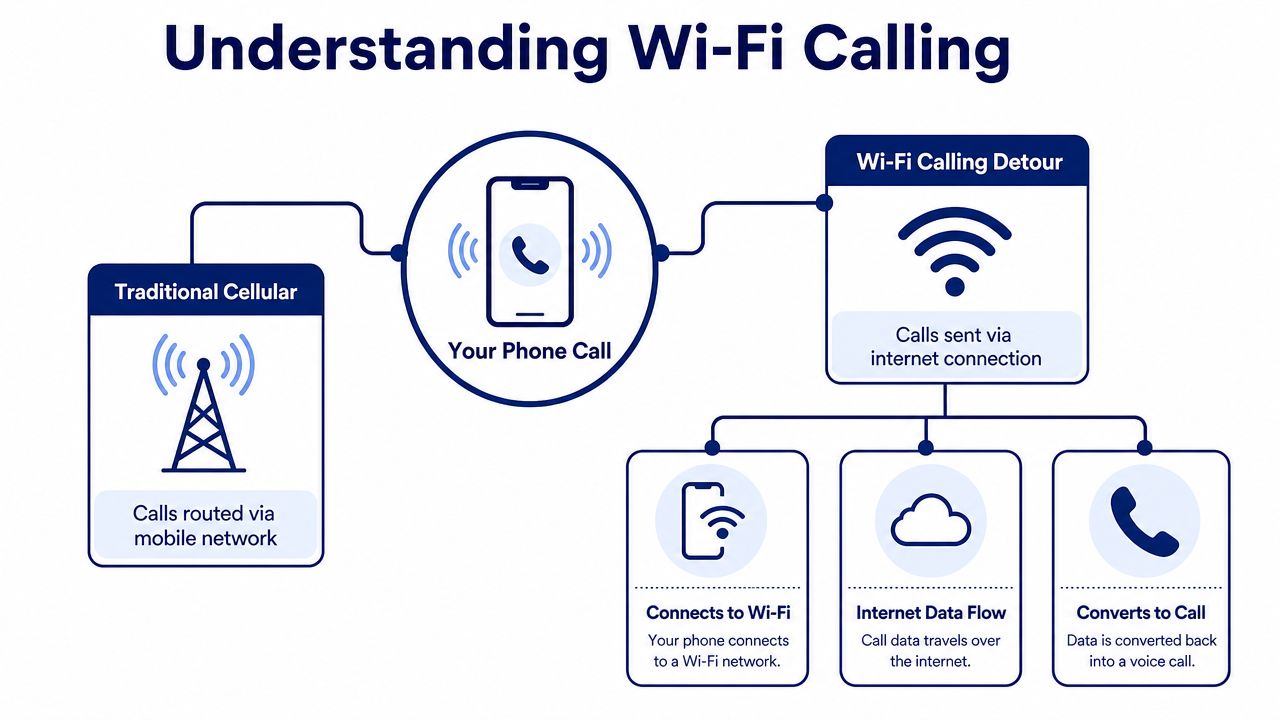
Think of Wi-Fi calling as a detour for your phone call. Normally, your call travels over the carrier's cellular network. When the phone sees poor mobile coverage but a usable Wi-Fi connection, it can route that call over the internet connection instead and still present your usual mobile number.
That distinction matters. Wi-Fi calling is not the same thing as placing a call through WhatsApp, Zoom, Teams, or another app-based service. Those services live inside their own applications and ecosystems. Wi-Fi calling uses the phone's native dialer, your existing mobile identity, and your carrier relationship.
What your staff actually sees
Most employees won't think about the routing at all. They open the Phone app, tap a contact, and call as usual. To them, it feels like ordinary mobile calling. To the person receiving the call, it also looks normal.
That simplicity is a big reason businesses like it. There's no separate login, no “please call me on this app instead,” and no need to retrain people who are used to standard mobile behavior.
A practical guide on how to solve weak signal with iPhone WiFi calls can help teams confirm that the feature is enabled on supported devices, especially for staff who work from home or in low-signal buildings.
Why businesses often misunderstand it
Because Wi-Fi calling feels effortless, owners sometimes assume it works like a proper business voice platform. It doesn't. It's still a carrier feature on an individual handset. That makes it useful, but limited.
Its bandwidth footprint is also light. A typical high-quality voice call over Wi-Fi uses about 1 MB per minute, which means voice traffic usually has a negligible effect on a normal office or home broadband link according to this explanation of Wi-Fi calling versus traditional cellular. That efficiency is one reason it often performs well in small environments.
If you're evaluating desk hardware and wireless setups together, it also helps to understand how Wi-Fi VoIP phones differ from a mobile handset using carrier Wi-Fi calling. They may use the same wireless network, but they're not the same tool or managed the same way.
Wi-Fi calling feels simple because the phone hides the complexity. The business risk shows up later, when call quality depends on whatever else the network is doing.
The Clear Advantages of Wi-Fi Calling for Business
Wi-Fi calling has real business value. Used in the right places, it solves annoying coverage issues with almost no friction for staff. That alone makes it worth considering.
The biggest upside is indoor coverage recovery. Offices with concrete walls, metal framing, basements, thick insulation, or awkward layouts often block cellular signals. If the building has stable wireless coverage, Wi-Fi calling can turn those dead spots into usable calling areas without asking employees to switch numbers or learn a new interface.
Where it helps immediately
Some business environments benefit fast:
- Interior offices: Staff working in rooms far from windows often get stronger voice performance over Wi-Fi than over weak cellular signal.
- Warehouses and back rooms: Teams can stay reachable in the parts of the building where carrier coverage fades.
- Home offices: Remote employees with decent broadband but poor mobile reception can still use their regular mobile number reliably.
- Travel and temporary locations: If the Wi-Fi is trustworthy, staff may be able to place and receive calls where local signal is poor.
Another benefit is network offload. Carrier data described in this analysis of T-Mobile's Wi-Fi calling and VoLTE traffic shows Wi-Fi calling became a meaningful but still secondary voice channel while VoLTE remained much larger. That matters because it confirms Wi-Fi calling's real role. It's not replacing carrier voice. It's acting as a resilient extension layer that improves coverage and quality in places where the cellular path is weaker.
Why that's useful in an office
For a business owner, the practical takeaway is straightforward:
| Business need | How Wi-Fi calling helps |
|---|---|
| Weak in-building cellular coverage | Uses the local Wi-Fi network instead of waiting for a stronger mobile signal |
| Staff mobility | Lets employees keep using their normal mobile number and dialer |
| Network congestion relief | Offloads voice traffic away from the mobile network |
| Low-friction adoption | Requires little change in user behavior once enabled |
There's also a cost angle, though it's best understood qualitatively. In many cases, Wi-Fi calling is included as part of existing mobile plans rather than treated as a distinct premium service. That makes it appealing for hybrid teams because you can improve reachability without spinning up a separate mobile workaround for every user.
If you've already paid for strong office Wi-Fi, Wi-Fi calling lets you get more value from that network in the exact places where mobile coverage disappoints.
This is why the answer to “is Wi-Fi calling good” is often yes, at least at the convenience layer. It's good for patching coverage gaps, supporting mobility, and reducing frustration. The problem starts when companies ask it to do jobs it wasn't designed to handle.
The Hidden Risks and Reliability Issues
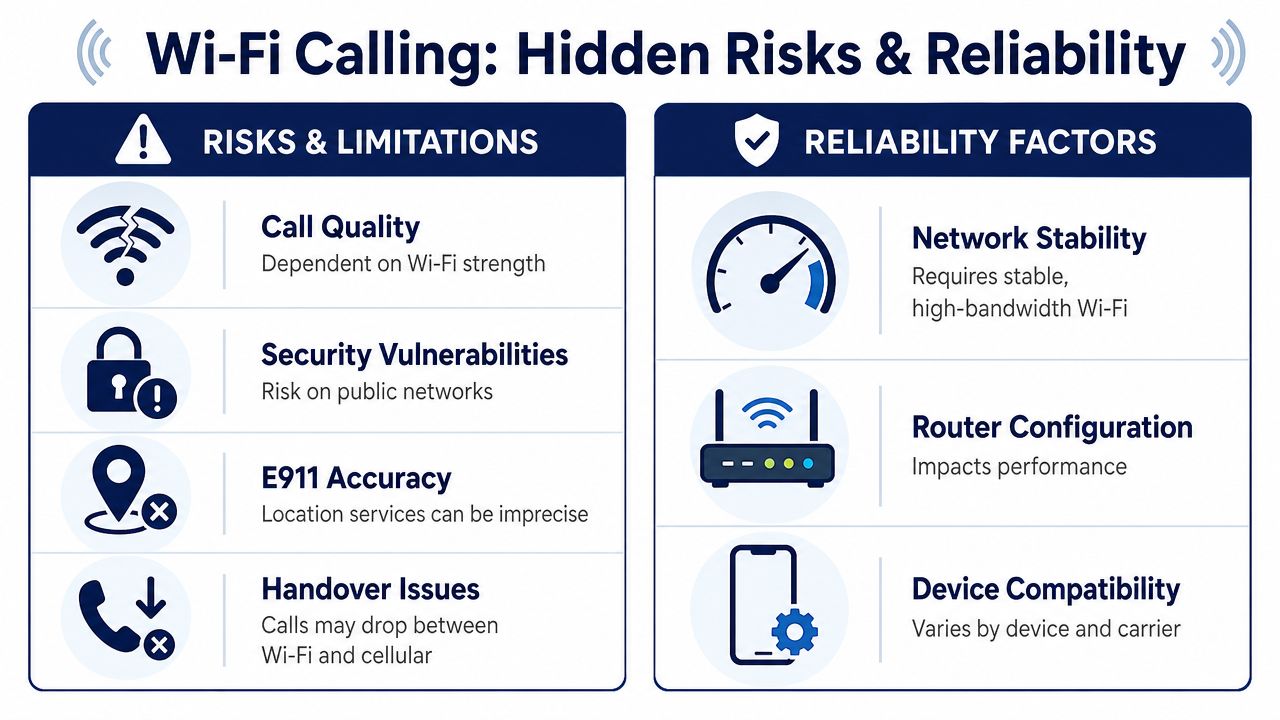
The same feature that feels effortless on a quiet network can sound terrible on a busy one. That's the part most consumer guides skip. Wi-Fi calling isn't judged by whether it works once. It's judged by whether it stays clear and stable during the worst hour of your business day.
The network decides whether the call sounds professional
Voice is unforgiving. Email can wait a second. File transfers can retry. A phone conversation happens live. If packets arrive late or disappear, people hear it immediately as delay, clipping, robotic audio, or dead air.
For acceptable voice quality, one-way latency needs to stay below 150 ms and packet loss below 5% according to this breakdown of Wi-Fi call technical thresholds. Once those limits are exceeded, speech intelligibility drops sharply.
That's why a call can sound fine at 8:30 a.m. and poor at 11:00 a.m. when the office is full of video meetings, cloud backups, and large downloads.
What breaks Wi-Fi calling in real offices
Consumer advice tends to assume one user, one router, and light traffic. Businesses rarely look like that. Real offices have competing demands on the same wireless environment.
Common failure points include:
- Shared airtime: Voice competes with video calls, cloud apps, file sync, and guest devices.
- Poor Wi-Fi design: Access points may cover the room but not support voice traffic well under load.
- Weak roaming behavior: People move between parts of the office and calls don't always transition cleanly.
- Mixed-use networks: Staff phones, personal devices, printers, TVs, and IoT gear all add contention.
If you need a practical starting point before relying on Wi-Fi for voice, a bandwidth planning guide for VoIP helps frame the problem the right way. The issue isn't just raw internet speed. It's concurrency, latency, packet loss, and what else is happening on the network during active calls.
A fast internet plan doesn't guarantee good calling. Voice quality depends on consistency, not just headline speed.
Busy SMBs hit the breaking point sooner than they expect
Another issue is scale. In busy SMB environments, Wi-Fi calling quality can degrade when upstream bandwidth falls below about 1.5 Mbps per concurrent call or latency exceeds 150 ms, as noted in this business-focused discussion of Wi-Fi calling. That's a more practical warning than the generic “you only need basic internet” advice found in many setup guides.
For owners, this explains why one executive making occasional calls from home may have no complaints while a sales team using Wi-Fi heavily in the office runs into choppy audio and dropped conversations.
Security and compliance are a separate problem
Even if the audio is acceptable, security may not be. Businesses can't assume Wi-Fi calling offers the same level of control they'd get from a managed voice platform. Unmanaged or public Wi-Fi introduces exposure points that many teams don't evaluate carefully.
That matters for firms handling regulated customer information, legal conversations, payment discussions, healthcare coordination, or any call that creates a compliance trail.
A simple rule works here:
- Private, controlled office Wi-Fi: Lower operational risk if the network is maintained properly.
- Employee home Wi-Fi: Variable. It may be acceptable for routine use, but standards differ widely.
- Guest or public Wi-Fi: Poor choice for sensitive business calls.
The other common problem is handoff. If someone walks out of Wi-Fi range during a live conversation, the experience may not be smooth enough for an important client call. In consumer life that's annoying. In business, it sounds careless.
Wi-Fi Calling vs a True Business Phone System
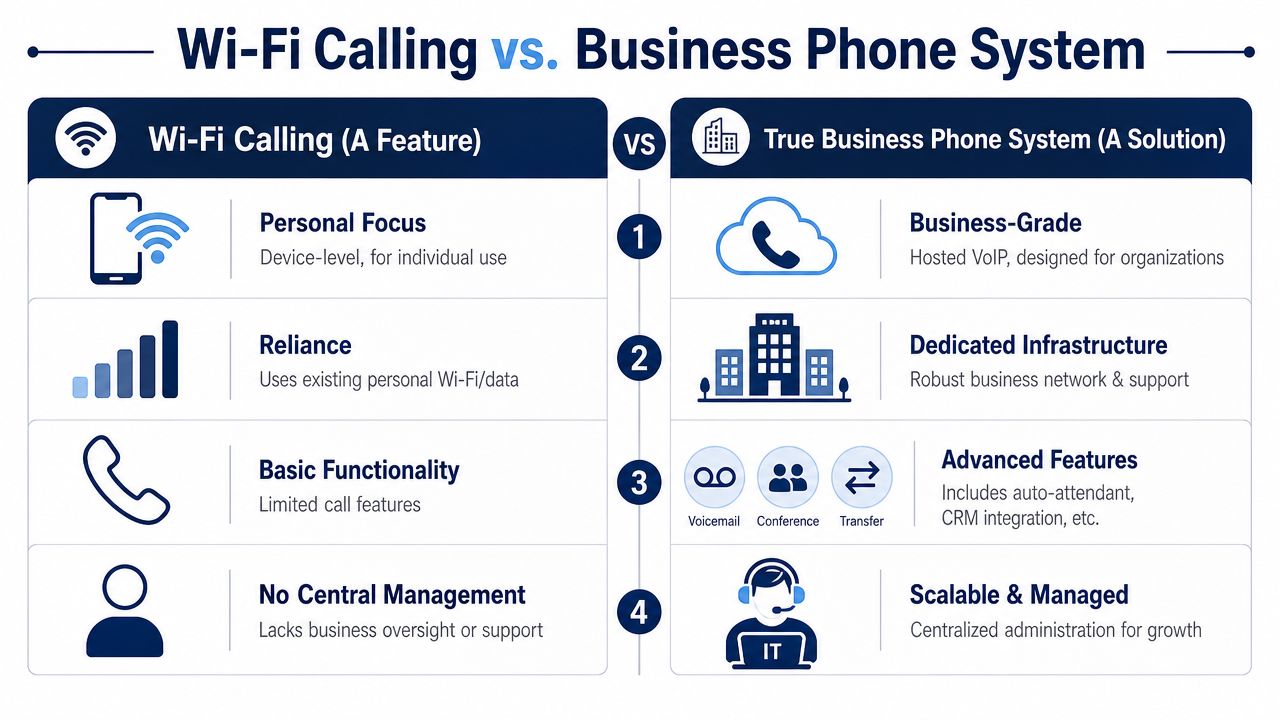
Wi-Fi calling is a feature. A business phone system is a platform. Confusing the two leads to bad decisions.
A feature helps one person place a call from one device under certain conditions. A platform gives the business a managed communications environment with policy, routing, reporting, accountability, and support. Those are different categories of tool.
The simplest way to compare them
| Question | Wi-Fi calling | Business phone system |
|---|---|---|
| Who manages it | Individual user on their handset | Admin team through a central portal |
| What number is used | Personal or carrier mobile number | Business numbers and extensions |
| Core purpose | Extend mobile coverage | Run company communications |
| Call handling | Basic calling behavior | Advanced routing, queues, recordings, reporting |
| Reliability model | Best effort on available Wi-Fi | Managed around business voice requirements |
That difference gets clearer when teams grow. If each employee relies on native mobile Wi-Fi calling, every device becomes its own small island. There's no unified call flow, no central policy for routing, and no clean oversight for how inbound calls are handled across departments.
What businesses lose when they rely on the handset alone
Owners often notice these gaps only after a problem appears:
- No central call control: You can't easily standardize routing rules across the company.
- No proper front door: Auto attendants, queues, hunt groups, and scheduled call flows aren't built into basic Wi-Fi calling behavior.
- Limited analytics: It doesn't give managers the visibility they need for staffing, service levels, or missed-call patterns.
- Support is fragmented: Troubleshooting gets split between the carrier, the local network, the handset, and the user.
This short overview of what a cloud phone system is is useful because it frames the comparison correctly. The question isn't “can both make calls?” Of course they can. The question is whether the tool was built for business communications management or merely for improving mobile reachability on a single device.
A quick visual example helps:
Why business systems handle stress better
In busy SMB settings, guidance that works for a household often falls apart. As noted earlier in the article, business environments hit concurrency and latency issues much faster than casual users expect. That's exactly why professional voice platforms exist. They're built around routing logic, user administration, voice quality planning, and support expectations that a carrier handset feature was never meant to solve.
When the phones are part of your revenue process, “it usually works” isn't an operating model.
If your company only needs occasional backup calling in a dead zone, Wi-Fi calling may be enough. If customers depend on your availability, it isn't the same class of solution.
The Smart Way to Use Wi-Fi Calling in Your Business
The right answer is not “never use it.” The right answer is use it deliberately.
Wi-Fi calling is good when you treat it as a supplemental tool. It's useful for patching weak indoor signal, helping remote staff stay reachable, and giving employees a fallback path on supported mobile devices. It's less useful when a business lets it become the default method for important customer conversations without setting rules.
A practical policy most businesses can live with
For most SMBs, this framework works well:
- Encourage Wi-Fi calling for convenience: Let staff use it in known dead zones, during travel, or in home offices with poor cellular reception.
- Keep client-facing workflows on a managed phone system: Sales, support, dispatch, and reception need consistency, routing, and oversight.
- Avoid unmanaged networks for sensitive calls: Public and guest Wi-Fi create unnecessary security and compliance uncertainty.
- Test the network where calls occur: Conference rooms, warehouse floors, break rooms, and remote home offices all behave differently.
The security issue deserves a plain answer. Businesses can't assume the same level of security and compliance with Wi-Fi calling as with managed VoIP, and calls placed over unmanaged Wi-Fi may expose voice metadata or create conflicts with requirements such as GDPR according to this discussion of Wi-Fi calling pros and cons. That alone should stop any regulated business from treating Wi-Fi calling as a blanket replacement for a managed communications setup.
The real verdict
So, is Wi-Fi calling good?
Yes, if you define “good” correctly. It's good as a coverage extender. It's good as a user convenience feature. It's good as a backup path when mobile reception fails indoors.
It is not good enough to be the foundation of business communications where call handling, compliance, reliability, and customer experience matter every day.
A business should decide which conversations can tolerate a best-effort mobile feature and which ones require a platform built for accountability. That distinction saves a lot of frustration later.
If your team has outgrown patchwork calling and needs a system built for reliability, routing, reporting, and support, take a look at SnapDial. It gives growing businesses a managed cloud phone system for calls, conferencing, mobile work, and customer-facing communication without relying on a handset feature to carry the load.