
Your office probably didn't decide to become a patchwork of desk phones, personal cell numbers, chat apps, voicemail boxes, and video tools. It just happened over time.
A small business adds a second location. A manager starts forwarding calls to a mobile. One employee prefers Zoom, another lives in Microsoft Teams, and someone still relies on the old PBX in the back closet that only one person knows how to reboot. Customers don't see the internal mess. They just feel the result when calls bounce around, messages get missed, or nobody knows who was supposed to answer.
That's usually the moment when owners start looking into an office communication system. Not because they want shiny new tech, but because the old setup is slowing down the business.
Beyond the Desk Phone Rethinking Office Communication
A familiar story plays out in growing companies. The front desk phone rings, but the receptionist is helping a walk-in customer. A sales rep answers from a personal phone because the office line doesn't forward correctly. A technician in the field misses an urgent update because it was sent in the wrong app. By noon, three people have asked the same question: “Who got that call?”
That kind of confusion isn't just annoying. It changes how customers experience your business and how your staff works every day. When communication tools are scattered, people create workarounds. Workarounds become habits. Habits become operational drag.
When the old system stops fitting the business
A legacy phone system was built for a business where people sat at assigned desks, used one phone line, and worked from one location. That model doesn't match how many teams operate now. Staff move between office, home, car, warehouse, job site, and laptop. Customers expect one business number to reach the right person fast.
An office communication system is better understood as the central nervous system of the business. It carries customer calls, internal updates, voicemail, video meetings, team chat, and often file sharing too. If that system is weak, every department feels it.
The problem usually isn't that a business has no communication tools. It's that the tools don't behave like one system.
The broader shift is already happening across the market. Between 2019 and 2021, the share of global respondents using digital collaboration tools in office communication systems rose from 55% to 79%, according to collaboration software market data. That tells you something important. Businesses aren't just replacing handsets. They're moving toward connected communication environments.
The real issue isn't the phone on the desk
Most owners begin by saying, “We need a better phone system.” What they usually mean is:
- Calls need to reach the right person without manual forwarding.
- Employees need one business identity instead of mixing work with personal numbers.
- Messages need to stay visible across the team.
- Remote and in-office staff need the same experience instead of two separate setups.
That's why this topic matters in 2026. The question isn't whether your business has phones. The question is whether your communication setup still matches how your business operates.
Defining Your Business Communication Hub
If the phrase office communication system sounds broad, that's because it is. It includes phone calls, voicemail, video meetings, team messaging, call routing, mobile apps, desktop apps, and often integrations with the other tools your team already uses.
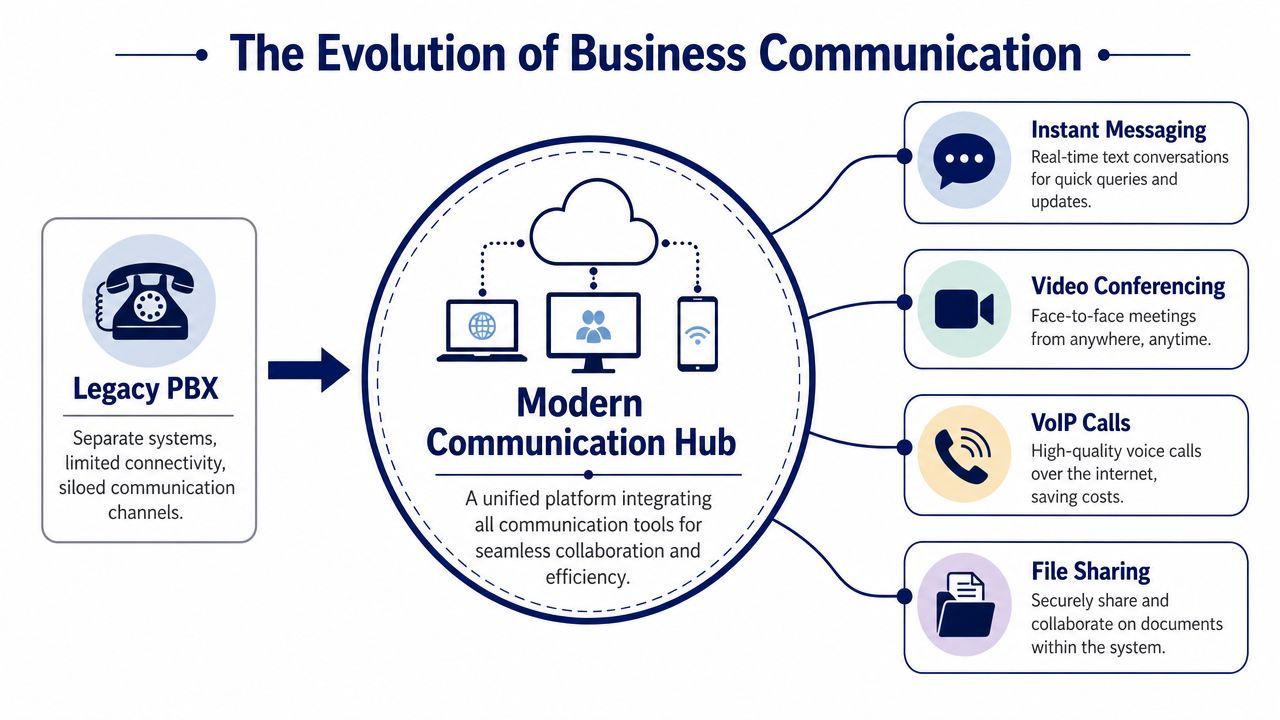
The easiest way to think about it is this. A legacy PBX is like a collection of landlines in different rooms. A modern system is like a smartphone for the whole company. Instead of separate tools doing separate jobs, one platform brings them together.
Landline thinking versus platform thinking
With an older setup, each communication channel tends to live on its own island. Phone calls happen in one place. Video meetings happen somewhere else. Chat messages happen in another app. Voicemails sit in a separate inbox. Admin changes often require a specialist, on-site hardware, or both.
A modern communication hub flips that model. The business gets a single environment where voice, messaging, video, and user management work together. Staff can move from desk to laptop to mobile app without losing continuity.
Here's a simple comparison:
| Approach | How it feels day to day |
|---|---|
| Legacy PBX | Fixed, siloed, harder to update |
| Modern communication hub | Flexible, connected, easier to manage |
What UCaaS means in plain English
You'll often hear the term UCaaS, which stands for Unified Communications as a Service. Strip away the acronym and it means this: your communications platform is delivered as an online service instead of being trapped inside a physical box in your office.
That changes a lot for a small business.
- You manage more through software instead of technician visits.
- New users are easier to add when the team grows.
- Remote staff get the same business tools as office staff.
- Features work together instead of forcing people to jump between disconnected systems.
Practical rule: If your team uses one tool for calls, another for chat, another for video, and personal phones to fill the gaps, you don't have a communication strategy. You have a tool pile.
The hub model matters because communication isn't just about talking. It's about routing, visibility, responsiveness, and consistency. When those pieces live under one roof, the business runs with less friction.
Understanding the Engine Behind Unified Communications
The technology sounds more intimidating than it is. Most modern systems are powered by two ideas: VoIP and Cloud PBX.
If you understand those, the rest gets much easier.
VoIP is your voice traveling like data
VoIP, or Voice over Internet Protocol, sends phone calls over a data network instead of old-style phone lines. A simple way to picture it is “email for your voice.” Your words are converted into digital packets, sent across the internet, and reassembled almost instantly on the other end.
That's why a business can make and receive calls through desk phones, laptops, or mobile apps while still using the same company number. It's also why these systems feel more flexible than older PBX hardware.
According to this guide to office communication systems, VoIP can reduce costs by up to 50% compared to traditional legacy PBX systems while maintaining HD voice quality. For a small business owner, that matters because the savings come from the design itself. You're using internet-based delivery instead of paying to maintain older telephony infrastructure.
Cloud PBX is the brain in the cloud
A PBX handles the logic behind your phone system. It decides where calls go, how extensions work, what happens after hours, and how voicemail is managed. In a legacy setup, that PBX often lives in a physical box on your premises.
A Cloud PBX moves that brain off-site and into a hosted environment.
That gives you a very different operating experience:
- Admin changes happen in a web portal instead of through a service call.
- Adding a user is simpler because you're not working around fixed hardware limits.
- Multi-location teams stay under one system rather than stitching offices together.
- Maintenance is lighter because there's less equipment to babysit in the office.
If you want a plain-language breakdown of how hosted systems differ from older phone infrastructure, this overview of what a PBX system is helps connect the dots.
Why SMBs usually feel the difference quickly
The main shift isn't just technical. It's operational. Calls become software-managed instead of hardware-limited. That means the business can adapt faster when someone changes roles, works remotely, covers another location, or needs calls routed differently for part of the day.
For owners comparing options, resources on cloud unified communications can be useful because they frame the move as an infrastructure decision, not just a phone purchase.
When your phone system behaves like software, it stops being a fixed utility and starts becoming a business tool.
That's the point many businesses miss. VoIP and Cloud PBX aren't interesting because they're modern terms. They matter because they remove the rigid limits that older systems implicitly impose every day.
Powerful Communication Tools You Can Use Today
Features matter, but only when you can picture them in real work. So let's walk through a normal business day.
A customer calls your main number at 8:03 a.m. They hear a clean greeting and a short menu. They press 2 for service. The call goes to the right group without a receptionist manually transferring it. One team member is in the office on a Yealink desk phone. Another is at home on a laptop. A third is on the road using a mobile app. To the customer, it all feels like one business.
Your professional front door
The first job of a communication system is simple. Help customers reach the right destination fast.
That's where Auto Attendant and IVR come in. Instead of a busy front desk acting as a human switchboard all day, the system answers with structure. It can route by department, location, schedule, or urgency. Even a small company can sound organized and easy to use.
This is the difference between “Let me see who's available” and “You've reached service, and the right team already has your call.”
Fewer missed calls and less guesswork
Once calls enter the system, routing rules take over. If one person doesn't answer, the call can ring another device, another user, or another team. Voicemail becomes easier to manage when it's visible, searchable, and tied to the user rather than trapped on a physical handset.
Useful tools here often include:
- Find-me follow-me routing so calls reach staff across multiple devices.
- Visual voicemail so users can review messages quickly.
- Business caller identity so employees don't expose personal numbers.
- Schedules and after-hours rules that change automatically.
A cloud phone platform becomes much easier to evaluate once you understand what a cloud phone system is, especially if your team no longer works from one physical office all day.
The work-from-anywhere office
Modern systems also change how internal work happens. A manager can take a business call from a mobile app, transfer it, message a coworker, then join a video call from a laptop. That's one communication environment, not four separate tools duct-taped together.
For teams trying to reduce that kind of fragmentation across channels, it can also help to clean up adjacent workflows. These top Gmail productivity tools are a good example of how businesses often improve communication by making email, too, easier to track and manage alongside calling.
A good system doesn't force employees to remember where a conversation started. It keeps the business reachable wherever the work happens.
Some businesses also need call recording, queue management, wait-time messaging, and reporting. Those features are especially useful when service quality depends on quick handoffs, training, or handling high call volume without chaos.
Why Upgrading Your System Drives Business Growth
A better office communication system doesn't just tidy up IT. It changes how the business performs.
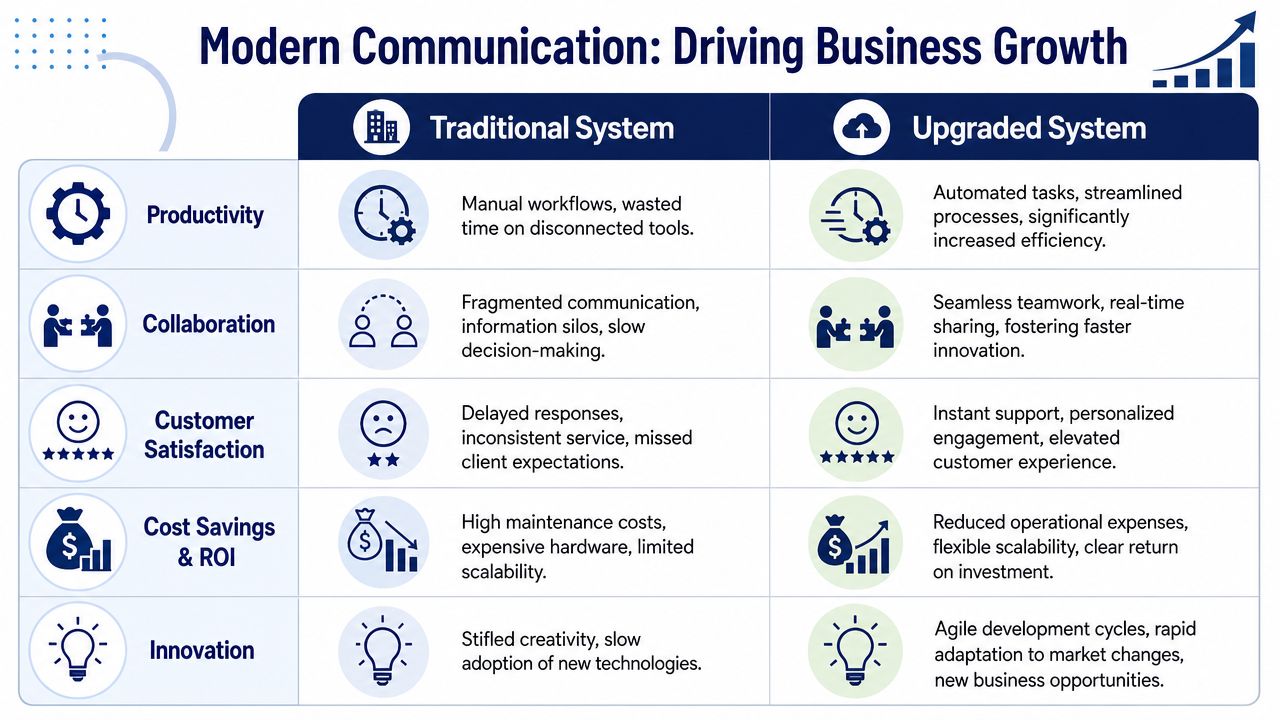
Before an upgrade, teams often lose time on avoidable friction. Calls ring the wrong extension. Staff ask each other for cell numbers. Customers repeat themselves because the first handoff failed. Managers can't easily see where breakdowns happen. None of that appears as one giant problem on a balance sheet, but it shows up everywhere.
After an upgrade, the gains are usually more practical than flashy. People answer faster. Customers feel less bounced around. Managers can adjust routing without waiting on a vendor. The business sounds more organized because it is more organized.
Customer experience improves first
Customers don't care whether your system is legacy or cloud-based. They care whether someone answers, whether they get transferred smoothly, and whether your business feels easy to deal with.
An upgraded system helps in familiar ways:
- Calls get routed more intelligently based on team, schedule, or availability.
- Busy-signal style dead ends shrink because calls can move across devices and users.
- The business sounds consistent even if your staff works from different places.
That consistency matters for small companies. It creates a more established presence without requiring enterprise complexity.
Productivity rises when tools stop fighting each other
The biggest productivity win often comes from reducing tool switching. When calling, messaging, voicemail, and meetings behave like parts of one system, staff spend less time figuring out where information lives.
That becomes even more important in hybrid work. A research paper on communication in underserved communities highlights a critical gap in one-size-fits-all communication. Generic systems often fail to address specific needs, which can lead to mistrust and missed updates. The lesson for SMBs is clear. Hybrid communication needs to be adaptable, not assumed.
If your office has desk staff, field staff, part-time staff, and managers working remotely, one message format won't fit every situation.
That's one reason many businesses look into guides on unified communications for SMBs. The value isn't just more features. It's a better fit for how smaller teams communicate.
Professional polish without enterprise baggage
A modern system also changes how the company presents itself. Auto attendants, direct extensions, mobile business calling, voicemail visibility, and consistent routing make a small operation look coordinated instead of improvised.
For many owners, that's the hidden return. The business stops sounding like it has outgrown its infrastructure. It starts sounding ready for the next stage.
If you want a broader look at the benefits, this explanation of the advantages of unified communications gives a useful overview of why businesses consolidate these tools instead of managing them separately.
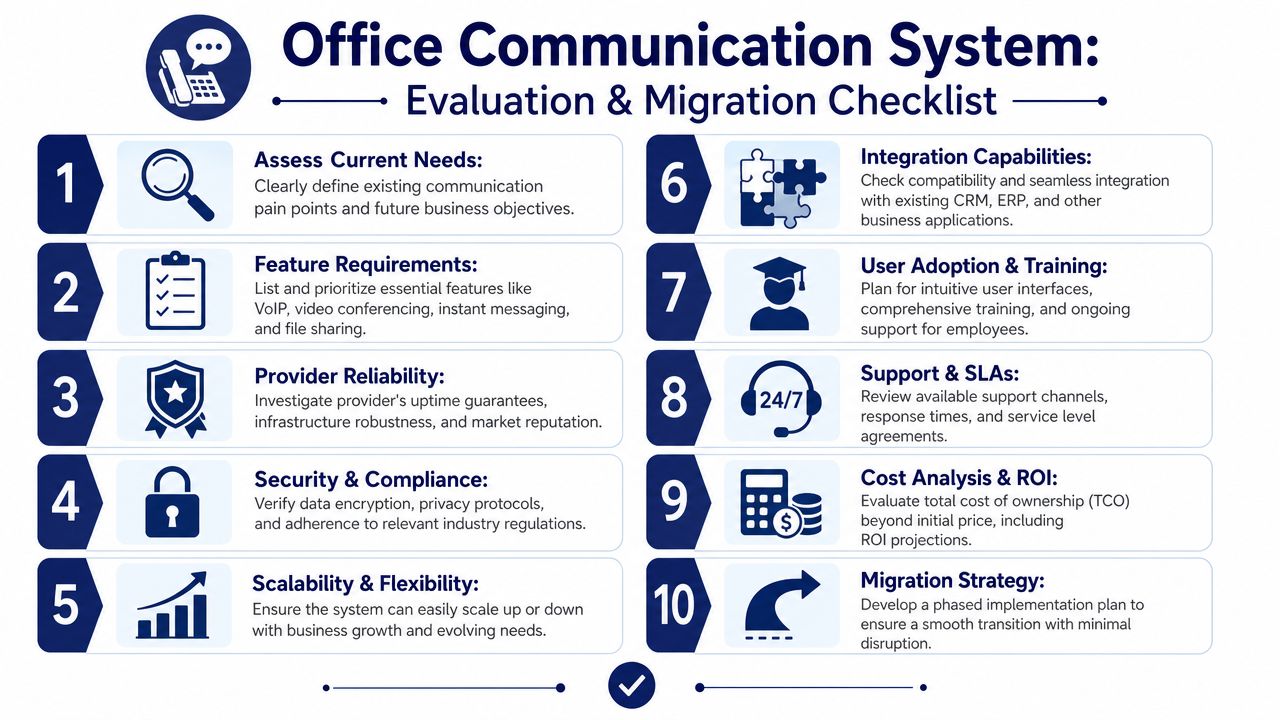
Your Evaluation and Migration Checklist
Choosing a new office communication system is less about finding the longest feature list and more about finding the right fit for your business shape.
Office size matters more than many buyers expect. Omnilert's discussion of office size and internal communication notes that physical size is a “biggest challenge” for internal communication, especially when urgency and response rates suffer in hybrid setups without size-adaptive strategies. In plain terms, a tiny office and a spread-out multi-room facility can both struggle, just in different ways.
That's why evaluation should start with your real operating conditions, not a vendor demo.
Questions to ask before you buy
Use these questions to pressure-test a provider and your own planning.
How will this fit our office layout and work pattern
A front-office-heavy team has different needs than a field-service business or multi-location company. Ask how routing, paging, mobile access, and departmental call handling would work for your actual setup.Can we manage routine changes ourselves
If every name change, holiday schedule, or routing edit requires outside support, the system may recreate the same bottlenecks you're trying to escape.How easy is it to add or move users
Growth doesn't always mean hiring in neat annual blocks. You want something that adapts when roles change, locations open, or temporary coverage is needed.What does support look like
“Support included” can mean many things. Ask who answers, when they're available, and what happens during a real outage or cutover issue.
What a practical shortlist should include
A good shortlist usually covers five areas:
| Evaluation area | What to look for |
|---|---|
| Reliability | Stable service and clear operational accountability |
| Security | Strong protection for business conversations and access |
| Ease of use | Simple admin tools and user-friendly apps |
| Integrations | Clean connection with CRM and daily business tools |
| Scalability | Room to grow without rebuilding everything |
A manageable migration plan
Most SMBs fear migration because they picture a chaotic rip-and-replace project. A smoother transition usually comes from basic planning, not heroics.
- Audit your current reality. List users, phone numbers, call flows, voicemail boxes, and pain points.
- Map your future call handling. Decide how main lines, departments, after-hours rules, and mobile users should work.
- Plan number porting early. Business numbers are core identity assets, so treat them that way.
- Choose a pilot group. Test with a small set of users before wider rollout.
- Train employees by role. Reception, managers, field staff, and service agents won't all use the system the same way.
- Set a cutover date with coverage. Make sure someone can respond quickly if a user gets stuck.
Migration advice: Don't aim for a perfect diagram. Aim for a system your team can actually use confidently on day one.
That's what makes the switch feel manageable. You're not rebuilding the company. You're replacing a weak communication backbone with one that fits the business you already have.
Making the Switch to a Unified Future
A modern office communication system is no longer a nice extra for fast-growing companies. It's part of the foundation. It affects how customers reach you, how employees coordinate, how quickly problems get solved, and how easily the business adapts when work moves beyond a single desk.
The biggest mindset shift is this: you're not just replacing phones. You're replacing a disconnected model of communication with one system that can support calling, messaging, meetings, routing, mobility, and day-to-day management in a much cleaner way.
The market direction reflects that change. The global Unified Communication market is valued at USD 227.69 billion in 2026 and is projected to reach USD 897.95 billion by 2034, according to Unified Communication market projections. That isn't a passing trend. It's a sign that integrated communication platforms are becoming standard business infrastructure.
If your current setup feels fragile, patched together, or dependent on too many workarounds, that feeling is useful. It's your operations telling you the old system no longer matches the way your business works.
If you're ready to move off a legacy phone system without turning the transition into an IT fire drill, SnapDial is built for exactly that kind of upgrade. Its cloud-based business phone platform combines calling, conferencing, routing, mobile access, and unified communications in one managed system, with white-glove setup and dedicated support to help your team switch over smoothly.