
The pattern is familiar. A customer calls to buy, hits voicemail, calls back, gets transferred twice, then gives up. Meanwhile your front desk is juggling invoices, your sales lead is answering support questions, and nobody can tell you how many calls you missed last week.
Most owners treat this as a staffing problem. It usually isn't. It's a systems problem.
A modern small business call center doesn't mean leasing more space or building a room full of headsets. It means putting structure around the calls you're already getting, so the right person answers faster, customers stop bouncing around, and your team can handle growth without sounding overwhelmed.
From Chaos to Control with a Call Center
A growing SMB rarely notices the break point on day one. Calls still come in. Staff still answer. Customers still get helped, eventually.
Then volume changes the math. One employee steps away for lunch and three calls stack up. A sales inquiry lands with a technician. A billing question reaches the owner because nobody set up a proper routing path. The business is busy, but the customer hears friction.
That's when a small business call center starts to matter. Not as a big-company vanity project, but as an operating system for voice communication.
What chaos looks like in practice
In the field, the warning signs tend to show up in clusters:
- Missed opportunity: New leads hit a generic line and nobody knows who should respond first.
- Repeated explanations: Customers re-state the same issue because there isn't a clear handoff path.
- Invisible bottlenecks: Managers know the phones feel busy, but they can't see queue pressure or abandoned calls in real time.
- Team burnout: Your best people become human routers instead of doing the work they were hired for.
The moment your team starts saying "Who was supposed to get that call?" your phone setup has stopped being a phone setup. It's become an operational risk.
The fix isn't more improvisation. It's giving your business a call flow that works the same way every time.
What control actually means
Control means every inbound call follows a defined path. Sales goes to sales. Support goes to support. Overflow has a rule. After-hours calls have a rule. VIP customers have a rule. Remote staff and office staff can answer from the same system without turning your business into a patchwork of cell phones and sticky notes.
That shift is what moves a company from reactive to reliable. Customers notice it immediately, even if they never use the term call center themselves.
What Is a Modern Small Business Call Center
Forget the old image of fluorescent lights and rows of cubicles. A modern small business call center is software, usually delivered through Hosted VoIP or a Cloud PBX, that organizes how your business answers, routes, tracks, and manages calls.
Think of it as the central nervous system for your customer communications. Calls come in from one direction, the system interprets what they need, and then it sends them to the right destination with far less guesswork.
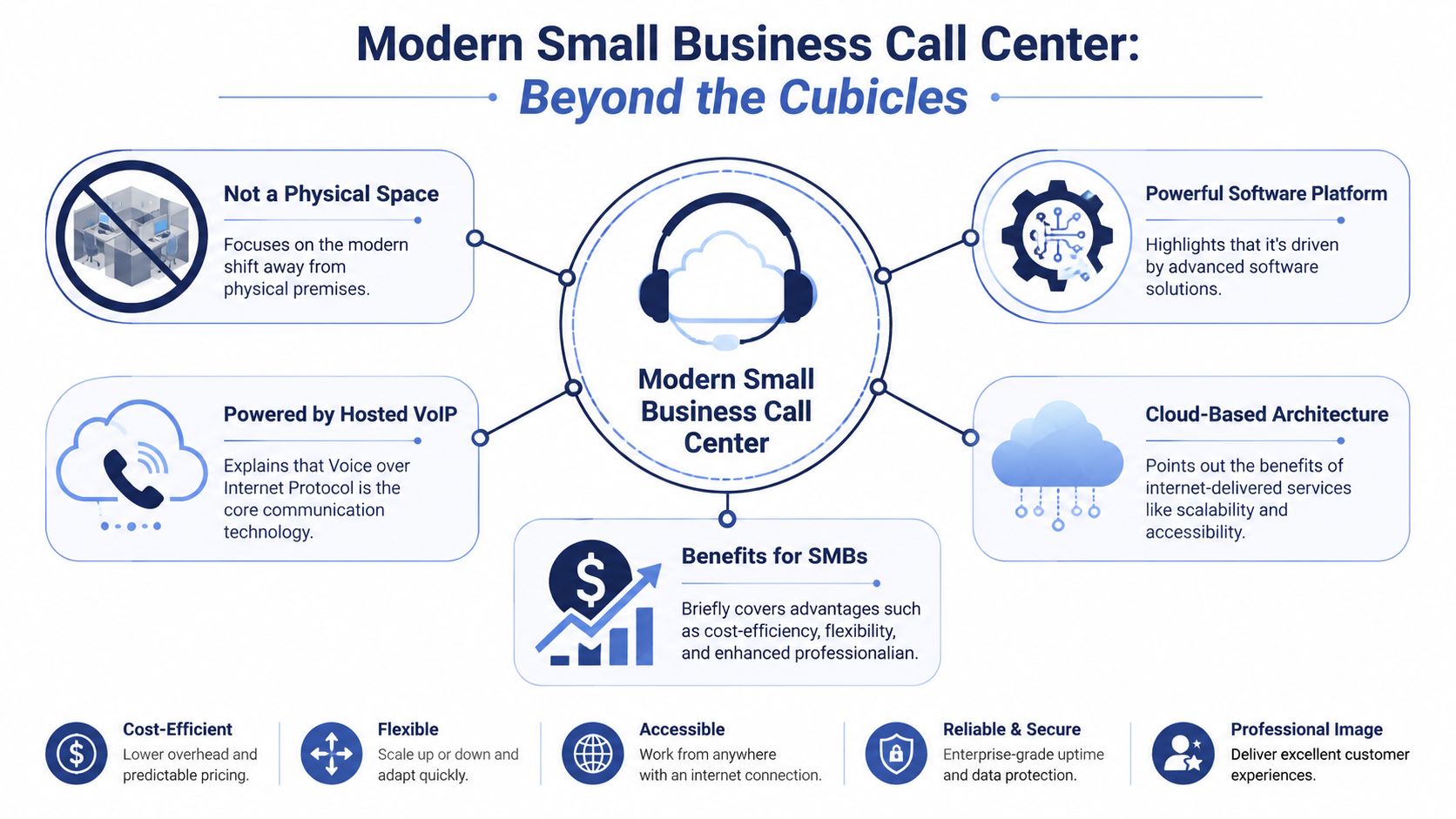
It's a system, not a room
That distinction matters because a lot of SMB owners disqualify themselves too early. They hear "call center" and assume it only applies to large support teams.
In practice, a team of three, five, or ten people can run a capable call center if the platform includes the basics: routing logic, call queues, reporting, device flexibility, and centralized administration. The agents might answer from desk phones, laptops, or mobile apps. The customer never sees that complexity. They just experience a smoother call.
If you're comparing terminology, this overview of call center vs contact center differences is useful because many vendors blur the two.
Why voice still deserves attention
Plenty of businesses assume customers want everything handled through chat or forms. Sometimes they do. But voice still carries the hardest conversations: urgent support, billing disputes, scheduling, sales objections, and anything emotional or high value.
That matches the trend reported by Call Centre Helper. 55.4% of contact centers reported a rise in inbound voice channels from 2022 to 2023, up from 53.5% the year before, while social media saw only a small increase from 2.8% to 3% in the same period, according to Call Centre Helper's contact centre analysis.
Customers don't call because they love phone trees. They call when the issue matters enough that they want a person.
What changes for a small team
A proper cloud-based call center gives a small business several practical advantages:
- One business identity: Calls route through one company system instead of scattered personal numbers.
- Flexible staffing: Office staff, remote staff, and managers can answer through the same environment.
- Cleaner handoffs: Calls move by skill, department, or schedule rather than whoever happens to be free.
- Better visibility: Supervisors can see what happened, not just what people remember happening.
That's why the modern version isn't about size. It's about control, consistency, and being reachable without adding unnecessary complexity.
Core Features That Drive Customer Satisfaction
The market is full of feature lists. Most of them are padded. For a small business call center, a few tools do most of the heavy lifting.
If these are configured well, customers notice faster answers and fewer dead ends. If they're configured badly, even an expensive platform will still feel clumsy.
Auto Attendant and IVR
An Auto Attendant, often paired with IVR, is your virtual receptionist. It answers immediately, presents options, and sends the caller down the right path.
Done right, it reduces front-desk interruptions and stops random transfers. Done badly, it traps customers in menu hell.
A practical setup keeps options short and tied to real team responsibilities. For example:
- Sales path: Route buyers to your best closers, not a generic ring group.
- Support path: Send technical questions to staff who can solve them.
- Billing path: Keep account questions out of the sales queue.
The point isn't automation for its own sake. It's making sure the first hop is useful.
ACD and skills-based routing
Automatic Call Distribution, or ACD, decides who should receive each call. The difference between basic and smart routing is massive.
Round-robin routing treats every call as equal. Skills-based routing doesn't. It uses rules such as department, issue type, or caller input to send the conversation to the person most likely to resolve it.
According to NICE, implementing skills-based routing through an ACD system can lead to a 25 to 30% reduction in Average Handle Time and a 15% increase in First-Call Resolution. That's why skills-based routing in ACD is one of the first features I look for in any SMB rollout.
Practical rule: If your team has different specialties, don't let the phone system pretend they don't.
Queues and callback options
Queues are unavoidable when demand bunches up. The core question is whether your queue design protects customer patience or wastes it.
A good queue tells callers what's happening. It gives them an estimated wait experience, preserves order, and offers a callback when holding doesn't make sense. A bad queue does the opposite. Silence, uncertainty, and repetitive transfers.
The following tends to work best in small teams:
| Feature | What it solves | What usually fails |
|---|---|---|
| Queue announcements | Reassures callers they reached the right place | Long promotional recordings |
| Callback option | Saves customers from sitting on hold | Forcing everyone to wait live |
| Overflow routing | Prevents one queue from freezing the business | Sending every overflow call to the owner |
| Priority rules | Protects urgent or high-value calls | First-in only logic for every scenario |
Customers don't care what acronym sits behind the routing engine. They care whether they reached somebody who can help without repeating themselves three times.
Build vs Buy The Right Path for Your Business
Most SMBs have three options. They can assemble a call center from separate tools, outsource the function, or buy an integrated cloud platform and run it in-house.
Each path can work. But each one shifts cost, control, and operational burden in a different direction.
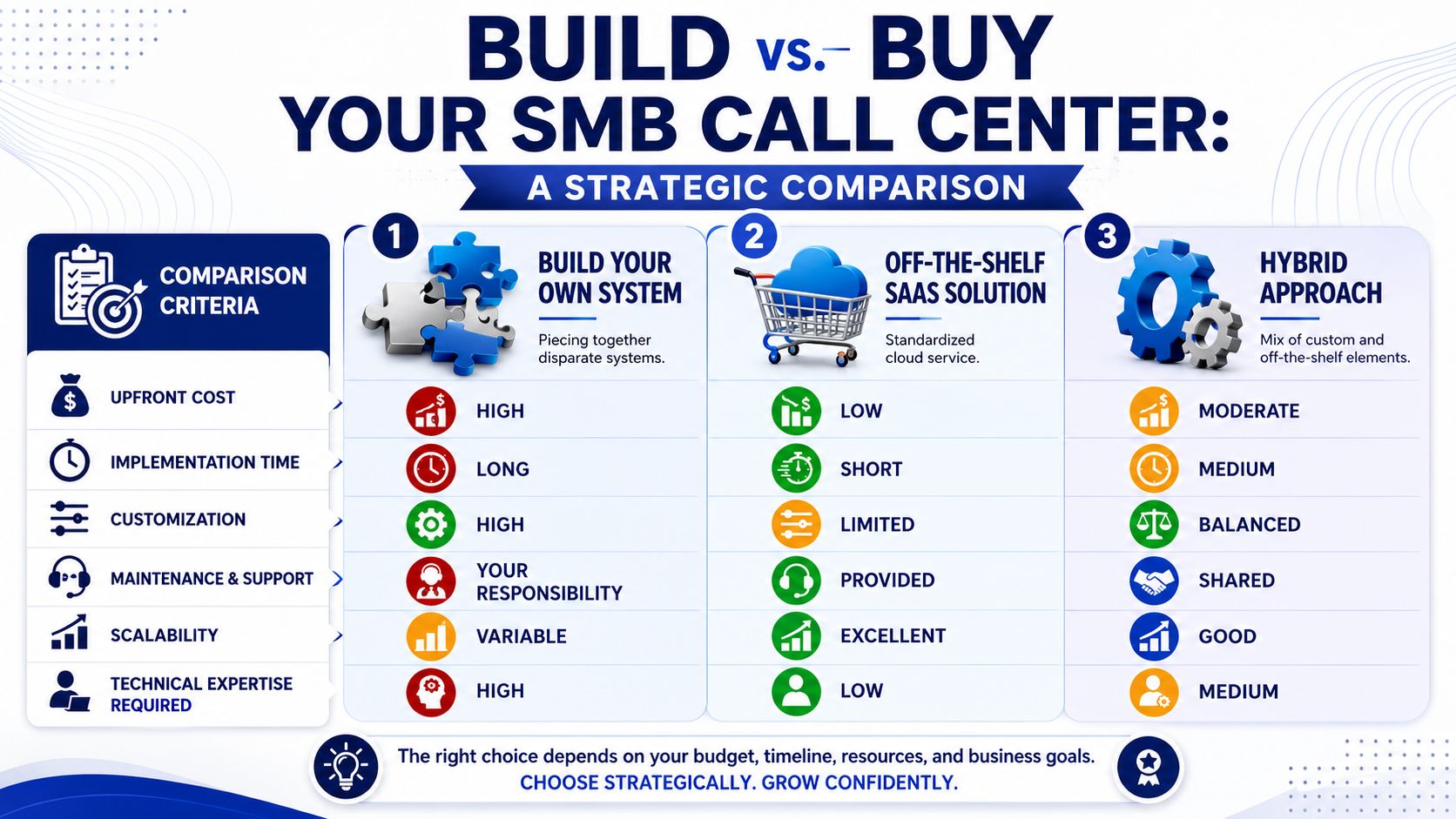
Option one, build it yourself
Some businesses start with a patchwork. One VoIP app for calling. Another tool for ticketing. A shared mobile number for overflow. Maybe a CRM integration held together by manual workarounds.
That gives you flexibility, but it also makes you the integrator.
You own the routing logic, troubleshooting, vendor disputes, reporting gaps, and training headaches. For a very technical team, that's manageable. For most growing SMBs, it becomes fragile fast.
Option two, outsource it
Outsourcing can make sense when your main problem is coverage and your internal team can't absorb call volume. It can also solve after-hours handling if you need a human answer outside standard business hours.
The trade-off is brand control. External agents can follow scripts, but they won't know your customers, internal exceptions, or service culture the way your own team does.
This path usually works best when the call type is narrow and process-driven. It works worst when calls require judgment.
Option three, buy an integrated cloud solution
This is the sweet spot for most SMBs. You keep ownership of the customer experience while offloading the infrastructure burden to a provider that manages the platform.
Instead of maintaining hardware and stitching together apps, your team gets one environment for call handling, routing, and reporting. That matters because integration is where small teams lose time.
Aberdeen reports that adopting an integrated cloud contact center solution can deliver a 40% improvement in agent productivity and a 35% reduction in IT infrastructure costs compared with legacy on-premise PBX environments, based on research into cloud contact center ROI.
A practical way to decide
Use these criteria before you choose:
- Pick build if your business has unusual workflow requirements and someone on your team can own the technical stack.
- Pick outsource if your biggest need is labor coverage and your call types are tightly scripted.
- Pick integrated cloud if you want enterprise-style capability without becoming your own telecom department.
If your team says, "We just need the phones to work and the calls to land in the right place," that usually points to an integrated platform, not a custom project.
Choosing Your Technology Cloud PBX and Hosted VoIP Explained
These terms sound more technical than they are.
A traditional on-premise PBX is hardware you own and maintain. It lives on-site, needs upkeep, and often turns even small changes into a project. A Cloud PBX moves that core phone system into the provider's environment. Hosted VoIP is the calling method behind it, sending voice over an internet connection instead of old phone lines.
What this means in plain business terms
For an SMB, the change is simple. Your phone system stops being a box and starts being a service.
That gives you flexibility in a few areas that matter immediately:
- Remote work: Staff can answer business calls from office phones, desktop apps, or mobile devices.
- Expansion: Adding users or locations doesn't require a hardware rethink.
- Administration: Changes to routing, greetings, and users are easier to manage.
- Continuity: If one location has a problem, calls can be redirected elsewhere faster.
If you're sorting through the basics, this primer on what a cloud phone system is does a good job of explaining the foundation without vendor jargon.
Why scalability matters on busy days
Small businesses often underestimate how expensive a bad queue experience is. Invoca found that 28% of callers abandon the call after waiting on hold for 5 minutes or less, based on its call experience statistics. That's not a minor service issue. That's revenue walking away and frustrated customers deciding not to try again.
A scalable cloud system gives you better tools to manage those peaks. Calls can queue cleanly, route to alternate staff, offer callbacks, and keep the customer informed instead of leaving them in silence.
Don't ignore connectivity
Cloud calling is only as stable as the network underneath it. Before rollout, I always tell SMBs to review internet reliability, traffic prioritization, and device readiness, especially if they're supporting remote staff or multiple locations. For a practical outside reference, Constructive-IT's guide to telephony and data connectivity solutions is worth reviewing when you're matching call quality expectations to network reality.
The technology itself isn't the hard part anymore. The business decision is choosing a setup that supports the way your team works.
Your Implementation Checklist
A small business call center rollout doesn't need to feel like a telecom migration from a decade ago. The cleanest deployments follow a short checklist and avoid overdesign.
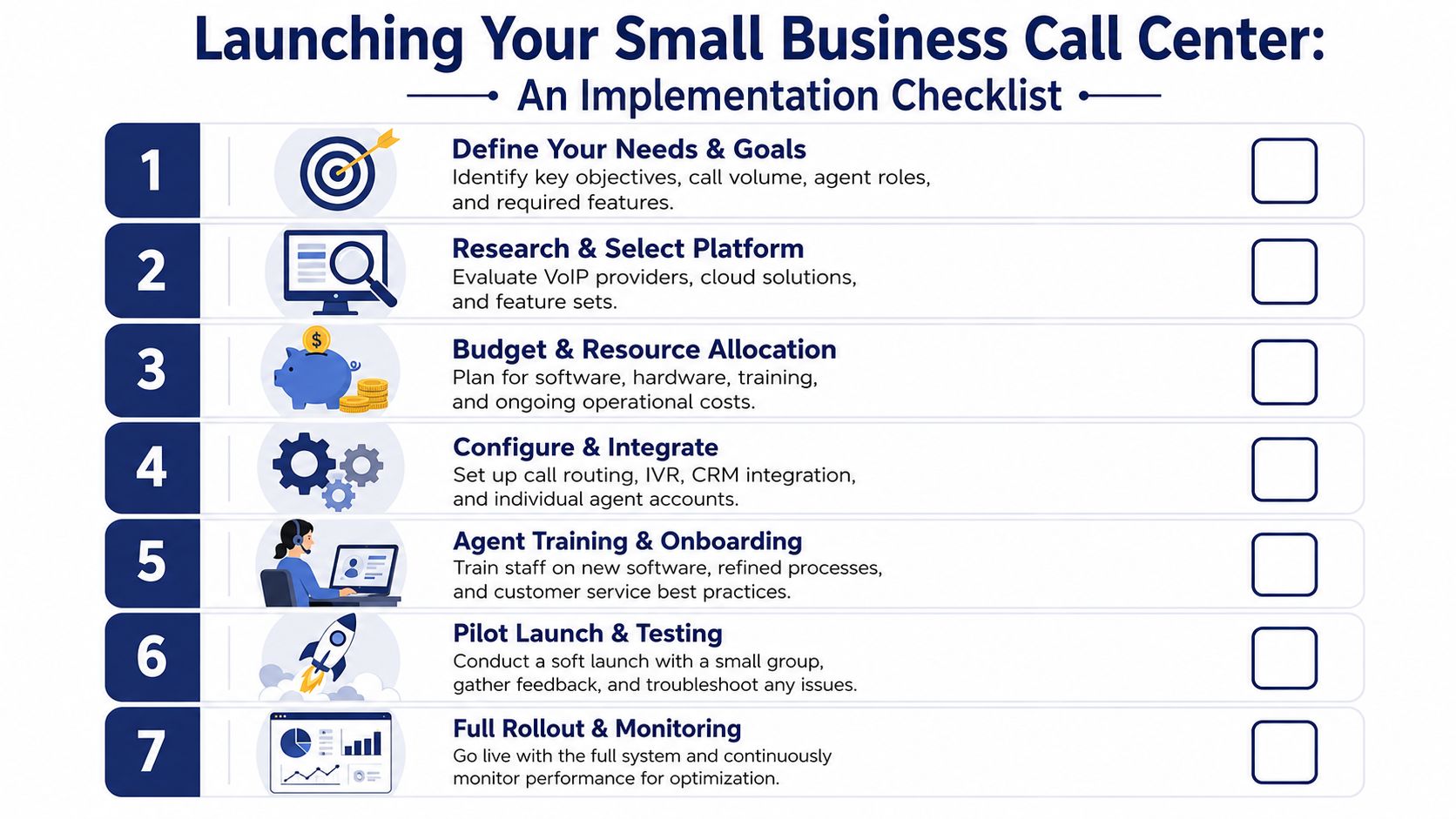
Start with call reality, not vendor demos
Begin by mapping what happens today.
- Audit your incoming calls. Identify your main call types, busy periods, repeat pain points, and who currently answers what.
- List your failure points. Missed calls, after-hours confusion, bad transfers, and voicemail black holes should all go on paper.
- Define simple success. Maybe that means cleaner sales routing, fewer support handoffs, or consistent after-hours handling.
This first pass prevents a common mistake. Buying features you won't use while ignoring the routing problems you face every day.
Design the call flow before you touch settings
A good call center is built on call logic.
Sketch the customer journey from the moment the phone rings. What should happen for new sales inquiries, existing customer support, billing, urgent calls, and after-hours calls? If a queue gets backed up, where should overflow go? If nobody answers, what should the fallback be?
Keep the structure tight:
- Short menus: Fewer options usually create better outcomes.
- Clear ownership: Every route should land with a real person or a clearly monitored queue.
- Planned exceptions: Holiday hours, lunch coverage, and manager escalation shouldn't be afterthoughts.
The best IVR for a small business is usually the one with the fewest options that still routes accurately.
Handle setup, compliance, and training early
Once the flow is clear, implementation gets much easier.
- Choose a provider that assists with onboarding. Number porting, device prep, and queue configuration are where delays often show up.
- Review recording policy. If your team records calls, make sure you understand the rules in your region. This guide on stay compliant recording calls is a practical place to start.
- Train by scenario, not by feature. Teach staff how to answer, transfer, disposition, and escalate real calls, not just where the buttons are.
- Pilot before full launch. Test from an outside line, run through every menu option, and validate voicemail, routing, and failover paths.
The businesses that get this right don't aim for a perfect diagram. They aim for a dependable first version they can refine once real call data starts coming in.
Measuring Success Key KPIs for Your Call Center
Most SMBs don't need a dedicated analyst to manage service quality. They need a short list of metrics, a dashboard they can read, and the discipline to review it regularly.
That's the shift from "cheap vs expensive" to smart vs outdated. Modern tools let small teams monitor performance without building a manual QA department.
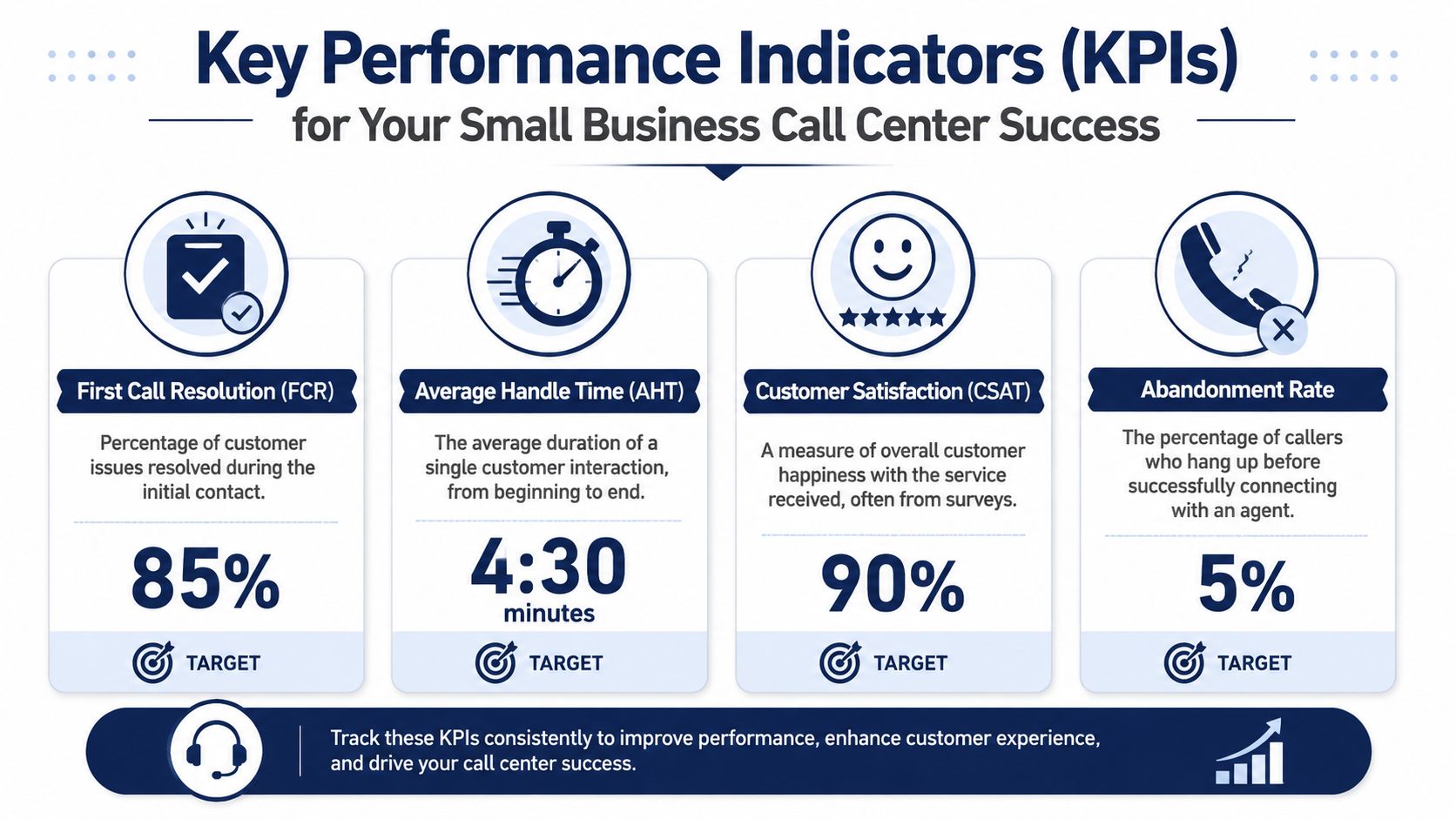
The KPIs worth watching first
Start with a handful of measures that connect directly to customer experience and team efficiency.
| KPI | What it tells you | Why it matters |
|---|---|---|
| First-Call Resolution | Whether the issue was solved on the first interaction | Fewer repeat calls, less customer frustration |
| Average Handle Time | How long calls take from start to finish | Helps spot routing problems and coaching needs |
| Abandonment Rate | How often callers give up before reaching someone | Shows if your queue design is failing |
| Customer Satisfaction | How customers felt about the interaction | Keeps efficiency from coming at the expense of experience |
These metrics work together. AHT by itself can mislead you if agents rush customers off the phone. FCR without CSAT can hide poor call quality. The goal is balance, not chasing one number in isolation.
Why small teams should care
A common mistake is assuming KPI discipline is for enterprise contact centers only. It isn't.
The process burden is what usually blocks SMBs, not team size. A 2025 report cited in the brief behind this article states that 68% of SMBs with fewer than 50 employees fail to meet Fortune 500 service standards due to process complexity, and that modern cloud features can help even a 3-person team achieve 90% FCR when routing and analytics replace manual QA workflows. Because the cited URL is not a verifiable research source, I would treat that claim as directional rather than authoritative.
The practical takeaway still holds. Small teams can perform at a high level when the platform automates the tracking and surfaces obvious problems quickly.
For owners who want a broader service lens beyond phone metrics, Mava's practical guide to customer happiness is useful for connecting operational data to customer sentiment.
What good management looks like
You don't need long reporting meetings. You need a weekly review rhythm.
- Check FCR trends: Are customers getting solved on the first try, or are they bouncing back into the queue?
- Review handle time by call type: Long technical calls are normal. Long billing calls often signal process confusion.
- Watch abandonment patterns: If callers drop during lunch coverage or at opening time, staffing and routing need adjustment.
- Sample recordings and summaries: A few targeted reviews often reveal more than broad assumptions.
If your platform includes dashboards, call summaries, and quality views, use them. If not, you'll spend too much time reconstructing what happened after the fact, making call center quality monitoring practical for small teams, not just large operations.
Good KPI tracking doesn't turn your business into a call center bureaucracy. It stops guesswork from running your customer experience.
If you're replacing a legacy phone system or trying to bring order to missed calls, transfers, and inconsistent service, SnapDial is worth a look. It gives SMBs cloud PBX and hosted VoIP capabilities, white-glove setup, queue management, routing, reporting, and mobile-ready calling without the usual telecom complexity.