
A telephone auto attendant is a virtual receptionist that answers and routes incoming calls automatically. Think of it as your company's digital front desk—one that offers a professional greeting and guides callers to the right person or department without needing a human to pick up the phone.
What Is a Telephone Auto Attendant?
Imagine having a digital receptionist who never takes a sick day, works 24/7, and always greets callers with a perfectly polished, professional message. That's the simple but powerful function of a telephone auto attendant.
It’s the friendly, automated voice that answers your main business line and presents callers with a simple menu, something like, "Press 1 for Sales, Press 2 for Support." This system acts as the first point of contact, making sure every call is answered right away and sent where it needs to go based on the caller's keypad input.
For small and growing businesses, it’s a game-changer. It instantly projects the image and operational muscle of a much larger company. Instead of letting a call ring endlessly or hit a busy signal, you immediately engage your customers and get them on the right path, improving their experience from the very first moment.
A telephone auto attendant is a key tool for businesses looking to automate business processes, especially within their communication workflow. By taking over the repetitive job of directing calls, it frees up your team to focus on more complex, high-value work.
The Digital Receptionist for Modern Business
An auto attendant is much more than a fancy answering machine; it's a core piece of modern business communications. It works by playing a pre-recorded greeting and then listening for a caller's response to the menu options. Based on that simple input, it seamlessly transfers the call to the right destination.
Here’s what it really delivers:
- Professional Image: A consistent, high-quality greeting reinforces your brand’s professionalism on every single call.
- Improved Efficiency: Calls get to the right person much faster. This cuts down on hold times and gets rid of the need for a human receptionist to manually transfer calls all day.
- 24/7 Availability: Your business can capture leads and serve customers even after hours, on weekends, and during holidays by directing calls to a voicemail box or an on-call number.
- Cost Savings: It reduces the payroll costs that come with a full-time receptionist, making enterprise-level functionality accessible to any business, no matter the size.
The widespread adoption of this technology really speaks for itself. A massive 85.8% of Fortune 500 companies depend on auto attendants to manage their inbound calls, which is a powerful testament to their ability to boost professionalism and cut operational costs. This allows smaller businesses to offer the same level of polish and efficiency without the huge overhead. You can find more details about these industry statistics by exploring Fortune 500 phone system insights.
By putting a telephone auto attendant in place, you’re setting the stage for smarter operations and much better customer interactions.
How Auto Attendants Work and How They Differ From IVR
At its heart, a telephone auto attendant is your digital front door. When someone calls your business, this system instantly picks up and plays a professional, pre-recorded greeting. It then offers a simple menu of options, allowing the caller to route themselves using their phone's keypad.
Think of it as a virtual receptionist that never takes a break. The system is programmed with a simple set of rules. For example, when a caller presses “1” for sales, the auto attendant immediately follows that rule and connects them to the right extension or call group.
The whole process is built for speed and efficiency. It completely removes the need for a human to answer every single call and manually transfer it. This frees your team from a repetitive, time-consuming task so they can focus on more important work.
The journey a caller takes is simple and direct, as you can see in this quick breakdown.
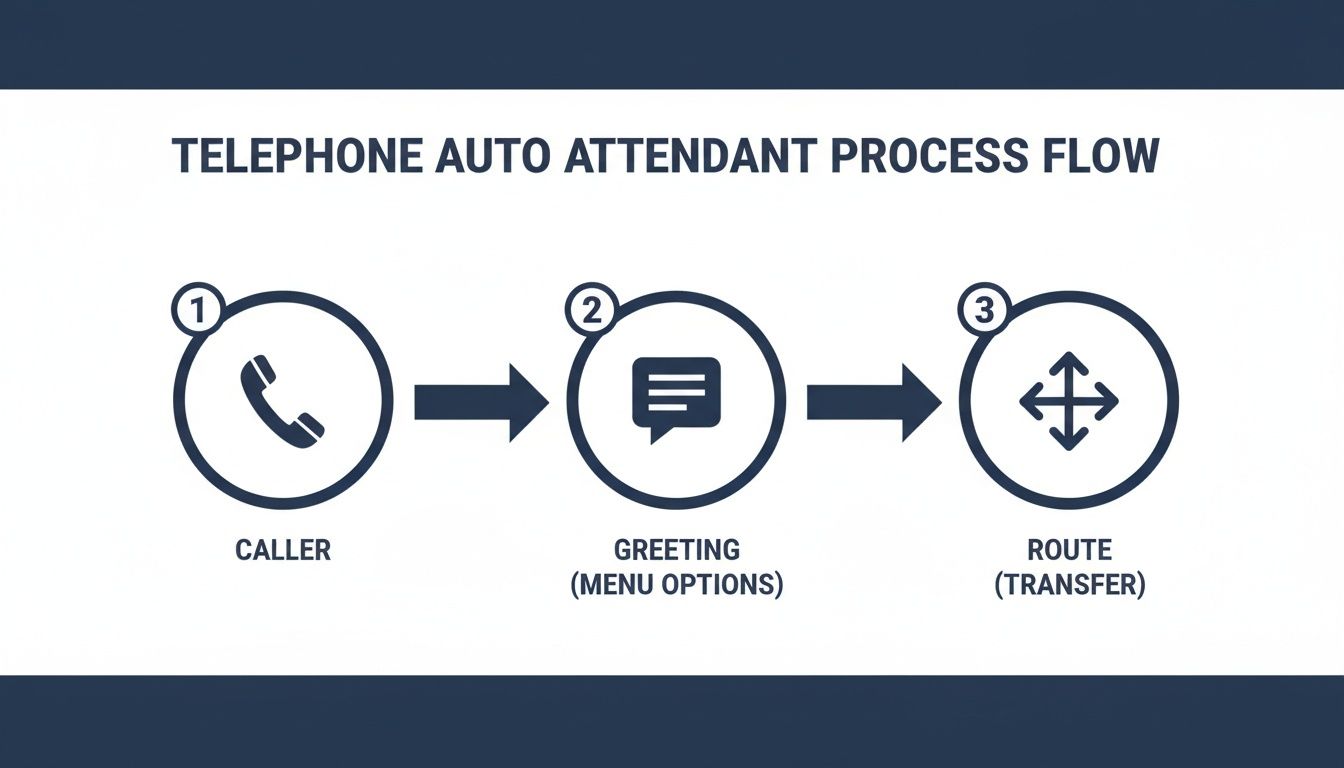
This flowchart highlights the clean, linear path an auto attendant creates, ensuring every caller is greeted professionally and pointed in the right direction without any delay.
The Critical Distinction: Auto Attendant vs. IVR
One of the most common points of confusion in business communications is the difference between an auto attendant and an Interactive Voice Response (IVR) system. People often use the terms interchangeably, but they serve fundamentally different purposes. Getting this right is critical for choosing the technology your business actually needs.
Here’s a simple way to think about it. An auto attendant is like the directory in an office building lobby. It tells you that the sales department is on the third floor and support is on the fifth, then points you toward the right elevator. Its job is simply to provide directions and get you there.
An IVR, on the other hand, is more like a building concierge. It doesn't just give you directions; it can actually perform tasks for you. An IVR system can interact with your other business software, like your CRM or billing platform, to provide real-time information or even complete actions for the caller. This includes more complex jobs like checking an account balance, paying a bill, or confirming an appointment—all without needing to speak to a person.
Key Takeaway: An auto attendant is a routing tool. An IVR is an interaction tool. While an IVR can do everything an auto attendant can, a basic auto attendant lacks the advanced interactive capabilities of a true IVR.
The primary difference comes down to interaction and integration. An auto attendant follows a fixed, pre-programmed menu to forward calls. An IVR engages in a two-way exchange, often pulling data from backend systems to fulfill a caller's request. For a deeper look at how calls are directed, you can learn more about the principles of modern business call routing.
To make this distinction crystal clear, let's put their core functions and common uses side-by-side.
Auto Attendant vs. IVR System Comparison
This table breaks down the fundamental differences in what these two systems do, how they work, and what they're typically used for.
| Feature | Telephone Auto Attendant | Interactive Voice Response (IVR) |
|---|---|---|
| Primary Goal | Route calls to the correct person or department. | Automate tasks and provide information to callers. |
| Complexity | Simple, menu-based routing using keypad inputs. | Can use keypad or voice commands to interact with databases. |
| Common Use | "Press 1 for Sales, Press 2 for Support." | "Please say or enter your account number to check your balance." |
| Integration | Limited; primarily integrated with the phone system. | Deeply integrated with CRM, billing, and other software. |
Ultimately, understanding this difference is vital. If your main goal is to project a professional image and make sure calls get to the right team quickly and efficiently, a telephone auto attendant is the perfect, cost-effective solution. But if you need to automate routine customer service tasks and free up your agents from handling common inquiries, an IVR is the more powerful tool for the job.
Core Business Benefits of an Automated Call System
Putting a telephone auto attendant in place is about so much more than just answering calls. It’s a strategic move that delivers real, measurable benefits across your entire business. From elevating your brand to cutting operational costs, this single tool can deliver a serious return on investment.
Let's break down the core advantages that make an automated call system a must-have for any modern company.
The first and most immediate benefit is a dramatic boost to your professional image. Every single caller, whether a new lead or a long-time client, gets the exact same polished, on-brand greeting. This consistency gets rid of the risk of a rushed or distracted human response, making sure your business always sounds organized and ready for business.
This instant sense of professionalism builds caller confidence from the very first second. It signals that your company is established, efficient, and serious about service, putting you on the same playing field as much larger competitors.
Slash Operational Costs and Reallocate Resources
One of the most compelling financial benefits is a sharp reduction in overhead. A telephone auto attendant effectively takes over the main job of a full-time receptionist: answering and routing every call. This alone can lead to huge payroll savings.
By automating this repetitive work, you free up your valuable team members to focus on more complex, revenue-generating activities. Instead of spending their day transferring calls, they can dedicate their time to customer support, following up on sales leads, or working on strategic projects. That shift from administrative tasks to high-value work is a direct boost to your team's productivity.
Understanding how different automated systems work, including tools like AI-powered chatbots for customer support, helps clarify where a modern auto attendant fits in. Both aim to improve efficiency by handling routine interactions, which lets your human experts focus on more critical issues.
Improve Customer Satisfaction with Faster Routing
In today's fast-paced world, nothing frustrates customers more than being stuck on hold. An auto attendant solves this by empowering callers to get themselves to the right department or person immediately. There’s no waiting for a receptionist to finish another call or look up an extension.
This self-service model drastically cuts down on wait times and eliminates the dreaded "let me transfer you" loop. When a customer can quickly connect with a sales expert or a support tech, their satisfaction skyrockets. Efficient call routing shows you respect their time and are committed to solving their problems fast.
But a word of caution: a poorly designed system can backfire.
Research reveals that 85% of people have hung up on an auto attendant, and 51% will abandon a business entirely after a frustrating automated experience. This just underscores how critical it is to have a simple, intuitive menu design.
A well-configured system is a huge asset, but a confusing one quickly becomes a liability.
Never Miss a Business Opportunity
Your business doesn't stop generating leads just because the office is closed for the day. A key benefit of an automated call system is its 24/7 availability. It works tirelessly after hours, on weekends, and during holidays.
This ensures you never miss a call from a potential customer or an urgent message from a current client. You can set up your auto attendant to:
- Provide Key Information: Offer callers your business hours, address, or website.
- Route to After-Hours Voicemail: Direct calls to specific mailboxes, like a general sales inbox or an emergency support line.
- Forward to an On-Call Number: Make sure urgent matters get handled by a designated team member, no matter the time of day.
By capturing every single opportunity, a telephone auto attendant transforms your phone system from a simple utility into a powerful tool for business growth and customer retention.
Essential Auto Attendant Features and Customizations
When you’re looking at different telephone auto attendant solutions, the list of features can seem endless. But what really separates a generic, frustrating system from a truly powerful business tool comes down to the quality of those features and how well you can customize them.
Think of it like this: the right features are the building blocks for your ideal digital receptionist. Each one adds a new layer of smarts and efficiency, turning a simple phone menu into a strategic tool that guides customers, saves your team time, and makes your business look great. Let's dig into the features that really matter.
Custom Greetings and Professional Recordings
Your auto attendant greeting is the first thing a caller hears. It’s your digital handshake. A choppy, robotic voice immediately makes your business feel small and impersonal, while a clear, professional greeting sets a tone of competence and care. Getting this right is non-negotiable.
A good system gives you total control over this first impression. You should be able to:
- Upload a professional voice recording: Hire a voice actor for a top-tier, polished sound that perfectly matches your brand.
- Record your own message: Add a personal touch by recording a greeting in your own voice (or a team member's) right from your computer or phone.
- Use text-to-speech: While less personal, modern text-to-speech engines are great for quickly updating announcements, like a temporary closure or special promotion.
A custom greeting is how you start every single call on the right foot, creating a confident and positive experience from the get-go.
Time-Based and Holiday Call Routing
Your business doesn’t operate the same way at 2 PM on a Tuesday as it does at 8 PM on a Friday. Your phone system needs to know the difference. That's where time-of-day routing comes in, automatically changing how calls are handled based on your actual business hours.
For example, during the day, your menu can direct callers straight to sales and support. After hours, the system can automatically switch to a different menu that offers voicemail or provides emergency contact info. Holiday routing does the same thing, letting you set up special greetings and call flows for specific dates well in advance. You'll never miss a lead or leave a customer hanging.
Key Insight: A modern telephone auto attendant should adapt to your business schedule automatically. This 24/7 intelligence ensures callers always receive the right message and options, regardless of when they call, protecting your customer experience and capturing every opportunity.
Multi-Level Menus and Dial-by-Name Directory
If your business has more than a few people or departments, a simple, one-layer menu just won't cut it. Multi-level menus are essential for creating a clean, organized path that guides callers without overwhelming them. A caller might first press "2" for Support (Level 1), then be offered "1" for Product Issues or "2" for Billing (Level 2).
This keeps your main menu from getting cluttered and helps callers find who they need, fast. Paired with this is the dial-by-name directory. This feature is a lifesaver for callers who already know who they're trying to reach. They can simply start spelling the person’s name on their keypad to bypass the menu and connect directly, saving everyone time.
These features are fundamental for creating an efficient call flow in any organization, working hand-in-hand with tools like well-designed call queues manage high call volumes for busy teams.
And let's not forget voicemail-to-email transcription. This is a massive productivity booster. The system automatically transcribes a voice message into text and emails it straight to your inbox. This lets your team quickly read and prioritize messages on the go, no listening required, and keeps a searchable archive of all communications. It transforms your voicemail from a passive chore into an actionable, text-based workflow.
Best Practices for a User-Friendly Auto Attendant
A bad telephone auto attendant is more than just an annoyance; it’s a customer-repellent. We've all been trapped in a confusing phone menu, and it can quickly turn a potential customer into a frustrated ex-prospect. But when done right, it becomes a powerful asset that makes your business look professional and efficient.
The entire goal is to design an experience that feels effortless and respects the caller's time. A few smart decisions during setup can be the difference between a happy customer and a hang-up. Let’s walk through the rules for creating a system people will actually appreciate.
Craft a Welcoming First Impression
The very first thing a caller hears sets the tone for their entire experience. Getting this right is non-negotiable. Your welcome message needs to be professional and, most importantly, brief, letting them know instantly they've called the right place.
Think of the audio quality as a direct reflection of your brand. A fuzzy, robotic, or long-winded greeting screams unprofessionalism. Here’s how to nail it:
- Keep it brief: Simply welcome the caller and state your company name. Ditch the marketing pitches and lengthy introductions.
- Use a human voice: A high-quality recording from a professional voice actor or even a clear-speaking team member will always outperform a default text-to-speech voice. It builds trust from the first second.
- State instructions clearly: Only tell callers to "listen carefully as our menu options have recently changed" if they actually have. Otherwise, get straight to the point.
This initial greeting is your first—and sometimes only—chance to make a solid impression.
Design a Simple and Logical Menu
After the greeting, the menu is where most callers get lost. The guiding principle here is absolute simplicity. An overwhelmed caller is just a few seconds away from hanging up.
The best auto attendant menus are built from the caller's point of view, prioritizing clarity over complexity. And always, always include a direct path to a human to prevent frustration and abandoned calls.
Stick to no more than five options in your main menu. If you absolutely need more, organize them into logical sub-menus to keep the initial choices clean and simple. When laying out your menu, put the most requested options first—Sales and Support usually come before the Company Directory.
Finally, always provide an "escape hatch." This is an option, typically "0" or the last number on your list, that routes the caller directly to a live person or a general voicemail. Knowing there's an easy way to reach a human provides a critical safety net for anyone who is confused or has an urgent issue.
Continuously Review and Refine
Your business isn't static, and your telephone auto attendant shouldn't be either. As your company grows and your customer needs change, you have to look at the data to see if the system is still working. Check your call logs and analytics to spot where people are dropping off or getting stuck.
This data-driven mindset is crucial, especially as more businesses adopt this technology. The global market for these systems was valued at USD 2.5 billion in 2023 and is projected to hit USD 5.7 billion by 2032, a boom driven largely by small and mid-sized businesses chasing efficiency. You can get more details on this growth by exploring the auto attendant market trends on dataintelo.com.
Regularly updating greetings, killing off outdated options, and tweaking your call flow based on how people actually use it is what keeps your auto attendant a powerful tool instead of a digital relic.
Choosing the Right Auto Attendant Solution
After seeing what a great auto attendant can do, picking the right solution is the final, crucial step. This isn’t just about adding a feature; it’s about choosing a communications partner. The best providers know that a powerful auto attendant isn't a DIY project—it’s a core business system that needs expert attention right from the start.
Look for a provider that offers a guided, hands-on setup. It’s far too easy for businesses to get tangled up in confusing configuration panels, leading to poorly designed call flows that only succeed in frustrating customers. A partner who helps build your system ensures it’s optimized from day one, avoiding those common mistakes and creating a great caller experience right away.
Prioritize Transparent Pricing and Seamless Integration
As you start comparing your options, keep a close eye on the pricing models. Hidden fees are everywhere. Many providers will charge extra for what should be standard features, like multi-level menus, call recording, or a dial-by-name directory. The best solutions have transparent, all-inclusive pricing where these advanced tools are part of the standard package, not expensive add-ons you discover later.
The true value of a telephone auto attendant is realized when it doesn't just route calls, but acts as the central hub of a unified communications platform. It should connect every tool your team uses, from mobile apps to call management software, into a single, cohesive system.
A modern auto attendant also needs to integrate perfectly with the rest of your tools. Does it work with your team’s mobile apps so they can manage calls and settings from anywhere? Can it connect to call center software for advanced queue management? That level of deep integration is what separates a simple call-routing gimmick from a truly powerful business platform. The system should grow with your business, not hold it back. For more on this, check out our guide on what a cloud phone system is and how it brings all your communications together.
Build a Future-Proof Communication Stack
Ultimately, your choice should set you up for success not just today, but for 2026 and beyond. This means picking a provider with a reliable, scalable platform and a clear roadmap for future growth.
As you evaluate your options, use this checklist as a guide:
- Expert Setup and Support: Does the provider offer a white-glove setup to get your call flows configured correctly from the get-go? Is expert help easy to reach when you need to make changes?
- All-Inclusive Features: Are advanced tools like custom greetings and after-hours routing included, or will you get hit with surprise fees for essential features?
- Unified Platform: Does the auto attendant connect seamlessly with mobile apps, desktop software, and other business tools to create a single source of truth for all communications?
- Scalability and Reliability: Is the platform built on a dependable cloud infrastructure that can grow effortlessly as your business expands?
By focusing on these key areas, you can select a telephone auto attendant that does more than just make you sound professional. You’ll be putting in place a foundational piece of your company’s long-term success.
Got Questions? We've Got Answers
Even after getting the hang of how a telephone auto attendant works, you probably still have a few specific questions floating around. That’s perfectly normal. To help you feel confident about getting started, we’ve put together straightforward answers to the questions we hear most often.
Let's clear up any lingering concerns about setup, cost, and what your callers will actually experience.
Can I Use My Own Voice for the Auto Attendant Greeting?
Absolutely. This is one of the most important ways to keep your brand’s personality front and center, and most modern phone systems give you total control here. You typically have a few solid choices:
- Upload a professional audio file: You can hire a voice actor to record a polished greeting and then simply upload the MP3 or WAV file. This sounds incredibly professional.
- Record your own greeting: Many systems let you record messages right from your computer's mic or by calling in from your phone. Using a familiar voice can be very reassuring for callers.
- Use text-to-speech: While it’s less personal, today’s text-to-speech engines are remarkably clear. They’re a great option for announcements that you need to change often, like special hours or promotions.
A familiar or professionally recorded voice creates a much more welcoming first impression than a generic, robotic one. It's a small detail that makes a huge difference.
How Many Menu Options Should I Have?
The golden rule here is to keep it simple. The best practice is to limit your main menu to between three and five essential options. If you give a caller too many choices right off the bat, you’re on a fast track to frustration and hang-ups.
But what if your business is more complex? The answer isn't to cram everything into the main menu. Instead, you use multi-level menus (or sub-menus). A caller might press "1" for Support, which then leads to a second menu with options like, "Press 1 for Technical Issues" or "Press 2 for Billing Questions." This approach keeps the experience clean and logically guides the caller where they need to go.
What Happens If a Caller Does Not Press Any Key?
A well-designed telephone auto attendant never leaves a caller at a dead end. You can—and should—configure exactly what happens when someone doesn't make a selection after hearing the menu. The most common actions include:
- Repeating the menu: The system can play the menu options again, but you should limit this to a maximum of three times.
- Transferring to a default extension: This is the best practice. If there's no input, the call should automatically route to a general operator, receptionist, or a main voicemail box where a real person can follow up.
- Disconnecting the call: This should always be avoided. It creates a terrible customer experience and makes you look unprofessional.
Pro Tip: Always configure the "no input" setting to transfer to a live person or a general mailbox. This ensures even confused or distracted callers get the help they need, preventing lost leads and frustrated customers.
Is an Auto Attendant Expensive for a Small Business?
Not anymore. In the past, this kind of technology was a major expense that only large enterprises could afford. But with the rise of modern cloud-based phone systems (like Cloud PBX or Hosted VoIP), the auto attendant is now a standard feature, often included in the base subscription price.
For a small business, it has become one of the most cost-effective ways to instantly boost your professional image, improve efficiency, and make sure no call ever goes unanswered. You get an enterprise-level feel without the enterprise-level price tag.
Ready to see how a digital receptionist can transform your business communications? The SnapDial Auto Attendant comes with white-glove setup, so our experts will help you design the perfect call flow from day one. Learn more and get started with SnapDial.