
Your phone system usually becomes a priority only after it starts costing you business. Calls hit a busy signal at the wrong time. Staff can’t transfer cleanly between locations. Remote employees end up using personal cell phones. The old PBX still works, technically, but it no longer matches how your company operates.
That’s where most SMB owners begin a serious voip providers comparison. Not from curiosity, but from friction. You need something modern enough to support mobile teams, queues, routing, voicemail transcription, and reporting, without turning the migration into a side project that drags on for months.
Choosing Your Next Business Phone System
The challenge isn’t finding a VoIP provider. It’s filtering out a market full of plans that look affordable until you price the features you require.

Businesses are moving for a reason. The global VoIP services market was estimated at $169.38 billion in 2025 and is projected to reach $264.27 billion by 2029, while VoIP can reduce communication expenses by up to 50-75% compared to on-premises PBX, according to Nextiva’s VoIP market statistics. That shift isn’t just about lower phone bills. It reflects a broader move toward cloud-based communications that are easier to scale, easier to manage, and better suited to hybrid work.
If you’re still sorting out the basics, it helps to ground the decision in a simple definition of what a cloud phone system is before comparing vendors. Once you do that, most of the marketing claims start to look less impressive.
The wrong phone system rarely fails all at once. It leaks money and efficiency in small ways. Missed calls, manual workarounds, extra lines, added support costs, and upgrade fees.
A useful comparison should answer practical questions. Will your front desk stop juggling calls manually. Will managers get queue visibility without a separate analytics package. Will your staff be able to work from a mobile app without sacrificing call handling quality. And most important, what will the full system cost after setup, porting, training, hardware, and the add-ons that providers prefer to reveal late in the sales cycle.
That’s the lens to use throughout this guide. Not the cheapest advertised seat price. The true operating cost of replacing your legacy phone system and living with the new one for the next several years.
Defining Your VoIP Selection Criteria
A solid voip providers comparison starts before you open a pricing page. Most buyers get distracted by feature grids too early. The better approach is to decide what your business needs the system to do every day, then test providers against that reality.
Start with daily call flow
Map out how calls move through your business now. Don’t start with AI, dashboards, or integrations. Start with the basics.
Ask questions like these:
- Who answers first: Is there a live receptionist, a ring group, or an automated attendant?
- Where do calls break down: Are missed calls happening after hours, during lunch coverage, or when one location gets overloaded?
- What needs to happen on mobile: Do field staff only need outbound calling, or do they need full business caller ID, transfers, voicemail, and queue participation?
- Which departments need structure: Sales, service, dispatch, and support usually need different routing rules.
Many SMBs buy a general business phone plan and only later discover they needed stronger queue logic, callback, better reporting, or easier user management.
Separate useful features from brochure features
Some functions change operations immediately. Others look good in a demo but don’t affect daily work.
The features that usually matter most are:
- Auto attendant and routing: This reduces receptionist bottlenecks and gives callers a cleaner path to the right team.
- Call queues and overflow handling: Essential if more than one person handles inbound demand.
- Recording and voicemail transcription: Useful for accountability, follow-up, and manager review.
- Mobile and desktop apps: These matter if your team works away from a desk or across locations.
- Admin controls: If common changes require a support ticket, the system becomes a burden fast.
Practical rule: If a feature won’t help your staff answer, route, document, or recover calls more effectively, don’t pay extra for it.
Evaluate total cost, not sticker price
Most comparisons fail because a low monthly rate can still produce a high-cost system if you pay extra for recording, IVR levels, queue tools, analytics, or implementation help.
Build your cost review around three buckets:
| Cost area | What to check |
|---|---|
| Monthly service | Per-user pricing, required plan tiers, feature gating |
| One-time migration | Setup, number porting, handset provisioning, training |
| Ongoing administration | Time required for changes, add-ons, reporting, support access |
A provider that includes more in the base plan often costs less over time, even if the seat price looks higher on day one.
Test for growth and operational fit
You don’t need an enterprise platform if you run one office with a small staff. But you do need a system that won’t force a rebuild when you add locations, departments, or remote users.
Look closely at these points:
- Scalability: Can you add users, phones, and numbers without redesigning the whole setup?
- Integrations: Do you need Microsoft Teams, Salesforce, or CRM connectivity now, or later?
- Administration: Can your office manager handle routine changes, or do you need an IT specialist?
- Support model: When something breaks, do you get a real support team or a ticket queue and documentation portal?
A good provider fits the business you’re becoming, not just the one you are today.
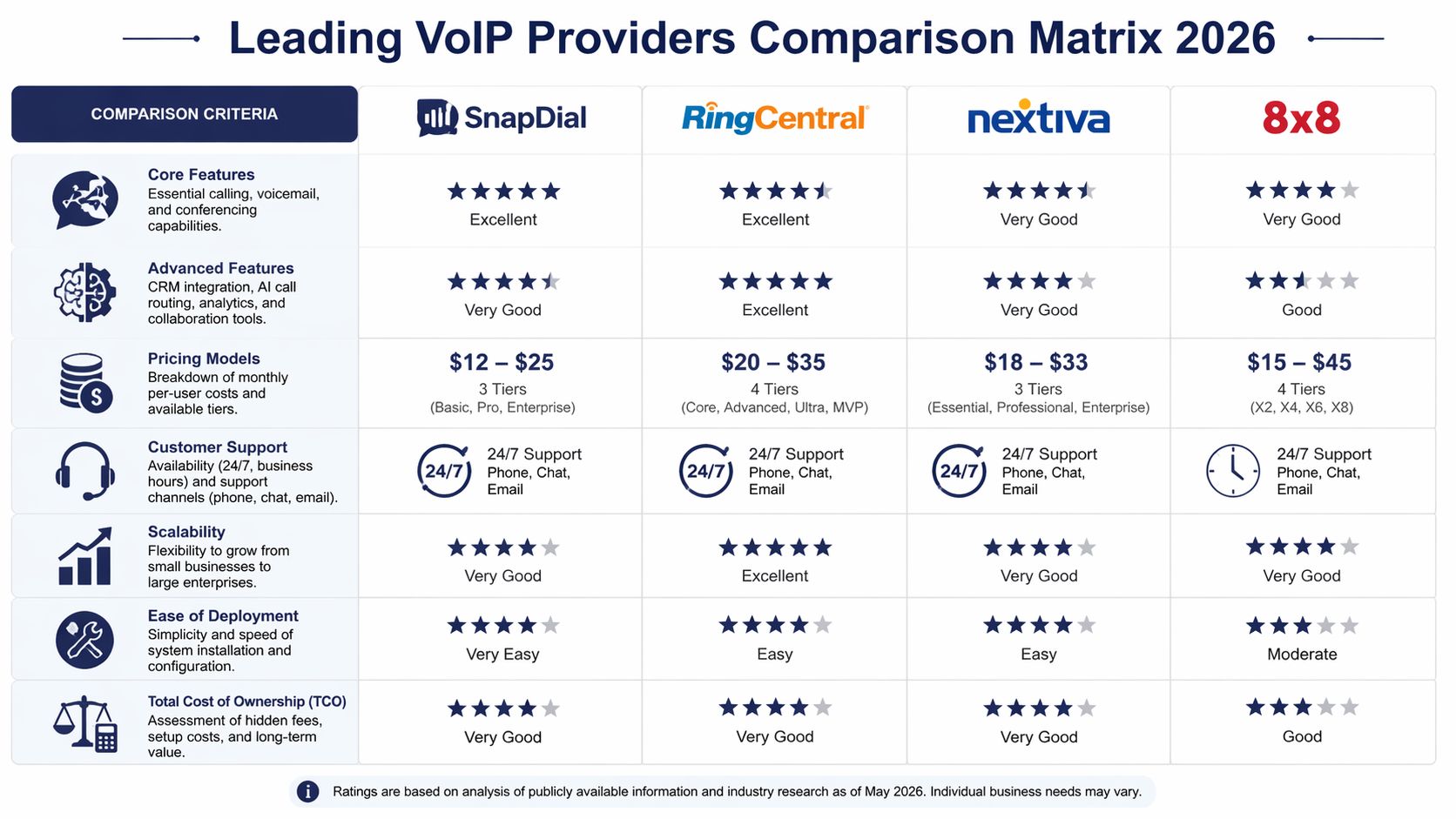
Leading VoIP Providers Comparison Matrix 2026
Your office manager has three browser tabs open, two vendor quotes on screen, and one simple question: which system will work without turning the migration into a side job for your staff?
That is where most comparison tables fall short. They show feature checkmarks, but they do not show how many of those features sit behind a higher tier, a separate product, or a paid onboarding package. For an SMB replacing an aging PBX, that gap matters more than a polished demo.
| Feature | SnapDial | RingCentral | Nextiva | 8×8 |
|---|---|---|---|---|
| Core business calling | Included | Included | Included | Included |
| Auto attendant and call routing | Included | Available | Available | Available |
| Call recording | Included | Varies by plan | Varies by plan | Varies by plan |
| Visual voicemail with transcription | Included | Available | Available | Available |
| Mobile office support | Included | Available | Available | Available |
| Cloud fax | Included | Not emphasized in standard SMB comparisons | Not emphasized in standard SMB comparisons | Not emphasized in standard SMB comparisons |
| Queue callback | Included | May depend on plan and product tier | May depend on plan and product tier | May depend on plan and product tier |
| Real-time queue statistics | Included | Available in broader UC/contact center stack | Available in broader CX stack | Available in broader contact center stack |
| Self-service admin portal | Included | Available | Available | Available |
| White-glove setup | Included | Varies | Varies | Varies |
| Pricing model focus | All-inclusive and predictable | Tiered per user | Tiered per user | Tiered or quote-based |
Core communication features
For most growing companies, the shortlist starts with a practical requirement: the phone system has to handle front-desk traffic, route calls cleanly, support remote staff, and let someone inside the business make routine changes without opening a support ticket.
RingCentral stays in the conversation because it is widely adopted, offers a 99.999% uptime SLA, and serves organizations that need deep integrations and a mature UCaaS platform, according to RingCentral's investor materials. That makes it a reasonable benchmark for buyers who expect the system to scale with them.
Nextiva usually appeals to SMBs that want a simpler path into unified communications and customer engagement tools. 8×8 often makes sense for companies with international calling needs or broader UC requirements. Both can be good fits. The fundamental question is how much of the day-to-day functionality you need is already in the plan you are pricing.
Use the matrix to pressure-test four operating areas:
- Reception and routing: Auto attendants, schedules, hunt groups, and voicemail routing
- Team handling: Ring groups, queues, transfers, and overflow rules
- Remote work: Mobile and desktop apps that keep the business caller ID intact
- Admin control: Fast changes to users, greetings, hours, and routing logic
If a provider can do those things only after two plan upgrades and a setup package, the monthly seat price stops being the useful number.
Advanced call handling and queue visibility
A lot of SMBs say they do not need call center tools. Then I look at the business and find a service desk, appointment line, intake team, dispatcher, or sales queue. That is call flow management, whether the company uses the term call center or not.
Dialpad and CloudTalk are good examples of how the market has shifted. Features like live transcription, queue controls, and smarter routing are now part of the buying decision, not niche extras. UCaaS Review’s guide to comparing VoIP services highlights how buyers should evaluate those tools based on actual workflow needs rather than broad feature labels.
The point is simple. Advanced calling features only help if they are available to your team without forcing you into a separate contact center contract.
The capabilities worth checking closely are:
- Queue callback: Reduces abandoned calls during busy periods
- Wait-time announcements: Gives callers a realistic expectation
- Live queue data: Helps supervisors adjust coverage in real time
- Call reporting: Shows missed demand, answer delays, and repeat bottlenecks
- Rules-based routing: Gets calls to the right person faster
For a growing company, these are operations tools. They affect staffing, customer experience, and missed revenue.
Administration and mobility
Administration is where many systems get expensive after the contract is signed. The software may be strong, but the business still pays if every user change, phone swap, greeting update, or routing edit requires vendor support or a more technical admin than you have.
A usable system should give your office manager or operations lead direct control over users, devices, greetings, call logs, and recordings. The mobile app should work like the office phone, not like a stripped-down companion. Provisioning should be clear enough that adding a new employee does not turn into a week of back-and-forth.
That is where the provider models separate. RingCentral has depth and a broad integration ecosystem. Nextiva often suits teams that want communications tied more closely to customer workflows. 8×8 can fit organizations with more complex UC requirements, especially across locations. SnapDial is relevant for buyers who want managed deployment, included cloud fax, queue tools, a self-service portal, and white-glove setup in one package instead of assembling the final system through add-ons.
That distinction matters during migration. On paper, several providers can meet the requirement list. In practice, the better fit is usually the one that asks less of your staff, includes more of the functions you will use, and does not turn each missing feature into another line item.
Analyzing Price Models and Total Cost of Ownership
The advertised monthly seat price is the visible part of the iceberg. The expensive part sits underneath.

That’s why total cost of ownership matters more than headline pricing. Legacy PBX replacement can bring 15-25% unexpected costs, while VoIP options with white-glove setup and included hardware can eliminate some of that burden, and self-service portals can cut admin time by 40%, according to Crazy Egg’s business VoIP cost analysis.
Why low entry pricing often misleads
Per-user pricing isn’t a problem by itself. The problem is feature separation. A provider advertises an attractive base plan, then you find out the practical version of the service requires upgrades for recording, queue management, analytics, integrations, or onboarding help.
That creates four common cost traps:
- Feature gating: Core business functions sit one or two plan tiers up.
- Migration fees: Setup, handset prep, porting coordination, and training appear late.
- Operational friction: Your staff spends time managing workarounds because the plan lacks what they need.
- Expansion penalties: Adding locations, departments, or queue tools triggers another pricing jump.
A cheap phone system is expensive if it forces manual work or repeated upgrades.
The all-inclusive model usually wins for SMBs
SMBs don’t just need a lower bill. They need a more predictable one.
All-inclusive pricing works better when your business wants to budget confidently and avoid procurement surprises. That’s especially true if you’re replacing a legacy setup with multiple departments, front-desk routing, call recording, mobile users, and some level of customer support queue.
A practical cost review should include:
| Cost question | Why it matters |
|---|---|
| What features are included on day one | Prevents immediate upsell pressure |
| Who handles setup and cutover | Reduces internal labor and downtime risk |
| Are phones and provisioning part of the package | Avoids separate hardware and config spend |
| Can admins make routine changes themselves | Lowers support dependence over time |
This short walkthrough is worth watching before you sign anything:
What actually works during migration
The best migrations are boring. Numbers port on time, routing gets tested before cutover, phones arrive ready, and employees know where to click on day one.
The cleanest deployments come from providers that treat setup as part of the service, not as a billable event after the contract is signed.
That’s why white-glove setup has real value. It doesn’t just save money directly. It lowers the chance of downtime, configuration mistakes, and internal project creep. For a busy SMB, that often matters more than shaving a few dollars off the monthly license.
Matching VoIP Features to Business Use Cases
Feature lists are abstract until you tie them to an actual operating model. The same phone system that fits a field service company may frustrate a support desk. The right voip providers comparison should account for the way your business handles calls, not just the number of seats you need.
Multi-location service business
A company with several offices, branches, or service areas usually struggles with fragmented call handling. One site gets overloaded while another has staff available. Managers can’t easily see missed-call patterns across locations. Customers get bounced around because the old phone setup mirrors the org chart instead of the service process.
In this scenario, the useful features are centralized routing, location-aware call flows, business-hour rules, mobile access for managers, and a single admin view across the company. The provider doesn’t need the flashiest AI. It needs to make the business sound unified.
What tends to work:
- Shared call handling: One number can route to the right location or team based on time, menu choice, or overflow conditions.
- Consistent caller experience: Customers hear one brand, not a patchwork of office-specific workarounds.
- Faster admin changes: Openings, closures, staffing changes, and holiday schedules can be updated without rebuilding the whole system.
If the business also serves international customers, rate transparency matters too. A practical resource for reviewing cheap calls to specific countries can help operations teams sanity-check destination costs before expanding outbound calling.
High-volume customer support team
Many SMBs don’t call themselves call centers, but they still operate like one. If your team fields steady inbound demand, then queues, callback, and live stats stop being optional.
The wrong provider gives you a basic ring group and calls it a queue. The right setup helps supervisors understand what’s happening now and what happened this morning when wait times spiked.
Here’s what support-heavy teams should prioritize:
- Queue callback: Keeps customers from sitting on hold and reduces abandoned calls.
- Wait-time announcements: Sets expectations and lowers frustration.
- Real-time statistics: Lets supervisors react during staffing gaps.
- Detailed reporting: Shows missed demand, staffing mismatches, and peak periods.
- Call recording: Supports coaching and dispute resolution.
A queue without reporting is just a nicer way to lose visibility.
This is also where bundled versus add-on pricing becomes a major operational issue. Support teams often discover that the features they assumed were standard live in a separate contact center package.
Remote-first startup
Remote and hybrid teams care less about desk phones and more about mobility, app quality, and clean integrations. The biggest risk here isn’t old hardware. It’s inconsistent communication when employees juggle laptops, personal phones, and scattered workflows.
A remote-first team should focus on:
- Mobile office capability: Staff can answer, transfer, and return calls from anywhere with business identity intact.
- Self-service administration: New hires, routing changes, and voicemail settings don’t require vendor intervention.
- Unified access to logs and recordings: Managers can review activity without chasing information across tools.
- Integration fit: CRM, collaboration apps, and customer history should connect cleanly.
If you want a clearer sense of how these setups differ in practice, these examples of VoIP use cases are useful because they connect business models to phone system design choices.
The common thread across all three scenarios is simple. Buy for the call patterns you already have, plus the ones you’ll create as you grow. Don’t buy a stripped-down system and assume you’ll layer in the important parts later.
Ensuring Performance Uptime and Support
Reliability isn’t a bonus category in a voip providers comparison. If the phone system is unavailable, every feature discussion becomes irrelevant.
What uptime percentages actually mean
Top providers such as RingCentral, Nextiva, and 8×8 commonly guarantee 99.99% to 99.999% uptime through SLAs. That translates to a maximum of 52 minutes of annual downtime at 99.99% or 5 minutes at 99.999%, according to AIS’s guide to evaluating VoIP reliability and price.
Those numbers matter because they turn an abstract percentage into operational risk. For a business that depends on inbound sales or service calls, the difference between occasional outages and near-continuous availability is real.
What to verify before you sign
Don’t stop at the SLA headline. Ask what supports it.
Check for these practical items:
- Redundant infrastructure: The provider should have network resilience, not a single point of failure.
- Support access: You need a clear path to a real support team when call quality drops or routing fails.
- Call quality planning: Your internet environment still matters, especially across multiple locations.
- Administrative visibility: Logs, recordings, and routing controls help your team diagnose issues faster.
If your IT lead wants a useful companion resource, these network monitoring best practices are worth reviewing alongside your phone vendor assessment.
Strong uptime on paper won’t rescue a weak local network. Both sides matter.
Bandwidth planning is part of that reliability conversation. Before migration, use a simple VoIP bandwidth planning guide to estimate whether your current internet connection can support your expected call volume without degrading quality.
Support quality matters as much as platform quality
A lot of outages aren’t full outages. They’re partial issues. One queue fails. One site has call-quality problems. A port stalls. A holiday routing rule behaves differently than expected.
That’s when support quality becomes part of the product. The most useful providers make it easy to reach knowledgeable people quickly, especially during cutover and the first weeks after deployment. Self-service portals are valuable. They’re not a substitute for responsive human help when the phones are central to revenue.
Our Recommendation and Your Migration Checklist
Your office manager has three browser tabs open, a spreadsheet full of line items, and a porting date that suddenly feels too close. On paper, several providers look similar. In practice, the wrong choice shows up later in setup fees, paid training, extra queue features, fax add-ons, and internal time your team did not plan to spend.
For most SMBs replacing a legacy system, the better choice is the provider that fits how your business answers calls, bills services, and handles change. Pricing needs to be clear. Admin work needs to stay manageable. Migration needs to be owned by the vendor, not pushed onto your front desk, IT generalist, or office manager.
RingCentral still belongs on many shortlists because it is widely adopted, mature, and built for companies that expect broad UCaaS capabilities. If you need a large ecosystem, layered integrations, and room to standardize across multiple teams, it remains a credible benchmark. The trade-off is that buyers need to check the actual monthly cost carefully, especially once implementation scope, feature tiers, and support expectations are clear.
For SMBs focused on total cost of ownership, included functionality, and hands-on migration support, SnapDial deserves close review. Its cloud PBX and hosted VoIP offering centers on all-inclusive pricing and no-cost setup, which matters more than it sounds. A quote that includes call handling, cloud faxing, mobile access, queue callback, wait-time announcements, reporting, and admin tools is easier to budget than a lower starting price that grows every time you add a real-world requirement.
That difference matters during migration.
I have seen businesses save money on the quoted seat price, then give it back through add-ons, rushed configuration work, staff retraining, and post-cutover cleanup. White-glove setup reduces that risk because someone is accountable for building the system correctly, validating routing, and getting users live without turning the project into a part-time job for your internal team.
Migration checklist for a cleaner cutover
Use this checklist before signing the agreement and again before go-live:
- Audit every active number: Confirm main lines, direct numbers, extensions, hunt groups, fax lines, toll-free numbers, and failover destinations.
- Document call routing in plain language: List business hours, after-hours handling, holiday schedules, overflow rules, and who answers what.
- Confirm internet readiness: Check expected call volume against your current connection and note any weak spots by location.
- Decide who needs which device: Separate desk phone users, softphone users, shared common-area phones, and employees who need both mobile and desk access.
- Define training by role: Reception, supervisors, managers, and system admins each need different instruction.
- Test the full call path before porting: Verify greetings, voicemail, ring groups, recordings, mobile apps, queue behavior, and fax delivery.
- Assign cutover-day owners: Name one internal decision-maker and confirm the provider’s support contacts are scheduled and reachable.
- Prepare a fallback plan: Document temporary forwarding, backup numbers, and what staff should do if a port is delayed or routing fails.
The cleanest migrations are organized early. Businesses that write down call flows, approval owners, user lists, and fallback steps before the port date usually avoid the expensive surprises.
Choose the provider that can carry the operational load with you. If your current phone system is already slowing down hiring, customer response, or multi-location coordination, waiting often costs more than the move itself.
If you want a business phone system that replaces legacy PBX complexity with predictable pricing, included features, white-glove onboarding, and real 24/7 support, take a close look at SnapDial. It’s built for companies that need modern calling, call center functionality, mobility, and an easier migration path without the usual add-on sprawl.