

Your phone system becomes a business problem the moment a good customer has a bad calling experience.
A buyer calls during lunch and reaches a voicemail maze instead of a person. A sales rep working from home gives out a personal cell number because the office line does not follow them. You open a second location, and a basic phone setup turns into a wiring job, a hardware purchase, and a service appointment. At that point, the issue is no longer just dial tone. It is cost, flexibility, and the impression your company leaves on every caller.
That is why business owners keep asking a practical question: how does a VoIP phone work, and what does that change for the company?
At a technical level, VoIP takes your voice, converts it into digital data, sends that data across an internet connection, and rebuilds it for the person on the other end. A useful way to picture it is mail delivery. Your words are broken into small packets, each packet is sent to the destination, and the receiving device puts them back together in the right order. The business result is what matters. Calls are no longer tied to a specific desk in a specific office, which makes it easier to support remote staff, open new locations, control costs, and give customers a more consistent experience.
That shift reflects a real market change. Analysts at Grand View Research describe the VoIP services market as growing as companies replace legacy systems with internet-based calling and cloud communications, which points to how widely businesses now use VoIP as standard operating infrastructure, not as a niche upgrade (Grand View Research's VoIP services market analysis).
If you are comparing options, it also helps to see where business calling is heading next. This guide on an AI-powered business phone system shows how modern phone platforms can do more than pass calls back and forth. They can help teams respond faster, route conversations better, and turn phone traffic into a stronger sales and service process.
Your Old Phone System Is Costing You More Than Money
A traditional phone system rarely fails all at once. It wears you down in small ways.
One missed call here. One employee saying, “I’m out of the office, call my cell instead.” One customer sitting through the wrong menu path. One office move that turns into a wiring project. Over time, the problem isn’t just the monthly bill. It’s the friction your team accepts because the phone system feels too painful to change.
That’s the key business case for VoIP. It doesn’t just replace the way calls travel. It changes how your company answers, routes, manages, and follows up on conversations.
What business owners usually notice first
Most owners don’t start by thinking about packets or protocols. They notice symptoms:
- Missed opportunities: Calls ring the wrong desk, hit voicemail too early, or never reach the person who can help.
- Remote work gaps: Staff outside the office lose the experience of being part of one phone system.
- Customer frustration: Callers bounce between extensions instead of getting directed cleanly.
- Growth penalties: Adding users, locations, or call flows feels like a hardware project instead of an admin task.
A legacy PBX can still “work” while gradually making your business slower.
Old phone systems often fail as management tools before they fail as phone systems.
VoIP solves that by moving voice onto the same kind of network logic your business already uses for modern software. The call is no longer trapped inside office wiring. It becomes data that can be routed, prioritized, logged, and managed.
Why the switch matters strategically
When owners ask whether VoIP is worth learning, my answer is yes, because understanding the mechanics makes the buying decision easier. Once you see how a call is digitized, transported, and directed, the benefits stop sounding like marketing language.
You can judge tradeoffs more clearly. You can ask better vendor questions. You can connect technical choices directly to cost control, customer experience, and flexibility.
Turning Your Voice into Digital Data
A business call sounds simple on the surface. You speak, the other person hears you, and the conversation moves on. Underneath, a VoIP system is doing fast conversion work that determines whether your calls sound clear, whether your network can handle busy periods, and whether your phone system can support features your team uses every day.
When you speak into a VoIP phone, softphone, or mobile app, your voice starts as an analog sound wave. Networks cannot send that sound wave in its original form, so the device converts it into digital information that can be processed, routed, and delivered.

How the conversion happens
Inside the device or app, the system takes tiny snapshots of your voice, converts those samples into numbers, and prepares them for transmission over an IP network. That process happens so quickly that it feels instant to the caller.
The practical takeaway is straightforward. Once speech becomes digital, your phone system can treat a call more like software than a fixed utility line.
That is why VoIP can support call recording, voicemail-to-email, analytics, mobile apps, and CRM integrations more naturally than older phone systems.
What a codec does
A codec is the method used to encode and decode audio. Its job is to capture speech efficiently, preserve enough quality for a professional conversation, and avoid wasting network capacity.
One common example is G.711, a standard codec described by the Internet Engineering Task Force RTP A/V profile, which specifies a 64 kb/s audio encoding rate for PCMU and PCMA. Other codecs, including Opus, are designed to adapt more flexibly to network conditions and bandwidth limits.
For a business owner, that matters because call quality and internet usage are tied together. A good codec choice can help your team keep conversations clear while reducing strain on the network, especially during busy hours or in offices with many simultaneous calls.
Why digitizing voice changes the business case
Traditional phone systems reserve a dedicated circuit for each call. VoIP handles voice as digital data, which gives you more control over how communication fits into the rest of your business systems.
That shift affects more than IT.
- You use network capacity more efficiently: Voice shares the same modern infrastructure your business already uses for cloud apps and internet access.
- You can add users with less friction: Expanding a team often becomes an admin task instead of a line-installation project.
- You get more useful features from the same call: Digital voice is easier to route, record, transcribe, report on, and connect to other software.
- You improve flexibility for staff: Employees can use desk phones, laptops, or mobile apps without becoming separate communication islands.
Practical rule: Once your voice is digital, your phone system can be managed more like software, with clearer options for cost control, flexibility, and customer service quality.
This is the point where VoIP starts to make sense as a business decision, not just a phone replacement.
How VoIP Calls Travel Across the Internet
Once your voice has been converted into digital form, it needs to travel to the other person. Many find this stage confusing, because the call sounds instant even though several things are happening in the background.
The easiest way to understand it is to think of a business call like mailed packages moving through a delivery system.
Near the start of that journey, this visual helps map the process:
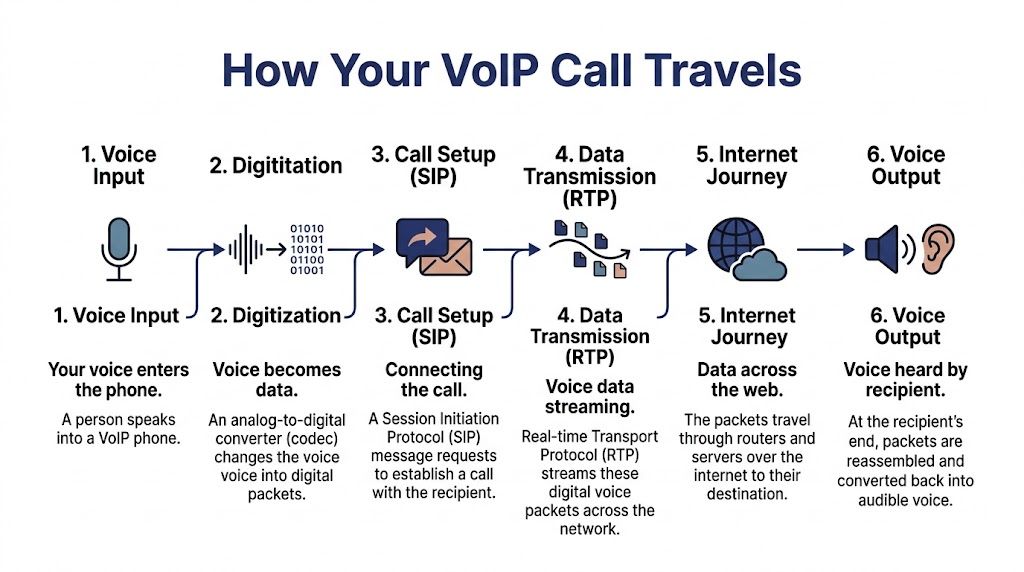
SIP handles the setup
SIP, or Session Initiation Protocol, is like the envelope, address label, and delivery instructions.
When you dial a number, SIP helps establish the session. It tells the system who you’re calling, where the call should go, and what devices are involved. It also helps handle actions like ringing, answering, transferring, and ending the call.
If you call a coworker on an app, SIP helps connect the dots before anyone speaks.
RTP carries the conversation
After the setup is complete, RTP, or Real-time Transport Protocol, takes over the actual movement of your voice.
Using the same analogy, RTP is the truck carrying the packages. Those packages are the small chunks of audio created from your speech. The network sends them in sequence so the person on the other end hears a continuous conversation rather than chopped-up pieces.
The distinction matters:
| Protocol | What it does | Business meaning |
|---|---|---|
| SIP | Sets up and manages the call | Makes calling, transfers, and routing possible |
| RTP | Carries the voice data | Delivers the actual conversation in real time |
If SIP is wrong, the call may not connect properly. If RTP is disrupted, the call may connect but sound poor.
To see the journey in motion, this short explainer is useful:
Packets don’t move like a fixed phone line
This is the mental shift that matters most. Old landlines relied on a dedicated path. VoIP sends packets, which are small units of data, across a network that can route them efficiently to the destination.
That’s similar to shipping many small parcels through a logistics network rather than reserving one private truck for every conversation.
For a business owner, packet-based delivery creates practical advantages:
- Calls can be routed more flexibly across offices, home setups, and mobile devices.
- Software can intervene intelligently with features like transfers, recordings, and analytics.
- Scaling gets easier because you’re not thinking in terms of fixed copper lines and on-site switch hardware.
What happens at the other end
When the packets arrive, the receiving device reassembles them, decodes the data, and converts it back into sound. The person hearing you doesn’t notice the mechanics if everything is working well. They just hear a normal conversation.
That’s why VoIP can feel simple at the surface while being complex internally. To the caller, it’s just a phone call. To the business, it’s a software-driven communication process that can be shaped around workflow, service quality, and mobility.
The Cloud PBX Your Virtual Switchboard Operator
A missed call at 4:55 p.m. can turn into a lost sale by 5:05. A customer who reaches the wrong person twice may never call back. The part of VoIP that prevents those problems is the cloud PBX.
If the internet carries the conversation, the cloud PBX decides where that conversation should go. It replaces the old box in the phone closet with software that lives in a provider’s data centers. For a business owner, that shift matters because call handling stops being tied to one office, one receptionist, or one set of wires.

Every device has to announce where it is
Before a desk phone or softphone app can ring, it registers with the system. The PBX records, in effect, “Sarah is available on her desk phone, laptop, and mobile app right now.”
That registration step is why one business number can follow an employee instead of staying attached to one handset. A sales rep can leave the office, keep the same extension on a mobile app, and still look professional to customers. You do not need to publish personal cell numbers or rely on call forwarding chains that are hard to manage.
A practical way to picture it is a front desk updating a staff location board throughout the day. The cloud PBX keeps that board current automatically.
Routing rules turn a phone system into an operations tool
The value of a cloud PBX is not that it can make phones ring. Any phone system can do that. Its value is that it applies rules before the call ever reaches your team.
You can send new leads to sales, route existing customers to support, ring an on-call manager after hours, or send calls to multiple devices at once. If a caller chooses “Press 2 for billing,” the PBX reads that input and sends the call to the right queue. If no one answers in 20 seconds, it can try the next person, send the call to voicemail, or offer a callback.
That improves customer experience and labor efficiency at the same time. Callers spend less time bouncing around. Employees spend less time acting as human switchboard operators.
Research from McKinsey on customer care transformations notes that better routing, self-service, and automation can reduce avoidable live contacts while improving service outcomes. In plain business terms, the PBX helps your team spend more time solving problems and less time redirecting them.
It also connects your internet phone system to the regular phone network
Your company may run on VoIP internally, but customers still expect to dial a normal phone number. The cloud PBX handles that handoff through your provider’s carrier connections, so calls can move between internet-based devices and the public telephone network without the caller noticing any difference.
That is one reason hosted phone systems work well during office moves, hybrid work, and growth. Your numbers, call flows, and extensions stay consistent even when people and locations change. If you want a business-level overview, this guide on what a cloud phone system is explains how hosted phone systems are structured.
Of course, cloud calling still depends on a working internet connection. If your team runs into outages, this guide can help you troubleshoot internet connectivity issues before they start affecting inbound calls and customer response times.
Solving Network Challenges for Crystal-Clear Calls
A business owner usually notices network problems in a very human way. Customers start saying “you cut out for a second,” sales calls feel awkward, and your team repeats itself more than it should. The issue is not that VoIP is unreliable by nature. The issue is that voice is one of the few types of internet traffic people experience in real time.
An email can arrive a few seconds late and nobody cares. A conversation cannot. If parts of speech arrive late, out of order, or not at all, the call sounds broken immediately. That is why call quality depends less on “Do we have internet?” and more on “Is our network set up to treat voice properly?”
QoS creates a fast lane for voice
Quality of Service, or QoS, is the set of rules that tells your network which traffic should go first.
A simple comparison helps. Your internet connection works like a mailroom serving the whole office. Large file downloads, software updates, video meetings, and web browsing all send their own packets through that room. Voice packets are small and time-sensitive. If they get mixed into the same pile without priority, they can be delayed behind less urgent traffic. That delay is what turns a normal call into clipped audio, echoes, or the familiar robotic sound people blame on “bad VoIP.”
Cisco’s guidance on enterprise QoS explains that real-time traffic such as voice is commonly marked for priority treatment so routers and switches can forward it ahead of lower-priority data. For a business, that translates into fewer interrupted conversations, less frustration for staff, and a more professional experience for customers.
Jitter and latency in plain English
Two network terms explain many call quality complaints.
- Latency is delay. You speak, then the other person hears you after a noticeable pause.
- Jitter is uneven delivery. Parts of the conversation arrive at different times, so speech sounds choppy or stretched.
Both problems are common on busy or poorly configured networks. Your connection can look fine for web browsing and still struggle with calls, because browsing tolerates delay while conversation does not.
That distinction matters for budgeting. A company might assume its internet service is “good enough” because email, CRM pages, and streaming all work. Then support calls suffer during peak hours. Fixing that often costs far less than replacing a phone system, because the answer is usually better traffic prioritization, stable Wi-Fi for mobile users, or the right amount of bandwidth for your call volume.
NAT traversal is the front-desk problem
Another issue sits behind the scenes. It is called NAT traversal.
Your office network uses private internal addresses, which helps with security and device management. The challenge is that outside services cannot always see which phone or app inside your network should receive the call. NAT traversal tools and session border controls help direct the call to the right destination, much like a front-desk receptionist guiding a visitor from the building entrance to the correct office.
This matters most when teams work across office Wi-Fi, home networks, and mobile apps. If call setup fails, audio works only one way, or phones register inconsistently, the problem is often not the handset. It is the path through the network.
When owners need to troubleshoot internet connectivity issues, they often find that “internet is available” and “voice traffic is healthy” are two different things.
If you want a practical way to estimate capacity before problems show up, use this guide for how much bandwidth you need for VoIP.
Choosing the Right VoIP Phone and Apps for Your Team
A VoIP system is only useful if the people using it have the right endpoint. That’s the device or app where calls happen.
Most businesses don’t need one universal answer. They need the right fit by role.
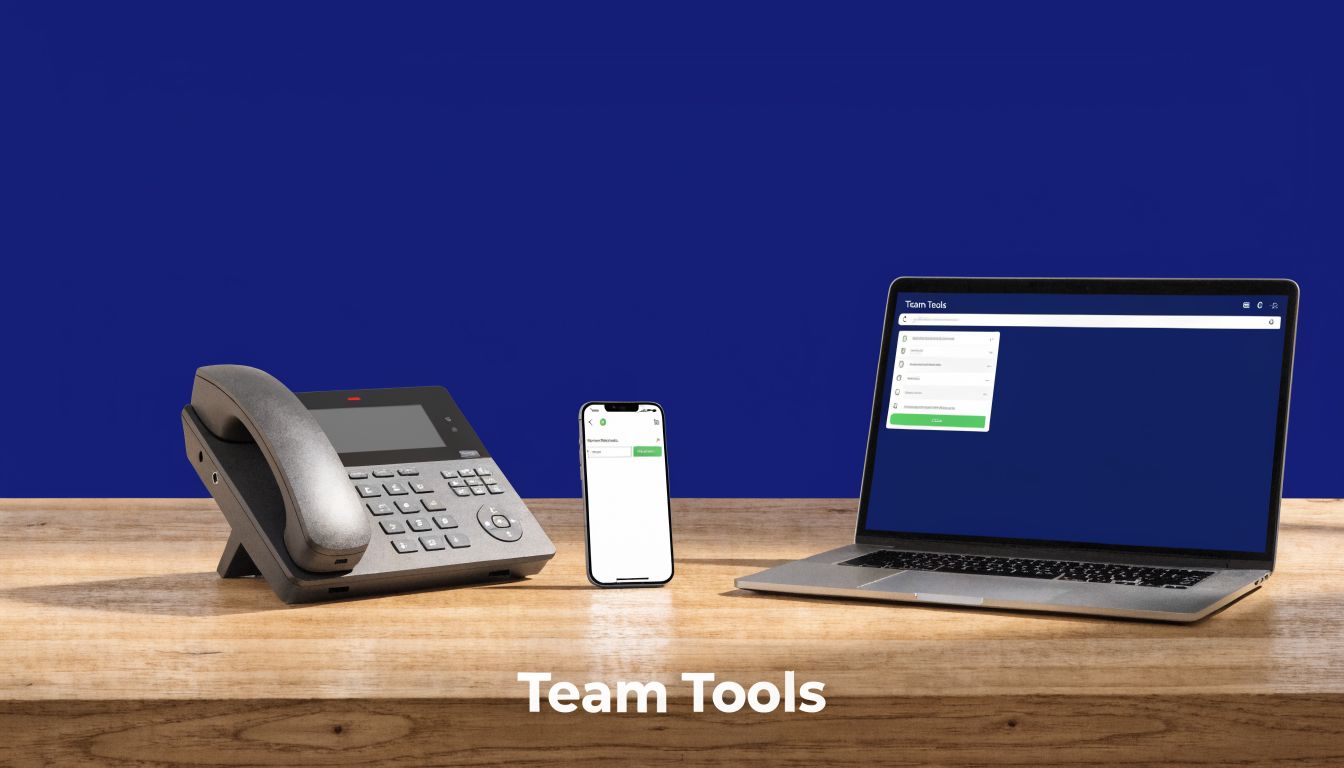
Desk phones for front-line reliability
A dedicated IP desk phone still makes sense in many environments. Reception desks, support teams, shared office spaces, and executives who spend much of the day on calls often prefer a physical handset, dedicated buttons, and consistent audio behavior.
These phones feel familiar, which reduces adoption friction. Pick up handset, press transfer, place on hold. Very little retraining is needed.
Softphones for office and hybrid staff
A softphone is a calling app on a desktop or laptop. For many knowledge workers, it’s the most flexible option because it lives where they already work.
That can be a strong match for sales reps, account managers, or support staff who need to click-to-call, wear a headset, and move between calling and CRM work without changing devices.
Here’s a quick role-based comparison:
| Team role | Best fit | Why it works |
|---|---|---|
| Reception or front desk | Desk phone | Stable, always-on, easy call handling |
| Hybrid employee | Softphone | Works well with headset and desktop workflow |
| Field or traveling staff | Mobile app | Keeps business calling available on the go |
Mobile apps for reachability away from the office
For service managers, field teams, and owners who aren’t tied to a desk, the mobile app is often the most important endpoint. It turns a smartphone into a business extension so calls can follow the user without exposing a personal number.
That creates a cleaner customer experience. The company presents one phone identity even when the team is distributed.
The best endpoint is the one that matches how the employee actually works, not the one that looks most “professional” on a spec sheet.
If you’re comparing physical handsets for a small team, this roundup of the best VoIP phones for small business is a useful starting point.
The Business Impact Turning Technology into Revenue
A business owner usually feels the value of VoIP long before anyone talks about codecs or call routing.
It shows up in small moments that affect revenue. A new lead reaches sales instead of voicemail. A customer gets to the right department on the first try. A manager adds a new employee without waiting for a technician to rewire the office. Those are technical outcomes, but they matter because they change how fast your company responds and how professional it sounds.
Where owners usually see the return
The first return is often cost control. Traditional phone systems charge you for lines, hardware changes, and maintenance tied to a physical office. VoIP shifts much of that into software and internet-based calling, which gives businesses more flexibility as teams grow, move, or work from multiple locations.
The second return is time.
Analysts at Tech.co report that businesses can cut phone costs by as much as 50% by switching to VoIP, while also gaining features that remove manual call handling tasks, such as voicemail-to-email and easier forwarding (Tech.co's VoIP statistics roundup). In plain terms, your team spends less time playing phone tag and more time selling, solving problems, or booking work.
A simple way to look at it:
- Lower operating costs: Fewer legacy line expenses, fewer on-site changes, and less dependence on aging phone hardware
- More productive staff: Calls, messages, and extensions are easier to manage across office, home, and mobile devices
- Better customer experience: Smarter routing and faster response times reduce missed opportunities and frustrating transfers
Revenue grows when response gets easier
A phone system works like a front door. If that door is hard to find, slow to open, or sends visitors to the wrong room, business suffers.
VoIP helps fix that by making your phone system easier to adjust as the business changes. You can route calls by schedule, send overflow calls to another employee, and keep the same business presence even when staff are spread across locations. That flexibility does more than help operations. It protects sales opportunities and helps customers feel taken care of.
For a decision-maker, that is the key point. VoIP is not only a cheaper way to place calls. It is a way to answer faster, handle more conversations well, and give customers a smoother experience without adding the same overhead as a legacy system.
VoIP Security and Final Questions Answered
A lot of owners ask the same question near the end of a VoIP evaluation. If calls now travel over the internet, are they still safe?
They can be, provided the system is set up and managed with the same care you already give email, banking, and customer records. Voice traffic is another form of business data. The difference is that a call problem is noticed right away. A dropped sales call, a hacked admin account, or a routing change nobody approved can affect revenue and customer trust the same day.
The good news is that the basics are clear. Use strong passwords, keep phones and apps updated, and choose a provider that supports encrypted calling and secure account controls. The U.S. Cybersecurity and Infrastructure Security Agency also recommends routine software updates, strong authentication, and access control as core security practices for internet-connected business systems (CISA guidance on cyber hygiene). For a business owner, the takeaway is practical. Security is part of phone system setup, not a separate project for later.
Security habits that matter
A few habits prevent a large share of avoidable problems:
- Use strong credentials: Each employee should have a unique login. Shared passwords make it harder to control access and easier for mistakes to spread.
- Keep software current: Desk phones, mobile apps, and firmware need updates because updates fix known weaknesses.
- Limit admin access: Give routing, billing, and user management permissions only to the people who need them.
- Review provider protections: Ask how the provider handles encryption, multi-factor authentication, fraud monitoring, and account recovery.
A simple comparison helps here. Your VoIP system works like a digital front desk. If too many people have the master key, or if no one checks the locks, problems are much more likely.
Common final questions
Is VoIP as reliable as my old landline
Yes, it can be very reliable if the network is set up correctly. Call quality and uptime depend on internet stability, voice prioritization, and provider support. For a business, that means reliability is less about the label "internet calling" and more about whether the service is configured to protect calls during busy hours.
Can I keep my current business number
Usually, yes. Number porting is a normal part of a business VoIP rollout, so customers can keep calling the number they already know. That continuity matters because changing phone numbers can create confusion, missed calls, and lost leads.
How much internet speed do I really need
The requirement is often lower than owners expect. As noted earlier, a single high-quality VoIP call does not use much bandwidth by modern business internet standards. What matters more is consistency. If your connection gets congested every afternoon, call quality will suffer even if your plan looks fast on paper.
Good VoIP performance comes from enough bandwidth, proper call prioritization, secure configuration, and a provider that supports the system well.
If you're replacing an aging PBX or trying to unify office, remote, and mobile calling, SnapDial is worth a look. It offers hosted business phone service, cloud PBX features, call routing, mobile access, and hands-on setup support so your team can move without turning the transition into an IT headache.