
What are you really choosing when you compare VoIP vs SIP? They aren't competing phone systems, and treating them as alternatives can lead you toward the wrong architecture. The practical decision is usually whether to adopt a managed cloud PBX, connect an existing phone system through DIY SIP trunking, or retain an on-premise platform with more responsibility for your own team.
VoIP describes how voice travels across IP networks. SIP helps establish and control the communication session. Once that distinction is clear, the buying conversation becomes much more useful. You can evaluate ownership, support, security, call quality, integrations, and operational workload instead of comparing two technologies that sit at different layers.
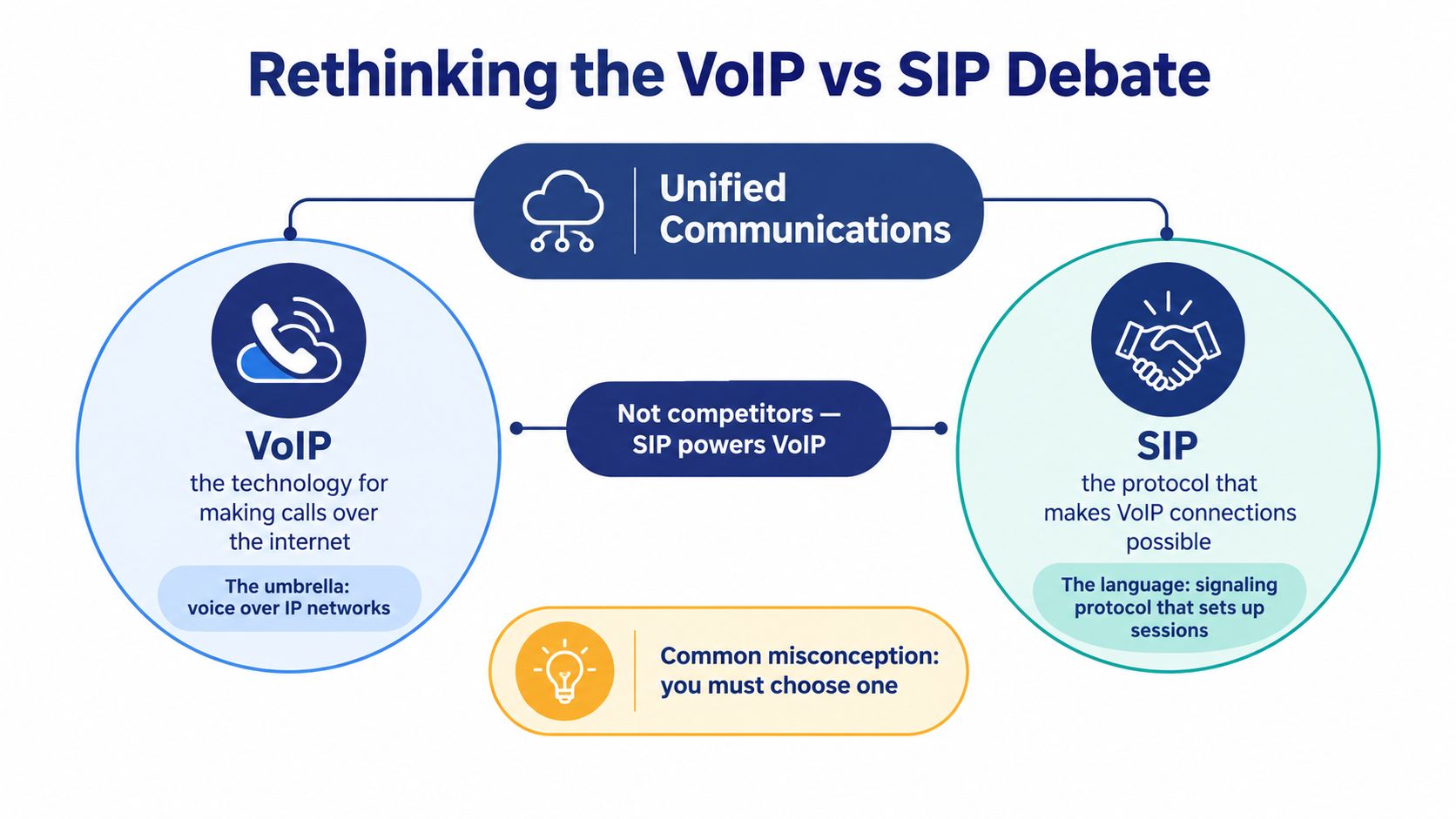
Rethinking the VoIP vs SIP Debate
The simplest explanation is also the one many vendors skip: VoIP is the broad technology, while SIP is a signaling protocol used within many VoIP systems. VoIP carries voice as digital packets across an IP network. SIP tells communication endpoints how to start, modify, and end a session.
That means SIP doesn't carry the conversation itself. The audio travels through media protocols such as RTP, while SIP manages the control information around the call. The distinction matters because a buyer who asks for “SIP instead of VoIP” may be describing a requirement for connectivity, not a preference between two rival products.
SIP can also manage more than voice. It supports the setup and control of voice, video, instant messaging, and file-sharing sessions, which makes it useful as a control plane for unified communications. The technical distinction between SIP and VoIP provides a useful reference for separating signaling from media transport.
The architecture behind a business call
A typical IP call involves several parts working together:
- Endpoint: An IP phone, desktop softphone, mobile app, or browser interface where the user communicates.
- Signaling: SIP messages coordinate registration, call setup, ringing, answering, transfer, hold, and termination.
- Media: RTP or a comparable media protocol carries the audio or video stream.
- Phone system: A PBX or cloud platform applies extensions, queues, auto attendants, voicemail, routing rules, and user permissions.
- Network: The local network, internet connection, provider infrastructure, and any security controls carry and protect the traffic.
The business owner usually doesn't need to configure every protocol directly. The owner does need to know which party operates each layer. A managed provider may administer the PBX, signaling, media services, failover, updates, and support. With a self-managed deployment, the internal team may need to coordinate the PBX, SIP provider, firewall, network quality, endpoint configuration, and incident response.
Practical rule: Don't ask whether SIP or VoIP is better. Ask which parts of the calling stack you want to own and which parts you want a provider to operate.
This is why product comparisons often feel confusing. A cloud phone subscription may be marketed as VoIP, while the provider uses SIP behind the scenes. A SIP trunk may connect to an on-premise PBX, but the resulting calls are still VoIP calls. One describes the broader method of transmitting voice. The other describes how sessions are controlled.
How SIP Became the Standard for Unified Communications
SIP became important because it gave IP communications a common language for session control. The IETF first standardized the Session Initiation Protocol as RFC 2543 in 1999, then revised it into RFC 3261 in June 2002. RFC 3261 became the core specification for creating, modifying, and terminating real-time communication sessions over IP networks, as documented in this Cisco reference on SIP RFC compliance.
That history explains why SIP appears in so many business communications products. A protocol standard gives carriers, PBX vendors, phone manufacturers, application developers, and service providers a shared foundation. Each company can build its own interface or feature set while still exchanging the signaling required to establish a session.
Why the control plane matters
SIP handles the logic around a call rather than the audio payload. It can identify participants, negotiate session capabilities, request a connection, alter the session, and close it. The same general session model can support voice, video, messaging, and other real-time collaboration workflows.
This separation gives businesses architectural flexibility. An organization can change its phone endpoints without necessarily replacing its carrier relationship. It can also adopt a different PBX or communications application while retaining standards-based connectivity, provided the systems interoperate correctly.
SIP's flexibility helped it displace older, more rigid approaches such as H.323 in many carrier and enterprise environments. As vendors and cellular or IMS architectures standardized around SIP, the protocol became closely associated with voice, video, and messaging interoperability. That doesn't mean every SIP deployment is simple. It means the buyer is working within a widely supported communications framework rather than an isolated, proprietary signaling model.
Standards don't remove implementation risk
A standard solves compatibility problems, but it doesn't eliminate operational work. Providers can differ in their authentication methods, supported codecs, failover behavior, number management, emergency calling processes, firewall requirements, and troubleshooting practices. Two systems can both support SIP and still require careful validation before production use.
IT teams evaluating broader collaboration requirements should also consider how calling fits into unified communications for business. The relevant question isn't whether a vendor uses the word SIP. The question is whether its platform connects reliably to the devices, applications, users, and workflows the business already depends on.
For buyers, SIP's standardization is reassuring, but it isn't the main purchasing criterion. The provider's implementation, documentation, monitoring, migration process, and support model determine whether that technical flexibility helps or creates more work.
Managed Cloud PBX vs DIY SIP Trunking
Once the terminology is corrected, the choice becomes clear. Managed cloud PBX and DIY SIP trunking can both support business calling, but they place responsibility in different hands.
A managed cloud PBX moves the phone system's core functions into a provider-operated environment. The service generally includes user administration, call routing, voicemail, auto attendants, applications, updates, and support as part of a recurring subscription. DIY SIP trunking keeps the PBX under your control and adds an IP-based connection to the public telephone network through a SIP provider.
Recent market analysis indicates that SIP trunking held 46% of service revenue and represented 48.70% of total type-category revenue by 2025, highlighting its continued role in enterprise connectivity paths. See the SIP trunking market analysis for that reported market breakdown.
Deployment Architecture Comparison
| Feature | Managed Cloud PBX (Hosted VoIP) | DIY SIP Trunking |
|---|---|---|
| Core phone system | Operated by the provider | Owned or operated by your organization |
| Initial setup | Provider-led configuration and onboarding | Internal configuration across the PBX, network, and trunk |
| Feature delivery | Calling, routing, voicemail, and collaboration features are commonly bundled | Features depend on the PBX and applications you select |
| Maintenance | Provider handles platform updates and much of the service operation | Internal staff manage the PBX, integrations, security, and troubleshooting |
| Scaling | Add users or services through the provider's administration tools | Add channels and configure capacity within the existing architecture |
| Control | Less infrastructure control, simpler administration | More control over routing, equipment, and software |
| Best fit | Teams that want predictable operations and limited telecom administration | Organizations with a capable PBX and appropriate technical expertise |
The managed option usually works well for a growing SMB, a multi-location company, or an organization without a dedicated voice engineer. It can include an auto attendant, visual voicemail, mobile applications, call recording, queue controls, and a self-service portal without requiring the business to assemble each layer.
DIY SIP trunking can be the better engineering decision when the organization has a stable PBX, specialized routing logic, existing integrations, and staff who can manage voice infrastructure. It avoids an unnecessary rip-and-replace project, but it doesn't turn the PBX into a hands-off service.
The cheaper invoice isn't always the cheaper architecture. Count internal configuration, monitoring, upgrades, outage response, security reviews, and vendor coordination as part of the operating cost.
Procurement teams should apply the same discipline to communications infrastructure that they use when selecting procurement software architecture. Compare ownership boundaries, implementation effort, support obligations, renewal terms, and integration requirements before focusing on the headline subscription price.
A business with an existing PBX should also understand precisely what SIP trunking means before requesting proposals. The phrase can describe a straightforward connectivity upgrade, but the surrounding responsibilities still include network readiness, number migration, routing, security, and continuity planning.
Matching Communication Architecture to Business Needs
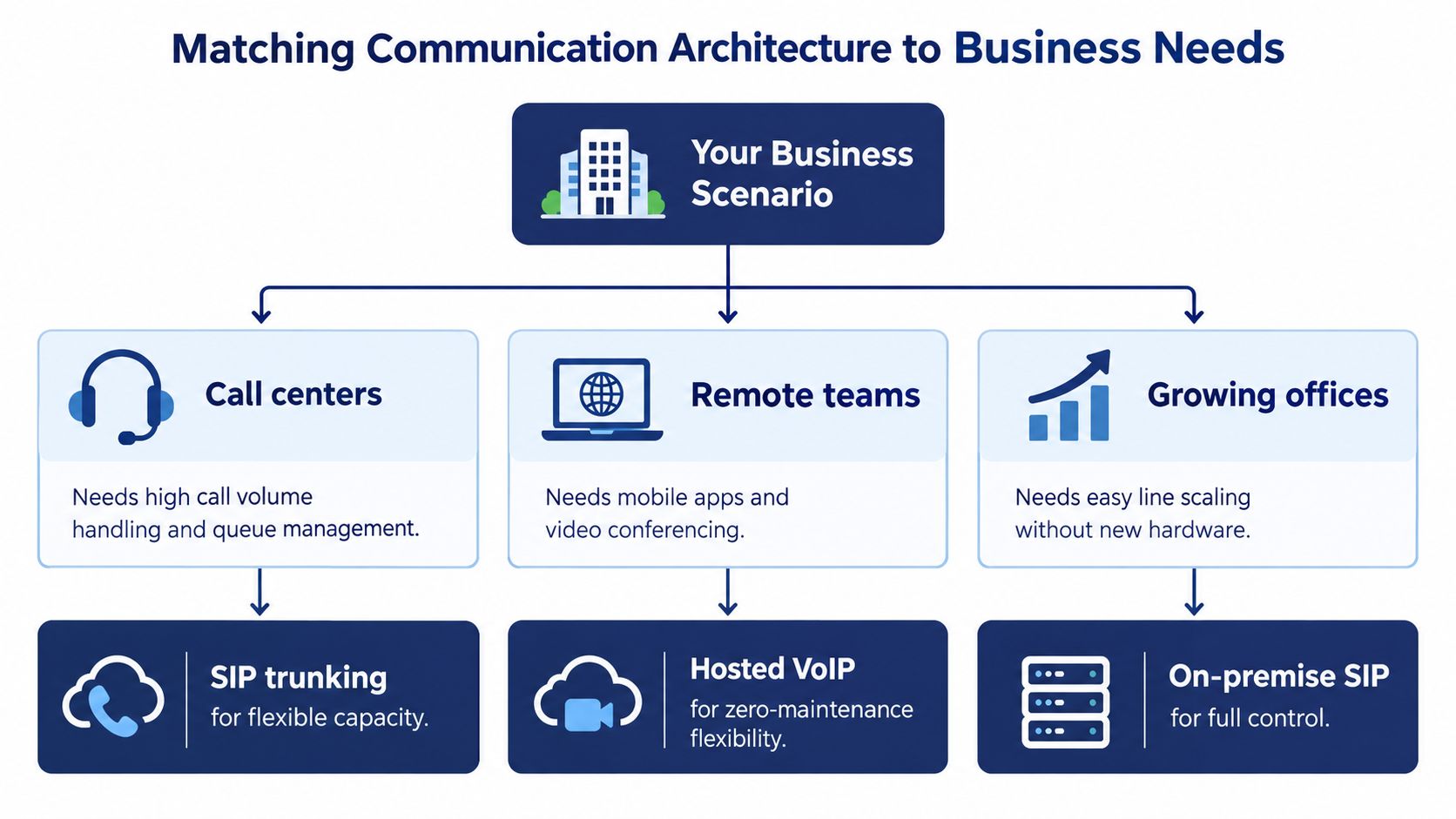
The right architecture depends less on the label attached to the service and more on how people work. A remote team, a customer service operation, and a company with a mature on-premise PBX have different failure points and different reasons to prioritize control.
Remote and hybrid teams
Distributed employees need more than a desk phone assigned to an office. They need a consistent business identity across laptops, mobile devices, and physical phones, with call routing that doesn't depend on someone being at a particular desk.
Hosted VoIP often fits this environment because the provider manages the central phone platform while users access calling through apps or softphones. Administrators can apply schedules, forwarding rules, ring groups, and voicemail policies centrally. The practical benefit is continuity of work location, not just the ability to make a call over the internet.
A business should still test mobile handoff, headset compatibility, notification behavior, call transfer, and access controls. A feature listed in a brochure has little value if employees can't use it reliably during a normal workday.
Call centers and support desks
A call center has different priorities. Supervisors need queue visibility, routing rules, agent states, callback handling, wait-time announcements, recordings, and reporting. A basic hosted line with voicemail may technically provide VoIP, but it won't necessarily solve a queue-management problem.
SIP trunking can suit an organization that already operates a capable contact-center platform and wants flexible carrier connectivity. A managed cloud PBX may suit a smaller support team that wants queue functions without maintaining the underlying voice stack. In both cases, test the operational workflow, not just the call connection.
A useful evaluation exercise is to follow one customer interaction from inbound number selection through queue entry, agent answer, transfer, callback, recording, and report generation. That exercise exposes missing features faster than a generic product demonstration.
Growing offices and established PBXs
A growing office may value fast user administration and simple line expansion. A company with an established PBX may value its existing call flows, hardware, integrations, and internal expertise more highly than a provider-managed replacement.
For practical network planning, businesses adding phones across locations should assess switching, wireless coverage, power, segmentation, and voice prioritization with a specialist in business network setup in Melbourne, or an equivalent local service for their region. Voice reliability depends on the environment carrying the calls, not just the phone platform.
Use the architecture that matches the constraint:
- Choose hosted VoIP when low maintenance, mobility, and rapid administration matter most.
- Choose SIP trunking when a reliable PBX already exists and the team can operate it.
- Choose an on-premise SIP platform when control, customization, or local system ownership outweighs the convenience of managed service.
This isn't a permanent identity for the business. A company can begin with hosted calling and later integrate more specialized systems, or retain an on-premise PBX while modernizing its carrier connection.
A short visual guide can help stakeholders understand how the three deployment paths relate to common business scenarios.
Navigating Security and Reliability in IP Calling
Internet-based calling introduces risks that traditional dedicated voice services handled differently. SIP credentials can be targeted, poorly protected endpoints can expose the phone system, and weak routing controls can enable unauthorized calling. Reliable service also depends on network design, provider resilience, emergency calling, and a clear response process.
The global VoIP market is projected to exceed $160 billion in 2025, with an 11% CAGR through 2034, according to Acrobits' analysis of VoIP's next decade. The same coverage identifies zero-trust hardening, E911 modernization, and AI-layered fraud detection as important drivers, which reflects how the buying decision is shifting from features alone toward operational risk.
Ask how the provider protects signaling
Start with SIP security. Ask whether the provider supports SIP over TLS, how it protects credentials, how it limits registration attempts, and how it detects unusual calling patterns. Encryption should apply to the signaling exchange, while the provider should clearly explain how media is protected and where recordings are stored.
Don't accept “secure” as a sufficient answer. Request the actual control categories, including authentication, access management, fraud monitoring, alert escalation, audit visibility, and account recovery. Your team should know who receives an alert and what happens after suspicious activity is identified.
Teams comparing implementation details can use this guide to SIP IP ports to build a more informed technical discussion with their network and voice administrators.
Validate continuity before deployment
Reliability planning begins with dependency mapping. Document the internet connection, local network, power, firewall, provider platform, phones, applications, and emergency calling path. Then ask what happens when each dependency fails.
A credible provider should explain its failover and rerouting approach in plain language. It should also clarify how emergency services receive location information, how users update that information, and how the organization tests the process. E911 isn't a checkbox to review after installation. It belongs in the design and onboarding conversation.
Treat AI as an operating control
AI is increasingly being layered into call routing, analytics, and fraud detection. Those tools can help identify abnormal dialing behavior, support queue decisions, and surface patterns that manual monitoring might miss. They don't replace access controls, encryption, segmentation, or a documented incident process.
Ask what data the system analyzes, who can access the results, how long records remain available, and whether administrators can review or override automated decisions. A useful AI feature should reduce operational risk or administrative effort. It shouldn't add an opaque dependency that your team can't audit.
Choosing the Right Communications Partner
A standards-based phone system still needs a capable operator behind it. Providers can offer similar protocol support while delivering very different experiences during onboarding, troubleshooting, number porting, and service changes. The partner's operating model often matters more than the technical label on the proposal.
Start with the migration plan. The provider should explain how it will inventory existing numbers, users, devices, call flows, business hours, queues, emergency locations, and integrations. It should identify what can remain in place and what must change. A white-glove setup model can reduce the burden on an office administrator who doesn't have time to become a telecom project manager.
Evaluate the service, not just the protocol
Use these questions during vendor review:
- Who owns the configuration? Confirm whether the provider handles users, routing, devices, software updates, integrations, and troubleshooting.
- What does support mean? Check support channels, escalation procedures, hours of coverage, and whether you can reach a real technical person during an outage.
- Can administrators work independently? Review the web portal for user changes, voicemail, call logs, recordings, schedules, and routing adjustments.
- How does the platform scale? Ask how the provider adds users, locations, phone numbers, queues, and devices without creating a separate project each time.
- What is included in the price? Clarify setup, equipment, porting, support, recording, mobile apps, conferencing, fax, emergency calling, and usage-related charges.
Predictable pricing helps with budgeting, but only when the scope is clear. A low recurring fee can become difficult to compare if essential functions, implementation work, support, or administrative changes appear as separate charges.
Look for an operating fit
The best partner for an organization with a capable internal voice team may not be the best partner for an office administrator seeking a managed service. Likewise, a contact center should test queue reporting and supervisor workflows rather than approve a platform based on ordinary inbound calling.
A practical pilot should include real devices, representative users, normal call flows, remote access, transfers, voicemail, recordings, and failure scenarios. Test the administration experience as well as the call quality. If a simple user or routing change requires a support ticket every time, the platform may create unnecessary friction after deployment.
The central decision in VoIP vs SIP isn't which acronym sounds more advanced. It's whether the provider gives your business the right balance of control, support, security, mobility, and predictable administration. SnapDial offers a hosted business phone system with features such as auto attendant and IVR, call recording, visual voicemail with transcription, mobile applications, call routing, queue management, a self-service web portal, and support for SIP-based business phones.
If your team is deciding between a managed cloud PBX and DIY SIP trunking, SnapDial can help you evaluate the practical fit and move forward with a hosted business phone system. Visit SnapDial to discuss your current PBX, users, call flows, and migration requirements, then plan a setup that keeps your staff reachable without making your business own every layer of the voice infrastructure.