

A lot of businesses are still running modern operations with old phone behavior. Sales reps hover near desks so they don't miss inbound calls. Warehouse staff hear a phone ring and walk fast to a fixed extension. Front desk staff become the human patch cable between callers and everyone else.
A VoIP WiFi phone changes that, but only if the network behind it is designed for voice. That's where many deployments go wrong. The phone isn't usually the problem. The weak point is often the handoff between access points, the way traffic is prioritized, or the lack of a failover plan when internet service drops.
Untether Your Team from the Desk
A desk phone still works fine if your team stays put. Many teams don't. Retail associates move between the floor and the stockroom. Medical staff move between rooms. Supervisors walk the building. The moment work happens away from a desk, a fixed handset becomes friction.
A VoIP WiFi phone removes the copper leash. It lets staff carry their extension with them and stay reachable over the office wireless network instead of a wired phone drop. That sounds like a small hardware change, but operationally it's much bigger. Calls reach the person, not just the desk they were assigned last year.
The market is moving in that direction fast. The global VoIP market is projected to grow from $176.16 billion in 2026 to $388.97 billion by 2034 at a 10.4% CAGR, according to Fortune Business Insights' VoIP market outlook. That growth reflects a broad move away from legacy PBX hardware and toward software-driven phone systems that fit hybrid and mobile work.
Where wired phones slow a business down
A wired desk phone creates problems that owners often normalize:
- Missed first contact: Calls ring at one station while the right employee is somewhere else.
- Bottlenecked communication: The front desk becomes a relay point for messages that should go directly to the person handling the issue.
- Clumsy internal transfers: Staff bounce calls between extensions because location matters more than availability.
- Harder scaling: Every office move, team reshuffle, or expansion can turn into a cabling and provisioning project.
A phone system should follow how your staff work. Your staff shouldn't have to work around the phone system.
That's why businesses evaluating mobility usually start with features, then realize the bigger issue is architecture. If you're still comparing “desk phone vs cordless handset,” it helps to first understand how a modern cloud setup fits together. This ultimate guide to business VoIP is useful background because it frames VoIP as a business system, not just a cheaper way to make calls.
What changes when mobility is done right
When the deployment is sound, staff answer faster, transfers get cleaner, and internal communication stops depending on who is nearest a reception desk. The primary benefit isn't novelty. It's removing delay from everyday work.
How a VoIP WiFi Phone Works with a Cloud PBX
A VoIP WiFi phone is a wireless business handset that sends your voice over the data network instead of a traditional phone line. The phone connects to your WiFi, packages your voice into digital packets, and sends those packets through the internet to a hosted phone platform that routes the call.
Here's the simplest mental model I use with clients. Imagine it as a delivery chain.
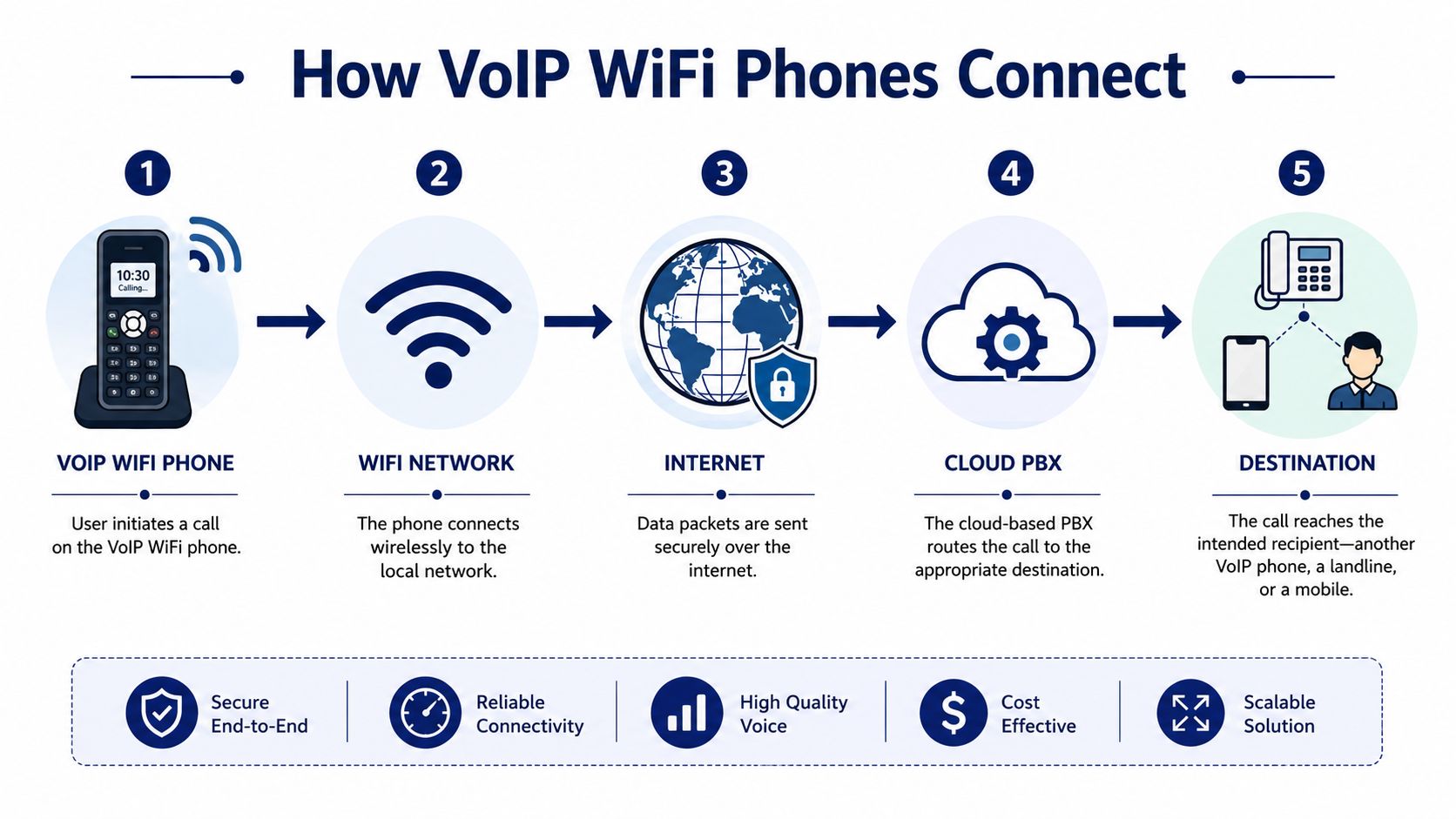
The digital mailroom analogy
Your VoIP WiFi phone is the person handing off a package.
Your WiFi network is the local street.
The internet is the highway.
The cloud PBX is the central sorting hub.
The recipient's phone is the delivery destination.
If any part of that path is slow or misconfigured, voice quality suffers. But when each layer is set up properly, the process feels instant.
The call path in plain English
The handset joins your wireless network
The phone authenticates to the office WiFi like another endpoint, but its traffic is much more sensitive to delay than a laptop browsing the web.Your voice is digitized into packets
The handset converts speech into compressed audio data using a codec, then sends those packets across the local network.Traffic leaves the building over your internet connection
At this stage, network quality matters more than raw marketing speed claims from an ISP. Voice needs consistency.The cloud PBX handles call logic
Routing decisions occur at this stage. The platform can send calls to an extension, hunt group, auto attendant, voicemail, mobile app, or external number.The destination receives the call
That endpoint could be another VoIP phone, a mobile phone, or a legacy number on the public phone network.
Why the cloud PBX matters
Without the PBX layer, you'd just have internet-connected handsets. The cloud platform is what turns those handsets into a business phone system. It handles extension dialing, voicemail, ring groups, call routing, recordings, and administrative controls.
If you want a concise explanation of that layer, this overview of what a cloud phone system is is worth reading before you shop for handsets. It helps separate the phone device from the service architecture behind it.
If the handset is the doorway, the cloud PBX is the building's switchboard, receptionist, and records room combined.
That's also why two WiFi phones can look similar on a spec sheet and behave very differently in production. The user experience depends on the whole chain, not just the handset brand.
Critical Network Requirements for Clear Calls
Most failed VoIP WiFi phone rollouts don't fail because “the internet is bad.” They fail because voice was dropped onto a network built for general data. Email forgives delay. File downloads tolerate bursts. Voice doesn't.
A call has to arrive in order, in sequence, and fast enough that people don't talk over each other. That means you need to pay attention to bandwidth, latency, jitter, wireless design, and traffic prioritization.
The baseline numbers that matter
For reliable performance, devices need at least 100 Kbps upload and download per user, with latency under 150ms and jitter under 70ms, based on this practical VoIP bandwidth discussion. The same source notes that G.711 uses about 80 Kbps per call, while G.729 uses about 24 Kbps per call.
Those numbers matter because voice is small but unforgiving. A network can look lightly used and still sound terrible if packets arrive late or unevenly.
Codec choice affects bandwidth and audio trade-offs
A codec is the method the phone uses to compress and transmit audio. In business terms, it's the rulebook for how much bandwidth each call consumes and how the call sounds under load.
| Codec | Approximate bandwidth per call | Practical implication |
|---|---|---|
| G.711 | 80 Kbps | Higher bandwidth use, commonly chosen when bandwidth is stable |
| G.729 | 24 Kbps | Lower bandwidth use, useful where capacity is tighter |
Lower bandwidth use can help in constrained environments, but codec selection should match your provider, device support, and network design. Don't treat it like a magic fix for weak WiFi.
Quality of Service decides who gets priority
If someone starts a large file transfer on a flat network with no prioritization, your call can degrade immediately. Voice traffic needs QoS so the router and switches treat call packets as time-sensitive.
Think of QoS like an express checkout lane. The store still serves everyone, but customers with one urgent item shouldn't wait behind a full cart. Voice is the urgent item.
- Prioritize SIP and RTP traffic: Call signaling and audio streams need preference over bulk data.
- Separate noisy traffic where possible: Guest WiFi, backups, and large sync jobs shouldn't compete directly with phones.
- Verify policy enforcement: A QoS setting that exists on paper but isn't active on the actual path won't help.
WiFi design matters more than people expect
A strong signal icon doesn't guarantee a good call. Voice over WiFi needs stable coverage, careful access point placement, and support for modern wireless standards. The technical guidance in this VoIP over WiFi office analysis highlights the need for 802.11k/r/v roaming protocols, dual-band support across 802.11 a/b/g/n/ac/ax, HD voice codecs such as Opus, and properly managed network density.
That last point is where many offices get surprised. A network that feels fine for laptops can collapse for voice if too many clients share the same airtime.
Practical rule: Don't judge a voice deployment by whether staff can browse the web. Judge it by whether a moving handset can hold a clean call while the rest of the office is busy.
If you're checking whether your circuit and internal network are sized properly, a VoIP bandwidth planning guide can help frame the conversation with your IT team. And if you need more visibility into congestion, packet loss, and WiFi behavior over time, these managed IT network tools are useful examples of the kind of monitoring businesses should have in place before blaming the phones.
Solving the Number One VoIP WiFi Problem Roaming Drop-Offs
The most common bad assumption in this space is simple. If WiFi works for laptops and phones, it should work for voice handsets too.
That's not how roaming voice behaves.

Businesses deploying 80 to 90 or more WiFi VoIP phones report choppy audio when users move between access points, and the underlying issue is handoff speed. VoIP needs less than 5ms handoff latency, which generally requires support for 802.11k/r/v roaming protocols, as discussed in this mass deployment WiFi VoIP thread.
Why movement breaks calls
A laptop can tolerate a brief pause while it reassociates to a better access point. A voice call can't. Even a short interruption is enough for audio clipping, robotic speech, or a dropped call.
That's why a phone that sounds fine standing still can fail the moment a user walks the building.
What 802.11k r and v actually do
These standards get thrown around like checkbox features, but they matter for a reason.
- 802.11k helps the handset learn nearby access points so it doesn't waste time guessing where to roam next.
- 802.11r speeds up the handoff process so authentication doesn't interrupt the conversation.
- 802.11v assists with transition decisions so clients move more intelligently through the wireless environment.
Together, they reduce the dead air between one access point and the next.
What works and what doesn't
Here's the trade-off in plain terms:
| Deployment choice | What usually happens |
|---|---|
| General-purpose WiFi with no roaming tuning | Calls sound okay when stationary, then break while moving |
| Dense AP layout without voice tuning | Signal looks strong, but handoffs still create audio problems |
| WiFi with 802.11k/r/v configured properly | Mobile handsets stay usable across larger spaces |
If users will walk during calls, test while walking. A conference room speed test won't reveal roaming failures.
When owners tell me, “the phones are dropping, but only in the hallways,” I don't start with handset replacement. I start with the wireless controller, AP settings, and roaming behavior.
Deployment Security and Management Best Practices
A VoIP WiFi phone rollout isn't finished when the handset registers. That's the easy part. The harder part is making sure the phones stay secure, manageable, and reachable when conditions aren't ideal.
A lot of businesses treat deployment as a one-day install. It's better to treat it like an operating model. Voice devices sit on your network, carry sensitive conversations, and depend on internet access. They need policy, not just power and passwords.
Separate and secure the voice environment
Putting phones on the same flat network as every laptop, printer, guest device, and smart TV is asking for noise and risk. In most business environments, voice should live on a dedicated segment so you can apply tighter controls and cleaner QoS policies.
A practical baseline looks like this:
- Use a dedicated voice VLAN: This simplifies policy enforcement and reduces unnecessary contention.
- Enforce strong wireless security: WPA3 is the right target where your infrastructure supports it.
- Lock down provisioning paths: Only approved servers and ports should handle phone registration and updates.
- Control admin access: Don't let every local user know how to reset, reprovision, or reconfigure a handset.
If your team also supports home or hybrid users, the basics still matter. This primer on home WiFi safety from Bridge Global is consumer-focused, but it's useful for employees who take business calls from residential networks and don't understand why weak wireless security becomes a company problem.
Provisioning and port planning
The cleanest deployments use remote provisioning so phones pull the right configuration when they first connect. That cuts manual setup, lowers error rates, and makes handset replacement much less painful.
A cloud PBX platform such as SnapDial can provide centralized user, routing, and phone management through a web portal. That matters when you're deploying across multiple sites or supporting remote staff who can't hand a device to an onsite technician.
You also need to understand the traffic path. This reference on SIP and IP ports is useful for planning firewall policy and avoiding the common mistake of allowing “some VoIP traffic” without validating the actual call path.
Failover is not optional
Most buyers ask whether calls sound clear on WiFi. Fewer ask what happens when WiFi or internet service fails.
That's backwards.
A verified data point worth taking seriously: 68% of SMBs with VoIP WiFi phones lack failover plans, according to the provided Vonage overview reference. If there's no continuity plan, outages become missed calls, stranded staff, and angry customers.
What to put in place:
- Call forwarding rules: Route unanswered or unreachable calls to mobile numbers or alternate sites.
- Documented outage behavior: Staff should know what stops, what continues, and where inbound calls go.
- Provider-supported continuity features: Some services support continuity options, but they must be configured ahead of time.
- Regular testing: A failover plan you've never tested is just a guess.
Voice resilience should be designed before the first handset goes live, not after the first outage.
Smart Use Cases for Modern Businesses
The value of a VoIP WiFi phone shows up fastest in places where employees are moving, multitasking, or serving customers away from a desk. In those environments, the phone becomes part of the workflow instead of a separate station people have to return to.
Businesses switching to VoIP typically save 30% to 50% on communication costs, and 67% of mobile workers report higher productivity and faster problem resolution, according to Tech.co's VoIP statistics roundup. Those numbers make sense in practice because mobility cuts delay out of routine communication.
Warehouse and distribution
A warehouse manager can walk receiving, check inventory, and speak with a supplier without bouncing between a radio, a cell phone, and an office extension. That cuts the classic “let me get back to my desk and check” delay.
The same applies to floor supervisors. They can stay available to purchasing, logistics, and customer service while moving through the building.
Clinics and care settings
In clinics, staff need reachability more than they need a desk. Front office teams can transfer directly to a nurse or provider who's in motion instead of sending callers to voicemail because the intended extension isn't physically nearby.
That's also where handset choice matters. Devices need to be simple enough for quick use, loud enough for active environments, and easy to manage centrally when rooms or roles change.
Retail and service businesses
A retail associate can answer a customer question from the stockroom instead of asking the customer to wait while someone tracks down the right employee. In hospitality or field-heavy service settings, mobility also helps managers stay reachable without broadcasting personal cell numbers.
Here's where businesses usually see the biggest difference:
- Faster internal reachability: The right person gets the call sooner.
- Fewer abandoned handoffs: Staff don't need to jog back to a fixed station.
- Cleaner customer experience: Customers spend less time on hold while staff locate information.
Hybrid support and remote operations
For remote and hybrid teams, the mobile-office effect is just as important. A worker doesn't need to be physically in headquarters to stay part of the same call flow. They need a stable connection, a properly supported device, and a system that routes calls intelligently.
The best use case isn't “calling over WiFi.” It's letting employees stay reachable where the work actually happens.
Your Buyer's Checklist for the Right VoIP WiFi Phone
Buying a VoIP WiFi phone gets easier when you stop comparing glossy feature lists and start checking operational fit. The right handset for a quiet office is often the wrong one for a warehouse, clinic, or roaming-heavy site.
Use this as a practical filter.
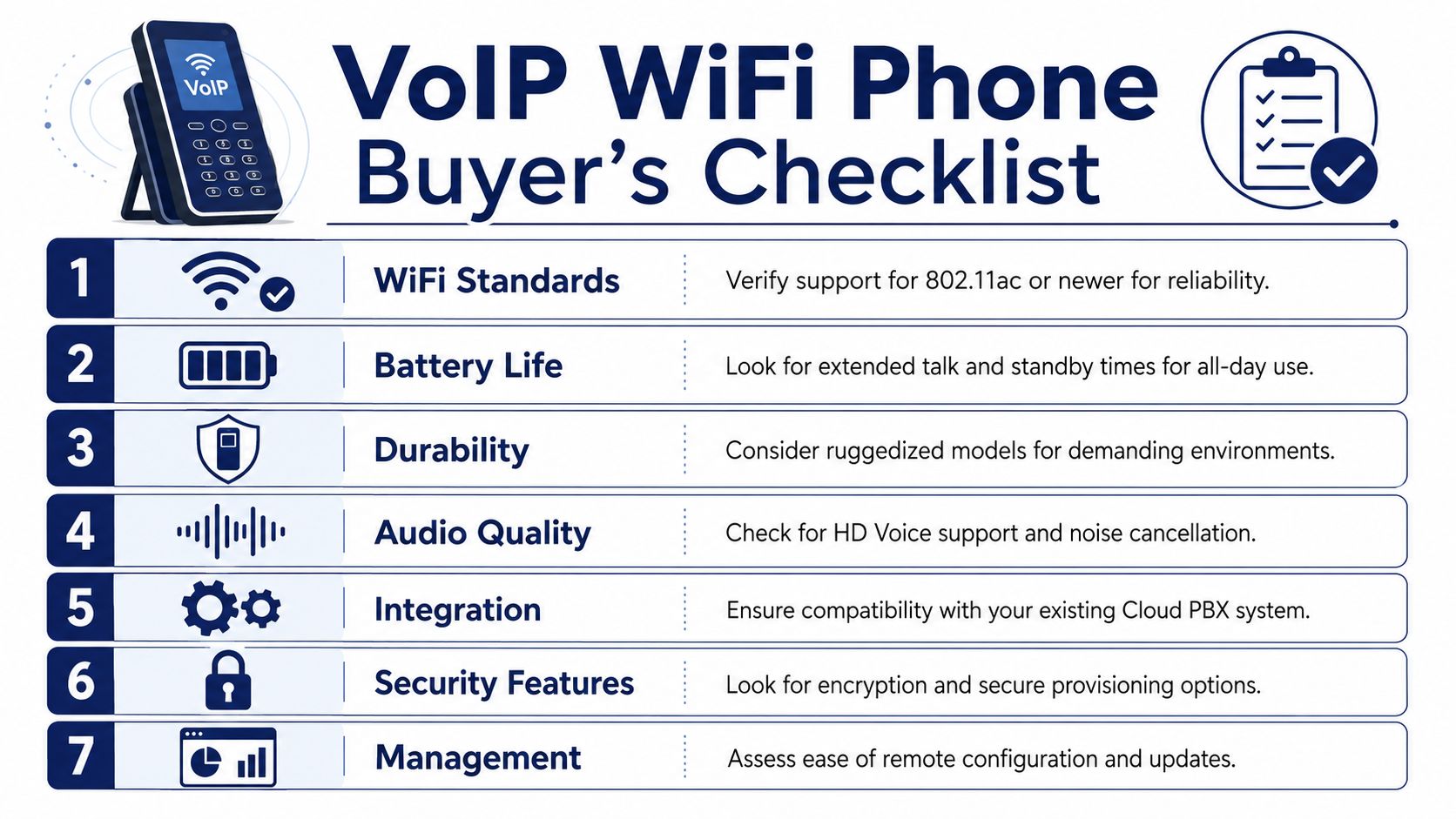
What to verify before you buy
- WiFi support: Confirm support for business-ready wireless standards and roaming behavior that matches your environment.
- Battery performance: All-day operation matters more than brochure standby numbers. Ask how the device performs in real talk-heavy use.
- Durability: Offices can use lighter handsets. Industrial and clinical environments usually need tougher hardware.
- Audio quality: Look for HD voice support, strong speaker output, and noise handling that fits busy spaces.
- Cloud PBX compatibility: The phone should register cleanly with your provider and support the features your call flow depends on.
- Provisioning options: Remote setup and centralized management save time every time a device is replaced or reassigned.
- Security controls: Encryption, secure provisioning, and controlled administration should be standard questions, not advanced ones.
The decision most buyers miss
Don't buy based on the handset alone. Buy based on the whole path the call takes. A solid phone on weak roaming WiFi will disappoint. A modest phone on a well-designed voice network often performs better than expected.
If your users will roam, test roaming. If they work in noisy spaces, test speaker and microphone behavior there. If uptime matters, ask how the device behaves during an outage and what fallback options your provider supports.
A good buying process doesn't just prevent returns. It prevents a rollout that looks fine in staging and fails once your staff starts moving.
If you're replacing an older phone system or trying to make mobile calling work across offices, warehouses, or hybrid teams, SnapDial is one option to evaluate for cloud PBX, routing, provisioning, and business continuity features. The key is to assess the service and the wireless environment together so the handsets you choose can perform the way your team needs them to.