
Do Not Disturb means your device silences incoming calls, texts, and alerts so you aren't interrupted, while often still allowing exceptions for important contacts or emergencies. On iPhone, that can also include a repeat-call exception where a second call from the same person may come through within 3 minutes.
If you searched what does Do Not Disturb mean, you're probably dealing with one of two situations. Either your phone keeps dragging you out of work every few minutes, or you're trying to understand what happens when a customer calls your business line and nobody wants the phone ringing through.
Those are related problems, but they are not the same problem.
For an individual, DND is usually about focus, sleep, or getting through a meeting without constant buzzing. For a business, DND affects customer experience, missed opportunities, voicemail handling, and how available your team appears. That difference matters more now than it did a few years ago, because DND has shifted from a simple mute button into a rules-based communication setting on personal devices and a call-handling instruction on professional phone systems.
What Do Not Disturb Really Means in 2026
A business owner usually notices DND when interruptions pile up. A sales rep is trying to finish a proposal, Slack is chirping, texts keep landing, and two calls hit back to back. Someone taps DND thinking, “I just need silence for half an hour.”
That works on a personal device. But in a business setting, the meaning of that action changes.
Historically, Do Not Disturb became standard as smartphones moved from basic call blocking to broader notification management, and it evolved into a built-in boundary-setting tool as calls, texts, and app alerts multiplied across daily life, as explained in this overview of how Do Not Disturb mode evolved. That history matters because it explains why DND now sits at the center of modern work habits, right alongside calendars, status settings, and tools like a best macOS focus app that help reduce digital noise on the desktop side.
The personal meaning versus the business meaning
On your own phone, DND usually means, “Stop bothering me unless it's urgent.”
In a business environment, DND can mean, “Change how the system treats me while I'm unavailable.”
That sounds subtle, but it's a major operational difference. One protects your attention. The other reshapes the path an incoming call takes.
Practical rule: Personal DND protects concentration. Professional DND should protect concentration without creating caller confusion.
Why the old definition is too simple now
The old explanation was easy. DND silences your phone.
That's no longer enough. Today, DND is tied to Focus modes, schedules, exceptions, app-level behavior, and business routing logic. If you run a company, the better question isn't only what DND means. It's what DND means for the person trying to reach you.
When teams ignore that distinction, they create avoidable friction. Employees get quiet. Customers get voicemail. Managers assume everyone understands what happened. Often, nobody does.
How Do Not Disturb Works Across Your Devices
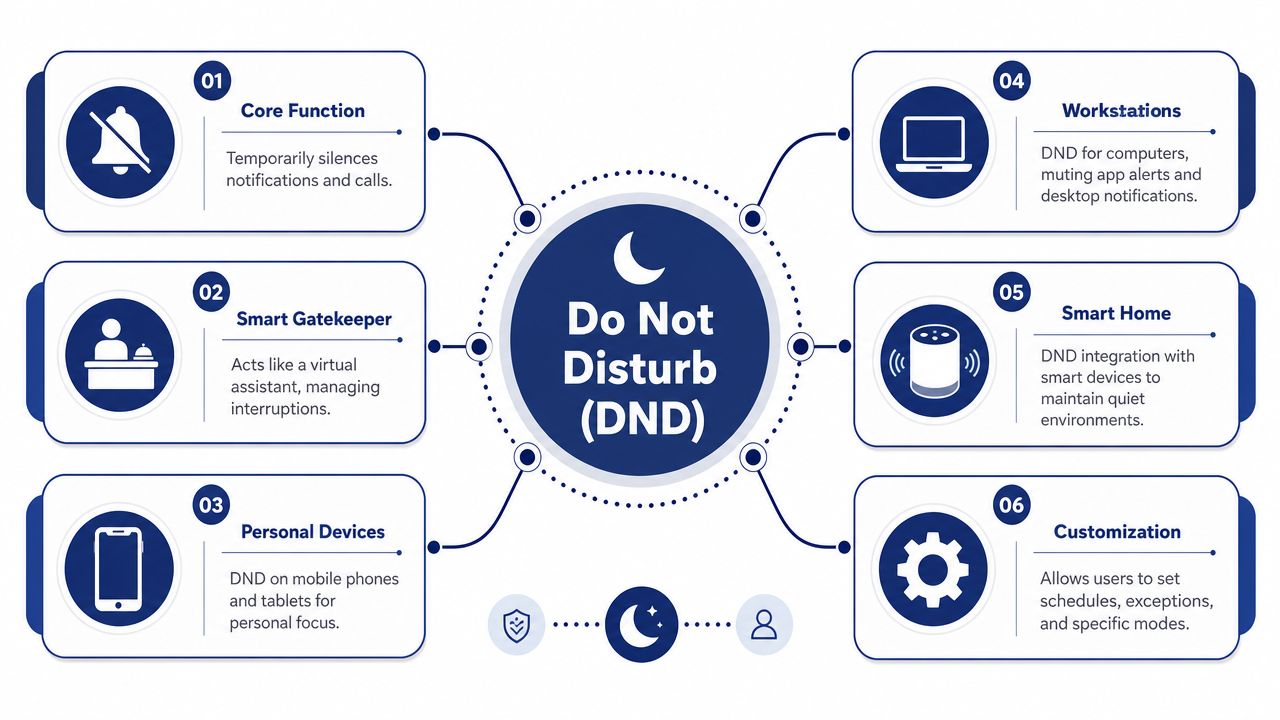
The easiest way to understand DND is to think of it as a gatekeeper, not a brick wall.
A brick wall blocks communication. A gatekeeper checks each interruption against a rule. If the alert qualifies, it gets through. If it doesn't, the device suppresses the sound or visual prompt.
That's why DND often feels inconsistent to users. The call or text may still arrive. The phone just doesn't present it the normal way.
It silences alerts, not always delivery
On devices, DND can mute all incoming notifications from calls, texts, and app alerts, as described in Illinois State's Android guidance on setting Do Not Disturb on an Android device. That doesn't automatically mean the communication failed to arrive. In many cases, the message is there waiting. The user just won't notice it until they check manually.
That's the practical misunderstanding I see most often. Someone says, “I had DND on, so I didn't get your text.” What they usually mean is, “I didn't get alerted.”
What the device is actually deciding
When DND is active, your device typically evaluates interruptions using rules such as:
- Who is calling: Favorite contacts, selected people, or emergency paths may still be allowed.
- What type of alert it is: Calls, texts, apps, alarms, and system alerts may not all behave the same way.
- When it happens: Many people schedule DND for sleep, focused work, or recurring meetings.
- Whether it appears urgent: Some systems treat repeat contact attempts differently from one-off pings.
That makes DND less like “off” and more like “filtered.”
DND works best when you configure it around intent. Sleep mode should not behave like meeting mode, and business availability should not behave like personal quiet time.
Why business phones behave differently
On business phone systems, DND often becomes more operational. Instead of merely muting the ring, the system can mark lines as busy and force incoming calls to voicemail rather than ringing the user's endpoint, as noted in the Illinois State guidance above.
For a company, that's a meaningful shift. The system is no longer just reducing distraction for the employee. It is actively deciding what the caller experiences next.
That's why business leaders should stop treating DND as a harmless personal preference. On a work line, it affects response flow, callback expectations, and whether callers feel ignored or properly redirected.
Do Not Disturb on iPhones, Android, and Apps
If you've asked what does Do Not Disturb mean because your team uses different devices, the answer depends on platform. The broad idea is consistent, but the controls are not.
Apple moved Do Not Disturb into the broader Focus system in iOS 15 and later, while Android places it within its own broader Modes approach with automatic rules, schedules, and per-app overrides, according to Apple's explanation of Do Not Disturb as a Focus option.
Apple and Android are solving the same problem differently
Apple treats DND as one profile inside a larger attention-management framework. Work, Sleep, and Driving sit in the same family of settings. That's useful for people who want context-based behavior.
Android often feels more granular. Many Android users prefer it because it gives clearer rule options, especially around apps and schedules.
A practical takeaway for business owners is simple. Don't assume your team's phones all behave the same way when DND is turned on.
Comparison table
| Feature | Apple iOS (Focus) | Google Android | Slack/Teams |
|---|---|---|---|
| Core purpose | Silences calls, alerts, and notifications within Focus | Silences notifications through DND or Modes rules | Suppresses workspace interruptions inside the app |
| Scheduling | Yes, with scheduled Focus behavior | Yes, with time-based and automatic rules | Yes, through notification preferences and status controls |
| Contact exceptions | Yes, selected people can be allowed | Yes, exceptions can be configured | App-level mentions or priority notifications may still appear depending on settings |
| App exceptions | Yes, selected apps can be allowed | Yes, per-app overrides may be available | Native to each app's notification system |
| Work use case | Strong for personal device organization | Strong for detailed rule control | Useful for collaboration noise, but doesn't control phone calls |
The exception settings matter more than the on-off switch
Most user confusion comes from exceptions.
Someone turns on DND and still gets a call from a spouse, a manager, or a repeat caller. They assume the feature failed. Usually it didn't. The settings allowed that interruption through.
For teams using work mobiles, it's worth pairing DND settings with call-flow planning. If staff also need backup coverage, a guide on how to forward calls from a cell phone helps solve a different problem than DND alone can solve.
App notifications are their own layer
Slack and Teams add one more wrinkle. Their quiet hours and notification settings don't replace phone-level DND. They sit on top of it.
That means a person can mute Slack, leave their phone active, and still get interrupted by calls. Or they can enable phone DND, allow a few contacts through, and still have Teams behave differently depending on app settings.
If your staff says DND “doesn't work,” the issue is usually configuration overlap. Phone settings, app settings, and business expectations are colliding.
Using Do Not Disturb on Your Business Phone System
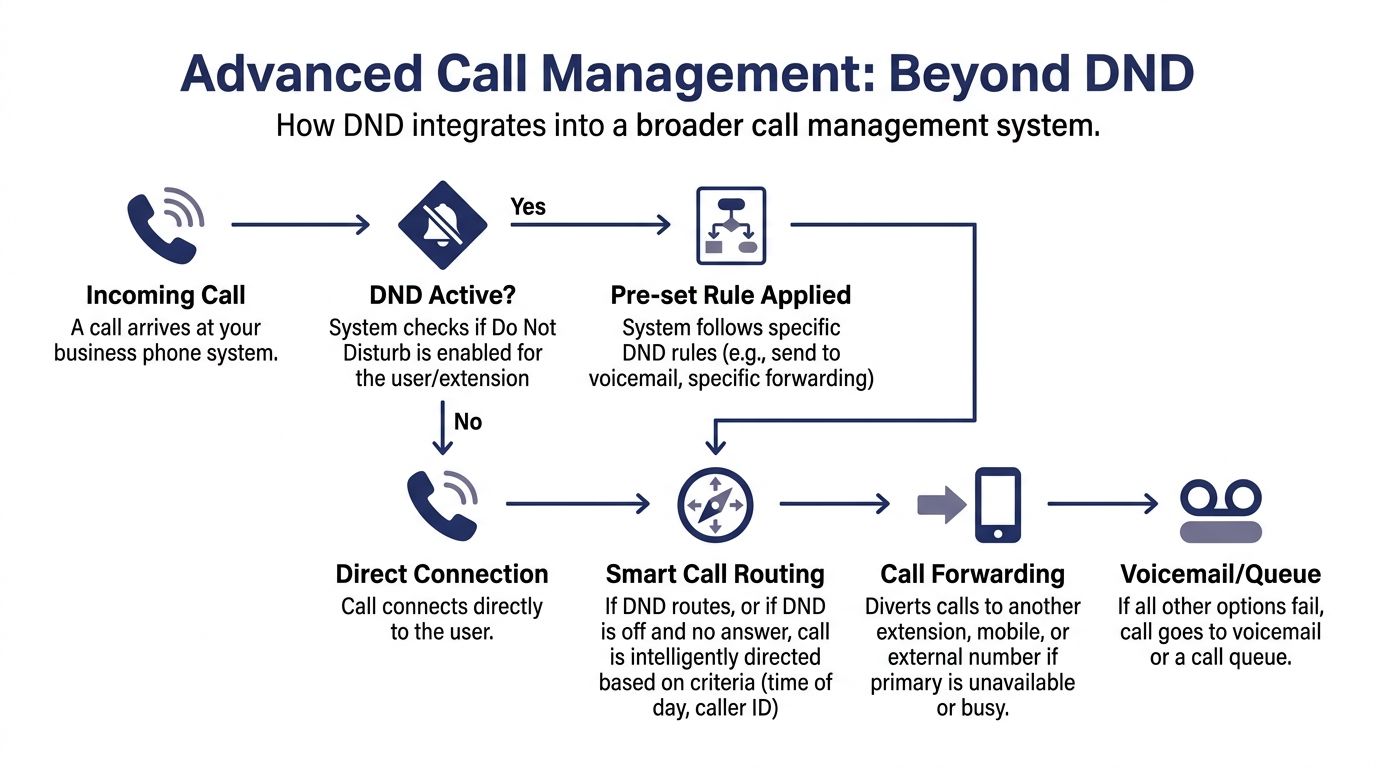
On a business phone system, DND is not just a personal silence setting. It often changes the line state to busy, which means inbound calls are routed somewhere else instead of ringing the user directly. Nextiva's VoIP definition explains that Do Not Disturb commonly sets the line to busy and routes calls to voicemail.

This is the strategic line between personal DND and professional DND. On a cell phone, you're mainly protecting your own attention. On a business system, you're also instructing the phone platform what to do with live customer traffic.
What changes when a work extension uses DND
In most business environments, activating DND does a few practical things at once:
- It stops the endpoint from ringing: The employee isn't interrupted mid-call, mid-meeting, or mid-task.
- It gives callers a deterministic path: Instead of endless ringing, the system follows a rule, usually voicemail or another fallback.
- It reduces ambiguity inside the company: Colleagues can treat that extension as unavailable instead of wondering whether the user is ignoring calls.
That predictability is useful. It's much better than random no-answer behavior.
The trade-off is customer experience. Sending every caller straight to voicemail might be fine for a consultant in a client session. It's much less fine for a front-desk function or inbound sales role.
Good use versus bad use
Good use of business DND looks intentional. A manager turns it on during a board meeting, and calls follow a known path. A support lead uses it while handling an escalated issue, and another team member covers the line.
Bad use looks passive. An employee turns on DND and forgets it's still active. Callers hit voicemail all afternoon. Nobody notices until opportunities have cooled off.
A related policy issue comes up when businesses rely on voicemail, recordings, and review workflows. If your team also records calls for training or compliance, it's worth understanding recording calls legality before building those habits into your process.
For situations where you want callers to skip ringing and go straight to a preplanned destination, this walkthrough on forwarding directly to voicemail is useful.
After the line-state change, many teams benefit from seeing the routing logic in action:
Beyond DND with Smart Call Routing and Forwarding
DND is helpful, but it's a blunt instrument if you use it as your only availability tool.
For many businesses, “send everything to voicemail” is not the best answer. It protects the employee, but it can create a weak caller experience. Modern phone systems work better when DND is just one rule inside a larger routing strategy.
What works better than voicemail-only handling
A smarter setup asks a better question: if this person is unavailable, where should this call go next?
That's where routing design matters. You might send VIP callers one way, new sales inquiries another way, and routine overflow to a queue or shared coverage group. If you want a useful primer on that logic, this guide on optimizing call routing gives a good strategic lens.
Better patterns for small and midsize teams
If you run a growing company, these patterns usually outperform simple DND:
- Follow-me logic: Try the desk phone, then the mobile, then voicemail.
- Simultaneous ring: Ring more than one endpoint when fast pickup matters.
- Auto attendants: Let callers choose billing, sales, service, or staff directory options.
- Shared coverage rules: Route calls to another person or team when one extension is unavailable.
Those approaches preserve focus without making your business feel unreachable.
Key takeaway: DND should express unavailability, not create a dead end for callers.
If you're evaluating your current setup, it helps to review how business call routing works so DND becomes one part of the system instead of the whole system.
The strategic shift
A mature phone workflow doesn't ask employees to choose between focus and responsiveness. It designs for both.
That's the core business lesson behind Do Not Disturb. The feature isn't the strategy. The routing behind it is.
DND Best Practices and Frequently Asked Questions
The most effective DND setups are deliberate. People get into trouble when they treat DND like a panic button instead of a planned workflow.
For personal use, scheduled quiet windows usually work better than manual toggling. For business use, coverage rules matter more than silence itself.
Best practices that actually hold up
- Schedule routine focus time: Use DND during recurring work blocks, not only when you're already overwhelmed.
- Decide who can break through: Executives, family, and true escalation paths should be configured intentionally.
- Separate personal from customer-facing use: A personal mobile can be quiet. A public business number still needs a caller path.
- Test the caller experience: Have someone call while DND is active so you know what customers hear.
- Review exceptions after setup: The wrong favorite contact or app override can undo the whole point.
Frequently asked questions
Does DND block calls completely?
Usually, no. It commonly suppresses alerts rather than preventing the call or message from arriving. On business systems, it may route the call away from the endpoint instead of ringing it through.
Will repeat callers get through?
Sometimes. On modern mobile platforms, DND is a rules-based notification filter, and iPhone behavior can allow a second call from the same caller within 3 minutes, which acts as an urgency signal, as shown in this explanation of how repeat-call exceptions work on iPhone DND.
Can selected contacts still reach me?
Yes. Many DND setups allow exceptions for selected contacts.
Will the caller know I'm on DND?
Not always. On a phone, they may experience ringing, voicemail, or another routing result. On a business system, they usually only notice the call outcome, not the setting behind it.
Do alarms still work?
That depends on device settings and mode configuration. DND behavior is conditional, not universal, especially when exceptions and overrides are involved.
If you're replacing an old PBX or trying to stop missed calls without keeping everyone constantly reachable, SnapDial is worth a look. It gives businesses the tools to handle DND the right way, with call routing, voicemail control, mobile flexibility, and managed setup that keeps customer communication organized instead of chaotic.