

Your phone bill arrives. The monthly rate looked manageable when you signed the contract, but the invoice keeps drifting upward. A few new users got added. Someone needed call recording. You opened a second location. Now the old system is expensive, rigid, and annoying to manage.
That’s where most small and mid-sized businesses start looking for an inexpensive voip phone service. The problem isn’t finding providers that call themselves cheap. The problem is figuring out which one will still look inexpensive after setup, porting, add-ons, taxes, support issues, and growth.
A lot of owners already know they need to leave the old phone setup behind. They just don’t want to trade one billing headache for another.
The Search for an Inexpensive VoIP Phone Service
A business owner replacing a legacy phone system usually wants four things at once. Lower monthly cost. Better flexibility. Reliable call quality. Less hassle for staff. Vendors know that, so nearly every pricing page starts with the same pitch: low rate, fast setup, easy switch.
That’s why shopping gets messy fast. One plan looks cheaper because it strips out features you need. Another bundles more but hides costs in the onboarding process. A third gives you a tempting starter rate, then pushes the bill up with extra numbers, international usage, or compliance add-ons.

The broader market makes the decision more important, not less. As of 2026, VoIP powers over 83% of all business communications worldwide, up from about 1% in 1995, according to VoIP Business's history of internet telephony. That tells you two things. First, this isn’t an experimental technology anymore. Second, the actual question isn’t whether to adopt VoIP. It’s how to avoid choosing the wrong provider.
Cheap isn’t the same as cost-effective
The lowest advertised number rarely tells the whole story. For a business, “inexpensive” should mean the service fits daily operations without forcing workarounds, missed calls, or constant upsells. If the platform can’t handle routing, remote staff, or basic call management, the savings disappear in labor and lost opportunities.
A phone system isn’t cheap if your team spends part of every day fighting it.
That matters even more for companies with remote teams, multiple offices, or regional calling needs. Regulatory rules, call routing expectations, and provider limitations can vary by market. If your business touches the Middle East, for example, this Expert Guide to Licensing & Cost Savings for UAE VoIP Calls is useful because it frames cost control alongside licensing and service availability, which is where many “cheap” decisions go sideways.
What smart buyers actually compare
The businesses that buy well usually look past the front-page rate and compare:
- Included features like IVR, call routing, mobile apps, and voicemail transcription
- Implementation effort required from internal staff
- Billing predictability once the system is fully live
- Support quality when something breaks at the worst possible time
That’s the lens to use for every provider you review. Not “What’s the cheapest line item?” but “What will this cost me once it’s doing the full job?”
Decoding What 'Inexpensive' Really Means for Business VoIP
A 12-person office signs up for a $9.99 per-user phone plan and expects to cut costs fast. Three months later, the bill is higher than the old system because call recording, auto attendant, extra numbers, and support were not included at that entry price.
That is how "inexpensive" gets misunderstood in business VoIP. Price only matters in context. The useful question is whether the plan fits your call volume, staffing setup, and feature requirements without forcing upgrades the moment the system goes live.
The three pricing models you’ll see
Most business VoIP offers fall into three categories. Each can be a good fit. Each can also become expensive if it does not match how your team uses the system.
Metered or pay as you go
This model charges by usage. It can make sense for a very small office, a seasonal operation, or a team that handles only occasional outbound calling.
The downside is cost variability. One busy month, a spike in support traffic, or a few international calls can push spending well past the expected baseline. Metered service also adds administrative overhead because someone has to review usage and explain the invoice.
Tiered per user per month
This is the standard SMB model. You pay a monthly amount for each user and receive a defined set of features. In practice, this format is easier to budget than metered calling and easier to scale as headcount changes.
The catch is plan design. Entry tiers often include basic calling but leave out functions many businesses need after week one, such as ring groups, analytics, call recording, or CRM integration. If you’re comparing seat-based services, a detailed look at hosted VoIP seat pricing and plan structure helps clarify what should be included at the user level versus what providers often bill separately.
All-inclusive flat rate
This model works well for businesses that want a stable monthly number and fewer purchasing decisions after rollout. It usually suits companies with front-desk routing, shared lines, multiple departments, or a mix of office and remote users.
You may pay for capacity you do not fully use at first. Still, many SMBs end up spending less over time with this structure because it reduces add-on creep and cuts the time spent managing plan changes.
What inexpensive should mean in practice
An inexpensive voip phone service should lower total operating cost, not just advertise a low starting rate.
That means the service needs to deliver four things:
- Predictable billing that finance can forecast with confidence
- Enough included functionality to run daily call flows without extra tools
- Straightforward scaling as you add users, locations, or remote staff
- Low admin effort so your office manager or IT lead is not stuck fixing avoidable issues
Practical rule: If a low-cost plan needs multiple paid add-ons before your team can use it properly, it was never low-cost in operational terms.
I advise clients to apply the same discipline they use in other spending categories. They look for strategies to reduce operational costs, but they also check whether the savings hold up after implementation. Phone systems deserve the same scrutiny. A lower telecom line item loses its appeal fast if it creates missed calls, slower response times, or more internal support work.
Which model fits which business
The right pricing model depends on how your business runs.
- Metered plans fit light-use teams that can tolerate monthly variation.
- Tiered per-user plans fit many SMBs, provided the required features are included in the right tier.
- All-inclusive plans fit businesses that value stable budgeting and want fewer billing surprises.
The common buying mistake is treating the advertised rate as the decision. In VoIP, the better measure is whether the plan stays affordable after you add the features, support, and flexibility your team will use.
Beyond the Monthly Fee The Hidden Costs of Cheap VoIP
A provider quotes $12 per user. Six weeks later, the first real invoice lands closer to $21 per user after taxes, extra numbers, recording, and setup help. That gap is where cheap VoIP turns into an expensive decision.
What matters is total cost of ownership. TCO includes the monthly plan, setup work, required add-ons, hardware, support, and the internal time your team spends getting the system usable. A low advertised rate can still produce a high operating cost.

Cheap VoIP plans usually break budget in familiar ways. International calling may sit outside the plan. Extra local or toll-free numbers often cost more. Compliance functions can require a higher tier. Taxes and carrier fees also push the final bill above the number on the pricing page.
That pattern shows up constantly in real evaluations. The sales quote presents the base service. The actual invoice reflects how the business really uses the phone system.
Where the invoice starts to expand
The extra cost rarely comes from one big surprise. It usually comes from several smaller charges that looked harmless during the buying process.
Setup and onboarding charges
Some vendors keep the recurring rate low by charging separately for implementation. That can include account setup, user provisioning, handset configuration, call flow design, and admin training.
For a five-person office, a do-it-yourself rollout may be fine. For a business with multiple departments, call queues, or more than one location, that work consumes real staff time. If your office manager spends two full days fixing routing errors and training users, that is part of the project cost whether the provider bills for it or not.
Number porting and extra numbers
Keeping your existing numbers protects customer continuity. It also avoids the cost of updating printed materials, web listings, ads, and vendor records. Some providers charge to port numbers in, and many charge monthly for additional direct lines, local presence numbers, or toll-free inventory.
A quote can look lean because it assumes the simplest setup. Many businesses do not run on a single main number and a few extensions.
Feature gating
This is one of the most expensive traps. A plan appears usable until you discover that call recording, IVR menus, advanced routing, reporting, voicemail transcription, or CRM integration require a higher tier.
The result is predictable. You either pay to upgrade, or your team works around missing functions with manual steps and separate tools. Both options raise cost.
The base plan only matters if it supports the way your business already operates.
Hardware changes the math
Softphones are often the right starting point because they reduce upfront spend. But many SMBs still need physical devices at reception desks, conference rooms, common areas, warehouse stations, or executive offices.
Desk phones and headsets can add a meaningful one-time cost, especially if the provider requires certified hardware for full support. Businesses also need to account for replacement units, shipping, and the time required to configure devices properly. If your team is moving from an older phone system, cabling, switches, or power-over-Ethernet capacity may also need attention.
As noted earlier, hardware can range from minimal to substantial depending on the deployment. The point is simple. If phones are part of the operating model, they belong in the budget from day one.
A short explainer helps frame what to inspect in a provider quote before you sign:
The hidden costs buyers miss most often
Review the quote for these line items, even if the provider markets the service as inexpensive:
- International usage for teams calling customers or vendors outside included regions
- Compliance and security add-ons if your industry has retention, privacy, or audit requirements
- Taxes and carrier fees that appear only at checkout or on the first invoice
- Extra numbers and porting fees for direct lines, toll-free service, or local presence
- Support limits that push you into paid onboarding or premium response coverage
- Scaling costs when you add users, call queues, locations, or routing complexity
Another cost sits off the invoice but still hits the business. Some vendors leave migration work to your internal team. That shifts effort to payroll. Someone on your staff has to build schedules, test call flows, train users, fix mistakes, and handle complaints after go-live.
TCO is operational, not just financial
Phone systems create cost in two places. One is the bill. The other is day-to-day friction.
Missed calls, bad transfers, weak mobile apps, poor reporting, and longer training time all have a price. So does the common fallback where staff start using personal mobiles because the business system is unreliable. The telecom line item may look smaller while service quality and accountability get worse.
TCO lens: Add provider charges, internal labor, support burden, hardware, and the cost of disruption. That is the real price of an inexpensive VoIP service.
Smart buyers do not stop at the monthly rate. They ask what the system will cost once it is live, fully configured, and used the way the business needs.
Essential VoIP Features You Cannot Afford to Cut
The fastest way to overspend on VoIP is to buy a stripped-down plan and then patch the gaps later.
An inexpensive voip phone service should cover the functions that protect call handling, response times, and staff mobility. Those aren’t luxury features. They’re the minimum required to run a modern business without leaking opportunities.
There’s a useful historical benchmark here. The first successful residential VoIP services launched by Vonage in 2004 proved that affordable flat-rate pricing could work without sacrificing essential features like number portability and simple hardware setup, according to Ring4's history of VoIP. That principle still matters. Lower cost shouldn’t require accepting an inferior operating setup.
Auto attendant and IVR
If your business answers calls through a live person only, every busy spell becomes a bottleneck. Auto attendant and IVR give callers a path to the right department without making your front desk play air traffic control.
For a small business, this feature does two jobs. It makes the company sound organized, and it reduces wasted staff time on manual transfers. If a provider treats IVR as a premium upsell, check whether the low monthly rate is really serving your workflow.
Mobile and desktop apps
A desk phone alone no longer covers how people work. Sales reps move. Managers travel. Hybrid employees switch locations. Support staff may need to answer from home on short notice.
Good mobile and desktop apps let the business number travel with the employee. That keeps outbound caller ID consistent and prevents teams from defaulting to personal phones, scattered messaging apps, or callback delays.
Call routing that fits your actual business
Basic forwarding isn’t enough for many SMBs. You need routing rules that reflect office hours, departments, backup coverage, and overflow handling. A missed call often has nothing to do with demand and everything to do with poor routing logic.
Look for routing that supports:
- Time-based handling for open, closed, and holiday schedules
- Department paths so callers don’t bounce around the office
- Fallback rules when one person or location doesn’t answer
- Ring strategies that fit sales, service, or shared reception workflows
If your business depends on answering the phone, call routing is revenue protection.
Visual voicemail and transcription
Voicemail isn’t dead. Bad voicemail management is the problem. Audio-only inboxes slow people down because staff have to stop, listen, replay, and sort.
Visual voicemail with transcription makes messages easier to triage. A service manager can scan the inbox, spot urgency, and respond faster. That’s a practical time-saver, especially for teams splitting time between calls, email, and field work.
Call recording and reporting
Not every business needs heavy analytics. Many do need enough visibility to train staff, resolve disputes, and understand call flow. Recording and reporting often get buried in mid-tier or premium plans, but in plenty of real businesses they belong in the baseline.
A support desk uses recordings for quality review. A sales manager uses them for coaching. An owner may use reports to check whether the office is missing calls at lunch or after hours.
The false economy of bare-bones plans
When businesses cut these features to save a few dollars, they usually pay somewhere else. Reception gets overloaded. Staff start improvising with personal devices. Follow-up slows down. Management loses visibility into what’s happening on the phones.
A sensible low-cost plan includes the tools your team will use every day. If those basics are missing, the plan isn’t lean. It’s incomplete.
Your Evaluation Checklist for Low-Cost VoIP Providers
A provider looks inexpensive on the pricing page. Three months later, the invoice is higher than expected, support is slow, and simple changes still require a ticket. That is the ultimate test.
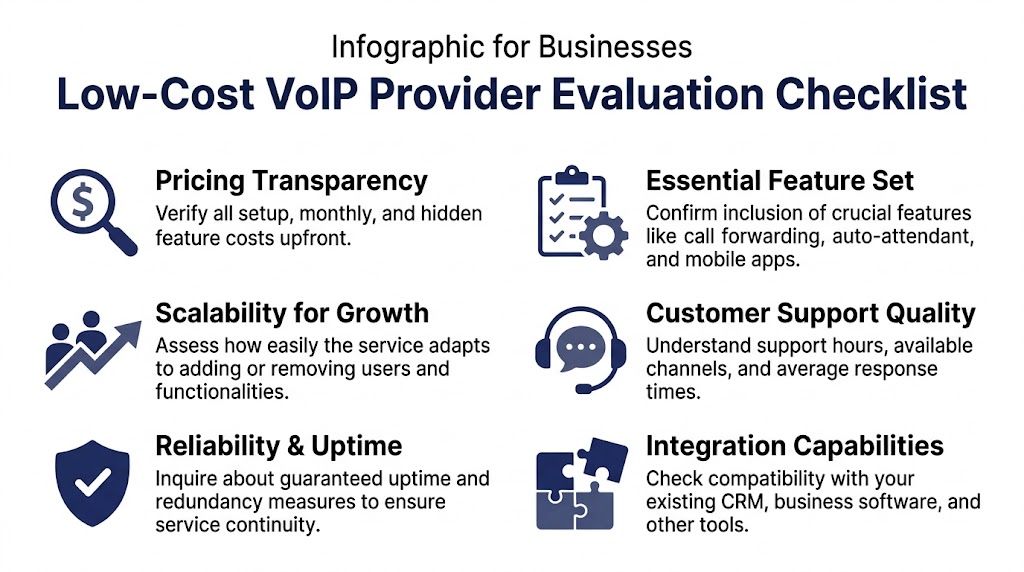
Use the checklist below to evaluate total cost of ownership, not just the advertised seat price. A low monthly rate only matters if the service is predictable to run, simple to manage, and stable enough that your staff can rely on it every day.
Ask for pricing in writing
Do not buy from a pricing table alone. Ask for a written quote that shows the full recurring cost and every one-time charge tied to setup, porting, phones, training, and support.
Ask each provider:
- Can you send a quote that includes all recurring charges?
- Which features are included in this plan, and which ones cost extra?
- Are taxes, regulatory fees, extra numbers, and e911 charges outside the quoted rate?
- What happens to pricing if we add users, another location, or heavier call handling later?
If you need a starting point for comparing options, this list of business VoIP phone service providers can help you narrow the field before requesting quotes.
Compare the pricing model, not just the monthly number
The wrong billing model can erase any savings.
| VoIP Pricing Models Compared | Best For | Potential Pitfall |
|---|---|---|
| Metered | Low-volume teams with irregular usage | Bills can swing month to month |
| Tiered per-user | SMBs with steady staffing | Key features may sit in higher plans |
| All-inclusive flat-rate | Teams that want predictable budgeting | You may pay for capacity you will not use yet |
I usually tell owners to map pricing against call patterns, staffing plans, and feature needs for the next 12 to 24 months. That exposes the plans that start cheap but become expensive as soon as the business grows or needs basic administration tools.
Test support before you sign
Phone support quality shows up fast. If sales cannot answer direct questions, support usually will not improve after the contract is signed.
Ask:
- What are your support hours and contact methods?
- Do we reach a live support team, or do all issues start as tickets?
- Who handles onboarding and porting questions during rollout?
- How are after-hours call issues handled?
Send a few questions by email. Call the support line if they allow pre-sales access. Measure the response time and the quality of the answer, not just whether someone replies.
Verify reliability and day-to-day administration
A low-cost system should not trap your staff in provider tickets for every small change. Day-to-day control matters because it affects labor cost inside your business.
Check for:
- Admin tools for users, call routing, greetings, voicemail, and business hours
- Live reporting for missed calls, queue activity, and user status
- Clear uptime commitments and a plain-language explanation of redundancy
- Room to scale during seasonal hiring, new locations, or department changes
One factual example is SnapDial, which offers hosted VoIP with Auto Attendant, call recording, visual voicemail with transcription, mobile apps, smart queue management, real-time statistics, and a self-service web portal, with managed setup handled by the provider.
Buy for the next stage of the business, not just the current headcount.
Questions for implementation
A cheap plan becomes expensive fast if the migration goes badly. Missed calls, delayed ports, and confused staff cost more than a modest onboarding fee.
Ask every provider:
- Who owns the number porting process?
- Do you perform a network readiness check before launch?
- Will desk phones arrive preconfigured?
- What training is included for admins and end users?
- What is the fallback plan if porting is delayed?
Strong providers answer these clearly and in writing. Weak providers stay vague, leave key tasks to your staff, and turn implementation risk into your problem.
Implementing Your New Service Without Business Disruption
Most businesses worry less about choosing VoIP than about surviving the changeover. That concern is reasonable. If the migration is sloppy, your phones become a project instead of a tool.
The two common approaches are DIY setup and provider-managed onboarding. Both can work. They don’t carry the same risk.
DIY setup versus managed onboarding
DIY works best when the organization is simple. One location, limited call routing, tech-comfortable staff, and enough internal time to test devices, greetings, users, and call flows. The benefit is direct control.
The downside is that your team becomes the implementation crew. Someone has to coordinate porting, validate the network, configure devices, build call routing, train users, and troubleshoot launch-day problems while still doing their normal job.
Managed onboarding shifts that workload to the provider. For many SMBs, that’s the safer route because the main cost of a bad migration isn’t the setup fee. It’s missed calls, confused staff, and downtime during business hours.
The steps that matter most
A clean rollout usually depends on a few basics:
- Network readiness first so voice quality issues don’t appear after launch. If you need to estimate capacity, this guide on how much bandwidth you need for VoIP is a practical starting point.
- Number porting discipline so you don’t cancel old service before the port is complete.
- Device and app preparation so desk phones, softphones, and mobile apps are ready before users switch.
- User training focused on everyday tasks such as transfers, voicemail, mobile access, and call handling.
Don’t judge implementation cost in isolation. Judge the cost of disruption if implementation goes badly.
Where businesses get into trouble
The most common mistake is treating the phone migration like a quick utility swap. It isn’t. Your call flows, hours, failover paths, and user behavior all need attention.
Businesses also underestimate change management. Staff need to know what’s changing, when it’s changing, and who to call if something doesn’t work. The smoothest transitions happen when the provider treats onboarding like an operational handoff, not just an account activation.
Frequently Asked Questions About Inexpensive VoIP
Can I keep my existing business phone numbers
Usually, yes. Number portability is a standard expectation in business VoIP. The important part is process control. Confirm the provider handles porting in a structured way, verify all account details match your current carrier records, and don’t cancel your old service until the port is complete.
What kind of internet connection do I need for reliable VoIP
You need a stable connection more than a flashy advertised speed. Voice traffic depends on consistency, not just bandwidth. If your network is congested, poorly managed, or shared heavily with other traffic, call quality can suffer even when the internet package looks adequate on paper.
Is VoIP secure compared to a traditional landline
It can be, but security depends on the provider and your internal practices. Ask about admin controls, access management, and how the service handles account security. For most SMBs, the bigger practical risk isn’t the technology itself. It’s weak configuration, poor account hygiene, or staff using unmanaged workarounds.
Are softphones enough, or do I need desk phones
That depends on the role. Softphones work well for many hybrid, mobile, and office users. Desk phones still make sense for front-desk staff, common areas, shared stations, and users who spend most of the day on calls. A mixed deployment is common and often more cost-effective than forcing one model on everyone.
Is an inexpensive voip phone service good enough for a multi-location business
Yes, if the provider supports centralized administration, solid routing, and predictable billing. Multi-location firms should be especially careful about hidden costs, onboarding support, and whether location-specific call flows require upgrades. The wrong low-cost service becomes hard to manage as soon as the second or third site goes live.
If you’re replacing an aging phone system and want predictable costs instead of a low teaser rate, SnapDial is one option to review. It’s a hosted business phone platform built for companies that need calling, routing, conferencing, mobile access, and managed setup without turning the migration into an internal IT project.