

You’re probably in the same spot most buyers are when they search review voip. One tab says a provider is the best choice for small business. Another says the same provider has terrible support. A third looks like a neutral review until you notice every button says “Start Free Trial” and every ranking just happens to favor vendors with affiliate programs.
That confusion matters because your phone system isn’t a side tool. It sits in the middle of sales calls, support queues, front desk routing, remote work, and customer trust. Business adoption didn’t climb by accident. US business VoIP lines grew from 6.2 million in 2010 to 41.6 million in 2018, and businesses have used VoIP for cost savings of 30 to 50 percent compared to traditional PBX systems, according to Tech.co’s VoIP statistics roundup. A decision this central deserves better than a star rating and a sales page disguised as a review.
The useful question isn’t “Which provider is ranked number one?” The useful question is “How do I judge whether this provider will work in my environment, for my users, with my call volume, and under failure conditions?”
That’s the difference between browsing and buying intelligently.
Beyond the 5-Star Rating Why Most VoIP Reviews Fail You
A lot of online VoIP reviews are written for clicks, not for implementation. They reward broad feature lists, polished websites, and low advertised entry pricing. They rarely tell you what happens when a receptionist transfers calls all day, when a support queue spikes, or when a branch office internet connection starts behaving badly.

Why generic rankings mislead buyers
A “best VoIP providers” article usually compares vendors as if every buyer has the same needs. That’s the first mistake. A ten-person accounting office replacing an old PBX needs something different from a multi-location service business, and both need something different from a support team that depends on queue management and reporting.
The second mistake is that many review sites evaluate software like consumers evaluate headphones. They reduce the decision to a score. VoIP doesn’t work that way. You’re not buying a gadget. You’re choosing the system your staff and customers will touch every day.
Practical rule: If a review doesn’t mention setup, failover, porting, support responsiveness, and admin usability, it hasn’t reviewed the hard parts.
What useful review voip research actually looks like
A strong review should answer questions like these:
- How stable are calls in normal business use: Not just one clean demo call, but transfers, conference joins, mobile app usage, and desk phone calls over a full workday.
- What happens during disruption: If internet quality dips or one location has an outage, does the provider offer a practical path to keep calls flowing?
- Who will administer the system: A phone platform that looks powerful in a comparison grid can become a burden if simple routing changes require digging through a clumsy portal.
- How honest is pricing: Entry-level plans often look attractive until the business needs reporting, recording, callback, or advanced routing.
A useful review voip process gives you a decision framework, not a winner badge. That’s how you separate marketing from operational reality.
Decoding VoIP Reviews The Five Core Pillars of Evaluation
Most buyers get lost because reviews throw too much jargon at them. SIP. hosted PBX. softphones. integrations. AI. omnichannel. None of that helps if you don’t know what bucket each claim belongs in.
A simpler way to evaluate any provider is to sort everything into five pillars.
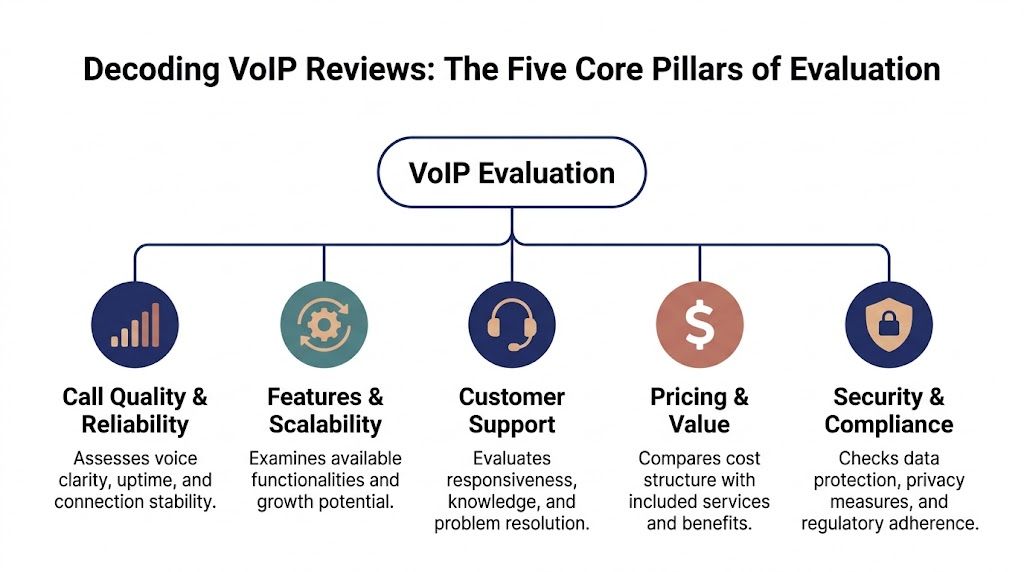
If you need a quick refresher on the basic technology before you compare vendors, Rocket Review’s explanation of what a VoIP phone is is a useful grounding piece. Then come back and judge providers through this lens.
Reliability first
Call Quality and Reliability
This is the backbone. It covers voice clarity, uptime, call stability, and how the provider handles disruption.
This pillar matters more than any flashy feature. A provider can advertise every workflow tool in the market, but if calls break up or routing fails at the wrong moment, users lose confidence fast.
Enterprise VoIP providers target 99.99% uptime, which means less than an hour of downtime per year, and they typically support that with redundant data center architecture, as described in AIS’s guide to evaluating VoIP providers. That’s a useful standard because it helps you distinguish a managed business service from a basic calling app.
Features that fit your use case
Features and Scalability
This is about whether the system solves your current workflows and whether it can grow without forcing a rework later.
A small office may care most about auto attendant, voicemail transcription, mobile apps, and easy user changes. A call center will care more about queues, callback, wait-time messaging, live stats, recording, and reporting. Good reviews tie features to jobs people do.
Support when things go sideways
Customer Support
This covers response speed, technical depth, onboarding help, and whether support can solve issues instead of reading scripts.
A lot of review sites treat support as a minor category. In practice, it’s one of the biggest differentiators. The support team becomes visible during porting, after-hours problems, device rollout, and routing changes. That’s when nice branding stops mattering.
Price versus total cost
Security and compliance
The last two pillars are easy to underestimate, so evaluate them side by side.
- Pricing and Value: Don’t stop at per-user pricing. Check what’s included, what’s add-on only, and what happens when you need call center functions or integrations.
- Security and Compliance: If you handle sensitive information, ask how calls and voicemails are protected and whether the provider can support your compliance requirements.
A review is only useful if it covers all five pillars. Most don’t. They grade the brochure, not the service.
Spotting Deception and Red Flags in VoIP Reviews
If you’ve read enough comparison pages, patterns start to repeat. The headline says “unbiased.” The rankings look fixed before the review even starts. Every provider sounds “perfect for growing teams.” That language is your cue to slow down.
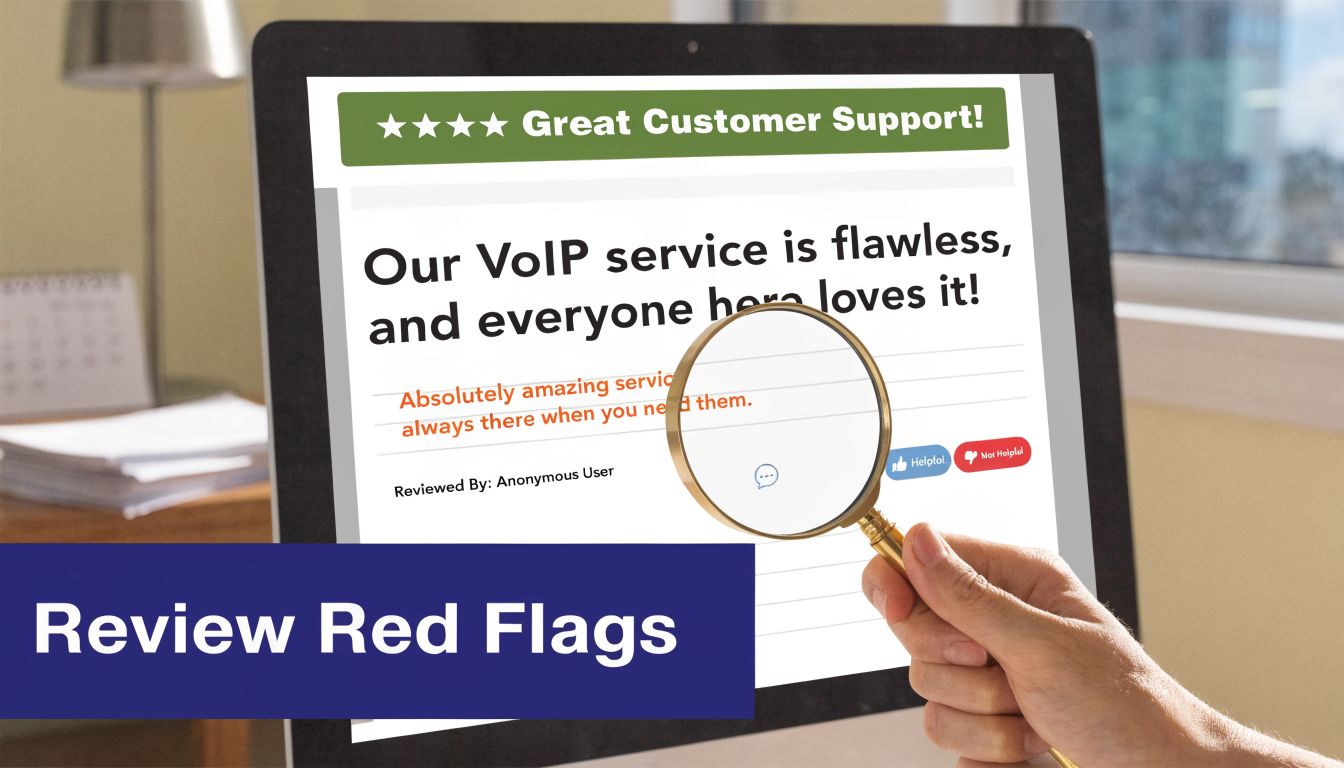
The biggest red flag is what they ignore
The most common failure in review voip content is not that it lies outright. It’s that it leaves out the operational details that make or break a deployment.
One major blind spot is internet outage behavior. Recent FCC reports from 2025 to 2026 indicated that VoIP outages affected 15% of business users in major markets, yet many reviews still don’t benchmark providers on uninterrupted failover performance, as noted in Crazy Egg’s business VoIP review discussion. If a review spends five paragraphs on AI summaries but says nothing about failover, that’s not thorough analysis. It’s product-page recycling.
A review that never asks “What happens when the network is unstable?” isn’t reviewing business telephony. It’s reviewing marketing copy.
Language that usually means nothing
Watch for these review habits:
- Universal praise: Every provider is described as intuitive, scalable, reliable, and affordable. Real systems have trade-offs.
- No use-case discipline: The review never separates front-office needs from call center needs or single-site from multi-site operations.
- Feature list padding: It counts every checkbox equally, even though uptime matters more than niche extras for most SMBs.
- No mention of admin burden: If the portal is awkward, your office manager or IT lead will feel it quickly.
- Weak pricing analysis: The article compares only starting plans and pretends that’s the full picture.
A lot of businesses begin with a price-first search, which is understandable. If that’s where you are, this look at cheap VoIP service options is useful as a starting point, but it should be treated as the beginning of due diligence, not the end.
How to read reviews like an operator
Use this simple filter when reading any review:
| Review sign | What it usually means |
|---|---|
| Heavy focus on “best overall” | The writer is flattening very different business needs |
| No screenshots of admin tasks | They may not have used the system deeply |
| No discussion of outage handling | Reliability testing probably didn’t happen |
| No porting or onboarding detail | They ignored implementation risk |
| No contract or add-on discussion | They reviewed headline pricing only |
A credible review sounds narrower, not broader. It says who the product is good for, where it struggles, and what a buyer still needs to verify.
Put Them to the Test How to Run Your Own VoIP Trial
The most reliable review is the one you build yourself. Not by placing two test calls and calling it done. By running a short, deliberate trial that mirrors how your business communicates.
Start with your network and traffic patterns
Before anyone touches handsets or apps, measure the environment where calls will live. Call quality depends on latency, jitter, and packet loss, and enterprise systems rely on tools like G.729 compression and silence suppression to use bandwidth efficiently without giving up clarity, according to the ESR Groups journal article on QoS and voice compression.
If your team needs help translating call volume into practical network planning, a VoIP bandwidth planning guide is a useful companion before the trial starts.
Build your test around actual usage:
- Map busy periods: Identify when reception, sales, or support gets hammered.
- Include every device type: Desk phones, desktop apps, and mobile apps should all be part of the test.
- Use real workflows: Transfers, voicemail, hunt groups, after-hours routing, and conference joins matter more than a simple outbound call.
Test the system under everyday strain
Don’t let the vendor run the entire demo. Ask for a real trial or pilot setup and assign staff to use it for normal work.
Here’s a practical sequence:
Run inbound call tests
Call your main number repeatedly. Check greeting timing, menu logic, transfer behavior, ring groups, voicemail routing, and caller experience.Run internal workflow tests
Have users transfer calls, park calls, retrieve them, move from desktop app to mobile app, and access voicemail through the admin workflow you expect them to use.Run queue tests if you handle support or sales traffic
Put several callers into queue. Listen to announcements, callback handling, overflow behavior, and supervisor visibility.Run remote-worker tests
Put at least a few users on home internet, Wi-Fi, and mobile data. A system that only sounds good in one office tells you very little.
Field check: During the trial, ask users to note the exact time of any clipping, delay, echo, or dropped call. Vague feedback is hard to troubleshoot. Timestamped examples are useful.
Test support, not just the product
This part gets skipped constantly. It shouldn’t.
Send support a mix of questions. One easy. One mildly technical. One operational. Ask about porting steps, failover options, admin changes, and who owns the issue if hardware and service overlap. Judge how clearly they answer and whether they take responsibility.
The product trial tells you how the platform behaves. The support trial tells you what your life will be like after signing.
Essential Questions to Ask Every Potential VoIP Vendor
Sales calls go better when you control the agenda. Most reps will gladly talk about features. Fewer will volunteer details about onboarding risk, change management, failover, or billing traps. Ask direct questions and wait for direct answers.
Questions that expose total cost
A lot of buyers get surprised after contract signature because they compared plan pricing instead of actual operating cost. That’s risky, especially for teams that need queueing, reporting, callback, transcription, or more advanced routing.
A 2026 analysis found that add-ons for essential call center features such as queue callback and real-time stats can push monthly cost 30 to 50 percent above the advertised per-user price, according to Tech.co’s review of business VoIP providers.
Ask these questions plainly:
- What features are included in the quoted plan: Ask specifically about call recording, queue callback, live dashboards, visual voicemail, reporting, and admin permissions.
- What triggers extra fees: Porting, onboarding, extra numbers, international routing, storage, analytics, and hardware replacement are common areas to probe.
- How does pricing change when we add locations or queues: A vendor should explain expansion cleanly.
Questions about onboarding and accountability
Good implementations are organized. Weak ones are improvised.
Ask:
- Who manages number porting and cutover coordination
- What does the onboarding timeline look like
- Who trains admins and end users
- What happens if there’s a problem during migration day
- Is support in-house or outsourced
Questions about reliability and control
These questions usually separate polished sales operations from mature service operations.
“If our primary internet connection fails at one office, what exact call path takes over, and who sets that up?”
Also ask:
- How do you handle failover for multi-location businesses
- What visibility do admins get into call logs and performance
- Can we change routing rules ourselves without opening a ticket
- How are voicemails and call data protected for regulated workflows
A vendor that answers these in plain language is usually easier to work with. A vendor that pivots back to “award-winning interface” usually doesn’t want the scrutiny.
Your Final VoIP Decision Checklist for SMBs and Call Centers
By the time you reach the shortlist, the choice should stop feeling abstract. You should have notes from reviews, observations from your trial, and written answers from vendor calls. Put all of that into one decision sheet.
For support teams, customer-facing quality should also be part of the final discussion. If your operation depends on call handling consistency, this practical guide to call center quality assurance is worth reviewing alongside the phone system decision, because platform choice and QA discipline affect each other.
VoIP Evaluation Checklist
| Evaluation Area | Checkpoint Item | Status (Pass/Fail/NA) |
|---|---|---|
| Core Needs Assessment | Defined whether the business is office-first, multi-location, remote, or call-center driven | |
| Core Needs Assessment | Listed must-have workflows such as auto attendant, queueing, recording, routing, mobile app use, and reporting | |
| Core Needs Assessment | Identified who will administer the system day to day | |
| Vendor Review Analysis | Verified reviews discuss real use cases instead of generic praise | |
| Vendor Review Analysis | Confirmed the review addresses outage handling and failover, not just features | |
| Vendor Review Analysis | Checked whether pricing analysis includes add-ons and setup realities | |
| Trial Period Performance | Tested call quality across desk phones, desktop apps, and mobile apps | |
| Trial Period Performance | Tested transfers, voicemail, auto attendant, ring groups, and remote users | |
| Trial Period Performance | Ran queue and reporting tests if the team handles high call volumes | |
| Trial Period Performance | Logged issues with timestamps and checked how support handled them | |
| Support and Onboarding | Confirmed who owns porting, cutover, training, and escalation | |
| Support and Onboarding | Confirmed how to reach support and what response experience feels like | |
| Security and Compliance | Confirmed the provider can support your security and compliance requirements | |
| Admin and Scalability | Verified the admin portal is usable for routine changes without friction | |
| Final Cost and Contract Review | Reviewed contract length, renewals, add-ons, hardware terms, and cancellation language | |
| Final Cost and Contract Review | Confirmed total monthly operating cost for the actual feature set required |
What buyers miss at the end
The final mistake is choosing the vendor that looked best in isolation instead of the one that caused the fewest concerns during the process. A strong provider doesn’t need the most features on paper. It needs to perform reliably, be manageable by your team, and stay predictable once billing and support become real.
If two vendors look close, choose the one that answered hard questions clearly and behaved well during the trial. That usually tells you more than one extra feature ever will.
Choosing Your Communications Partner with Confidence
A smart review voip process doesn’t end with finding a provider that looks good in a list. It ends when you’ve pressure-tested the service against your environment, your workflows, and your tolerance for risk.
That’s why paid rankings and star scores only get you so far. They can help you build an initial shortlist. They can’t tell you how a vendor will handle a porting issue, whether your admins will like the portal, or what happens when one location has connectivity trouble. Only a structured evaluation can do that.
The best buyers do three things well. They read reviews skeptically. They run meaningful trials. They ask vendors questions that force clear answers. Once you work that way, the market gets much less confusing.
At that point, the decision stops being “Which phone system should we buy?” and becomes “Which communications partner can support how our business operates?” That’s the right frame for SMBs, multi-location teams, and call centers.
If you’re comparing providers and want a benchmark for what a business-focused option should include, this overview of VoIP providers for business can help you judge whether a vendor’s setup, support model, and feature set line up with your operational needs.
If you want a provider that matches the buying framework in this guide, SnapDial is worth a close look. It offers predictable pricing, white-glove setup, managed migration for teams replacing legacy PBXs, and 24/7 Texas-based support. For SMBs, multi-location companies, and call centers that need a practical cloud phone system without the usual implementation chaos, it’s the kind of partner a careful buyer should have on the shortlist.