
You’re in the middle of something that matters. Maybe you’re finishing a proposal, helping a client, or trying to get through a focused hour without your phone exploding every few minutes. Then a call comes in that isn’t urgent, breaks your concentration, and pulls you off track.
That’s usually when people ask, what does DND mean on a phone, and assume the answer is simple. It isn’t. On a personal phone, DND usually means silence. In a business phone system, it can mean call routing, voicemail handling, status visibility, and missed-opportunity prevention.
If you use both a smartphone and a work phone system, understanding that difference can save your focus without sacrificing customer service.
Why DND Is Your Most Misunderstood Productivity Tool
A lot of people first meet Do Not Disturb, or DND, during a meeting, at bedtime, or while driving. They tap the moon icon, the phone goes quiet, and that seems like the whole story.
But at work, that simple habit can have very different results.
A virtual assistant taking calls for multiple clients, a sales rep working from a mobile app, and an office manager using a desk phone all need quiet time. They also need a safe way to handle incoming business calls while they’re unavailable. That’s why many remote professionals pair communication habits with tools like productivity software for VAs to reduce interruptions without losing track of important tasks.
Here’s where readers often get confused. Most explanations of DND focus on consumer mobile use, but they skip the business side, where DND can mark lines as busy and send calls down a specific route rather than muting your device, as noted in Google’s Android help documentation context.
Big misunderstanding: On your personal phone, DND usually controls what you hear. On a business phone system, it can control what the caller experiences.
That distinction matters if you’re replacing an old office phone setup, supporting customers, or juggling calls across a desk phone, laptop, and mobile app. If you think DND only means “mute,” you can accidentally send real callers to voicemail, confuse coworkers, or miss urgent issues.
Used well, DND protects deep work. Used casually, it creates blind spots.
The Difference Between DND Silent and Airplane Mode
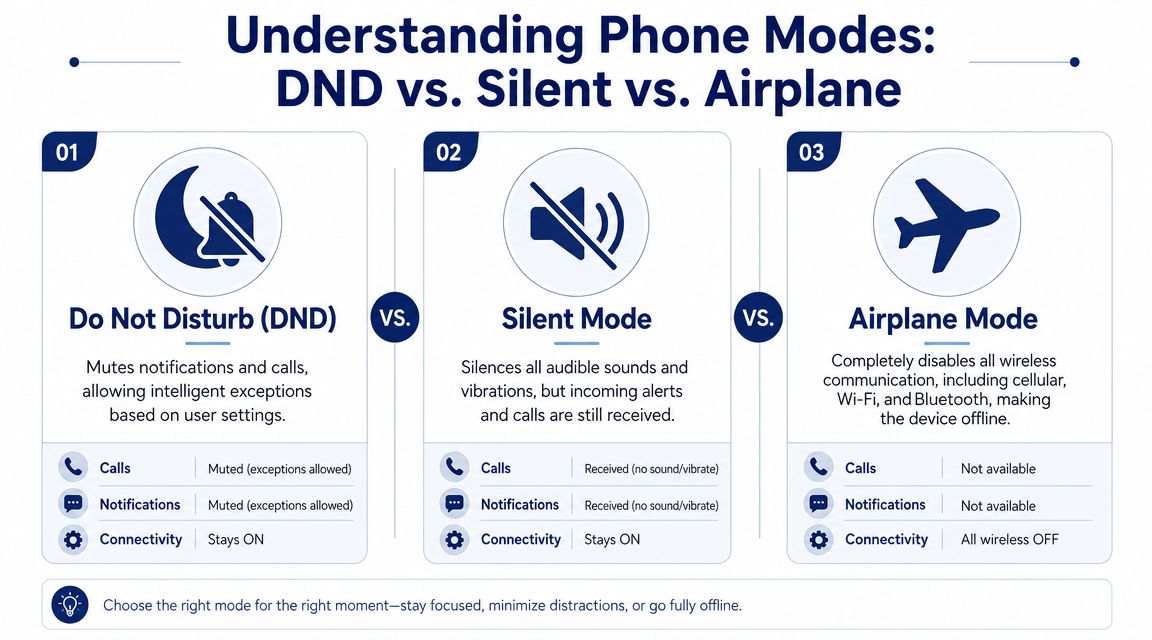
People often treat DND, Silent Mode, and Airplane Mode as interchangeable. They aren’t. Each one changes your phone in a different way.
The easiest way to think about DND is this: it acts like a smart receptionist. Instead of shutting the phone down, it follows rules. It may allow favorite contacts through, block most alerts, or show notifications without making noise.
What each mode actually does
Silent Mode is the simplest. Your phone still receives calls, texts, and app notifications, but the sound is muted. Depending on your settings, it may still vibrate.
Airplane Mode does something much more drastic. It disconnects wireless communications, which means your phone goes offline unless you manually re-enable certain connections like Wi-Fi on supported devices.
DND sits in the middle. It doesn’t necessarily disconnect the phone, and it doesn’t just mute everything blindly. It filters interruptions based on rules.
DND vs. Silent Mode vs. Airplane Mode
| Feature | Do Not Disturb (DND) | Silent Mode | Airplane Mode |
|---|---|---|---|
| Main purpose | Reduce interruptions with rules and exceptions | Mute sounds | Disconnect wireless communications |
| Calls still reach the phone | Usually yes | Yes | No cellular calling while disconnected |
| Notifications still arrive | Usually yes, but muted or filtered | Yes | Often no live delivery until reconnected |
| Can allow favorite contacts | Yes, on many devices | Usually no | No, because communications are disabled |
| Good for meetings | Yes | Sometimes | Usually not |
| Good for flights | No | No | Yes |
| Best use case | Focus without going fully offline | Quick muting | Full disconnection |
Where people get tripped up
The phrase “my phone didn’t ring” can mean three different things:
- DND was on: The phone received the call but suppressed its notifications.
- Silent Mode was on: The call arrived, but your phone made no sound.
- Airplane Mode was on: The call may never have reached the phone at all.
Silent Mode hides noise. Airplane Mode cuts connection. DND manages interruptions.
That’s why DND is usually the best choice when you still need to stay reachable in some controlled way. You can remain connected to messages, calendar alerts, and approved callers without letting every notification take over your day.
How to Configure DND on iPhone and Android
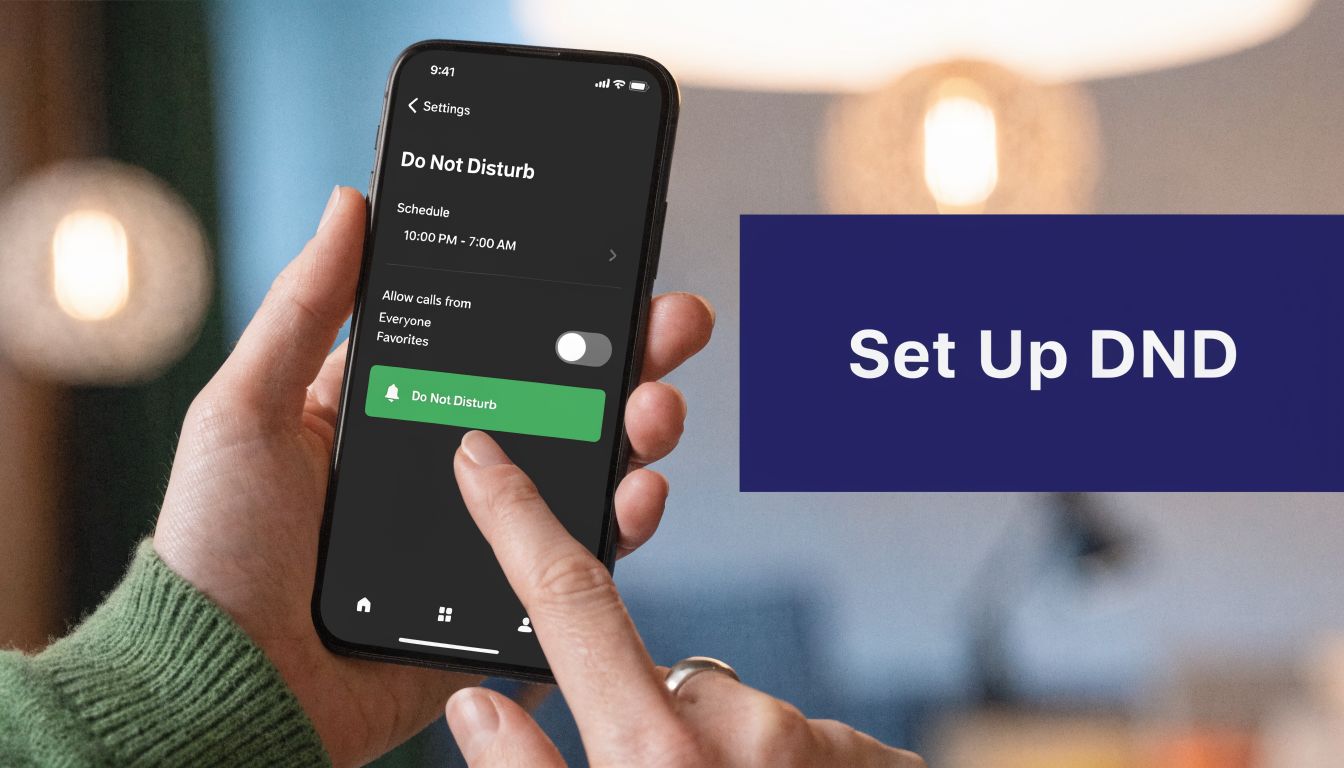
Setting up DND well is less about turning it on and more about deciding who gets through, when, and why.
On iPhone
On iPhone, DND lives inside Apple’s Focus settings. That means you can create different behavior for work, personal time, sleep, or specific routines.
A practical iPhone setup usually includes:
Open Settings and choose Focus.
Tap Do Not Disturb or create a work-related Focus.Choose allowed people.
Let family, a manager, or key clients through if needed.Choose allowed apps.
You might allow calendar alerts or messaging apps while blocking everything else.Set a schedule.
You can trigger DND during meetings, work blocks, or specific hours.Enable repeated call behavior if appropriate.
This helps with urgent situations if the same person calls again.
If your job depends on redirecting calls while your mobile phone is quiet, it also helps to understand how to forward calls from a cell phone so DND and call coverage work together instead of against each other.
On Android
Android settings vary a bit by manufacturer, but the basic logic is similar. You’ll usually find DND under Settings, then Notifications or Sound.
On many Android devices, you can:
- Set people exceptions so starred contacts can still reach you
- Allow alarms so you don’t miss wake-ups or reminders
- Schedule DND automatically for nights, work hours, or calendar events
- Decide what appears on screen when DND is active
The trick is to avoid using the default settings forever. Users often turn DND on once, then never check what it’s allowing or blocking.
Practical rule: Test DND by calling your own phone from another line after you change the settings. Don’t assume it works the way you intended.
A short walkthrough can help if you want to see the settings in action:
A simple setup that works for most people
If you want a safe starting point, use this approach:
- During work hours: Allow calendar alerts, your top contacts, and repeated calls.
- During deep work: Mute almost everything except true emergency paths.
- At night: Allow alarms only.
That gives you quiet without creating a communication black hole.
DND in a Business Phone System A Critical Distinction
Here, the meaning of DND changes in a major way.
On a smartphone, DND usually affects the device. On a business phone system, DND often affects the extension. That sounds technical, but the result is easy to understand. The phone system changes how calls are handled before they ring you.
According to Nextiva’s VoIP definition of Do Not Disturb, in VoIP and cloud PBX systems, DND can silence all lines on an extension by forcing 100% of incoming calls to voicemail or alternate paths, with the system responding with a 486 Busy Here SIP code.
That’s a completely different idea from muting your iPhone or Android device.
What business DND means in practice
If someone calls your work number while business DND is active, the system may do one of these things:
- Send the call to voicemail
- Route it to an auto-attendant
- Send it to another person or team
- Treat the extension as busy
The key point is that the caller is interacting with the phone system, not just your handset.
That’s one reason many companies spend time choosing the right communications system instead of treating business calling like a basic mobile feature. In a professional setup, DND affects call flow, coverage, and the caller experience.
Why this matters for hybrid teams
A modern employee might have a desk phone, a softphone on a laptop, and a mobile business app. In many systems, those tools belong to the same extension or user identity.
When DND is enabled at the system level, it can create a unified unavailable status across that setup. That’s useful because it avoids one device ringing while another stays quiet.
It also means you need to think about routing. If your extension is unavailable, where should the call go next?
For teams working through setup changes, a guide on how to set up call forwarding helps connect DND with real coverage rules, rather than leaving callers stranded.
Business DND isn’t just about stopping noise. It’s about deciding the next best destination for the call.
The caller hears the difference
This is the part many businesses miss. A customer doesn’t care whether your device was muted or your extension was in DND. They care whether they reached a person, clear instructions, or a dead end.
That’s why business DND should never be treated as a casual personal setting. It’s a routing decision.
Best Practices for Using DND Without Losing Customers
DND can protect focus, but it can also create friction when it’s used without a plan.
That risk is real in customer-facing roles. Improper DND use in SMB contact centers can contribute to higher customer churn, and 40% of B2B callers will abandon a call after reaching voicemail once, according to the cited source in this section’s planning data, supported by this referenced video source.

So the question isn’t whether you should use DND. The better question is how to use it without teaching customers to give up.
Use DND in scheduled blocks
Randomly turning DND on and forgetting about it causes the most damage. Planned blocks work better.
Try using DND for:
- Proposal writing
- Training sessions
- Internal meetings
- Short recovery periods after heavy call volume
When DND follows a predictable schedule, teams can prepare coverage instead of reacting after the fact.
Pair DND with a backup path
If callers hit voicemail every time you need focus, you’re relying too heavily on one fallback. That’s risky, especially for sales and support.
A stronger setup includes:
- An alternate destination for urgent calls
- A queue or receptionist path for live coverage
- Voicemail visibility so messages get reviewed quickly
If voicemail is part of the backup plan, forwarding voicemail to email can make responses much faster because missed calls don’t stay trapped inside one device.
Make your status visible internally
Coworkers shouldn’t have to guess whether you’re ignoring calls, in a meeting, or heads-down on a deadline.
Use presence indicators, status notes, or team norms so people know:
- when DND is intentional
- who to contact instead
- what counts as urgent enough to interrupt
A good DND setup protects your attention and still gives callers a clear next step.
Don’t use the same DND rule for every role
A finance manager, front-desk coordinator, and support agent shouldn’t all use identical settings. Customer-facing roles need narrower DND windows and better overflow handling. Internal roles may have more freedom.
That’s the strategic use of DND. You’re not blocking communication. You’re shaping it.
Conclusion Master Your Focus Master Your Calls
DND can mean two very different things depending on the phone in your hand.
On a personal smartphone, it usually helps you quiet interruptions while staying connected. On a business phone system, it can change the path of every incoming call and affect what customers hear when they try to reach you.
That’s why the answer to what does dnd mean on a phone isn’t just “it silences calls.” Sometimes it does. In a business setting, it often does much more.
Used thoughtfully, DND gives you room to focus without making your business unreachable. The best setups combine quiet, clear exceptions, and reliable call routing so you can protect your time and still take care of the people trying to reach you.
Frequently Asked Questions About DND
Does DND block alarms
Usually, no. On both iPhone and Android, alarms are often treated separately from regular calls and notifications. Still, check your own settings because custom Focus or DND rules can change behavior.
Can emergency contacts get through DND
Yes, often they can. Many phones let you allow calls from favorites, starred contacts, or repeated callers. That’s one of the biggest differences between DND and muting the phone.
If this matters for your family or your job, test it. Don’t rely on memory.
Will people know I’m on DND at work
In many business phone systems, yes. Your status can appear to coworkers or administrators as part of presence or extension status. That visibility helps teams know whether to transfer a call, wait, or contact someone else.
Does DND send every business call to voicemail
Not always. In a business system, DND may send calls to voicemail, another extension, an auto-attendant, or another predefined path. It depends on how the phone system is configured.
Is DND better than Silent Mode for work
Usually yes, because DND gives you more control. Silent Mode just removes sound. DND can allow exceptions and support more intentional communication habits.
Can DND hurt customer experience
It can if it’s unmanaged. That’s most likely when customer-facing staff use DND without backup routing, clear status handling, or fast voicemail review.
If callers can’t reach you live, they should still reach a useful next step.
Does mobile DND affect my business phone app the same way as system DND
Not necessarily. Mobile DND may silence the app on your device, while business system DND can change call handling at the platform level. If you use both, make sure they don’t conflict.
If your team wants the benefits of DND without missed calls, a modern business phone platform matters. SnapDial gives businesses a cloud phone system with call routing, auto attendants, mobile access, voicemail tools, and call center features that help teams stay focused while keeping callers covered.