
A lot of growing businesses hit the same wall at the same time. The phones are still technically working, but the operation around them isn't.
One office is answering faster than another. Front-desk staff are acting as human routers. Customers repeat the same issue to three different people. Managers know calls are being missed, but they can't say when, why, or how often. If you're running multiple locations, the problem gets worse because each site develops its own workaround, and none of those workarounds scale.
That's usually the point where a basic business phone system stops being a communications tool and starts becoming an operational bottleneck. Call center management software exists to fix that transition. It gives smaller teams the controls, visibility, and workflow discipline that larger support operations have used for years, without forcing you to build an enterprise IT department to manage it.
Why Your Current Phone System Is Holding You Back
A small team can get surprisingly far with a basic phone setup. Add a few lines, build a ring group, record a cleaner greeting, and for a while it works well enough.
Then growth changes the math.
The front desk starts acting like a dispatcher. One location answers quickly while another lets calls stack up. A senior employee becomes the unofficial routing map for the whole company. If that person is out, calls get transferred twice, voicemails sit longer than they should, and customers hear the confusion.
That is usually the point where leaders blame staffing first. Sometimes staffing is part of it. More often, the actual problem is that the phone system was built for dial tone, not for managing demand across teams, departments, and locations.
The symptoms show up in daily operations
A basic business phone system can ring phones. It usually cannot give a manager a clear live view of what is happening across the operation.
Once call volume becomes uneven or work needs to be shared across sites, a manager needs answers fast:
- Who can take the next call right now
- Which department is falling behind
- How long customers are waiting before someone picks up
- Where transfers keep breaking down
- Which call types should go straight to a specialist instead of the front desk
Without those answers, supervisors make coverage decisions by instinct. Teams create workarounds. Customers repeat themselves because the system is passing calls around without passing context.
Practical rule: If call routing depends on memory, sticky notes, or one experienced employee who “just knows” where things go, the process will fail under pressure.
Growth exposes the hidden cost of a basic setup
For SMBs and multi-location companies, the pain usually arrives before anyone labels it a phone problem.
A missed call looks like a scheduling issue. Long hold times look like a training problem. Uneven service between locations looks like a local management issue. In many cases, those are second-order effects. The root issue is that the business has outgrown a system designed for simple calling, not queue control, reporting, and rule-based routing.
That gap gets expensive fast. Sales calls hit voicemail during busy periods. Service teams interrupt each other to ask who should take what. Managers spend time investigating anecdotes instead of fixing patterns. Every extra handoff adds friction, and friction shows up in lower conversion, slower resolution, and more customer effort.
For a growing company, that is the true constraint. The phone system is no longer supporting the operation. It is shaping the operation in all the wrong places.
What Is Call Center Management Software?
A growing company usually hits the limit of a basic phone system in a very specific moment. One location is slammed, another has idle staff, and supervisors still cannot shift calls cleanly because the system was built for extensions, not for managing demand across the business.
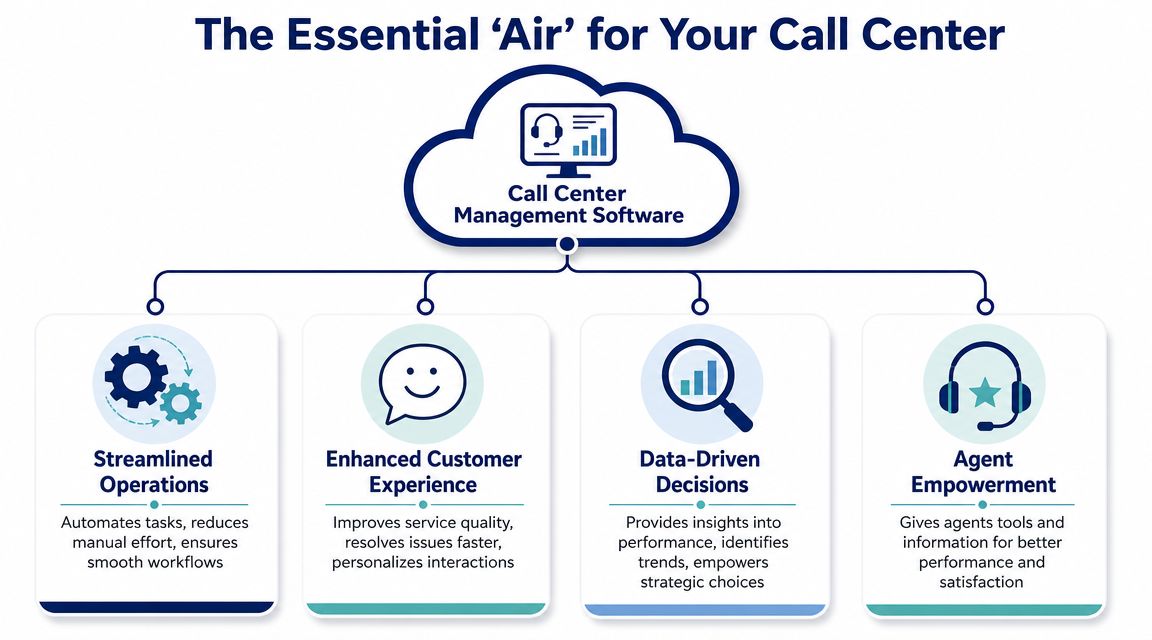
Call center management software is the operational control layer for customer communications. It sits on top of calling and adds the rules, visibility, and workflow management that a front desk phone setup lacks. For an SMB or multi-location company, that shift matters because growth creates more call types, more handoffs, and more ways for a customer to get stuck between teams.
It manages flow, not just calls
The practical difference is simple. A phone system helps people place and receive calls. Call center software manages who should get the interaction, how long it waits, what context travels with it, what the customer experienced, and what managers need to fix next.
That is why businesses often move from a business phone platform to VoIP call center solutions for growing teams. They need queue control, routing rules, recordings, supervisor visibility, and reporting that goes beyond missed call counts.
| Tool type | What it does well | Where it falls short |
|---|---|---|
| Basic phone system | Calling, extensions, voicemail, simple menus | Limited routing logic, little reporting, weak queue control |
| Call center management software | Routing, queue management, reporting, recordings, supervision, multi-channel operations | Requires planning, setup discipline, and adoption |
It gives distributed teams one operating model
This matters even more for companies with multiple offices, stores, clinics, or service locations. Without a shared system, each site develops its own habits. One team transfers manually. Another sends calls to voicemail. A third relies on whoever has been there longest to sort things out.
Call center software standardizes that work. It creates one set of routing rules, one view of queue activity, and one source of interaction history, even when the people answering are spread across locations or working remotely.
Voice is usually the starting point. Over time, many teams also want text, chat, email, and transcripts tied back to the same customer record. That is where tools like call recording and transcription start paying off. If you need a plain-language primer on how transcripts are generated, this guide on speech to text conversion explained is useful context.
A good platform becomes the business memory for customer conversations. It keeps the process consistent, preserves context, and gives managers a clean way to spot where service is slowing down instead of relying on anecdotes.
The Core Features That Power Modern Support Teams
A growing company usually feels the strain before it names the problem. One office answers live. Another lets calls roll to voicemail at lunch. A remote rep picks up sales calls but has no context on an open support issue. At that point, software features stop being a checklist item and start becoming operating controls.
The useful way to evaluate call center management software is to tie each feature to a failure you already see in the business. Wrong transfers point to weak routing. Long hold times point to poor queue design. Inconsistent coaching points to missing recordings, transcripts, and reporting. If a feature does not fix a recurring service problem, it is probably not worth paying for yet.
IVR and ACD decide how work enters the business
IVR and ACD sit at the center of the system.
IVR handles the first interaction. It greets callers, collects basic intent, and can answer simple requests without an agent. ACD decides where the call goes next based on your rules, such as location, department, agent availability, skill, or priority.
As noted by Intermedia's overview of essential call center phone system features, these tools help businesses route calls with more control across office-based and remote teams. For SMBs with multiple locations, that matters because growth usually creates routing sprawl before leadership notices it. One number becomes five. Direct lines multiply. Good employees become human switchboards.
The practical test is simple:
- IVR identifies why the customer is calling
- ACD decides who should take the call
- Queue rules determine what the customer experiences while waiting
Get those three parts right and the operation feels organized. Get them wrong and even a strong team looks scattered.
Queue management shapes the waiting experience
Queue management is where many smaller companies either protect margin or lose it.
A weak queue setup sends too many calls to the same few people, leaves callers listening to dead air, and creates avoidable hang-ups. A better setup sets priority rules, offers callbacks where they make sense, and distributes work in a way the team can sustain. That is not just a customer experience improvement. It reduces agent fatigue and lowers the number of repeat contacts caused by dropped or mishandled calls.
This is often where companies moving beyond a basic phone setup see the first clear return. The win is not fancy technology. The win is fewer calls bouncing around the business and less paid time wasted on cleanup. Teams comparing VoIP call center solutions for growing support and sales teams should spend more time on queue behavior, overflow logic, and callback options than on surface-level feature grids.
Recording, transcription, and analytics make coaching specific
Recording gives managers evidence. Transcription makes that evidence searchable. Analytics help teams spot patterns across far more conversations than any supervisor can review manually.
That changes how coaching works. Instead of telling an agent to “handle objections better,” a supervisor can pull a set of calls where billing confusion led to transfers, listen for the exact breakdown, and coach to that issue. For businesses with more than one office or a mix of in-person and remote staff, that consistency matters. Everyone gets measured against the same customer-handling standard.
If you want a plain-language primer on how transcripts are created, this guide on speech to text conversion explained is useful background.
A good reporting layer also helps managers answer harder questions. Which call types create the longest handle times? Which locations need better training? Which agents solve issues on the first conversation and which ones trigger follow-up work? Those answers are hard to get from a basic business phone system because the system was never built to capture the full interaction story.
Managers who review a handful of random calls coach opinions. Managers who can search calls by topic, phrase, queue, or outcome coach patterns.
Workforce management helps smaller teams staff with less guesswork
Workforce management sounds bigger than it is. For an SMB, it usually means forecasting demand, scheduling to match it, and making adjustments during the day when call volume shifts.
That matters as soon as the business has enough call traffic that one busy hour can throw off the whole team. A two-location service company may not need a large planning department. It does need a way to see when Mondays spike, when lunch coverage breaks down, and when one branch is overloaded while another has capacity.
The trade-off is straightforward. Better planning tools require cleaner processes, manager attention, and agent adherence. But without them, staffing decisions stay reactive, and reactive staffing gets expensive fast.
Key Business Benefits for SMBs and Multi-Location Companies
The break point usually comes during growth. A company adds a second location, extends hours, or starts routing calls to remote staff, and the old business phone system stops acting like shared infrastructure. It becomes a patchwork of personal habits, local workarounds, and missed handoffs.
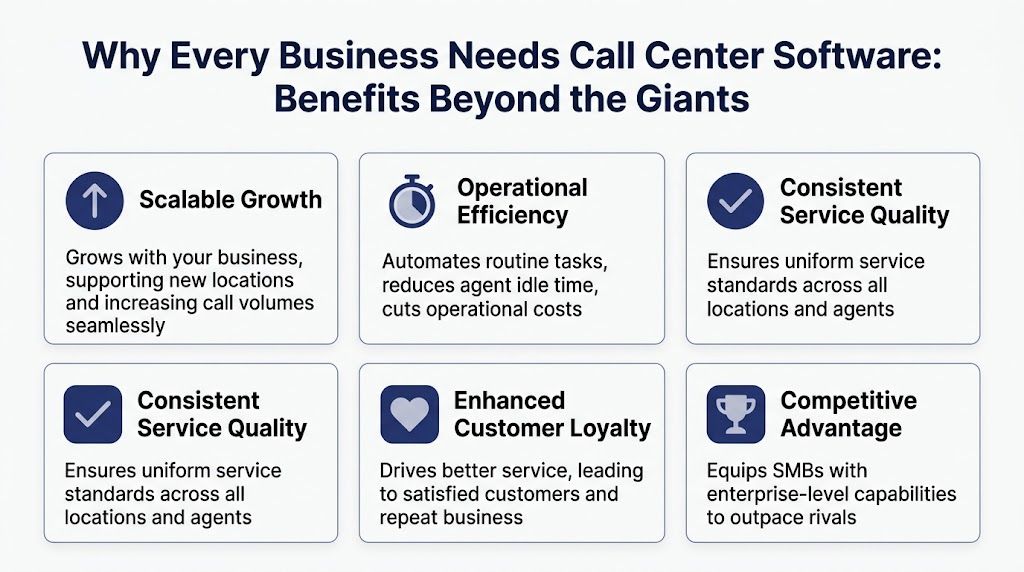
For SMBs, that is the actual business case for call center management software. It creates one operating model across a team that is no longer sitting in one office, using one schedule, and solving one kind of customer request.
You get consistency across locations without building a bigger management layer
A growing service business does not need more supervisors watching every call. It needs the system to handle the basics the same way every time. Greeting logic, queue rules, overflow paths, callback options, and escalation steps should not change based on which branch answered first.
That matters more than many owners expect. Customers do not separate your north office from your south office. They judge the brand as one business. If one team answers in 20 seconds and another lets calls ring, the customer still sees one company that feels unreliable.
The payoff shows up quickly:
- More predictable customer handling because calls follow defined paths instead of individual preference
- Fewer avoidable transfers because the system captures intent earlier and sends calls to the right queue
- Cleaner oversight because managers can review queue performance across the whole business, not chase updates branch by branch
Better visibility turns coaching from guesswork into management
Once every call, transfer, hold, and outcome sits in one system, coaching gets more practical. Managers can review patterns across teams, compare locations fairly, and spot process problems before they become customer complaints.
That is a meaningful shift for smaller companies. In a basic phone setup, one experienced employee often carries the operation through memory and hustle. In a call center platform, the process carries more of the load. New hires ramp faster because managers can coach from real interactions, not secondhand retellings. If a branch struggles with repeat calls or long talk times, leaders can trace the cause and decide whether the issue is training, routing, or staffing. A good starting point is tracking average handle time benchmarks and improvement strategies alongside transfer rates and repeat contacts.
Here is how that changes day-to-day operations:
| Business challenge | What modern software changes |
|---|---|
| Different service quality by location | Shared routing, recordings, and reporting create one operating standard |
| Managers spend time firefighting | Dashboards and interaction history expose issues earlier |
| Agents learn unevenly | Coaching uses actual calls, common failure points, and repeatable examples |
Small teams rarely struggle because they lack effort. They struggle because the work depends too much on individual memory.
You can grow capacity without rebuilding the phone environment every year
For small and midsize business buyers, this area typically offers the clearest return on investment. Implementing a call center system makes scaling your operations far less fragile. A single new branch, a seasonal rush, or the absence of a key employee will no longer throw the entire service operation off balance.
A multi-location company can reroute overflow to another office, centralize after-hours coverage, or give remote staff the same call flow as in-office teams. That is practical control, not enterprise theater. The goal is not to copy a large contact center. The goal is to run a smaller operation with fewer dropped balls, fewer customer repeats, and less manager intervention.
The customer experience side matters too. If you collect feedback after calls, structured prompts help teams compare patterns across locations and issue types. These VoC templates for product managers are useful examples of how to turn raw comments into themes a leadership team can act on.
For a growing business, the benefit is straightforward. You spend less time patching service gaps and more time running a system that can support the next location, the next hiring wave, and the next spike in demand.
Essential Call Center KPIs You Must Track
Buying better software without tracking the right numbers is like installing a new HVAC system and never checking the thermostat. You might feel improvement, but you won't know what changed, what broke, or whether the investment is paying off.
The goal with KPIs isn't to create a dashboard full of noise. It's to answer a handful of management questions clearly.
Track the metrics that explain customer effort and team efficiency
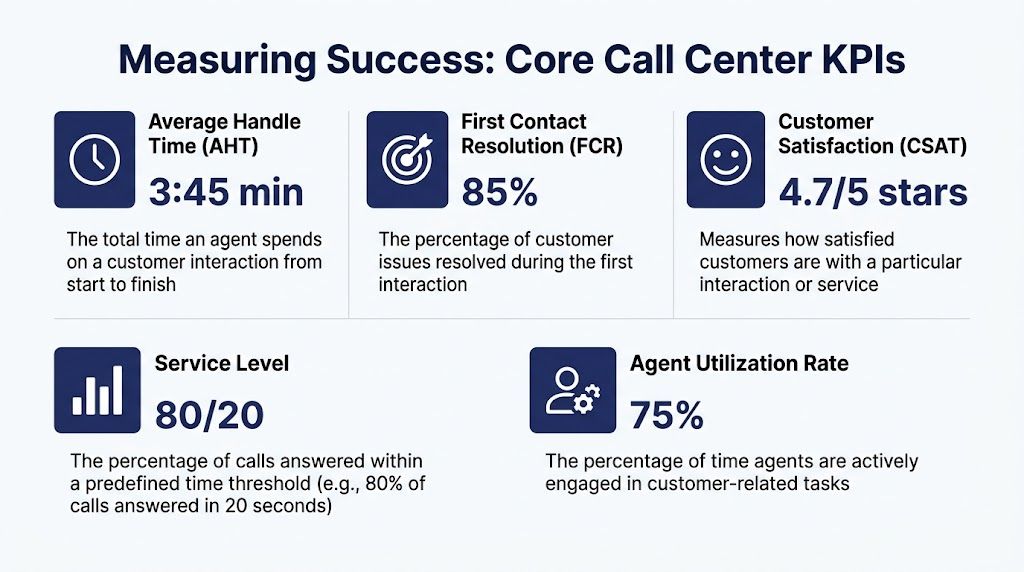
Start with a short set of KPIs that connect directly to service quality and labor use.
- Average handle time tells you how long interactions take from start to finish. It's a useful efficiency signal, but only when paired with quality.
- First contact resolution tells you whether the customer's issue was solved without repeat work or a handoff.
- Customer satisfaction tells you how the interaction felt from the customer side.
- Service level helps you see how reliably the team answers demand within your target window.
- Agent utilization shows how much time agents spend actively engaged in customer-related work.
If you want a deeper operational breakdown of this metric specifically, this guide on average handle time is worth reviewing before you set targets.
A common mistake is optimizing one metric in isolation. Push handle time down too hard and agents rush callers off the line. Focus only on service level and you may overstaff. Chase CSAT without understanding repeat contacts and you can miss hidden inefficiency.
This short walkthrough is a useful visual overview before you build your own dashboard:
Ask business questions, not just reporting questions
The best KPI reviews sound like operating reviews, not spreadsheet recitals.
Ask:
- Are customers reaching the right person the first time
- Where are waits increasing
- Which issue types create repeat contact
- Which teams resolve quickly without sacrificing quality
- Where does coaching need to be specific
For customer feedback beyond the standard post-call survey, these VoC templates for product managers can help teams structure how they collect and categorize qualitative feedback from real interactions.
If a metric doesn't change a staffing, routing, or coaching decision, it probably belongs lower on the dashboard.
Use trends to manage, not punish
KPIs are most useful when they reveal patterns over time. One bad day doesn't define a team. A repeated transfer spike every Monday morning does.
That's why good managers use metrics for diagnosis first. The point is to identify friction, improve call flows, and support agents with clearer expectations. Teams that treat dashboards as punishment tools usually get defensive behavior instead of better service.
Your Checklist for Choosing the Right Software
Most bad software decisions don't happen because the product had no features. They happen because the buyer asked the wrong questions.
For SMBs, the risk is usually one of two extremes. Either the system is too basic and you outgrow it quickly, or it's overloaded with complexity your team won't adopt. The right choice sits in the middle. Strong routing, usable reporting, manageable administration, and enough flexibility to grow without turning the rollout into an IT project that never ends.
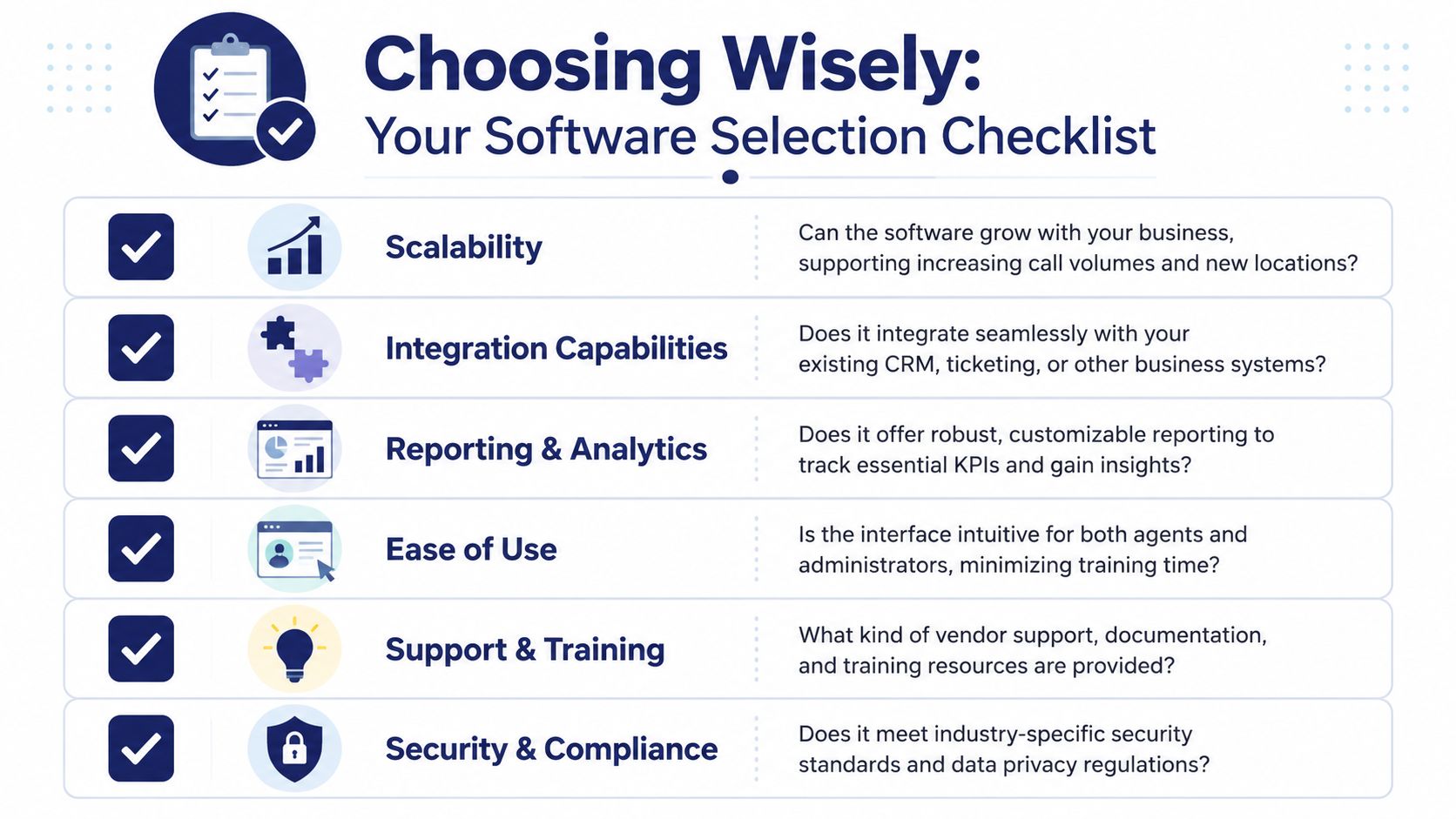
The questions that expose fit quickly
Use vendor demos to test operational fit, not just interface polish.
- Can we build the routing logic we need? Ask them to model your real call paths, including overflow, after-hours handling, and multi-location routing.
- How hard is day-to-day administration? Someone on your team will own queues, users, schedules, and recordings. Make sure that work is realistic.
- What reporting comes standard? If key dashboards require add-ons, outside consultants, or manual exports, the total cost of ownership goes up fast.
- How does the system handle growth? Adding a location, remote agents, or another service line shouldn't require redesigning everything.
Compliance and security need direct answers
Many buying processes often become sloppy. Comparison pages frequently emphasize features but rarely address governance.
That's a problem because software choices affect retention, recording, review, and data handling. Calabrio's overview of call center tools highlights an issue buyers often overlook: platforms that capture 100% of interactions can reduce regulatory risk only if the vendor provides clear controls for data residency, call recording consent, and industry-specific retention rules.
Ask blunt questions:
| Checklist item | What to ask the vendor |
|---|---|
| Data residency | Where is interaction data stored, and can storage be aligned with our requirements? |
| Call recording consent | How does the platform support consent workflows and policy configuration? |
| Retention controls | Can we apply different retention rules by team, use case, or compliance need? |
| Access management | Who can search, playback, download, or export interactions? |
A polished demo can hide weak controls. Compliance gaps usually don't show up until after go-live, when changing platforms is far more painful.
Support matters more than buyers think
For smaller businesses, implementation support isn't a bonus. It's part of the product.
The software may be cloud-based, but your operation still has to translate real-world call flows into queues, rules, permissions, and reports. If the vendor leaves that burden entirely on your team, the project can stall or go live half-built.
A strong partner should be able to help you map business processes, not just provision seats.
Implementation, ROI, and Avoiding Common Pitfalls
The software decision gets the attention. The setup determines the outcome.
A mediocre platform with disciplined implementation often outperforms a powerful platform that was rolled out carelessly. That's especially true for SMBs, where the same few people are juggling operations, IT, training, and vendor management at the same time.
Start with the call flows that matter most
Before launch, define the handful of customer journeys that create the most volume or the most pain. New customer inquiries, billing questions, service scheduling, support escalations, and after-hours handling are usually enough to build the first version well.
Then pressure-test them.
- Map current call paths so you can see where transfers, dead ends, and manual work happen today.
- Set routing rules before go-live instead of improvising them after customers start calling.
- Train supervisors first because they'll handle exceptions and coach everyone else.
- Launch in phases when possible so one broken queue doesn't disrupt the whole operation.
ROI comes from adoption, not feature count
Teams often overspend. They buy the suite, turn on the basics, and leave the rest untouched.
That pattern isn't unique to contact center software. CH Consulting Group's article on underutilized contact center software capabilities notes a broader SaaS problem: companies waste more than $135,000 annually on unused, underused, or duplicate tools. The lesson for call center buyers is straightforward. ROI depends less on buying the most advanced package and more on choosing the capabilities your team will use.
Measure return through operational changes you can observe:
- Fewer missed or misrouted calls
- Less repeat work caused by poor first-contact handling
- Better supervisor visibility into coaching and queue pressure
- Smoother staffing decisions
- A clearer customer experience across locations
If you're reviewing operational levers beyond software alone, this guide on how to reduce call center costs is a useful companion for thinking through staffing, workflows, and automation together.
Watch for the common failure points
Most rollout problems are predictable.
One is overprovisioning. Teams buy advanced modules they won't touch for months. Another is weak change management. The software goes live, but agents don't understand the new flows, supervisors don't review reports consistently, and old habits survive inside the new platform.
The third is underestimating setup support. Cloud software is easier to deploy than old PBX hardware, but that doesn't mean the operational design happens automatically. If you're moving off an older phone environment, a managed path into hosted VoIP solutions can reduce disruption because the transition is handled as an operations project, not just a telecom swap.
Good implementations don't try to activate everything. They make the core workflows reliable first, then expand with purpose.
The best outcomes usually come from a simple sequence: stabilize routing, train around real scenarios, review early KPI trends, and only then add more advanced workflows. That approach protects service quality while giving the team time to absorb the change.
If you're replacing an aging phone setup and need a smoother path into a more capable support operation, SnapDial is built for that transition. It gives growing businesses cloud-based calling, queue management, call routing, reporting, and mobile-ready access with predictable pricing, white-glove setup, and 24/7 support from a Texas team. For SMBs and multi-location companies that want modern call handling without hidden complexity, that kind of hands-on implementation support can make the difference between buying software and improving operations.