
On a normal weekday, an SMB owner might start with one simple goal: get a project shipped, answer customers faster, and keep the team aligned across home offices, branch locations, and the main office. By noon, that goal has turned into a scavenger hunt. One update lives in chat. A client request sits in email. A decision happened on a quick call that nobody documented. Someone in the office assumes everyone heard the hallway discussion. The remote employee didn't.
That's what broken remote team communication looks like in practice. Not dramatic failure. Constant friction. Small misses pile up into delayed work, duplicate effort, slower customer response, and preventable tension between people who are all trying to do their jobs well.
For SMBs, this is an operations problem before it's a culture problem. The businesses that handle it well don't necessarily communicate more. They communicate with clearer rules, fewer blind spots, and better follow-through.
The Hidden Cost of Disconnected Teams
A familiar pattern shows up in growing companies. Sales asks support for an update in chat. Support replies in email. Operations jumps on a call to sort it out. Two hours later, nobody is fully sure who owns the next step. The work moves, but slowly. More importantly, margin gets eaten by avoidable coordination.
That hidden cost gets larger when the volume of communication explodes. The shift to remote work pushed teams into a much heavier digital operating model. Microsoft Teams grew from 2 million daily active users in 2017 to 320 million monthly active users by early 2024, and one 2025 synthesis estimated that the distributed workforce sends 376 billion emails daily and that office workers receive about 121 business emails per day, according to remote work communication statistics compiled by SpeakWise. That's not a niche workflow anymore. It's the default way many businesses run.
When communication volume rises, missed handoffs become expensive. The same logic applies to customer conversations. If calls go unanswered, revenue slips through cracks that often stay invisible until someone reviews the pipeline. That's why resources on the cost of missed business calls matter. They help owners connect communication failures to actual business impact, not just annoyance.
Where SMBs usually get stuck
Teams often don't have a people problem. They have a system problem.
- Too many unofficial channels create parallel conversations.
- No shared rules leave employees guessing whether to call, chat, email, or wait.
- Decisions aren't captured so the team repeats the same discussions.
- Office-first habits shut remote staff out of important context.
A business doesn't fix this by telling people to “communicate better.” It fixes it by building a usable operating system for communication. A practical starting point is to define how each channel should be used and how information gets recorded, which is the same principle behind improving business communication in a more structured way, as outlined in this guide on how to improve business communication.
Practical rule: If your team has to ask where a message belongs, your communication system is already costing you time.
Why More Tools Create More Problems
Many SMBs respond to communication friction by buying another app. That usually makes things worse.
The issue isn't a shortage of tools. It's uncoordinated tools. A team might use Microsoft Teams for meetings, Slack for internal chat, email for clients, a project board for tasks, text messages for urgency, and personal phones when nobody can find the right thread. Each tool may be useful on its own. Together, without rules, they create an orchestra where every section is reading different sheet music.
A 2026 workplace communication review reported that 29% of remote workers still cite communication gaps as their biggest challenge, 38% of managers say collaboration is harder in remote settings, and 55% of employees find it difficult to manage the volume of work communications, according to Pumble's workplace communication review. More channels didn't remove confusion. They multiplied it.
The real problems hiding behind tool sprawl
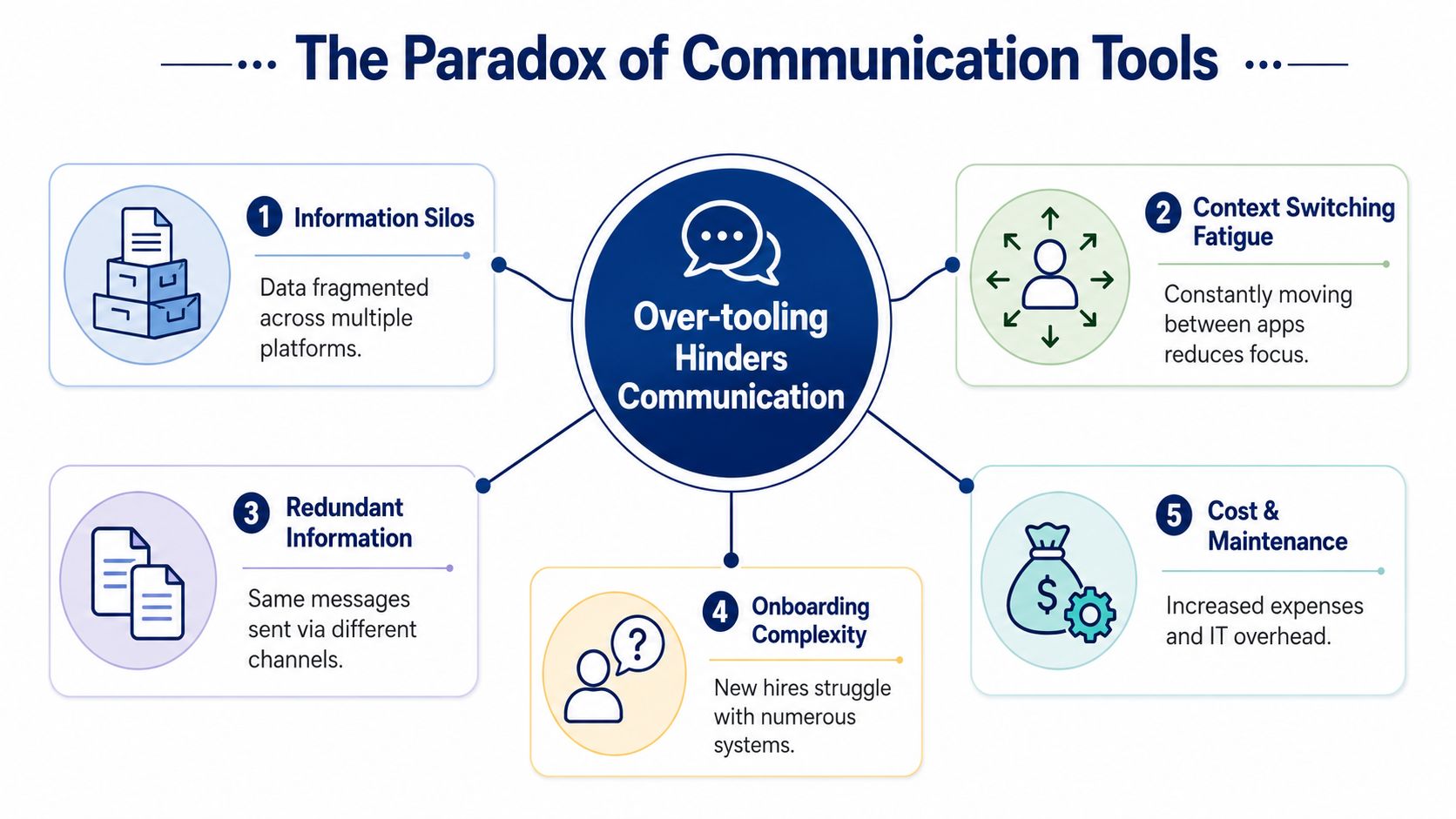
The pain usually shows up in five ways.
- Information silos. Teams split records across inboxes, chat threads, meeting notes, and project boards.
- Context switching fatigue. Employees spend their day bouncing between apps instead of moving work forward.
- Redundant information. The same update gets posted in multiple places because nobody trusts a single channel.
- Onboarding complexity. New hires learn tools before they learn workflows.
- Cost and maintenance. Every added platform creates admin work, licensing decisions, and support overhead.
None of those issues are solved by “better adoption.” They're solved by tighter architecture.
The mistake leaders make
Leaders often assume responsiveness equals alignment. It doesn't. A team can reply quickly and still misunderstand each other. In fact, constant responsiveness often hides weak process because people are forced to clarify in real time what should have been clear from the start.
When employees jump between tools all day, communication feels active. That doesn't mean it's effective.
A good remote team communication system lowers the need for rescue messages. People know where decisions live, how urgency gets flagged, and when a conversation needs to move from text to voice or video.
What to replace app chaos with
Instead of adding another layer, simplify around three questions:
- Which channel handles urgent interruptions
- Which channel stores official decisions
- Which channel resolves ambiguous work fastest
If leadership can't answer those clearly, the team will improvise. Improvisation works for a week. It fails at scale.
Four Pillars of Successful Remote Communication
Strong remote team communication rests on four pillars: clarity, consistency, context, and culture. Most SMB communication problems can be traced back to one of those four breaking down.
Clarity
Clarity starts with channel purpose. Real-time communication should handle ambiguity, conflict, and work that needs fast back-and-forth. Written or recorded communication should handle routine updates, decisions, and information others may need later.
That split matters. Effective remote communication works best when organizations separate synchronous and asynchronous channels, using real-time media for complex problem-solving and written or recorded updates for routine status, as explained in Prialto's guidance on remote team communication. SMBs that ignore this end up scheduling meetings for updates that should have been written, while urgent problems get buried in long message threads.
Here's a practical version of that rule set.
Synchronous vs. Asynchronous Communication
| Method | Best For | Examples for SMBs | Tool Feature |
|---|---|---|---|
| Synchronous | Complex issues, conflict resolution, live decisions | Customer escalation call, pricing discussion, implementation troubleshooting | Calling, video meetings, screen sharing |
| Asynchronous | Status updates, approvals, records, routine handoffs | Weekly progress update, SOP changes, client summary, task assignment | Email, shared docs, recorded updates, task comments |
| Synchronous | Sensitive feedback or nuanced coaching | Manager one-on-one, performance clarification | Voice call, video call |
| Asynchronous | Repetitive or reference-heavy information | Onboarding notes, process checklists, meeting recap | Knowledge base, document repository |
| Synchronous | Work with many dependencies happening at once | Launch war room, service incident coordination | Group call, team chat with live presence |
| Asynchronous | Cross-time-zone collaboration | End-of-day handoff, next-step notes for another location | Shared task board, documented update |
Consistency
A system only works if people can rely on it. If your team uses chat for urgent issues on Monday and email for urgent issues on Thursday, they don't have a communication system. They have habits.
Consistency means setting a repeatable pattern:
- One primary channel for urgent internal issues
- One standard place for task ownership
- One method for post-meeting recaps
- One escalation path when a response is delayed
That reduces hesitation. Employees stop wondering what the boss prefers and start following a known process.
Context
Context is where many businesses fail. A meeting happens, people leave with different interpretations, and nobody notices until the handoff breaks.
Documentation is what keeps distributed work from unraveling. Decision logs, action items, and written summaries give remote employees the same access to context that in-office staff often get informally.
The team doesn't need more messages. It needs fewer gaps between decision, ownership, and follow-through.
Culture
Culture isn't separate from communication. It shows up in whether people ask questions early, whether managers leave room for disagreement, and whether remote staff are treated as fully present participants.
For SMB owners, this pillar has a hard business edge. If people don't feel safe saying “I'm unclear on the next step,” mistakes get discovered later, when they cost more to fix.
The best communication cultures are easy to describe: clear expectations, predictable channels, documented decisions, and no second-class participants.
Building Your Remote Communication Tech Stack
Technology shouldn't drive your communication model. It should support it. That means your stack has to do more than send messages. It has to reduce fragmentation, preserve context, and keep people reachable whether they're at a desk, on the road, or working from home.
A lot of SMBs build their stack by accumulation. They start with a legacy phone system, add a video app, bolt on chat, and rely on personal cell phones when the rest doesn't cooperate. The result is operational drift. Employees choose whatever works fastest for them in the moment, which usually creates more cleanup for everyone else later.
What a usable stack needs to cover
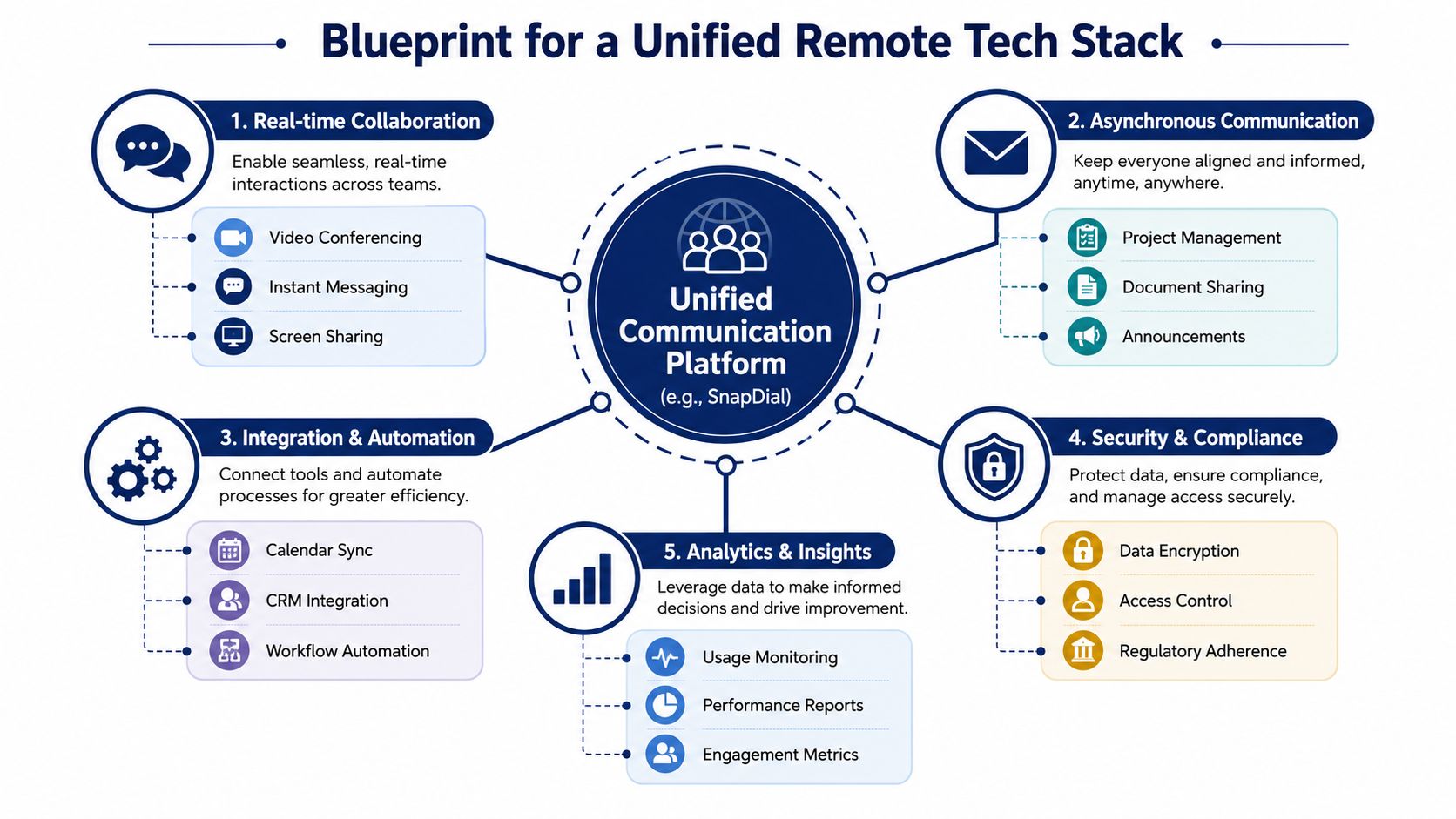
A practical remote communication stack should support five functions.
| Function | What it needs to do for the business |
|---|---|
| Real-time collaboration | Handle calls, meetings, screen sharing, and fast internal coordination |
| Asynchronous communication | Store updates, notes, files, and decisions people can review later |
| Integration and automation | Connect calendars, CRM records, task systems, and routing logic |
| Security and access control | Keep business communications governed and centrally managed |
| Analytics and reporting | Show call activity, queue behavior, response patterns, and usage trends |
Many buyers compare features line by line but miss the operational question: does the system keep communication in one managed environment, or does it force employees to create workarounds?
The backbone matters more than the app count
For many SMBs, the communication backbone is the phone and unified communications layer because it touches customer contact, internal escalation, call routing, and mobile access. If that layer is fragmented, everything built on top of it gets noisier.
A unified platform can help standardize calling, conferencing, messaging, routing, voicemail handling, and admin controls in one place. That's why many businesses look at unified communications for business rather than separate point tools for each function. The goal isn't novelty. It's fewer handoff failures.
As one example, SnapDial combines hosted VoIP, calling, conferencing, call routing, mobile access, call recording, visual voicemail with transcription, and admin controls in a single system. For an SMB, that can reduce the number of places employees have to check when they're trying to answer customers and coordinate internally.
Features that solve specific remote-work problems
Don't buy based on generic “collaboration” language. Buy against the friction your team already feels.
- For missed calls and uneven coverage choose auto attendants, call routing, queue management, and mobile apps.
- For lost context use call recording, voicemail transcription, call logs, and centralized user management.
- For hybrid mobility make sure staff can handle business calls away from the office without exposing personal numbers.
- For manager visibility look for reporting that shows usage patterns and service bottlenecks.
If you're comparing categories and vendors, this overview of tools for distributed teams is useful for framing the broader ecosystem around messaging, collaboration, and employee communication.
Buy fewer tools that do more of the right work together. Every workaround your team invents today becomes tomorrow's process debt.
How to Fix the Broken Hybrid Meeting
Hybrid meetings are where communication inequality becomes visible. The people in the room read body language, hear side comments, and often keep talking before remote attendees can jump in. The remote group gets the formal meeting. The in-room group gets the meeting plus the surrounding context.
That's why hybrid meetings fail even when the technology works.

The University of Oregon specifically warns that side conversations in the room can be difficult for remote employees to follow and recommends giving all employees an opportunity to participate, leaving space for small talk, and communicating expectations in writing as well as verbally, in its guidance on remote work communications and engagement. That advice matters because the primary problem isn't etiquette. It's meeting design.
Run hybrid meetings as remote-first
If some people are remote, design for the remote experience first. That changes a few habits immediately.
- Use one shared digital workspace instead of a physical whiteboard that only the room can see clearly.
- Have everyone join with the same agenda and materials before the meeting starts.
- State decisions verbally and in writing during the meeting, not after.
- Pause for remote input first before moving to the next topic.
A strong video setup helps, but hardware alone won't fix conversational imbalance. What helps more is a structure that protects airtime and keeps all participants inside the same information flow. Businesses evaluating that side of the stack should understand the basics of video conferencing as part of the meeting design, not just the equipment decision.
Give someone ownership inside the room
In mixed-location meetings, remote attendees often need an advocate. Assign one person in the room to watch for raised hands, monitor chat, repeat unclear in-room comments, and stop side conversations.
That role sounds minor. It isn't. It corrects the most common hybrid failure, which is assuming remote participants will interrupt if they need something. Many won't, especially when the room energy is moving fast.
A few practical rules work well:
- Open with expectations. Confirm how questions will be handled and where notes will live.
- Rotate speaking turns on key decisions. Don't rely on whoever talks fastest.
- Summarize before closing each topic. Confirm owner, next step, and deadline in the shared space.
This short video is a useful prompt for teams that need to rethink mixed-location meeting habits.
Hybrid meetings should feel slightly over-structured. That's usually a sign they're finally fair.
An Actionable Implementation Checklist
Most SMBs don't need a six-month transformation project. They need a clean implementation sequence that removes ambiguity fast and gives employees a simple set of rules to follow.
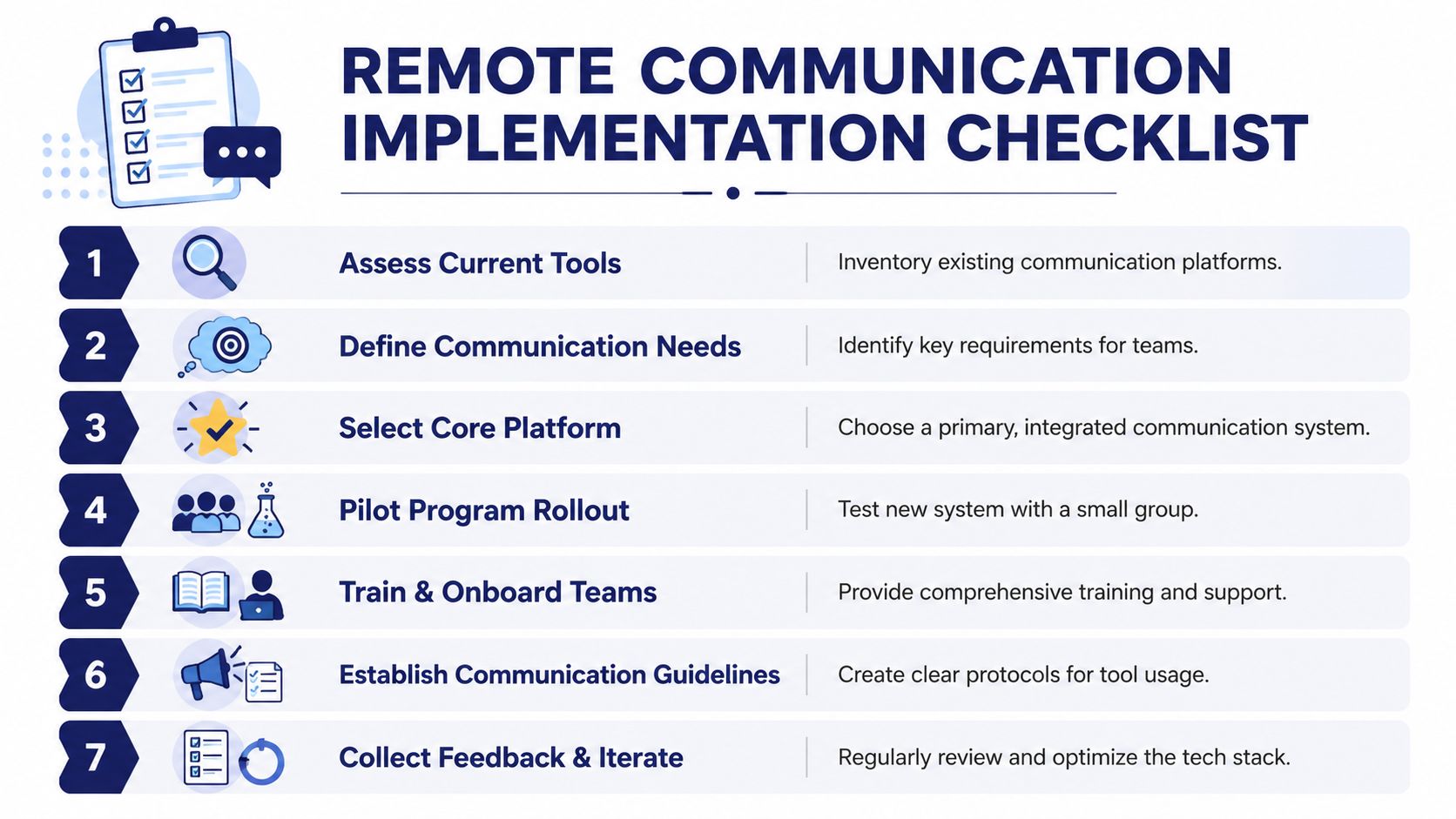
Seven steps that work in real businesses
Assess current tools
List every channel your team uses for customers, internal questions, meetings, and task handoffs. Include unofficial workarounds such as texting, personal cell calls, and ad hoc document sharing.Define communication needs
Separate needs by use case. Urgent internal issue. Customer callback. Routine project update. Formal approval. Escalation. Hybrid meeting. If you skip this step, you'll choose tools based on demos instead of operations.Select a core platform
Choose the system that will serve as the primary communication backbone. That usually means the platform handling calling, conferencing, routing, and centralized administration.Run a pilot
Start with one team or one location. A pilot reveals where your rules are unclear before you roll them across the company.Train and onboard
Don't just explain buttons. Train employees on scenarios. Which tool do they use when a client calls after hours? How do they escalate an urgent internal issue? Where do they document a decision from a meeting?Publish communication guidelines
Keep this to one page if possible. Employees should be able to scan it quickly and know how your business communicates.Collect feedback and adjust
Review what people still bypass. Those workarounds usually reveal the next fix you need to make.
The one-page guide every team needs
Your internal guide should answer these questions clearly:
- Urgency rules for chat, call, and email
- Meeting rules for agendas, note-taking, and action items
- Hybrid rules for inclusion, turn-taking, and shared documents
- Escalation rules when responses lag or customers are waiting
- Ownership rules for documenting decisions
For managers who want broader people-process advice alongside system rollout, WeekBlast's guide to remote team success is a useful companion read.
What not to do
Avoid three common mistakes:
- Don't launch everything at once if your team is already overloaded.
- Don't let each manager invent separate norms unless you want cross-team confusion.
- Don't treat rollout as finished after setup. Communication systems fail in adoption, not in procurement.
Measuring Success and Fostering a Clear Culture
If you want better remote team communication, don't measure activity alone. More messages, more meetings, and more call volume can mean the system is getting noisier, not clearer.
A better test is whether the team preserves decision context. After a meeting, can someone who wasn't there understand what was decided, who owns the next step, and what happens next? That's where communication quality starts to show up in operations.
One industry source reports that taking meeting minutes can reduce misunderstandings by up to 25%, especially when teams pair minutes with assigned action items and explicit next steps, according to Huler's discussion of why communication is important in remote teams. For SMBs, that matters because dropped handoffs are expensive. They slow delivery, frustrate customers, and create rework that never appears as a line item on a budget.
What to watch instead of vanity metrics
Use a small set of business-facing indicators:
- Clarity after meetings measured through recap quality and owner assignment
- Speed to decision on projects that require multiple people or locations
- Reduced follow-up churn when fewer messages are needed to clarify the same issue
- Fewer missed customer handoffs between teams, shifts, or locations
Culture reinforces those outcomes. Teams communicate better when managers reward clear documentation, answer ambiguity early, and make it normal to ask for context before acting.
Remote communication works when tools, process, and behavior support each other. If one is weak, the other two have to compensate. That's rarely efficient, and it's never very profitable.
If your business is replacing a legacy phone system or trying to unify calling, conferencing, routing, and mobile access for a remote or hybrid team, SnapDial is worth evaluating as part of that architecture. The platform is built around cloud business communications, with features such as hosted VoIP, call routing, auto attendants, mobile apps, conferencing, call recording, visual voicemail with transcription, and centralized administration that can help SMBs reduce communication sprawl and keep employees reachable across locations.