
The usual trigger for looking up what an IVR system is isn't curiosity. It's pain.
Your front desk is juggling sales calls, support questions, vendor calls, and after-hours messages. A customer calls during lunch and gets voicemail. Another caller presses zero three times because your old phone menu makes no sense. Someone on your team answers a billing question, then transfers the call twice because they don't have the right context. That kind of phone chaos doesn't just waste time. It makes a growing business sound smaller and less organized than it really is.
An IVR system, short for Interactive Voice Response, is the layer that brings order to that mess. Think of it as a digital receptionist with routing rules, business logic, and self-service options built in. It answers, gathers intent, sends callers where they need to go, and in more advanced setups, handles routine tasks without involving a live person at all.
For teams comparing phone platforms, it also helps to understand where IVR fits among other automation tools. If you're also evaluating outbound communication, this guide to an automated calling system is a useful companion because it shows the difference between handling inbound demand and proactively reaching customers.
What Is an IVR System and Why It Matters in 2026
A basic definition is simple. An IVR system is a phone system feature that lets callers interact with your business through keypad inputs or spoken responses, then routes them to the right destination or gives them an answer automatically.
That sounds technical, but the business purpose is straightforward. It helps you stop treating every call like it needs a human receptionist from the first second.
Why businesses keep investing in IVR
IVR isn't a niche tool used only by giant call centers. The market itself shows that. The global IVR market was valued at $4.2 billion in 2020 and is projected to reach $6.7 billion by 2026, while 85.8% of Fortune 500 companies use IVR or auto-attendant technology to manage high call volumes efficiently, according to Fit Small Business IVR statistics.
That matters for smaller companies because large enterprises usually adopt communications tools only after they've proved operational value. If nearly all major firms rely on some version of IVR, the question for an SMB isn't whether the concept works. It's whether you're choosing the right version.
Practical rule: The wrong IVR frustrates callers. The right IVR removes friction before your team even picks up.
Why the 2026 decision is different
A lot of businesses still picture IVR as the old “press 1 for sales” menu. That's part of the story, but not the full one anymore. There are now two very different categories on the market:
- Legacy menu-based systems that mainly route calls
- Modern conversational systems that understand intent and support self-service in a more natural way
If you're replacing a legacy PBX, that distinction is strategic. You're not just buying a phone menu. You're deciding how customers experience your business when nobody is immediately available.
For companies still sorting out the broader phone stack, it also helps to understand how IVR fits inside a hosted setup. This overview of cloud phone systems for business gives that bigger picture.
How an IVR System Actually Works
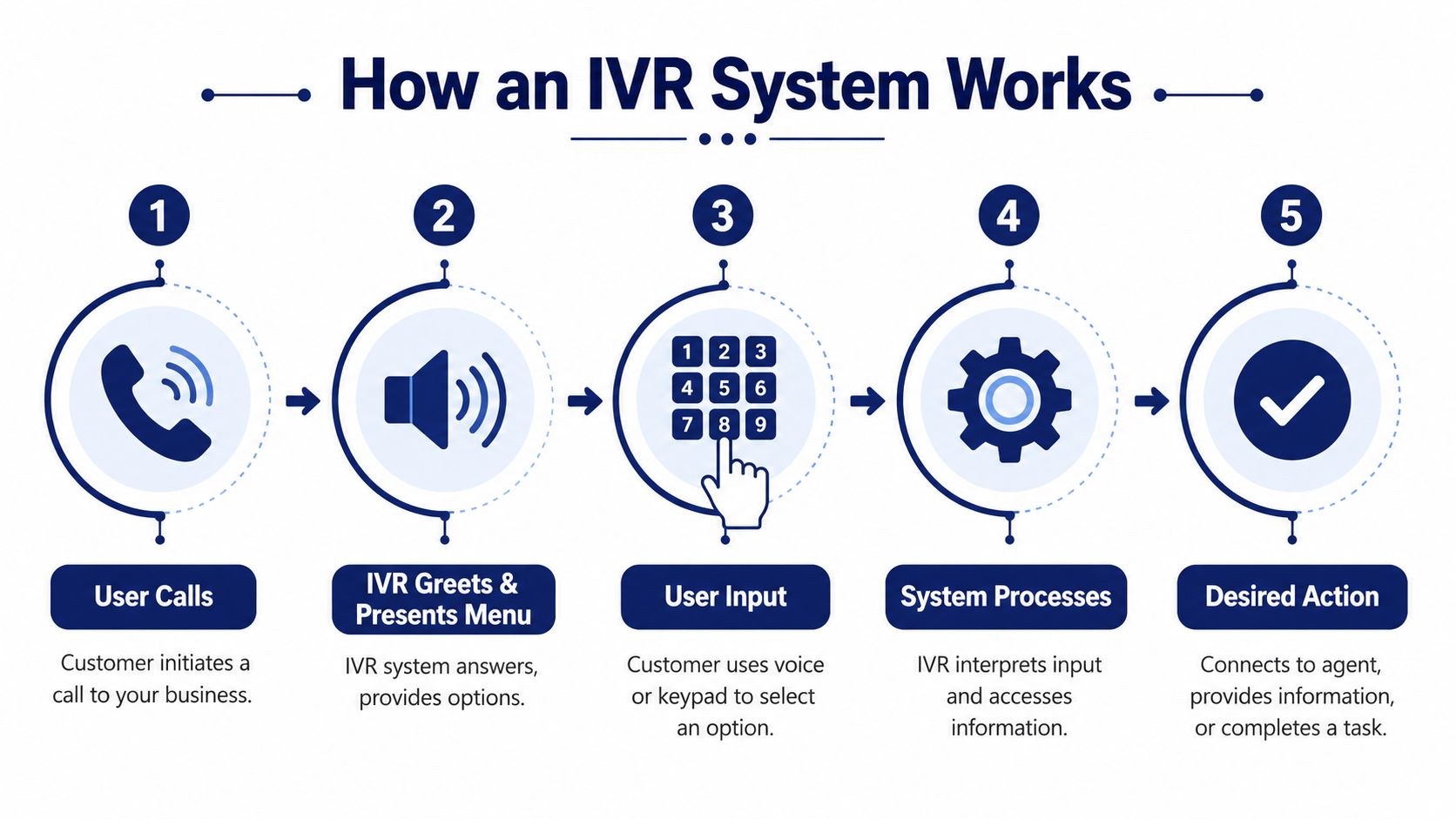
At a technical level, an IVR works like a digital traffic controller for calls. A caller comes in, the system identifies what lane they belong in, and then it either sends them to the right person or resolves the request automatically.
The core pieces behind the scenes
An IVR runs through Computer-Telephony Integration, often shortened to CTI. It connects phone calls with software logic, so the system can take an incoming call, interpret input, and route the call based on rules. IVR systems operate over VoIP networks, process DTMF keypad inputs and voice recognition, and can route calls to agents or databases, replacing the old manual switchboard while enabling 24/7 service and improving first-contact resolution, as described in Wikipedia's overview of interactive voice response.
The practical components usually look like this:
- Phone connectivity so the call reaches your business
- Call flow logic that determines what the caller hears next
- Input handling through speech or keypad selection
- Routing rules that send the caller to a queue, user, voicemail, or self-service result
- Integrations that let the system check records, order status, appointments, or account details
What happens during a typical call
Here's the simplest way to think about the flow:
- The caller dials your number.
- The IVR answers with a greeting.
- The system offers choices such as sales, support, billing, location, or hours.
- The caller responds by speaking or pressing a key.
- The system acts by routing the call, giving information, or collecting details before transfer.
That last step is what separates a smart setup from a dead-end phone tree. Good IVR design doesn't just ask callers to choose from a list. It reduces work for the person answering next.
If your team still spends the first minute of every call collecting information the customer already entered, your IVR is only half built.
Where modern businesses see the difference
The real leap happens when IVR connects to business workflows instead of acting like a standalone menu. A restaurant can route callers to ordering, reservations, and hours. A clinic can separate appointments from billing. A service company can direct emergency calls differently from routine scheduling.
If you're in food service, this breakdown of OrderOut's solution for restaurant orders is a good example of how phone automation becomes operational, not just administrative.
IVR vs Auto Attendant What Is the Difference
Many buyers often get confused. Vendors, resellers, and even internal IT teams often use auto attendant and IVR as if they mean the same thing. They don't.
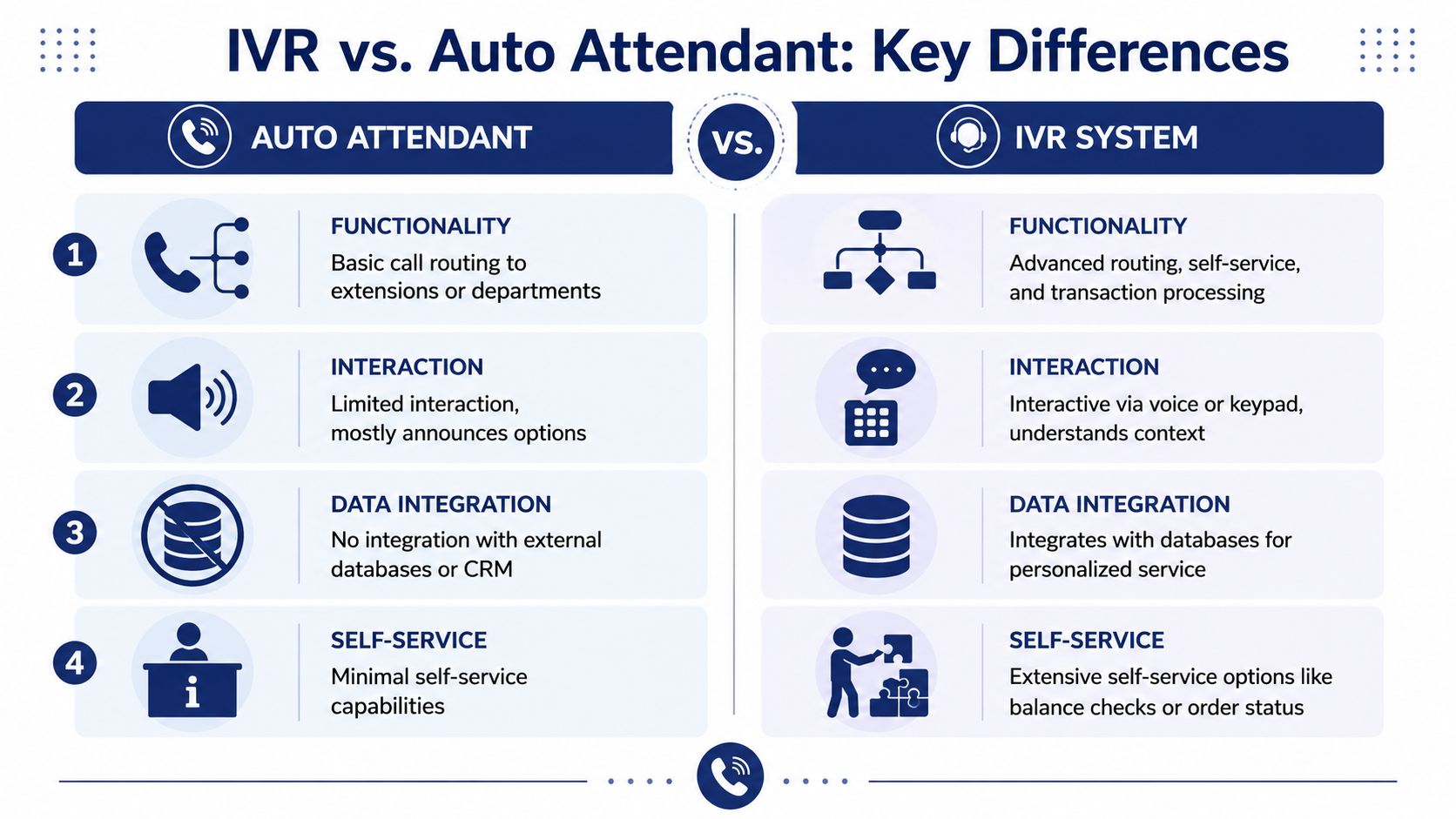
An auto attendant is usually the simpler tool. It answers the phone and offers routing options. An IVR system goes further. It interacts, gathers information, checks systems, and can complete tasks before a person joins the call.
The simple side-by-side view
| System | Best description | What it usually does | Where it falls short |
|---|---|---|---|
| Auto attendant | A digital receptionist | Greets callers and routes by extension or department | Limited self-service and little context |
| Traditional IVR | A rule-based interactive phone system | Routes calls, collects keypad input, offers basic self-service | Can feel rigid if overbuilt |
| Conversational IVR | An intent-driven voice interface | Understands natural requests and adapts the path | Requires better design and setup discipline |
A basic auto attendant is often enough for a very small office with low call complexity. If callers mostly need a person and the only question is which person, keep it simple.
If your callers regularly need status updates, billing help, order information, appointment handling, or triage, a basic menu starts breaking down fast.
For a closer look at the simpler category, this explanation of a telephone auto attendant helps draw the line.
Why conversational IVR changes the experience
The distinction between rigid DTMF menus and conversational IVR is not cosmetic. Organizations adopting Conversational IVR see up to 35% lower abandonment rates and 20% faster resolution times because intent-based routing replaces rigid button presses, according to RingCentral's interactive voice response guide.
That tells you something important. The issue isn't whether customers dislike automation. They dislike bad automation.
A caller saying “I need to change my delivery address” wants progress, not a scavenger hunt through four menu layers. Conversational IVR is built for that kind of intent.
A short overview can help make the contrast more visual:
Old phone trees ask callers to think like your org chart. Better IVR lets them speak in terms of their problem.
Key Business Benefits of Using an IVR
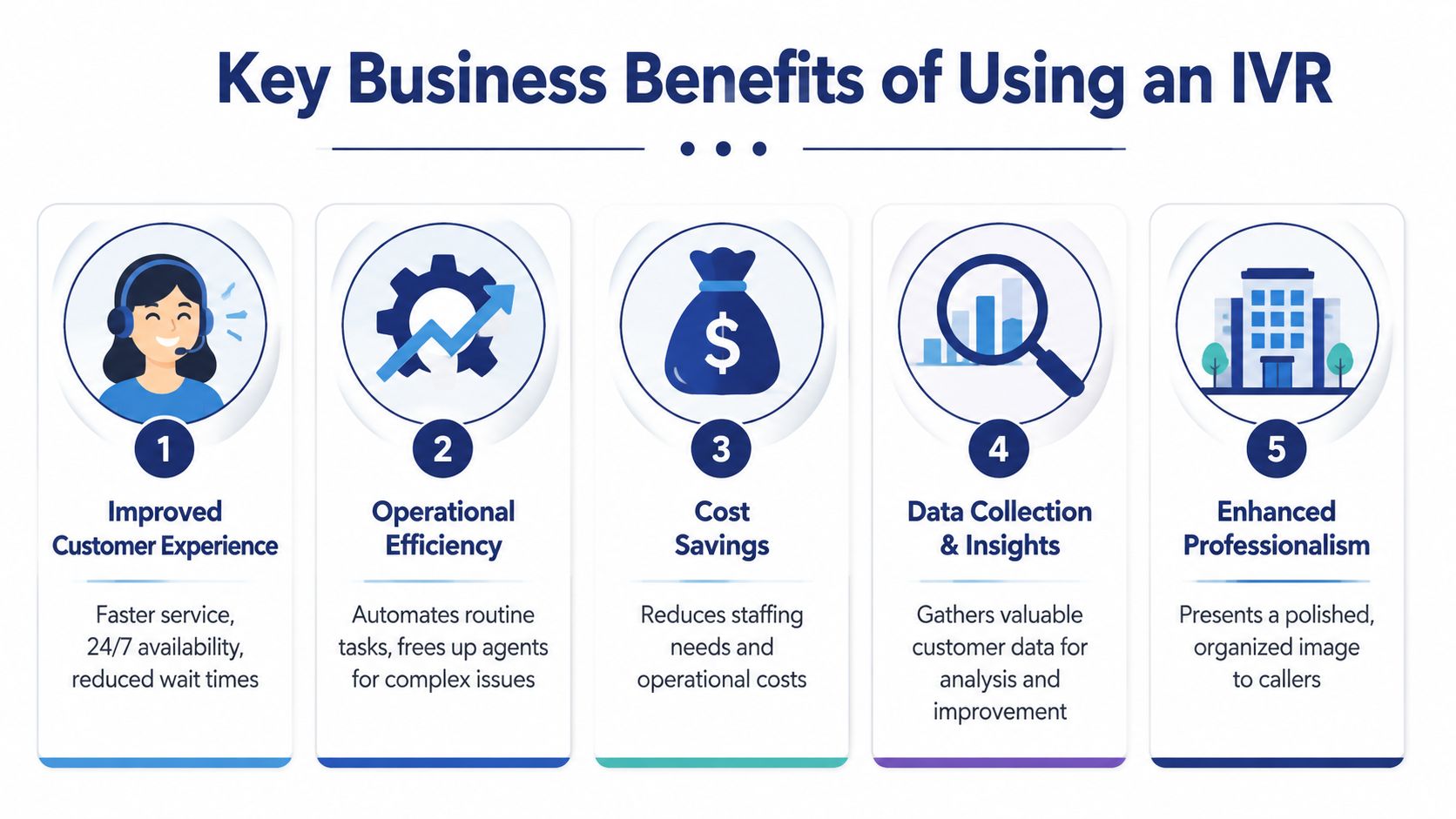
Businesses don't implement IVR because it's a telecom feature. They implement it because it changes staffing pressure, customer wait time, and the number of calls that need a human.
Better customer experience at the point of entry
The first benefit is simple. Callers get directed faster.
That can mean hearing store hours without waiting. It can mean reaching billing without going through reception. It can mean getting a callback option instead of sitting in queue. Customers judge competence quickly, and phone handling is one of the earliest signals.
Higher efficiency for the team
Good IVR protects your staff from preventable interruptions. Instead of everyone handling whatever rings through, the system filters the easy stuff and sends qualified calls where they belong.
Modern IVR systems using NLP and conversational AI can lower contact center call volumes by up to 30% to 50% in optimized implementations through effective call deflection, according to Zendesk's guide to IVR in call centers. In practice, that means fewer routine calls land with live agents, and the agents who do answer spend more time on work that requires judgment.
More predictable operations under pressure
A phone system gets tested when volume spikes, not when the office is quiet. IVR helps absorb that pressure.
Some of the practical gains include:
- After-hours coverage: Callers still get help, directions, or a voicemail path that makes sense.
- Cleaner routing: Sales doesn't keep receiving support calls by accident.
- Consistent handling: Every caller gets the same opening experience, even when your staff rotates or works remotely.
- Less front-desk overload: Admin staff stop acting as a live switchboard.
A more professional brand impression
This part is underrated. Call handling shapes perception.
A business with a clear greeting, useful options, and smooth routing sounds established. A business where every call rings a desk phone and bounces around sounds patchwork, even if the actual service is strong.
The customer doesn't care whether your phone setup is old, underfunded, or temporary. They only hear whether getting help feels easy.
Practical IVR Use Cases for Modern Businesses
The easiest way to understand what an IVR system is is to look at where it earns its keep. The answer changes by business type.

A small business that needs cleaner call handling
A law office, agency, accounting firm, or home services company often starts with one shared number and too many interruptions. In that environment, IVR does best when it's restrained.
A practical flow might sound like this:
- Press 1 for new business
- Press 2 for existing client support
- Press 3 for billing
- Press 4 for office hours and location
- Press 0 to leave a message
That setup doesn't need to be fancy. It just needs to stop sales calls from colliding with support requests and stop after-hours callers from hitting a dead end.
A multi-location business that needs consistency
Retail groups, clinics, franchise operators, and regional service companies often struggle with fragmented phone habits. One location answers differently from another. One site sends everything to voicemail. Another keeps handwritten transfer lists near the phone.
IVR helps centralize the front door while still routing locally.
A caller can choose a location, department, or service type from one number. The system can then send the call to the right site, voicemail, or on-call path. That matters if your business wants one public brand presence but still runs across several offices or stores.
A service team that needs triage
In support-heavy environments, not every call deserves the same path.
A good IVR can separate urgent issues from routine ones. It can direct existing customers to support while keeping prospects on a sales path. It can gather order numbers, account references, or the reason for calling before transfer, so the next person starts with context.
That changes the quality of the conversation. Agents spend less time sorting and more time solving.
A remote or hybrid workforce that can't rely on desk phones
This is one of the most practical modern use cases. When employees work across home offices, branch locations, and mobile devices, the old model of “ring the front desk and transfer manually” breaks apart.
IVR becomes the stable front layer. Calls enter one business number, then route by role, schedule, queue, or escalation rule. The caller doesn't need to know whether your support lead is in headquarters, at home, or on a mobile app. They just need the call to reach the right person.
IVR Implementation and Best Practices
An IVR can improve operations fast, but it can also create a new kind of frustration if it's designed poorly. Most bad systems fail for predictable reasons. Too many choices, weak routing logic, no way to reach a person, and no connection to the tools your team already uses.
Start with the call reasons, not the phone menu
Don't begin by asking what options you can put in the greeting. Start by listing why people call.
Usually that list includes a few repeat categories: sales, support, billing, scheduling, location info, order status, and after-hours needs. Once you know the top reasons, build the shortest path for each.
A useful design check is this: if a caller knows what they need, can they get there in a few decisions or less? If not, the menu is probably doing too much.
The best practices that hold up in real deployments
These are the rules that consistently work:
- Keep the first menu tight: Broad categories beat long lists.
- Use plain wording: “For technical support” works better than internal department names.
- Offer a live-agent escape path: Some calls should not stay in automation.
- Record a clear voice prompt: A rushed or muffled greeting makes the whole business sound careless.
- Design for after hours: Tell callers what they can still do when nobody's live.
- Test on mobile phones: If prompts are hard to hear or choices are confusing, callers won't be patient.
Operational advice: Every extra menu layer is a tax on the caller. Spend that tax only when it prevents a worse transfer later.
Why CRM and CTI integration matter so much
The biggest missed opportunity in IVR projects is treating routing as the entire job. Routing is only part of it. Significant gains often appear when the IVR passes caller information into the next step.
An IVR's value rises sharply with CRM integration. 78% of CX leaders report that screen-pop data from an IVR reduces the need for agents to re-ask questions by 40%, directly boosting first-call resolution and customer satisfaction, according to Whippy's explanation of IVR and screen-pop workflows.
If you've ever watched an agent ask for the account number, then the reason for calling, then the location, after the caller already entered all of it, you've seen the cost of missing integration.
For businesses refining flows beyond the menu itself, it helps to understand the broader logic behind call routing strategies for business phone systems.
What doesn't work
A few patterns fail over and over:
- Too many menu choices at the top
- Department names customers don't understand
- No route to a person when the issue is unusual
- A script written for the business, not the caller
- No review process after launch
Good IVR isn't “set it and forget it.” It needs call listening, small adjustments, and periodic cleanup as your business changes.
Example IVR Scripts for Your Business
A script should sound simple to the caller and deliberate to the operator. Below are two practical starting points.
Script for a small or mid-sized business
Greeting
“Thank you for calling. If you know your party's extension, you may dial it at any time.”
Main options
“Press 1 for sales. Press 2 for customer support. Press 3 for billing. Press 4 for office hours and location. Press 0 to leave a general message.”
Why this works:
- It gives frequent callers an extension shortcut.
- It separates revenue calls from service calls.
- It removes common informational calls from staff workload.
- It gives after-hours callers a usable endpoint.
Script for a higher-volume support or e-commerce team
Greeting
“Thank you for calling customer care. Please listen carefully so we can get you to the right team.”
Intent and triage flow
“For order updates, press 1. For returns or exchanges, press 2. For product support, press 3. For billing questions, press 4.”
Queue handling
“If you'd like to keep your place in line and receive a callback, choose the callback option when prompted.”
Agent handoff note
“Please have your order number ready.”
This structure works because it organizes by caller goal, not by your internal org chart. It also prepares the caller for a smoother handoff.
A strong IVR script sounds like a helpful receptionist. A weak one sounds like a filing cabinet.
Keep the wording conversational, short, and easy to hear once. If a prompt has to be replayed to make sense, rewrite it.
If you're replacing a legacy PBX and want a cloud phone platform with IVR, call routing, mobile-ready calling, call center features, and white-glove setup, take a look at SnapDial. It's built for growing businesses that need enterprise-grade phone handling without making phone administration a full-time job.