
Your phone rings while you're already helping a customer. A second caller hits a busy signal. Your office manager tries to forward calls from a personal cell phone. Someone on your team texts, “Can you give this client my number instead?”
That setup works for a while. Then it starts costing you business.
Most owners start looking into multi line phone systems for small business when the pain is already obvious. Missed calls. Confusing handoffs. No clean way to tell which calls are sales, support, or vendor issues. Customers repeat themselves because the line quality is bad or because the wrong person answered first. The phone stops being a simple tool and becomes a daily source of friction.
A good multi-line system fixes more than busy signals. It gives your business one professional front door for calls, puts structure around who answers what, and makes it easier for your team to stay reachable whether they're at a desk, on the road, or working from home. The important part isn't just choosing features. It's choosing a setup you can switch to without disrupting the business you already have.
Is Your Business Outgrowing Its Phone Line
A small office usually doesn't fail all at once. It frays at the edges.
The first sign is often simple. One person is on a call, and the next caller can't get through. Then the workarounds start. A receptionist juggles hold buttons. A sales rep uses a personal number to catch overflow. After-hours calls go to whichever mobile phone happens to be available. Nobody planned it that way, but that's how many businesses end up running communications.
That patchwork creates two problems. The first is customer-facing. Callers hear busy signals, get bounced around, or wonder if they're dealing with a real business or someone's side hustle. The second is internal. Your team wastes time deciding who should answer, where messages went, and whether someone already handled the issue.
What the chaos usually looks like
These are the patterns I see when a business has outgrown a single-line setup or a basic phone arrangement:
- Calls pile up at the wrong moment. Peak periods don't wait for free lines.
- Staff use personal phones for business. That blurs boundaries and creates tracking problems.
- Messages live in too many places. Some are on voicemail, others in text threads, others on sticky notes.
- No one owns the call flow. Customers get transferred manually, or not at all.
- Growth exposes the weakness. Adding staff doesn't help much if the phone setup still behaves like a one-person office.
A phone problem is rarely just a phone problem. It usually shows up as lost revenue, slower response times, and a less professional customer experience.
A multi-line system is the practical fix. Not because it's flashy, but because it gives you control. Multiple people can handle calls at the same time. Incoming calls can go to the right person or department. Your business can present one number and one professional voice, even if your team works from different locations.
For a small company, that's a real shift. The phone stops being a bottleneck and starts acting like a managed business system.
What Is a Multi-Line Phone System Really
At the point where two customers call at once and one lands in voicemail for no good reason, you are no longer dealing with a simple phone issue. You are dealing with a routing issue.
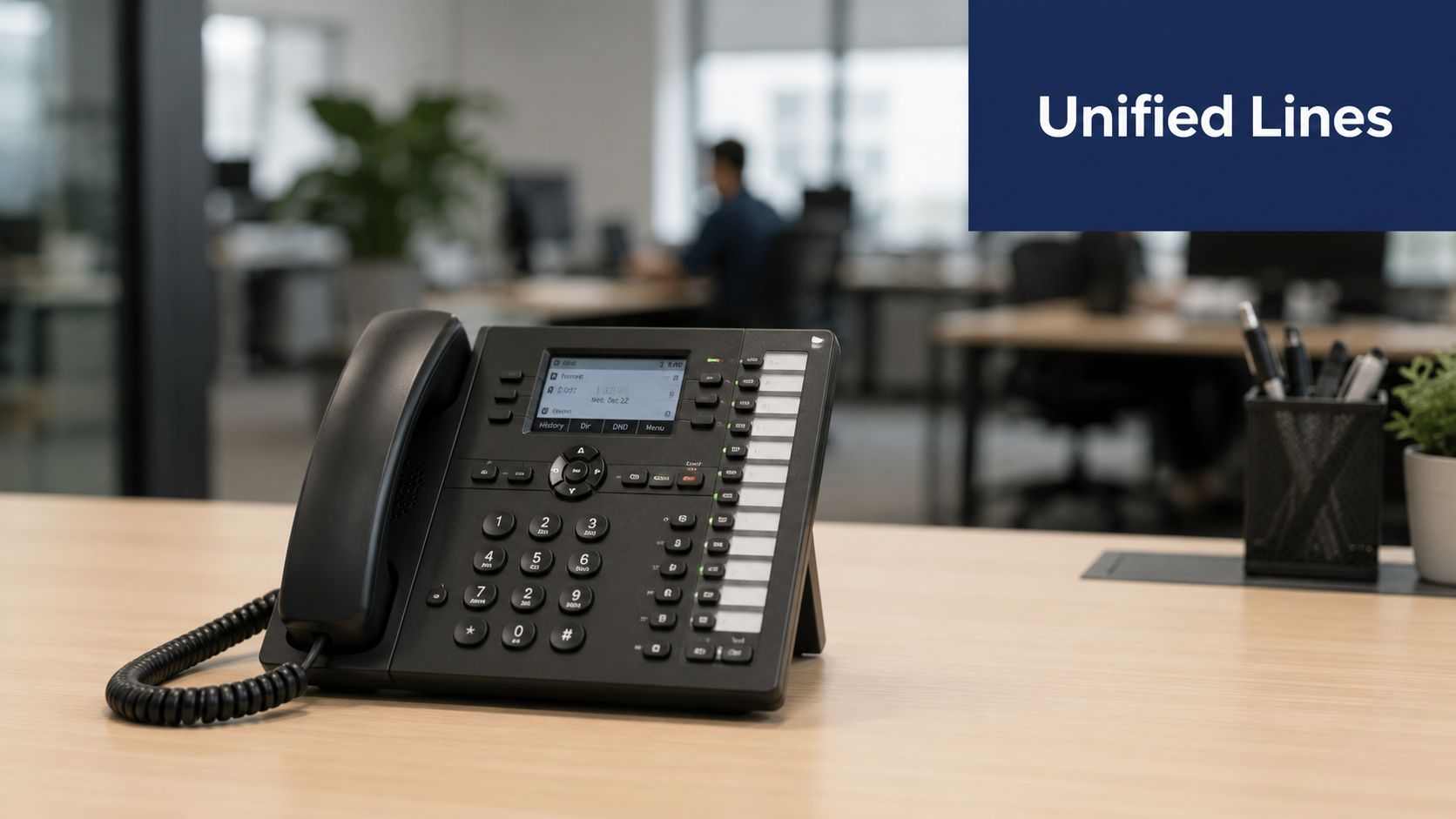
A multi-line phone system gives your business a single number with rules behind it. Calls can ring one person, a group, or different departments based on time of day, availability, or the caller's choice. It also lets multiple conversations happen at the same time without forcing customers to redial and hope for better timing.
It is more than extra call capacity
Older systems were built around physical lines and desk phones. If you needed more capacity, you often added hardware, wiring, and another layer of maintenance.
A modern multi-line setup is built around call handling. Capacity still matters, but the bigger gain is control. You decide what happens when the main number is called, who gets priority, where after-hours calls go, and how backups are handled if someone is busy or away. If you need a clearer technical definition before comparing options, this overview of what a PBX phone system does is a useful reference.
That difference matters during growth. Adding a new employee or location should not require rebuilding your whole phone setup.
What it changes in day-to-day operations
A good system reduces friction in places small businesses feel it first:
- One number, one business presence: customers are not guessing which mobile number to use.
- Fewer handoffs: callers reach sales, service, dispatch, or the front desk through routing rules instead of hallway conversations.
- Shared coverage: your team can answer under the same business identity, even if staff work from different rooms or different sites.
- Better continuity: calls still get handled when one person is tied up, off site, or out for the day.
This is also why migration matters as much as selection. If your current setup lives in personal phones, paper notes, and informal workarounds, the goal is not to buy features. The goal is to move to a system your team can adopt without disrupting customer service.
If your communication setup extends beyond customer calls, advanced intercom systems for businesses can also play a role in how staff handle entry points, deliveries, and on-site coordination.
Practical rule: If calls depend on staff remembering who should pick up, transfer, or follow up, your process is fragile.
A multi-line system fixes that by turning phone coverage into a repeatable workflow. That is what makes the upgrade worthwhile.
The Core Decision Cloud vs On-Premise Systems
Your front desk is busy, two staff are working off site, and you need to add a new hire before Monday. If your phone setup turns that simple change into a hardware project, you are already seeing the fundamental difference between cloud and on-premise.
This decision affects more than call quality. It shapes how fast you can make changes, how much support you need, and how risky the migration feels while your business is still answering customers every day.
Cloud systems fit the way most small businesses operate
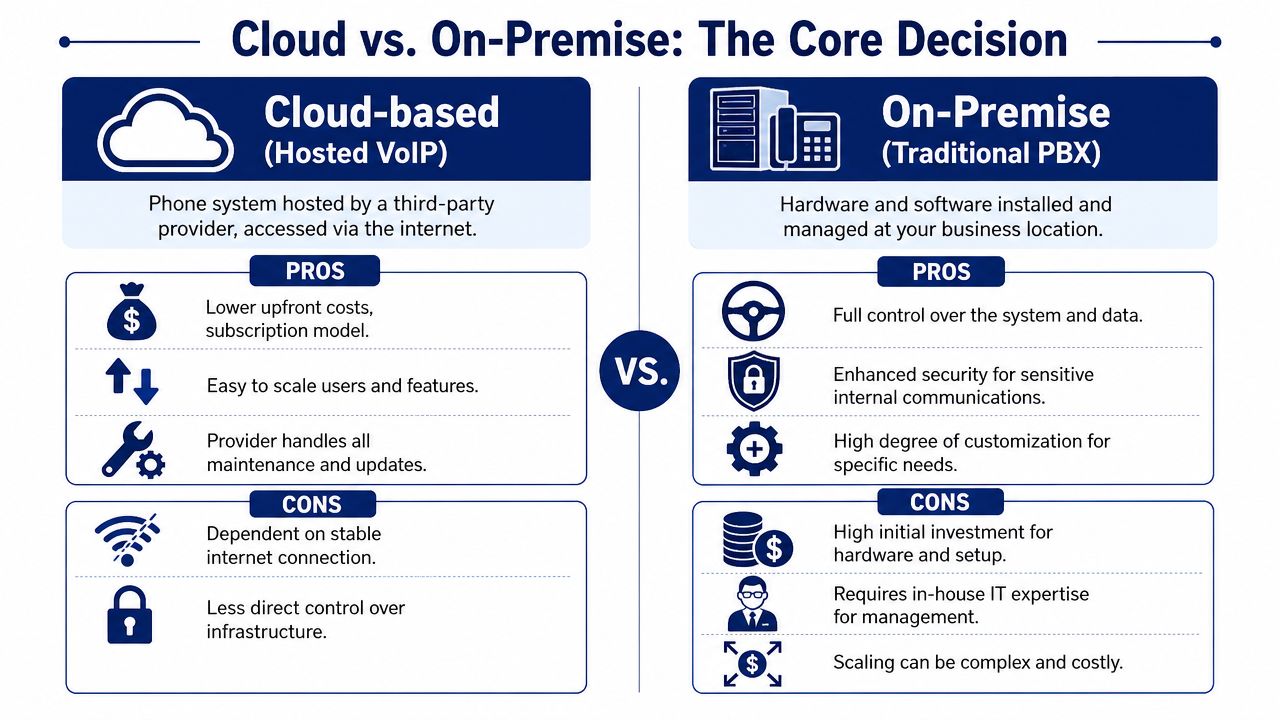
A cloud phone system is hosted by your provider and managed through software. An on-premise PBX lives at your location and depends on local hardware, configuration, and support.
If you want a grounding in the core concept, this overview of what a PBX system is is useful before you compare deployment models.
For most small businesses, cloud wins for one practical reason. It removes friction from change. Adding users, updating call flows, routing calls to mobile devices, and opening a second location are usually admin tasks, not technical projects. That matters during migration too. You can roll out numbers, users, and routing in stages instead of forcing a full cutover in one risky afternoon.
Cost usually follows the same pattern. Cloud systems tend to require less money upfront and shift spending into predictable monthly fees. They also make it easier to connect calling with CRM tools, reporting, and remote work policies without buying more on-site equipment.
A quick visual helps before you go deeper:
Where on-premise still makes sense
On-premise is still a valid option for some businesses. I usually see it make sense in three cases: you have strict internal control requirements, you already have IT staff who can support telephony, or you depend on site-specific equipment and workflows that are expensive to replace.
That control has a price. Hardware has to be installed, maintained, patched, and eventually replaced. Expanding the system can mean new cards, handsets, vendor visits, and downtime windows that are hard to schedule when your phones are tied to sales or service.
| Factor | Cloud-Based System (VoIP) | On-Premise System (PBX) |
|---|---|---|
| Upfront cost | Lower initial investment | Higher hardware and setup cost |
| Scalability | Add or remove users and lines through software | Expansion often requires hardware changes |
| Maintenance | Provider handles updates and system upkeep | Your business handles maintenance directly or pays for support |
| Remote work | Built for mobile and distributed teams | Usually more limited and location-dependent |
| Feature rollout | Easier to deploy new features | Slower, more dependent on equipment and configuration |
| Control | Less direct infrastructure control | More direct local control |
The trade-off that matters most
The better system is the one your business can change without disrupting customers.
Cloud is usually the stronger fit if you expect headcount changes, remote coverage, seasonal demand, or another location in the next few years. It also gives you a safer migration path because you can test call routing, train staff, and port numbers in phases while your old setup stays live as backup.
On-premise can still be the right call. You just need a clear reason for accepting the hardware burden and a migration plan that accounts for installation time, support coverage, and cutover risk.
Choose the model your team can manage without turning routine phone changes into service interruptions or IT tickets.
Must-Have Features for a Modern Small Business
A customer calls at 4:55 PM with an urgent question. Your front desk is tied up, the salesperson they need is out of office, and the call lands in the wrong voicemail box. That kind of miss is exactly why small businesses replace old phone setups. The best features reduce call friction today and make your migration easier because your team can adopt them in stages instead of changing everything at once.
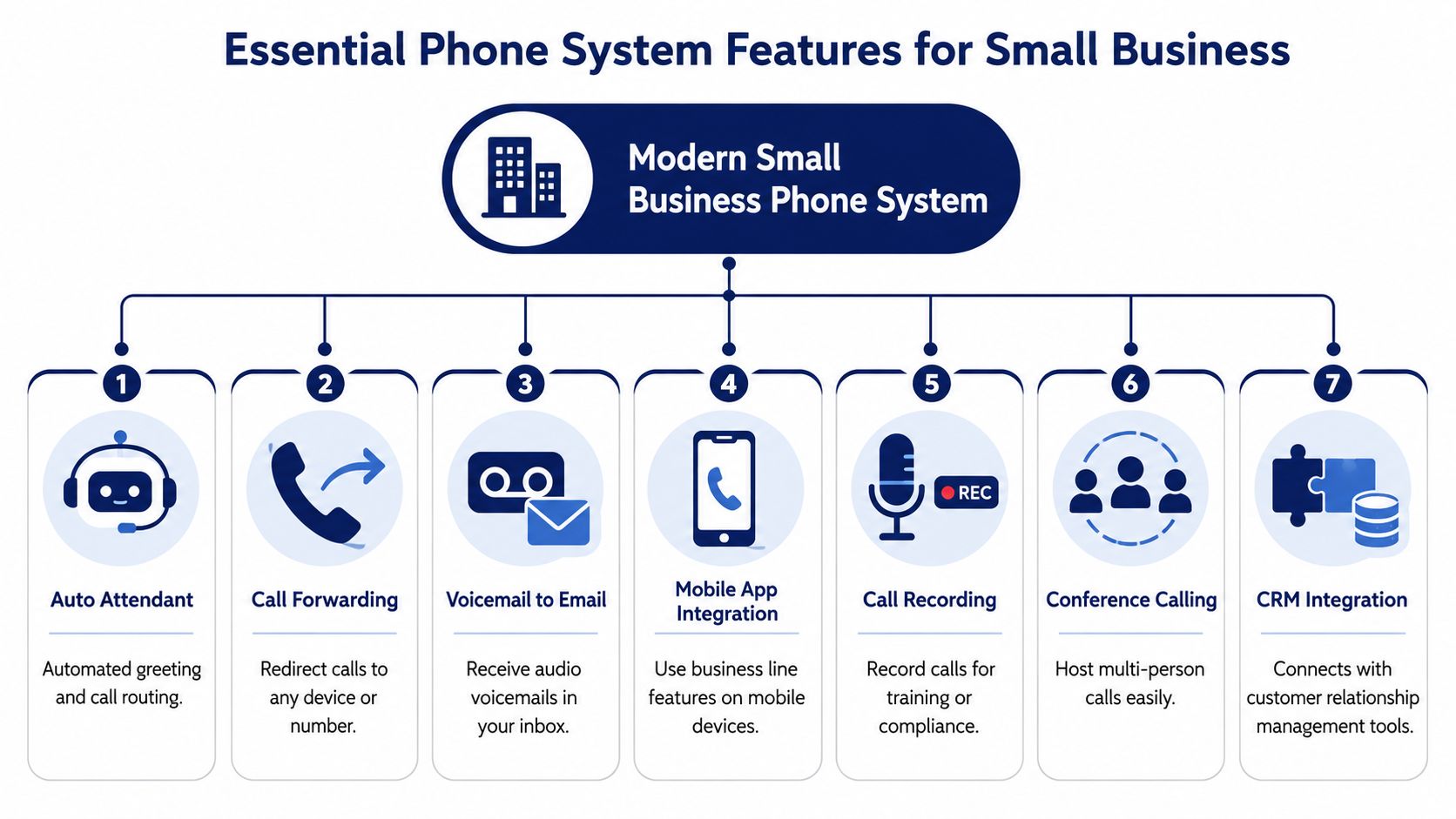
Start with the features that fix call flow problems first. If inbound calls drive appointments, service work, or sales, these are the tools that protect revenue and customer patience.
- Auto attendant: Greets callers and routes them by department, business hours, holiday schedule, or emergency routing rules.
- Call routing and forwarding: Sends calls to the right person, ring group, or backup number without manual handoffs.
- Call queues: Holds callers in an orderly queue instead of sending them to a busy signal or endless ringing.
- Conference calling: Lets staff bring in a manager, dispatcher, or specialist during a live call.
According to Vonage's guide to multi-line phone systems, businesses using call routing and automation tools report shorter handling times and stronger customer satisfaction. That matches what I see during system reviews. When the first 30 seconds of a call are handled well, you get fewer transfers, fewer repeat explanations, and fewer abandoned calls.
The next set of features matters when your staff works from more than one location, shares after-hours coverage, or needs to respond quickly without sitting at a desk. For many owners, these features yield the quickest return.
A good way to assess the gap is to compare your current setup with the tools included in modern VoIP small business solutions. Basic dial tone is cheap. Fast response and consistent coverage are what save time.
These features usually matter most:
- Visual voicemail: Sends voicemail to email with transcription so staff can scan messages and prioritize urgent callbacks.
- Mobile and desktop softphone apps: Lets employees make and receive business calls from laptops and smartphones using the company number.
- BYOD support: Allows staff to use personal devices for business calling without giving out private numbers.
- CRM integration: Pulls up customer records during calls and logs activity automatically.
Vonage also notes that mobile-integrated unified communications is a priority for many IT decision-makers. Small businesses feel that same pressure in practical terms. If your team misses calls whenever someone leaves the office, mobile apps and BYOD support stop being nice extras and start fixing a real operating problem.
One warning. Do not buy every feature shown in a demo.
Some capabilities only pay off in the right environment:
- Call recording for training, dispute resolution, or compliance
- Wait-time announcements for businesses with heavier inbound volume
- Queue callback for service teams that get bursts of calls
- Detailed reporting for managers tracking missed-call patterns, peak hours, and staffing gaps
Choose features your staff will use on a busy Tuesday, not features that look impressive during a sales presentation. That approach also makes migration easier. You can roll out routing, voicemail, and mobile calling first, then add reporting, integrations, or recording once the core call flow is stable.
Calculating ROI and Understanding Pricing Models
Most owners make the same mistake when comparing phone systems. They look at the monthly bill first and stop there.
That's too narrow. The actual return comes from a mix of hard costs and operational effects. If your current setup leads to missed calls, slow callbacks, or staff wasting time on manual transfers, the “cheap” option may be more expensive than it looks.
What to include in the real business case
Start with direct costs you can identify today:
- Current service spend: What you're paying for lines, maintenance, and scattered add-ons
- Hardware burden: Whether your existing setup forces you into repairs, technician visits, or replacement parts
- Administrative time: How much internal effort goes into managing call changes, voicemail access, and user updates
Then look at the effects that don't always show up on an invoice:
- Fewer missed opportunities: Better call coverage usually means more sales conversations and fewer lost leads
- Faster response times: Teams can return urgent calls sooner when messages are easier to retrieve
- Stronger customer retention: A smoother calling experience makes your business feel easier to work with
How cloud pricing usually works
Most cloud systems use a per-user monthly model. That structure is easier for small businesses to budget because you can tie cost directly to headcount and role changes. It also reduces surprises compared with older setups that hide costs in hardware, service calls, or piecemeal upgrades.
When you compare providers, ask direct questions:
- Which features are included by default?
- Are mobile apps, voicemail transcription, and recording extra?
- What happens when you add or remove users?
- Who handles setup and number porting?
- Is support included, and how do you reach it?
If a quote looks cheap, check whether the essentials are missing and sold back to you later.
The best pricing model is the one you can understand quickly, forecast confidently, and manage without constant exceptions.
Your Zero-Downtime Migration and Selection Checklist
Most businesses hesitate at this point. They can see the value of switching, but they worry the change itself will interrupt sales, service, or front-desk operations.
That concern is justified. 68% of small businesses cite downtime fear as their primary barrier to adopting a new phone system, according to CloudCall's discussion of cost-effective multi-line systems. That's the part many buying guides gloss over. They compare features and never explain how to move from old to new without breaking the phone flow your business depends on.
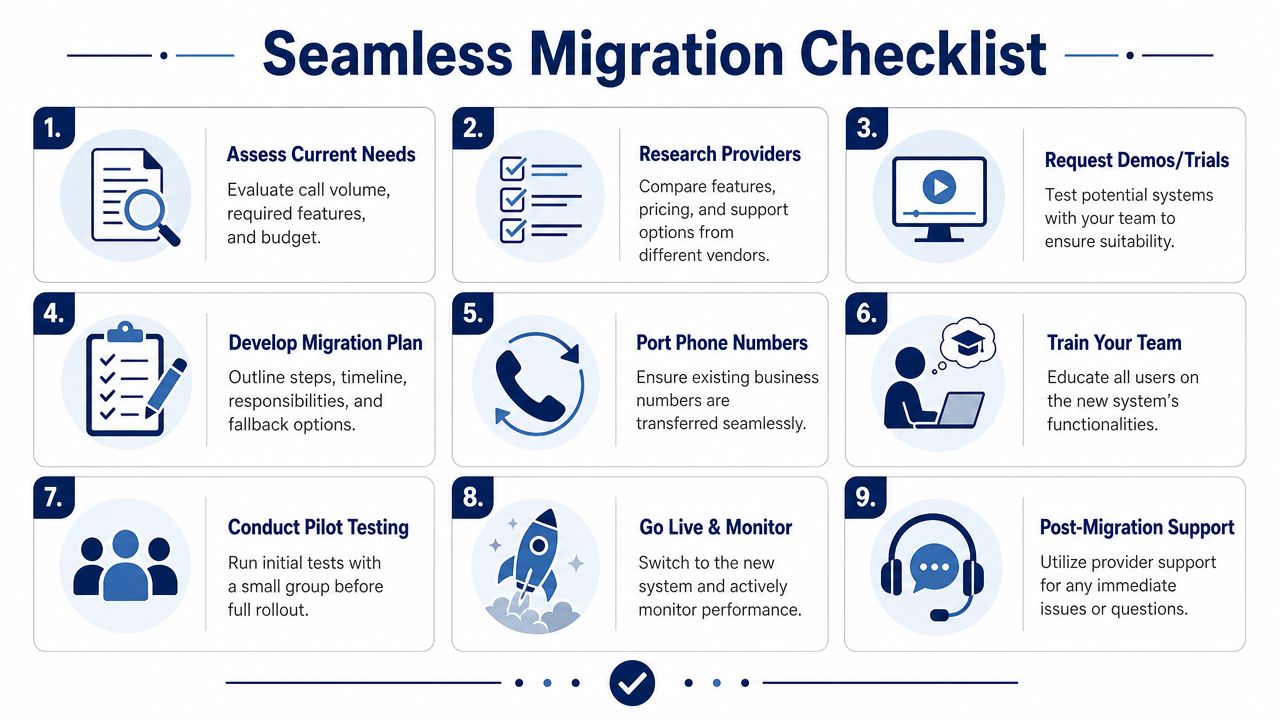
The checklist that prevents avoidable disruption
Before you sign with any provider, ask how they handle VoIP phone number porting. If the answer is vague, the migration process probably is too.
Use this checklist to keep the transition controlled:
- Audit your current call flow. List your main numbers, extensions, after-hours routing, hunt groups, voicemail destinations, and any special handling for departments or locations.
- Identify failure points. Note what can't go down. For some businesses that's the front desk. For others it's dispatch, support, or appointment scheduling.
- Map the new structure before porting. Build the call tree, greetings, ring groups, and fallback rules in advance.
- Confirm ownership of every number. Porting delays usually happen because account records don't match.
- Stage a pilot group. Test with a small set of users first, especially the people who handle the most inbound traffic.
- Train the team before go-live. Staff should know transfers, voicemail access, mobile app use, and what to do if something looks off.
- Schedule the cutover carefully. Avoid your busiest windows.
- Keep a rollback contact path. Know exactly who to call at the provider if routing doesn't behave as expected.
- Monitor live traffic after launch. Watch missed calls, queue behavior, voicemail delivery, and mobile app login issues right away.
What good migration support looks like
A provider doesn't need to make the process sound magical. They need to make it sound disciplined.
Look for signs of a mature migration process:
- Named setup ownership: One accountable team or person
- Preconfigured users and devices: Less improvisation on launch day
- Porting coordination: Clear status updates and document checks
- Post-launch support: Fast access to real help after cutover
A safe migration isn't about luck. It's about removing unknowns before the phone numbers move.
Businesses that switch cleanly usually do the boring work upfront. That is what preserves continuity.
Frequently Asked Questions about Multi-Line Phone Systems
Can I keep my current business phone number
Yes, in most cases you can keep it through number porting. The important part is process discipline. Make sure the provider has the exact account information tied to the current number, and don't cancel the old service before the port is complete. Good migrations treat number ownership records as a project step, not a last-minute detail.
What kind of internet do I need
You need reliable business-grade internet with enough stability to support voice traffic consistently. In practical terms, consistency matters more than headline speed. If your connection drops often, your calls will suffer no matter how advanced the phone platform is. Before switching, test your network during the busiest part of your day and ask the provider what they recommend for your call volume and device mix.
Do I need to buy all new hardware
Not always. Many businesses use a mix of desk phones, laptops, and mobile softphone apps. Some teams prefer physical desk phones at reception or in shared office spaces, while mobile staff may work well without any desk hardware at all. The right answer depends on how your people answer calls.
If you're replacing an aging setup and want a cleaner path to a modern cloud phone system, SnapDial is built for businesses that need predictable pricing, strong feature coverage, and a managed transition instead of a stressful DIY cutover. Their team handles white-glove setup, supports number porting, and helps businesses move off legacy PBX systems without disrupting day-to-day operations.