

Your office phone setup probably looks fine until it doesn't. Calls ring at an empty front desk. Staff answer from personal cell phones because the desk phones are stuck in one building. Someone misses a customer call because the old system can't route after-hours traffic cleanly. Then you start shopping for VoIP and run into a swamp of “unlimited” plans, seat licenses, bundles, add-ons, and contract language that somehow gets less clear the more you read.
I've seen this play out in law firms, clinics, contractors, multi-location retailers, and support teams. Most businesses don't struggle because VoIP is complicated. They struggle because providers package simple decisions in confusing pricing and feature language.
A good phone system should do four things well. It should route calls correctly, work anywhere your team works, keep voice quality consistent, and produce a bill you can predict. If a plan fails on any one of those, the cheap monthly number won't save you.
Why Choosing a VoIP Plan Feels So Complicated
A lot of businesses start the search at the wrong moment. The old system hasn't completely failed, but everyone's irritated. Reception can't see who's available. Managers want call recordings. Remote staff need business caller ID on mobile. The wiring closet still has hardware nobody wants to touch. So the owner types “VoIP phone plans” into Google and gets buried in feature grids.
The problem isn't just too many choices. It's that providers sell different things under similar labels. One vendor's “standard” plan includes call recording. Another puts it behind an upgrade. One says “unlimited calling” and means domestic only. Another advertises a low user price and makes up the margin with fees that show up after signing.
Cheap on the quote and cheap on the invoice are not the same thing.
That's why businesses end up comparing plans that aren't comparable. They focus on sticker price, not billing structure. They ask whether a mobile app exists, not whether staff can realistically work from it. They hear “HD voice” and never ask what service levels are guaranteed if call quality drops.
What buyers usually get wrong
Most buyers make one of these mistakes:
- They buy for today only: The current headcount drives the decision, but no one checks what adding users, locations, or queues will do to cost and admin overhead.
- They overpay for features nobody uses: A small office doesn't need a contact center suite just because the sales demo looked polished.
- They underbuy on routing and support: The business saves a little on paper, then loses time every week dealing with missed calls, bad transfers, and support tickets.
What actually matters
When I evaluate VoIP phone plans, I care about three things first. Pricing model. Feature fit. Operational reliability. Everything else comes after that.
If you get those three right, the rest becomes manageable. If you get them wrong, every month becomes an argument about invoices, call quality, or both.
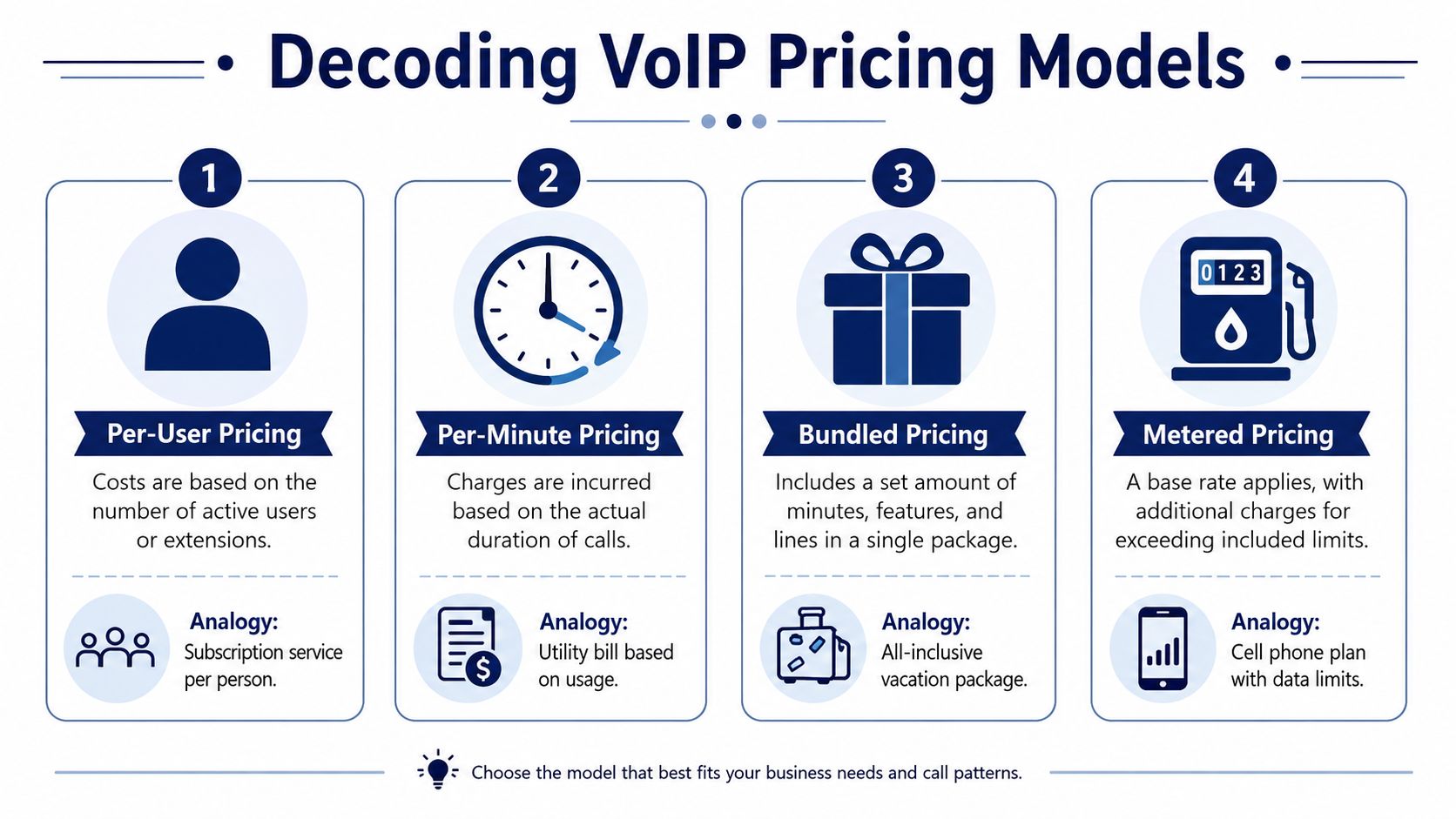
Decoding VoIP Pricing Models
The monthly price is where providers do their best misdirection. They know most buyers want one simple number. So they lead with the smallest one and leave the rest for the quote, invoice, or contract.
Per-user pricing
This is the most common model. You pay a monthly amount for each user or extension. It operates as a subscription service. Add a person, add a charge.
It works well for businesses with predictable staffing and average call volume. It also makes budgeting easy at first glance. The trap is that per-user plans often look straightforward while hiding separate line items for features, taxes, and regulatory fees. According to Consumer Action's phone services guide, advertised base plans often fall in the $15 to $20 per user range, while the final invoice can end up 15–25% higher once taxes, surcharges, and other charges are added.
Per-minute pricing
This model is closer to a utility bill. You pay for what you use. Low call volume businesses can do well with it, especially if most staff rarely spend long periods on the phone.
The upside is efficiency. The downside is unpredictability. A quiet month looks great. A busy month, seasonal rush, or expansion into more outbound calling can turn a cheap option into a budgeting headache. This model makes sense only when you understand your call habits well.
Bundled pricing
Bundled plans package a set amount of service into one offering. That might include lines, minutes, and a group of features. It's the all-inclusive vacation package of VoIP. You know roughly what you're buying before you leave home.
Bundled plans can work for firms that want a simpler quote and fewer variables. They can also hide limits. If the bundle includes more than you need, you're paying for dead weight. If it includes less than you assumed, overage billing starts.
Metered pricing
Metered plans sit between flat-rate and pure usage billing. You pay a base amount, then pay more when you exceed included limits. That can be useful for small teams with occasional traffic spikes.
It can also be the most annoying plan structure to manage. Finance wants predictability. Operations wants flexibility. Metered pricing rarely satisfies both for long.
My recommendation on pricing structure
If your business depends on phones every day, predictable billing usually beats a bargain headline. That's why many companies prefer a hosted seat model with a clearly defined feature set. If you want an example of how that structure works, review a hosted VoIP seat model and compare it against plans that split core features into paid add-ons.
Practical rule: If you can't tell what the real monthly invoice will look like before signing, the plan isn't transparent enough.
A quick comparison
| Pricing model | Best fit | Strength | Risk |
|---|---|---|---|
| Per-user | Stable teams | Easy to forecast | Add-ons inflate cost |
| Per-minute | Very light usage | Pay only for usage | Busy months get expensive |
| Bundled | Teams wanting simplicity | Fewer moving parts | Included limits may not fit |
| Metered | Small teams with variable demand | Lower base cost | Overage confusion |
The right model depends less on what sounds cheapest and more on how your business uses the phone system.
Core Features Every Business Phone Plan Needs
Providers love feature lists because long lists make weak plans look strong. Don't buy that way. Most businesses need a short set of features done well, then a second layer of tools only if call volume or complexity justifies them.
Foundational tools every business should insist on
Start with call handling. If the system can't route inbound calls correctly, nothing else matters.
- Auto attendant and routing: Every business needs a clean way to direct callers by department, office, or hours of operation.
- Mobile and desktop calling: Staff should be able to place and answer business calls without being chained to a desk phone.
- Visual voicemail: Nobody wants to dial in and slog through voicemail prompts like it's two decades ago.
- Call recording: Training, dispute review, and internal quality checks all get easier when recordings are available.
- Admin portal: Somebody in your business needs to update users, greetings, schedules, and call paths without opening a support ticket every time.
For teams that deal with a lot of voicemail, voicemail transcription becomes more than a convenience. It helps managers scan messages quickly, triage urgent issues, and respond faster from a phone or inbox. If you want a practical look at how teams are transcribing voicemails into usable text workflows, that's worth reviewing before you decide whether transcription should be included or optional.
Advanced capabilities for scaling teams
A common mistake businesses make is overbuying. Not every office needs contact center tooling. But some absolutely do.
If you run support, intake, reservations, dispatch, or appointment-heavy operations, look for:
- Queue management: Calls need to wait in an organized line, not hunt randomly for whoever might answer.
- Wait-time announcements: Customers tolerate waiting better when the system tells them what's happening.
- Queue callback: This reduces frustration during busy periods.
- Real-time dashboards: Supervisors need live visibility into queue conditions and agent activity.
- Detailed reporting: If you can't see patterns, you can't fix staffing or routing problems.
What's essential versus what's sales bait
A feature is essential if your team will use it every week and it fixes a specific operational problem. A feature is sales bait if it sounds impressive in a demo but nobody can explain how it changes daily work.
That's why I'd rather see a well-built system with strong routing, mobile access, recordings, visual voicemail, and a usable portal than a bloated plan with every acronym in telecom. In the hosted VoIP market, platforms such as SnapDial package core business calling, routing, recordings, visual voicemail with transcription, mobile apps, and call center options in one cloud system. That type of packaging is useful when you want fewer moving parts, not just more features.
Buy the feature set your staff will actually touch. Ignore the rest.
Uncovering the Hidden Costs of Cheap VoIP Plans
The advertised monthly rate is usually the least important number on the page. The actual number is the invoice after every fee, condition, exclusion, and overage shows up.

A cheap VoIP plan often relies on one of two tricks. It either strips out features you assumed were included, or it keeps the headline rate low and makes up the difference elsewhere. Sometimes both.
The unlimited calling trap
A lot of buyers hear “unlimited” and stop asking questions. That's a mistake. As explained in VoIP Review's VoIP FAQ, “unlimited” calling commonly excludes specific countries and often applies mainly to domestic calling. Businesses that assume international destinations are included can end up with unexpected per-minute charges.
If you have suppliers, customers, or staff outside your home country, don't let sales language do the thinking for you. Ask for the exact destination list in writing.
Hidden cost categories that deserve scrutiny
These are the line items that tend to cause friction after rollout:
- Activation charges: A provider may advertise a monthly rate that looks attractive, then add setup fees.
- Number porting costs: Keeping your existing phone numbers can come with administrative charges or delays if the process isn't handled well.
- Hardware expenses: Some businesses want desk phones, conference phones, or headsets. Those may be purchased outright or rented.
- Feature upcharges: Call recording, analytics, extra queues, or mobile functionality may sit behind higher tiers.
- Bandwidth readiness: If your network is already strained, the phone plan isn't your only cost. You may need network cleanup and traffic prioritization. A practical place to start is checking how much bandwidth you need for VoIP before you compare plan pricing.
The contract matters as much as the quote. A plan can look cheap only because the provider assumes you won't notice what's missing.
Don't skip the operational fine print
Watch this before you sign anything. It's a useful reality check on what buyers miss during procurement.
Questions that flush out hidden charges
Ask these directly:
- What will my first invoice include besides the monthly rate?
- What features in the demo are not included in the quoted plan?
- Which calling destinations are excluded from unlimited service?
- What happens financially if I add users, numbers, or recordings later?
- Are taxes, surcharges, and regulatory fees included in the quote or separate?
A cheap plan isn't cheap if you need three add-ons and a contract interpretation to use it properly.
How to Choose a Plan for Your Business Type
The right plan depends on how your business communicates. Not your industry label. Not the provider's package names. Your call patterns, staffing model, and tolerance for billing surprises should drive the decision.
Lean SMB
A small business usually needs professionalism without complexity. Think local office, small clinic, contractor, agency, or retail group. They need an auto attendant, business texting if offered, mobile access, voicemail handling, and basic recordings. They do not need a stack of enterprise modules no one will configure.
For this group, a straightforward per-user or all-inclusive plan usually makes the most sense. The goal is simple administration and predictable billing. If one office manager can handle routine changes without filing support tickets all week, the plan is probably matched well.
A metered model can work for a very low-call business. But once the phone becomes central to revenue, saving a little on a light month usually isn't worth the variability.
Multi-location business
This group cares less about basic features and more about consistency. They want one admin view across offices, extension dialing between locations, centralized recordings, common routing standards, and fewer local workarounds.
The wrong plan creates little islands. Each office ends up configured differently. Nobody knows who controls what. Reporting becomes messy.
For this business type, pay for standardization. A unified cloud PBX setup with a single management layer is worth it because it reduces administrative drift. If locations share departments or overflow call handling, this matters even more.
High-volume contact center
Many general VoIP plans start to crack when a support desk, intake team, appointment center, or outbound group needs more than phones. They need flow control.
Here, advanced queueing, callback, announcements, dashboards, and detailed reporting aren't “nice to have.” They're operational infrastructure. If the provider can't show how supervisors monitor live activity and adjust call handling in real time, move on.
A bare-bones cheap plan will punish this group fast. It creates long waits, poor visibility, and weak agent management. Spend for the right tooling here. This is one area where underbuying costs more than overbuying.
Fully remote or hybrid workforce
Remote teams need mobility and network realism. The phone system has to work across laptops, mobile apps, headsets, and home internet connections that aren't always pristine.
According to Nextiva's VoIP data usage guide, a single concurrent VoIP call typically needs 80–100 kbps with the standard G.711 codec, and 10 employees making simultaneous calls need at least 1–1.25 Mbps of dedicated upload bandwidth to maintain clear audio. That's the kind of practical detail remote teams need to take seriously, especially when staff share home internet with video meetings, cloud backups, and everything else.
Remote calling fails most often because companies buy the phone plan and ignore the network conditions employees actually use.
Sample monthly cost scenarios by business type
Use this table as a decision frame, not a universal pricing sheet. The cheapest column isn't automatically the smartest choice.
| Business Type (Users) | Metered Plan (Low Use) | Per-User Plan (Average Use) | All-Inclusive Plan (High Use) |
|---|---|---|---|
| Lean SMB (Users) | Best when calls are infrequent and billing variability is acceptable | Usually the safest fit for routine business calling | Worth it when you want fewer billing surprises and broad feature access |
| Multi-location Business (Users) | Rarely ideal if sites share calls or overflow traffic | Good if features are standardized across locations | Strong fit when centralization and billing clarity matter |
| Contact Center (Users) | Usually a poor fit because usage swings and queue demand are high | Can work if advanced tools are included, not bolted on | Often the better fit when calling volume is consistently heavy |
| Remote Workforce (Users) | Works only when call volume is genuinely light | Good balance for distributed teams | Useful when staff rely on mobile and desktop calling all day |
My blunt recommendation
Match the plan to the business model, not the provider's sales script.
- Small office: Keep it simple and predictable.
- Multi-site operation: Prioritize centralized control.
- Contact center: Pay for queueing and reporting.
- Remote team: Validate bandwidth and mobile usability before you sign.
That's how you avoid paying enterprise money for a small-office need, or small-office money for a high-demand operation.
Your VoIP Migration and Vendor Evaluation Checklist
Most VoIP failures happen before the first live call. The business skips prep, assumes number porting will be easy, ignores network conditions, and lets the sales demo stand in for technical validation.
Migration checklist
Before you switch providers, get your own house in order.
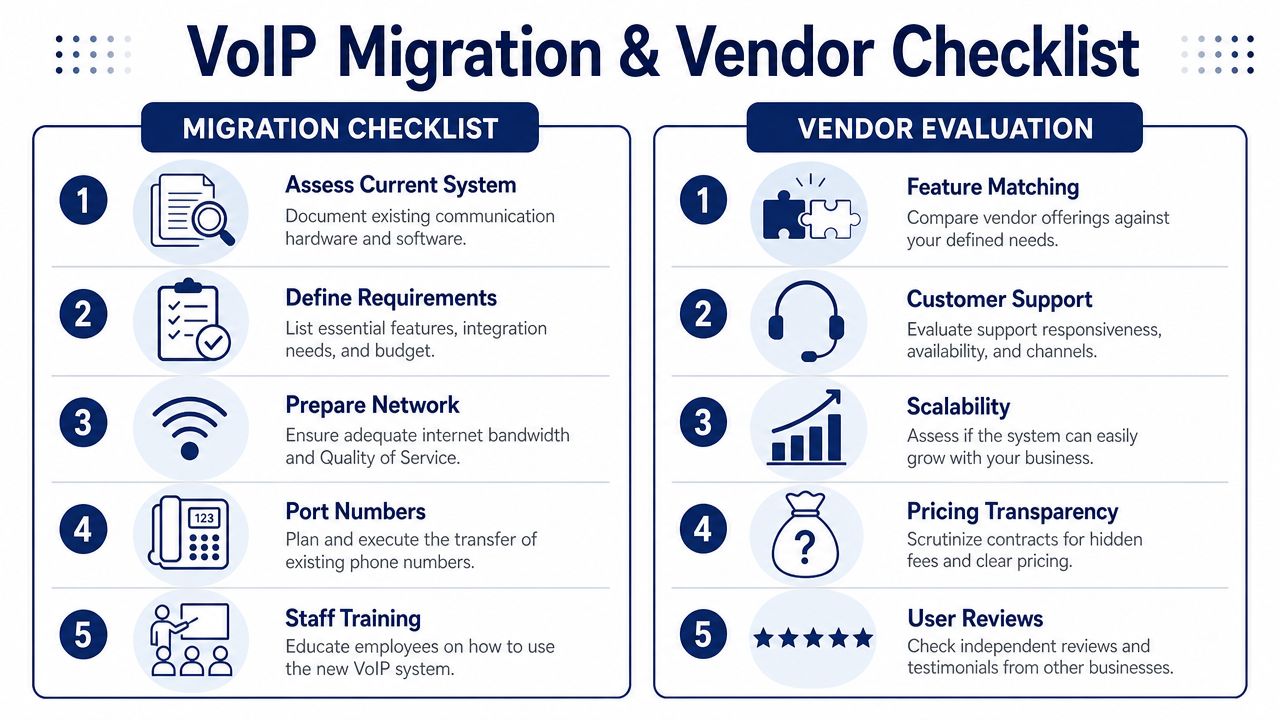
- Audit your current setup: List phone numbers, call flows, auto attendants, hunt groups, devices, recordings, and any special routing rules.
- Document what must stay the same: Some workflows can improve during migration. Others should not change on day one.
- Prepare the network: VoIP traffic is sensitive to congestion and delay variation. Quality of Service on the router is mandatory if you want voice traffic prioritized properly.
- Plan number porting early: Gather recent bills, account details, and authorized contact information. If you're keeping your numbers, review the VoIP phone number porting process before kickoff so nothing stalls over paperwork.
- Train staff on the new workflow: New phones are easy. New habits aren't. Show people how calls move between desk, desktop, and mobile.
Vendor evaluation checklist
Buyers need to sharpen up. Sales teams are usually ready for feature questions. They're less comfortable when you ask for measurable service commitments.
As outlined by VoIP Navigators' SLA comparison, enterprise-grade VoIP plans should guarantee a Mean Opinion Score above 3.5 and packet loss under 1% in the SLA. That same benchmark also points to FIPS 140-2 encryption and service credits for disruptions as meaningful indicators of a reliable service.
Ask every serious vendor these questions:
- What MOS and packet-loss standards are written into your SLA? If they can't answer clearly, that tells you a lot.
- What support is included after onboarding? You want real support, not a help center article as a substitute for a technician.
- What happens during an outage? Ask about failover behavior, rerouting options, and service credit terms.
- Which features are native to the plan and which are paid upgrades? Force them to separate included capabilities from optional modules.
- How do you handle onboarding and cutover? A provider that treats migration casually will create avoidable downtime.
Ask this in plain English: “If call quality goes bad, what exact service levels have you committed to, and what do I get if you miss them?”
The checklist buyers should actually use
| Area | What to verify |
|---|---|
| Current environment | Numbers, devices, call flows, routing rules |
| Network readiness | Stable bandwidth, QoS, problem spots |
| Porting | Documentation, timing, ownership details |
| Support | Hours, channels, escalation path |
| SLA | MOS, packet loss, encryption, credits |
A smooth migration usually comes down to discipline. Inventory first. Test early. Get promises in writing. Then switch.
Finding a Partner Not Just a Provider
A phone system isn't just another monthly utility. It affects sales responsiveness, customer experience, internal coordination, and how reachable your team is when work moves beyond one office.
That's why the lowest advertised price usually loses in the long run. If the billing is murky, the routing is weak, or support disappears when something breaks, you haven't saved money. You've just moved costs into downtime, frustration, and missed calls.
The best VoIP phone plans are the ones that match how your business works. A small office needs simplicity. A support team needs queue control. A remote workforce needs reliable apps and realistic network planning. Every business needs clear pricing and a provider willing to answer hard questions before the contract is signed.
Pick a company that behaves like an operational partner. That means transparent billing, competent onboarding, real support, and a plan structure you can understand without decoding telecom jargon.
If you're comparing providers and want a clearer read on what fits your business, talk with SnapDial. Their team can help you sort out plan structure, feature fit, number porting, and rollout questions without forcing you into a generic package.