

A lot of business owners arrive at the same point the same way. Calls ring on the office desk while the salesperson is on the road. A customer returns a missed call after hours and reaches nobody. A remote employee uses a personal cell number because the old PBX can't follow them home. The phone system still works, technically, but it no longer matches how the business operates.
That's why VoIP calling apps matter now. They turn your business phone system from a place into a service. Your number, extension, voicemail, routing, and call handling travel with your team instead of staying bolted to a front desk.
The shift isn't small. The global VoIP services market reached US$160.8 billion in 2025 and is projected to reach US$340.2 billion by 2032, growing at a 11.3% CAGR, according to Persistence Market Research's VoIP services market analysis. That growth comes from businesses replacing hardware-heavy phone systems with cloud-based calling that's easier to scale, easier to manage, and better suited to remote and hybrid work.
Beyond the Desk Phone Why VoIP Calling Apps Matter
Old business phone systems were designed around buildings. Modern businesses are designed around availability. That mismatch shows up in lost calls, awkward handoffs, and staff creating workarounds that make the company look less organized than it really is.
A VoIP calling app fixes the core problem. Instead of tying a line to one physical handset, it lets a user place and receive business calls from a smartphone, desktop app, browser, or IP phone while keeping the same business identity. Customers still dial the company. The company answers from wherever work is happening.
What changes in practice
The biggest change isn't the app itself. It's the operating model.
With a traditional PBX, adding locations or moving staff usually means more hardware decisions, more forwarding rules, and more friction. With VoIP calling apps, businesses can route calls by team, schedule, role, or location without rebuilding the whole system every time the org chart changes.
That matters for small and midsize businesses because customers judge responsiveness fast. They don't care whether your employee is in a branch office, at home, or in an airport. They care whether someone answers, whether the transfer works, and whether the company sounds organized.
Practical rule: If your team's real workflow already happens across mobile devices, laptops, and multiple locations, your phone system should follow that workflow instead of fighting it.
Why this has become a business decision
VoIP used to be framed as a cheaper phone bill. That undersells it.
For SMBs, VoIP calling apps help in three ways:
- Flexibility: Staff can use the same business number and extension across devices.
- Customer experience: Auto attendants, routing, voicemail access, and easier transfers create a more polished front door.
- Administration: Changes happen in software instead of through hardware moves and ad hoc forwarding tricks.
The market data reflects that broader shift. Businesses aren't adopting cloud calling because it's novel. They're adopting it because the old model keeps breaking under modern working patterns. A service company with dispatchers, a regional retailer with multiple sites, and a remote support team all need the same thing: consistent reachability without physical constraints.
VoIP calling apps solve that when they're implemented properly. The caveat matters. A good cloud system improves responsiveness and control. A sloppy rollout just moves your phone problems from copper wires to Wi-Fi. That's where many buyers get surprised, especially around call quality and compliance.
How VoIP Calling Actually Works
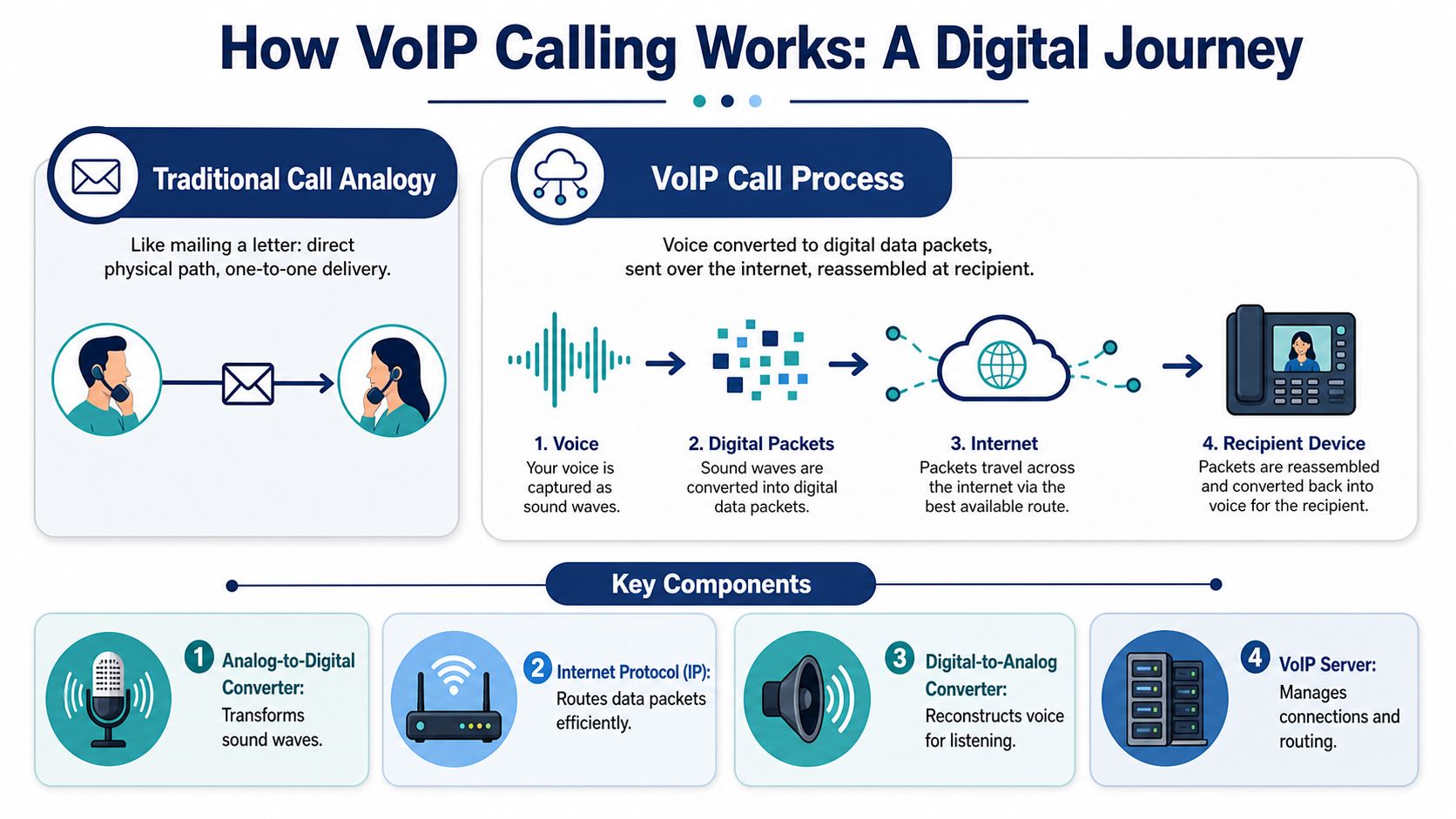
A traditional phone call is like mailing a letter on a fixed route. One call follows one dedicated path through the phone network.
A VoIP call works more like sending an email. Your voice is converted into digital data, broken into small packets, sent across the internet, and reassembled almost instantly on the other end. If those packets arrive cleanly and in order, the call sounds natural. If they arrive late, out of sequence, or not at all, you hear gaps, delay, or that familiar robotic audio.
The three parts that matter most
When a user speaks into a VoIP calling app, three things happen very quickly:
- Voice is digitized. The app turns sound waves into digital information.
- Packets are routed. Your network and provider move that data to the recipient.
- Audio is rebuilt. The receiving device converts the packets back into something the ear hears as speech.
That's the simple version, but it explains why internet quality matters more than raw phone hardware. In a cloud setup, the network becomes part of the phone system.
If you want a basic overview of the hosted model behind this, cloud phone system basics are a useful starting point.
Why codecs matter
A codec is the method used to encode and decode voice. Think of it as the language your audio uses while traveling.
For HD voice, the system needs to negotiate wideband codecs such as G.722 or Opus. Those codecs can deliver MOS ratings above 4.0, compared with 3.5 to 3.8 for narrowband calls, according to Nextiva's HD voice explanation. In plain terms, that usually means clearer consonants, less listening fatigue, and fewer “can you repeat that?” moments.
What business owners should take from this
You don't need to memorize codec names, but you should understand the trade-off. VoIP calling apps can sound better than old phone lines. They can also sound worse if the network, devices, or provider don't support the right path end to end.
HD voice isn't a marketing label. It depends on the app, the device, the network, and the connection path all cooperating.
That's why two systems with similar feature lists can produce very different experiences in practice. One sounds crisp and reliable. The other sounds fine until the office Wi-Fi gets busy and everyone starts talking over each other because of delay.
Essential Features That Transform Business Communication
Features are where many buyers get distracted. A provider lists dozens of options, and every platform starts to look the same. In practice, only a handful of features change how a business operates day to day.
The broader trend backs that up. The global mobile VoIP market was valued at USD 44.9 billion in 2024 and is forecast to reach USD 104.9 billion by 2030 at a 12.9% CAGR, according to Grand View Research's mobile VoIP market report. That growth reflects how central app-based calling has become for the mobile office.
The front door features
For most SMBs, the first win is making the company sound organized before a human even answers.
An auto attendant greets callers and routes them to the right destination. Call routing sends calls based on time of day, department, user status, or failover rules. Ring groups and hunt groups help teams answer shared lines without relying on one receptionist to manually forward everything.
These aren't flashy features. They remove friction. A caller reaches billing, support, or sales faster. Staff spend less time playing switchboard. Managers spend less time apologizing for missed calls.
The mobile office features
Here, VoIP calling apps stop being a phone replacement and become a workflow tool.
A good business softphone lets employees answer from a mobile device or laptop while showing the business number, not their personal one. Voicemail becomes visible and easier to manage. Presence and status indicators make transfers less random. Internal extension dialing keeps remote teams feeling like one office instead of disconnected freelancers.
If you're evaluating this category, a softphone for VoIP should be judged on ease of use as much as feature depth. A tool that's rich on paper but awkward on a phone screen won't get adopted.
After the calling layer is in place, this is the next part to assess:
The accountability features
Some features help managers more than end users. That doesn't make them less important.
- Call recording: Useful for training, dispute resolution, and process review.
- Call logs: Helpful for seeing what was answered, missed, transferred, or returned.
- Voicemail transcription: Faster triage when staff can scan messages instead of listening to each one.
- CRM integrations: Better context when staff can see who's calling and what happened last time.
The strongest phone systems don't just move calls. They preserve context, which is what makes customer conversations faster and less repetitive.
Cloud platforms often pull ahead of legacy systems. They connect communication data to the rest of the business instead of trapping it inside a closet PBX nobody wants to touch.
Tangible Business Benefits and Use Cases
The easiest way to judge VoIP calling apps is to ignore the feature sheet for a minute and look at the business scenarios they improve.

For the local service business
A plumbing company, legal office, clinic, or property manager usually has the same pain point. Calls come in all day, but the people who need to answer aren't always at one desk.
VoIP calling apps let office staff, field staff, and managers share a business presence without passing around personal numbers. Dispatch can transfer live. Missed calls can route elsewhere. After-hours rules can send urgent calls to the right person while routine calls land in voicemail with a clear path for follow-up.
The result is simple. The company sounds bigger, faster, and more consistent than it would with a single office line and a pile of manual forwarding.
For multi-location companies
A business with several branches often ends up with several phone setups. That creates inconsistent greetings, uneven call handling, and reporting that doesn't line up.
A unified VoIP system changes that. One admin portal can manage users, call flows, hours, and recordings across locations. Staff can dial extensions instead of guessing direct numbers. Leadership gets a cleaner view of how customer calls are being handled across the whole company.
That kind of consistency matters just as much internally as externally. Teams collaborate better when everyone uses the same call logic and tools.
For support teams and call-heavy operations
Support desks and customer service groups need more than dial tone. They need queues, clear escalation paths, and visibility.
A practical setup might include wait-time announcements, queue callbacks, routing by skill or department, and real-time monitoring for managers. Those features reduce chaos during busy periods and make staffing decisions easier because managers can see where bottlenecks are forming.
Remote agents also need communication habits that don't degrade customer trust. If your support team splits time between voice and video, this guide to Translate AI meeting etiquette is useful because it addresses the behavior side of clear communication, not just the technology side.
For remote and hybrid teams
Good and bad implementations separate quickly.
A remote-first startup can look polished with business caller ID, shared call handling, and voicemail access from anywhere. It can also look chaotic if employees rely on mobile forwarding and ad hoc texting. VoIP calling apps create structure, but only if the team uses a shared system instead of a patchwork of personal devices and side channels.
One example worth noting in this category is SnapDial. It offers hosted business calling with mobile apps, auto attendant, call recording, call routing, cloud faxing, and call center functions such as queue management and wait-time announcements. That makes it relevant for SMBs that want one managed platform rather than separate tools stitched together.
Navigating VoIP Security and Compliance
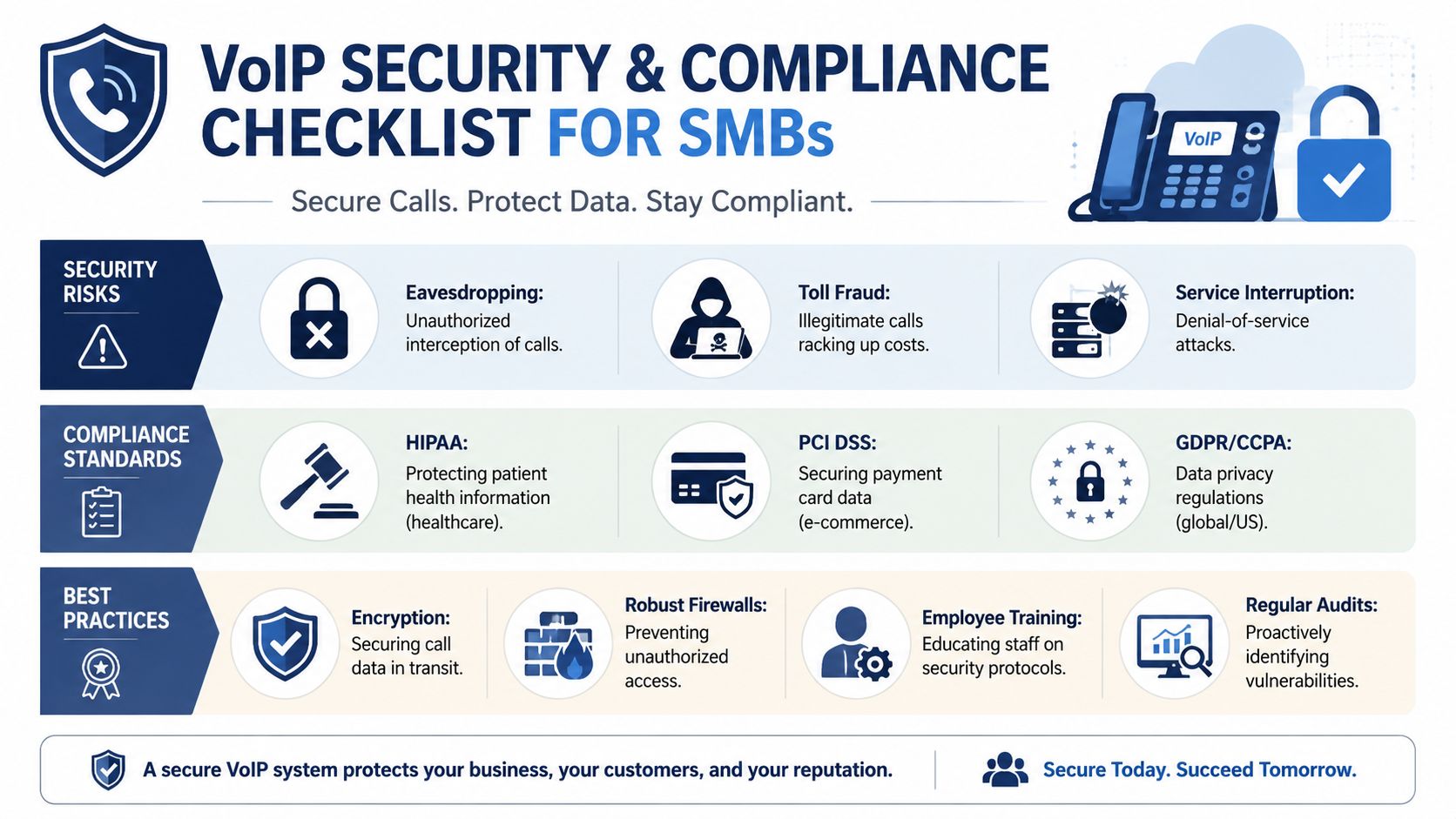
A lot of companies assume cloud calling is compliant by default. It isn't. The provider can offer tools, storage, and security options, but your business still controls how features are used, what gets recorded, who has access, and whether callers gave the right consent.
That matters because some of the most attractive VoIP features also carry the most legal risk. Call recording, voicemail transcription, AI-generated summaries, and searchable call logs all create data that may fall under privacy rules, industry-specific regulations, or internal retention policies.
The hidden risk in convenience features
SMBs often get caught off guard. A visual voicemail inbox with transcription feels harmless because it's convenient. But once speech is transcribed, stored, searchable, and maybe forwarded internally, the privacy exposure changes.
According to Nextiva's VoIP FAQ discussion of privacy liability, 68% of SMBs are unaware of their liability under new state-level VoIP privacy statutes. That's a serious gap, especially for businesses using features like visual voicemail with transcription or call recording without a clear consent and retention policy.
Compliance reality: “Cloud” describes where the system runs. It doesn't answer whether your staff should record, transcribe, retain, or share customer conversations the way they currently do.
What to verify before enabling recording or transcription
Before you switch these features on, answer a few basic questions:
- Who gives consent: Are you operating in places where one-party or all-party consent rules may apply?
- What gets stored: Are you keeping raw audio, transcript text, or both?
- Who can access it: Can any supervisor open recordings, or only approved staff?
- How long it remains available: Is there a retention rule, or are files accumulating indefinitely?
- How it's communicated: Do greetings, disclosures, and workflows match what your business is doing?
Caller identity controls matter too, especially as spoofing and trust issues affect answer rates. Businesses reviewing outbound legitimacy should understand caller ID authentication as part of their broader telephony risk management.
Security isn't just about compliance paperwork
Security issues in VoIP also include toll fraud, unauthorized access, weak passwords, exposed admin accounts, and poorly managed endpoints. For many SMBs, these risks are less dramatic than a major breach but more common in day-to-day operations.
A sensible approach includes user access controls, careful review of recording permissions, regular account audits, and coordination with whoever manages the wider business network. If your team needs a broader reference point beyond voice alone, this overview of comprehensive cyber protection is useful because it frames communications security inside the larger business security picture.
Don't treat security as a one-time setup. A significant risk appears later, when new staff are added, features are enabled casually, and nobody revisits whether the original rules still fit the business.
Choosing the Right VoIP Solution A Practical Guide
Most VoIP buying mistakes happen because businesses compare price and features before they compare call quality, implementation discipline, and support. That's backwards. If calls break under load, the rest of the feature list doesn't matter.
The most common quality problems are measurable. According to Telnyx's HD voice guidance, VoIP quality degrades primarily from jitter above 30 ms and packet loss above 1%. The same source notes that applying QoS rules to prioritize VoIP traffic can reduce latency by 40 to 60% and improve call success rates from 92% to 98.5% during congestion. For SMBs, that makes QoS a practical requirement, not an advanced extra.
Why network fit matters more than app design
A polished app can still produce lousy calls on a weak network. Many remote users assume their home internet is fine because streaming video works. Voice is less forgiving in a different way. It doesn't need huge bandwidth, but it does need stability and priority.
That's why I tell clients to ask harder questions during evaluation:
- How will this behave on office Wi-Fi during peak use?
- What does the provider recommend for router QoS?
- How are remote users supposed to test call quality before go-live?
- What happens when a user's mobile app and desktop app ring at the same time?
- Who helps with setup when the issue is partly network and partly telephony?
If a provider only demos features and never talks about packet loss, jitter, router settings, or rollout support, you're not seeing the hard part yet.
VoIP provider selection checklist
| Criteria | What to Look For | Why It Matters |
|---|---|---|
| Call quality approach | Clear guidance on network readiness, QoS, and device support | Good voice quality depends on configuration, not branding alone |
| Admin simplicity | Straightforward user, routing, voicemail, and reporting controls | SMBs need changes handled quickly without specialist intervention |
| Mobile and desktop support | Reliable apps across the devices your team actually uses | Staff adoption drops when one group has a worse experience |
| Implementation help | Porting guidance, setup assistance, training, and testing | A smooth rollout prevents rushed workarounds |
| Support model | Real support access by phone and online when issues occur | Telephony problems are disruptive and often time-sensitive |
| Compliance controls | Recording permissions, retention options, and policy flexibility | Convenience features can create legal exposure if unmanaged |
| Scalability | Ability to add users, locations, queues, and call flows without redesign | The system should grow with the business |
A smarter buying process
Ask every vendor to walk you through a real deployment scenario, not just a feature tour. Use your actual business conditions. A front desk, two remote users, a sales manager on mobile, shared support queue, and number porting. That reveals far more than a polished demo account.
If you operate internationally or want a regional perspective on deployment questions, this overview of business VoIP solutions in Canada provides useful context on how businesses evaluate service models and infrastructure fit.
The right provider isn't just the one with the longest checklist. It's the one whose system your team will use effectively, whose support can resolve problems quickly, and whose implementation process respects that voice is still mission-critical.
Your Migration Checklist and Final Thoughts
Moving to VoIP calling apps is less about replacing phones and more about removing friction from how your business communicates. Done well, the shift gives your team mobility, gives customers a cleaner experience, and gives management better control over routing, reporting, and accountability.
The migration itself doesn't need to be dramatic. It needs to be organized.
A practical migration checklist
- Audit current call flows. List main numbers, extensions, voicemail boxes, after-hours handling, and any special routing rules.
- Decide how people really work. Separate desk-based users, mobile users, reception roles, managers, and queue-based teams.
- Test network readiness. Review office Wi-Fi, remote user setups, and whether router QoS can be configured properly.
- Review compliance settings early. Decide whether recording and transcription should be enabled, limited, or left off until policies are defined.
- Plan number porting carefully. Confirm ownership of numbers, billing records, and the cutover sequence.
- Run a pilot group first. Start with a small team that reflects real usage patterns, not just your most technical staff.
- Train for daily use. Show people how to transfer, check voicemail, manage status, and use the mobile app correctly.
- Monitor the first weeks closely. Watch missed calls, failed transfers, user behavior, and any quality complaints.
The businesses that get the most from VoIP calling apps don't treat them as a side utility. They treat them as part of customer operations. That's the right mindset going in.
If you're replacing an aging PBX or trying to unify office, mobile, and remote calling, SnapDial is worth a look. It provides a cloud business phone system with white-glove setup, predictable pricing, business calling features, and ongoing support for organizations that want a managed path out of legacy telephony.