
A growing support team can tell when its phone system has become the bottleneck. Calls queue during busy periods, remote agents struggle to connect reliably, and adding capacity means another conversation about hardware, carrier changes, and IT availability. The system may still place calls, but it no longer gives the business the control, visibility, or flexibility that customer operations require.
Call center as a service, usually shortened to CCaaS, moves contact-center software and infrastructure into the cloud. It can combine voice, chat, SMS, email, social messaging, routing, analytics, recording, and agent tools in a managed platform. The attraction isn't avoiding a PBX purchase. The opportunity is replacing a collection of fixed, disconnected systems with an operating model that can adapt as customer demand, staffing, and channels change.
The risks deserve equal attention. Cloud delivery doesn't remove the network, integration, security, or migration work. It changes where that work sits. This guide focuses on the practical decisions that determine whether CCaaS becomes useful infrastructure or just another complicated layer in the technology stack.
Why Businesses Are Moving to Call Center as a Service
A mid-sized online retailer may run smoothly for most of the year, then face a sudden flood of order-status calls during a seasonal promotion. Its legacy PBX has fixed trunks, fixed queues, and a limited number of agent positions. Customers wait longer, supervisors have little real-time insight, and the IT manager is asked to add capacity to a system that was designed around yesterday's demand.
That situation pushes companies toward CCaaS, but the strongest business case isn't “the cloud is modern.” It's the mismatch between fixed infrastructure and variable customer demand. On-premise contact centers require organizations to buy, maintain, and protect capacity before they know exactly when they'll need it. CCaaS lets teams provision users, queues, channels, and features through a hosted platform, subject to the provider's commercial model and technical limits.
Practical rule: Don't compare a CCaaS subscription only with a PBX license. Compare it with the full cost of owning, upgrading, securing, monitoring, and recovering the existing environment.
From hardware maintenance to customer operations
An on-premise contact center makes internal IT responsible for more than telephony. The team may manage servers, application releases, carrier connections, backups, recording storage, firewall rules, user provisioning, and outage recovery. Those tasks compete with projects that directly improve customer service.
A cloud contact center shifts much of the underlying platform responsibility to the provider. That doesn't make IT irrelevant. It gives IT a different job, namely defining standards, validating integrations, monitoring service quality, managing identity, and making sure the platform supports business workflows.
The historical path explains why this model became practical. Call-center technology traces back to the early 1960s, AT&T introduced toll-free 1-800 numbers in 1967, and the term “call centre” was first recorded in 1983, according to this history of call centers and contact centers. Outsourcing, VoIP, CTI, and early cloud software gradually separated customer-service capability from a physical room full of equipment.
Remote work and channel expectations
Location-bound systems became harder to defend as organizations adopted remote and hybrid operations. Agents need secure access to queues, customer records, recordings, and supervisor support without being tied to a particular desk. Browser-based workspaces and mobile-ready calling can help, but only when the underlying network and identity controls are sound.
Customers also expect more than a basic call queue. Voice may sit beside chat, SMS, email, or social messaging, with the interaction history available to the next agent. A business that's only replacing its PBX should first review a practical cloud-based business phone system guide to separate general hosted telephony from the deeper routing, reporting, and workforce requirements of CCaaS.
Market demand reflects this shift. Independent estimates place global CCaaS revenue at about USD 8.0 to 8.33 billion in 2026, compared with roughly USD 6.8 to 7.08 billion in 2025, while long-range projections vary from about USD 30.15 billion by 2034 to USD 32.7 billion by 2033. The same market reporting places North America as the largest region, with reported shares around 35.97% to 39.0% in 2025. These estimates come from CCaaS market reporting summarized by CMSWire, and the variation between firms is a reminder to treat market forecasts as directional, not as a budgeting model.
How CCaaS Architecture Actually Works
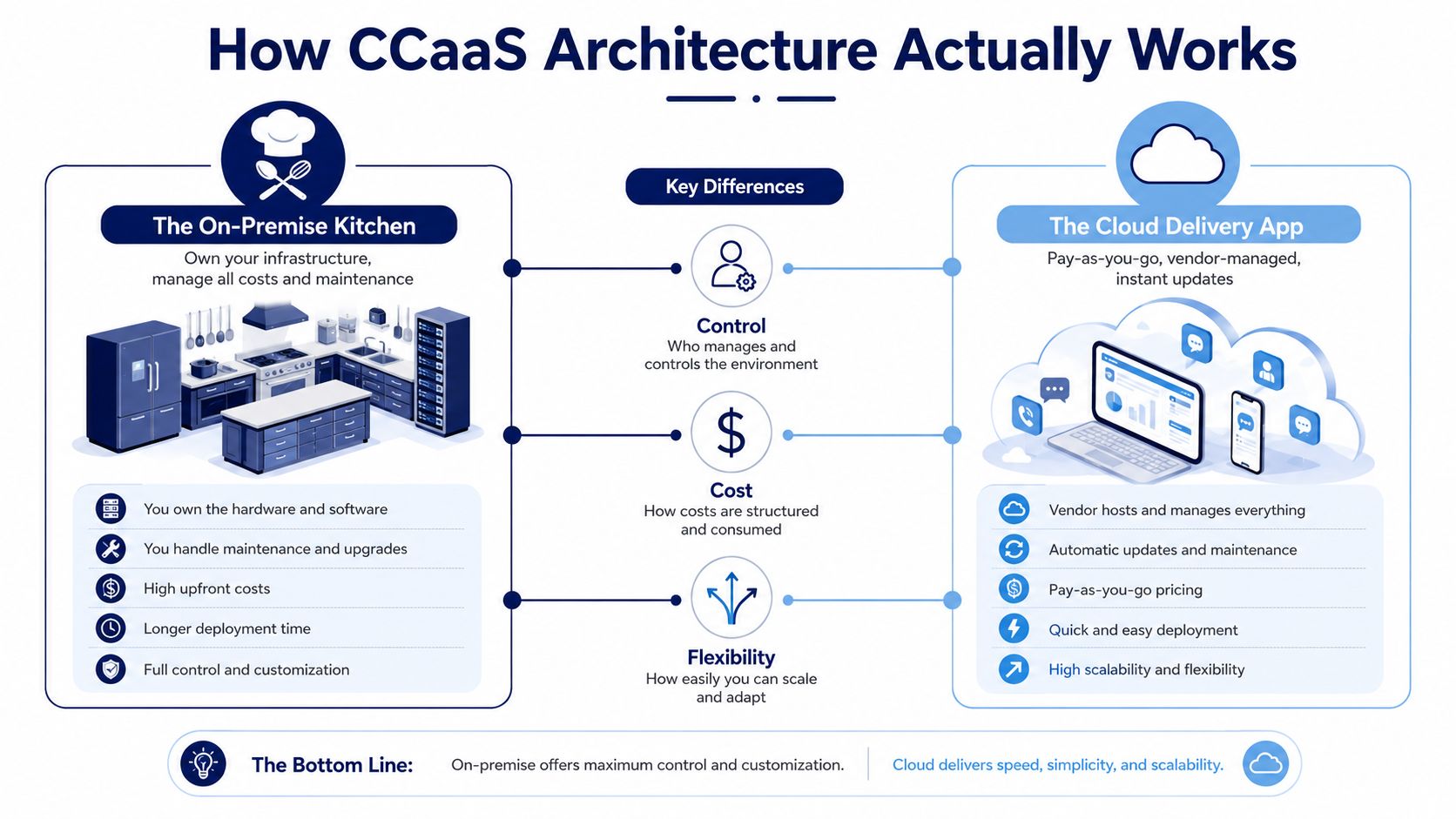
The easiest way to understand CCaaS is to compare it with a restaurant. An on-premise contact center is like owning the kitchen, including the building, ovens, refrigeration, staff systems, maintenance contracts, and backup arrangements. CCaaS is closer to using a delivery platform. You still define the menu and the service standards, but another company operates much of the infrastructure that delivers the meal.
The three layers
The network layer carries the interaction. It includes internet connectivity, SIP trunks, PSTN gateways, local carrier services, firewalls, and quality-of-service controls. If this layer introduces delay, jitter, or packet loss, the agent experience suffers even when the cloud application is functioning correctly.
The platform layer runs the contact-center logic. The provider hosts automatic call distribution, interactive voice response, queue management, recording, reporting, workforce tools, and channel orchestration. Distributed cloud infrastructure can make it easier to add agents or route contacts across locations, but the actual behavior depends on the provider's architecture and configuration.
The application layer is what users work with. Agents may use a browser workspace, a desktop application, or a mobile interface. Supervisors use dashboards and quality tools, while administrators configure queues, permissions, schedules, and integrations.
What happens to a customer call
A simplified flow looks like this:
- A customer call enters through the PSTN or a connected carrier.
- The provider's edge services authenticate and terminate the communication.
- IVR collects information or offers self-service options.
- The ACD evaluates queue, skill, availability, priority, and routing rules.
- The platform sends the interaction to an agent's browser or application.
- CRM context, call controls, recording, transcript, and reporting data remain connected to the interaction.
An agent in another state can therefore receive the call on a laptop rather than a dedicated desk phone. WebRTC makes browser-based voice possible, though it doesn't eliminate the need for suitable headsets, reliable networks, device management, and clear security policies.
Integrations determine the real value
A platform demo can look impressive while the integration plan remains vague. API-first architecture matters because your CRM, helpdesk, order system, identity provider, and analytics tools need to exchange information without forcing agents into manual copy-and-paste work.
Out-of-the-box connectors for systems such as Salesforce, Zendesk, or HubSpot usually reduce implementation effort compared with a custom integration. Before selecting a platform, review the cloud communications platform options that match your current application stack, then ask exactly which events, fields, recordings, transcripts, and call outcomes the connector supports.
Call recordings and transcripts may move through edge services into centralized storage or analytics systems. That flow affects retention, access control, regional storage, search, and export. Treat data movement as part of the architecture, not as an administrative detail added after the contract is signed.
CCaaS vs On-Premise PBX vs UCaaS
The terms overlap in vendor brochures, but the operating jobs differ.
UCaaS, or Unified Communications as a Service, focuses mainly on internal collaboration. It brings together employee calling, team messaging, meetings, presence, and video. CCaaS focuses on external customer interactions, with features such as ACD, IVR, queue management, skills-based routing, interaction history, quality management, and contact-center analytics.
An on-premise PBX gives the organization direct control over its hardware and software. That control can matter in regulated environments or where a recent investment still has useful life. It also means the organization owns the maintenance burden and must plan capacity, upgrades, backups, and recovery.
| Criteria | On-Premise PBX | UCaaS | CCaaS |
|---|---|---|---|
| Primary use | Business telephony controlled by internal IT | Internal collaboration and communications | External customer engagement and support |
| Cost model | Capital purchase plus maintenance and carrier costs | Subscription, usually tied to users and features | Subscription, often tied to agents, channels, usage, and add-ons |
| Scaling | Requires hardware, licensing, and configuration planning | Adds users and collaboration features through the provider | Adds agents, queues, channels, and routing capacity through the platform |
| Routing depth | Basic to advanced, depending on the PBX | Usually designed for employee calls | Built for skills, queues, priorities, customer context, and workload |
| Remote work | Requires additional design and secure access controls | Usually central to the product | Supports distributed agents when network and identity controls are ready |
| Analytics | Often fragmented or dependent on separate tools | Focused on collaboration and usage | Focused on contact volumes, service performance, quality, and outcomes |
| Disaster recovery | Organization must design and test it | Provider manages much of the service layer | Provider manages platform resilience, while the buyer still owns connectivity and procedures |
A decision matrix for SMB buyers
On-premise remains defensible when strict data residency or regulatory requirements conflict with a provider's hosting model, or when the business has significant recent investment in hardware and specialist skills. That choice should still include a written modernization and recovery plan.
UCaaS may be enough for an internal-focused company with limited customer contact, simple call handling, and no requirement for advanced queues or interaction analytics. Adding a full contact-center platform in that situation can create unnecessary administration.
CCaaS is usually the better fit for customer-facing teams that need seasonal capacity, distributed agents, omnichannel engagement, detailed reporting, or structured routing. A hybrid model is common. Employees use UCaaS for internal calls and collaboration, while customer support uses CCaaS, with presence, transfers, directories, and CRM context connected between systems.
The important question isn't which label sounds more advanced. It's whether the selected platform matches the workflow your agents perform every day.
Measurable Business Benefits of Cloud Contact Centers
CCaaS can improve financial and operational performance, but the result depends on implementation quality. A subscription doesn't automatically reduce cost, shorten calls, or improve resolution. Those outcomes come from specific changes in routing, agent workflow, staffing, reporting, and infrastructure ownership.
Metrigy's global customer-experience study found that nearly 36% of contact-center operations used CCaaS as their primary platform, while its market analysis placed global CCaaS revenue at $6.0 billion in 2023, up 23% year over year, with growth forecast at about 13% annually. These figures are reported in the Metrigy CCaaS market study. The practical meaning is that CCaaS is no longer an experimental deployment model. Buyers should evaluate it as core operating infrastructure.
Where the business case usually comes from
The clearest savings often come from removing work rather than chasing a headline feature.
- Infrastructure ownership: The company can reduce dependence on dedicated contact-center servers, hardware refreshes, and local application maintenance.
- Capacity management: Teams can adjust agent and queue capacity without buying physical equipment for every anticipated peak.
- Telephony consolidation: Centralized carrier and SIP management may reduce duplicated services, though the actual result depends on contracts and traffic patterns.
- IT allocation: Internal staff can spend less time repairing the contact-center stack and more time on security, integration, data, and service improvement.
- Agent workflow: CRM screen pops, unified interaction history, routing rules, and embedded knowledge can reduce repeated searches and manual entry.
The last category is often the most valuable operationally. Faster handling isn't the only goal. A shorter interaction that fails to resolve the customer's issue moves the work into another queue.
Build an evidence-based scorecard
Don't promise finance a universal percentage improvement. Establish a baseline first, then measure the same indicators after rollout.
| Metric | Before CCaaS | After CCaaS | Improvement |
|---|---|---|---|
| Cost per contact | Include carrier, hardware, support, labor, and licensing costs | Include subscription, usage, implementation, support, and network costs | Compare like-for-like |
| First-contact resolution | Record by queue, intent, and channel | Track after routing, CRM, and knowledge changes | Look for resolution quality, not just shorter calls |
| Agent productivity | Measure active handling, after-call work, and avoidable transfers | Compare with unified tools and improved routing | Separate workflow gains from staffing changes |
| Service continuity | Document outages, manual workarounds, and recovery procedures | Test provider failover and local connectivity alternatives | Validate recovery rather than assuming it |
| Reporting effort | Count time spent assembling reports from separate systems | Measure time to produce trusted operational views | Confirm data definitions before comparing |
| Capacity response | Record how quickly the team can add or reassign capacity | Test changes during controlled demand periods | Include training and quality controls |
Remote-agent enablement and real-time analytics can support better continuity and coaching, but only when managers act on the information. A dashboard that nobody reviews is an expense, not an operational benefit.
Hidden Risks and Network Dependencies Most Vendors Ignore
“Plug and play” is useful sales language, but it isn't an implementation plan. A cloud contact center still depends on the public network, local connectivity, device quality, identity controls, browser behavior, integrations, and carrier processes.
An academic CCaaS deployment study explicitly measured bandwidth, response time, and delay variation. Its benchmark work emphasized end-to-end security and distributed virtualization across a private cloud connected to both the PSTN and the internet. The study's practical lesson is straightforward, and it is documented in this academic CCaaS deployment study: network quality must be engineered as part of the contact center, not treated as a general office-IT concern.
The network is part of the product
High round-trip time, jitter, or packet loss can make speech overlap, sound clipped, or force agents to repeat themselves. Browser voice adds dependencies on headset drivers, local Wi-Fi, endpoint performance, firewall behavior, and other applications competing for connectivity.
The buyer may need network assessment, QoS configuration, redundant internet service, monitoring, and clear escalation paths. Those costs can sit outside the CCaaS quote. Ask the provider to identify the responsibilities that remain with your business and to specify how they'll help isolate a problem between the agent device, local network, ISP, carrier, and cloud platform.
For a deeper explanation of one common voice-quality issue, review what jitter means in networking. The terminology matters because “the internet is working” doesn't prove that real-time voice is working well.
Fragmentation can survive the migration
Some contact centers run up to four separate contact-center technologies at once, according to 2026 contact-center trend reporting from IPC Technologies. Consolidation is therefore a business problem, not just a platform feature. A new CCaaS tool can add fragmentation if it fails to connect cleanly with the CRM, helpdesk, ERP, workforce system, or identity provider.
Before signing, ask:
- Service levels: What uptime commitment applies to voice, digital channels, APIs, recording, and reporting separately?
- Incident response: How are priority incidents classified, communicated, and escalated?
- Recovery: Where does failover occur, what remains available during an outage, and how often is recovery tested?
- Security: What encryption, audit logs, access controls, and administrator protections are included?
- Data control: Where are recordings and transcripts stored, how long are they retained, and how can they be exported?
- Exit terms: Can you retrieve numbers, recordings, configurations, reports, and customer history in usable formats?
The provider should answer these questions in writing. A polished demo can't compensate for unclear ownership during an outage or an expensive exit.
Your CCaaS Migration Checklist and Timeline
A controlled migration usually takes 8 to 12 weeks, depending on carrier coordination, integration complexity, security review, and the number of workflows being replaced. The calendar matters less than the decision gates. A project can appear on schedule while number porting, CRM permissions, or agent training remains unresolved.
Phase one and phase two
Pre-migration, typically weeks one and two, starts with an inventory. Document numbers, queues, IVR menus, call flows, business hours, recording policies, transfer behavior, reports, integrations, and current pain points. Test network quality from every important office and remote-work location. Confirm number-porting requirements with the carrier early, because carrier delays can affect the entire cutover.
Define success criteria before configuration begins. Examples include accurate queue reporting, functioning CRM screen pops, tested call recording access, reliable remote-agent login, and a rollback decision that someone has authority to make.
Configuration, typically weeks three through six, turns that inventory into working services. Build IVR menus, routing rules, skills, schedules, permissions, recording policies, dashboards, and integrations. Use realistic customer journeys rather than testing isolated features. A caller who selects a language, enters an account reference, reaches a skill group, transfers to a supervisor, and receives a follow-up should be tested as one complete path.
Pilot before production
A pilot should use a small, representative group of agents and supervisors. Include different locations, devices, skills, and call types. Test inbound and outbound calls, transfers, holds, recordings, reporting, CRM updates, password recovery, and failure handling.
User acceptance testing should produce written evidence, not verbal confidence. Record the expected result, actual result, owner, severity, and decision. Keep the legacy system available during the pilot so the team can compare behavior and preserve a rollback option.
Cutover and stabilization
During go-live, coordinate carrier activation, platform changes, user provisioning, endpoint checks, and communications. Keep a named technical bridge open, publish an escalation list, and define the conditions that trigger rollback. Don't let a launch proceed because the test call worked.
After launch, monitor quality, abandoned contacts, transfers, agent login problems, CRM errors, recordings, and queue behavior. Train agents in short sessions supported by job aids, then schedule a 30-day optimization review to remove unnecessary IVR branches, correct skills, adjust schedules, and close integration gaps.
Migration checkpoint: If the team can't explain how it will restore customer service when the provider, carrier, or local internet connection fails, the project isn't ready for production.
How to Evaluate Vendors and Write an Effective RFP
A vendor evaluation should force comparable answers. Demos are useful for seeing workflows, but they often hide implementation effort, add-on pricing, data limitations, and the buyer's responsibility for network performance.
Start with requirements that reflect the operation rather than the brochure. Identify critical queues, channels, integrations, security obligations, reporting needs, retention policies, agent locations, and expected growth patterns. Then score providers against the same criteria.
The following weighting is a practical starting framework for an RFP. It is a buyer-created model, not an industry benchmark.
| Evaluation Category | Weight | Key Questions to Ask | Red Flags |
|---|---|---|---|
| Reliability | 30% | What availability commitment covers each service? How does failover work? How are incidents reported? | One broad uptime statement, no service-specific detail, no tested recovery evidence |
| Integration capability | 25% | Which CRM, helpdesk, identity, and reporting integrations are native? What does the API expose? | “Integrates with anything” without documentation, ownership, or implementation scope |
| Total cost of ownership | 20% | What will licenses, usage, recording, AI, storage, implementation, support, and exit cost over 36 months? | Core price excludes required add-ons or uses unclear usage assumptions |
| Security and compliance | 15% | Where is data stored? What logs, encryption, retention, and access controls are provided? | Vague compliance language, unclear residency, limited audit access |
| Vendor viability | 10% | Who supports the account? How are product changes communicated? What happens if the service is discontinued? | No roadmap clarity, weak support model, restrictive exit terms |
Questions that expose production reality
Ask vendors to describe a failed deployment, not just a successful demo. Request evidence of failover testing, the average resolution process for priority incidents, support coverage, maintenance notifications, and responsibility boundaries between the vendor and the customer.
Your RFP should also ask:
- Can the business export recordings, transcripts, reports, call detail records, numbers, and configuration data?
- Which CRM fields can the platform read and write during a live interaction?
- How are failed API calls, duplicate records, and partial updates handled?
- What happens to recordings and transcripts when retention policies change?
- Which features require separate licenses?
- Can the buyer terminate for repeated service failures, and what assistance is provided during transition?
- What network conditions and endpoint standards does the provider require?
- Which functions continue during a carrier or internet disruption?
Pricing deserves particular scrutiny. A low per-agent figure may exclude recording storage, advanced analytics, AI routing, digital channels, implementation, premium support, or usage-based services. Build a three-year model with conservative assumptions and require each vendor to complete the same template.
For additional buying context, use this 2026 guide to choosing a cloud VoIP provider when separating general hosted telephony from contact-center requirements. A platform such as SnapDial can fit organizations looking for hosted calling with auto attendant, call routing, queue management, recording, mobile applications, reporting, and cloud faxing, but buyers should still validate whether its contact-center capabilities and integrations match their specific workflows.
A strong RFP doesn't ask which vendor has the longest feature list. It asks who owns each dependency, how each failure is handled, what the buyer will pay, and how the business can leave if the platform stops fitting.
If your team is replacing a legacy PBX or assessing CCaaS, SnapDial can help map hosted calling, queues, routing, recording, mobile access, and contact-center workflows to your operating needs. Visit SnapDial to discuss a practical cloud communications setup with predictable pricing and end-to-end implementation support.