
A regional retailer's phone system fails during a holiday rush. Customers hear dead air, store managers can't redirect calls, and the IT team waits for a specialist to change a basic routing rule. The problem isn't that the old PBX broke. The business chose a communications system it couldn't adapt or operate quickly.
That's the risk behind every cloud PBX purchase. Providers can look similar on a feature sheet, yet differ sharply in pricing structure, migration support, call-flow control, security, and response when something goes wrong. This guide compares cloud PBX providers by their operational consequences, then shows where SnapDial may fit and what you should verify before signing.
When the Right Cloud PBX Decision Matters
A growing professional services firm can face a different version of the same problem. Three offices share one main number, consultants work from home, and callers need to reach the right team without memorizing separate extensions. If each site uses a different routing setup, receptionists become the integration layer. They transfer calls manually, explain delays, and cover gaps when someone is unavailable.
The wrong cloud PBX provider adds friction in several ways:
- Recurring cost creep: A low seat price may exclude recording, queue tools, toll-free usage, or advanced reporting.
- Fragmented call flow: Separate sites may use inconsistent menus, ring groups, business hours, and failover rules.
- Slow administration: Routine changes may require a support ticket instead of an authorized administrator.
- Weak operational visibility: Supervisors may see missed calls without seeing queue behavior, wait times, or agent activity.
- Migration exposure: Poor porting coordination can create confusion around numbers, greetings, voicemail, and call forwarding.
Independent comparison guidance repeatedly evaluates cloud PBX platforms on IVR and routing depth, queue controls, mobile and softphone stability, and admin self-service. Those criteria matter because they reveal how a provider behaves during overflow, outages, staffing changes, and urgent routing updates, not just how many icons appear in a product brochure (cloud PBX comparison criteria).
Practical rule: Buy the provider that makes the next operational change easy, not the one that wins the longest feature checklist.
A suitable deployment absorbs new users, standardizes call handling across locations, and gives managers enough information to correct missed-call problems. The provider decision is therefore an operating-model decision. Price matters, but so do ownership of the call flow, support responsiveness, and the amount of work your team must perform after launch.
Understanding Cloud PBX Fundamentals
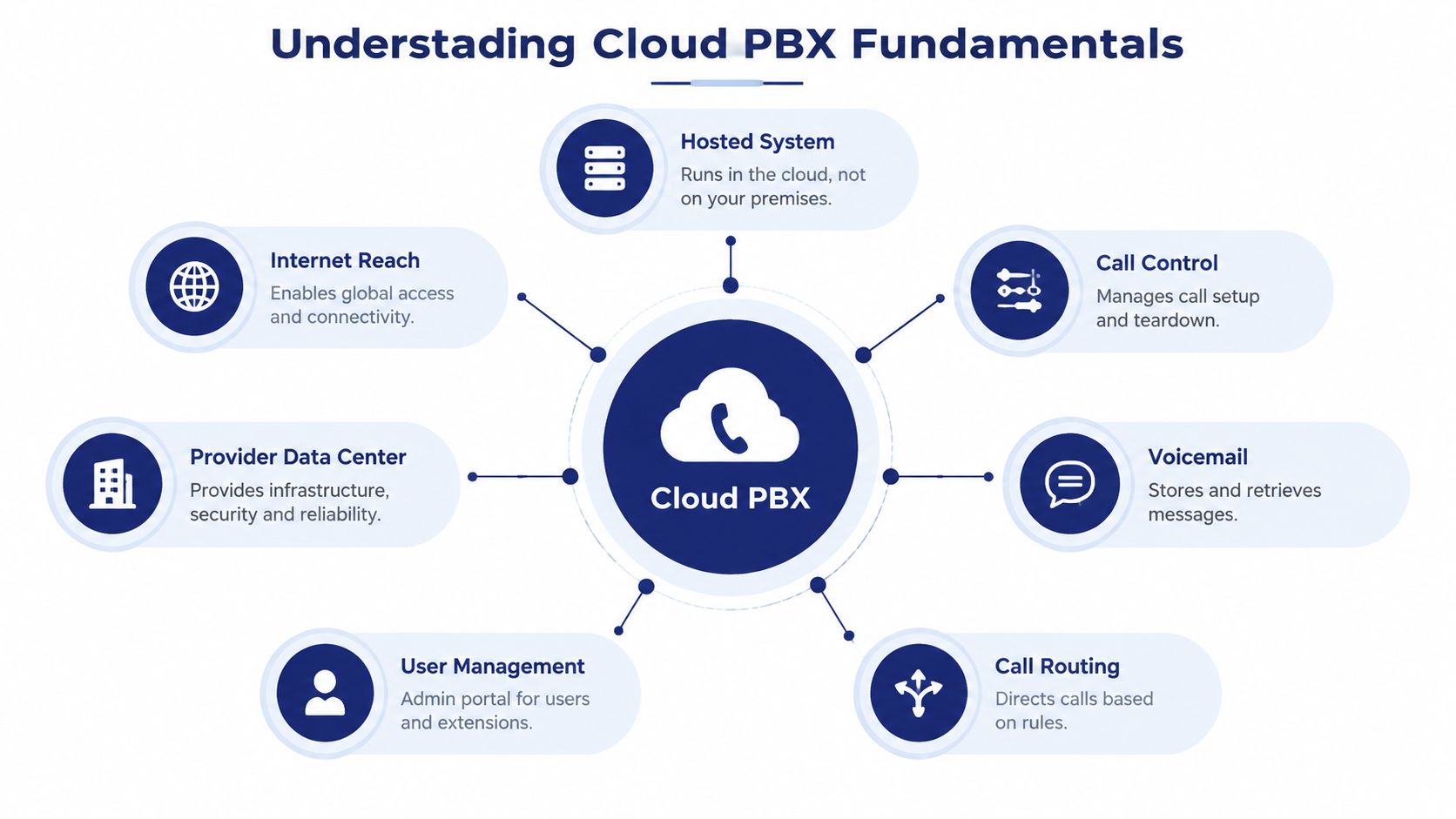
A cloud PBX is a hosted business phone system. The provider runs call control, voicemail, routing, user management, and related services in its data center, while employees connect through desk phones, desktop applications, mobile apps, or compatible endpoints over the internet.
The core components are straightforward:
- External connectivity: SIP trunks or native cloud connectivity connect the business to outside telephone networks.
- Call-control layer: The platform handles extensions, transfers, ring groups, IVR menus, queues, recording, and business-hour rules.
- Administration portal: Authorized staff provision users, assign numbers, manage permissions, update greetings, and change routing.
- User endpoints: Softphones and mobile applications let employees answer calls without being tied to a physical desk.
- Business integrations: CRM, helpdesk, collaboration, and workflow connections place calling inside the tools employees already use.
Hosted PBX and cloud PBX are often used interchangeably. An on-premise PBX places the hardware and much of the maintenance responsibility at the customer's location. A virtual PBX generally describes a hosted system focused on routing and business calling. UCaaS usually extends the phone system into a broader package involving messaging, meetings, collaboration, and other communication tools. The boundaries overlap, so ask what is included rather than relying on the label.
The buying implications are more important than the terminology. Your numbers must be portable, your internet connection must support reliable voice traffic, and your administrators need a clear answer to the question, “Who can change the call flow?” A subscription removes hardware ownership, but it doesn't automatically create operational simplicity. You still need usable controls, documented failover behavior, sensible permissions, and a provider that can explain how calls move through the system.
Before selecting among cloud PBX providers, assess the network that will carry the service. A practical starting point is reviewing SwiftNet Wifi business internet options, then confirming whether each location has adequate reliability, redundancy, and support for business voice.
For a focused overview of hosted architecture and administration, review the SnapDial cloud PBX system information alongside your technical requirements.
Comparing Cloud PBX Providers
Cloud PBX providers should be compared as operating models. One vendor may offer an inexpensive entry tier with basic menus and voicemail, while another bundles deeper queue controls, recording, analytics, and mobile access into a higher subscription. Neither is automatically better. The correct choice depends on who will manage the system, how complex the call flow is, and what happens when demand exceeds normal capacity.
| Criterion | Low-Cost Hosted PBX | Mid-Market UCaaS | Contact Center-Centric Provider | SnapDial Fit |
|---|---|---|---|---|
| Core calling | Basic extensions, menus, transfers, and voicemail | Broader calling plus messaging and meetings | Deep IVR, queues, recording, reporting, and supervisor tools | Hosted business calling with IVR, routing, recording, voicemail, mobile and desktop access |
| Pricing model | Low entry price, often with add-ons | Bundled plans with tier differences | Higher cost tied to advanced modules and seats | Review all-inclusive scope, included features, usage terms, and add-ons |
| Migration | Self-service or light assistance | Guided onboarding, sometimes managed | Project-led migration for complex call flows | Verify the exact setup scope, porting process, testing, and training |
| Administration | May require tickets for changes | Portal access varies by plan | Granular controls, but can be complex | Self-service portal for users, routing, voicemail, logs, and recordings |
| Scalability | Suitable for simple growth | Strong for users, locations, and collaboration | Built for queues, agents, and operational reporting | Relevant to SMBs, multi-location teams, and support groups, subject to verification |
| Support | Standard business-hours channels may dominate | Tiered support and escalation | Formal support structure and specialist coverage | Verify written SLA terms, response expectations, and escalation process |
| Security and compliance | Basic controls may be sufficient for low-risk use | More identity and administration options | Usually requires detailed compliance review | Map documented controls to the buyer's regulatory and data-handling needs |
Feature depth should follow call complexity
A single-site office that mainly needs an auto attendant, business-hours routing, voicemail, and mobile access shouldn't pay for a contact-center stack it won't use. A customer-support operation with queues, callbacks, wait-time announcements, agent reporting, and recording controls needs more than a basic hosted dial tone.
Independent buying guides consistently emphasize call routing, IVR depth, queue callback, wait-time announcements, mobile stability, and self-service administration as meaningful comparison dimensions (operational dimensions used to compare cloud PBX providers). Those features affect staffing and customer handling directly. If supervisors can't see where calls wait or administrators can't change a menu, the business pays through missed opportunities and slower response.
Pricing and contracts change the operating model
Bundled plans are easier to budget, but they can include capabilities you don't need while excluding the one feature your team requires. À la carte plans look flexible, but the final bill can become difficult to forecast. Ask for a complete quote that includes users, numbers, recording, toll-free service, international calling, implementation, hardware, support, and cancellation terms.
Endpoint lock-in deserves scrutiny, too. Proprietary devices or applications may simplify deployment, yet make future migration harder. Favor providers that support practical number portability, clear export procedures, and standard business workflows.
Support is part of the product
A provider that offers a polished application but routes every urgent issue through a slow ticket queue may be a poor fit for a phone-dependent business. Ask who investigates call quality, whether support can inspect routing and network events, and how severity levels are defined.
For healthy hosted VoIP service, industry guidance commonly treats 99.99% uptime as a benchmark, equivalent to roughly 4 minutes 22 seconds of downtime per month. Major-market buying guidance also uses under 15 minutes for severity-one support response as a comparison benchmark, so review the written SLA and support process rather than accepting a general reliability promise (VoIP uptime and response-time benchmarks).
Analyzing Pricing and Total Cost
Cloud PBX pricing usually starts with a per-user subscription, but that figure is only the beginning. Vendors may separate standard calling from recording, advanced queues, analytics, toll-free usage, international numbers, hardware, implementation, and premium support. Compare the complete operating package, not the number printed beside the entry plan.
Build a 12-month cost model for every shortlisted provider. Include:
| Cost Component | Entry Tier | Mid Tier | Contact-Center Tier |
|---|---|---|---|
| User subscriptions | Basic users and core calling | Users plus collaboration or management features | Agents, supervisors, and advanced operational tools |
| Numbers and usage | Local numbers, toll-free charges, usage allowances | Expanded number inventory and usage terms | Higher-volume calling, recording, and queue-related usage |
| Add-ons | Recording, transcription, analytics, or mobile features may be separate | Some tools may be bundled, others remain tier-dependent | Specialized modules may carry separate charges |
| Implementation | Self-service or limited assistance | Guided configuration and onboarding | Project management, call-flow design, testing, and training |
| Hardware | Desk phones, headsets, and replacement policy | Mixed endpoint and softphone requirements | Agent devices, supervisor tools, and quality-monitoring needs |
| Contract terms | Minimum seats, renewal language, and cancellation conditions | Discount commitments and expansion rules | Longer commitments, implementation conditions, and exit obligations |
A 25-seat SMB might find a basic subscription attractive until recording, voicemail transcription, mobile use, and porting services appear as separate lines. A 100-seat multi-site company should also model site administration, number inventory, network upgrades, training, and the internal time required to manage changes. The right question is not “What's the monthly rate?” It's “What will this deployment cost to run, change, support, and eventually leave?”
Look closely at minimum seat counts, auto-renewal terms, cancellation fees, porting charges, overage rates, and feature activation fees. Ask whether the provider bills inactive users, whether seasonal changes are allowed, and whether adding a location changes the commercial model.
For a direct view of package structure and available plans, examine SnapDial cloud PBX pricing and request a quote that reflects your actual users, locations, numbers, and required features.
The cheapest quote is often the one that leaves the most work and risk outside the quote.
Normalize each offer into the same categories. Keep one-time charges separate from recurring charges, identify usage assumptions, and write down what happens in the first renewal period. A transparent provider should answer these questions without forcing you to reverse-engineer the bill.
Matching Providers to Business Use Cases
The best cloud PBX provider for a small office may be the wrong choice for a contact center. Start with the work your employees perform, then identify the failure that would hurt most. That approach produces a shorter, more useful shortlist than comparing every feature every vendor has released.
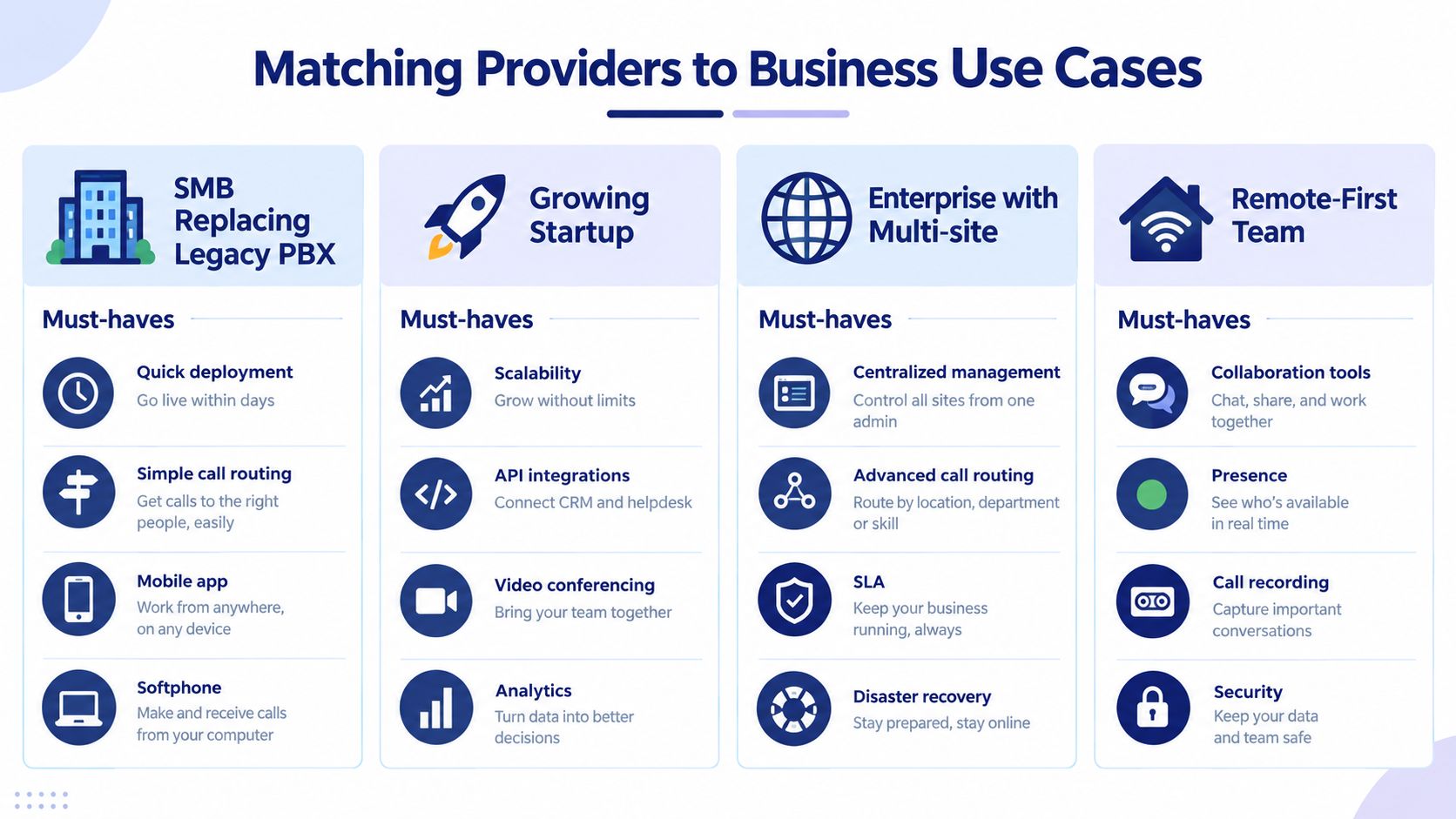
SMB replacing a legacy PBX
Prioritize quick deployment, simple routing, mobile and desktop applications, and predictable user pricing. You likely need an auto attendant, ring groups, voicemail, business-hours rules, number porting, and straightforward administration. You don't need a complex contact-center platform unless your team actively manages queues and agent performance.
Test the provider with real scenarios. Can an office administrator add a user, change the main greeting, redirect calls during an emergency, and remove access when someone leaves? If every adjustment requires vendor intervention, the system may recreate the maintenance burden you were trying to eliminate.
Multi-location organization
Look for centralized administration with local control. Each site may need its own numbers, business hours, queues, greetings, and emergency procedures, while leadership still wants consistent policies and reporting.
Inter-site dialing, location-aware routing, failover rules, and shared directories matter more here than a long list of collaboration features. Ask the provider to demonstrate how a call moves from the main number to a site, queue, overflow destination, and final failover target.
Contact center
A support team needs more than extensions and voicemail. Evaluate advanced IVR, skills-based routing, queue callback, wait-time announcements, real-time dashboards, recording controls, quality monitoring, and workforce-management integrations.
Recording also creates governance questions. Confirm who can access recordings, how permissions work, what retention controls exist, and how supervisors export or review calls. For healthcare-facing teams, a resource about a medical call center can help clarify why call handling, escalation, and data controls require more attention than basic business calling.
A contact-center-first provider may justify higher pricing when queue performance directly affects revenue or service levels. A general UCaaS platform may be sufficient when queues are occasional rather than central to the business.
Remote and hybrid teams
Remote users need reliable softphones, mobile applications, secure provisioning, presence, transfer controls, and sensible BYOD policies. Test calls from the environments employees use, including home networks and mobile connections. Don't evaluate the desktop app only from a managed office network.
A provider can be strong for one profile and weak for another. Pay more when a feature protects a material business process, such as queue visibility for a support team or centralized routing for multiple offices. Don't pay for enterprise complexity merely because the brochure calls it advanced.
Planning Migration and Ongoing Administration
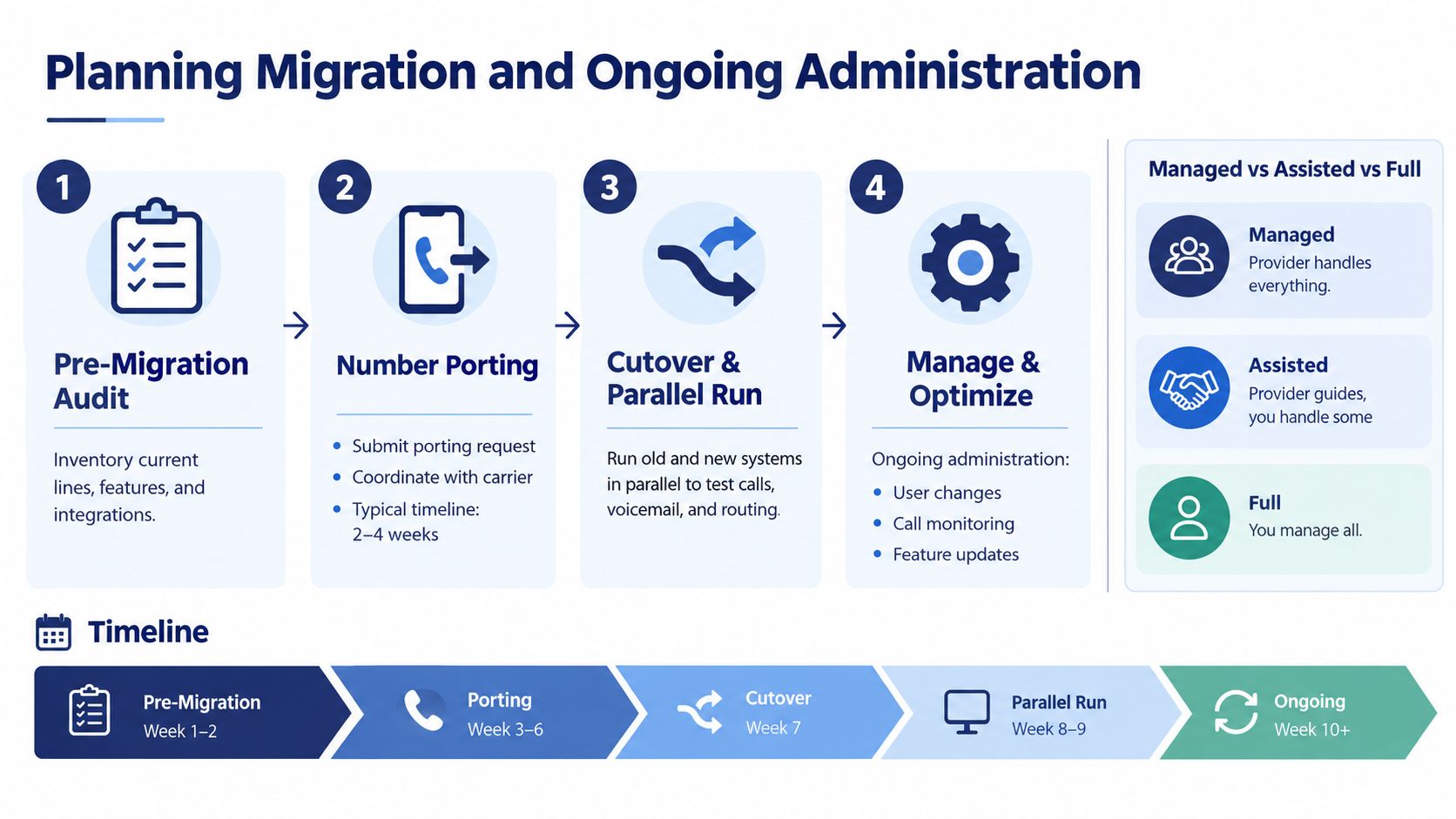
Migration is a project, not a switch flip. Start with an inventory of numbers, extensions, call flows, greetings, voicemail boxes, queues, recordings, integrations, devices, emergency-calling requirements, and business-hour rules. Missing one dependency can create a failure that appears to be a provider problem but began as an incomplete audit.
Choose the onboarding model deliberately
A managed migration gives the provider responsibility for configuration, porting coordination, testing, and training. It suits teams with limited telecom expertise or complicated call flows. An assisted model splits the work, while a self-service model gives your team control but demands more internal time and technical confidence.
Number porting requires carrier coordination and careful cutover planning. Keep the old system available while the new environment is tested, verify inbound and outbound calls, check voicemail and menus, and document the rollback plan. Employees should know how to sign in, transfer calls, use mobile applications, and report call-quality problems before the old system is retired.
Administration determines long-term value
After launch, someone must provision users, update IVR prompts, adjust queues, manage permissions, monitor call quality, and review recordings. A portal that exposes these controls reduces dependence on support. A provider that requires tickets for every routing change shifts recurring labor and delay back onto your team.
Before signing, ask for a live administrative demonstration. Have the provider show how to add a user, change an overflow destination, update a holiday schedule, locate a recording, and remove access. For installation planning and deployment responsibilities, review SnapDial business phone system installation as one reference point, then compare the actual scope offered in your proposal.
Evaluating Reliability Security and Support
Reliability is more than an uptime figure. Ask how the provider handles redundancy, failover, disaster recovery, network congestion, call-quality monitoring, and number routing when a site or service component becomes unavailable. A strong SLA is useful only when the provider defines measurement, exclusions, remedies, and escalation clearly.
Security and compliance deserve the same operational scrutiny. Market research identifies VoIP security and compliance hurdles as a drag on adoption, particularly for regulated sectors, while broadband quality remains a concern in emerging markets and multi-region deployments (cloud telephony security and compliance risks). Healthcare, finance, and distributed organizations should examine data handling, recording retention, emergency calling, regional processing, and network quality across every operating location.
Use a weighted scorecard, but set the weights according to business risk. A contact center may assign more importance to queue resilience and support response. A regulated organization may prioritize audit logs, identity controls, retention, data residency, and documented compliance scope.
| Criterion | What to Verify | Weight | SnapDial Fit |
|---|---|---|---|
| Uptime and resilience | SLA definition, redundancy, failover, disaster recovery, and service credits | High | Verify written SLA terms and architecture documentation |
| Call quality | Monitoring, jitter and packet-loss handling, network troubleshooting, and escalation | High | Test representative networks and confirm troubleshooting ownership |
| Support responsiveness | Channels, coverage, severity definitions, escalation, and response commitments | High | SnapDial describes a 24/7 Texas support center; verify contractual terms |
| Security controls | Encryption, SSO, role-based access, audit logs, recording permissions, and retention | High | Map documented controls to your compliance requirements and obtain evidence |
| Compliance | Applicable certifications, agreements, data processing terms, and residency options | High | Require current documentation for your specific industry and geography |
| Scale | Users, locations, concurrent calls, number inventory, and administration model | Medium | Test expected growth scenarios and multi-site controls |
Don't treat a support center description as a substitute for an SLA. Ask who owns the network path, who can trace a poor-quality call, and how quickly the provider escalates a routing or outage issue. Request current security documentation rather than relying on general statements about protection.
Choosing the Best Fit and Why SnapDial May Fit
Shortlist two or three providers, then run a live pilot using real call flows. Include the main number, IVR, queues, overflow, voicemail, recording, mobile users, transfers, reporting, and administrator changes. Score each provider against your reliability, support, security, migration, and total-cost criteria.
SnapDial may fit growing SMBs and multi-location teams that want predictable per-user pricing, hosted calling, IVR, call recording, mobile and desktop applications, call routing, and a self-service administration portal without building an enterprise telecom operation. Its described offering also includes setup support, queue tools, voicemail transcription, number porting, and business phone hardware options. Verify every feature, SLA, compliance obligation, add-on, porting timeline, and exit clause in the commercial proposal.
Choose a global UCaaS provider when broad collaboration, international operations, or deep meeting integrations dominate the requirement. Choose a contact-center-first platform when workforce management, quality monitoring, and complex agent operations are central. A carrier-integrated provider may suit organizations that need tighter control over connectivity and troubleshooting ownership.
The right choice is the one your team can afford, migrate safely, administer quickly, and support under pressure. Make providers prove that fit in a pilot and in contract language.
SnapDial offers hosted cloud PBX calling with IVR, call routing, recording, mobile and desktop access, queue management, and self-service administration for teams replacing legacy systems or unifying multiple locations. Visit SnapDial to review the platform and request a proposal based on your actual users, call flows, and support requirements.