
Call routing software automatically decides where an incoming call should go based on business hours, caller selection, queue state, agent availability, or skills. The market behind this capability was valued at USD 4.6 billion in 2024 in one estimate and is projected to reach USD 6.1 billion by 2030, while another estimate places it at USD 5.2 billion in 2024 and USD 7.2 billion by 2030, showing that routing has become substantial business infrastructure rather than a niche telecom feature.
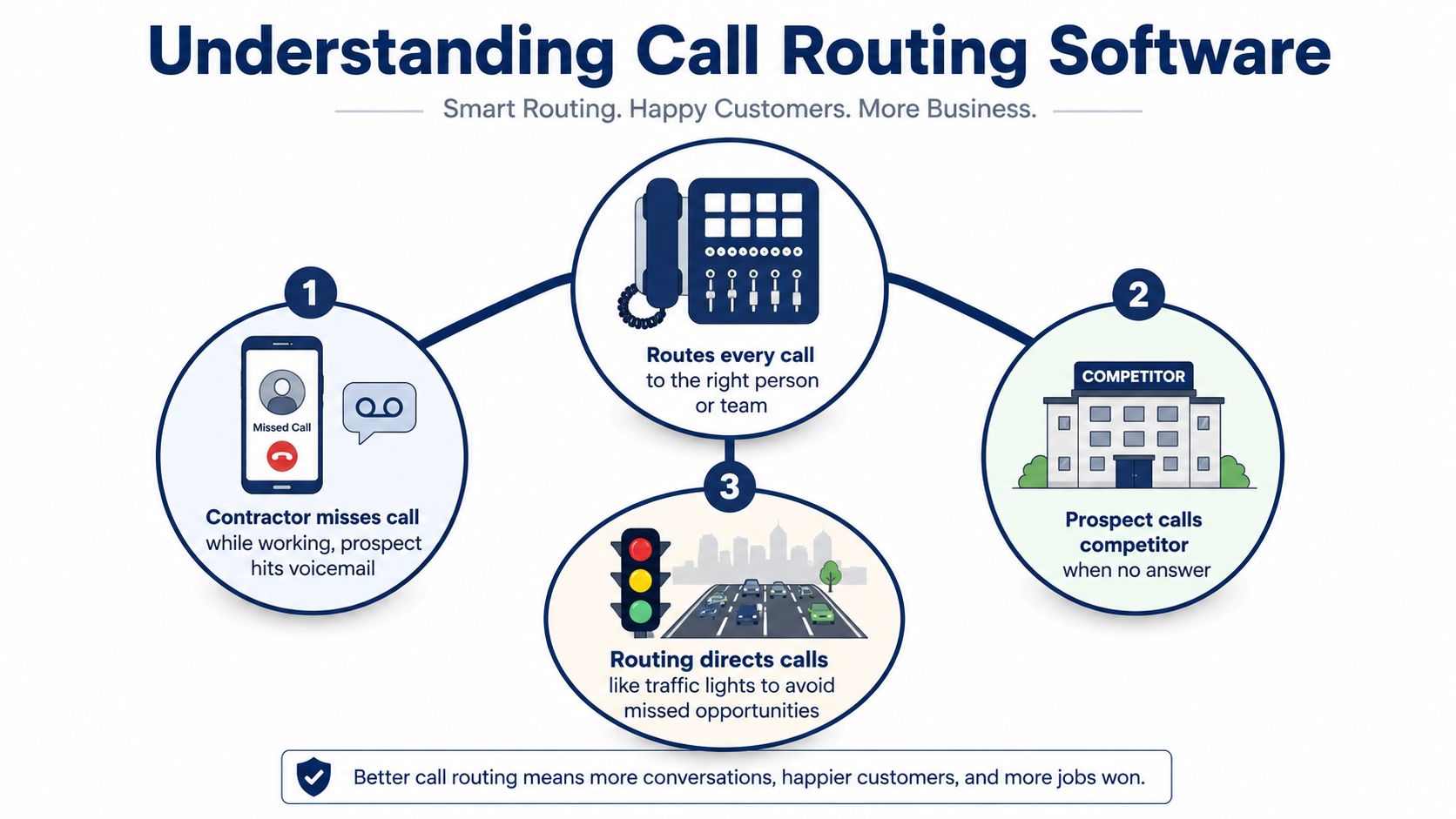
A contractor's phone rings while they're under a sink, hands occupied and unable to answer. The caller hears voicemail, assumes the business is unavailable, and tries a competitor instead. The contractor didn't necessarily lose the job because the service was poor. The call reached the wrong destination at the wrong moment.
That's the practical problem call routing solves. It acts like traffic control for business calls, directing each caller toward the person, team, device, queue, or automated service best suited to handle the request. The buying decision isn't whether your phone system has a long feature list. It's whether your routing rules reflect how your business works.
Understanding Call Routing Software
A basic phone setup might forward every call to one mobile number. An auto-attendant might ask callers to press a key for sales, support, or billing. More advanced call routing software can combine those choices with business hours, caller history, location, queue conditions, and live agent availability.
The easiest way to understand the difference is to follow the call rather than the feature name. A caller reaches your main number. The system checks whether the office is open, asks what the caller needs, identifies the right destination, and tries the appropriate person or group. If nobody answers, it applies a fallback rule, such as a second team, voicemail, callback request, or emergency number.
Three levels of call handling
Call forwarding makes a simple destination change. It can send calls from a desk phone to a mobile device or another extension, but it usually makes limited decisions.
An auto-attendant gives callers a menu. It can separate departments or provide self-service, though overly deep menus can frustrate callers who just want a person.
Intelligent routing adds context. It can consider whether an agent is available, whether a queue is already busy, whether the caller belongs to a particular region, or whether a specialist should handle the inquiry.
A small office may only need time-of-day routing and a ring group. A support operation may need queues, callbacks, priority handling, and skills matching. A multi-location company may need one public number with different rules for each branch.
Practical rule: Buy the simplest routing model that reliably handles your real exceptions, not the largest feature list a vendor can demonstrate.
For broader communications planning, it can help to compare unified communications platforms and see how calling, messaging, meetings, and mobility fit together. The important questions remain operational: which rule decides the destination, what happens when the first choice is unavailable, and who can change the flow without creating a new problem?
How IVR ACD and Ring Groups Work
Consider a caller seeking technical help. Four routing layers may handle that journey, and each layer answers a different question.
First, IVR identifies intent
Interactive voice response, or IVR, greets the caller and collects information through keypad selections or speech. The prompt might ask whether the caller needs sales, billing, or support. It might also offer account-status information without involving an agent.
IVR is the historical backbone of automated call routing, voicemail handling, and menu-based self-service. One market summary reported a worldwide IVR market of USD 4.6 billion in 2024, with projected growth to USD 6.1 billion by 2030 at a 4.9% CAGR. Another estimated USD 5.2 billion in 2024, rising to USD 7.2 billion by 2030 at a 5.6% CAGR. These estimates are summarized by Speech Technology Magazine's IVR market coverage.
The trade-off is menu depth. A short menu can filter calls effectively. A long menu may force callers through choices that don't match their situation.
For a closer explanation of the underlying system, see what an IVR system is.
Next, ring groups try available phones
A ring group sends the call to several phones simultaneously or in sequence. This works well for a small team where everyone can answer the same general category of inquiry.
A simultaneous group can produce a quick answer when staff members are available. Sequential ringing gives the first person a defined opportunity before trying the next. The larger the group becomes, however, the more difficult it can be to assign ownership and understand who is responsible for follow-up.
ACD manages waiting callers
Automatic call distribution, or ACD, places the call into a queue when no suitable agent is free. The system can use queue order, waiting time, priority, or other configured rules to decide which caller should be presented next.
ACD is useful when call volume changes throughout the day and managers need visibility into queue behavior. It also creates an explicit experience for waiting callers, with announcements, estimated options, or a callback path instead of an unexplained ring.
A short visual explanation can make the sequence easier to remember.
Finally, skills-based routing chooses fit
Skills-based routing considers attributes such as language, certification, product knowledge, region, or account ownership. It might send a technical issue to a qualified support agent instead of the first available representative.
Academic work treats this as an optimization problem because routing can seek both shorter waiting time and stronger resolution quality. The UCL research summary on skill-based call routing describes routing structures designed to balance those competing outcomes. A fast connection isn't always a successful connection if the caller is transferred again.
Research on dynamic routing also shows why queue state matters. A priority rule that combines the longest-waiting call with the longest-idle agent can balance customer patience and unused staff capacity, as discussed in this INFORMS study of dynamic call-center routing.
Choosing the Right Routing Model
The right model depends on how often your business needs to make a decision beyond “who answers next?” A professional office with stable hours has different needs from a support team with specialist queues and changing demand.
| Criteria | Static Rules | Queue-Based Routing | Context-Driven Routing |
|---|---|---|---|
| Typical decision | Time, day, sequence, or fixed destination | Queue order, wait time, priority, and availability | Intent, history, skills, location, and customer context |
| Caller experience | Direct and predictable | Structured waiting with queue messages or callbacks | More personalized matching, with more logic behind the scenes |
| Administrative effort | Low | Moderate | High, especially when skills and data integrations change |
| Best staffing model | Small, stable teams | Shared teams handling variable demand | Specialist teams, account owners, or layered support |
| Reporting depth | Basic missed-call and forwarding records | Queue, wait, abandonment, and agent activity views | Routing decisions, outcomes, transfers, and context-based analysis |
| Main risk | Calls reach the wrong person during exceptions | Queues expose staffing gaps | Complexity becomes difficult to test and govern |
When static rules are enough
Choose static rules when your business has predictable hours, a small team, and limited differences between callers. Time-of-day routing can send after-hours calls to voicemail or an on-call person. A round-robin or sequential group may be sufficient when each employee can handle the same work.
The warning sign is repeated manual intervention. If someone constantly changes forwarding because one employee is away, one branch closes early, or one service area needs different coverage, the simple model may already be creating administrative work.
When queues earn their place
Queue-based routing becomes useful when callers regularly arrive faster than agents can answer. It gives managers a way to see where waiting occurs and decide whether overflow, callback options, or staffing changes are needed.
Queues also make service policies more explicit. If certain calls must receive priority, or if hold-time rules matter, a basic ring group won't express those requirements clearly.
When context justifies complexity
Context-driven routing earns its place when the caller's situation materially affects the outcome. Examples include technical tiers, language matching, account ownership, regulated workflows, or different service levels.
AI-powered routing is often presented as a way to use intent, urgency, history, availability, and skills together. RingCentral's call-routing overview reflects that broader shift beyond simple menu and queue rules. The caution is just as important: every added signal creates another dependency to maintain.
If you can't explain what a routing rule is trying to improve, don't add it yet.
Comparing Cloud and On-Premises Deployment
Deployment changes who maintains the routing environment and how quickly the business can adapt it. The choice is not just between modern and old. It's a decision about responsibility, control, mobility, and the conditions your team can support every day.
| Dimension | Cloud PBX / Hosted VoIP | On-Premises |
|---|---|---|
| Administration | Provider maintains core infrastructure; administrators usually use a web portal | Internal staff manage servers, hardware, updates, and local configuration |
| Mobility | Desk, mobile, and remote devices can use the same hosted service | Remote access requires carefully managed connectivity and local system support |
| Scalability | Capacity and users can generally be adjusted through the provider | Expansion requires hardware planning, licensing, and implementation work |
| Control | Provider manages the underlying platform; customer controls assigned settings | Organization keeps direct control over hardware, storage, and system configuration |
| Change speed | Routing changes can often be made remotely | Changes may depend on internal IT availability and system access |
| Cost profile | Subscription spending and provider service replace much of the infrastructure burden | Greater upfront investment, with internal maintenance and upgrade responsibility |
| Operational risk | Depends on provider availability and internet connectivity | Depends on local equipment, power, network resilience, and internal expertise |
A hosted system fits teams that need employees to answer from offices, homes, mobile devices, or multiple locations. It also suits organizations without a dedicated telecom administrator, because the provider carries much of the platform maintenance.
An on-premises system can make sense when the organization needs direct control over hardware or call-recording storage, has strong internal IT resources, or must keep infrastructure within its own environment. That control brings responsibility. Staff must plan upgrades, backups, redundancy, fault recovery, and remote access themselves.
The manager's daily experience matters
Ask who will change holiday hours, add a new branch, update an IVR prompt, or move an employee into an overflow group. A system can satisfy technical requirements and still fail operationally if ordinary administrators can't safely manage routine changes.
Cloud adoption has become a major part of the routing market. One independent market report described cloud solutions as exceeding 60% of new installations and cited SaaS at about 62% of global deployments in 2026 in adjacent call-tracking research. Those figures are presented in Data Insights Reports' call-routing software market coverage. Treat them as market context, not as proof that every organization should choose hosted deployment.
For a plain-language foundation before comparing systems, review what a PBX system is.
Buyer Criteria for SMBs and Call Centers
A buyer should start with the work callers need completed, then select the routing controls that support it. The same platform may serve a small office and a call center, but the evaluation priorities won't be the same.
Small businesses need manageable flows
A small business often needs a short IVR menu, business-hours rules, a ring group, voicemail, and forwarding to a mobile phone. The key test is administrative independence. Can an office manager change holiday hours or add a user without waiting for a specialist?
Look for:
- Simple configuration: A visual editor or clear portal should make ordinary changes understandable.
- Fallback behavior: Every main route should have a destination when nobody answers.
- Predictable pricing: Confirm which users, numbers, recordings, queues, and support services are included.
- Human support: Ask how the provider handles number porting and urgent call-flow problems.
Multi-location organizations need consistency with local control
Branches may share a brand and public number while keeping different hours, departments, or on-call coverage. Buyers should test location-aware routing, local schedules, centralized administration, and reporting that can separate site activity without fragmenting the caller experience.
A useful demonstration request is specific: show how a caller from one region reaches the correct branch, what happens after that branch closes, and how a central administrator changes the rule.
Call centers need operational evidence
A call center should evaluate more than IVR and simultaneous ringing. Its shortlist should include queue management, wait-time announcements, callback options, priority handling, skills-based routing, supervisor visibility, and CRM or ticketing integration.
The enterprise adoption context is clear. 78% of U.S. enterprises with more than 1,000 employees used IVR systems in 2023, and the same benchmark reported more than 1.38 million active IVR systems across the U.S. and Canada. It also stated that 85.8% of Fortune 500 companies use IVR. These figures come from the GITNUX IVR statistics benchmark, and they show that automated call handling is established infrastructure in large organizations.
Hybrid teams need routing that follows people
Remote and mobile employees shouldn't depend on a desk phone being present or occupied. Test mobile apps, softphones, simultaneous ringing, presence status, shared voicemail, and the handoff between office and remote devices.
Ask for a trial or sandbox. Make real test calls from inside and outside the business, during open and closed hours, with an unavailable agent, and through every overflow path. A routing system isn't validated by a feature checklist. It's validated by what callers experience when the preferred person doesn't answer.
Routing Scenarios for Different Businesses
The same routing platform can support very different businesses, but each one should use only the decisions its operation requires.
A small professional office
An accounting office may use one public number and a short menu. During business hours, callers choose appointments, billing, or general questions. Outside those hours, the system plays an announcement and sends urgent matters to an on-call mobile number, while routine callers can leave a message.
The important design choice is the definition of urgent. If every caller is treated as urgent, the on-call person becomes the default receptionist. A clear prompt and a sensible fallback protect both caller access and staff boundaries.
A distributed service team
A plumbing or repair company may have field staff moving between jobs. A desk-only ring group would make the public number dependent on whoever happens to be near the office phone.
Follow-the-agent routing can send calls to mobile apps, softphones, or desk devices under one business identity. Simultaneous ringing can give several available technicians a chance to answer. Location or skill information may narrow the route when the request requires a particular service area or qualification.
The system also needs a shared voicemail and a visible missed-call process. Otherwise, a call may reach one employee's personal device and disappear from the team's view.
A queue-based support operation
A support team with several specialist groups needs a more deliberate flow. IVR can identify the product or issue. ACD can place the caller in the appropriate queue. Skills-based routing can prioritize an agent with the right product knowledge, while a priority queue handles defined customer or incident categories.
Overflow rules matter just as much as the primary route. During a spike, the system might offer a callback, send calls to a secondary group, or provide a service message rather than allowing an unbounded wait.
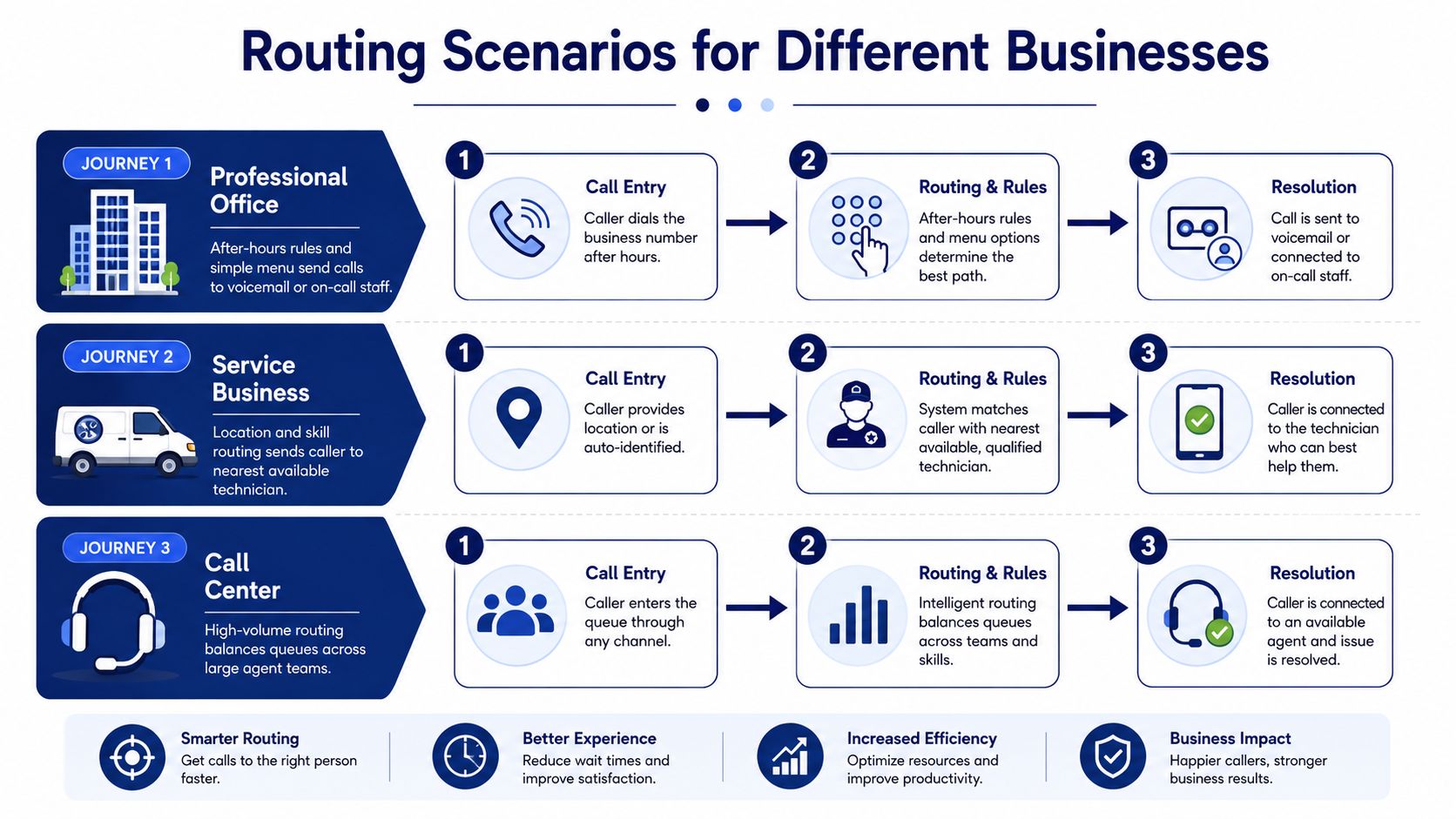
Across all three examples, four questions stay constant:
- Who should answer: Identify the person, group, or automated service responsible for the call.
- When should the route apply: Define hours, holidays, shifts, and location schedules.
- What happens if the first choice fails: Configure overflow, escalation, callback, or voicemail.
- How will the team know it worked: Review missed calls, queue behavior, transfers, and unresolved handoffs.
Implementing Routing Without Disrupting Calls
A routing change is a live operational change. Treat it like one. A rushed cutover can affect public numbers, menus, schedules, devices, and after-hours coverage at the same time.
Map the current journey first
Write down every public number, extension, menu option, ring destination, queue, voicemail box, and emergency fallback. Ask staff where calls go, not just where the old documentation says they go.
Mark the points where calls wait, transfer, or disappear. Include exceptions such as holidays, lunch coverage, branch closures, employee leave, and mobile workers in low-reception areas.
Prepare numbers and configuration
Audit numbers, extensions, carrier settings, greetings, and user assignments before porting or forwarding. Decide which numbers remain public, which departments share a route, and which users need desk, mobile, or browser access.
Build the new call flow on a test number or sandbox where possible. Keep the existing path available until the replacement has passed real-world checks. Guidance on the practical setup process is available in SnapDial's business phone system installation guide.
Test failure paths, not just successful calls
Have internal testers call from different devices and locations. Check open hours, closed hours, menu selections, ring order, queue announcements, transfers, voicemail, callback requests, and escalation.
Then test the failures deliberately:
- No agent answers: Confirm the call reaches the configured fallback.
- The primary agent is unavailable: Verify the next group or queue receives it.
- A remote device loses connectivity: Confirm the system applies the intended alternate route.
- A caller selects the wrong menu: Make sure a human escape path exists.
- A schedule changes: Confirm the new assignment takes effect without changing the public number.
Prepare short staff scripts for answering, transferring, placing callers in a callback flow, and explaining after-hours coverage. Cut over during a low-volume period, then monitor abandoned calls, average wait time, missed-call alerts, and unusual transfers during the first week.
Assign one owner for routing changes. Keep a change log, document who approved each update, and review the flow regularly against business hours, staffing changes, and seasonal demand.
How SnapDial Supports Business Call Routing
SnapDial brings several routing layers into one hosted business phone platform. Its capabilities include time-based and location-based rules, auto-attendant and IVR menus, ring groups, call queues, mobile and remote extensions, and a web portal for managing users, numbers, voicemails, call logs, recordings, and routing settings.
For a small office, that can mean sending calls to a menu during business hours, forwarding urgent calls after hours, and using voicemail when no staff member is available. For a multi-location organization, the same environment can support location-aware destinations and centralized administration. Larger support teams can use queue management, queue callbacks, wait-time announcements, real-time statistics, detailed reporting, and skills-based routing.
Match the platform to the operating model
The useful question isn't whether a provider lists every routing feature. Ask whether the platform supports the decisions your team can explain and maintain.
- For simple offices: Confirm that managers can adjust schedules, greetings, forwarding, and ring groups without specialized telecom training.
- For distributed teams: Test whether one business number can reach desk, mobile, and remote users while preserving shared visibility.
- For support operations: Validate queue priorities, callback behavior, agent activity reporting, and specialist assignment.
- For migration projects: Ask who handles number porting, call-flow design, configuration, staff preparation, and post-cutover troubleshooting.
SnapDial also provides support for number porting, call-flow design, and configuration changes. That can matter when an organization is replacing a legacy PBX and wants to reduce the number of separate vendors involved in routing, administration, mobility, and queue management.
The decision framework is straightforward. Use static rules when the business is predictable, add queues when waiting and staffing need measurement, and introduce context-driven routing only when caller history, skills, location, or urgency changes the right outcome. Then choose the deployment model and provider that your staff can operate reliably after launch.
If you're replacing a legacy PBX or trying to make a hybrid team easier to reach, visit SnapDial to review hosted calling, IVR, mobile-ready routing, queue management, and guided setup. Ask the team to map your current call flow and test the exact hours, devices, overflow rules, and locations your business depends on.